


Heads up: This is an old version, Garmin has since released the Run Dynamics Footpod. Check out that link for the full review! Thanks
Tis the season when the weather goes from bad…to ugly, and as such – many folks are heading indoors to the treadmill to get in their quality runs completed.
Of course, for data junkies like myself (and many of you) that means that the GPS signal on your various fitness devices is no longer able to record all the information you’re likely accustomed to – such as pace and distance. But don’t worry, there’s a solution that can help you get all that information, despite your treadmill-bound workouts.
Enter, the foot pod.
Many of you from the ‘way-back’ era of…well…2000-ish, probably remember foot pods as the defacto way that sports watches could measure distance and speed – this being well before GPS fitness devices. Back then the solution was looked at as a way to capture both distance inside and outside. In the past, it was rather bulky as well.
The foot pod of today though is now a simple device about the size of a quarter that fits on your shoe. From there, it broadcasts via ANT+ protocol to any number of devices, including your Garmin Forerunner, Timex Global Trainer and others.
Of course, some of you may be wondering why you’d need a foot pod when a treadmill tells you pace and distance. Well, first, as many of you have probably realized over time, treadmill speeds are horribly unreliable (and thus by extension, distance too). Second – and most importantly – you can’t easily record that data with second by second heart rate data, unless it’s all going to one device such as your Garmin. Thus, the appeal of a consolidated system. This way, you can download your treadmill workout and have the same important data that you would when outdoors: Pace, Distance, Time, Heart Rate – and any applicable laps/splits that you may have created.
But there’s one little piece of data you won’t get from a treadmill console – or from GPS – and that’s running cadence. Yup, the foot pod will tell your cadence, which is a key area that many high end runners aim to improve (increase). Think of it simply as how many times your foot strikes the ground each minute. Ideally, this would start at about 92 times per minute, but that’s a whole different discussion for another day…
The device:
The foot pod itself is a very small and lightweight device that you simply snap onto your shoe. It used to be that even just a couple years ago these things were the size of Twinkies, but now, being the size of a quarter you could just about make a phone call in a pay-phone with it.

The device has two pieces, the main accelerometer piece, and the plastic clip. Despite thousands and thousands of miles of running – from snow to sand to dirt to mud – I’ve never had one fall off.

The device is designed to run about a year on the user-replaceable battery. And once that year is up, you just turn it over, give it a twist, and pop the battery out and put in a new $3 one from the drugstore:
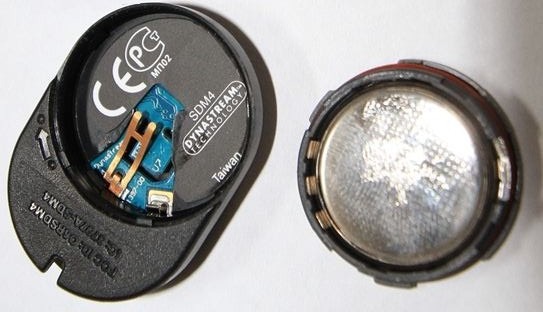
Simple as that. There’s no buttons, on/off switches, or any other area to poke at. It just sits there on your running shoes…forever.

And for those curious – it doesn’t actually matter which way the arrow points, as long as it stays pointing that way (the manual merely suggests one way to simplify support questions, I validated that with the Garmin Fitness support folks).
Connecting up the foot pod:
Pairing the foot pod is super easy. It’ll vary by device of course, but just using the FR310XT as an example, you’d go into the ANT+ menu and enable the foot pod there by pairing it. Each foot pod is assigned a unique ID, which then connects to your watch, so there’s no interference with others at the gym. Quick and easy.
Once enabled, you typically want to calibrate it for the highest levels of accuracy. In general I recommend going to a track – but if that’s iced over, you can also use GPS to calibrate it.
Once it’s connected, you’re good to go! As long as you don’t adjust the position, you’ll never have to touch this menu again.
Going for a run…indoors:
To use the foot pod you literally have to do nothing. Well, technically, if you’re running indoors you should put the Garmin into indoor mode by turning off the satellite. This will ensure that there isn’t a satellite track recorded with a distance of roughly zero (since you’re not moving).

(Yes, I know this photo is of outdoors, while talking about indoors – but at the moment my running shoes and luggage are apparently thousands of miles away from me elsewhere, so I can’t take a new photo quite yet…sorry!)
If you forget though, don’t worry – the unit will actually still record your pace/speed/distance using the foot pod. It’s just that some older applications don’t correctly interpret this. Though, none of the major ones in use today have any issues.
Once you’re done running, you’ll see two graphs on Garmin Connect (or other similar application). First, is the speed and distance like you would normally see outdoors:
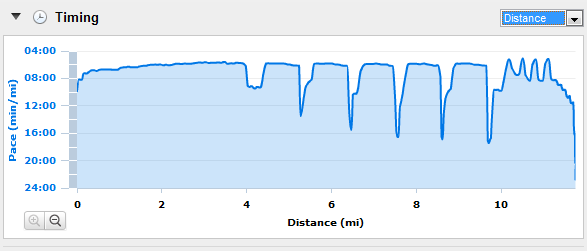
Note how incredibly smooth the paces are – that’s because I’m on a treadmill running a set pace as part of intervals.
And second, is your running cadence:
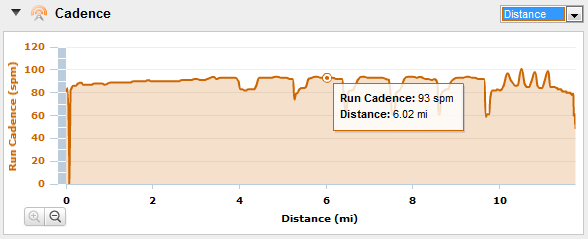
You’ll get cadence whether your indoors or outdoors from here on out.
Accuracy:
I get a lot of questions around accuracy of foot pods in general. For example – if you change pace, are they still accurate? Or if you do intervals, are they still accurate? Or what about terrain, or snow?
I’ve found again and again that the latest generation of foot pods are incredibly accurate. Last winter I put together a review of the FR60 – which is an ANT+ watch that doesn’t have GPS. As such, it depends on the Garmin ANT+ foot pod. After doing calibration I did many runs side by side with it’s GPS-enabled brethren, the FR310XT.
Perhaps the most telling test was one I did in the snow, for 7.78 miles, doing intervals. The FR60 using the foot pod, and the FR310XT using GPS. The end results? Well, check out the photo below:

Pretty darn impressive I think.
Using the foot pod or GPS outdoors?
Of course, another common question I get is whether to use a foot pod or GPS in race situations. The actual root of the question usually stems from: “I’m looking to qualify for Boston and need to be able to pace an exact pace per mile, and I can’t afford to have it be off, or I won’t qualify”.
Well, the real answer here is: Don’t depend on either.
What I mean by that is that no matter what number your Garmin tells you at the end of the race – if you missed the time cutoff, it won’t matter. As such, you should be actually taking mile splits manually based on the course mile markers and ensure that meets your goal time. For virtually every BQ marathon course out there, the mile splits are probably going to be pretty darn accurate.
For general use – just use GPS, it’s generally easier and that way you’ll still get a pretty satellite map when you’re done.
Calibration without going to the track:
(Updated August 6th, 2011)
One really cool tool that’s come available since I originally wrote this is a tool which enables you to actually calibrate the footpod by just doing your runs as normal outside with the GPS turned on. Based on those runs the tool can determine your correct calibration factor. Pretty cool!
![image[20]](http://media.dcrainmaker.com/images/2011/01/garmin-ant-foot-pods-everything-you-ever-wanted-to-know-19.png "image[20]")
For more information on that, check out the post I wrote up here on it.
Questions and Answers:
I literally have an entire e-mail folder full of foot pod questions. I even dedicated an entire Slowtwitch article to them, but…there’s still more flowing in! So here’s all the ones I’ve amassed, in simplified form:
Q: My foot pod says I’m running faster (or slower) than I think I am, what’s up?
A: More than likely the calibration has become skewed. Try and re-calibrate it to re-gain accuracy. It only takes a moment to run half a mile (ideal calibration distance), but the benefits are huge.
Q: Why does my foot pod show dropouts in numbers (i.e. 95.92.93.50.50.92.93.94.93…)?
A: This is typically caused by a battery that’s dying. Simply replace the battery and you’ll be good to go!
Q: Do I have to set the Garmin to ‘indoors’ mode to get accurate distance indoors?
A: Actually, no. All this does is turn off the GPS, so you get a ‘clean’ track. Otherwise, some older applications may incorrectly process the GPS track (basically showing you standing still), instead of the foot pod tack (moving).
Q: Do Garmin units record distance both the foot pod and GPS at once?
A: No, the track points use GPS while outdoors and with signal. No devices/apps that I’m currently aware of record both and allow you to use both tracks. Not that someone couldn’t develop such an app, just not in the Garmin’s today.
Q: Is the number displayed in cadence (i.e. 95) per foot, or total?
A: The number if per foot, thus you’d double to get total cadence – (i.e. 190)
Q: Should I use the foot pod or GPS while trail running?
A: It depends. In general, I recommend GPS (the newer GPS chips are incredibly accurate in trees) – but if it’s really dense and really twisty, the foot pod may be a better option.
Q: If GPS signal drops (like in a tunnel), will the foot pod pace be used instead?
A: Yes, foot pod pace takes over if GPS speed drops to 0, and foot pod speed shows a higher number. The inverse is also true, if foot pod speed shows 0, and yet GPS speed shows a number, than GPS speed will be used.
Q: Can I set which speed source to use?
A: Yes, on some of the Garmin watches (such as the 310XT), you can go under settings to Speed Source and set which one to use. Note however that the previous bullet still overrides that though.
Q: Does it matter which way I put the foot pod on?
A: As long as it’s not sideways, it won’t matter which way the arrow points. It’s merely there for simplicity’s sake.
Q: Is there any difference between the different Garmin foot pods out there?
A: Yes and no. In general, they all work just fine. It’s simply that the newer ones have a longer battery life and are smaller, while the older ones are cheaper (albeit harder to find now). They all are ANT+, and they all work with all devices. And, they all have cadence and speed/distance.
Q: Is there any difference between the different non-Garmin foot pods out there?
A: In short, no. The non-Garmin ones are OEM variants of one of the older Garmin versions, so aside from marketing, they’re all the same. The new Garmin ones though are the smallest ones on the market today though, whereas the non-Garmin ones are a bit bulkier.
Q: Does the foot pod contain a GPS chip?
A: No, your ANT+ receiver will likely have one though (except the FR60). There are no ANT+ foot pods on the market that have a GPS chip in them. And there are no non-ANT+ foot pods that have them either to my knowledge.
Q: Will my Polar foot pod work with my Garmin or ANT+ devices?
A: No, the Polar foot pod works on a separate proprietary platform.
Q: Does my Nike+ foot pod work with my Garmin or ANT+ devices?
A: No, the Nike+ foot pod works on a variant of ANT, but is not ANT+ compatible.
Q: Can I use the foot pod to record kayak strokes on a paddle?
A: Technically, yes – but it’s unclear how long the foot pod would last over time at the end of a paddle. There’s also some potential workaround discussed at the end of this thread.
Q: If I have a foot pod on my shoes in transition area, and then have a Garmin on my bike, when it gets to T2, will it automatically pickup the foot pod?
A: Yes, once in running mode (using multisport or manually), it’ll automatically pickup the foot pod within a few strides.
Q: Can I really put the foot pod in a phone booth pay-phone quarter slot?
A: With enough force and determination…anything is possible.
Q: Does the Garmin Edge series support the foot pod?
A: No, none of the Garmin Edge cycling devices allow use of the foot pod, it’s considered a different ANT+ device profile and isn’t one you can pair to the Edge devices. Though I should note this is actually a really common request from cyclists that occasionally run. Also of note is that the Edge series doesn’t display pace in Minutes/Mile, but rather only MPH (speed). Again, another highly requested feature from occasional runners that are primarily cyclists.
Q: Does the Timex Global Trainer support the foot pod?
A: It does now! As of August 4th, 2011 Timex released a new firmware version for the Global Trainer that does support the ANT+ foot pods. More information here.
Q: Which Garmin devices support the foot pod?
A: The Forerunner 305, FR310XT, FR405, FR405CX, FR410, FR610, FR210, FR50 and FR60. Note that the FR205 is NOT foot pod compatible.
Q: Does the Forerunner 110 support the foot pod?
A: No…and unfortunately won’t in the future. The FR210 was released as an ‘upgraded version’ of the FR110 to specifically support the foot pod.
Q: Which iPhone Apps support the ANT+ foot pod?
A: Well, that depends. But anything that supports the Wahoo Fitness iPhone Dongle will generally support the foot pod if it has a running mode. Similarly, the Digifit dongle has the same capabilities.
Q: Which Android Apps support the ANT+ foot pod?
A: At the moment there’s only a few hard to get Android phones that support ANT+ natively, so support will look much better in Feb 2011.
Q: Is the foot pod waterproof?
A: Yes, it’s IPX7 rated waterproofing – so 1 meter deep at 30 minutes.
Q: How much does the foot pod weigh?
A: 10g…or…well…not much. That’s less than an Oreo cookie (11g).
Q: Can I use the running foot pod on my cycles shoes to get cycling cadence?
A: No, you need the $30 cycling cadence kit to get both cycling cadence, as well as speed/distance (indoors). And don’t be tryin’ to attach the cycling cadence kit to your running shoes now…I don’t want to have to bring out Chuck Norris on ya.
Q: When using the foot pod outdoors, will I still get the satellite image of my run?
A: Yes, as long as you don’t disable GPS, the satellite image will still appear. If you disable GPS however (by answering ‘Yes’ to ‘Are you indoors now?’), then you will not get a route map.
Q: Is lap distance/pace recorded when using the foot pod?
A: Yup, all the same data is recorded. The only thing not included is a map of where you went, and in the case of GPS-dependent watches – elevation data isn’t included.
Q: How much does this little thing cost?
A: About $45 for the most current generation one, new.
Thanks for reading all – and feel free to post any other foot pod related questions in the comments below!
Help support the site!
I have partnered with the retailers on the left, and any shopping you do through those links or the ones below, helps support this website. Thanks!
Garmin Running Dynamics (RD) Pod – Amazon
Garmin Running Pod – Amazon
Additionally, anything else you pickup on Amazon helps support the site as well (socks, laundry detergent, cowbells). If you’re outside the US, I’ve got links to all of the major individual country Amazon stores on the sidebar towards the top. Though, Clever Training also ships there too and you still get the 10% discount.
Thanks for reading! And as always, feel free to post comments or questions in the comments section below, I’ll be happy to try and answer them as quickly as possible. And lastly, if you felt this review was useful – I always appreciate feedback in the comments below. Thanks!
Finally, I’ve written up a ton of helpful guides around using most of the major fitness devices, which you may find useful in getting started with the devices. These guides are all listed on this page here.
P.S. – If you’re looking at the ANT+ Speed/Cadence sensor for cycling – here’s the same style ‘All you ever wanted to know’ post for that sensor. Enjoy!

















Just completed my first treadmill run after GPS calibration of the foot pod with my Garmin Fenix 2. The resulting data lined up almost exactly with the tread mill data output (distance/time/calories), so I’m very happy with result!
I finally gave in to the temptation to buy a foot pod. I’m not sure why. Perhaps curiosity or maybe I thought I just needed another step counter to add to my growing collection (Vivofit, Fitbit One, and Polar Loop). The second reason was a failure as my FR410 apparently will not count steps even with the foot pod paired. My Running Dynamics data appears to be confined to Avg and Max Run Cadence.
But then there is the curiosity factor. I’m curious about the whole calibration thing. I have gotten the impression from things I have read that calibration is about fine tuning speed and distance estimation. I used GPS to calibrate mine while walking first day out and ended up with a calibration factor of 0906 whatever that means. I intend to calibrate it again today while running and am curious to see if I get a substantially different calibration factor.
And that is the source of my curiosity. My step length changes pretty dramatically as I speed up—from about 30” walking at 3 mph to more than 44” running at 7 mph. Even sticking with running alone, my stride length is about 34”, 40” and 44” at speeds of 5, 6, and 7 mph respectively. Will every average speed require a new calibration? Does the accelerometer in the foot pod actually measure stride length? If it does, why the need for calibration? If one calibration suffices for all paces why the need to calibrate at all? The fact that the foot pod is as accurate in interval runs as those at a steady pace would indicate that it “knows” something about changing stride length.
Update—I’m a little disappointed. Went to my local high school track and did a walking 800m calibration which came out at 907, very close to my GPS walking calibration of 906. Next I did a 800m fixed distance calibration while running. The Calibration factor jumped to 955. I turned the GPS off and took 9 laps around the track. My FR410 registered 3.40km instead of the 3.60 I had actually traveled. Out of time to play with fitness toys today, I did another GPS calibration while running home. That came out at 1035. I guess I’ll test that setting out tomorrow. Sure is boring running around a track though.
I don’t know if it is relevant but during my nine lap test run, speed dropped to zero briefly three times and spiked into the 12-14 range three times as well. Most of the tall spikes immediately followed the zeros. The speed graph in general was very rough jumping up and down in the 8-10kph range. The cadence graph is super smooth averaging 162 and maxing at 164.
I would start by trying a manual (non-GPS) calibration of 2 laps around the track at your comfortable long run pace (so neither super fast, nor walking) and see where that puts you. I find that by calibrating at my long run pace I get pretty solid accuracy across both running and sprinting (with a footpod).
Yesterday morning, I scouted out a much nicer 400m track at Piedmont High. Pretty pristine rubber surface with all of the nice lines and numbers. This morning I went pack there and did the following tests:
Manually set the calibration at 900, turn the GPS off and run around the track five times (2KM) at my comfortable long-distance pace of 9.5 km/hr (I know, its pathetic but I am old.)
Next I incremented the manual calibration by 50 and repeated. I kept doing this until I I got to a Calibration factor of 1200. Then I did a few more things.
Findings:
1. As the Calibration Factor increases, so does estimated stride length and, therefore, estimated distance traveled. Set at 900, my actual 2km run was estimated at 1.70km. Set at 1200, my actual 2km run was guestimated at 2.26km. Every 50 point increase in Calibration Factor was worth about 0.1 km on a 2km course. The “right” number for me,for now, for running seems to be 1050 (2.01 estimated km).
2. The calibration factor is quite a bit different for walking than running. I did three, back to back 800m known distance calibrations while walking. They came out 912, 906, and 916 in that order. All 130-140 points below my running Calibration factor.
3. For neither walking nor running is known distance calibration (everyone agrees this will produce the most reliable result) the silver bullet of accuracy. In #2 immediately above, you see numbers that vary by a little more than 1% from high to low. I did three running known distance test calibrations today as well. Those values were 1033, 1048, and 1035—again a roughly 1% spread.
4. As long as you stick to running OR walking, I think this is an impressive tool. Certainly for moment to moment pace/speed readouts it is WAY better than GPS and given the foot pod’s placement on a shoe, I have to believe the cadence numbers (which I would not have at all without the foot pod) are golden and a useful training metric.
5. I don’t think my 410 is going a great job picking up/interpreting my foot pod signal. Here is my 1050 calibration factor 2K trial: link to connect.garmin.com. Look at the speed graph there and compare it to this one from Ray Maker’s 620: (Image 7 of 10 earlier in this blog post) It would be nice to hear from or be able to look at other FR4XX Foot Pod output.
Yeah, that looks wonky (your FR410 activity). It’s hard to say whether it’s a footpod or watch issue, though I’d actually be more suspecting that it’s a footpod issue.
Here is the very next one: link to connect.garmin.com. Seems odd to me that the big spikes correspond with laps (pushed the lap button at end of each track circuit) but it all looks pretty rough. I reread your 410 review a couple of times and there is no foot pod only speed graph in there.
This evening, I plan to do a 10K with GPS off and Auto Lap set to 1K. We’ll see how that works out. It really is nice to have a better way to judge pace at a glance. Just based on glancing at the 410 from time to time the pace is less erratic than the graph would indicate and way less erratic than GPS. $45 well spent.
Here is the data from this evening’s 10K: link to connect.garmin.com Calibration Factor at 1035 still a little off. Changed afterwards to 1050 which worked well at the track.
Those spikes which seem to occur at 1k intervals (had auto lap set tonight) are odd and look suspiciously like the ones I got manually marking 400m laps at the track. All of that would point to the 410 or GC rather than the foot pod. The saw tooth pattern of the speed graph also seems wrong. I had the steady cadence of a robot.
Again, the speed that shows up on the face of the 410 is nice and useful. I’m glad to have it. But . . . I get like a pit bull when my data does not “foot” to borrow a term from the accounting profession.
One other bit of calibration trivia. Calibrations are recorded as Activites by the 410. If you do not reset after a calibration and before beginning a “real” activity, your last calibration session will become the beginning of your next activity. This information could save your life someday :).
When I turned off auto-lap and quit lapping manually, the giant speed spikes/dropouts in the speed graph disappeared but the remaining graph is very jagged and not at all representative of actual performance: link to connect.garmin.com
I would love to get input from other FR4XX/Foot Pod users regarding whether this is just as good as it gets with this combo or if I should be seeking to get something repaired or replaced.
Can the garmin footpod effect race timing chips? I’ve just had my 2nd no result recorded since using the pod but never had any before. Chip was properly placed on my other shoe and I definitely hit the timing mats. Maybe just coincidence but seems strange twice in a row?
I’ve never heard of it messing with timing chips – and I’ve almost always had a footpod on without issue. Odd though.
Hi there. I saw a post asking if the foot pod of the Fr 70 is waterproof but I didn’t see a response. Is it waterproof? For trail runs and running through streams would it survive? Thanks so much
The footpod is IPX7 waterproofed, so that means it can hang out in water 1-meter deep (3ft) for 30 minutes. No problems with streams/etc…
I was having problems with my footpod with Fenix 2 using my treadmill.
The Fenix 2 was connected to my heart rate monitor and foot pod.
It was showing GCT and V Osc but not showing distance or cadence.
Changed the battery… still no joy.
Then I noticed that every time I started an activity it searched for power.
I would click on skip to get to foot pod search but no speed distance or cadence.
I went into settings, sensors, and turned off power.
Now the fenix 2 shows distance, speed and cadence as it is meant to.
It seems it was trying to get the distance, speed and cadence measurement from the power meter and not the footpod.
Problem solved. Hope this helps someone.
Hi and thank you very much on the reviews for this one and for the fr 305 as well.
I’m using my good old FR305 with 2.9 firmware and i wonder if i should buy the foot pod or if it won’t work properly and perhaps even lose the gps data to synchronize with my pc? I read (something from 2011) that there are problems with the new firmware cutting the cadence in half and furthermore I read that the 305 doesn’t sync the gps data if you’re using the foot pod. Can someone confirm either of these?
Thanks in advance!
No, neither is true. :)
Thank you very much! :)
Hm, now that I bought the foot pod I ran a half-marathon to see how I am doing.
But I cannot see the map neither in Garmin Connect nor in Sport Tracks 3.1. And it’s not only the map but there is no data provided for the elevation changes as well. And Sport Tracks doesn’t even show max. pace and no information about heart rate at all. (For Sport Tracks that might be effected by my free version as well, but it did work before) I can see the map if I look it up at the device, but no synced data. :/ And no, when I was asked if I’m using in indoors I said no! ;)
Hmm, strange. All of the symptoms you describe sound like the GPS was disabled (n omap, no elevation, etc… Though, HR would have come through. Can you try another simple run (just do a 1-minute run loop around your home).
As I mentioned, I can see the map, not just the distance and elevation changes, the whole map on the device. It just doesn’t sync with the software no matter which one. I read it before in a review on amazon.de but wanted to try myself.
I’ll try it tomorrow and give another feedback.
Btw. thanks for the video reviews of the cameras from Paris. Loved to cycle through the busy traffic, though it was just a velib. :D
OK, I have to revise this. Today I started at home after being asked to train inside -> no. I wanted to calibrate the foot pod but I saw that I need to have 800 m of straight track (rough translation). So I started without calibrating. After 1,45 km I wanted to calibrate the pod. After I pressed start I realized that it doesn’t work with gps but I have to have a known piece of track of 800 m to do this. So I canceled and started anew. After 1,8 km I realized that the symbol for gps was crossed so I stopped and checked the device. The gps was turned off. I turned it on and restarted again. On the way back I checked the middle part (1,8 km) of the track with gps, it was just 1,65 km so the gps was turned off and the foot pod didn’t measure right. I don’t blame it because I didn’t calibrate it. At home I uploaded it all to garmin connect and sport tracks and had the first part with map and all the rest. The second part without map but with all the rest. And the third part with a map and all the supplementary data. So it DOES work. But than something must have gone wrong last Saturday because the cadence and heart rate was corrupted in some way.
Wow Dennis. That made me dizzy. If you calibrate using a known distance, it does not matter whether the GPS is on or not and it does not have to be straight. You tell the device when you have begun and completed the known distance. 800m is the default (2X around most running tracks—at least the ones in the US). If you use GPS to calibrate, it is suggested that you run in a straight line so that the GPS does not clip corners. In that mode, the device will tell you when it has enough data for a calibration. In my experience with the FR410, I did both and then tweaked it manually until twice around the track measured 800m with the GPS off. The 410 measures distance using the GPS if it can whether the Foot Pod is set to Speed Source or not.
Even then, it’s not bullet proof. I did two known 5K’s a few days ago using a 1050 calibration. The results of both indicated that the calibration should have been 1032. A few days before that, I ran a half marathon with the 1050 calibration and the measured distance indicated that the proper calibration should have been 1075. These last three experiments were run on a Fenix 2 which (unfortunately) uses the foot pod to measure distance whether the GPS is on or not if the foot pod is set to Foot Pod Speed Always On (which it must be to record pace outdoors). The 5K’s were on flat terrain. The half was a little hilly but we finished where we started so that should not have made much difference. All of these runs were on a paved surface. I wore Asics Gel Nimbus 14s for the 5K’s and Asics Gel Nimbus 12’s for the half. Maybe it’s not BS that the shoe makes a difference :).
Seeking clarity on an issue I previously thought I understood.
When I use a foot pod with either my FR410 or Fenix2 running outdoors, is my distance estimated using the GPS, foot pod, or a combination of the two? What I thought before it was questioned on the Garmin Fenix2 forum was that the foot pod was only giving me instant pace/speed feedback while the GPS was taking care of distance unless/until I ran into a cave at which point the foot pod would handle distance reporting as well until I reemerged to a clear view of the sky at which time the GPS would resume its normal distance measuring function.
By default it’ll use GPS unless GPS = 0 and footpod = something other than zero.
However, most Garmin units (except ironically some of the more recent ones like the FR220/620) support the ability to set the “Speed Source”, and select either GPS or foodpod.
This might help a little bit in terms of real-world implications of it: link to dcrainmaker.com
I enjoyed reading about your cruise ship experiments but it didn’t really answer my question which was about distance estimation rather than speed. So I devised a little experiment of my own which was to run a known 5K outdoors distance with my Fenix2 manually calibrated to a very low 900 and the GPS on. I then changed the calibration to 1,100 and ran back. Just for fun, I brought along my Forerunner 410 (also paired to the foot pod and fed intentionally low and high calibration factors). I also brought my iPhone running Runkeeper for one more set of confirmatory data.
This is what I got:
——————————————Distance (km)
——————————–Fenix 2——FR410——-iPhone
Run 1 (900 calibration)——4.36———5.01———4.98
Run 2 (1,100 calibration)—-5.33———5.01———5.02
Clearly, the Fenix is using the foot pod speed to estimate distance even outdoors with the GPS on. Just as clearly the Forerunner 410 is using the GPS to measure distance and is ignoring the foot pod data for this purpose. Both devices were showing the same slower than actual speed data on the the first run and faster than actual on the second.
I do not believe it should be this way and will be asking Garmin to change it to the way the 410 works. If the GPS is on and getting a reasonable signal, GPS rules for distance. The foot pod can assist if the GPS signal gets really bad or disappears altogether. Obviously, if you turn the GPS off or tell it you are indoors distance estimation becomes pure foot pod.
Here is the data from these two runs just in case it helps:
Run 1—900 calibration
Fenix 2—http://connect.garmin.com/modern/activity/568255058
FR 410—http://connect.garmin.com/modern/activity/568253943
iPhone—http://runkeeper.com/user/fyoung1111/activity/416345693
Run 2—1,100 calibration
Fenix 2—http://connect.garmin.com/modern/activity/568255075
FR 410—http://connect.garmin.com/modern/activity/568253959
iPhone—http://runkeeper.com/user/fyoung1111/activity/416386343
I am using the FR210 with a footpod and am also seeing drop outs. My battery is less than 2 weeks old.
Here’s what I am noticing…
When I run indoors (GPS off), both the cadence and the timing indicating drops where it literally goes to 0 for a few seconds. Usually happens 2-3 times per run (~30-40 minutes).
When I run outdoors with the footpod, I do not see this drop off.
It dawned on me this morning that when I run indoors, I ALWAYS use a Bluetooth headset and am connected to WiFi. But when I run outdoors, I do not use either. So I am thinking it may be an interference issue causing the drop offs. I am going to do some experimenting next week, hopefully I’ll have it narrowed down then.
Thanks for the vast information on your site.
Just one question on this foot pod. I’m planning to get the Fenix 2 with HRM-Run strap.
Do i need to get the footpod for indoor treadmill run?
as i understand, footpod produces cadence, HRM-Run also produces cadence + more.
Since the base model now is at $299, extra $50 will give me an HRM-Run strap
.
If i’m getting the base model + another $40 for foot pod, it’s almost the same price as the performer.
or do i need to get the performer model + the footpod for indoor running?
appreciate if anyone could enlighten me, thanks.
Hi,
I am looking for a footpod for (indoor) basketball activity.
I read number of reviews but I am still not sure what is the best footpod for my needs:
– Monitor the distance that I made on the practice
– Monitor the peak and average running speed during the practice.
– Stats graphes (per minutes)
– Do I need to have a mobile device on the bench that will collect the data from the footpod? if yes , do I need additional plug for that mobile (I have iPhone4)
– I assume that footpod must have logger (buffer) capabilities in case that there is no bluetooth connectivity , or maybe it can log few hours of data that I can be sent to the mobile app when I’ll get Home.
I’ll appreciate some advices about the right product for me.
Thanks
I have a 405CX If I have understood your comments correctly, you can have your HRM and Footpod connected at the same time. In this scenario you will gain the same training info as with the GPS but with heart rates and cadence. Is my understanding correct?
Many thanks,]
Jamie
Correct on both fronts.
Hi – Great article! Quick question on the calibration, the excel spreadsheet standard is 1000 but my watch is 100. Its not clear how to read the new calibration number once the run data has been – can you advise?
Thanks!
Gavin
Simply transition things one digit. So it should be 100.0. Thus, if you had 1028, it’d be 102.8.
I just purchased two Adidas miCoach speed_cell footpods (ANT+ version, ANT+ USB stick and iPhone Adapter included).
I am desperately trying to pair them with my Forerunner 305 and 405CX but none of the two can find any of the two foot pods. I found similar reports on the Garmin and Adidas forums but no real solution.
I put in a brand new Varta battery, let it stay without battery over night to reset itself, put in the battery reversed to reset the pod.
Using the USB stick on either the PC or my Android tablet immediately detects both foot pods, though!
Firmware on both Forerunners is the latest one.
Can anyone put me in the right direction making the sensors talk to the watches?
Thanks,
Fabrizio
Thanks for a great article. This device sounds like it should be great for measuring running cadence throughout a run and I intend to buy one of these. Up to now I have checked cadence intermittently by counting 90(same foot) strides on my normal wrist watch which has a stopwatch mode. During a running event it is easy to count strides and stop and start the watch without looking until afterwards.
However, something bugs me about the distance measurement by the foot pod v GPS. I assume you calibrate your stride length on a level even surface like a track. Surely your stride will significantly shorten uphill and lengthen downhill, if your cadence stays fairly constant. Therefore on an uphill section the speed and distance will be overestimated and underestimated downhill. If you do not finish the run at the same elevation this could lead to distance discrepancy. The GPS is not brilliant here either. Most GPS devices(all of them as far as I know) see the run as on the level in two dimensions from above, so that uphills and downhill are measured as if on level horizontal ground. This always underestimates the distance travelled. The GPS graph certainly shows the elevation of the run(best using topographical data rather than altimeter readings) but does not include the ups and downs in the distance travelled on the X axis. By printing out the elevation graph of the run, I have used a map wheel to run along the GPS elevation line, and after adjusting the vertical scale to equal the horizontal distance scale I found that a fairly hilly 10K run was actually about 85m further than the horizontal distance. That is why GPS distances are nearly always a little short by maybe 0.5% to 1% compared to accurate wheel measured distances, depending on the ups and downs of the ground level.A lot of people are blissfully unaware of this inaccuracy in GPS distance measurements.
A couple of random thoughts:
1) The ANT+ sensor actually doesn’t simply take stride rate and use a multiplier, rather, it measures the full stroke. You can dig into the ANT+ documents on this, hence why even if your cadence shifts the pace is still accurate.
2) While there is some different in GPS distance going uphill/downhill, it really is tiny (barely a percent) in most cases. It’s not until you’re doing something with significant incline (such as skiing), that’s it’s even barely noticable. Which, is ironicaly why Garmin added it in two winters ago intially as part of a Ski mode, and now part of a 3D distance mode.
3) For the vast majority of people, GPS will register long, not short, in races. This is due to zig-zagging, as discussed here: link to dcrainmaker.com. For training, you’ll typically only see being short if you’re doing trail running.
Thanks for your comments DC Rainmaker,
I don’t agree with a couple of points you make. The loops and turns are more likely to lead to reading short on a GPS, as if you go in a circle, some of the circumference is lost from reference point to reference point. Plot points on a circle and join them up and it comes to less than the real circumference. I do regular wheel measured 5K parkruns which are very twisty and turny and they invariably show up short on my Garmin…I don’t think I’ve ever had one long yet.
1% discrepancy on a run distance is not negligible. 1% of a marathon is about a quarter of a mile! On a 5K run it is equivalent to 50m distance. This can take an average runner like me about 15 seconds which is significant for PBs or PRs.
That’s why I said “trails” for twists and turns could shorten it. Ironically, what often happens though is that poor GPS accuracy adds incorrect data points offset to the sides end up adding ‘extra’ un-run distance. Of course, as you noted, mileage will vary.
However, 1% is within spec for GPS (up to 2%), and honestly, on a footpod with variation you’re likely to get the same as well over time (due to changes in position).
Hi, I bought a footpod to increase the pace accuracy of my Fenix 2 as it has often bad gps Signal and also for threadmill use. I’ve seen good accuracy for lower running Speeds. But if I started to do Speed runs and Intervall workouts. I’ve detected a strange behavior. When running faster than 4min/km pace increases to 3:40, when running at 3:30/km it Shows 2:50 and at the end of a 10Km run there are 1200 meters missing.
Has anyone experience at higher Speeds? or do I have a defect unit?
The garmin foot pod has been around for a few years now, does anybody know when it is likely to be replaced with a new model. This usually happens about 1 month after I have bought something :)
I definitely wouldn’t expect anything at all there anytime soon.
Well that was a very accurate response in hindsight. How about now? The SDM4 can only be purchased on ebay (at a premium price) and rumors of an imminent release of a new model have been swirling around for the better part of a year now.
I’m a serious footpod devoté and would love to have something new and improved to add to my collection of 5 SDM4’s.
Does the footpod (sensor) somehow wear out/uses up. I use the SDM 4 now for more than 4 years and especially on the tread mill it showed good consistent values. This season the SDM4 (more than 4000km)
wobbles between 5:15 and 6:30min/km when I run 10km/h on the tread mill in the Gym. First I thought
the tread mill has some problem. But a frieds foot pod shows the pace +/- 5 seconds/km.
I bought a new one and it again works without problems…
Battery?
I went to calibrate my 310 and was at home so set it too GPS. The device has frozen up and i cannot exit the screen that says its calibrating. Any assistance with this problem would be greatly appreciated.
It necessary to calibrate the foot pod? I’ve had mine for a month and run 200k outdoors with Fenix 2 the foot pod, which I haven’t calibrated. So has the foot pod learned to know my stride and is good for using on a treadmill? Or do I still have to calibrate it?
Nope, it doesn’t learn on the footpod side unless you calibrate it. The Fenix2 however does learn for the wrist based pace/distance though, so that would have helped there.
Thank you sir!
I use my footpod when I run on my treadmill and notice a weird thing with it showing my pace gradually increasing throughout the run. For example, if I do 6 miles at the same level and incline for the entire run on the treadmill the foot pod shows my pace faster each mile (I have my garmin set to auto split every mile for steady or long runs), such as from a recent run where it showed the paces for 6 miles: 8:05, 7:55, 7:50, 7:57, 7:45, 7:40. I didn’t change anything on the treadmill so my pace should have been the same for each mile. Also, I’ve noticed the same thing when I do interval workouts. If I do each hard interval at the same level on the treadmill the foot pod often shows my pace is slightly faster for each interval. This doesn’t make sense to me. If I haven’t changed the speed of the treadmill then my pace should not be changing. Have you heard of anyone else with this issue? And do you know any way to correct it? If it was just a couple seconds it wouldn’t bother me, but there is a fairly big difference between running 6 miles at 8:05 pace versus 7:40 pace.
Ray – I have come to rely on your site for all things running, cycling and now swimming. Thanks for all your insights. I have been using my footpod boyh indoors and outdoors for months with my FR15 and find it very consistent for distance. As you describe, I simply ran outside with it and when I ran inside on the treadmill, I got good distance and hence pace data. I recently upgraded to the FR920xt and assumed the same process would work. But after a half dozen outdoor runs, the footpod doesn’t semi to be calibrated for treadmill running. I *think it must be a 920 issue, but haven’t had any luck on the Garmin forum or your 920 review Q&A. I unpaired then re-paired the footpod and restarted the watch, but no luck. Any ideas? Thanks.
Ran inside on the treadmill after 60+ miles outside with GPS and footpod. Seems to be calibrated now.
How to you calibrate the footpod with a Garmin 920XT?
Hi DC, great article to refer to.
Swapping my footpod between two pairs of shoes I regularly use I am getting a bit worried about wearing out or breaking the clip and so am considering buying another footpod so I’ll have one on each pair of shoes. Will my 910xt pair with two footpods so that whichever one I am using will link up automatically with the watch? I saw in an earlier post that you said another model watch wouldn’t do this but not sure about the 910xt.
No, only one footpod unfortunately at a time. But as long as nobody is around, you’ll just re-scan and it’ll find it immediately.
Forgot to mention that I’m only using it for cadence so will try it out on my wrist to see what happens, ever heard of anyone using the pod on their wrist?
Never heard of one trying it on the wrist unfortunately. Sorry!
Taped it to my 910xt strap today, had it oriented in direction of swing as is done when placing on a shoe. I know my cadence would have been around the 180 mark and got an average of 140 on a 5k run. I know from the audible alerts coming from the 910 that it was in the rough ball park of 180 at times but on average it was giving too low a count. I found the fact that it would almost instantly show zero or low figure when I stopped my hand swinging to look at reading a bit of an irritation as well as it giving me alerts every time I went to scratch or wipe sweat etc with my hand. I’m sure for some it will work if their swing has a more rapid deceleration than mine but I’m not going to mess with my swing for sake of this setup and so the pod goes back on the shoes again.
Hi BillM. If you call Garmin and ask very nicely, they will send you a second clip for free. At least it worked for me several months ago.
Do you know whether a foot pod would work on inline skating to measure glide distance?
Here is a new question for an old post! In theory, are there any hardware reasons why the footpod could not provide the same GCT and VO indicators as the HRM run? If not, in theory, could someone with the appropriate programming skills use connect iq to create similar data fields using the footpod as the data source on newer devices? Just wondering…thanks!
I would like to track my running when playing indoor hockey. I have a garmin forerunner 15 and have been looking at the garmin foot pod – is the sdm4 and ant+ the same thing – if not which one would i need?
thanks
vikki
Ray, kudos for your reviews. Bought this footpod on Clever Training with your promo code – hope this supports your effort! :-)
I’m curious whether it’s advisable to calibrate it w/920xt whenever I do LSD runs at a covered track, as opposed to (more regular) interval/tempo runs at the same track? The reason I’m asking is that having had a couple of initial outdoor runs (with a regular speed) with my new 920xt I’ve noticed that on the indoor track 920xt shows more or less correct mileage only when I run at about the same speed/cadence/step length as I probably did on the outdoor runs. On the other hand, when I did a couple of slow runs on that same indoor track, the distance logged by 920xt was considerably longer – by ~20%? – than it was in reality (I counted laps on my 920xt). My take on this is that my LSD runs were super slow and, quite likely, with shorter step lengths – probably, 920xt just applied the “average” step length obtained from my outside/GPS-enabled runs and applied them to the number of steps I did on the indoor track. I’m not 100% sure about this argument myself, as Garmin Connect did show different step lengths on each track lap (possibly, again based on some sort of adjustment to the “calibrated” outside run). I’ll be running quite a bit indoor during this winter and I could probably calibrate the footpod whenever I know that my training will include shorter strides. What’s your take on this? Thx.
Neil, you are not alone pretty much everyone changes pace by changing both stride length and cadence. The foot pod compensates for this by attempting to measure the time and distance your foot is flying through the air as well as the time it is planted on the ground. Calibration kind of anchor’s the device’s expectations of your “average” stride. Also, completely different gaits will require completely different calibrations. For me, walking is 950 and running is 1040. If I run really slow or really fast this number will be off a little and over a very long distance the accumulated error will be substantial but, if I want to know my pace right this second, the foot pod info is 90% more likely to be close to right than GPS derived speed which averages out quite nicely but likely to be inaccurate at any single moment in time.
If I was a talented as Ray and capable of videoing it both ways while running at a constant pace, I could show you but I am not that talented :).
There are my numbers from a recent treadmill experiment:
Speed—–Cadence—–Step Length
—2————88————-29″
—3———–106————-35″
—4———–120————-40″
—5———–158————-34″
—6———–158————-40″
—7———–162————-44″
And these are the speeds my fenix 2 reports while sitting still in a lawn chair: link to s1375.photobucket.com
I left it out there for 15 minutes and it hiked 317 feet without ever leaving the chair :).
I come from China and I have a question related to footpod. I have 2 footpods one is garmin and the other is from adidas micoach pacer. The question is that if i can use the same calibration factor with both footpods, or i need to calibrate each other independently? Another question is if the 2 footpods are the same brand, can the calibration factor be used in common. Sorry for my English, hope you can understand my question.
If they look the same and are both Ant+, they were built by the same company and should calibrate exactly the same. That said, they should probably each be calibrated independently after being attached to the shoe you intend to use it on. I am guessing too much is made of this but the conventional wisdom is that the brand of shoe and exact attachment placement can make a significant difference in calibration.
Hi,
Thanks for the review. My question is, will the foot pod work when i use this during indoor exercise on elliptical cross trainer? I mean will it calculate the pace and the distance? -Thx-
No, unfortunately not. Only for running/walking.
Ray,
Sorry if you answered this and I missed it. Does the footpod calculate pace by:
1) Gathering the cadence, then use (steps * user-calibrated-stride-length)
2) Use actual acceleration information & time, to derive a change in position off of a position equation?
Solution one seems kind of worthless, so I doubt it but just wanted to check. Also, do you know if Garmin’s software has been updated to be able to use GPS & footpod concurrently? Skyscrapers where I live cause GPS to give really wonky results sometimes, so I was hoping that if I got a fenix3 and a footpod, either automatically or in post-processing, I could update my records to show accurate info.
“worthless” was too strong of a word, it could use different stride lengths for different speeds?
For solution two more specifically I mean:
for pace: integrate accelerometer data
for distance: double integrate accelerometer data?
A mind is a terrible thing to waste. You could have read the article and posts. Instead you can read this: link to dynastream.com
It’s not quite as user friendly as DCRainmaker but will answer most of your questions :). The answers to the others are in this thread.
Thanks for link. I skimmed the comments but clearly didn’t spend enough time doing so and missed some relevant (several yours) comments.
Now you are a Scholar AND a Gentleman. Please do read the linked document both critically and thoroughly. A lot of people are religious about these things. Ray himself—as objective as he normally is—likes them a lot.
For me—a pretty inexperienced runner but lover of all gadgets—foot pods are only good for two things: 1) Running in overhead environments whether treadmill, indoor track, Manhattan, or Michigan Avenue. When GPS sucks, these things rule. 2) When pace matters. If you are as inexperienced as me, an 8 minute mile feels just like a 10 minute mile (at least for a little while). If you rely on GPS for pace, it bounces all over the place. With a foot pod—calibrated or not—it is dead nuts on.
Get one. link to clevertraining.com
Has anybody got any idea if the Geonaute ONmiles Pod from decathlon(40€), has the same accuracy as the other ant+ pods ?
Has the same FCC ID Number as my Garmin which looks identical as well. I would be willing to bet they are made by Dynastream just like nearly all of the other Ant+ foot pods and will function exactly the same.
I have the Garmin 310XT I tried to recalibrate today, when I accidentally hit a button the watch stopped calibrating and the alarm/buzzer started to go off cautiously. I tried all the buttons simply pressing them and or holding in for a few seconds.. The watch is just buzzing and nothing else… What did I do and how do I fix it? Thank you
I’m trying to work on maintaining a decent cadence (spm>180). When I run on the treadmill, I’m usually pretty close (176-180 spm). When I run outside, I’m around 164spm. It occurred to me that one possibility is that the values for cadence get recorded at 0s when I stop at a light. Is that a possibility? Otherwise, I’m having a hard time figuring out why the data would be so consistently different. Thanks.
Yes. That would do it. I believe Garin uses the total time of an activity rather than the moving time to come up with average cadence. Three minutes of standing still in an activity with a total time of 60 minutes and an actual cadence (while moving) of 180 will knock your average down to 171. Five minutes standing still will take you down to 165.
I’ve used the footpod for barefoot running by placing it on an elasticated strap on my foot just above the ankle. Results were pretty accurate as far as I could tell running 5k on hard sand by the sea.
could you use the foot pod to track your movement and distance covered in sports like squash, tennis and badminton?
Is there a newer one out now?
Nope, still the newest!
Then what is this?
Garmin Foot Pod for Forerunner 305, 405, and 50 link to amazon.com
link to amazon.com
That’s the super-old one.
Thanks! I must be just as old.
Any difference between sdm3 (super old one you referred to :-) ) and the latest sdm4 ? Just upgraded to Fenix 3 from 310xt and the sdm3 works. Just want to justify if I need to upgrade footpod as well ;-)
Nah, not really. I believe there are some minor performance improvements, but otherwise no.
Can i link my samsung gear and samsung 5 with the foot pad to sink heart rate with pace
That’s entirely up to the Samsung Gear and Samsung 5 (whatever that is) in terms of whether they can receive ANT+ signals. The footpod just transmits its data to any device able to listen. Unlike bluetooth which is two-way pairing, with ANT+ any “pairing” is one-sided on the receiver end and the transmitting device (such as the footpOd) merely broadcasts its signal. This has the benefit of allowing multiple receivers for one transmitter (i.e. testing multiple watches all with one HRM)
The S5 supports any ANT+ accessory. But it requires a specific application top of it, such as ipBike.
Hello Ray,
can this Footpod store data and send it to an App or watch afterwards?
Is there any Footpod with ant+ on the market who can do this?
If not – are there any plans to implement this?
kr Flo
No, it doesn’t do store/forward.
Only the Adidas ones do – and even then, only with the Adidas apps.
thanks ray.
background to my questions is:
I play a lot of soccer and due to a lot of stop and go during training the GPS is not so reliable. so I think about using a footpod for the distance and speed analysis. During training i wear my Fenix3 and it would be cool to have the footpod data on the watch (therfore ANT+). During an official match I am not allowed to wear a watch so I cant wait for the new HRM Tri from Garmin but I would also like to have the possibility to analyse the footpod data afterward (on phone or on PC).
this leads me to another 3 questions:
1. do you mean the old Adidas one with ANT+ or the new one with Bluetooth smart
2. how do I get the data from the Adidas with ANT+ on my IPHONE 5S? I fear not possible. so the only way to analyse is via USB dongle on PC, right?
3. do you have another idea how to solve my problem.
thanks for your superb work.
kr Flo
1) Both do, but I was primarily looking at the new BT Smart one since I don’t think they even sell the ANT+ one anymore.
2) You had to had the dongle on your iPhone, which would require an adapter.
3) No, unfortunately it’s pretty slim pickings. :(
I got a very pleasant foot pod surprise yesterday. Actually, I got it first day before yesterday but my aging eyes missed it. In short, while running on a treadmill, My fenix2 buzzed and displayed a “Foot Pod Battery Low” message keeping it on the screen until I dismissed it with the ^ button.
Given the way my Garmin HRM’s have always just sort of gotten wonky when the battery was low or strap began to fail, I assumed that the Ant+ specification had made no provision for a low battery warning.
For the record, that run where I got the second Foot Pod Low Battery warning was recorded as 7,338.51 miles long. In case you are wondering, I did NOT really run that far :). link to connect.garmin.com
That foot pod had the original battery in it. I began using it 13 months ago 4-5 days a week on average so the one year life expectation looks solid to me.
Do I still need a footpod for indoor or can I rely on the HRM-Run Strap ? Which one will give me better and reliable results?
No, the HRM-RUN doesn’t transmit pace. See this: link to dcrainmaker.com
Hi,
I have a conversion issue with my garmin footpod. maybe It is just settings matter but still didn’t find out how to solve it.
I calibrated my foot pod using different method, (800m athletic stadium and food pod calibration tool).
Until now i was using the footpod i was only using the footpod for the cadence and the pace (min/km) was still set on GPS data, and data were pretty accurate (comparing them on the calibration tool)
But due to really bad weather those last few weeks, i had to run on treadmill couple of times. I selected the pace detection (on my FR910xt) on footpod and some display issue on my Watch appeared. The pace was display in m/sec instead of min/km (when using GPS detection outside).
After Upload the data on Garmin connect, the data remained in m/sec instead to be convert in min /km.
To be more clear, Watch diplay a pace of 3.5 min/km (actually was more near 5 min/km which correspond around 3.5m/sec) and after download on connect, it displayed 3.5 min/km instead of 3.5 m/sec of 5 min/km.
I don’t know if there is a converstion problem or just a setting to adjust to make all devices (footpad, Watch, gamrin connect) working on the same wavelenght ?
I don’t have a 910. I use a Fenix2 with my foot pod. With that disclaimer, it looks like you have both your watch and Garmin Connect set to display speed instead of pace. Of course, those numbers are just two sides of the same coin and should translate back and forth precisely. In your case 3.5 m/second (speed) is exactly equal to 4.76 min/km (pace).
3.5 m/sec = 210 m/minute = 4.7619 minutes/km.
You tell your watch which to display (or display them both at the same time if you like). Same with Garmin Connect only is is one or the other at a time. There is a little box near the heading titled Timing that can be toggled back and forth between Speed and Pace that instantly changes all velocity related figures under this heading from one format to the other. This is the case in both the Classic and Modern versions of Garmin Connect.
I do not believe there is any relationship between what you have your watch set to display and what Garmin Connect displays.
Hi Ray,
How long does it take for 920xt on an outdoor run to do the failover from GPS to foot pod? When I run under bridges (I imagine something like 6-8 lanes wide) I get, I think, over 1 minute/km difference at the exit than before running under the bridge. It’s not a big deal, but it’s kinda irritating (I tend to run under fair few). Do you think foot pod could solve that (over relatively short distance without GPS)?
Thanks.
Hi Tomasz,
I’m interested in Ray’s answer as well though my fenix2 won’t do that failover trick at all. I use the foot pod all of the time as I am inexperienced enough not to just “know” what pace I am running. I run primarily in forested environments and the pace provided by GPS is all over the place from one minute to the next. That provided by the foot pod is always steady and rock solid.
There are a couple of minor caveats with the foot pod. I use manual calibration. The faster I run, the lower the calibration needs to be and the perfect calibration for a set pace on a treadmill is different than for the same pace on pavement. I believe that you can set your 920xt to display pace from the foot pod while calculating distance from the GPS which is the best of all worlds. Unfortunately, my fenix 2 won’t do that trick either though the firmware upgrade to support it was promised a few months ago.
Get a foot pod. It will be the best $50 fitness investment you ever made.
Hi Frank,
Thanks for your comment. If I understand it correctly for 920xt it is not possible to set the foot pod as a source of pace as long as GPS signal is found. So I would have to run in “Indoor” mode outside to use the foot pod, losing GPS.
Ray mentionet it here: link to dcrainmaker.com (search for “failover”)
Hence my question about the time required to switch between GPS and foot pod.
Thanks anyway:)
Tomasz,
Sorry to hear it is still that way. I was assured way back in February that this upgrade was coming for my fenix2: link to forums.garmin.com.
Really hard to believe you guys with the newest toys still don’t have it either. At least with the fenix2, I can look at foot pod based pace while I lay down a GPS based track.
Frank
Apparently the new firmware 6.10 allows to set foot pod as speed source:
link to www8.garmin.com
“Added support for using a footpod as the speed source while running.”
But I don’t have the foot pod to check if this really means that it’s possible now to use a foot pod on outdoor run with GPS on..
Tomasz
I have a quick question. If I pair the foot pod and use the heart rate monitor belt with my Fenix3 would there be any interference between both as they both provide cadence data, so in essence can I have both paired and run on the treadmill.
Thank you
Lothar
Lothar,
If you link to the same article Tomascz referred me to: link to dcrainmaker.com ans scroll down to just beloe the photo of a FR620, an HRM_RUN, a Foot Pod and a running shoe, all will be made clear.
Frank
Lothar,
Forgive me. My reply was too hasty. Actually your answer lies under the heading: “What is the order of precedence if you have an HRM-RUN and a footpod?” in the FAQ’s section of that same article.
Given this answer to a later comment: link to dcrainmaker.com, I would say that your fenix 3 will take cadence from the HRM-RUN and pace from the foot pod when you are running indoors.
Frank
Which absolutely will depend on what you are generally at ease.
foot bed before fitting the straps from the MBT.
You can opt an superb sport shoes shop to buy one, for you will have
a wide selection for your shoes.
Does the foot pod show cadence on the watch during a run?
Yes, for almost every watch. Which watch?
I run barefoot on treadmill, and outside for that matter…..how would I attachtach a pod? Ankle with wristband? Where? side ankle? Shin? How would I orient it? Arrow toward front if on side of ankle? Arrow up and down if on shin?
Any help would help, or at least it would feel like it helped,…at least for a while.
Thanks
Hey there,
footpod used to kick in whenever I was running through tunnels. Now, on my 920XT it doesn’t seem to do the trick anymore. Footpod is ok, I am using it in gym without any problem. Outdoors, it doesn’t seem to switch over automatically right now. Does have have to do with the setting “footpod to use for speed when GPS is off”? Emphasis on off, as it is on but just not getting a signal in the tunnel?
Appreciate your insight!
David
Hi all,
I just got a new VivoActive and a foot pod. I can’t for the life of me figure out how one is supposed to determine the calibration factor. It seems that the default calibration is 100. I’ve done all kinds of web searches and read this review and the VA review and I don’t see a clear answer. It seems that if you do a run with GPS it’s supposed to self calibrate somehow, but if you run a known distance, you can use that. How? Where would you enter it? And if you’re supposed to use the distance to compute the calibration factor, how do you do that? The foot pod instructions say to see the device owner’s manual for calibrating instructions. The VA manual says increase the calibration factor if distance is too low and decrease it if too high. Are you supposed to keep doing the known distance and adjusting until you get it right? I’m not dumb, but this is stumping me.
Dan
Dan, I don’t have a VA so have to answer you in a general way. Go run a known distance in Indoor Run mode. Divide that known distance by whatever your VA reports for that run and multiply that result by 100. This is your new calibration factor. For instance if youvrun a mile and your recorded activity is 1.1 miles your calibration factor is 91 (1÷1.1=0.9090909091×100=91. Remember though that your calibration factor is pace dependent. On my fenix2 (1000 point calibration scale) proper calibration for walking is 950, long, slow run is 1040 and faster runs are closer to 1000.
Notwithstanding foot pod accolades you will find elsewhere in this article or comments, don’t expect perfection. Remember that the main purpose of a foot pod is to allow you to both see and record pace when running on a treadmill. To make matters worse (if you get all hung up on precision) I have discovered that the right calibration for a given pace on the road is different than the correct calibration for running the same speed on a treadmill. Go figure.
Thanks. Not that complicated. I don’t know why they just don’t come out and say this in the manual for the FP.
No it is not. It may be that the real deal is not quite the simple, linear relationship i describe but it will definitely get you in the right ball park.
If you think about it theoretically, a thing that knows how far and fast your foot travels as well as how long it stays stuck to the ground ought to be all knowing and require calibration only once if ever. The truth is more complicated but a foot pod is still WAY better for instant pace feedback—indoors or out—than GPS. If you don’t think it is working as advertised, just run in place and see what happens to your pace. Pretty cool stuff.
If only the Garmin devices would support the capabilities and best uses of these devices, they would sell a lot more of them.
I’m not that concerned with the pace information. I’ll mainly be using it on a treadmill (at least during the winter) and I don’t think the built in accelerator is very accurate for distance. Hoping this will be more so.
Does this work great if you change shoes a lot or do you have to re-calibrate for each time if you switch the foot pod from a pair of shoes to another?
Hey Ray,
I move my Garmin footpod to different shoes for Treadmill runs. I always have the arrow facing forward on any of the shoes. Will changing to different shoes hurt calibration? To calibrate my footpod with my Fenix 3, I usually go do mile repeats on the high school track. The calibration is automatic, right Ray? I don’t have to enter a manual calibration factor if I’m using a high school track do I? Sorry for the questions, just want to clarify.
If you’re doing it on a track, you may want to do manual calibration there, because GPS often struggles on a track (versus a more straight road).
But yes, you should re-calibrate if moving between shoes.
I just got a Garmin 235 and a footpod. I am a new runner – started in August. I mainly do 2 min run/1 min walk intervals at a pace around 10 min for run and 15 for walk.
That said, I used the watch a few times on local rails to trails so far and love it. I plan to use the footpod on an upcoming cruise (on the track on it – Oasis of the Seas). And tried the footpod on a treadmill tonight. The treadmill said I did 3 miles in 34 minutes. The watch/footpod said I did 3.23 miles in 34 minutes. So a pretty big difference.
I switch between two pair of shoes all the time. And have a third pair to start using too. And Garmin did not seem to indicate that this would be an issue — but I am thinking I need to calibrate. If I just wear the footpod on outdoor runs does it auto calibrate on the 235 or do I need to change things in the settings? But if I switch shoes, then this is a problem. Should I just not worry? Which is likely more accurate?
I also read your cruise article. Not sure if things have changed since you cruised, but if I use it on the track – but the ship is moving, do I set it to indoor or outdoor mode for the most accurate distance and pace info?
Also on a cruise, will activity/steps track as normal – or does the moving ship throw that off?
Thanks so much. Love your site and reviews.
Jodi
Unfortunately the challenge with all the new Garmin running watches (basically almost everything from/after 2013) is that Garmin doesn’t allow changing a pace source (i.e. GPS or running).
Now, they’ve just started adding that into units, such as the Fenix3, and it sounds like they’re working their way back down to other units. But right now the FR220/225/230/235/620/630 doesn’t allow selecting the footpod for speed while outdoors. So yes, it’ll be messy on a ship at sea with GPS on too. :( GPS off – no problems!
As for regular activity data , no issues there with ship movement (unless your in horribly rough seas, but if they’re that rough, activity data is the least of your issues, I’d be looking for my life jacket). :)
So basically use indoor mode while outdoors, connected to the footpod while cruising?
Thank you! I thought I was losing it as I could not seem to find what you mentioned – but that’s because it is not there anymore.
Yup, exactly!
Enjoy the cruise!
Jodi,
To answer your other question, there will be a calibration difference between shoes but it will probably be minor unless your shoes are significantly different such as training vs racing shoes. For me, the difference between well worn Asics Nimbus 16 and fresh, new Asics Kayano 22 was about 3½%. If you are using the foot pod to evaluate pace, 3½% turns out to be surprisingly significant.. If I am doing the time math right, your 10 minute running pace in my Niumus would show up as 9:40 in my Kayanos.
Also, the distance reported by the treadmill is at least as likely to be off as your foot pod calibration. Worse the correct calibration for me on pavement is significantly different than running the same speed on a treadmill. Your mileage may vary :).
Last, but not least, we all seem to forget that foot pods were invented primarily to allow you to record some kind of reasonable pace information as a component of your indoor runs and not as a highly precise speed or distance measuring instrument.
The Fenix2 has always used foot pod data for speed and distance estimation indoors or out as long as you have it set that way. Now that the Fenix3 can finally report foot pod based pace indoors or out, I am trading up.
I asked a series of questions related to the fenix3, sensor pool concept and foot pods here: link to dcrainmaker.com under the fenix 3 review but go no response. Does anyone know the answers?
At the moment, I use my newer shoes on the treadmill and older ones outdoors. Not only is the calibration different for each pair of shoes but it is different for the same pair depending on whether I am on the treadmill or the road.
Sorry about the mis-que. Apparently I have forgotten how to do the permalink trick. It was comment #2608. Anyway, here it is in its entirety:
I’ve been waiting for this foot pod based speed/pace display capability and am in the process of exchanging my flaky (3rd) fenix2 for a fenix3. While I wait, I have a few questions for those of you that have used this newly “restored” capability:
1. Is the foot pod derived instant pace information used only for display purposes or is it also used to estimate distance even when running outdoors with a good GPS lock?
2. Is the failover capability also back? In other words will the foot pod stand in when you run into the hypothetical tunnel and hand things back over to the GPS when you come out the other end?
3. Does the fenix3 accommodate multiple foot pods in line with it’s overarching sensor pool concept?
4. If the answer to #3 is yes, can each foot pod have a separate manual calibration?
1) If you specify the setting, it’ll be used in place of GPS lock.
2) I’m pretty sure, but haven’t validated this in a way that would easily separate it out from WDR.
3) Yes.
4) Don’t know off-hand.
Hi Ray,
Thanks a lot for your site and reviews !! i am a huge fan !!
I would like to have an aswer here as i am not sure…
I run mostly in urban context with alteration of the signal wich causes instant pace errors.
That’s why i bought the sdm4 in complement with the fenix3.*
What should i use in the footpod settings to be able to have the most accurate instant pace reading on the fenix3 ?
Thanks by advance !!
Cheers
Herve and Ray,
I finally got my fenix3 and a second foot pod so I can answer a few of my own questions as well as Herve’s.
If you are looking for reliable instant pace numbers out doors, set your foot pod Speed setting to Always. You can also set Distance to Always but I prefer to let the GPS take care of that and have mine set to Indoor.
I currently have one pair of shoes and a foot pod named OUTSIDE that I use exclusively outdoors. I have a second pair of shoes and a second footpod named TREADMILL that I only use indoors. You set your preferences and calibration factors for each foot pod independently. This way, when my f3 sees the OUTSIDE foot pod it defaults to Speed Always, Distance Indoor, and the asphalt calibration factor. If it sees the TREADMILL foot pod, it defaults to Indoor for both speed and distance and uses the calibration factor for that foot pod as well. In short, this seems to be working exactly as I hoped it would.
As for the failover in a tunnel scenario, I’ll try to figure out a way to test that. We are a little short of tunnels in this land of rolling hills but I’ll figure something out.
Thanks a lot Franck for your answer,
I tested today with both speed and distance set to allways.
It seems to me that when distance is indoor, i don’t have the pace from footpod, but i might be wrong…I will have another test tomorrow, to be sure of that.
If anyone can confirm ?
My fenix2 was all or nothing (if you wanted outdoor speed from your foot pod you also had to accept outdoor distance so that is what I normally did). I often ran where the distance was known and generally checked my calibration after every run. That number always came in between 1030 and 1050 but seemed to change on every run. Put another way, if you are not a highly trained running machine, your foot pod distance will generally be wrong. As bad as GPS is over a short distance, the errors generally average out to a better number over a reasonable distance. That is why I recommend leaving distance set to Indoor.
I may have misunderstood you but, if you ARE indoors, the pace can ONLY come from your foot pod. What you describe is the way I run OUTDOORS and the pace seems much more stable so I think it is coming from the FP but I only have one run so far with my new f3.
One way to test this theory is to change your calibration to something way off like, perhaps 50 and run a known distance at your normal pace. Then do it again with the calibration cranked up to say 150. The error induced on both distance and pace should be pretty dramatic. That way, you will know for sure what signal is controlling each estimate.
If you want to be crazy thorough, it will take eight runs (four at each calibration setting) but what the heck—you were going to run anyway :). If no one beats me to it, I’ll probably give it a go myself later this week.
Hi again Frank, and once again thanks for taking time to answer…
I made 2 tests today (simple jog but not ideal gps conditions):
I am OUTDOOR (never run indoor)
Footpod speed allways and distance indoor (as you suggested me)
– 1st one with calibration of 150= the instant pace reading in very fast (normal) so it works
– 2nd one with calibration of 50= theinstant pace is very slow so it works again.
Now what is strange is in garmin connect: the pace curve shows the values from the footpod (very slow or fast) but the average pace of the run is corrected by connect.
It’s probably because the distance was calculated by the GPS? but the footpod was in INDOOR mode… I am kind of stupid i think i am a bit lost with these settings…
Could you indicate me what are the differences between “allways” and “indoor” for both speed and distance ?
THANKS A LOT !!!
You are not stupid. Garmin’s terminology is confusing—even for me whose first language is English. I think the short answer to your question is that INDOOR as the setting for either SPEED or DISTANCE is functionally equivalent to NEVER—OUTDOORS. If this does not clear it up for you, perhaps the next 1,000 words that follow will.
A few foundation ideas may help put the terminology in a context that makes it easier to understand. First is the idea that GPS rules. If there is a good signal available, that is what people like Garmin think you should use—for everything. Second, at least since the invention of wearable GPS, foot pods have been viewed as a necessary evil to capture pace/speed in a GPS-signal-free environment (indoors).
SPEED, in Garmin parlance, means how fast you are moving right this second (momentary speed) and applies equally to the concept of speed and pace which are, after all, just two different presentations of the exact same information. For example a 10:00/mile pace will always equate to 6 mph and 10 kph will always equate to 6:00/kilometer pace.
DISTANCE is pretty straight forward. How far did you go? Where things get a little tricky is when you consider how do you know how far you went?
In the world according to Garmin, SPEED (whether shown as mph, kph, or minutes per mile or kilometer) is like the speedometer in your car. It tells you how fast you are traveling at any given point in time and has nothing to do with distance traveled. DISTANCE is how far you went and has no direct relationship to speed. It is like the odometer in your car. If you travel 100km at 10kph or 100kph does not matter you still traveled 100km. You can derive average speed from distance divided by time but that tells you nothing at all about how fast you were traveling at any particular point in time along the way.
The GPS signal will almost always be wrong at any particular moment in time. Since these errors are random, they tend to cancel each other out over time. Smoothing algorithms combined with speed (the more the better) mask but do not eliminate the scale of this error at any given point in time. This is why your speed, measured by GPS, will jump around a lot when you are walking, less when you are running, and almost not at all when you are zipping around in a jet.
A foot pod, on the other hand will ALWAYS be wrong but only a tiny bit wrong (if calibrated). That tiny bit is cumulative and adds up over a long distance unlike the random, error canceling nature of GPS. The foot pod attempts to measure both the speed and distance your foot flies through the air with every step. If you choose the foot pod to measure distance, it will just add up all of those estimates (cadence X stride) to estimate distance.
One more important basic concept is that your foot pod is ALWAYS capable of providing estimates of both SPEED and DISTANCE presuming only that you are performing a step-based activity, indoors or outside, with or without a GPS satellite signal. Getting this input from a GPS satellite is dependent on getting a GPS signal which normally will not happen unless you are outdoors with a reasonably clear view of the sky. If you tell your watch you are indoors by recording that type of activity, it will not even look for a GPS signal. As such, setting your foot pod to ALWAYS or INDOOR is only relevant when you are outdoors, have a good GPS signal and are recording an outdoor activity. Note that NEVER is not a foot pod setting option for either speed or distance though INDOOR is functionally equivalent to NEVER OUTDOORS. You can only actually achieve NEVER by having your watch forget your foot pod or by leaving the foot pod at home. If the foot pod is not present, my fenix3 automatically defaults to using GPS for both speed and distance. In this same scenario, my fenix2 would record zero distance at a speed of zero while recording a nice GPS track of my forward progress.
To come to the point, in my personal experience, a foot pod is ALWAYS a better estimate of momentary speed than GPS at speeds humans are capable of under their own power. In the same way, rotations of your bicycle wheel generate better estimations of momentary speed than GPS. In distance running, however, the GPS will nearly always trump estimates from a foot pod for distance and should be used for that metric when a decent signal is available.
Setting a foot pod SPEED setting to INDOOR means that speed/pace input from the Foot Pod will be ignored by your watch unless you have told it that you are running indoors by selecting INDOOR RUN as your type of activity. Setting it to ALWAYS means that your watch will always display speed and pace information derived from the foot pod irrespective of whether you are recording an outside activity (HIKE, RUN or TRAIL RUN) or an INDOOR RUN.
Setting foot pod DISTANCE setting to INDOOR means that distance estimates will ONLY be derived from the foot pod when you are recording an INDOOR RUN. Otherwise all distance estimates will be GPS derived. ALWAYS for distance means that the GPS signal will be ignored in favor of foot pod data for estimating distance irrespective of whether you are indoors or out and irrespective of the type of activity you are recording.
For 99 situations out of 100, I would recommend setting your watch to ALWAYS use foot pod data for speed/pace and only INDOOR for distance. The only situation I can conceive of where you would want to use the foot pod ALWAYS for both SPEED and DISTANCE is if you were trail running under a particularly thick forest canopy (think rain forest). Even then, if your watch defaults to foot pod data whenever signal is lost or unreliable, I might stick with INDOOR as the Distance setting for your foot pod.
Correction: Possible options for setting the variables SPEED or DISTANCE include the aforementioned INDOOR and ALWAYS options but also include OFF which is I am assuming a way to disable input from the foot pod without forgetting (unpairing) it or leaving it behind. So OFF means never ever; INDOOR means only when recording an indoor activity whether you are indoors or not; and ALWAYS means just that—every time you are recording an activity that involves walking or running, indoors or out, with or without a good GPS signal being available.
Wow !! Frank !
THANKS A LOT for all your explanations ! It must have taken you a long time to write all of this and i thank you A LOT !!!
It makes now things much much clear !!
I made some test yesterday and it seems that maybe the distance “Allways” is a good option as i am in a city preety much dense in terms of buildings, and maybe if it’s well calibrated there won’t be annoying things like “under the bridge” problem where the gps suddendly cut the line… I still don’t know.
Then i would have a last question….
I searched on the excellent Ray’s post about the fellnr calibration tool, but didn’t find the answer:
With the fenix 3 the calibration settings of the FP is separated in two parts (2 screens) with begin with 100 and 00.
I suppose then it’s 100,00 wich means 1000 in the James’s tool.
But what about for example, i put 150,00 in the fenix3 (to test like you said earlier) and then on the tool it goes from 800 to 1200….
What is the right things to do ?
– Import the fit file
– Put the calibration from the watch
– eventually insert the distance if known
– the tool will tell a calibration that we have to put in the watch back
But for example yesterday, with a number of 150 (in watch) i couldn’t make 1500.00
(put 1200.00) and it answered back a strange number like 1650, wich i couldn’t put back in the watch because it goes from 50 to 150….
What do i have to do ?
Excuse me i am such a Noob….(much less because you gave me a lot of explanations)
THANKS by advance Frank !!
Herve, I have never used a calibration tool. I started out on a track using the auto-calibration tool with my FR410. That number bounced around a lot (the GPS signals at that outdoor track near San Francisco were pretty erratic) so I began using manual calibration. On my fenix2, the Calibration scale was 1000 points. I finally settled on 950 for walking and 1040 for distance running.
I believe that the 100.00 scale on the fenix3 translates with a simple 10X multiplier. For example, my 1,040 on the f2 would translate to 104.00 on the f3. Having said that, I have never bothered to change my f3 from 100.00 because I am no longer relying on it for distance outdoors and the difference between 100 and 104 in terms of an instant pace display are too granular for an inexperienced, untrained, old runner like me to worry about. If I shoot for a 9:00 pace, it is just about all I can do to keep it between 8:30 and 9:30 if I don’t watch it every second and I don’t. Still, it is way better than having instant pace from GPS which wanders all over the place even if I, by some happy accident, run at a steady clip. I may try to fine tune it down the road but I need to fine tune myself first.
50 and 150 are both absurd numbers useful only when you want to make the foot pod’s contribution stick out like a sore thumb. I believe they are also the upper and lower limits that the f3 will accept. I think you will find that 99% of people will find their sweet spot well within the 90-110 range.
If you are going to use the Foot Pod for distance outdoors, It is more important to calibrate it pretty precisely though I think you can ignore the last two digits unless you run like a machine. Set Distance to Always and manual calibration to 100.00. Go to a place where you can run a precisely measured distance that is at least ¼ mile long and run it. Start your activity from a running start (pass the start point and push the button to begin the activity after getting to your expected pace for whatever type of running you do) and keep running past the end point pressing the end button as you pass it, Compare the distance recorded in your activity to it’s known length. If you ran a measured kilometer for example and your activity reports 0.96km, your calibration will be the known distance divided by the measured distance. 1/0.96 or 104.17 in this case. Change the calibration and do it again. This time it should be spot on. It is best if yo can do this on a close loop or out and back route so that the effects of wind and elevation changes will cancel themselves out.
I actually bought a surveyor’s wheel to measure my favorite courses. Even courses with posted distances have often turned out to be as much as 140 meters (8%) longer or shorter than they purported to be.
I just bought one of these foot pods from Amazon (tho’ supplied by a 3rd party).
I noticed that on the unit I got, the arrow is uncolored, there is no white dot behind the arrow, and there is no blue triangle above the N in Garmin.
All the images that I see in all the unboxings and promotional materials have a white arrow, white dot, blue triangle.
Does anyone know if Garmin regularly changes small details like this? Or if different production cycles look different? Or perhaps this item was a “second” (cosmetically irregular, as described), and thus was $20 below regular price from the seller?
I’m a little concerned about it…
– Tim
I just looked at the one I bought a couple of years ago as well as the four clips I have at home. The arrows are not colored on any of them and most of the clips came direct from Garmin. My two-year old pod has no triangle over the N in the word Garmin. Looking at the box my December 2015 foot pod came in, the picture on the front shows a blue triangle over the N in Garmin but the unit itself is on my other shoes at the gym. I’ll look in the morning.
In any event, if it works I wouldn’t sweat it and you should know pretty quick unless you have no confidence in your treadmill speeds. I’ve also never heard of knock-off foot pods. I would think the price too low and the market too small to make it worth the effort.
Thanks! Let me know what you find on your shoe. ;-)
I’ve contacted the seller to ask them, just to check, as well.
– Tim
Just as a followup, the seller said they get their stuff straight from Garmin. I called Garmin, and the guy on the phone grabbed a foot pod and said it looks like mine (no graphics on it, translucent cover) – so it looks like their ad copy and their actual devices can differ in these particulars. Funny.
– Tim
Tim, as you already know, my newer foot pod looks just like the old one. The word GARMIN in white is the only adornment on its surface. Interestingly, my tempe (same exact form factor) does have the blue triangle above the N as well as the word TEMPE below the MIN in Garmin. It does not have the white ink on the arrow on the clip nor the white dot on the sensor that show up here: link to buy.garmin.com on Garmin’s own site. None of the six clips I can currently find have any color on them at all. Attention to detail is not a Garmin core strength :).
Thanks! Glad to know I’m not going crazy! ;-)
– Tim
Failover Test Failure. It seems Garmin’s often superb hardware engineering has subverted my diabolical plan to test the failover performance of the fenix3 (where footpod data automatically stands in for GPS when the GPS signal is weak or absent).
The set-up. I set my outdoor foot pod to SPEED-ALWAYS, DISTANCE-INDOOR, and Manual Calibration 100.00. I began a RUN activity and ran a measured 2 mile outdoor course attempting a steady 10:00 pace. Without stopping the activity, I walked the 400-500 feet from the running path to a treadmill in the gym and ran one mile at a 10 minute pace. I walked the 400-500 feet back to the outdoor running trail and did the same two miles I started with, again attempting to maintain a 10:00 pace. At the end of that segment I ended the activity.
Here is the resulting activity: link to connect.garmin.com
The short story of my failure is that the fenix apparently never lost GPS lock even inside this two story concrete building. I never got a notification that signal had been lost. As you would expect in this situation, while my recorded pace never varied, the f3 recorded only 0.19 miles of distance during the mile I did on the treadmill.
For my next attempt (or for others who may wish to try this) I will either move a treadmill into my underground bat cave or (more likely) I’ll drop my watch into a tin box while I am on the treadmill at the gym.
The fact that the f3 recorded 1,000 feet of movement during the 10 minutes that I was stationary on the treadmill does indicate a degraded GPS signal and I would have hoped that, in that set of conditions (weak GPS signal, foot pod enabled and present, foot pod pace 10:00, cadence 162, GPS speed 1.14 mph [52:38 pace]) would have been enough to trigger a failover but it was not. Perhaps the f3 has no failover capability at all but until I can rob it of even a weak GPS signal in the middle of a run, I won’t know for sure.
Anybody else already know the answer to this one? Any details about how complete or long of a signal loss is required to trigger a failover? How strong or how long to trigger a reversion to GPS?
Without actually testing it, I now realize that the tin box idea won’t work. It will probably have a bigger impact on shutting down the Ant+ signals from my foot pod than it will the GPS signal. After all, I think my gym has a metal roof.
Instead, I have installed an app on my iPhone called GPS Check. I’ll use that and my Garmin GPS76Cx to try to locate a treadmill that has no signal and is in reasonable proximity to an outdoor running venue. Too bad the fenix3 no longer had a GPS accuracy screen. I imagine people were misusing that information to torment Garmin so they ditched it.
Can the forerunner 610 be set to display running cadence readings on the watch unit while running with a footpod?
Yes, in fact you’ll see an example of using that here: link to dcrainmaker.com
I have a Fenix 3 and have been using it indoors mainly on an elliptical trainer and a bike, but frustratingly I see frequent drop-outs in cadence when using the watch. These drop-outs happen irregularly and aren’t associated with me taking a drink or checking my pulse rate, but seem to be random in nature.
After a brief and unsuccessful foray into using a Garmin cadence sensor in my shoe on the gym bike (I came to the conclusion that the cadence sensor needed to be inverted to register a rotation, and that wasn’t happening when attached to my shoe!) I’ve just invested in a Sunnto ANT+ Foot Pod but have found that the drop-outs are still present. When on the treadmill both the watch and Foot Pod work as expected, I’m assuming because the forces of a running footfall are greater and more distinct than the gentle rotation if the trainer.
So my question is, has anyone got a reliable elliptical trainer cadence measurement, if so is there any advice you can give on Foot Pod placemen, and how can I be sure my Fenix 3 is taking pace/cadence data from the foot Pod as opposed to the watch?
As an aside, I did note that my first Foot Pod elliptical session of just over 1hr using the Foot Pod registered a measly 0.21 miles with an average cadence of 125 (comprising my 170 actual cadence with drop-outs) as against an estimated 6miles at 140 average when using the watch alone.
I think the thing that makes Ellipticals popular also works against you in using a footpod; simple that there’s no sharp acceleration as with when your foot hits the pavement.
Yes there’s a decelleration/accelleration as your foot rotates in an ellipse, but the acceleration pattern isn’t what the footpod’s internal software is looking for and thus it gets confused. Same for using a footpod on a cycle / spin bike / trainer. The movement pattern doesn’t match what the footpod is looking for in order for it to do it’s motion calculations.
That said, DCR looked into an option that might work for you: link to dcrainmaker.com
Hi there, I apologize if someone had asked this question before, as the comments date back several years, but I was wondering how one would use her Fenix 3 to record data from cycling on a stationary bike?
I do RPM classes a lot at the gym, but I’m not an outdoor cyclist (I use my watch for running / hiking mostly). I don’t even know what metrics cyclists want to see from their rides, but can I get them from my Fenix 3 indoors? I would like to know how I’m progressing in terms of my riding fitness.
If I can, what other devices will I need – a foot pod / heart rate monitor strap?
Thank you very much in advance for any advice you might have!
Cindy
I just saw this after I posted my comment above:
link to dcrainmaker.com
This answers my question; but instead of getting Wahoo could I use the Garmin foot pod instead and have the data on my Fenix 3 simultaneously? Are the Wahoo and Garmin foot pods basically the same thing but from different makers? (this might sound like a really elementary question)
Thanks,
Cindy
I couldn’t get the Garmin bike cadence sensor to give any information at all when riding a gym-bike. I tried Ray’s suggested position (side of shoe), vertically, horizontally, at 45 degrees, left-side, right-side and on-top but to no avail. The Garmin cadence sensor appears to require inversion to record, which is something your foot isn’t designed to do! I can only think the Wahoo version works differently.
I can’t get the Foot Pod (Sunnto version) to reliably work on the bike either.
It would appear that there isn’t a reliable gym-equipment sensor available at the moment. The most success I’ve had is to cycle with my watch-hand on my left knee which actually records cadence surprisingly well!
Thanks Steve! What a shame, it would be great to have just the one foot pod that works across everything.
I’m afraid Garmin foot pods have never recorded cycling cadence indoors or out. The Wahoo work around suggested by Ray won’t talk to your fenix as it is BTLE only while your fenix will only accept sensor input from your Ant devices.
I see no easy solution to your problem apart from changing to a gym that has Ant enables spin bikes. They seem to be somewhat rare. link to dcrainmaker.com
Thanks Frank. It makes me wonder why Garmin would bother availing bike apps at all on the watch when it can’t even do much with those activities.
Well, it does work well for outdoor cycling where people use their own equipment and can set up the sensors.
I have my own spin bike and was able to set up the garmin cadence sensor so it works. Couldn’t mount the speed/distance sensor to get it to work, although as Ray said somewhere, speed/distance on a stationary bike is meaningless. Cadence is probably too, but a little less so.
Depending on the bikes your gym has, you may be able to attach the garmin sensors with zip ties or something else that would be easy to put on and take off. If you brought the zip ties in bulk (link to amazon.com) you could probably do it. Don’t know that it’s worth the effort. Assuming the bikes don’t have a power meter, HR is probably the most meaningful info you can get while using a stationary bike.
I’ve this evening tried sticking a Footpod in my sock in various orientations, but can’t get a reliable cadence reading on either the exercise bike or elliptical trainer so I think I’ll have to concede defeat and accept that indoor cadence isn’t viable.
In the process I’ve also found out that the Footpod data doesn’t contribute to the watches daily step count.
Thanks to all of you’ve who’ve offered their thoughts, it’s now time to give up with measurement and just get on with the exercise!
Ray, I just got the new Forerunner 235 and I am thinking about getting a foot pod. Do you think this is a smart buy or does the 235 do a good enough job for indoor running?
Hello,
Where did you see is the cycling cadence kit for $30?
The link goes to Amazon, and the price is $93US.
Thank you.
Theresa
So, I just bought a foot pod to use on the treadmill and my fenix 3. I don’t see a way to manually calibrate it. It is set on a cal factor of 100.
Manual calibration is recommended if you know your calibration factor. If you have calibrated a foot pod with another Garmin® product, you may know your calibration factor.
The directions are listed below…
“Hold UP.
Select Settings > Sensors > Foot Pod > Cal. Factor.
Adjust the calibration factor:
Increase the calibration factor if your distance is too low.
Decrease the calibration factor if your distance is too high.”
What is your recommendation on the easiest way? Do you list the speed and distance to “always” and run outside with gps? Will it automatically calibrate or is it all manual?
Thanks for your help
Your questions are somewhat unclear but let me try to intuit what you are looking for.
First, congratulation on your new foot pod. It is a very useful device indoors and out.
Frankly, I would not futz with the foot pod calibration. The default value of 100 is very likely already good enough. If however, you are certain that the treadmill you are using is properly calibrated and therefore accurate AND the distances being recorded by your f3 (when using the foot pod for distance) and the treadmill are materially different, then adjust the foot pod calibration. You have already posted the correct sequence of button pushes to do this. If that is not working, the most likely problem is that you have not yet paired your new foot pod with the watch. To do that, shake the foot pod about a bit to wake it up. Then UP > SETTINGS > SENSORS > Add New > Foot Pod.
To arrive at the “correct” manual calibration, divide the distance recorded by the treadmill by the distance recorded on your f3 and multiply the result by 100. This is your new calibration factor. For example, if the treadmill shows 10.21 miles and your watch shows 9.75, your calibration factor is 104.72. You could do the same trick out doors if you have a measured distance of reasonable length you can run at your normal pace. Having said that, unless you are running in the jungle (urban or tropical) I recommend letting the GPS take care of distance outdoors. Which leads me to your next general question.
Set your foot pod to Speed Always and Distance Indoors. That way, when you run outside, the distance will be calculated by GPS and your pace information will come from your foot pod which is a much more stable source of moment to moment measurement but tends to drift over longer periods of time.
As for Auto Calibration, I see it is a Calibration option on my 6.50 Update F3 but I would not use it. First, there have been a number of reports that it simply does not work. Second, I don’t like the idea of values changing without my intervention or knowledge. Third, the correct calibration for the treadmill is likely to be different than the same number for outdoors runs and I am presuming that Auto Calibrate only does it’s thing outside where it has a GPS signal it can use to second guess your existing calibration.
Hope this helps.
Thanks for the reply. Sorry for the confusion on the post. I was in a rush.
I ran today on the treadmill. The treadmill had me at 7 miles and the foot pod had me at 7.58 miles. I did some intervals at 650 on the treadmill and the pod had me at 615. I know I wasn’t going 615. I used the formula to make the calibration adjustment. Is there a way to correct the data from the run I just performed?
Not as far as I know but I have never used any of the alternate analysis software such as TrainingPeaks which may or may not accommodate such a tweak.
I am sure this vary’s a lot from person to person. Keep in mind that I am an old man that just started running in the last few years. Having said that, I have noticed that my “correct” calibration is somewhat pace dependent but within a reasonable range of running paces the difference between slow and fast is only 2-3%. Now that I am not forced to use Foot Pod for distance outdoors (as was the case with my F2) I don’t bother to calibrate anymore.
Your 6:15 6:50 scenario indicates a correct calibration of 91.46 which is pretty substantial. I would probably make that adjustment. Unless you are a highly trained machine, you should probably spot check the calibration a few times a year and every time you change shoes.
Hi DC, I have been getting this bizarre pace info on a number of recent runs (real pace is around 5:40 per km). These appear not to be battery related (as cadence is still correctly reflected). Could this merely be an old tired footpod (about 4 yrs old) or is this more likely to be a battery issue?
Thanks for your help (and wonderfully informative site),
Sorry – meant to include the link to the chart link to connect.garmin.com
When I’m driving my Garmin vivoactive is still counting steps would a foot pod stop it from counting in the car or is there another gadget you know of that would.
For some people, some devices will indeed do this. While extremely rare – it does seem to happen. It’s possible a different device from a different company will resolve it, but it’s hard to say.
I’ve yet to get a clear explanation from any company (Garmin, Fitbit, Polar, etc…) on why or what triggers it to happen for some people. Whether it be orientation, or driving style, or even car make. It’s one of those things where it’s likely some quirk in an algorithm that this falls into an edge case for. :(
You could power it down while you are in the car. I don’t thank pairing it with a foot pod would stop it from counting steps. My fenix 3 does not stop counting steps while I am standing still in my foot pod equipped shoes chopping onions. Yes. I get a lot of steps preparing delicious fresh food. Unlikely your Vivoactive would behave any differently :).
Hello Ray and folks!
I have a few questions for you:
From Ray’s Q&A:
—
Q: When using the foot pod outdoors, will I still get the satellite image of my run?
A: Yes, as long as you don’t disable GPS, the satellite image will still appear. If you disable GPS however (by answering ‘Yes’ to ‘Are you indoors now?’), then you will not get a route map.
Q: Is lap distance/pace recorded when using the foot pod?
A: Yup, all the same data is recorded. The only thing not included is a map of where you went, and in the case of GPS-dependent watches – elevation data isn’t included.
—
1. I find the above two answers somewhat unclear and conflicting: If you don’t disable GPS, do you get a map (as per answer 1) or not (hinted at by answer 2)?
2. Can I set the Garmin fénix 3/fénix 3 HR/epix (please note which, if they’re different in this respect) to record cadence, ground contact time, vertical oscillation, ground contact time balance, stride length, and vertical ratio (except for epix in respect to the last three, meh) from the HRM-Run/Tri, running pace and distance traveled from the Garmin foot pod, and still get a route map with elevation data from the watch’s GPS? If so, what changes do I need to make in the given watch’s settings menu?
3. Would you recommend getting a foot pod to complement Garmin fénix 3/fénix 3 HR/epix GPS watches if one desires best pace/distance traveled accuracy?
Thank you very much!
I’ve generally had a footpod on my shoes for the last few years. The first one I had seemed to go a bit bonkers within a year, and Garmin replaced it with a new one… but I have seen the new one now also giving really odd pace data (I will try to attach a GC plot picture).
My question: is this a normal failure mode? I have had 2, and they both seem to do this eventually… the first definitely within a year, the second may be a similar timeframe give or take 6 months. I’ve tried swapping batteries and putting a battery in backwards to reset it… nothing seems to have fixed it yet.
I’d just grab a new one, but given that I basically only use it for cadence 90% of the time (I am outside), and have a fenix 3 now anyway… maybe I’ll just abandon the thing. I do like the smooth cadence data when pushing a stroller (the wrist based jumps around depending on arm used for the push) though.
Hi Ray. Sooooo, I did the Paris Marathon today. Just purchased the new Fenix 3 HR (through Clever Training) and paired the footpod. However, when I ran through the tunnels I lost GPS but the footpod didn’t take over. I’ve one kilometre of well over 8 minutes! Any ideas? I am fairly sure the footpod was recognised by the watch at the start of the race.
HI Stephen – congrats!
Hmm, hard to say without knowing the exact footpod settings (i.e. how it was configured).
However, it sounds like the calibration was off, if it was still tracking a distance but just a wrong distance. Did you set/determine a calibration value ahead of time?
No, if I’m honest I didn’t calibrate at all. I have used this footpod with my 920xt for ages and I’m pretty sure I ran with it in Paris last year. I’ve done paris 5 times and never had a problem in the tunnels before. I had the watch set to default INDOORS for both speed and distance. I assumed it would simply use the footpod when signal was lost. Calibration may be a thing then. Might try and get to the patisserie on Tuesday btw.
Yeah, unfortunately calibration values aren’t stored in the footpod, but on the watch. :(
Unfortunately the main CupCakery locations is closed right now (owners of the space decided they wanted to do their own thing). We have a second locale, but it’s just for special orders/catering/events/etc…
Sorry!
Aaah no!! Never mind. Thanks Ray. Take care.
I see that the original review of the Garmin footpod was from 2012 and Ray found it very accurate, but I have read many other reviews that say accuracy degrades when pace changes. I’m interested in using it primarily for treadmill runs with intervals. I want to use it with a Vivoactive.
So I’m wondering, is the footpod sold today and same as the one reviewed? Has the firmware in the watches changed any to make it accurate across different paces?
Yes it is the same device they were selling as their “new” model in 2012.
It is not perfect but, for treadmill work, it is the most accurate pace measurement sensor you can get. To make it super accurate you would have to be able to give it pace specific calibration numbers and that capability is not currently supported. I have sent two emails to Dynastream (Garmin subsidiary that manufacturers the foot pod) requesting that they auto-detect walking vs running and support multiple calibrations. Heck, a Vivofit can do it so why not a foot pod? Those emails were ignored.
The best you can do today when running intervals is to select a calibration value that, on average, is right. Of course, if your treadmill is not calibrated, figuring out what is right is kind of impossible. I finally decided I was spending too much time worrying about stuff like this and not enough time running. My foot pods have all been left at their default 100 calibration ever since.
” I finally decided I was spending too much time worrying about stuff like this and not enough time running.”
Really! Sometimes the tech takes on more importance than the actual activity. Unless one is a world class athlete and every tenth of a second is important, for the most part it is much ado about nothing.
Thanks Frank. Actually I doubt the foot pod has any calibration in it. It probably sends raw data and it’s up to the watch or whatever to apply any calibration factors.
My Vivoactive reports a 3.8 mile run while the treadmill reports 3 miles, so i have quite a discrepancy. I expect I could improve it by setting a stride length for running; I have only done that for walking. But hey, another toy! I’ll give it a try.
So, when you change your pace, how much is it off by?
Jim,
If the Vivoactive is like the Forerunner 235, if you go for a run outside with the footpod connected, it will use the GPS distance to help auto calibrate (Mine has a calibration factor 98.7 without me actually doing anything)
Well, sometimes my OCD just adopts a new target. Lately it is the application of Segal’s law to the subject of outdoor distances. When I figured out I could not trust my fenix 3’s GPS, I switched to my bike. Couldn’t be 100% sure it was correctly calibrated. Besides, the resolution of the Edge is limited to two digits. That’s up to 53 feet in a mile or 10 meters in a kilometer. Then I wore my self out pushing a commercial grade surveyor’s wheel around my favorite courses. Kept getting different measurements. Took it to two different USATF calibration courses. Turned out to be about 0.75% generous. That’s 40 feet per mile. Thinking about ordering a Jones counter. How sick is that?
I have not done that experiment in a while but you have tweaked my curiosity so I’ll do it again. The reason I know it is true is that my former fenix2 was incapable of supporting foot pod pace without also using it for distance. When I repeatedly ran the same course with that set-up, the distance recorded was a factor of average pace. The most noticeable gap is between walking and running at practically any speed. If I recall correctly, walking was about 95 and running 105. My current fenix3 supports using the footpod to display pace outdoors without requiring you to use it for distance too. That’s really the main reason I quit obsessing over calibration factors.
OK. I did a very limited, one-off experiment with these results:
MPH __CALCULATED PACE___REPORTED PACE ___INDICATED CALIBRATION
3_____0:20:00_____________0:18:33____________107.8%
4_____0:15:00_____________0:13:40____________109.8%
5_____0:12:00_____________0:11:35____________103.6%
6_____0:10:00_____________0:09:41____________103.3%
For those interested in the gory details, this is what I did—
I got on a 16 month old Matrix model T-5X-07-C treadmill set at a 1% incline and walked for 10 minutes at a setting of 3 mph. At 10 minute intervals, I increased the speed by 1 MPH up through 6 mph. I was wearing a fenix3 on 6.90 software, an HRM-RUN and a SDM4 Garmin foot pod. The foot pod was set at a calibration of 100.0 on the fenix3. At 2 and 3 mph, I was walking. At 5 and 6 mph, I was running.
I have no way of knowing if the treadmill is properly calibrated for speed but it felt “right”. Besides, the main goal of this experiment was to determine the impact of relative pace on calibration factors as opposed to determining whether either or both of the displayed treadmill speed/indicated foot pod pace were actually accurate.
The numbers I used in the REPORTED PACE column were the ones reported in Garmin Connect as Avg Moving Pace.
As previously reported, the big difference comes when running vs walking—a full 5% in this case. In both running cases, the difference in indicated calibration seems pretty insignificant. On a 10K course, running uncalibrated at 5mph would bring you up 360 meters short vs. 330 meters short at 6 mph if you used the foot pod for distance and assuming that the treadmill speed was accurate.
I theorize that these results will likely vary considerably from one individual to the next. I am both old and inexperienced. My 20% speed increase from 5 to 6 mph was accomplished with a less than 1% increase in cadence and 19% increase in stride length. I am guessing this is not an optimal combination.
The actual activity is available here: link to connect.garmin.com.
Hi Frank, nice test thanks!
I actually did buy a foot pod but I have only had a chance to use it twice, both times on the treadmill. Before the footpod, my Vivoactive was reporting a 0.8 mile increase over what the treadmill said was ~3.0 miles. Using the foot por right out of the box showed a much better result but still not perfect. I did some math and changed the calibration to 0.965% and this time, over about 3.25 miles it was off by 0.02 miles. Based on that I further adjusted the calibration to 0.966% and I’ll see how that works tonight.
But, the “run” was a mix of brisk walking (17:00 pace) and running at about a 9:30 pace to an 11:00 minute pace. To have it only off by 0.02 miles during all that made me quite happy.
Here is my Garmin Connect on that “run”:
link to connect.garmin.com
BTW, your watch gives you much more interesting data than mine, I may have to get a new running watch!
Jim,
The problem is that you don’t know if the treadmill is accurate (unless it’s been accurately calibrated recently). So if it’s off and you use it to calibrate the foot pod, then the foot pod is similarly off. I think the best option is to calibrate the foot pod using a known distance outdoors (such as a track). Still not perfect though because I think your stride length will tend to be different outdoors than on the treadmill. And, as Frank notes, pace will change your stride length. So, when you do the calibration you would want to mimic your treadmill pace and stride as much as possible.
Thanks Dan, that’s in the plan. Typically I don’t get home from work until 8:00PM, and it’s dark, and my weekends are too often consumed with stuff I didn’t have time for all week. The guy at the gym said the treadmills are accurate, but I’ll get to the high school track as soon as I can, or just run on the road and let the GPS do it. For now, I’m finding out how consistent it is, at least with my treadmill pace.
Fortunately, there is a USATF 400m calibration course a few steps from the front door of my gym. I did some test runs there a few days ago. I don’t like the data for the 10:00 pace so I am going to repeat it all again. I can tell you already though that things look generally different on pavement vs. treadmill.
I may also try to put my surveyor’s wheel on treadmill #8 this week to try to get a picture of it’s general level of accuracy.
Another variable is treadmill incline. I inclined it 1% for my test as conventional wisdom is that this is required for treadmill running to match the perceived level of effort for outdoor running at the same speed. Not sure how it impacts the foot pod though. Maybe that is another experiment worth doing.
If I don’t run out of experiments to do, I might actually get in good shape some day :).
I tried to calibrate mine this weekend by simply doing a 1/2 mile run at the track at the local high school. First I reset the calibration factor to 100. Then I did a GPS run for two laps:
link to connect.garmin.com
(BTW, I’m not terribly impressed with the GPS accuracy).
I was expecting the watch to adjust the calibration factor, but it didn’t. So I uploaded the data to my iPhone running Garmin Connect, still nothing. Then I pulled out the laptop, still nothing! The cal factor is still set to 100.
So, either the Vivoactive does not update the cal factor or 100 is the correct cal factor. So… I tried running a lap with it set to indoor running:
link to connect.garmin.com
It measured .26 miles, which I guess if I didn’t push the button exactly right is feasible. But I’m not sure. The guy at the gym sure could have been wrong when he said the treadmill was accurate, and I don’t have a wheel to check it. But the difference between the treadmill and the footpod set to 100 is substantial.
I’m going to read up on the Vivoactive and see if it is supposed to self calibrate, but so far the manuals have not said much about this. More googleing…
The vivoactive doesn’t self calibrate. This is how you do it (credit to Frank): Go run a known distance in Indoor Run mode with the pod. Divide that known distance by whatever your VA reports for that run and multiply that result by 100. This is your new calibration factor. For instance if you run a mile and your recorded activity is 1.1 miles your calibration factor is 91 (1÷1.1=0.9090909091×100=91.
Okay then, mystery solved, thanks Dan and Frank! I won’t be able to get to the track (at least in daylight) until the weekend. But I did recall that when I ran the one 1/4 mile lap the Vivoactive, set to 100 as the cal factor, reported 0.24 miles. So I’ll try setting the cal to 104 and see what that gives me. Will I know if its right? Npe, not until the weekend but what the heck!
Actually 104.2.
Do any of the other watches have better GPS receivers? I realize that the higher end running watches will take position readings more frequently, but would the reading be any more accurate than the Vivoactive?
This better receiver debate has gone on seemingly endlessly in various forums online. In my personal experience, practically all of the receivers do a pretty darn good job over reasonably long distances. They all also have bad days when the satellites aren’t aligned just so or you have overhead interference in the form of tall buildings or dense tree cover. Practically all consumer grade GPS’s fare poorly over short distances which is why they do such a poor job of measuring pace. It does help if you can force your running watch to sample every second instead of less frequent or “smart” frequency.
Your track is probably 400 meters (0.248548477 miles) but it could be ¼ mile or even 440 meters. For people that do not have a track readily available, check link to usatf.org. I sugges you put in your state and select Course status: Active and Course type: Calibration. While you are on their site, you may as well read: link to usatf.org. For a real appreciation of the answer to the question “How far is it anyway?” download and read this: link to usatf.org and/or this: link to dcrainmaker.com.
Alrighty. I’ve done a bunch of testing. This is what I have found:
1. It is hard to determine treadmill speed accuracy. It turns out that it matters (maybe a lot) whether there is a person on the treadmill. Matrix tells me that their TX-5 draws 2.5 amps running at 2 mph with no person on board. Add a 200 lb person and the current draw jumps to 6.5 amps. I don’t think I can run on the treadmill with the wheel. It would take the help of another nut like me to count belt rotations in a loaded state. That could be hard to find.
2. Pace—at least in my case—has a dramatic impact on calibration when running on pavement. At my preferred long run pace of 9:00/mile, the proper calibration looks to be between 102 and 103. For both walking at a leisurely 20:00 and sprinting at 6:30, I am coming up with 96. It looks like a bell shaped curve with a peak of 104 at around 9:30.
3. Treadmill calibration is significantly different. At all running paces my treadmill calibration came out at 97 + or – 1.
If you are really only interested in pace (my case) the difference between calibrations of 97 and 103 if you are actually doing 9:00 is 8:44 vs 9:17. I’m doing well if it can stay within 30 seconds of my target. Nonetheless, I do have indoor vs outdoor running shoes each pair with its own foot pod so I will probably enter different calibrations for each.
Whoops! I got my math backwards. The preceding table should read:
MPH __CALCULATED PACE___REPORTED PACE ___INDICATED CALIBRATION
3_____0:20:00_____________0:18:33____________92.8%
4_____0:15:00_____________0:13:40____________91.1%
5_____0:12:00_____________0:11:35____________96.5%
6_____0:10:00_____________0:09:41____________96.8%
If your reported pace is less than (faster than) your theoretical pace, the foot pod thinks you have gone further than you really have so the calibration should be less than 100 not more. In any event, dividing the reported pace by the “actual” pace should always give you an appropriate calibration factor regardless of which side of 100% it falls on.
I have since reconfirmed these numbers with another test: link to connect.garmin.com
Very interesting, thank you..
I recently was given a Garmin “Activity Monitor” by a friend. It looks exactly like the food pod shown in the article above except under the word GARMIN on the front in smaller letters it says Activity Monitor.
Does anyone know what this device is, or how it differs from a standard foot pod?
Thanks!
Hmm, any chance it’s actually a Garmin Vivoki? That’d be a fitness tracker. It looks very similiar when missing its rubber pod:
link to buy.garmin.com
Definitely not a Vivoki. Believe it or not, I’ve actually seen a Vivoki in person. I’ve got a chirp and a tempe at home and this is the same size, shape, etc. I’ll try to get a photo this evening.
I have searched the Garmin website and the web in general with no luck.
Here’s a photo..
What does the back look like? A vivoki has the name molded into the case.
This is what the back looks like
Ok. There is SDM4 on the back. So it should be a foot pod.
I’m having trouble connecting my footpod with fr235 fir indoor bike/spinning as there is no indoor bike option on the watch. Any idea how i can get pace and distance fir indoor bike using footpod and fr235?
I’m pretty sure they sell a different sensor for bikes.
Can Garmin ANT+ Foot Pods connect map my ride android app parallelly? if yes, should the blutooth be on to connect ant+ signal?
Can i use two Foot Pod sensors on both legs?
To accomplish what?
The output of a single foot pod is estimated metrics for both legs.
There is no way to currently to improve the quality of output by combining the signals from 2 pods.
You could attach as many foot pods as you like to your feet and each one will do its best to estimate the running characteristics for both legs. You could record and compare outputs if you like.
If you need further clips for the footpod you can get them here: link to shapeways.com
Hello,
so… if I use this with Fenix 3 and set it to prefer to foot pod for recording distance, watch dont use GPS for draw track?
Thank You.
No. The watch will still use it’s GPS to draw a track but will NOT use GPS to estimate distance. IMHO, unless you are running outside in a very challenging overhead environment, the best way to set a foot pod is Speed Always, and Distance Indoors. Then you can forget about it. Outside you will get bullet-proof pace from the foot pod and better distance estimation from the GPS. On a treadmill, you will get everything from the foot pod.
Problem is that my Fenix 3 has not accurate gps drawing, so it is why I ask.
I’ve been using the footpod with my Garmin Fenix and it works great, until today. I had to change the battery and now my watch can’t see it. I waited the full minute before putting in the new battery. I’m sure it’s in the right way….what else can I do. I tried to repair but my watch can’t find any device to pair with. Any other suggestions? Please help.
I recently did this with a foot pod, I use with my Fenix3. It did not need to be re-paired. Just kept working. I swapped te battery in the foot pod in response to a Low Battery warning so it never completely died. Even then, that should not matter.
Sounds to me like your FP is simply not transmitting. Are you making sure to move it around a bit? They go to sleep after sensing no movement for some period of time.
I lost my foot pod and somehow my vivoactive keeps telling me connected. I turn off the device and turn it back on and it does a search and then it says connected. no matter where I am it keeps doing the same thing. any idea what is going on here. I looked around the house, I asked twice in the gym that I go and nothing but the vivoactive watch keeps doing the same. I thought I can actually find my foot pod but the way it behaves it is a mysteries.
I’ve replaced the battery in my footpod and tried to pair it with my Vivoactive HR and it says it can’t find it and to walk with it. Did that…still nothing. Can they just up and die? It was working before I replaced the battery, although not well…that’s why the new battery. HELP!!!
I have a couple of foot pods and have replaced batteries in both of them after receiving low battery alerts on my Fenix3. I have never had to re-pair them after a battery change and would be surprised if you would have to even after letting the battery die altogether. After all, they turn themselves off after sitting still for a while.
My oldest foot pod is probably three years old and well used. I cant say I have ever heard of one just bricking after working. I’m guessing you either inserted the new battery wrong or the battery was dead out of the wrapper.
Thank you, Frank. I took it out with me for an outside run (using GPS) and now I will see i it makes a difference on a TM run (haven’t been able to check it yet). If it still doesn’t work, I am going to trouble tree it by replacing the battery, then trying to re-pair it. I never paired with with my Vivoactive HR in the first place (that I remember). Thanks for the follow up!!
Do I need to “power-on” the foot pod every time I need to use it.
Specifically, after pairing it and then leaving it idle for a few days, do I need to remove the battery to power-cycle the item before going for another run?
Ed-
No. The foot pod will power itself down after about 30 minutes of inactivity. (My battery lasted for many years – but then I don’t do a lot of indoor activity that would need it.) If you do a search in the TOC under ANT+ and Sensors, you’ll find all of the information about the foot pod and how it should work with your device.
Good luck.
If I used a footpod with a Fenix 5X, would the footpod overrides the watch and records steps from the footpod rather than the watch?
See: link to dcrainmaker.com and link to dcrainmaker.com.
Hi guys,
Beginner runer here . I normally run outdoors just using my iPhone+Strava, but now that winter is around (Australia), I bought a foot pod to track my treadmill runs.
The catch is I don’t own a Garmin watch to pair my foot pod with. I do have a viiiiva HRM, so I should be able to pair it with my iPhone.
I’m struglling to find an iOS app that would allow me to track cadence/speed directly from my foot pod’s data.. any recomendations?
Hi,
Recently lost my foot pod… the calibration factor on that unit was 97.1. Can I plug that in for a new unit and be safe or do different units likely have different calibration factors?
I would check the calibration again. Even subtle shoe placement differences can make a difference. Besides, it’s not difficult and your gait may have changed a little. It’s worth checking once a year anyway.
Hi, the new garmin edge 520 instruction manual says , it could be paired with a footpod.any updates to this ?
Where? link to www8.garmin.com
Didn’t make any sense to me. Why would you link a foot pod which is a step oriented sensor to a cycling computer?
Just to be sure, I scanned Edge_520_OM_EN.pdf for any mention of foot, pod, or footpod. None found. I also scanned the Ant+ accessories section of this manual and found references only to speed, cadence, power and heart rate sensors which is what I would have expected.
Can the foot pod record the distance cycled in a spin class?
No, just cadence.
Oops, sorry, now that I look at the title of this post – it won’t do cadence either. For that you’d want something like the Wahoo RPM pod.
I have a garmin forerunner 35. Will the garmin footpod work for my watch?? I’d hate to spend the money only to realize it’s not compatible! Let me know. I’ll be treadmill running soon!!!
Yes. link to www8.garmin.com.
Sorry if this is a silly question, can it be used without a watch. I have a Garmin but I’m not permitted to wear it during matches. Would the footpod record and store data until I was able to sync it to my watch after a game?
No, unfortunately not. No storage in it.
It has a reasonably long range. If you have some kind of watch on the side lines, that might work.
Thanks for this information.
I am trying to sync my foot pod With my fenix 5 and I have set Speed and distance to indoors and auto calibration, but my calibration still reads 100. Kindly help
Thanks
Baz
I have a Garmin 235 and use a foot pod. I ran on four different treadmills at my gym and all four showed that I was running much faster (:20-:30) and farther (about .15) than my foot pod showed. If I had to judge by perceived effort, the treadmill felt more accurate based on the paces shown. How can I fix my foot pod to make sure it is accurate? It is supposed to be self calibrating. I ran with it numerous times on the road with my GPS on. I’m not sure what I am missing.
Notwithstanding a lot of information you may find here regarding the inaccuracy of treadmills, I have not personally found that to be the case particularly if you stick to newer, well maintained commercial models. Unfortunately, it is almost impossible to to gauge the accuracy of a treadmill. Part of the problem is that, every time your foot strikes, the belt slows down almost imperceptably so doing something like putting a surveyor’s wheel on one will get you a different answer than running on it. I am not coordinated enough to run on one and push a wheel at the same time :).
Once I finally decided to trust the numbers on the treadmills I use most often (Matrix T5x), I learned that the “right” calibration for theadmill running is 5% lower than for running on pavement at most speeds in my usual range. This seems to work well on all 12 of the machines that are lined up in my gym.
At the end of the day, I wish I had trained all of the hours I spent trying to figure this out :).
Finally, remember that the reason you use a footpod on a treadmill is not to assess its accuracy or lack thereof but to have a record of how fast and how far you ran indoors. How much does it really matter if you ran 10 miles at an 8:00 pace or 9.7 miles at an 8:15 pace? What really matters is that you got in 80 minutes at a respectable speed.
FWIIW, I use a Fenix 3 calibration factor of 105 on pavement and 100 on the treadmill. Both seem to work well for me. I use different shoes for indoor and out and each pair has its own foot pod so I don’t have to change the calibration everytime I change venue. I have never trusted automatic calibration after testing it and seein ghow much it bounced around.
Hey there,
Sorry, if my question got asked before. Is the foot pod also accurate, if I‘m varying my step length? Most of the time, I‘m doing around 180 spm, whether I‘m running 4:50min/k or 5:30min/k. Can the foot pod measure the length of each individual step or is it just a „dumb“ device, that counts steps and multiplies it with a given calibrated length of a standard step?
Thanks for an answer.
Short answer is yes. It is “aware” of your stride length. The most obvious evidence of this is that, if you run in place at busy intersections while waiting for a light change or break in the traffic, your pace will drop to (nearly) zero even if you keep your cadence up. It is not perfect but is amazingly smart for technology that has been around mostly unchanged for a decade or two.
It is important to remember that the foot pod was originally intended to address indoor running where a GPS signal was unavailable to measure distance covered. Indoors—whether on a treadmill or track—your foot pod provided both pace and distance. This was not originally intended to second guess the treadmill information but to allow you to capture this information with the rest of the activity.
As a fairly inexperienced runner, I find the foot pod also provides a much better “instant” readout of pace outdoors than the GPS and always leave the pace display defaulted to the footpod and distance to the GPS. I have been doing this for so long that, for all I know, GPS pace has become rock-solid in the interviening years but I kind of doubt it. Particularly if you run outdoors in places with substantial natural or man-made overhead envoronments, my money is still on the foot pod for instant feedback.
FR735XT displays instant pace rounded to 5 sec/km. If I had this foot pod connected and set as speed source, would I get instant pace accuracy of 1 sec/km? Would it display, say, 4:17?
When i do intervals outside sometimes the 935 drops GPS so drops interval pace by second or 2. I started using my foot pod again but i realised it hasn’t got the same setting as 920 did when GPS is low the foot pod will take over. do you know if that is right?
thanks
I have a new Fenix 5s Plus. (Loved your review but overwhelmed!). In the winter I referee a lot of basketball and want to track steps/distance. I tried just putting my Fenix in my sock under my uniform but it came out that I ran 9.5 miles….I typically have about 3 miles per game. Would the foot pod solve this issue? And would I set it up for a run or “other” sport?
Thanks!
AB
Indeed, it would. You’d need to put it in a run or walk sport mode for the footpod to function (meaning, it can’t just be in daily activity mode). But a lot of people use footpods to track sports where watches aren’t permitted on the wrist.
As you implied though, you will need to have it on your person somewhere – though to be fair a basketball court is just small enough that it might actually get to most corners of the court if you placed it on a table on the sidelines at center court. Might…
Would this mean I could track a Volleybal match (or training) with a footpod on my Fenix 5?
Hi Ray,
I’ve recently bought a Garmin footpod and have taken it out several times. I tend to run the same route, so I was a bit concerned when my 10k mark was not being consistent. I set the footpod seetings to pace always and distance always and wait for a GPS lock before starting. I analysed the tcx file from Garmin using python and I was surprised to see errors as large as 2.8% over 10k (graph attached). Is this normal? because it seems a little high to me. Seriously considering a Stryd power meter, would that be any better?
Hi
Will the footpod work for skipping (jump rope)?
Depends on what you mean by “work”. I can tell you that, if you jog in place while waiting for traffic, the footpod correctly interprets you pace pretty close to the same as standing still even if your cadence is in the high 100’s.
What are you wanting to measure?
Hi I use a Garmin vivoactive HR & would the pod sync with that & record cadence number of jumps etc also track the time I exercised at the moment I use an app on my watch but was wondering if a footpod would be more accurate?
I don’t jump rope much but, if I did, I don’t think I would be much interested in how many times per minute I jumped. I think I would be more interested in average and peak heart rate, activity time and maybe calories burned. For that, you could just start a general cardio exercise activity. If you are really interested in jump metrics, there are several apps in the Connect IQ store you could consider.
I am honestly not sure whether a foot pod will help in this regard or not. It generally supplies cadence and pace information and, I think, its cadence input would trump the input of your Vivoactive when wearing both. Cadence would probably be accurate when alternating feet and wrong by a factor of 2 when hopping and landing on both feet at once. In either case pace would come in at or near 0 (distance per hour).
I am struggling to understand if my new Foot Pod (FP) is working correctly.
I also have a Vivosmart HR (VHR) smart watch. I have ‘paired’ the FP with the VHR and I can manually connect them. I do not see any difference on the Garmin Connect apps after an activity is synchronised?
I use a treadmill, should the steps recorded by the FP get added to the general steps recorded by the VHR and be displayed in Garmin Connect iOS (Apple)?
The website and manuals are poor. I cannot find an email address to contact Garmin support so I am a bit stuck.
I am very confused. Any help will be appreciated.
Thanks
M
Hi, does the footpod provide other metrics about the stride, like how high you kick back for instance (as opposed to a shuffle gait, where the feet stay close to the ground)? Would be amazing if it would provide a virtual image of the arcs of your stride, like in motion-capture.
(Sorry about the seriously non-technical terms I’m using.)
This specific posting is Ray’s review of the legacy foot pod introduced ~2011. The amount of data it is designed to collected is limited. You may want to check out Ray’s review of Garmin’s Running Dynamics Pod or his reviews that mention similar capabilities built into Garmin’s HRM-Run & HRM-Tri heart rate monitor straps.
There are foot pod solutions from other companies that Ray has reviewed recently that may be worth a look.
Thanks. I’ll look at those.
Looks like the Milestone Pod has exactly what I’m looking for! Thanks again.
Can I use this foot pod on a horse?
If you use a 4iiii Viiiiva heart rate monitor (yes that’s the correct spelling). You can connect this footpod to Bluetooth devices. I use these for running on Zwift using an iPad.
Inventicons provide the best vector icons
design. You can use easily and edit Royalty Free Premium vector icons who you need. Inventicons have many types of unique vector icons like social icons, business icons, web icons and many more in all formats. You can use commercial and personal purpose.
Has this been updated at all?
Has anyone here successfully used a foot pod for indoor badminton or tennis? I have tried a couple of times – and the pod has given me a distance of 7km for a 2h badminton session. This seems way too much considering the rather small court in badminton…
Anyone have a solution for laceless shoes? Just got a pair of laceless 2019 Nike Free RN 3.0. Really enjoyed my test run last night, but slipping my foot pod between the layers lasted about .1 miles until it went flying out (plus it hurt my foot).
If the attachment worked like the RD POD, it would work, but not with the clip it comes with. Anyone have a solution?
This version seems to no longer be available. High prices on Amazon and eBay. Is Garmin planning to replace this with an updated version?
I saw a leak of a new, smaller, rounder pod this summer, but nothing since then. Who knows.
Hey guys! What is going on with Garmin food pod availability? It is no longer available on the Garmin website and extremely limited availability from online retailers. I still like to use them for instantaneous pace outdoors.
Well, that could signal that NEW foot pods are coming. Probably dual BLE/ANT+. Hold out a bit and buy the new ones instead.
Garmin foot pod suddenly removed from the site.
If you need one, I have 2, and only need one, so I’m happy to sell one to you if you want.
I’ve seen some crazy prices for the Garmin foot pod on ebay, but the Timex store on ebay has their clone for $35. Looks identical and also made by Dynastream. Brand new in the package, but mine was marked as made in 2012, so the CR2032 battery was dead. Quick change and now it works great.
Beware that the Suunto version also looks identical and is ANT+, but they made it incompatible with non-Suuntos (BOO HISS).
Actually, the Suunto footpod that looks identical does indeed support dual ANT+ & private-ANT (Suunto variant). It’s the one unicorn out there. I talk about it a bit back in the comments way up above somewhere.
First noted March 30, 2013. However, the Suunto mini is no longer available either. What’s the story on Garmin’s “new” footpod rumored to be imminent for close to a year now?
That’s not a footpod – the thing that some people have said is ‘imminent’ for a year now. Never was. It was a small sensor pod used in some B2B applications Garmin was working on that had nothing to do with fitness/outdoors. Just happened to use the generic Dynastream (owned by Garmin) pod shell (same as Tempe, Chirp, and various other things) as a starting point before getting some tweaks for the specific application they were using it for.
A lot of folks don’t realize how many random B2B things Garmin does behind the scenes in other industries. This is/was one of them.
Good to know, because Garmin’s own support page says the Suunto pod is incompatible:
“The Suunto Foot Pod is ANT+ compatible and produced by Dynastream; however, Suunto uses a proprietary network that is closed to Garmin fitness devices. The Suunto Foot Pod can only be used in conjunction with a compatible Suunto device.”
link to support.garmin.com
“ However, the Suunto mini is no longer available either. ”
FRANK
First you posted in this thread a lot sharing the details of your stories and tests, so years later I do the same just for fun. :-)
I remember you bought a couple of footpods as did I. I cannot tell you the exact dates right now, I need some check in my written notes made on the purchases sports tools, but I think I bought one Suunto mini back in 2013 or 2014, another one in 2020 and the third one just a year ago. Between the last two Suunto minis I bought a Stryd, too.
Since I acquired my Stryd, which I use only for runs, I have been exclusively using 2 Suuntos for walk and hike (one on a pair of shoes and one on a pair of boots). The third one was given to one of my sons to use it for his runs.
Until recently I used footpods not just to get the speed, but to estimate the distance, too. I was not pleased with the distance related algorithms of Garmín for their Fenix 3HR and Fenix5+ after made some tests.
But as regards Fenix 6X I never tried what it would have given me as a distance covered if I had disabled my footpod as the source of distance.
But I realized that in case of slow walks uphill (less than 3 km/h) my footpods tend to give zero speed. Not always, but quite frequently. Moreover last time in the cold (minus 6 degrees Centigrade) it happened that my footpod simply sent 0.0 km/h for minutes even when I was walking at least at 4 km/h.
So a couple of days ago I decided to disable my footpod as a distance source outdoors and parallely I grabbed two of my three :-) rusty 910XTs which have been paired with these two Suunto minis. Certainly only one footpod per one watch. I know that 910XT would record distance using by GPS, because it uses footpod only a speed source, and distance only in case of lost GPS fix, so I will disable GPS before each of my future walks and hikes.
So I will log the distance of outdoors walks and hikes with my 910XTs and parallely my Fenix 6X can fulfil its original mission, it will be able to use it distance-related algorithms based on GPS data and internal accelerometers.
I will see whether I will disable my footpod as a distance source for eternity, or not.
I picked up a Fenix 5x recently for a great price. Since I have a treadmill in the basement I thougt it would be nice to get a foot pod so I can track and sync info for those workouts. But, like others I’ve been having a hard time finding the garmin foot pod from a reliable source for a decent price. Is there a new version coming out or other options?
Hi, are there any other ANT+ foot pods compatible with the Garmin forerunner range at the moment? Been keeping an eye out for ages but not willing to pay silly prices for a 2nd hand one on eBay. I know someone mentioned a Timex one a few months ago but I haven’t been able to find one of those either. I’m in the UK. Many thanks,
Sadly not, aside from the Stryd footpod – it’s basically a dearth of footpods.
There are ANT+ Footpod compatible devices though that are newer, for example the Wahoo TICKR X broadcasts as an ANT+ footpod, but I haven’t looked in detail into how accurate that data stream is.
Live stream of sensor data is not developed in Garmin devices. Alternatively, Bitalino devices can be used, for heart rate, but also for a foot pod:
link to forum.bitalino.com
Software for a Bitalino foot pod can for instance being developed in Matlab, since there is a Bitalino Toolbox for Matlab with a Bluetooth live stream to Matlab.
There is already an example in Matlab for step counting with the Beagle Bone Blue, which could also work as a real-time foot pod:
link to mathworks.com
But you probably need to have installed both Beagle Bone BLue and Software support package, before all links are working >:( advice from Matlab support team).
Sorry, I got the wrong thread. I can t erase it here. I post it once more in the Polar BLE footpod thread. Sorry for the repetition.
Is there something to gain with a foot pod, compared to a 2020-watch with built in step tracker?
Thanks.
Treadmill accuracy
Hey Ray!
I just inherited a foot pod which I’ll use with a Fenix 6.
I get why I’d want to use it indoors (because “duh – I can’t stick an NPE Runn to a gym treadmill”).
What’s to be gained using a foot pod outdoors, if I set the speed and distance source to “GPS”?
I *think* this would just give me the most accurate cadence, followed by a fail-safe if I run through at tunnel and lose GPS, yes? Beyond that, nothing really?
It gives you way better pace information. Set speed to foot pod and distance to GPS.
Hi Ray and all,
Has anyone tried tracking activities like Basketball by using the Garmin footpod and a chest strap HRM, but leaving your watch on the side of the court? Just curious if the range would allow tracking and it would mean better safety for other players on court (not getting the watch snagged on others)
Cheers.
I know a few people have tried soccer/football (indoor and outdoor) with mixed success. I suspect with basketball being a substantially smaller court you’d probably be in better shape transmission-wise.
Is the Running Dynamic compatible with Vivoactive 4?
Will one footpod be sufficient walk/run or are two required?
No, Running Dynamics are not supported on the Vivoactive series.
For running footpods, you only need one (well, it only supports one). :)
It’s 2021. Garmin Vivoactive 4 doesn’t support Running Dynamic pod. And to get running cadence, is the Footpod sdm4 only option?
Would this work on the Enduro 2 for tracking walking distance and steps on an indoor treadmill?
“ Would this work on the Enduro 2 for tracking walking distance and steps on an indoor treadmill?”
Sure. In case of modern watches like Fenix families and Enduro family it works not just in run apps, but in walk or hike apps, too. I have been using my footpods with F3HR, F5+ and F6X when I walk/hike.
My older watches like 310XT and 910XT connected to a footpod just in Run mode, and not in Other mode I used for walk/hike. I guess Other mode was planned just as a Ski mode as its Sports icon show.
If you wear your watch too: yes: otherwise: go for the HRM Pro for yor steps and connect to Zwift.
Re “The inverse is also true, if foot pod speed shows 0, and yet GPS speed shows a number, than GPS speed will be used.”
Newer watches like Fenix 6X behaves in a different way. If you set both Speed source and Distance source to Always then on very steep ascents where your speed and cadence drops below appr. 2.4 km/h and like 60rpm, speed shows zero and distance is not accumulating at all.
This was the reason why I changed Distance to Indoor in my Hike/Walk apps. Thus even if speed is shown constantly zero for minutes when I am struggling on steep rocky terrain distance is nicely and relativley accurately accumulated.
Does the foot pod work with Garmin XT 735?
link to www8.garmin.com
TLDR – yes, it supports it.
You are nice, but you encourage people in their “keeping on not using” pretty simple, straightforward google searches like “735xt”
“Footpod” which in fact gives a bloody full confirmation in the first two hits:
link to www8.garmin.com
link to www8.garmin.com
But your site, your philosophy, your business, your friendlyness.
I have an FR255, HRM-Run, and an Adidas branded foot pod.
Is there any advantage to using the foot pod for outside runs, where I’m running at a set steady pace or intervals?
Or would the FR255 and HRM-Run be more accurate without it?
What are the best settings to choose:
Speed
-Off
-Indoor
-Always
Distance
-Off
-Indoor
-Always
I’m trying to find a way to measure my speed and laps of a 25m indoor pool doing entirely underwater dolphin kick. My hands stay straight ahead the whole time, so conventional swimming apps didn’t register anything. My only success to date has been to attach a foot pod to my ankle and use the indoor track option. Any ideas? Ps -the foot pod has stayed waterproof for a whole hour in the pool. Thanks Steve
Just a thought.
Even if your hands are straight ahead, a watch containing accelerometers and gyroscopes should have an accurate knowledge about your current speed.
Unfortunately I dont swim, but maybe my thought gives you some ideas.
Eg. if I were you I would not use the footpod on my ankle, but eg. a Fenix 6X on my wrist and would try all of its sports apps to see whether any of these have a speed and distance calculation which gives you reasonable data, meaning data of the same/better quality as/than with the footpod
Hi Zoltan thanks for the ideas. I’m wearing a forerunner 55 on my wrist linked to the footpod. It doesn’t register anything useful except heartrate on my underwater lengths. If you’re doing crawl the accelerometer will register the arm movement, kick-off and finish/turn, but accelerometers and gyros are no use in measuring speed, hence the use of gps outdoors and/or footpods.
Anyone have a Garmin Foot Pod SDM4 they’r willing to part ways with for $?