
A bit ago I stumbled upon a really cool tool that allows you to determine your Garmin ANT+ footpod calibration factor based on existing run data that you might have already run with your footpod. For example, if you’re like me – you’ve probably got a few pairs of shoes you probably rotate your footpod around on each shoe depending on a variety of factors. The problem with this is that each time you adjust the footpod location on the shoe – it affects the footpod calibration. In most cases for outdoor running it’s not a huge issue, as the GPS on the Garmin Forerunner units is used by default, with the footpod merely providing cadence or in the event of GPS loss – data for that missing segment. But if you do quite a bit of treadmill running, or if you just happen to use the footpod over GPS, it’s important to ensure the two are aligned. Now for me going to the treadmill and/or the track to perform another calibration test is a bit of a PITA…so I tend not to do it as often as I probably should after I change footpod shoe positions. Thus, in the semi-rare cases where I do end up on a treadmill, the speed may not be correct unless I first re-calibrate it for the new position. And I usually only do that if I’m going to be doing multiple treadmill runs (i.e. – travelling overseas in certain problematic cities where running outside would be heavily frowned upon). Thus, I introduce you to the Garmin Footpod Calibration Tool – which looks at your existing Garmin TCX files that contain both GPS and footpod data, and calculates what you should set your calibration factor to manually.  The tool is super easy to use. When you open it up, it’ll automatically read in all of your running files from all of your watches. In my case…that’s a lot of watches…and a lot of files. In my case because I’m often swapping shoes/watches/footpods for reviews (and not re-calibrating), the data is a bit more mixed up. For most of you, you probably have a bit more steady data with just one watch and one footpod that’s likely correctly calibrated. Nonetheless, check out the massive list of files for just the past year that it pulled in:
  This list of files shows up in the application on the left side in a column, sorted by date – but also displaying distance as well. When you click on a given activity, it displays more information about that run on the right hand side.
  For those activities that have lap markers in them, you can then expand it to see how the accuracy varies per lap. For example, if you’re doing intervals you may find that on some laps where you’re ‘walking’ you may have higher/lower accuracy that those at faster paces.
 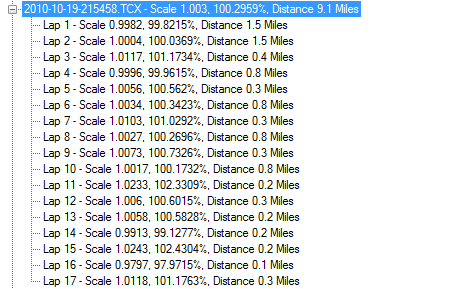 In the above examples where the mileage is .3 – these are lower intensity ‘rest’ periods done at a jog pace – thus you see slight differences in accuracy compared to other paces. That said, I’m 99% sure the unit wasn’t calibrated at the time, hence the larger accuracy shift than I would have preferred. On the right hand side of the application you’ll see two graphs that plot GPS accuracy over footpod accuracy (top chart), and then plot scale factor based on the GPS distance (bottom chart).
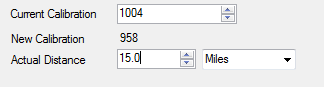
  Perhaps more important though is the calibration suggestion/correction portion. This data area displays the new suggested calibration factor should be based on the data from that particular run. In this case, it sees a default factor of 1000 (but you can change that based on your watch) and then the actual distance based on the data in the file.
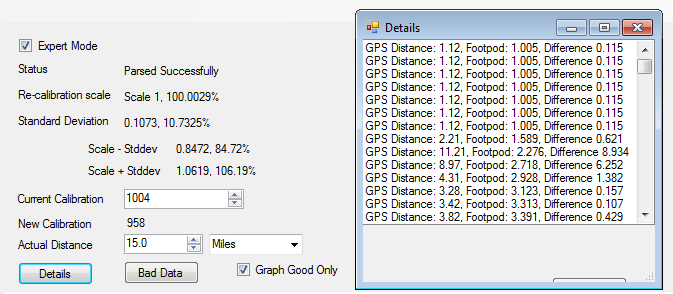
  If you’re super geeky, you can go into expert mode, which lets you look file by file and section by section at the deviations for each run and the differences between them.
  Pretty cool stuff, huh? To adjust your manual calibration factor on your watch based on the tool you’ll simply go into the footpod settings area on the watch and then to manual calibration. Each one of the Garmin Forerunners has this in a slightly different place – but for most of them its in the unit settings section. The best part here is that the little app is free – developed by Jonathan Savage, and downloadable here. Note that the app is not made by Garmin, but rather just an enthusiastic runner in the community. But technically speaking it’s giving you the exact same data that you would manually insert into the ‘manual calibration factor’. A key item to remember here is that the calibration tool is using GPS data to provide the footpod calibration factor, which is never going to be as accurate as an absolute distance such as 400m/800m on a track. And while GPS accuracy in a track environment can be quite close (as my recent tests have shown), it’s just something to keep in mind if you choose to use the calibrate tool over a track test. For most of us (or maybe just me), I’ll gladly take the time savings over having to run to the track to re-test. Especially given how close the accuracy factor is. Also keep in mind that in some of the screenshots above that I created you see vast difference in accuracy from footpod to GPS. Remember again that I rarely calibrate the footpod myself since I’m changing it so often. But in the past when I do remember to calibrate I’ve shown how astoundingly accurate it can be – especially on the newer units with the newer footpods. This goes for both Garmin and Polar. I’ve gone out and had long interval runs literally exactly the same (GPS vs footpod) – despite being in crazy conditions like snow.
  With that, go download and enjoy the tool, and thanks for reading! – Other resources I’ve put together that may be of interest for those footpod fancy: Garmin ANT+ Foot Pods- Everything you ever wanted to know If you’re looking for literally over 40+ questions and answers on the footpod, I put together this post earlier this year that goes super in depth on the topic. I’m pretty sure there’s no footpod left unturned. 2011 Sport Device GPS Accuracy In Depth- Part I / 2011 Sport Device GPS Accuracy In Depth- Part II These recently published tests I put together talk to the GPS accuracy side of the house, allowing you to consider what types of scenarios terrain-wise you may want to use GPS data from to calibrate your footpod.
FOUND THIS POST USEFUL? SUPPORT THE SITE!
Hopefully, you found this post useful. The website is really a labor of love, so please consider becoming a DC RAINMAKER Supporter. This gets you an ad-free experience, and access to our (mostly) bi-monthly behind-the-scenes video series of “Shed Talkin’”.
Support DCRainMaker - Shop on Amazon
Otherwise, perhaps consider using the below link if shopping on Amazon. As an Amazon Associate, I earn from qualifying purchases. It doesn’t cost you anything extra, but your purchases help support this website a lot. It could simply be buying toilet paper, or this pizza oven we use and love.

















thanks Ray for pointing out this usefull app!
I’m really surprised it doesn’t do this automatically for you. The device could easily check to see if the two values (footpod and GPS) were in alignment. The only times they wouldn’t be is when you’re indoors, or on a treadmill on a boat.
As much as I’m “technical” (I’m a dba) Figuring all that out would probably take me more time than running 800M (which is a PITA) to calibrate the watch. Which just shows how good you are at this stuff! And how bad I am with this stuff!
I was wondering why can’t garmin guesstimate the foodpod calibration using gps automagically.
I just noticed that on the link for the software, under the heading “Supported Garmin Devices,” it appears that only the 310XT is supported.
“This utility works with the 310XT. The 305 and 405 do not seem to record the data required for calibration.”
No mention of the 610, at least not yet.
Very cool but no 305 support :-(
The only issue I see is that it uses a manually entered current calibration. I’ve varied my calibration a couple times from the default, to a self-calibrated, and back to the default with the new FW.
As such I guess I’ll just manually select the run(s) where I knew the calibration factor and see what it turns up with.
Anyone compared this with what Garmin’s self calibration comes up with?
I ran a 800 m on a high school track (2 laps and ending on the exact starting spot) and my calibration values are different from the software that gives me.
Example: 901 (track) vs 991 (software)
Does the pacing done at calibration affect these values?
I could not get it to work with a 210. It says that the tcx file I exported from Garmin connect does not contain footpod data, but garmin connect shows the cadence data.
I wonder how well they do when running stairs.
The lap data confirms what I claimed in the past: the accuracy of the footpod depends on the pace.
Ray, am I correct that the even laps (from lap 4) are fast intervals, while the odd laps (from lap 5) are jog intervals? If so, the accuracy of the footpod differs by about 1% between fast and jog intervals.
The challenge with my rest intervals is that it depends on the workout. Some workouts the rest interval is walking, whereas some workouts the rest interval is Z3 (running). It’s always half the distance of the work interval. For the walking one, usually I’ll walk for the first 1-2 minutes, then jog the rest. Now that I’ve got the tool, it’d be interesting to re-calibrate my footpods and do some interval workouts with it ‘perfectly calibrated’ and see how it does across both my walking (12-15/mile) and my easy running (9-12/mile) compared to my regular running paces (5:30/mile-7:45/mile).
Is there a way for the tool to know what was loaded into the watch in terms of the calibration factor? can this value be determined from the data within the tool? Or do you need to check the watch? Reason that I ask is that I’ve calibrated on several occasions, and I don’t know what was previously loaded in my 310.
Unfortunately not. If you didn’t calibrate, it would be 1,000 by default. But since it sounds like you did, it’d be hard to tell. Sorry!
(I make a habbit of writing down calibration values when I calibrate…just for fun and so when I update firmware when it occasionally erases that value I can just manually add it back in).
Thanks…what a cool tool, just the same!
Hey I just bought the footpod, I was just wondering if there is a way to calibrate it with the Timex Global Trainer?
I know that the data charts that the Trainer makes is different than the garmin series, so how would I adjust the calibration?
Thanks,
Eddie
While the calibration value is ultimately the same (though the decimal I think shifts one place) – the tool only ingests Garmin files, and not the Timex PWX files. Sorry!
I was able to get this program to work today with data from my 305, but I’m not 100% sure if the data is accurate. I had to actually export TCF files from garmin connect in order for the program to read them, but it seems to be working. Here’s a screen cap of some of my 305 data.
link to flickr.com
Ray using garmin fit on my iphone for the first time i hopped the treadmill at my local Y and was amazed at how far off the footpod was according to the treadmill. 3 mile treadmill run was off by round about .5 a mile! yes thats 1/2 mile. I thought maybe the treadmill was off so I stopped and ran on a diferent treadmill another mile and over 1 mile the footpod was long again by 1/10th of a mile. Any clue are the footpods usually that far off or are my local Y’s treadmills likely out of whack? Any suggestions?
what if you have a bunch of files with treadmill runs with the 1000 default calibration? can you go back and enter the calibration to get accurate values from past runs? thanks.
I enjoy your product reviews, they are the best.
Yup, you could. Might be a bit tedious – but the data is there so you could definitely correlate it and go from there.
how would you go about fixing the data? sounds like the 1000 is a multiplier, but of what? or what is the basic equation to use in this instance? thank you.
Thanks for the post, am I getting this right, on the FR60 you would need to run with the footpod and then upload the data and amend the calibration when you know the exact distance?
I have been running with my Edge 305 bike computer in pocket to get GPS distance, so in this case would i do both and then calibrate when uploaded?
Yup, correct to both!
This almost seems like a case of “how to calibrate your sundial with a wristwatch”.
Ya never know when you might have a solar eclipse…
I calibrated my pod using my 910 on an indoor 200 meter track. I used the distance of 800m to set the calibration but I keep getting 863 meters when I’m done, any ideas what could be wrong? The battery in the pod is only a month old. Thanks
Hello! Is it possible to calibrate the footpod without a clock this way? I’ve got a sony ericsson active and a garmin footpood and do not really know how to do a proper calibration. In addition I’ve got an ant+ USB-Stick.
No, ultimately the app/device will need to be able to enter a calibration value – as the calibration is stored in the device, and not in the footpod.
Thank you so much for information! One last question: Do you know if there’s an app that saves both, the gps-track and the footpod-speed, at the same time? I would like to get a gpx- or tcx-file that includes the gps map on the one hand and the speed diagramm from the pod on the other.
Hmm, I’m not aware of any. I’m guessing that probably one of the 150 or so apps that supports the Wahoo Fitness iPhone app does do it, just not aware off hand of any. If you had two devices, you could do it that way, but it’s kinda messy.
Another way would be using two different apps. But then you have to combine two files into one. Is that possible? Anyway, I rather do sports than thinking of all this :)
You can combine them via Excel or the sort. I do it daily for accuracy tests.
Hello to All, how to calibrate the Garmin’s sdm4 footpod with Suunto Ambit watch? Thanks and regards, Piotr
Hello.
I had the chance to get 2 Garmin foot pods for a very good price. Would the calibration be unique per footpod in my FR610? In other words running with 2 pairs of shoes, depending on road or trail, can I leave the footpods in place and expect to get watch see 2 different gears and manage 2 calibrations?
Best regards.
You’ll want to calibrate each pair of shoes individually, and then as you note just manage teh 2 calibration settings manually.
But, there isn’t an option to change gear/shoes, so you’ll have to manually change the footpod settings each time you use a different pair of shoes.
I have two foot pods, shoes for when I do weights and shoes for just running. I have the FR620 and I was wondering if I would have to re-calibrate it whenever I remove the sensor connection to the watch to the other sensor when I switch shoes. Main reason why I bought a second sensor is so I wouldn’t have to remove the location on the shoe and not have to re-calibrate by running half a mile outside.
Yes, if moving between shoes you should re-calibrate – it’s unfortunately fairly sensitive.
But, if you have two footpods then you can go ahead and just write down the calibration value and manually change it in a few seconds depending on which shoe you’re using. Super easy.
I have downloaded the tool, and loaded my last 15 or so runs into it. The tool suggests a new calibration based on each run or each lap. My runs seem to recommend a calibration anywhere from 981 to 1003.
Should I just manually average all of my runs? How did you come to decide which new calibration number is most accurate?
I generally go with the most recent number, unless it looks out of whack.
Hello Ray ,
I usually run indoors on a treadmill and just bought a footpod. However to calibrate my footpod I made a small walk (not running).
I was thinking that , because I don’t have much data it is more accurate to make a slow walk than run. Is there a difference between the two and if so, am I right to prefer to walk in other to calibrate the tool.
Thanks for your info.
Keep up the fantastic work. Much appreciated.
Honestly, it’s not likely to be accurate as a calibration mechanism (my guess). You should really try and get in a run if at all possible.
I cannot understand you find it acceptable that you have to do this! As some people suggested; why don’t the receivers do this? It’s no big deal. It happens with the SC-10 as well. (though technical info on this isn’t really available I think this works continuously. Which isn’t really necessary (wheel, tyre, pressure are (pretty) stable) while it is with the pod!!)
I also would like to get a specification of how much of a reg’s distance was measured by GPS and how much by the pod. And some other 20 things.
But it’s not with Garmin that we’re gonna win the war (expression in my language) I think………
It’s just waiting for the app builders.
I’m confused. It does do this, just not every time. But the watch does calibrate both the footpod and the speed sensor from GPS.
In short, time is my enemy:
I’ve never found that the software does calibrate the pod using GPS. Pl post links to any Garmin info on this.
And if it does: why use the tool in this guide? Recent calibration is more useful than a longtime average.
By the way: the 1000 factor doesn’t change?
In a recent 10k race I experienced 2 things: the course was reported around 100 m. longer than within margins and my pace was 5.4% higher. 1+1=2 so it could be that distance determination was partly based on poddata. But I cannot check that.
This is also an indication that no recent calibration had taken place unless the poduse has been in the very beginning. Which isn’t very likely, I had a fix and the first 1 k was in open terrain.
Did I read in any reaction above that one can make a choice between pod and gps based measurement?
The only choice I know is the one in the calibration, fixed or GPS.
Hola, i have the adidas foot pod with the pacer and having a very hard time to calibrate, i have two pairs of shoes and i always remove the foot pod from the shoes i use…is these affecting the calibration? Is the foot pod that sensitive? If changing shoes affect calibration what can i do? calibrate always? buy another foot pod?
best regards
It is actually that sensitive, so you’ll want to be aware of changes made, as it will affect calibration and accuracy.
In general, the best bet is to buy another footpod (annoying/sucky) and then remember the manual calibration numbers for each.
Bad to read these actually and not cheap either…maybe thats the reason i can’t calibrate the strider. I like to run using pace zones. There are days where i need to run using the upper part of the zone (tempo) and others the lower part (long runs) of the same zone and with GPS is not possible, at least using the micoach mobile app i don’t know if garmin’s watches are more stable for these kind of method…are they?
With the foot pod the stability is great i was able to maintain a pace +/- 2 seconds in a 6 km session using the low part of the zone and never heard a warning to go off the zone and the adjust during race are instant…with GPS is not possible (micoach mobile app).
thanks for your fast answer as always.
I have a Garmin 620 and the default calibration is 100 not 1000. If I have my current calibration set to 96.9 on the watch, do I enter 969 into the current calibration within the Garmin Calibration tool? I just did that in the tool and the “new calibration” was calculated to 1006, so how would I translate that into the Garmin watch?
Yes, correct. So, back on the watch it’d be 100.6
On the polar RS800 you can calibrate the foot pod in two ways:
1) with manual calibration factor
2) during a run, you can press lap-time when a km starts and after finish a known or measure 1/2/3km round you press lap-time again. The you just go during the run! in a fast menu and update the measured distance to the actual distance. This is very easy and fast.
I wish Garmin and the new Polar V800 would or will offer this. For my different running shoes I bought holders so I can easily switch the foot pod between shoes and only select at my watch the shoe which I am using and the watch has the according calibration factor.
Ray, maybe you can forward this to your contacts in Garmin and Polar!!!
Thanks for your great reports.
Peter
Went for a run in my vibrams this morning. At end of run I did a short barefoot run with the vibrams held in my hand and afterwards I see that my 910xt recorded what looked like fairly accurate cadence info. Will the footpod give fairly accurate cadence if strapped to my wrist?
Purchased the newest garmin footpod and having a difficult time calibrating to timex global trainer. Can you please help? want to start using the footpod since the gps is almost 200 meters off in open areas for an hr run.
thanks
I don’t get the concept that the footpod calibration changes if you move its location on your shoes. I *do* get the concept that it could change with different shoes as sole thickness , etc could change. Isn’t the footpod just an accelerometer with a wireless ANT+ connection to a head unit, usually a running/multisport watch? Doesn’t it just send out a pulse when the foot strikes the ground? If that is the case then it shouldn’t matter where it is on your foot.
No, it’s not just sending out footsteps. This paper from Dynastream (the folks behind the ANT+ footpod, regardless of which company it’s branded), helps explain it a bit more: link to garmin.sk
The paper doesn’t really make it sound like the footpod position is that sensitive from shoe to shoe, only from runner to runner (ie: pronation).
I don’t have a footpod but may get one. Do you have to calibrate it or will it work out of the box?
This doesn’t seem to work anymore with the new Garmin Express software, it doesn’t find my latest tracks. And if I download a tcx file of a recent track from Garmin Connect it either doesn’t contain footpod data or the tool doesn’t recognize it.
It’s actually not to much a problem with Garmin Express, as it is with the file format. All of the newer devices (anything in the last 2 years) really only create .FIT files. But you can use various tools (see tool site) to convert from .FIT to .TCX.
Tools: link to dcrainmaker.com
Thanks Ray, just found that there is a beta version of the GarminFootpodCalibration tool that supports .FIT files. Also found the location where the Garmin Express software stores these files now. It used to be in a subfolder of %appdata% but they moved it to a subfolder of \ProgramData on the C drive now.
Nice, great to hear it’s being updated!
Ray I know this is an older thread but maybe you can help- just got a footpod to use with fr220 for treadmill runs. I used it out of the box and it was off about .16/mile and pace was way faster than I run. I know calibrating will help. I’ve scoured your sites and others with no answer. Every site says calibrate on a track. Literally what does this mean? Go with footpod to track and run? Won’t the watch just use GPS? On the watch I can change the calibration number but I don’t know what to change it to. I am so tech challenged!! Can you help please??!!!
The reason for the track calibration is that it’s the absolute most accurate. And since every few percent matters in this case, it’s the more clear way of doing it.
Hi Ray, thanks for all the great work! So to calibrate a new foot pod with Garmin 620, i would just pair it to the watch, the calibration factor stays at default. Than go on the track, do couple laps and load the file into this tool. Than i can see what Garmin reported VS how many laps i did on the track and set that as my new calibration factor?
Thanks again
is the foot pod app still available the link seems to be broken
Yes,
link to fellrnr.com
kind regards
agron
It’s a shame there seems no way to do a measured run on a track to calibrate the footpod on a fenix 3. I could do a track session, but then the GPS is used to calibrate – I can’t tell the watch, or the fellrnr tool, that I’ve done exactly 400/800/1600 etc. Is there any way around this?
Secondly, I intend to use the footpod during intervals on the treadmill. I assume to get best accuracy I would need to run at this interval pace outside with GPS, or will calibration at my normal pace be accurate at the quicker pace too? Normal = ~8:30/mile, intervals = ~6:00/mile.
I just picked up a Garmin Footpod and headed to the track where I sync’d it with my FR235 and ran a mile to calibrate it. According to the FR235 manual, I didn’t need to do anything other than run with the GPS enabled and it would auto calibrate.
Afterwards I went home and jumped on the treadmill because I always feel like I’m running faster than my treadmill says I am running and usually I feel like I’m running faster than my FR235 says I’m running when on the treadmill. I bought the footpod in the hopes of more accurate mileage inside on the treadmill. I ran 2 separate miles on the treadmill at different speeds and the FR235 and the footpod were nearly the same.
I read this article and downloaded the calibration tool and pulled the single mile run I did on the track with the GPS enabled along with the footpod and the tool told me to reset my calibration factor to 993. The FR235 has the calibration factor in 100’s not 1000’s so I set it to 99.3. I ran on the treadmill and the footpod was telling me that I was running even slower than the treadmill was reading. Did I make a mistake when I set the calibration factor to 99.3? Do I just need more GPS runs to calibrate the footpod? Or, am I just miserably slow on the treadmill?
Thanks for the article!
Here is a shot of the calibration tool.
GPS on a track will be dodgy due to the tight cornering causing it to, usually, under measure. The purpose of calibration on a track is to turn GPS off and work out the calibration factor manually using the formula:
(actual distance/recorded distance) x current calibration factor
On a track you will know exactly the actual distance so can use the formula to work out your new calibration factor.
However … Be aware that accuracy varies by pace. When running intervals at 6:00/mile, I need to use 112.6, but 102 when running steady at 8:30-9:00/mile!! It seems an obvious fix for garmin to enable multiple factors depending on pace…. But they don’t. :(
I have two footpods, one for my outdoor shoes and another for my indoor shoes. I use this tool to ensure my outdoor pod is accurate but I never take the indoor pod outdoors and so have no appropriate GPS-containing data to use with respect to that pod. Can I use the data from the treadmill to estimate a calibration factor? For instance, while running on the treadmill set at 5 min/km my pace data from the footpod says I am running at 4:50 min/km pace. Can I use that information to manually choose a calibration factor?
Yes (see post right above yours for the calculation). But that would mean you’re calibrating the footpod against the treadmill. So after calibration you should expect treadmill and your footpod-connected Garmin to show the same speed and distance.
However, treadmills are rarely accurate. So all you’ll achieve by doing this is to get consistently wrong data.
Hi Ray.
I’m figuiring out my Garmin 935 with Stryd.
What would be the best confirguration for a footpod.
I’m thinking in leave calibration to 100, with speed /always and distance/indoor, so the garmin can get the distance from GPS.
Thank You !!
Like the newsletter. Great information
I can’t seem to get the contact form to submit to fellrnr from his website. Maybe he will see this. I tried it with Forerunner 245 M, and it works if you “Export TCX” from Garmin Connect. The FIT file doesn’t contain the needed info.
Thanks for the handy tool, and thanks to Ray for posting about it!!! Very cool to be able to see this data so nicely compared.
Is anybody still using this tool? I stumbled over it for optimizing the calibration factor for my Stryd.
Same as noted in comment #78 i could also get only Garmin TCX files to work (instead of FIT). However, the data looks close to 100% aligned / perfect charts for several runs. That’s impossible, so i believe what the tool believes to be GPS data is in fact also the footpods distance (seems rounded – so 1.99km “GPS” vs. 1.992km footpod – therefore slight deviation from 100%).
Any idea how to solve this?