

When the Timex Global Trainer was announced earlier this year, most folks were quite excited to see a new entrant into the triathlon watch/device scene. With the watches ANT+ capabilities and full waterproofing it would make ideal training partner for any triathlete, as well as runner or cyclist. And because it was GPS based, it would also work with the myriad of other activities that people like you and I dream up. Finally, it actually looked like a normal Timex watch – a huge plus in many triathletes minds.
I went out and purchased the Timex Ironman GPS Global Trainer (just like any other athlete) in early June and after writing my First Look Review then, I’ve been using it constantly since. During this time I’ve quite simply beat the crap out of it, and picked every little detail apart.
I’m also had the opportunity to sit down with the full Global Trainer development team at Timex, as well as the folks at Training Peaks. During my discussion with them I grilled them for over an hour on everything and anything I could think of, and their answers in turn made there way into this in depth review. As a result, I’m fairly confident that if you have a question about the device…the answer is probably in here. ;)
Lastly, before we get to the grand un-boxing, note that I’m just an athlete like you. I look for the best device for my money, and this review is simply a way to detail out what I think of what I’ve purchased. If you’ve read my in depth reviews before, you’ll know that I’m pretty in depth – perhaps overly so. But that’s just my way of doing things. Think of them more like a reference manual than a simple ‘Should I buy this’ type of review. If you find something that doesn’t quite jive – feel free to let me know and I’ll double-check and get it all sorted out. Thanks again for reading!
Un-boxing/Components:
When you first get the unit, it’ll look something like this:

After you go ahead and unwrap all the components, you’ll be left with the following pile of goodies:

Let me go ahead and label them:

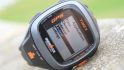
And let’s go step by step through each one. First up, is the watch itself:

Next, we have the USB charging and data sync cable:

Then, we have the USB wall charger adapter, so you can charge using a wall outlet instead. It comes with just the American plug type.


Then, if you bought the package with the heart rate strap, you’ll have that:


Tucked away as a clever piece of packing, is actually the bike mount – which I missed when I first took the initial unboxing pictures, but thankfully didn’t throw away:

And finally, last but not least, is the nifty paper quick start guide:

Size Comparisons:
When the watch was first announced, most (like myself) were pretty excited to see a GPS watch in a semi-normal looking wrist form factor. However, when I finally got a hold of my Global Trainer, I realized that while it looked normal…it was actually just about the same size as all the other large GPS watches out there today.

But…you probably wouldn’t notice that unless you put it next to a normal wrist watch:

Of course – in order to compare it against something in the same class of features and functionality…there’s only one solution: The kitchen rolling pin. This technological advancement has allowed me to easily compare half a dozen GPS watches at a time. And thus – I present my masterpiece:

(Left to right: Garmin Forerunner 110, Garmin Forerunner 405, Garmin Forerunner 305, Garmin Forerunner 310XT, Timex Global Trainer)

As you can see, the Forerunner 310XT and Timex Global Trainer are virtually identical in both thickness, and in size. It’s only when you compare it against less capable GPS watches (such as the Forerunner 110 or Forerunner 405) that you’d notice the larger size.

However, like all GPS watches I use – in general I find that you just simply don’t notice the size beyond the first few seconds of running with it. Yes, it looks funny at first, but realistically, if you want four data fields that are actually human readable, that’s pretty much the size the screen will have to be.
That said – the most common question I usually get regarding size is ‘I have small wrists…’. So I present you with my girlfriend, who at just over 5’, also has small wrists. While we had to ratchet down the strap all the way, it does fit.

Basic Operation/Modes:
Before we get into all the detail on all the different modes, let’s get into a basic primer of the watch. First up – turning it on.
To turn it on, you’ll simply hold down the left center ‘Pwr’ button for a few seconds, which will change it from standby mode (which has the time shown) to full blown sports watch. Once you do that, you’ll be in the default Performance mode:

This is the mode where you’ll do most of your activities. The watch has the following modes:
– Performance Mode (default activity mode)
– Multisport Mode (for triathlons)
– Navigate Mode (to use for basic GPS/compass navigation)
– Review Mode (to review historical data)
– Configure Mode (to change configuration options)
– PC Sync Mode (when you want to download activities & settings to computer)
So with that, let’s get into using the watch…
On the run:
The first activity you’ll probably partake in with the TGT is running, mostly because that’s the easiest to get up and start with. As noted above, after turning on the watch, you’ll be put into ‘Performance’ mode, which is simply a fancy word for ‘Go mode’.
Performance mode is one of a number of the modes I listed earlier that the TGT uses, and is the primary mode that you’ll use for most training and racing activities (save for multisport mode). Performance mode has five screens (called views) that you can customize with up to four data fields you’d like to display – such as ‘Time’, ‘Distance’, ‘Speed’, etc… I’ll talk more about that later on in the software configuration piece.
But first…let’s get running. Assuming you’ve powered the watch on, and satellites have been acquired, simply press the big button on the bottom to start.

Now that we’ve started the watch – we should start running too.

As you run you’ll notice that the screens continuously update with the information you’ve selected. You’ll see the pace fluctuate gradually while you run, though much less pronounced than on many other GPS watches. The folks at Timex have brilliantly put a smoothing factor in the run paces of about 5-7 seconds averaging, which removes much of the highly erratic paces folks sometimes see with GPS watches, by simply averaging the pace over the last 5-7 seconds.
You can switch to any of the other screens (views) that you’ve defined if you want to see other information. You’re able to configure up to four pieces of information per screen (though you can have less and make the size larger like below). To rotate through the screens, simply press the up/down buttons on the left side.

The side buttons are pretty sensitive, and as such, I find it useful in certain situations to lock them (such as if you were wearing a heavy jacket in the winter, or if you just tend to bump into stuff). To lock the buttons, just hold down the Enter key for a few seconds, and the screen will lock. Do the same again, to unlock.

Probably the most common item that folks want to know is how fast they just ran that ‘last mile’ (or ‘last kilometer’ for all you non-US folk). You can of course just do the simple math via distance divided by time…but it’s much easier if you use Auto-Split. This feature will automatically demark a lap at any interval you choose. For example, every 1 mile, or even every 1.87 miles (seriously, anything).

On top of that, you can also auto-split at any time interval as well. This is useful if you’re doing workouts based on time sets (such as 5 minutes easy, 5 minute shard). You can change the auto-lap settings directly on the watch (like above), or also using the Training Peaks software (like below).

While running, once a lap has been triggered, it will automatically display summary information for that lap, such as heart rate, pace and speed.

Laps are a useful way to record smaller groups of information, as they then show up within Training Peaks online, allowing you to analyze just that lap – as well as the run/ride in whole. I use laps to break apart my workouts, for example, if I’m doing a 10 minute warm up first, I’ll press lap at the end of that, and then again at the end of me next set. This allows me to easily analyze the important parts of the workout, without having warm-up (or cool-down) data skew the results.
Another popular feature is the ability to create alerts. Alerts are different from laps in that they don’t actually demark anything in your activity file. Instead, they simply alert you to information while using the device. Basically, it’s like someone screaming a reminder at you.
You can configure alerts for many different areas, such as Distance, Heart Rate, Power, Speed/Pace, Cadence, and Altitude. Though interestingly missing is ‘time’. For example, the ability to create a recurring time alert every 10 minutes reminding you to drink water.
That said, I use alerts quite a bit during races – to help me focus on staying within a given heart rate or power zone. By using this same functionality on the Timex Global Trainer, I can be reminded if I stray out of zone – helping me to better pace a race. Alerts can be both visual, as well as audible. There are no vibrating alerts in the Timex Global Trainer. When I asked the engineering team why – they explained it helped to keep the cost down, and thus one of the reasons why it’s $50 cheaper than its primary competitor.

You can configure alerts both on the watch, as well as within the software. Trust me, it’s a heck of a lot easier to do in the software:

The watch itself is super-easy to handle while running. Unlike some running watches where you have to press really hard to get the buttons to press (or have to use a touch-bezel), the TGT buttons easily depress. This won’t be a hard watch to operate once winter rolls around and you have thick gloves on.
Also, the watch is water-proof, so it’s resistant to sweat – and I find it’s super easy to wipe any sweat off the display if you sweat like a sprinkler system. I’ll talk more about waterproofing in the swim section though.
Finally, I want to cover the ‘Performance Pacer’ functionality – which is similar to what the competition calls their ‘Virtual Partner’. The Performance Pacer functionality allows you to set a defined target distance and time, and it’ll automatically help pace you during that effort. Think of it as having a computerized friend. It’ll tell you how far ahead/behind you are on that goal. This is great for races where you want to hit an exact time, but don’t want to go out too hard (or too slow).
You configure the feature via the watch or the software:

So, with running out of the the way…let’s get onto the bike.
On the bike:
The Timex Global Trainer includes a bike mount, so the first think you’ll want to decide is whether or not to wear the watch on your wrist, or use the included bike mount:

Once you make that decision – it’s time to get it (or you) on the bike. The watch simply wraps around the mount, which in turn wraps around your handlebar:

If you have a tri-bike (aka Time Trial bike), then you’ll need to decide where exactly you want to put it. On my bike, it only fit on the side of the aeropads. Functional, yes. Ideal, no. Ideally they would have included some sort of quick-mount system so I could put it wherever I’d like (such as up on the bars). Nonetheless, here ya go:


Ok, so with all the mountage out of the way, let’s get to using the device. Like run mode, you can customize any of the give views to be bike-specific. In fact, there’s nothing stopping you from making five bike views if all you want to do is bike.
Specific to the bike views are fields such as cadence, power, and speed (instead of pace).

Once you get started on the bike, you can change views just as you would with running, by pressing the up/down buttons. This is probably a good point to mention that the TGT doesn’t have a specific ‘Bike mode’, or ‘Run mode’, but rather just ‘Performance mode’ – and everything you view data wise is just controlled by the display views you’re using at that time.


If you have an ANT+ speed/cadence sensor, you’re able to scan for those ANT+ sensors and add the data being streamed from them. The ANT+ speed/cadence sensors allow you to pickup cadence – how many times per minute you rotate the crank (where your pedal attaches), and the speed portion of the sensor allows you to get speed while indoors on a bike trainer, or if in a location where satellite coverage is spotty. Also, some folks explicitly use the speed sensor to get a very exact speed (since it’s simply wheel circumference calculations).

Regardless of why you use the sensor, to configure it, you’ll switch over to Configure Mode, via the mode button, and then scroll down to sensors.

From there you’ll tell it to scan for the sensor type you have. Note that Timex has only in the last few days made the Timex Speed/Cadence sensor available and only via calling customer service. For most everyone else out there, you’ll probably be using any ANT+ compliant sensor, and most likely just using the Garmin GSC-10 speed/cadence sensor (sorta the mainstay of cyclists everywhere). This $35 speed/cadence accessory is money well spent, and it’s what I use on all my bikes. Since Timex didn’t have the speed/cadence sensor available yet, I’m using the GSC-10 instead in this review.

Once paired, you’ll see the sensor display cadence information on the screen using the data fields I’ve chosen.
We’ll talk about some of the other ANT+ sensor types in a moment, specifically, power meters.
But first, let’s cover auto-resume.
I’m sure you know the feeling of city riding where you’re constantly pressing stop or start as you hit stop lights…only to realize about 2 miles later that you forgot to hit resume/start at one of the lights.
Well, auto-resume is here to solve that. This feature allows you to configure a trigger speed where if you go below it, it will automatically pause the watch. And once you go above that speed, it will automatically resume it.
You can configure this view on the watch itself, or via the software settings.

Once configured and you’ve started your ride it’ll automatically pause and resume when you cross the threshold. Note that this function works not only in cycling, but also running (or anything else you happen to use the watch for).
The watch also supports the ability to show ascent/descent using the GPS-based altimeter that’s included within it. You can configure these settings on the watch or via the software, and display them in your data fields.
Finally, you can customize up to five bikes on your Global Trainer. Each bike includes separate weights, as well as wheel sizes (used to compute distance indoors), and also can have unique names:

With the basics on the bike set – let’s get onto more advanced topics – like Power Meter support.
Power Meter Support:
The Timex Global Trainer includes basic power meter support for ANT+ power meters. If you’re unfamiliar with Power Meters, I’d suggest checking out my Power Meter Primer Post. In short, power meters measure how much energy or effort you’re putting into your bike ride. Unlike metrics pace or speed, which can vary based on terrain – power is an absolute. Many competitive cyclists and triathletes use power to help pace based on a known threshold.
The Timex Global Trainer supports any ANT+ Power Meter, such as the PowerTap, Quarq Cinqo or SRM.

To pair the power meter, you’ll go back into the same menu system that you configured the speed/cadence sensors within:

Once the power meter is scanned, it will automatically display the power information on your Global Trainer.
The Global Trainer displays four power related fields: Power, Power (Avg), Power (Peak), and Power (Zone). Power is the current power, albeit slightly smoothed at about 6-8s. This makes it a bit easier to pace by power. Power (Avg) is actually Lap Average Power, and not ride average power. This topic came up during my call with the engineering team, where I was a bit confused as to why average wasn’t correctly correlating with my average. Once they explained that anywhere the watch says ‘avg’, it actually means ‘Lap avg’, then things made sense. Though, I still maintained they should simply say ‘Lap avg’.
The one piece of functionality that advanced users will note is missing is the ability to calibrate their power meter from the Global Trainer. When I asked why, the engineering team explained that they felt it was a slippery slope of having potentially having customers believe a given calibration issue lie in Timex’s camp to resolve, versus the manufacturer. I’d point out that that doesn’t seem to stop any other head unit (actually, all of them), from offering calibration options. I’d also point out that without said calibration option, it effectively renders the power meter functionality unreliable, as power meter calibration easily fluctuates with something as simple as bringing it outside or indoors.
Finally, I asked about recording interval. If you look at the Timex Global Trainer files today, you’ll notice that they record at 2-second intervals (listed under Timeoffset, 3rd column from right):
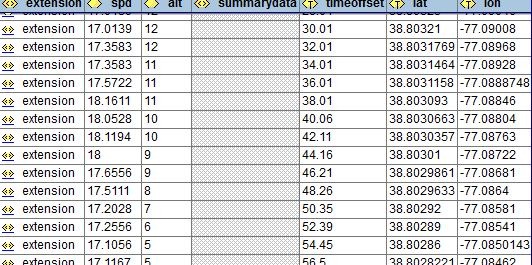
However, the default/gold standard for any power meter device is 1-second intervals, which is due to the amount of data lost if you use any higher interval, which in turn creates incorrect numbers for functions like normalized power. To understand all the implications, read this post by the godfather of power meter analysis (may require joining Wattage Google Group), thus here’s the snippet from Dr. Coggan himself.
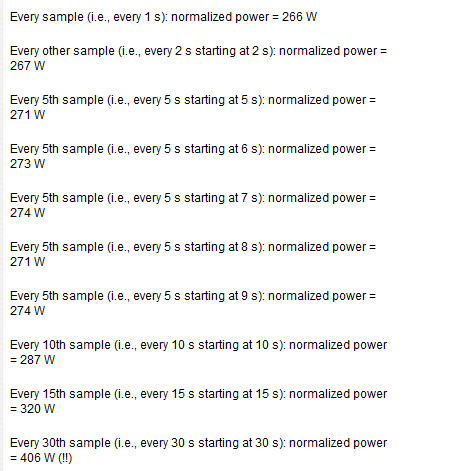
The Timex folks responded by saying the limiter to 1s recording was storage space on the unit, which was roughly 20-hours with 2s recording, and thus with 1s recording wouldn’t be enough to finish an Ironman. This is unfortunate, though not a huge deal killer as you can see above.
On the bright side, during my engineering call, they noted that they are currently planning on adding something akin to TSS to the device, which will be useful.
On the swim:
The Timex Global Trainer is fully waterproofed to 50 meters. And while I didn’t have any scuba trips planned, I instead went to the bottom of the pool and validated it didn’t die. It didn’t (nor did I). Though, I’d suggest that you not routinely go to the bottom of the deep end in races, as it probably won’t help your time any.

The Global Trainer will record your time information, but if worn on your wrist, will not record your distance during the swim. This is because like virtually all other GPS devices on the market today, the GPS signal will drop out about 2” below the surface. As such, it makes tracking rather difficult.

Of course, you might point out that there’s time during the stroke recovery that the watch is above the surface. But, the accuracy of those data points is in question, as the watch hasn’t yet re-established, thus no track points are made. Unlike the Garmin 310XT, Timex has not yet introduced any form of openwater swim mode (which was just recently added in June for the 310XT), though Timex notes they are evaluating their options.
Also note that because it uses 2.4Ghz ANT+ signals between the heart rate strap and the watch, those too don’t work underwater (just like all Garmin Fitness units), only the Polar T-31 coded straps with Polar units will work underwater. You lose HR signal on the Global Trainer less than 1” away from the HR strap, roughly in line with the Garmin units.

Now, there’s no reason why you still can’t get swim data…if you simply put it in your swim cap. This is what I do to get good distance data about my swims, and it works great. Just see my detailed post on where to position it.

Once there, simply hit the start button (big and easy to find), and then be sure to lock the watch (via the enter button for a few seconds). This will ensure that the cap won’t start pressing buttons. After which, just swim.
When back on dry land, you’ll find the Global Trainer will make some very nice pretty pictures:

And finally, as a sport watch or timer, it works just fine too in the water, so you can use it to record splits if need be in any wet environment. Also, one positive aspect to having no quick release system, is there is no fear at all that the watch will fall off. Once strapped to your wrist, the single-molded-unit is not going to go anywhere.

Multi-sport mode:
Multisport mode is utilized when you want to string a series of sports together – such as in a triathlon, where you start in the swim, and then move to bike and run. This enables you to record each sport individually, but without having to actually stop and reset the watch in between each sport.

To get into multisport mode, simply press mode until you see Multisport mode. It’s easiest to setup multisport mode though via the Computer, which allows you to configure the different views up front, as well as how exactly you want to parse the different activities:

Once in multisport mode, you utilize the Stop button to advance to the next sport. This is actually really cool, as it allows you to still utilize the Lap button if you want to mark laps – something the 310XT doesn’t allow.
Once in multisport mode and actually…well..sporting, it will show you the title of the sport on the upper portion of the screen.
After the workout, it’ll automatically splice the three different sports apart (if you choose that way), and display them individually in Training Peaks.
The only challenge with multisport mode is that physically speaking, the watch isn’t designed to easily transition from sport to sport. Because there is no quick release kit, you have to actually wrap the watch around the bike in transition (or while riding), just like you would around your wrist. Just something to be aware of. If you plan to wear it on your wrist the entire event, than this isn’t an issue of course.

Review Mode:
Review mode enables you to look back at your history holistically, as well as on a per activity basis.

You can drill down into each individual activity you’ve completed, and get a lap summary, as well as a ride summary:

Even cooler is that you can then go through four pages of summary and average information about either each lap/split – or each activity.


Pretty cool on-device historical information, especially if you’ve just finished a ride or run and want to know how things went.
Navigation mode:
Navigation mode allows you to utilize the Global Trainer for basic navigational functions. I say ‘basic’, because this isn’t your little car-based Tom-Tom here. This is pretty much just a digital compass, with a memory on where you’ve been, and where you should be going…all done via Etcha-a-sketch style (like all other competitor devices I should point out).

What is cool is that you can drill down into the map view to see exactly where you’ve been:

And if you’re really lost you can break out the digital compass as well:

You can also use the ‘Back track’ functionality to retrace your steps back to the start. And, if you set given waypoints, you can have the device get you back to those as well.

The Global Trainer also supports the ability to create courses using a string of GPS coordinates, but it’s honestly a bit of a pain in the butt to do right now…so I’d wait for that function to get refined a bit more.
Indoors:
When training indoors with the Timex Global Trainer, I’d recommend turning the satellite off. You can do this via the configure menu.
The reason for this is that while the default Training Peaks software easily handles the fact that you’re actually stationary, some 3rd party suites don’t. This means that while you may be using a speed sensor on a trainer, your actual GPS speed is still zero – and thus some 3rd party software will incorrectly parse it.
That said, the Global Trainer works great while on a trainer and indoors. There were some earlier kinks that caused me some data issues in the First Look Review, but those have been resolved with new software updates.
I use the TGT indoors when on a trainer, and combined with the ANT+ speed/cadence sensor, it’ll automatically tell me my distance, speed and cadence.

Note though that the Global Trainer does NOT support a running footpod – nor any of the ANT+ foot pods available today. When I asked why (given this is a pretty big item for the winter, or just folks wanting to track running cadence like myself), they explained that when the project first started there were some legal issues with accessing the footpod data stream, and those were only resolved recently. Unfortunately they were resolved after launch, and thus the following:
“At the time the Global Trainer development began, there were licensing issues that prohibited the use of the foot pod by Timex. In the last two years, those issues have been resolved, but we could not change the scope of the GT’s sensor capability for launch.”
I still don’t have a good concrete answer as to whether or not this means it’ll never support the sensors. I’ve traded a bunch of e-mails on the topic with them, and at the moment they’re saying they don’t plan to support foot pods going forward. Personally, if they don’t have this on the radar to support, this a deal-killer for me and treadmill running.
 (Here’s an ANT+ foot pod sensor)
Given the entire point of ANT+ sensors is the ability to pickup data types exactly like this, this seems like a pretty big ‘oops’.
Night Use:
The watch includes a basic backlight, the same Indiglo backlight found on all other Timex branded watches. While I understand this is the staple of Timex’s watch lineup, it’s also nowhere near as crisp or clear as many of the device high contrast backlights found in other GPS watches today:

Thus, I’d recommend they look at either ‘refreshing’ the Indiglo…or ditching it.
Using it for other things:
Of course, because it’s a GPS device, it can pretty much record anything, and therefore you can use it for just about everything. Making it even better is that it’s a simple wrist watch (though slightly large), and completely waterproof.
But sometimes, it is just as simple taking it for a hike, or a wander around the block. The Global Trainer will happily create maps and routes showing how long, how fast, and how far – as well as wear.
But…it’s always more fun if you go somewhere far away. Take for example, a few recent flights I did. In this case, I let it stay on and just record my flight path:
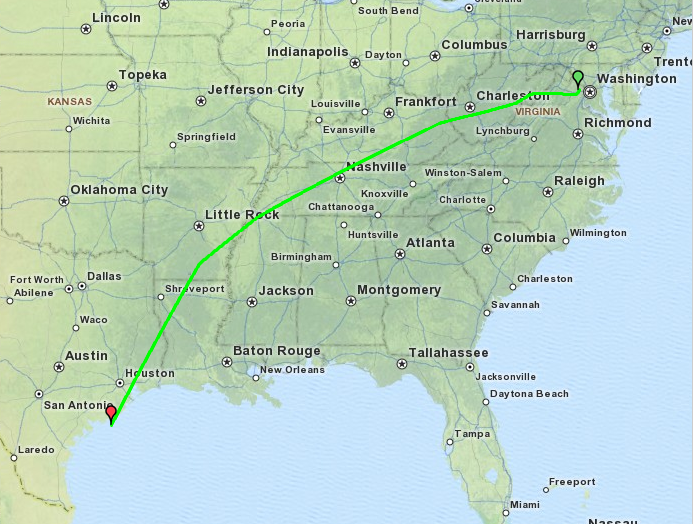
Pretty cool, ehh? And, on the unit itself, you’ll see the actual speed:

Of course, you’re imagination at activities is really the limiter here. In the past, I’ve used GPS devices for Kayaking in the South Pacific, trekking across Egypt, and wandering through Africa.
Battery Life & GPS Reception:
Two areas that have been heavily commented on since my initial First Look review were battery life, and GPS satellite reception.
First up – battery life. Getting a clear handle on battery life is an incredibly complex subject. Why? Well, everything from how many sensors are feeding data into the watch, to how much data is being recorded, to how long it’s been on. Finally, unless you go out and do a 15-hour activity, you’re likely downloading data in between, thus resulting in at a minimum a small charge.
In my testing I found that the battery charging indicator itself was very inconsistent. Meaning, one second it would tell me it was at 20%, and then I charge it for 5-10 seconds and now it’s at 40%. I also found that when using a USB charger, it would never go beyond 90%, whereas with a wall charge it would go to 100%.
Also, the watch supports two ‘standby’ modes, one which displays time – and one which displays nothing. I generally kept it on display time, because it also displayed battery status.
However, I could never got a solid handle on battery. Even when I thought it was fully charged, I had it die out on some flights that were just 5 hours. Yet other times, I was able to leave it recording significantly longer. I’ve been told that the latest firmware about to be released does include some corrections to the battery meter, so I’ll update this section once I get more detail on that.
Next – Satellite reception and dropouts. In my initial review, both myself and many others commented on continued satellite reception issues such as inability to get an initial lock on satellites, as well as dropouts during the middle of an activity.

Given the GPS chip in the Timex Global Trainer is the exact same GPS chip as in the Forerunner 310XT – I was curious why the huge difference in reception. I asked Timex where the chip is located, and they noted directly below the split/start button – which seems like a good location.
I went back to the engineering team on these issues and over the last week they sent over an updated firmware file for the watch, which, based on all my testing thus far – seems to have completely resolved my satellite lock/reception issues. The satellites lock almost instantly upon turning it on, and they stay locked for my entire activity.
I’ve been told by Timex this updated firmware will be released within the next 3 weeks.
Finally, one last item that continues to be ‘interesting’ is that the Timex Global Trainer seems to be registering about 2.5% ‘short’ for all activities I do, in comparison to the Garmin. I don’t have a good explanation here – but it’s happening for a number of folks, and in both my case, and theirs, it’s occurring on well measured courses/routes. As a result, this means that my paces/speeds are actually reporting slower than they really are, which is sorta a bummer.
Timex Engineering doesn’t really have a good answer here yet on this one. They’ve noted that this is within the ‘acceptable range’ of GPS accuracy – which is indeed true. But what doesn’t quite jive is how precise it is on every activity I get with being 2.5% short. Typical GPS inaccuracies would see some activities long, some short, and by varying amounts. 2.5% is too ‘computerized’ a number to be just due to occasional drift. Hopefully, like the other earlier satellite issues – they’ll work this one out too.
Accessories:
The Timex Global Trainer doesn’t have a wide number of accessories developed by Timex itself for it. However, because it’s part of the ANT+ ecosystem, there are tons of 3rd party accessories – some ironically enough developed by it’s primary competitor: Garmin.
Timex ANT+ Speed/Cadence Sensor:
As of this writing, this speed/cadence sensor wasn’t available. It’s apparently just come out in the past few days, and can be bought via customer service for $59.95. Sorry, I don’t have any further information on it at this time, but I’ve been told it should start trickling out into the normal retail channel over the coming weeks.
Timex ANT+ Heart Rate Strap:
Depending on which bundle you’ve selected, the package will either come with a heart rate strap – or it will require separate purchase. No worries though, any of the numerous ANT+ heart rate straps on the market today work just fine with the Timex Global Trainer. Or, you can pickup the Timex branded one (which is identical to others).

This is in theory available from Timex Customer Service also, for $50.
ANT+ Speed/Cadence Sensor:
You can instead (or in the meantime) pickup the standard Garmin GSC-10 Speed/Cadence sensor, which works just fine with it, and is what I used with the bike and Global Trainer.

Instead of costing $60, this is available on Amazon for $35…a much better deal in my opinion.
ANT+ Heart Rate Strap:
In addition to the Timex ANT+ heart rate strap, you can also pickup cheaper variants from Garmin.

The two pictured above are the soft-strap (upper) and classic heart rate straps (lower), available for $40 and $60 from Amazon respectively.
ANT+ Power Meter:
Lastly, for serious cyclists/triathletes, you can purchase an ANT+ power meter from any one of the different power meter vendors out there today, they are:
Software:
The Timex Global Trainer leverages Training Peaks as the core backbone of the analysis software. This is split into two key different components:
– The device agent installed on your PC
– The website based on Training Peaks
First up though is signing up for an account. This is completely free, and allows you upload data from your watch to a site for both storage and analysis. Sign-up only takes a second and is easy and painless.

Once signed up, you’ll go ahead and install the device agent. At the moment, it’s only available for PC – but the folks at Training Peaks are very close to getting a version for the Mac as well. I’m told by the September launch it should be there for general consumption.
Once you’ve got the device agent installed, it’s time to get syncing…
Uploading/Syncing Data (device agent):
In order to get data to/from the watch, you’ll need to press mode and change it to PC Sync mode:

From there, the watch is ready to both receive and transmit data. So, we’ll want to open the device agent:

At this point, you need only to select ‘Download from device’ in order to start the sync process. Once it’s completed downloading the files, it’ll automatically list each activity in the list below:

Note that it doesn’t erase the files from the device unless you press the erase button. This is important because if you fill up the watch (about 20 hours worth of data), then you may get into a situation where you can’t record a new activity. Though, you can always delete data while on the watch itself in review mode.
The last step is selecting to ‘Save’ the files to the Training Peaks website, which uploads them to your Training Peaks account. Note that if you already have a Training Peaks account (like I do), you can simply select which account you want from the dropdown, and upload to that account.
Also, it’s from the device agent where you can drill into and change any of the settings pages I’ve discussed throughout the review. I’ve covered many of them earlier in the post, but for those that I didn’t cover, I’ve created a gallery with every single settings page screenshoted – which you can view here, separated out by tabs and pages in order:

Now that we’ve got the data in Training Peaks, let’s dig into that a bit:
Training Peaks Overview
Training Peaks has long been the standard for online management of sports activity files, in particular, for cycling and running. Over the past few years they’ve expanded out the number of sports, devices and baseline fitness functions they support. Thus, when you look at all the options Timex had, leveraging an existing company to provide the underpinnings of the services not only makes a lot of sense for them, but also for us users as well.
Finally, Training Peaks is a great way to collaborate with a coach or team. This is the primary mechanism I use to upload and receive feedback on workouts that I complete, to my coach.
I’ll walk through each of the main TrainingPeaks.com areas that you’re likely to use. First up, is the Dashboard. The Dashboard is where you monitor and manage your day to day existence in Training Peaks. You can customize any of the different ‘pods’, to best fit what you want to see when you login:

The only slight bummer here is that many of the cooler pods are only available in the Premium version, which has a cost associated with it. For example, I normally use the Premium version – and you can see the pretty big difference:

Next up is the calendar tab. This is the area I actually use most, as it helps me to track all the workouts I complete. I can customize how each workout appears in the calendar. Below it the default view:

And here’s the view I use in my primary Training Peaks account that I’ve had for years:

Now we’ll drill into a given activity, such as a recent bike ride I had. As you can see, on the main page I have information that’s summary in nature, with the again customizable pods to easily change and breakout information dependent on what I want to see:

Next, if you click on the Maps and Graphs area, you can see a map of the activity, as well as a graph of my actual workout with the different ANT+ data streams charted (Power, Cadence, Heart Rate and then GPS provided Speed/Distance/Elevation). Also, you’re able to hide any metrics you’d like along the top bar:

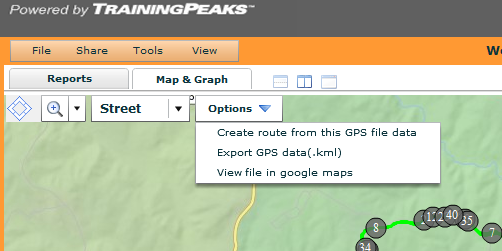
Now, Training Peaks uses MayQuest maps by default…which..aren’t necessarily the best out on there whole wide internets. So they’ve handily provided the ability to simply view your track in Google Maps as well via a quick dropdown menu:

Finally – my favorite feature in Training Peaks is the ability to see ‘Bests’ divided up by different time chunks. For example, my best power output, or my best pace:

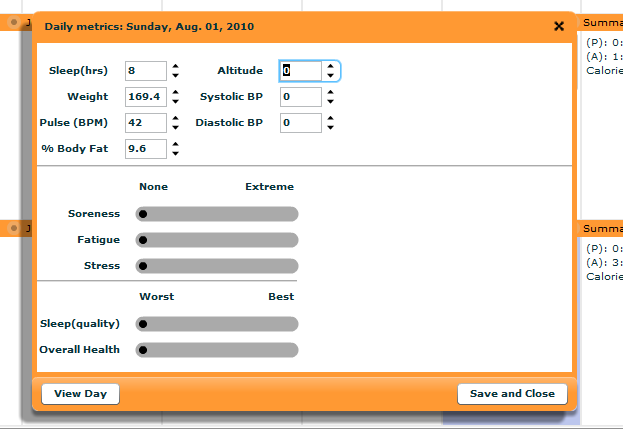
But Training Peaks isn’t just about looking at any given activity – it’s also about analyzing how you as an individual may be fairing. For example, via the Withings WiFi Scale I can automatically import weight measurements straight into Training Peaks. You can also modify these values, along with the others in the box below, manually.
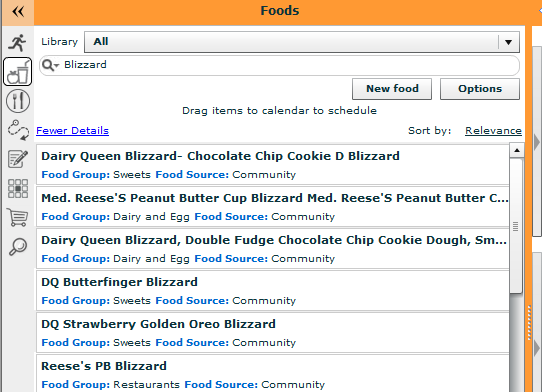
Also, I can go ahead manage a daily food log with a pretty big database of foods, occasionally I do this if I want to lose a few pounds…
Recently (just last week) they added TSS/IF and PMC functionality. TSS is Training Stress Score, and is a way to visualize and manage your training load, and is a great way to try and nail the perfect taper before a big race. You can read in depth about these functions here. Though this isn’t available in the free Timex version, you can see some of the options available in the subscription Training Peaks version.


Finally, some folks will note that Training Peaks is freely accessible to any user – without buying a Global Trainer – and that’s absolutely correct. In fact, there are two levels of Training Peaks access. The first is the free level, which includes basic functionality. And the second level is the Premium version, which includes advanced functionality primarily targeted at more advanced users. Here’s a little chart showing the differences. The Timex variant fits in the middle a bit, which contains specific enhancements not available in the basic version.
Also, note that if you already have a Training Peaks account, you can just download the updated device agent software and link it to your existing Training Peaks account – which is what I do for my day to day training log. Works great!
And same goes if you have other training devices from other vendors – they all seamlessly integrate into TP. For me, it’s my one-stop-shop training log.
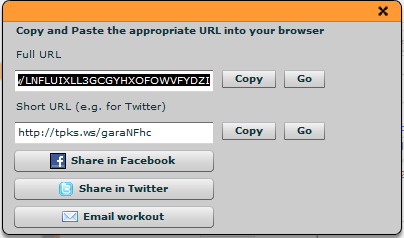
If you’d like to look around at exactly what’s offered – I’ve shared a few workouts from within Training Peaks for you to play with. Which…reminds me – that’s yet another cool feature of TP – the ability to share workouts!
Here’s how you can share them across a variety of mediums:
Updating the Firmware
Through the Training Peaks device agent software, you can fairly easily update the firmware on the Timex Global Trainer. This is important as new updates come out and you want to get either new functionality, or bug fixes for the TGT.

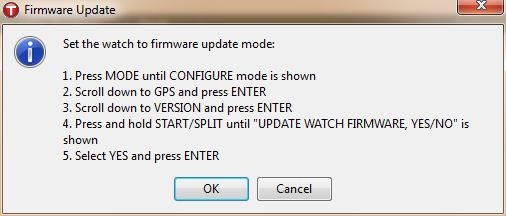
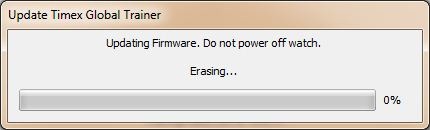
The whole firmware update process only takes a minute or two at most, and best of all – you can export and save all of your configuration settings, so you’ll be quickly back up and running – something that Garmin doesn’t provide for with their watches during some firmware updates.
3rd Party Software:
At this time, there are no 3rd parties that support the Timex Global Trainer. The good news though is that the Timex Global Trainer creates simple XML-based files within the Training Peaks folder structure, which could easily be parsed by 3rd parties:

For fun though, here’s a quick look inside the file structure:

I’ve talked with the founder and lead developer of Sport Tracks and he’s looking into what it will take to add Global Trainer support to Sport Tracks 3.0 (which is just entering beta). If you’re interested in having Global Trainer support, please let him/them know via their forums.
Summary:
In summary, I think the Timex Global Trainer is a great new entrant to the market. Even though the product is a first generation device for Timex, I think they’ve hit the mark in almost every category. Based on my in depth discussions with the development/engineering team – I think they understand the areas they need to address – and can largely do so with simple firmware updates. Between the Timex team and the Training Peaks team they are one of the most receptive athletic watch companies I’ve talked about new features with.
Further, based on the private firmware updates I was provided over the previous weekend, I think they are indeed making good on fixing some of the issues that were outstanding, and those updates should be making their way to your hot little hands in the next three weeks – just in time for the full retail availability launch in September.
Here’s a quick breakdown of what I see as the Pro’s and Con’s of the Global Trainer are:
Things I like:
– Highly customizable, everything is tweakable…everything.
– Leverages TrainingPeaks.com as data repository
– Ability to export/import all settings to a simple savable file on your computer
– Fully waterproof to 50 meters
– Multisport mode allows one to still utilize ‘Lap’ functionality (small, I know, but really nice!)
– Smoothing of run paces helps to minimize typical GPS speed fluctuations
– Same form and size as all other multisport GPS watches
– Only one unit – no separate GPS dongle/attachment required
Things that could use some improvement:
– No footpod support is a huge bummer for treadmill users
– Lack of power meter calibration makes it less than ideal for power meter users
– Backlight isn’t as bright as most competitors
– Some of the user interface could be smoothed out a bit
Below is a dynamic comparison chart with details compared against other units in the same category. Note that you can customize your own comparison chart against any unit I’ve reviewed using the “Comparison Calculator” on the right sidebar. Remember to click ‘expand results’ at the bottom to see all the data rows.
| Function/Feature | Timex Global Trainer | Polar Ignite 3 | Garmin Forerunner 55 | Polar Ignite 2 | Polar Unite | ||||||||||||||||||||||||||||||
|---|---|---|---|---|---|---|---|---|---|---|---|---|---|---|---|---|---|---|---|---|---|---|---|---|---|---|---|---|---|---|---|---|---|---|---|
| Copyright DC Rainmaker - Updated November 23rd, 2025 @ 5:49 pm New Window | |||||||||||||||||||||||||||||||||||
| Price | $150.00 | $329 | $199 | $229 | $149 | ||||||||||||||||||||||||||||||
| Product Announcement Date | JAN 25, 2010 | Nov 8th, 2022 | June 2nd, 2021 | Mar 24th, 2021 | June 30th, 2020 | ||||||||||||||||||||||||||||||
| Actual Availability/Shipping Date | JUN 23, 2010 | Nov 8th, 2022 | June 2nd, 2021 | Mar 2021 | July 2020 | ||||||||||||||||||||||||||||||
| Display Type | AMOLED | ||||||||||||||||||||||||||||||||||
| GPS Recording Functionality | Yes | Yes | Yes | Yes | Only via Phone Connected GPS | ||||||||||||||||||||||||||||||
| Data Transfer | USB | USB, BLUETOOTH SMART | USB, Bluetooth Smart | USB, BLUETOOTH SMART | USB, BLUETOOTH SMART | ||||||||||||||||||||||||||||||
| Waterproofing | 50 Meters | Yes - 30m | 50 meters | Yes - 30m | Yes - 30m | ||||||||||||||||||||||||||||||
| Dive/Snorkel Feature | No | ||||||||||||||||||||||||||||||||||
| Battery Life (GPS) | 15 hours | Up to 30 hours | 20 hours | Up to 20 hours | Up to 50hrs with phone GPS (4 days standby) | ||||||||||||||||||||||||||||||
| Solar Charging | No | ||||||||||||||||||||||||||||||||||
| Recording Interval | 2-Second | 1s | 1s/Smart | 1s | 1s | ||||||||||||||||||||||||||||||
| Dual-Frequency GNSS | Yes | ||||||||||||||||||||||||||||||||||
| Alerts | Sound/Visual | Vibrate/Visual | Sound/Visual/Vibrate | Vibrate/Visual | Vibrate/Visual | ||||||||||||||||||||||||||||||
| Ability to download custom apps to unit/device | No | No | Yes (all Connect IQ Apps) | No | No | Voice Integration | Timex Global Trainer | Polar Ignite 3 | Garmin Forerunner 55 | Polar Ignite 2 | Polar Unite | ||||||||||||||||||||||||
| Has Mic/Speaker | No | ||||||||||||||||||||||||||||||||||
| Can make/receive calls | No | ||||||||||||||||||||||||||||||||||
| Voice Assistant | No | Music | Timex Global Trainer | Polar Ignite 3 | Garmin Forerunner 55 | Polar Ignite 2 | Polar Unite | ||||||||||||||||||||||||||||
| Can control phone music | Yes | Yes | Yes | No | |||||||||||||||||||||||||||||||
| Has offline music storage and playback | No | No | No | No | |||||||||||||||||||||||||||||||
| Streaming Services | No | No | No | No | Payments | Timex Global Trainer | Polar Ignite 3 | Garmin Forerunner 55 | Polar Ignite 2 | Polar Unite | |||||||||||||||||||||||||
| Contactless-NFC Payments | No | No | No | No | Connectivity | Timex Global Trainer | Polar Ignite 3 | Garmin Forerunner 55 | Polar Ignite 2 | Polar Unite | |||||||||||||||||||||||||
| Bluetooth Smart to Phone Uploading | No | Yes | Yes | Yes | Yes | ||||||||||||||||||||||||||||||
| Phone Notifications to unit (i.e. texts/calls/etc...) | No | Yes | Yes | Yes | Yes | ||||||||||||||||||||||||||||||
| Live Tracking (streaming location to website) | No | No | Yes | No | No | ||||||||||||||||||||||||||||||
| Group tracking | No | No | No | No | |||||||||||||||||||||||||||||||
| Emergency/SOS Message Notification (from watch to contacts) | No | No | Yes (via phone) | No | No | ||||||||||||||||||||||||||||||
| Built-in cellular chip (no phone required) | No | No | No | No | No | Cycling | Timex Global Trainer | Polar Ignite 3 | Garmin Forerunner 55 | Polar Ignite 2 | Polar Unite | ||||||||||||||||||||||||
| Designed for cycling | Yes | Yes | Yes | Yes | Yes | ||||||||||||||||||||||||||||||
| Power Meter Capable | Yes | No | No | No | No | ||||||||||||||||||||||||||||||
| Power Meter Configuration/Calibration Options | No | N/A | N/A | N/A | N/A | ||||||||||||||||||||||||||||||
| Power Meter TSS/NP/IF | No | N/A | N/A | N/A | N/A | ||||||||||||||||||||||||||||||
| Speed/Cadence Sensor Capable | Yes | No | Yes | No | No | ||||||||||||||||||||||||||||||
| Strava segments live on device | No | No | No | No | |||||||||||||||||||||||||||||||
| Crash detection | No | Yes | No | No | Running | Timex Global Trainer | Polar Ignite 3 | Garmin Forerunner 55 | Polar Ignite 2 | Polar Unite | |||||||||||||||||||||||||
| Designed for running | Yes | Yes | Yes | Yes | Yes | ||||||||||||||||||||||||||||||
| Footpod Capable (For treadmills) | Yes | No | YES (ALSO HAS INTERNAL ACCELEROMETER) | No | No (but has accelerometer for indoor running) | ||||||||||||||||||||||||||||||
| Running Dynamics (vertical oscillation, ground contact time, etc...) | No | No | No | No | No | ||||||||||||||||||||||||||||||
| Running Power | No | No | No | No | |||||||||||||||||||||||||||||||
| VO2Max Estimation | No | Yes | Yes | Yes | Yes | ||||||||||||||||||||||||||||||
| Race Predictor | No | No | Yes | No | No | ||||||||||||||||||||||||||||||
| Recovery Advisor | No | No | Yes | No | No | ||||||||||||||||||||||||||||||
| Run/Walk Mode | No | No | Yes | No | No | ||||||||||||||||||||||||||||||
| Track Recognition Mode | No | Yes | No | Swimming | Timex Global Trainer | Polar Ignite 3 | Garmin Forerunner 55 | Polar Ignite 2 | Polar Unite | ||||||||||||||||||||||||||
| Designed for swimming | No | Yes | Yes | Yes | Sorta (waterproof but HR only tracking) | ||||||||||||||||||||||||||||||
| Openwater swimming mode | N/A | Yes | N/A | Yes | No | ||||||||||||||||||||||||||||||
| Lap/Indoor Distance Tracking | N/A | Yes | Yes | Yes | No | ||||||||||||||||||||||||||||||
| Record HR underwater | N/A | Yes | Yes | Yes | Yes | ||||||||||||||||||||||||||||||
| Openwater Metrics (Stroke/etc.) | N/A | Yes | N/A | Yes | No | ||||||||||||||||||||||||||||||
| Indoor Metrics (Stroke/etc.) | N/A | Yes | Yes | Yes | No | ||||||||||||||||||||||||||||||
| Indoor Drill Mode | N/A | No | No | No | |||||||||||||||||||||||||||||||
| Indoor auto-pause feature | N/A | Yes | Yes | No | |||||||||||||||||||||||||||||||
| Change pool size | N/A | Yes | Yes | Yes | No | ||||||||||||||||||||||||||||||
| Indoor Min/Max Pool Lengths | N/A | 20M/Y to 250 m/y | 20M/Y to 250 m/y | N/A | |||||||||||||||||||||||||||||||
| Ability to customize data fields | N/A | Yes | Yes | Yes | Yes | ||||||||||||||||||||||||||||||
| Captures per length data - indoors | N/A | Yes | Yes | Yes | No | Triathlon | Timex Global Trainer | Polar Ignite 3 | Garmin Forerunner 55 | Polar Ignite 2 | Polar Unite | ||||||||||||||||||||||||
| Designed for triathlon | Yes | No | No | No | No | ||||||||||||||||||||||||||||||
| Multisport mode | Yes | No | No | No | No | Workouts | Timex Global Trainer | Polar Ignite 3 | Garmin Forerunner 55 | Polar Ignite 2 | Polar Unite | ||||||||||||||||||||||||
| Create/Follow custom workouts | Yes | Yes | Yes | Yes | Yes | ||||||||||||||||||||||||||||||
| On-unit interval Feature | Yes | Sorta (offers structured workouts) | Yes | Sorta (offers structured workouts) | Sorta (offers structured workouts) | ||||||||||||||||||||||||||||||
| Training Calendar Functionality | No | Has daily suggested workouts | Yes | Has daily suggested workouts | Sorta (offers daily workouts) | Functions | Timex Global Trainer | Polar Ignite 3 | Garmin Forerunner 55 | Polar Ignite 2 | Polar Unite | ||||||||||||||||||||||||
| Auto Start/Stop | Yes | No | Yes | ||||||||||||||||||||||||||||||||
| Virtual Partner Feature | Yes | No (but can give out of zone information) | Virtual Pacer | No (but can give out of zone information) | No (but can give out of zone information) | ||||||||||||||||||||||||||||||
| Virtual Racer Feature | No | Yes (Race Pace) | No | No | No | ||||||||||||||||||||||||||||||
| Records PR's - Personal Records (diff than history) | No | No | Yes | No | No | ||||||||||||||||||||||||||||||
| Tidal Tables (Tide Information) | No | No | No | No | No | ||||||||||||||||||||||||||||||
| Weather Display (live data) | No | Yes | Yes | Yes | No | Navigate | Timex Global Trainer | Polar Ignite 3 | Garmin Forerunner 55 | Polar Ignite 2 | Polar Unite | ||||||||||||||||||||||||
| Follow GPS Track (Courses/Waypoints) | Yes (Barely) | No | No | No | No | ||||||||||||||||||||||||||||||
| Markers/Waypoint Direction | Yes | No | No | No | No | ||||||||||||||||||||||||||||||
| Offline Maps | No | No | No | No | No | ||||||||||||||||||||||||||||||
| Back to start | Yes | No | No | No | No | ||||||||||||||||||||||||||||||
| Impromptu Round Trip Route Creation | No | No | No | No | No | ||||||||||||||||||||||||||||||
| Download courses/routes from phone to unit | No | No | No | No | No | Sensors | Timex Global Trainer | Polar Ignite 3 | Garmin Forerunner 55 | Polar Ignite 2 | Polar Unite | ||||||||||||||||||||||||
| Altimeter Type | GPS | GPS | No | GPS | None | ||||||||||||||||||||||||||||||
| Compass Type | GPS | N/A | None | N/A | N/A | ||||||||||||||||||||||||||||||
| Optical Heart Rate Sensor internally | Yes | Yes | Yes | Yes | |||||||||||||||||||||||||||||||
| SpO2 (aka Pulse Oximetry) | No | No | No | No | |||||||||||||||||||||||||||||||
| ECG Functionality | NO | No | NO | ||||||||||||||||||||||||||||||||
| Heart Rate Strap Compatible | Yes | Yes | Yes | Yes | Yes | ||||||||||||||||||||||||||||||
| ANT+ Heart Rate Strap Capable | Yes | No | Yes | No | No | ||||||||||||||||||||||||||||||
| ANT+ Speed/Cadence Capable | Yes | No | Yes | No | No | ||||||||||||||||||||||||||||||
| ANT+ Footpod Capable | Yes | No | Yes | No | No | ||||||||||||||||||||||||||||||
| ANT+ Power Meter Capable | Yes | No | No | No | No | ||||||||||||||||||||||||||||||
| ANT+ Lighting Control | No | No | No | No | |||||||||||||||||||||||||||||||
| ANT+ Bike Radar Integration | No | No | No | No | |||||||||||||||||||||||||||||||
| ANT+ Trainer Control (FE-C) | No | No | No | No | |||||||||||||||||||||||||||||||
| ANT+ Remote Control | No | No | No | No | No | ||||||||||||||||||||||||||||||
| ANT+ eBike Compatibility | No | No | No | No | No | ||||||||||||||||||||||||||||||
| ANT+ Gear Shifting (i.e. SRAM ETAP) | No | No | No | No | |||||||||||||||||||||||||||||||
| Shimano Di2 Shifting | No | No | No | No | |||||||||||||||||||||||||||||||
| Bluetooth Smart HR Strap Capable | No | Yes | No | Yes | Yes | ||||||||||||||||||||||||||||||
| Bluetooth Smart Speed/Cadence Capable | No | No | No | No | No | ||||||||||||||||||||||||||||||
| Bluetooth Smart Footpod Capable | No | No | No | No | No | ||||||||||||||||||||||||||||||
| Bluetooth Smart Power Meter Capable | No | No | No | No | No | ||||||||||||||||||||||||||||||
| Temp Recording (internal sensor) | No | No | No | No | No | ||||||||||||||||||||||||||||||
| Temp Recording (external sensor) | No | No | No | No | No | Software | Timex Global Trainer | Polar Ignite 3 | Garmin Forerunner 55 | Polar Ignite 2 | Polar Unite | ||||||||||||||||||||||||
| Desktop Application | Training Peaks Agent | Polar Flowsync - Windows/Mac | Garmin Express (PC/Mac) | Polar Flowsync - Windows/Mac | Polar Flowsync - Windows/Mac | ||||||||||||||||||||||||||||||
| Web Application | Training Peaks | Polar Flow | Garmin Connect | Polar Flow | Polar Flow | ||||||||||||||||||||||||||||||
| Phone App | Training Peaks | iOS/Android | iOS/Android | iOS/Android | iOS/Android | ||||||||||||||||||||||||||||||
| Ability to Export Settings | Yes | No | No | No | No | Purchase | Timex Global Trainer | Polar Ignite 3 | Garmin Forerunner 55 | Polar Ignite 2 | Polar Unite | ||||||||||||||||||||||||
| Amazon | Link | Link | Link | Link | Link | ||||||||||||||||||||||||||||||
| Backcountry.com | Link | ||||||||||||||||||||||||||||||||||
| REI | Link | Link | DCRainmaker | Timex Global Trainer | Polar Ignite 3 | Garmin Forerunner 55 | Polar Ignite 2 | Polar Unite | |||||||||||||||||||||||||||
| Review Link | Link | Link | Link | Link | Link | ||||||||||||||||||||||||||||||
Finally…I take a lot of pictures during the review process. I took over 500 pictures for this review. It seems to me it’d be a shame to let them sit forever on my little home server, thus, I’ve picked out a fair ton of them and put them all in an album for you to browse through.
One last thing…if you’re looking for all the official information links – here they are (all PDF files):
Quick Start Guide
Full Manual (Other languages here)
Marketing Leaflet
Spec Sheet
FAQ Sheet
Bike Sensor Manual (actual product not available yet)
Found this review useful? Support the site:
Finally, if you found this review useful – you can support future reviews by simply using the links below to pickup the Global Trainer. Given pretty much everything is cheapest on Amazon or one of their sub-vendors anyway, it’s what I usually use. By doing so, I get a small credit back for anything ya pickup there – which helps find purchasing new devices and device giveaways.
The reviews generally take 20-40 hours to put together, so it’s a fair bit of work (and labor of love). Also, as you probably noticed by looking below, I take time to answer all the questions posted in the comments – and there’s a lot of details in there as well. So if you found this review helpful in your purchasing decision, you can support future reviews like this by using any of the Amazon links (accessories or the units themselves). As noted earlier, there are two versions available of the Timex Global Trainer– one without the HR strap, and one with the Premium HR strap.
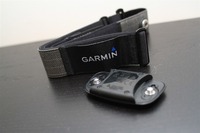
As you’ve seen throughout the review there are numerous compatible accessories for the unit. I’ve consolidated them all into the below chart, with additional information (full posts) available on some of the accessories to the far right. Also, everything here is verified by me – so if it’s on the list, you’ll know it’ll work. And as you can see, I mix and match accessories based on compatibility – so if a compatible accessory is available at a lower price below, you can grab that instead.
Thanks for reading! And as always, feel free to post comments or questions in the comments section below, I’ll be happy to try and answer them as quickly as possible. Further, you can always e-mail me at the address on the sidebar. And lastly, if you felt this review was useful – I always appreciate that feedback in the comments below too! Thanks!

















Awesome job. Thank you for taking the time for the review. I’m goona get one!
Hi DC Rainmaker,
I just received a Timex Global Trainer for Christmas. It is a great watch, except that now my various computers (Win 7 32 and 64 bit) will not recognize the USB device. I’ve tried uninstalling and reinstalling the software, to no avail. Do you have contacts at Timex, or maybe the USB driver to install manually?
Thanks, and I really enjoyed the review!
André
I am from Manila, Philippines and I would like to thank you for an in-depth review of the product. Your site has done our triathlon community here a lot of good and we wish you more power this coming year.
I am about to take delivery of my TGT. My fr305 conked out on me during our one and only 70.3 here. This is going to be my replacement for such a great gps training and race watch. My apprehension mainly is stemmed on the inaccuracy of the distance data. This would greatly affect the average speed as well and this might be a source of regrets in the end. I hope it lives up to my expectations.
Warm regards.
Thank you for the review; I love this watch and purchased it based on it, but I’ve started to have problems now that the weather has turned cold and haven’t been able to find any answers. I was hoping to use it in the winter for tracking my vertical feet while snowboarding, but the watch keeps locking up and factory resetting – losing all the settings and any workouts. Has anyone else experienced this and if so, have you solved it (and how?)
During the other (3) seasons, the watch has been great. I use it for mountain biking mainly, but have also started to do more outdoor running. And to make it even better, they finally added foot pod support.
Hi, I just got my watch and it is not reading the correct time or date to even start. Is this because I am in doors and the GPS signal is weak. I am wondering how I get the right time and date so I can begin using it.
Thanks,
Desiree
Use the device agent. There is an option to sync the time with the PC.
Aug 2011 firmware update adds some nice features to the already great watch. Foot pod sensor and enlarging screen so you can actually read your lap/splits is great. Curious if D/C Rainmaker will do an update to review the changes they made finally with the latest firmware updates? Pat
On my suggestion as an IT pro, the good people at Timex sent me a replacement USB cable and I am able once again to upload my runs.
RUN/WALK:
Anyone tried using the tgt for run walk method? If I want to run for 6min and 1min walk, how do I use the timers? Can anyone help?
Thanks
Nice review but I seem to be encountering the same problem as AdamZ where the TGT running firmware 3.14 simply freezes mid ride with portion of the screen blanked out where the alert would normally go. I also believe its related to the cadence alerts, anyone else has this problem or more details on a resolution from TIMEX?
link to facebook.com
I used this watch as my first, during my training last season for my first Ironman, and have been very satisfied. The one thing people keep making remarks on is the ONLY 15 hours of battery life – well if you can’t make your iron distance in less than 15 hours you will off cause have a problem…….., however that is one more reason to train hard. Anyway I am now considering the Garmin Forerunner 910XT because of the extra Swim features, the improved design, and the vibrator alert, unless Timex plus out a surprise Very fast.
hi…can you teach me how to download the google map into jpeg format? thanks
For some reason I can’t get my Garmin speed/ cadence sensor to read. My watch skips over the Speed/cadence sensor in the menu, only giving me the choice to scan for speed or cadence. So, I select the cadence sensor, press and hold the reset button per garmin, hit scan on watch, pedal bike, and the watch never picks up the sensor.
Any tips?
Bmleib at gmail dot com
I got this watch about 2 weeks ago for around $95 on Amazon (It was a “like new” unit) When I got the package the USB charger/cable was not included. Thankfully, I was able to order one from Timex for $10 and it arrived the next day.Kudos to Timex’s customer service as they were very good. (Amazon gave me a credit for the cost of the cable + shipping for my troubles)
I have used it on a number of runs and it has performed pretty well. I got the newest software update. I have no trouble acquiring satellite and it usually takes under 30 seconds.
I have also used the Garmin footpod on a number of runs to measure cadence & I used it for distance on the treadmill last night with no problems. I’m glad this feature was added.
I’m still getting used to the size of the watch. The distance measure does seem to be off, but I notice it’s getting better with the more runs I do. Certainly in the 2-3% range. I do like the buttons and the software. I
It does have a few quirks, but considering the 305 is now getting pricey again. I think this is a more viable option out there especially for the price now.
fwiw, the Timex GPS Global Trainer i picked up in February 2012 has firmware that supports ‘constant-on INDIGLO’. here’s how:
if you press INDIGLO button for 8 seconds, it stays on all the time
if you press for 4 seconds, it activates ‘Night Mode’ which turns on INDIGLO with any button press (not just the INDIGLO button)
any other time, it only comes for about 4 seconds when you press and release INDIGLO.
Hi,
very good review! and Iam very happy with my Time Ironman GPS Global Trainer, but recently I was worried because the display begin to fade.It lightened compared to the first time I use it!
I just got this unit and so far so good. One thing: did you ever have trouble with the time? for some reason my time won’t sync correctly…
Unable to get this device to charge. Will show as charging, and two hours later will still have zero battery. Have tried several outlets, so that’s not the issue. Anyone else with this problem?
I have recently bought thr BTWIN cadence/speed sensor from Decathlon but cannot get this to work with my Timex Global Trainer any suggestions ?
ironmanandy@sky.com
dear DCRainmaker,
thanks alot for such a detailed review on my favorite watch, the Timex Global Trainer. After reading through your review, immediately I purchased 2 units on this watch. It is too bad that Amazon does not provide a courrier service to my country, to my dismay I have to use another portal in order to get to my watch. eBay!
I have been using Cateye V3 for the past 3 years. Now it is time to option for such upgrade, a much higher grade one + GPS tracking. Cannt wait to impress my peers with such a wonderful watch. One thing which I am not too sure about the cadence/speed sensor (as well as the heart rate stripe) frommy Cateye, is it compatible with Timex Global trainer? I read the online spec on this watch it says anything with ANT+ would be just fine and they shall communicate. Well if I refer back to my Cateye spec, there is no indication on ANT+ but it has something like 2.4GHz ISM Band. Do you think they will work?
I know I can always try it out when the watch is here(ah such a long wait it takes about a month to get here) but it is really not working, I like to go ahead and buy the Timex cadence sensor right now.
thanks so much for your time indeed.
Hello Rainmaker, i am considering buying a quarq and this watch. I understand that this watch is not able to calibrate a powermeter. But is it possible to use a wahoo iphone for calibration then use the watch with corrected power values ?
Rainmaker or anyone,
I need some help, I am apparantly not smart enough to figure out how to calibrate my footpod. it registers cadence but not distance regardless if the GPS is on or off. Any help would be appreciated. Thanks
Tige
What to say, thanks for your time and effort, Im going to buy this watch and mostly it was because of you and your in depth analyse.
Best regards from Bosnia
I own a Timex Global trainer and recently purchased a Garmin
500 Edge which comes with a GSC10 speed/cadence transmitter.
Here’s my situation. Garmin picks the Timex HRM and the S/C sensor. Global Trainer picks the Timex HRM but won’t pick the Garmin S/C sensor.
I see from your review that you managed to pair the GSC10 with the Timex. The people at Garmin have told me that though the GSC10 is an ANT+ device, they cannot GUARANTEE that it will pair with the Timex global Trainer.
I love the Garmin Edge for training but for my triathlon races, I need the Timex since it works in the swimming bit.
Garmin Customer Service suggested I buy a Garmin GPS watch. Before I go into another expensive expedition, I’d like to ask you and your followers if anyone has any suggestions.
Some have told me to remove the battery, place it backwards and re-pair the GSC10 with my Timex. That would mean I can only get one of my receiver devices to record speed and cadence…and that bugs me.
Any ideas?
I have two Garmin GSC10 and they pair properly with my Timex Global Trainer and Timex HR. Read TGT pdf Manual page 25.
Hi,
I’m interested in purchasing a GPS device, having read through this review I have a few questions:
1. Do you know if the battery issue has been fixed?
2. Do you know if the GPS issue has been fixed?
3. You talk about an inaccuracy of 2.5% has this been fixed or is it still inaccurate?
4. If you had a choice between this and the Garmin 310XT (price excluded), which would you honestly go for?
Thanks a lot for your help
Josh
I was updating the firmware on my Timex Ironman GPS and we had a power cut. All I have now is an empty watch, it doesn’t even display anything when switched on :( can anyone help???
Used your review to make the choice for the TGT. Did the update, walked outside and wham full GPS. I love this thing. Paid 130 w/HB mon shipped. A no brainer. thanks for your diligence.
Tom
The device just arrived. I decided to use the usb charger on my PC. I got a blinking battery for 2-3 minutes and then blank screen….
Now the charger does nothing and I have a feeling that I would be returning it….
WATERPROOF ????
I’ve got the TGT since July 2011 (actually my second one: my first one was stolen) and I’ve had to send it now to Timex because it’s no more waterproof: by swimming (even under the shower) water comes in !!
I’m really disappointed and frustrated!!
It was told me that “Water Resistant 50M watches can tolerate a static pressure equal to 50 m depth for 1 hour, but are actually not suitable for swimming” !!!!!
Is Timex making fun of his customers or what ??!!
Anybody else with the same issue ?
Cheers,
yano
hi All, it is me again returning after 2 months of using TGT. Guys be extraaaaaa….. careful with the heart rate sensor. Mine stopped working just after two months! TGT failed to pick up any signal. Tried with my FR610 also to no avail. I had to get another replacement from Garmin. Believe me this is one heck of an expensive replacement item!! Hearbreaking still I got to replace it. After read through the Garmin’s manual, saw an important user notice that is “Unsnap the module before cleaning the strap”!!! I guess this is the reason I fried the sensor:( So please everyone be careful with cleaning and cleansing the sensor this is an expensive replacement parts!!
thanks
Just an update on my device. The local service center managed to somehow make it work (30 Euros) and now I will make good use of it while it lasts :P
In general the build quality is mediocre. The buttons are flimsy and provide crappy feedback, also their placement is akward. When I try to operate it with one hand, my index finger is trying to push right side buttons and my thumb tries not to push left side buttons while providing enough resistance to steady the watch….
I believe basic buttons should be place on the front side in order to be operated by using the thumb, just like a mobile…
With firmware version 3.14 gps took 15” for initial satellite lock but I had to walk outside my flat. After that it locked almost instantly anywhere I was.
I cannot make sense of the hands free feature. I want to hit the start button, run, auto stop, hit start again and so on.
So, I set auto start to OFF and auto stop when speed < 2 km/h. I press Start and before I could take one step the counter stops :P If it works like i think it works, this feature is useless for running…
Hi DC,
Would you know if the timex device agent will work on android apps?
No, there’s no method to download from the TGT to Android directly. The challenge is that Timex didn’t implement ANT+ downloads (usually via ANTFS), so you’ll have to use the USB cable to download to your computer first via the Timex Device Agent.
Hi DC or anyone,
I’ve got my TGT for 2 weeks now, but is not entirely happy with its performance. First off, when I turn on the watch to get GPS, the TIMEX logo would always appear on the screen and stay there like forever without getting any GPS signal. I had to turn it off and on again before it starts trying to acquire any signal. Next, I managed to download data from watch to computer without problem for the first week but now I’m getting an error msg telling me to check connection. Please advice, thanks
Hi DC,
I recently got a TGT after my Garmin 305 went dead on me. After using it for 2 weeks or so I must say I’m quite disappointed with the GPS accuracy(using the 305 as the benchmark. The current pace displayed can be off by as much as a minute or so even in open areas. I’m wondering if I have all the settings correct and whether other folks have experienced the same, By the way my firmware is the latest version.
@Anonymous
Timex software is crap. The Device agent is a joke and loses connection very often. The online free version of Trainning Peaks is a joke and WKO+ is primitive and definately not worth the cost..
Satelite acquisition varies. Sometimes it locks instantly, sometimes on the same place it takes 1-2′ to lock. The GPS is very inaccurate, I run on track and have the watch take 100m auto lap splits and it just can’t split on the same spot.
@DCrainmaker
Have you tried the auto lap split based on distance? I set it to auto split every 100m and what I get is 99, 104, 102, 100, 103, 101 and so on…. Why can’t it split correclty?
Hi Eaglos-
RE: TrainingPeaks and WKO+
I think it depends a bit honestly. If you want ‘pretty’, there are tons of online suites that are way prettier (i.e. Strava, etc…) than TP or WKO+. But, each of those has it’s challenges when looking at data that’s not just run or bike. For example, Strava handles run data poorly, and others are better at running. Yes, TP and WKO+ look old.
When it comes to data and analysis however, virtually nobody beats those two, except Sport Tracks and Golden Cheetah. And I’d say ST at default settings is generally equal to TP, and GC as-is beats TP in cycling, but fall far short in running/swimming.
What other apps would you recommend?
RE: Accuracy
At the points noted, you’re below the accuracy level of the unit. GPS units are advertised within about 2-4%, and offhand the unit is within I think 10 meters (advertised). So being a meter off is pretty good.
Now, as to why it just doesn’t call it 100m and ignore the actual, I don’t know – I’d suspect because they decided that based on the per-second split they’d show the distance. Meaning, they either had to round distance to the nearest meter or round time to the nearest 1/10th of a second, and it was easier to simply show the distance as-is. Though again, we’re talking levels far below GPS accuracy rates (for consumer grade devices – for military, aviation, and industrial grade it’s different).
Hi after reading your in-depth review I bought this watch and have been used for 2 weeks. I an fine with the GPS accuracy and searching time. However, I have a little problem here, I don’t know how to use the interval timer although I have go through the user manual! I mean I have follow the menu to set an interval timer, but I don’t know how to activate it in the performance mode! May you help me at this point? Many thanks!
After searching and not finding much info on the web and do several tests, I believe that the way to use the intervals in the TGT ends up being quite simple.
After you create a time interval and give it a name (for example Fartlek1), only we should select “Fartlek1” in any of the fields (1-4) of the display performance mode. Then, when you start the chrono with the start button, this field starts the sequence of intervals that we created previously, emitting an acoustic signal of 10 seconds to the exchange of interval.
I hope this is the solution because it really didn’t find much information and with this working properly.
Regards. Oso.
@DCrainmaker
Regarding software, the question is which one supports timex data files. So far I have played around with Golden Cheetah and Sport Tracks. Their user interface is far better than WKO+ but I cannot comment on the functionality just yet.
As for the auto split issue the general problem is that a 200$ flagship training device lacks a centisecond counter found on a 60$ track watch.
The other problem is that you get both a rounded time AND a false distance estimation. You run 100m on 18.45” and the watch records 98 on 18”. You run 100m on 18.72” and the watch records 102m on 19”….
Of course this is a “triathlon” watch where there is no logic in splitting over short distances and going off by 2-3m every 10.000m splits makes no difference. Nevertheless I wish it could take proper splits.
@Elvis
I understand that timers are just another piece of data like speed, distance and so on. I think that you would have to add them to the data screens of your workout in order to use them.
@Eaglos
Thanks very much for your reply. I have added the timer as 1 of the 4 data displayed on the screen but I found that the HR alert will not automatically adjust according to the timer setting. Neither any of the data option can show the target heart rate zone of the interval. Is it true? If so, the interval timer is not helpful at all…
Timex just released another firmware upgrade for the Global Trainer on 5/30/2012. More improvements in satellite aquisition, accuracy note in the release notes.
@PilotFishBob
Thanks for your info. I have updated the firmware.
I bought a timex global trainer and noticed it wasn’t precise while riding my mountain bike this past weekend. I rode the same course 3 times, and found three different distances (6.98, 6.51, 6.44 miles). The course is known to be just under 8 miles. It was quite wooded, but I made sure that the signal was acquired before I began riding. I am going to try pairing it with the garmin speed/cadence sensor to see if that fixes it, but if not, it will be going back in favor of a garmin.
I was not decided to buy this one until I read your post.
As I am a Spanish speaking person, it took me a while to understand every technic word in here. But it did worth the time. Your writing kept me hooked until the end.
Now, I will buy the TGT and continue training with it. Can’t wait!
Thank you DC Rainmaker !!!
Hi Ray.
I’ve had my Timex Global Trainer for more than a month now and this morning while on a bike ride I found that the distance data was off by 3kms! Yup 3kms. I checked this against my wife’s 910XT and my Cateye Velo 5 cyclocomp. Further to this, my heart rate monitor showed elevated heart rates on my way back. It showed a spike of 213bpm! I am wondering if anyone else has experienced this with their TGT or issues like mine are common with the TGT. Thanks a lot. :)
Hi,
Is there any chance you can put a request into timex?
I have two bikes and two speed/cadence sensors. Right now, every time I switch bikes, I have to pair the ANT+ sensors again. Timex already provides for Bike 1, Bike 2 functionality, why not save the sensor pairing so that when I switch from bike1 to bike2, I don’t have to pair the ANT+ sensors again.
Much appreciated.
How can one add a “average” pace to display in the main Run section (say to replace the HR)?
@Greg
Either from Device Agent software or by pressing the Enter button while on your selected activity (run, bike etc) and then selecting Displays and then telling it how many you want and finally choose which ones you want.
@beachdrifter – Dennis
The GPS does not work well, don’t use it for distance while riding your bike. I only use it for speed and even then only as an estimate.
I updated the device using the firmware that was released on 30th May 2012. GPS aquisition was extremely fast and for the first time it aquired satelites while inside my house.
The bad news are that I can no longer connect it to my PC :) Device agent sees the watch initialy but if I press Download or Settings the watch displays “Tranfer Complete” and Device Agent displays an error “cannot find the watch” or something like that.
@DCRainmaker
After spending a month with WKO+ and Sport Tracks I would say that I dislike both of them. They seem to be written by programmers for programmers, especialy WKO+. Simple tasks like modifying a lap are tricky or not available at all…
Yeah, WKO+ is pretty crusty UI-wise.
ST is better, but agree it can be confusing for non-computer people.
On modifying laps, very few progams out there allow this (in fact, really none that I’m aware of). Some allow creation of your own laps, which is what ST does – you can basically just override them.
I wish there was a better story there.
@Eaglos – thanks for the heads up :)
@Ray – any chance Timex will come out with a firmware update to include Time Alerts? I base my nutrition/gel intake on time alerts.
Thanks and more success!
I wouldn’t count on it. Timex updates are very few and far between.
@Eaglos – I had the same problem at first, seems that Windows got confused about the USB connection. I went into device manager and removed the TGT’s USB device, then re-plugged the watch and let it rediscover and install. After that I had no issues.
Yet another update.
Another minor issue I have found has to do with alarms. For example, if a lap split or a timer alarm goes on you have to press the stop button twice in order to stop recording your lap…
This is very frustrating if you take into account that a) Timex buttons have a very vague feeling b) Lap/Time measurement gets even more off the mark and c) Lap/Time editing is nearly impossible.
Another thing that I have found has to do with timer repetitions. In my mind, if repeat = 1 it means that the timer runs once and then repeats itself one more time. In Timex logic though, repeat = 1 means that the timer runs one time and than it stops, so there is no repeat :P
In order to have the timer repeat one time I have to set repeat = 2.
@Dc Rainmaker
Do you think a footpod whould be more accurate than the GPS?
It can be more accurate, but it can also be off more. It really can be incredibly accurate (with proper calibration), or it can be way off. In general, I find GPS more accurate, but there are certainly cases where you can really nail footpods – it just takes more work.
I got this watch as a back up. I have a 310XT and a 910XT (noticing a theme here), but sometimes running friends or pacers for ultras wanting to see the bene of GPS ask to borrow a watch…yeah…not gonna happen so thats why i got this one. for the price and the functions its solid, just something different to get used too
Hi DCrainmaker,
Great review, you are the authority for this space.
A quick question, when is the TGT2 supposed to come out?
Thanks,
Question: I’ve never trained with anything more than a regular watch (stopwatch function mostly) so when it comes to finding splits, gps being off by a bit, or calibrating power meters on my bike…I have no idea. I just took up triathlons as a hobby/way to stay in shape now that I’m 30. Will I be totally disappointed by this watch? I mean, all of the negatives are things I don’t have already and am not sure what they are for, so I won’t know I’m missing them right? I like the multi sport mode ease of use and the big display, so is there any reason a TOTAL NEWBIE should not buy this one?
Thanks!
Dave
Thank you for the great review !
I read everything about gps watches and you are really helping a lot with your true reviews . Thanks again
Thank you for your great reviews !
You are helping so much to choose!
Hi thanks for awesome reviews – they are so detailed that I get totally overwhelmed and frankly scared of the machine I bought ( Timex GPS Ironman) – I have a very simple question as I am setting up the watch and the training software- how do I get them both to recognise everything in Km ? I just can’t handle miles and my training plan also is in Km. Many thanks
I’ve been running for awhile with the Global Trainer and really like the watch except for one thing. The metal clasp on the watchband is horrible! Seriously, what was Timex thinking? The clasp digs into the wrist skin pinching it against the wrist bone. I don’t have it set outrageously tightly, just comfortably (at least at first). After a couple miles it starts to sting, and by 16 miles it is painful.
I expect more from the watch band on a watch made by a real watch company. If Garmin messed up on the watch band this badly, well, they’re just a GPS company, so oh well. But Timex? Very disappointing!
Hello,
Does anybody knows how to change current date and time for this watch?
I don’t found it in user manual and in Device Agent.
Thanks,
Tony
Great review! It convinced me to buy the device with the heart rate strap. A few things I have noticed about it:
Training Peaks is an amazing software system, and I have not felt the need to upgrade to Premium.
The pace graph is all over the pace on TrainingPeaks, just switch paced smoothing to high, and upgraded firmware, so we will see how that changes it.
It worked very well when I was biking in the park. Speed and distance seemed very accurate and the map was exact.
When running a tempo run, my teammate’s 410 was recording the mile splits earlier than I was, and getting slightly faster mile splits. May have been due to corners being cut off, but I don’t know.
It is now only $144 on amazon so I think it is worth whatever minor flaws it has. That is so much cheaper than any comparable device.
Hi DCR – I have read practically all your reviews and on this Timex review read almost all the comments too. I have a big problem- my Timex Ironman which I bought about a month ago and have used about four times – just plain refuses to lock on to any satellites – irrespective of time of day I run or route I choose ( all outdoors by the way). And yet when I come back to my apartment and step out on the balcony it seems to lock a satellite ! ( I live on the 18th floor of a tall building) !
What use is that to me ? Can you please tell me if I need to update some firmware or reset the watch to default settings ( how does one do that?) or should I just dump it back on the shop? Very frustrating – esp if it says no GPS and yet shows a speed – how can it do that?
DC Rainmaker thanks for the great review and thorough work, much appreciated. I am trying to turn my .pwx file into a spreadsheet, any ideas on a key to XML timex has used to carry the data? trying to save my self some time…thanks for you time rock on
I’ve decided to buy the Timex global trainer. I only run but it was at such a good price point and I find the virtual trainer a useful feature. It is also a huge watch (bigger than the 305). I believe I have made a very stupid decision
The watch standing alone is a great item. I love the customization and all the great things this watch is able to do. However, knowing now that it’ll cost me $120/year just to view the data from my workouts I would not have purchased this watch. When you upload the data to the website Training Peaks, it is clunky and difficult to navigate. The lack of customization in your personal account completely contrasts with the way in which this watch works. You are able to use a free account to view your data, but this is almost useless because any of the important data you would want to track is only available in the premium account for $120/year. I had owned the Suunto T6C and even though it was not GPS it had a much better interface and way more data I could track – there was no website to go to. All in all I am very disappointed that I spent all this money just to have a mileage counter on my wrist.
The watch standing alone is a great item. I love the customization and all the great things this watch is able to do. However, knowing now that it’ll cost me $120/year just to view the data from my workouts I would not have purchased this watch. When you upload the data to the website Training Peaks, it is clunky and difficult to navigate. The lack of customization in your personal account completely contrasts with the way in which this watch works. You are able to use a free account to view your data, but this is almost useless because any of the important data you would want to track is only available in the premium account for $120/year. I had owned the Suunto T6C and even though it was not GPS it had a much better interface and way more data I could track – there was no website to go to. All in all I am very disappointed that I spent all this money just to have a mileage counter on my wrist.
I nicely disagree with Le Hiep on this, the basic free version of Training Peaks is just fine for viewing plenty of data. Since the latest firmware updates I have no issues. I bought the watch used a while ago from a person who said it “never found sateilites” and “wasn’t easy to use”. Haha well duh, she didn’t have it updated.
I have no issues with it tracking my swimming, works great for running, as well as my biking in wooded areas.
Come on people! That’s so simple to fix. And as for user-ability, well, this watch is as easy as it gets. Great watch, i got it for $98 used on Ebay with free shipping and that included the Heart Monitor. Couldn’t be happier.
Hi DC
I have a query about how GPS functions w.r.t distance. The other day in the middle of my run I got caught in a massive tropical storm. I ducked for shelter hoping it would pass in a few minutes so I did not stop the GPS Global Trainer. However, the storm lasted for about 25-30 minutes. Whilst I was totally stationary during this period I noticed strangely that the Distance on the watch kept slowly ticking up to the point it had added almost 1.5 km’s in the 25 odd minutes that I was not running. Why is this happening ? Its rather odd that even though GPS is on and I am standing still the watch continues to add distance !
Is there more than one version of this watch (Timex IronMan Triathalon)? The one I have came in a box virtually identical to the one shown in this blog post, but it does not have the Start/Split buttons on the bottom like the one in this review. The part number on mine is T 5K575 F5 .
I’ve been using the TGT for a while and generally like it, however the speed/cadence sensor on my bike has started acting funny. Essentially it’s returning speeds that are really out of whack.
Is there a way to make the watch use GPS for speed and distance and just report cadence instead of using it for speed, distance and cadence?
Great review DC Rainmaker. Thanks.
Hi DC Rainmaker,
I currently have the TGT and recently purchased with Timex cadence/speed attachment for my bike. I hate it. Can you recommend any other cadence attachment that works with the TGT? Thanks for your thoughts.
Dr. Papenhagen
Hello-
Any ANT+ speed/cadence will work with the TGT. I prefer the new Bontrager quick release one.
link to dcrainmaker.com
But here’s a whole post full of options.
link to dcrainmaker.com
Enjoy!
Hi DCR,
I’m considering buying the TGT as it seems to have come down in price here in the UK. I’m actually trying to decide between this and the FR410. From reading your review as well as other less informative reviews, I’ve picked up that a lot of people are not satisfied with the GPS reception. However, it has been over 2 years since your review so would you say that this is still an issue (a significant enough issue to push me towards the 410?)
Thanks, fantastic review by the way.
I just got the TGT yesterday, and tried to establish a connection with a satellite in the afternoon (it seems it is the only way to adjust the time.) The signal was still not great, but I eventually managed to locate a satellite, and it took about a few minutes which was normal according to the manual as it was the initial connection. I live in a uptown neighborhood in a major city in Ohio, US btw. But other than that, am pretty happy with it.
I second the request for update since firmware could have improved GPS (or any other weaknesses) for TGT. However, in his recent (Nov) 2012 Sports Gadget Recommendations (link to dcrainmaker.com) he recommends the TGT as Triathalon Watch Budget. To me that infers that it has acceptable GPS (for the price range).
Thanks for your input, I’m definitely tipping towards the TGT. To me it seems the perfect multi-sport watch for the price.
hi, what’s the size of your GF’s wrist? i, too have small wrist and 5’4″ in height. my wrist is about 6.5 inches in diameter (i used a tape measure :D ) and i’m planning of buying TGT, but having 2nd thoughts because of it’s size. thanks very much…
sorry, but i mean 6.5 inches circumference, not diameter. :D
Eeek, not at the moment (I’m travelling). She’s 5’2″ high though, so a bit smaller than you. Her wrists are fairly small. Sorry!
I’m in the market for a new hrm (with gps) and have a (luxury ) dilemma. I’ve been a loyal polar user for about 15 years, going via an M71ti an S610i and my current RS400 with s1 footpod. I “played ” with Timex’s first gps speed+distance (around 1999/2000) for a while but given that the gps module was pretty huge and there was no hrm, that was kinda short-lived and is now gathering dust.
My problem now is that (a) My RS400 has been back to Polar 3 times already for warranty issues, so while it’s a great piece of kit when it’s working, the love affair is over(b) The Precision Performance software which was excellent with analytics etc seems not to be supported any more and the web-based Personal Trainer seems a step backwards.
I like the look of the TGT or the run trainer (most of my training currently is running ) but I’ve tried the basic TP software and quickly saw that a lot of the things i’d want to see were part of the premium paid version (not happening ). This leads me back to the relatively expensive Garmin FR610 or Polar RC3 and the RC3 lacks much of the flexibility of the others. Is the timex TP version more comprehensive than the basic, meaning I’m dismissing the significantly cheaper TGT and run trainer too quickly, or should I just suck it up and pay the extra for the 610? Lastly, how do you rate Gaming connect vs Polar personal Trainer and the timex TP?
Your reviews are hands down the best i’ve come across, telling us the things we really want to know in an unpartisan way! Keep it up – DC rainmaker is now bookmarked in my browser!
First off, great site and reviews. I wasn’t sure as to which type/brand to pick up but after reading all your reviews on the ones that interested me (FR110/FR210/FR410/TRT/TGT), you helped me make up my mind. Picked up the TGT with heart rate tonight, setup was easy, (partly because of your review), no issues with anything, quick pickup and having my first run in the morning. Have to mention that I got a really good deal on it also.
I am however dissapointed in the “free” version of trainingpeaks though. Should have paid more attention to that part. Oh well.
This is the biggest drawback of that device. You pay premium to
buy a computer (not a watch) and you cannot get the most out
of your data.
Anyone who owns the TGT, while running or biking, have you ever had the screen freeze and the only thing you can do is hold the power button down to reset? any solutions?
Update on my (crappy) Timex.
I left for summer holidays and when I came
back (20 days) the device would not charge.
Since there was no point in paying (again) 30
Euros to revive it, I decide to break it apart.
I was unable to find the triangular alen that is
required to unscrew the back so I had to improvise.
The battery is a Sanyo 600 something mAh which
there was nowhere to be found on the market
despite being “a common battery” as Timex told me.
In the end I managed to install it with a third party
1300 mAh battery (lots of drilling and improvising).
The device still charges whenever it feels like it and
so I will have to make a separate charger fot the battery…
I am extremely happy that I did not throw away the 300-400 Euros
that Timex wanted for this piece of junk. Next stop Garmin.
Great site, great reviews, was just wondering how the TGT deals with transitions in races and how it compares to competitors?
Cheers
I am trying to install the firmware updates to my Timex Ironman GPS on a mac and have downloaded from the timex link for the download and when I try and open it I get a message that there is no default application specified to open the document. Any help on what I need to do to get the firmware update.
Thanks
You’ll need to grab the Timex Device Agent, or the Training Peaks Device Agent. Then from there you’ll select the file from within that.
Timex GT is the biggest piece of crap I have ever bought in my entire life (at least so far ;-)
Bought it in 2011, basically it did not work decently till aug 2012 when the 4th or 5th firmware release was out: Then it randomly works. So, depending on the day, it fixes the sats quite quickly but still, often, half an hr after the workout has begun.
I also have major concerns about the accuracy (both of hr and pace). When running with friend with garmin complete different values…
Finally also the charging clip (or battery or something else) went broke and it does not charge anymore. So I am definitely pissed off and I am going to execute this rubbish toy with an heavy hammer
Timex NEVER again! it is a shame for a company to market such a piece of crap!!
DC
Thankyou for your fabulous review, they really help!
I purchased the TGT in mid 2012 after reading your review and have generally been very happy with it. I’ve noticed a couple of things and wondered what your thoughts were on these:
Swimming: Given that GPS on mode is not particularly useful for swimming (unless the watch is located in a swim cap), then is the best way to time a straight swim to simply turn GPS off and use it as a stop watch in performance mode? Presumably ‘GPS off’ mode deactivates the auto-start/auto-resume/auto-stop?
Multisport mode: In light of the above comment re swimming, does the same advice apply for a triathlon that incorporates a swim? If so, then the watch only performs as a timer for all events unless one fiddles around post swim to re-activate the GPS after the swim leg, or alternatively, you place it in a swim cap and leave GPS on.
Do you know if you can complete a triathlon wearing the watch on your wrist and with GPS on for the whole time? Presumably you would need to turn off ‘auto stop’ so that the lack of GPS signal doesn’t stop the watch from continuing to count time for each leg and for the event overall?
I’ve noticed that sometimes turning the watch on takes no time at all (<1 minute) to find GPS and other times it can take up to 15 minutes or the signal bar goes up then down, up, down but never finds a satellite or at least not for a frustrating period of time. This seems strangely completely independent of prevailing conditions or line of sight to clear skies. If this happens, I turn off, restart, and most times it comes good again pretty quickly. Strange though!
I have a Giant bike with Ridesense which pairs readily enough with the TGT. However it seems to have some form of conflict whilst in use. Could this be due to the device receiving for example speed information from both the Ridesense sensor and GPS and thus having two sets of data for the one metric (eg speed or distance)?
Lastly a couple of things when next your talking with Timex!
For us ‘mature’ folk, the font sizes of the TGT are quite small, even when they don’t need to be. Notwithstanding the flexible capacity users have re number of fields in display, they could do a much better job with the display under some of the firmware driven displays. For example when locking and unlocking the watch (which I use often due to bike gloves, and when MTBing or running), reviewing summary data , or changing settings. Generally they could make much better use of the display area.
The indiglo backlight is also able to be setup with some flexibility. I find it useful to have the light go on each time I press a button, particularly in those winter activities! However once the watch is powered off, the settings revert to default. This necessitates one having to reset the setting each time the watch is powered on. It seems that this type of setting should be a user preference that is independent of the watch being powered down.
I also had trouble getting the Giant Ridesense to work with the TGT. Like you say, it would pair immediately, but when riding there were constant dropouts. Actually, there was more time spent in dropouts than “drop-ins.” It was useless, so I returned the Giant Ridesense and took the Garmin Speed/cadence off of my old bike and put it on the new Giant and it works well, provided the TGT is relatively near the s/c sensor — it’s almost like the ANT+ has trouble transmitting around the Giant Trinity’s frame, or maybe the Ridesense range is just very short.
With the new TRT already out, do you see a possible firmware update coming to the TGT ? I just want the nutrition updates if possible.
Unfortunately, I don’t see it as likely.
I’m in the market for a new GPS watch and looking to spend up to £200. I’ve read all the reviews on your site (really entertaining by the way!) and it seems the TGT is a capable device. However, I notice it is coming up on 3 years old. Do you know of any replacement on the horizon? Or is the TRT supposed to fit this niche?
Thanks,
Paul
Nothing planned that I’m aware of.
I bought one of these last week and have used it on a 2 hour run and a long weekend of kayaking. So far the watch is pretty cool and is holding its own to replace my phone (xperia active) with endomondo as my GPS device for runs. I had the watch in GPS mode for about 8 hours and in time/off for the rest of the time over three days. The watch died at the end of the trip so there is about a weekend worth of outdoor activity in it which isn’t terrible but is a bit low.
My only real complaint is that the GPS lock takes an age compared with my phone. My phone will latch onto satellites in about 10 seconds while the watch will take minutes and often asks if I would like to reset the GPS (no!). I’ve upgraded the firmware to latest to no avail. This isn’t a big problem as long as I start to grab a fix a few minutes before my run. Otherwise I’ll have some annoyed running partners.
My most major disappointment is the lack of any kind of linux support for this phone. I dwell in linux almost exclusively and this is a major negative especially compared with Garmin which has great GPS support through GPSbabel. Further, the pwx file format is very poorly supported by third party software. I did find a site that will convert pwx to tcx here:
link to beta.pwx.raytracer.dk
And can use this to bring the route data to a usable format in endomondo.
Those are my thoughts. The linux issue will only apply to a small percentage of folks, so I’m sure that’s not a dealbreaker for them. I’m still deciding if it is one for me.
.
I’m confused…you list this at a $150 price point, but in the pics (and the name), it looks like you’re referring to this $360 watch: link to timex.com
What Global trainer is at the $150 price point? Is it this one: link to timex.com
What’s the difference?
Same watch, just that the Timex.com site has never bothered to lower their retail price like everyone else has. Kinda funny, since the official MSRP is much lower these days than $360.
Enjoy!
Awesome review, much more information than other sites provide.
I have the Garmen 410 and enjoy it quite a bit. Unfortunately I am one of those people who once put a watch on NEVER take it off. Means it needs to able to go in water (doing dishes, jumping the lake, …etc). This is the only point of the Garmin I do not like.
Its seems that the Timex has “almost” all the features of the Garmen with the addition of being water proof up to 50 meters.
My question is around the Performance Pacer compared to the Garmen’s Virtual Partner. How to they compare to each other.
I run alone quite often around the same course. The Garmen allows me to run the same course against one of my previous saved runs. Letting me know if I am ahead of behind my previous times. It shows on the screen if I am ahead or behind my virtual runner.
Does the Timex have a similar feature?
Excellent review!
someone could tell me where to buy the USB cable for this watch. I’ve looked on ebay and can’t find it
my cable does not work, so I can not use my watch!
Help!
My understanding is you can call Timex support and they’ll ship ya one for $20: 1-800-328-2677
I can’t
I live outside U.S.A.
I’ve email to local timex store, but it is unavailable
Have you tried calling that number though and seeing what options that they can arrange – despite being outside the US?
Just a quick FYI, Timex’s site does not appear to be selling the TGT (at least on their site). I have had this for 3 years and it has done a great job (being used almost every day). I was hoping that they might just do a firmware update to make it do a few more things but that really does not appear to be the case. Here’s to hoping for a new model to come out
Unfortunately I wouldn’t expect any further firmware updates on the current model.
Thanks. A friend of mine made the call to 1-800 to order the USB cable (10 usd). She’ll receive the device and then she’ll send it to me. It just a matter of time, around a week. Thanks again.
I’d like to buy Garmin Forerunner 910XT but i am not sure about it….
I just purchased this watch a week ago. I took it on a long bike ride today and it keep shutting off during the ride. How do I get the watch to stop turning off?
I’d ring up support. That’s not at all normal. It sounds like something might be loose inside, which could be getting bumped on the road.
Hi, great reviews. Does the TGT or any other GPS watch give map coordinates (British grid reference) or just a lat & long? I know that garmin 610 and 910 and fenix do as well as suunto x10 and ambit. Just wondered if I missed any before I take the plunge. I want to use it as an everyday watch, with all the training benefits of a garmin but occasionally use it with a map to pin point my location. Any other suggestions? I’ll probably go for the 610 I think.
Thanks a lot
I owned a Timex Global Trainer for two years. I used it for running every other day. I mount it on bike for a long ride during weekend. I never encountered a problem with it since I bought it until now because the watch’s strap was broken. The nearest Timex service center couldn’t do anything about it because they do not have stock. They said they’ll have to get the unit and then order the broken strap. Well, I didn’t agree with it and the worst is, I will have to wait for 60 days. Its a real life experience with Timex. I wonder if Garmin watches have a durable straps that could last forever. I was looking forward to replace it with Garmin because I can not used my Global Trainer anymore.
I returned mine, because of the disappointing GPS. It’s almost impossible to get a fix in a reasonable amount of time, if at all or without resets. I always ran together with my good old Garmin which is much more accurate.
I am in the market to purchase a new triathlon watch and have been spending a lot of time reading your reviews of the Garmin 910XT and the TGT. I am very curious of your thoughts on a straight up comparison??? I have 400 bucks to spend so money is not the big issue, I just want the best watch to get me through my first ironman.
thanks for the great review. hope to hear from you
Chris
Look how bad the TGT is:
link to dcrainmaker.com
I already bought a tgt gps watch and am now getting into the training peaks website. I was wondering if it would be worth the money to upgrade to premimium. If i do upgrade it would be for a year to save all that money, so i really dont want to upgrade for a year and then find out it isnt worth it. I was hoping you could give your two cents on my thought process. I am only teen and dont have a lot of money, so buying ANYTHING is kinda a hard thing for me to do because i like to think I’ll buy a car here in a few years when Im 16 and get my temps. But I also am a very dedicated runner though, and currently run around 3 miles a day, do some lean muscel building, plyometrics, biking, swiming, and LOTS of other cardio throughout the week when im not at work, so i dont know if i should upgrade that way i can get more information and to train with, or if i dont really need that info. and i should just use what is already given. One of the major things I would be looking foreward to if I upgrade would be the online coach, that way since cross country season hasnt started yet, i could incorporate a little more of a structured athletes type of training into my schedule, rather than repeating my daily 3 miles, which i know will eventually lead to a plataue… so is the trainer actually good quality or does it just state the obvious that i already know? I’m sorry for this post being so long, this is really important to me, considering how much other time and money I have invested in sports,particularly in run training, and because my money is so tight right now (im not poor, just a long term thinking penny pincher). I also want to thank you for this in depth review, its the reason i bought the watch. HELP IS MUCH APPRECIATED, IF IM GOING TO BUY IT NEEDS TO BE SOON BEFORE CROSS COUNTRY SEASON. THANKS AGAIN.
While TP is very good for analysis, based on what you’ve outlined, I wouldn’t spend the money. I think the money could be better spent in a training plan (even a free one online) – that would result in bigger gains. From a free software standpoint, there are tons of options as well, including Sport Tracks for the 2-plugin trial mode, if you want more detail.
Good luck!
Mr. Ray,
2013 is the year, with Suunto 2/2s, TomTom, targetting multisport athletes. There was already Garmin 310/910.
And recent the TRT2 has been updated into smaller formfactor…
Do you expect Timex to announce multisport update any time soon?
Thanks.
I don’t know (and I don’t have a unit in test).
In general though, if a company doesn’t announce a tri-focused product by Spring, it tends to get held until later in the year (Christmas/January/CES). At this point, announcing a tri product would essentially be a loss of 9 months of R&D for next year.
a great, in-depth review, thanks
i have an out-of-the-blue question, does the watch/software produce a heartrateover time chart? i would like to record my heartrate while i sleep, with a chart showing bpm at each few seconds for the whole night. this would indicate a moment of anxiety. also, when i wake up my heart goes extremely fast, too fast to count, and i need to know what the time/duration is. any thoughts?
jim
Yes, within TrainingPeaks you’ll see a HR over time chart.
Hello, I just recently updated the firmware in order to be able to use a footpod. Is there a way to display my run cadence at all? I don’t seem to see this option anywhere, though I can set an alert for my run cadence min and maximums..weird. Thanks
Oops, forget that comment…I had two footpods in too close proximity and so my watch paired with the one that was still in the box…so it works and all balance is restored in the world…
p.s. thanks for this great review–help me a lot last year when choosing my watch!
Can you use this watch as a 24/7 ‘watch’ as well as a training tool for triathlons?
I like the Garmin 910 but with a battery life of 20 hours, you can’t use it as a daily ‘watch’
Yes, no issues there.
However, note that the TGT is really darn big – bigger than the FR910XT. The marketing makes it look much smaller than it is in real life.
This review is really a classic! Kudos for still answering questions after all these years, Ray.
Have you or anyone else noticed that the TGT may be discharging if left connected to a computer on standby? Mine had a full charge last night when I closed the laptop. I pulled it off the USB cable this morning but it was almost dead when I went for a run later. (I leave the display off to conserve battery).
I think I saw something like this once before. The unit was attached, but since the computer was in standby, it wasn’t providing power. More importantly of course was that the unit was still in the on-mode, rather than the typical watch standby mode.
For fun, plug your computer in for a few minutes, then kick it into standby and see if the watch goes from charging to off, or charging to staying in the on mode.
I bought this and am trialling it at the moment. I’m not especially happy with it. The distancing algorithms aren’t great – perhaps due to 2 second sampling?. As evidenced in your accuracy review it can be 10% short if lots of zig-zagging movements. It’s probably not an issue in most cases, but it’s annoying knowing it does it.
More irritating for me is the overreporting of distance when stationary. Last night I reset the watch and placed it outside with a clear view of sky. Hit start. I came back this morning, 10 hours later, and it said 7.7km! It is adding up every GPS fluctuation to the total, and slowly ticking over like a car odometer. I am sure my garmin never did that. My phone gps doesnt.
Also, no speed smoothing option. Only pace smoothing, which is irritating. The speed display fluctuates a lot more than the 310xt. It’s annoying seeing the speed fluctuate +/- 2 kmh on the TGT, whilst diplaying to 3 decimal place “accuracy”! For future reviews it would be great if you could comment on whether devices do speed smoothing.
Finally, you can’t shut it up! It beeps when you turn it on, beeps when you push start, beeps when autolap is triggered, beeps when low batteries, beeps when gps is weak. When no silence option?
I should have bought another 310xt, or a 910xt.
Tom
You’ll find that for static locations like that, that pretty much all GPS units do the same (sport), as they’re really designed more for movement. The challenge with GPS is that accuracy fluctuates, thus resulting in slight movements of true location.
You’ll find your Garmin does the exact same – slowly ticking up. But that really has no bearing of accuracy while moving (i.e. running or cycling), as you can see in my various accuracy test posts: link to dcrainmaker.com
Thanks for the reply.
I’m sure my 310xt didn’t slowly tick over like that. Are you sure all GPS tick over like that? We’re talking almost 1 kilometer an hour!
From memory my 310xt didn’t register motion below a certain threshold, and speed will snap to 0.0kmh when it decides you’re stopped.
I could be mistaken of course. I’ll check on my next 310XT.
Tom
Yup, absolutely sure. The degree to which each unit does it varies based on the unit and conditions, but they all do it.
Ok, if they all tick over slowly then I take back that criticism about the TGT.
I’ve used it a bit more now and it’s growing on me. The accuracy over real distances and training routes seems much the same as my garmins, within 20meters or so of the true distance over a 10km course that I regularly do.
I agree with the comments about font size though. I use it when surf ski paddling and the drops of water that end up on the screen obscure the digits when in 4 panel display. Shame they give so little of the screen real estate to the numbers.
Ray, thanks for the feedback. Impressed that you still remember how the TGT works. It looks like I had the watch ON instead of OFF so it wasn’t charging even with the laptop ON. It’s a double-whammy because when you put the computer in standby the watch stays ON and discharges. I believe there is a timeout after no movement but I’m not sure.
At least I verified that TGT doesn’t turn back ON (while OFF and charging) when the attached computer goes into sleep mode.
We spoke once about custom flash settings for the TGT. I wish I had tome time to play with that because a few updates would improve the user interface. I can’t imagine that Timex will be spending much time on the TGT.
I have had this watch for about a year now and WOULD NOT recommend it. 10% of the time the watch finds a satellite within a few minutes, the rest of the time it takes up to half an hour even ona clear day with line of sight to sky. Resetting the GPS or switching it off and then on makes no difference. The next time it finds within a few minutes, so no consistency. Won’t be a problem shortly as this frustrating device will be recycled as part of a concrete wall shortly! Hoping garmin has a reasonable level of reliability
Hey, Steven. Sorry to hear about your problems. I’ve had the TGT for about six months and haven’t experienced 30 minutes with a failure to lock on to GPS. I’m sure you’ve tried the standard stuff, including the latest firmware update through the Device Agent? Sometimes I set it outside before going on my run, but it’s probably a matter of time before someone walks off with it (happened to a friend of mine with his Garmin 500). It is pretty aggravating but the watch does have a lot of features for the price.
Thanks Alan
Glad your having a better experience than me. My habit is now to take the watch outside, turn it on, come back inside for 5 to 10 then hope the watch has found a satellite. It seems that if it struggles the first time, then almost no amount of resetting and switching off then on will make a difference. Have tried the firmware updates but they don’t seem to make any difference.
Was also impressed with the price/features and also timex reputation. Just wish I could turn it on, pick it up within a few minutes and get on the road! Perhaps that’s too much to ask!
Steven, I haven’t had to wait 30 minutes, however the rest of what you say is familiar – needing to wait 5 to 10 minutes at times. It’s very inconsistent when it comes to GPS lock.
Get a garmin 310xt or 910xt. I’ve gone back to a 310XT (my first one died), and it’s so much more reliable and trustworthy than the Timex. It just works.
Thanks Tom
30 was the max I have experienced so far, typical for me is similar to you (5 to 10). Very frustrating! Garmin it is! Appreciate the comments/recommendation
I have never had issues connecting to satellites. I simply place it on top of my car that’s in open air, do my stretches/warm up ( a couple minutes) and I come back and its ready to roll. Once or twice I have had to turn it off and on again, but nothing big.
a ways up you wrote >>Finally, because many folks compare this watch to its two primary competitors (the Garmin Forerunner 305 and Forerunner 310XT), I’ve broken out all the details below:
Then you go on to show a table that has nothing to do with these competitors. Any chance you can fix it or send me the table?
Many thanks.
Hi Edward-
The comparison charts are dynamic, and thus I switched them out to update over time to competitive products. I’ll update the wording ahead of it.
That said, you can create your own comparison chart/table here: link to dcrainmaker.com
Or, here’s the one for the FR310XT, FR305 and Timex Global Trainer: link to dcrainmaker.com
Cheers.
I’ve been switching back and forth between Garmin’s and Timex for years now
Currently using the TGT and even with the most recent update I was a little surprised
to discovery that the TGT won’t display HR or Power Zone only actual HR or Power.
I realize that they have zone alerts however I am not much into all that clacking and beeping
while I am running.
Am I missing something? Is there a way to get around this so I can see what Zone my HR is in
rather than the actual HR?
Hello DC,
Im not sure if I found it here already but Is there a way I can join info from the 910xt and TGT in one say garmin connect?
TIA
Eric
Eric, you could use Golden Cheetah to append one file into another, export the file, then upload it to Garmin Connect.
Hello
you said that:
Workouts: Create/Follow custom workouts Yes
how can i do this?
thanks
You’ll complete it via the Training Peaks device agent in the options while the watch is attached.
thanks for the answer but i cant find it. i have installed timex device agent 3.0 and i can change all the settings of the watch.
where is the option to upload a workout??
Please help because i am very disappointed with the watch.
I’m travelling at the moment right now, so I don’t have a unit handy. But once connected if you press the “Settings” button on the device agent, it’s in there.
Theodore, I’m no expert but I’ve been using the TGT for about a year. I believe the only way to really upload a workout in the TGT is through the Settings, Navigation tab in the Device Agent by adding individual Waypoints. This is obviously very cumbersome and I’ve never tried it. I assume you could use any mapping software like Google, RidewithGPS, MapMyRide, etc. to map a ride/run and then enter the key waypoints. This is definitely a legacy method.
You can map out and save Workouts in Training Peaks but I don’t think you can upload those Workouts to the TGT device. At least in the Plus account service that comes with the TGT it tells me you need a Premium Training Peaks account to export workouts to GPX or similar formats. Even then, I don’t see how you could upload them to the TGT.
Not sure this is much help but check out the Waypoints entry in the Device Agent Settings, Navigation tab.
Alan
Correct. Note that waypoints/routes are a bit different than workouts, but I may have misinterpreted what Theodore is looking for. (Though, it’s all in the same area).
i create a workout at TrainingPeaks (online application) with specific time of warm up, some time of rest and the basic workout lets say 40 minutes.
is there any way to upload this workout to the device.
that is what i am asking for. thanks for trying to help me.
No, you can’t use the online app to push it to the TGT. You’ve got to use the Device Agent to build the workout and push it to the TGT, and then on the watch switch to workout mode.
use the Device Agent to build the workout???
on the watch switch to workout mode???
i use timex device agent 3.0 and i cant find any option od build my workout.
on the watch i cant find the workout mode.
i cant understand anything.
1) Connect the watch, ensure the watch is powered on and in “PC Sync” mode (press the mode button)
2) Using the Timex Device Agent (or Training Peaks device agent), select Timex Global Trainer and tehn press settings.
3) Select the “Performance & Multisport” tab. Then the “Timer” subtab, then finally, the “Timer 1” tab
4) Select the bubble next to “Interval Timer”
5) Create a new interval set – the name doesn’t really matter
6) On the left side, you can add in additional steps, each tied to a specific HR zone. Those zones can be set using the “Configure” tab at the top, and then “Heart Rate Zones”. Then save to the watch.
7) Once on the watch, switch to Performance Mode, then press Enter and select “Timer” before selecting the Timer # of your workout.
Enjoy!
The watch was a disappointment, or better the lack of service. The GPS was okay maybe 1 out of 5 times a training without GPS. The HRM transmitter was broken after 2 months so I bought another transmitter. I also had it on my wrist during swiming, however the first time I used it during a triathlon the display had waterdrops on the inside and the watch was not working anymore. Feedback from Timex was when I send it for repair that the watch was not damaged. So I probably used the buttons during the system and it did not fall under warranty. I am pretty sure I did not use any button on the watch during the swing however wearing wetsuit and being in a group of swimmers during a race it might be that somebody else be accident hit the watch.
Conclusion: I bought a triathlon watch which I cannot use in a triathlon, time to switch to another brand.! It was probably cheaper to buy a Garmin immediately.
Rainmaker many thanks but….!!!!
i followed the 6 steps and then i switch to Performance Mode, then i press Enter and i select “Timer” and then timer1
how do i start this workout?? when i press enter i see edit or change name
Thanks DC Rainmaker. I bought one 2 years ago because of this review.
The watch worked well, but now i have a big problem……the watch failed while updating, now freezed and can’t start up.
This happened when i updating it to 3.21, the device agent freezed, so i have to close it so as the update process was forced to stop. I am using Windows 8 and followed the instruction on “Disable Device Driver Signature Enforcement “.
What can i do to reboot TGT? Are there anythings to do beside sending it for repair? Thanks
Have you heard anything about a new version of this watch? I tried to pull it up on Timex’s website to read some of their stats, and there is no webpage, or it tells me I am not authorized to view it.
No, nothing new. I’d look at other units in the meantime (such as the FR310XT, which is down to about $190 these days).
Hi! I’m having this issue while I was running with this watch.
While I was running halfway, the GPS signal was lost, and it was not able to acquire back the signal.
Anyone is facing this issue? Is there any way to settle this problem?
Or is there something wrong with my watch? Need help here!
Thanks!
Hi Ray,
I am a beginner and wanted to choose between FR 10 & TGT. Considering both are available at the same price. Do you suggest FR 10 over TGT considering the release dates of these models?
In my view, even though I am beginner, TGT is a great product considering the price, but I am little concerned as it seems to be a dated product.
Kindly advice,
Vijay
Very different devices. That said, at this point I’d consider looking at the FR310XT instead of the TGT. In general, people just have less problems with it, and you can usually find it for about $190 these days.
Hi Ray,
Thanks a lot.. Primarily looking for a running watch.
I will stick with FR 10 then. Are there are any other devices that you want to point out??
Regards,
VJ
For running, I’d check out the FR210 or FR220, the FR610, the Polar RC3, and the TRT2.
I’m thinking to buy gently used TGT, but without bike mount, but I have Garmin Forrerunner bike mount. will TGT fit with Garmin bike mount?
BR
Aigars
This watch is no longer available at the timex website, do you know if they are planning to introduce a new model?
I’m not aware of any either way.
I tested my watch again. I ran a half marathon, and the signal was lost at 12km marker. I realized that when I run in a place with a lot of tall buildings, trees or mountains, the signal will be lost and unable to acquire back. Sometimes, I can’t even get GPS signal at all before run even though I turned it on like 30 minutes before the run.
After updating the latest firmware, it doesn’t solve this issue too. Is there any way I can strengthen the GPS signal or is it possible that my GPS chip is having problem? Any idea how to fix this?
I’ve tried to email Timex and they asked me to send the watch back for service. I bought the watch in US, and I’m living in Malaysia. That’s the very huge problem if I wanna send it back for service.
I wonder should I open the watch myself and try to see what’s wrong. It’s very frustrated that my watch is just 1 year old.
Sometimes fully resetting the watch helps in this case (back to initial factory defaults). You can backup your settings first though.
we had to roll clocks back 1hr my watch has not updated to reflect the time change im still one hr ahead. recently updated firmware and still no change. am I missing something?
Have you had a chance to re-gain satellite reception at least once?
I bought used few days ago. I’m so excited. This ir my first GPS sports watch. I was worried about GPS signal and battery, but not so bad. In the first day I test my TGT 11h, 4h use with GPS, all time HR belt was on. And at the end of the test battery indicator show ~50%, I thing it is OK. In cold start GPS was fixed during 2-3min, but in hot it takes few seconds.
I spend 86$ on ebay auction + shipping to Latvia and custom duties, totaly I spend +/- 150$. In Latvia Timex not very popular, but used Garmin 310XT cost twice more, 910XT x3 as minimum.
I think TGT is the best multisport GPS watch for this price.
Dear Ray,
Thanks for review, it is very helpful indeed. In fact I bought this watch after reading your website, it helped me to make up my mind. I’m starting to use it and i will post my feedback after some time.
In the mean time, Aigars from Latvia, can you please contact me at slava.fedorov@gmail.com, I have some questions for you
Kind Regards,
Slava
Lithuania
I am in the process of getting my fourth Timex GPS Run Trainer in a year. Not because i love it, but because the first three stopped working. I replaced firmware multiple times, and that didn’t fix it. The first watch simply stopped acquiring a GPS signal and wouldn’t even attempt to catch a signal. You pressed the GPS button and nothing happened. Timex sent me a replacement watch and it was a non working watch, believe it or not. So they rushed me a replacement to that one, and it worked for about four months. Now it says it’s acquiring a signal, but it never does acquire one. And i live in a major metropolitan area (Fort L / MIami) Note that during a 12 month period, after shelling out more than $100 for this watch, I’ve been WITHOUT GPS function for many, many, many months. Pretty sad. Sending it for repair requires a VERY long wait. Here we go again.
Hi everyone, i just bought TGP, and i have a small problem. While running i’m taking a split/lap (pressing the button or with ‘autolap’ on) , a screen-view with info about the lap is appeared, but it has only Tile-Lap and Time-Split info, no distance or enything else. Any suggestion? Thanks
I have the same “problem”.
I figured it out. when you press lap split then press “up” button. you will have data you want, like lap distance, avg. pace etc.
Thanks GADEMZ , i’ll check it soon
Can this watch track calories burned for indoor workouts such as Dips, Push ups, power band workouts? I guess the HRM should track all of that. Please do let me know. Thanks
Yes, it’ll track it based on HR, but nothing special for the components of the workout. It’s just HR driven.
Well, as long as it shows me calories burnt and provides me with accurate heart rate beats I am happy. Will it be the same when it comes down to weight training at the gym. I’ve heard the fitbit has no HRM and you always need to hook it up to a smartphone or PC to read stuff. I want this watch over the fitbit. All I need to track is indoor workouts like routine in door exercises and outdoor running activities. That’s it. Will the Global Trainer do well in your eyes? Thanks
It’s the same with weight training as well.
Yup, given what you’re saying – I think it fits the bill well. It is a bit large though, so do keep that in mind. There are units that are much smaller these days – such as the Garmin FR110 or FR210/220 that would also fit the bill.
Thanks, size isn’t an issue. I have fat wrists and currently use the DIESEL Mr. Daddy, so I am sure, this one is smaller than that! I’ll get hold of this one. When was the last this watch received an official update? And will the GPS etc all work fine in India, where I reside?
Thanks again,
Jude
Years ago. It’ll work fine anywhere in the world (except a few points at the north and south pole), no problems there.
Brilliant then, you’ve really been helpful :) Does the watch need to be charged on a regular basis if GPS is turned off? That is using it like a regular watch for time viewing?
No, it’ll standby for weeks in non-GPS mode.
And how about a battery change? Does this watch have more than 1 battery. Are they/ is it easily available in the market?
No, a single non-replaceable battery. Like pretty much all units on the market.
Alright and now the million dollar question, for all that I mentioned, would this be a better buy over the fitbit?
For tracking heart rate based activities, yes. But for tracking steps day to day – no, a FitBit or other ‘activity monitor’ is a better choice.
I’m new to these concepts. Have never tried them before. I need to check heart rate and calories burned for the following – jogging, weight training, cardio – treadmill, cycling and hand exercises, and the regular workouts like resistant bands, push ups and pull ups. Now I feel the TGT will do better than the FitBit. Hope I’m on the right track where my choice is concerned and sorry for repeating quite a few things again. Just that I need to pay import duty, etc which inflates the cost, hence asking so many questions. Thanks :)
Thanks for the great analysis of TGT.
I’m happy with it except for the 2% difference compared to other units. Saying that, when the weather is rainy, cloudy and in the mountains, the TGT is almost equally accurate than the forerunner 305 or 405. On the mountain, is more accurate than the 305 providing altitude data and distances.
A few days ago I got in touch with timex, requesting an update of samples per second by the user (eg 1s, 2s to 5 seconds) which would give a significant improvement to this great model but for the disadvantage of light loss of accuracy and would make a good watch on the mountain.
Timex gave me a response saying that there are no proposals for new updates to be discontinued. With an update as well, some perhaps would trust Timex again.
How long have you been using the TGT and for what purpose/activities?
Hi Rainmaker :)
First of all Id like to thank you for your blog, Its great and I have been a big fan for over a year.
Even though its 2014 and I already have a bunch of great training devices, all purchased after reading your in depth reviews of course I decided for pure nostalgic reasons to purchase a Timex global trainer two weeks ago.
The reason of course the great price offer you can find on ebay (approx $120).
After fiddling with the device and finding out that Training peaks is a little off for my taste and since I mostly use Garmin Connect, I decided to write a little service that would allow me to convert the .pwx workout files to .gpx and .tcx to be able to upload to Garmin Connect and to Strava.
I would like to take this opportunity and share this tool with the community as I believe that it can help more of your readers who use timex devices.
Please feel free to jump over and give it a try at: http://www.pwx2gpx.com.
Again thank you for your great work and super in depth reviews :)
Gur