


Heads up: This is an old version, Garmin has since released the Run Dynamics Footpod. Check out that link for the full review! Thanks
Tis the season when the weather goes from bad…to ugly, and as such – many folks are heading indoors to the treadmill to get in their quality runs completed.
Of course, for data junkies like myself (and many of you) that means that the GPS signal on your various fitness devices is no longer able to record all the information you’re likely accustomed to – such as pace and distance. But don’t worry, there’s a solution that can help you get all that information, despite your treadmill-bound workouts.
Enter, the foot pod.
Many of you from the ‘way-back’ era of…well…2000-ish, probably remember foot pods as the defacto way that sports watches could measure distance and speed – this being well before GPS fitness devices. Back then the solution was looked at as a way to capture both distance inside and outside. In the past, it was rather bulky as well.
The foot pod of today though is now a simple device about the size of a quarter that fits on your shoe. From there, it broadcasts via ANT+ protocol to any number of devices, including your Garmin Forerunner, Timex Global Trainer and others.
Of course, some of you may be wondering why you’d need a foot pod when a treadmill tells you pace and distance. Well, first, as many of you have probably realized over time, treadmill speeds are horribly unreliable (and thus by extension, distance too). Second – and most importantly – you can’t easily record that data with second by second heart rate data, unless it’s all going to one device such as your Garmin. Thus, the appeal of a consolidated system. This way, you can download your treadmill workout and have the same important data that you would when outdoors: Pace, Distance, Time, Heart Rate – and any applicable laps/splits that you may have created.
But there’s one little piece of data you won’t get from a treadmill console – or from GPS – and that’s running cadence. Yup, the foot pod will tell your cadence, which is a key area that many high end runners aim to improve (increase). Think of it simply as how many times your foot strikes the ground each minute. Ideally, this would start at about 92 times per minute, but that’s a whole different discussion for another day…
The device:
The foot pod itself is a very small and lightweight device that you simply snap onto your shoe. It used to be that even just a couple years ago these things were the size of Twinkies, but now, being the size of a quarter you could just about make a phone call in a pay-phone with it.

The device has two pieces, the main accelerometer piece, and the plastic clip. Despite thousands and thousands of miles of running – from snow to sand to dirt to mud – I’ve never had one fall off.

The device is designed to run about a year on the user-replaceable battery. And once that year is up, you just turn it over, give it a twist, and pop the battery out and put in a new $3 one from the drugstore:
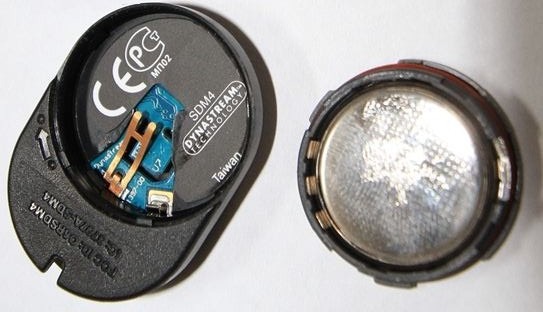
Simple as that. There’s no buttons, on/off switches, or any other area to poke at. It just sits there on your running shoes…forever.

And for those curious – it doesn’t actually matter which way the arrow points, as long as it stays pointing that way (the manual merely suggests one way to simplify support questions, I validated that with the Garmin Fitness support folks).
Connecting up the foot pod:
Pairing the foot pod is super easy. It’ll vary by device of course, but just using the FR310XT as an example, you’d go into the ANT+ menu and enable the foot pod there by pairing it. Each foot pod is assigned a unique ID, which then connects to your watch, so there’s no interference with others at the gym. Quick and easy.
Once enabled, you typically want to calibrate it for the highest levels of accuracy. In general I recommend going to a track – but if that’s iced over, you can also use GPS to calibrate it.
Once it’s connected, you’re good to go! As long as you don’t adjust the position, you’ll never have to touch this menu again.
Going for a run…indoors:
To use the foot pod you literally have to do nothing. Well, technically, if you’re running indoors you should put the Garmin into indoor mode by turning off the satellite. This will ensure that there isn’t a satellite track recorded with a distance of roughly zero (since you’re not moving).

(Yes, I know this photo is of outdoors, while talking about indoors – but at the moment my running shoes and luggage are apparently thousands of miles away from me elsewhere, so I can’t take a new photo quite yet…sorry!)
If you forget though, don’t worry – the unit will actually still record your pace/speed/distance using the foot pod. It’s just that some older applications don’t correctly interpret this. Though, none of the major ones in use today have any issues.
Once you’re done running, you’ll see two graphs on Garmin Connect (or other similar application). First, is the speed and distance like you would normally see outdoors:
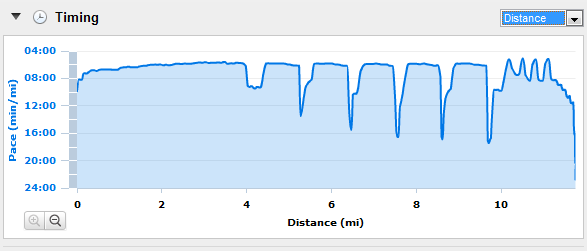
Note how incredibly smooth the paces are – that’s because I’m on a treadmill running a set pace as part of intervals.
And second, is your running cadence:
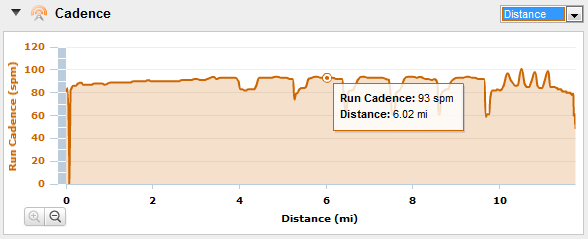
You’ll get cadence whether your indoors or outdoors from here on out.
Accuracy:
I get a lot of questions around accuracy of foot pods in general. For example – if you change pace, are they still accurate? Or if you do intervals, are they still accurate? Or what about terrain, or snow?
I’ve found again and again that the latest generation of foot pods are incredibly accurate. Last winter I put together a review of the FR60 – which is an ANT+ watch that doesn’t have GPS. As such, it depends on the Garmin ANT+ foot pod. After doing calibration I did many runs side by side with it’s GPS-enabled brethren, the FR310XT.
Perhaps the most telling test was one I did in the snow, for 7.78 miles, doing intervals. The FR60 using the foot pod, and the FR310XT using GPS. The end results? Well, check out the photo below:

Pretty darn impressive I think.
Using the foot pod or GPS outdoors?
Of course, another common question I get is whether to use a foot pod or GPS in race situations. The actual root of the question usually stems from: “I’m looking to qualify for Boston and need to be able to pace an exact pace per mile, and I can’t afford to have it be off, or I won’t qualify”.
Well, the real answer here is: Don’t depend on either.
What I mean by that is that no matter what number your Garmin tells you at the end of the race – if you missed the time cutoff, it won’t matter. As such, you should be actually taking mile splits manually based on the course mile markers and ensure that meets your goal time. For virtually every BQ marathon course out there, the mile splits are probably going to be pretty darn accurate.
For general use – just use GPS, it’s generally easier and that way you’ll still get a pretty satellite map when you’re done.
Calibration without going to the track:
(Updated August 6th, 2011)
One really cool tool that’s come available since I originally wrote this is a tool which enables you to actually calibrate the footpod by just doing your runs as normal outside with the GPS turned on. Based on those runs the tool can determine your correct calibration factor. Pretty cool!
![image[20]](http://media.dcrainmaker.com/images/2011/01/garmin-ant-foot-pods-everything-you-ever-wanted-to-know-19.png "image[20]")
For more information on that, check out the post I wrote up here on it.
Questions and Answers:
I literally have an entire e-mail folder full of foot pod questions. I even dedicated an entire Slowtwitch article to them, but…there’s still more flowing in! So here’s all the ones I’ve amassed, in simplified form:
Q: My foot pod says I’m running faster (or slower) than I think I am, what’s up?
A: More than likely the calibration has become skewed. Try and re-calibrate it to re-gain accuracy. It only takes a moment to run half a mile (ideal calibration distance), but the benefits are huge.
Q: Why does my foot pod show dropouts in numbers (i.e. 95.92.93.50.50.92.93.94.93…)?
A: This is typically caused by a battery that’s dying. Simply replace the battery and you’ll be good to go!
Q: Do I have to set the Garmin to ‘indoors’ mode to get accurate distance indoors?
A: Actually, no. All this does is turn off the GPS, so you get a ‘clean’ track. Otherwise, some older applications may incorrectly process the GPS track (basically showing you standing still), instead of the foot pod tack (moving).
Q: Do Garmin units record distance both the foot pod and GPS at once?
A: No, the track points use GPS while outdoors and with signal. No devices/apps that I’m currently aware of record both and allow you to use both tracks. Not that someone couldn’t develop such an app, just not in the Garmin’s today.
Q: Is the number displayed in cadence (i.e. 95) per foot, or total?
A: The number if per foot, thus you’d double to get total cadence – (i.e. 190)
Q: Should I use the foot pod or GPS while trail running?
A: It depends. In general, I recommend GPS (the newer GPS chips are incredibly accurate in trees) – but if it’s really dense and really twisty, the foot pod may be a better option.
Q: If GPS signal drops (like in a tunnel), will the foot pod pace be used instead?
A: Yes, foot pod pace takes over if GPS speed drops to 0, and foot pod speed shows a higher number. The inverse is also true, if foot pod speed shows 0, and yet GPS speed shows a number, than GPS speed will be used.
Q: Can I set which speed source to use?
A: Yes, on some of the Garmin watches (such as the 310XT), you can go under settings to Speed Source and set which one to use. Note however that the previous bullet still overrides that though.
Q: Does it matter which way I put the foot pod on?
A: As long as it’s not sideways, it won’t matter which way the arrow points. It’s merely there for simplicity’s sake.
Q: Is there any difference between the different Garmin foot pods out there?
A: Yes and no. In general, they all work just fine. It’s simply that the newer ones have a longer battery life and are smaller, while the older ones are cheaper (albeit harder to find now). They all are ANT+, and they all work with all devices. And, they all have cadence and speed/distance.
Q: Is there any difference between the different non-Garmin foot pods out there?
A: In short, no. The non-Garmin ones are OEM variants of one of the older Garmin versions, so aside from marketing, they’re all the same. The new Garmin ones though are the smallest ones on the market today though, whereas the non-Garmin ones are a bit bulkier.
Q: Does the foot pod contain a GPS chip?
A: No, your ANT+ receiver will likely have one though (except the FR60). There are no ANT+ foot pods on the market that have a GPS chip in them. And there are no non-ANT+ foot pods that have them either to my knowledge.
Q: Will my Polar foot pod work with my Garmin or ANT+ devices?
A: No, the Polar foot pod works on a separate proprietary platform.
Q: Does my Nike+ foot pod work with my Garmin or ANT+ devices?
A: No, the Nike+ foot pod works on a variant of ANT, but is not ANT+ compatible.
Q: Can I use the foot pod to record kayak strokes on a paddle?
A: Technically, yes – but it’s unclear how long the foot pod would last over time at the end of a paddle. There’s also some potential workaround discussed at the end of this thread.
Q: If I have a foot pod on my shoes in transition area, and then have a Garmin on my bike, when it gets to T2, will it automatically pickup the foot pod?
A: Yes, once in running mode (using multisport or manually), it’ll automatically pickup the foot pod within a few strides.
Q: Can I really put the foot pod in a phone booth pay-phone quarter slot?
A: With enough force and determination…anything is possible.
Q: Does the Garmin Edge series support the foot pod?
A: No, none of the Garmin Edge cycling devices allow use of the foot pod, it’s considered a different ANT+ device profile and isn’t one you can pair to the Edge devices. Though I should note this is actually a really common request from cyclists that occasionally run. Also of note is that the Edge series doesn’t display pace in Minutes/Mile, but rather only MPH (speed). Again, another highly requested feature from occasional runners that are primarily cyclists.
Q: Does the Timex Global Trainer support the foot pod?
A: It does now! As of August 4th, 2011 Timex released a new firmware version for the Global Trainer that does support the ANT+ foot pods. More information here.
Q: Which Garmin devices support the foot pod?
A: The Forerunner 305, FR310XT, FR405, FR405CX, FR410, FR610, FR210, FR50 and FR60. Note that the FR205 is NOT foot pod compatible.
Q: Does the Forerunner 110 support the foot pod?
A: No…and unfortunately won’t in the future. The FR210 was released as an ‘upgraded version’ of the FR110 to specifically support the foot pod.
Q: Which iPhone Apps support the ANT+ foot pod?
A: Well, that depends. But anything that supports the Wahoo Fitness iPhone Dongle will generally support the foot pod if it has a running mode. Similarly, the Digifit dongle has the same capabilities.
Q: Which Android Apps support the ANT+ foot pod?
A: At the moment there’s only a few hard to get Android phones that support ANT+ natively, so support will look much better in Feb 2011.
Q: Is the foot pod waterproof?
A: Yes, it’s IPX7 rated waterproofing – so 1 meter deep at 30 minutes.
Q: How much does the foot pod weigh?
A: 10g…or…well…not much. That’s less than an Oreo cookie (11g).
Q: Can I use the running foot pod on my cycles shoes to get cycling cadence?
A: No, you need the $30 cycling cadence kit to get both cycling cadence, as well as speed/distance (indoors). And don’t be tryin’ to attach the cycling cadence kit to your running shoes now…I don’t want to have to bring out Chuck Norris on ya.
Q: When using the foot pod outdoors, will I still get the satellite image of my run?
A: Yes, as long as you don’t disable GPS, the satellite image will still appear. If you disable GPS however (by answering ‘Yes’ to ‘Are you indoors now?’), then you will not get a route map.
Q: Is lap distance/pace recorded when using the foot pod?
A: Yup, all the same data is recorded. The only thing not included is a map of where you went, and in the case of GPS-dependent watches – elevation data isn’t included.
Q: How much does this little thing cost?
A: About $45 for the most current generation one, new.
Thanks for reading all – and feel free to post any other foot pod related questions in the comments below!
Help support the site!
I have partnered with the retailers on the left, and any shopping you do through those links or the ones below, helps support this website. Thanks!
Garmin Running Dynamics (RD) Pod – Amazon
Garmin Running Pod – Amazon
Additionally, anything else you pickup on Amazon helps support the site as well (socks, laundry detergent, cowbells). If you’re outside the US, I’ve got links to all of the major individual country Amazon stores on the sidebar towards the top. Though, Clever Training also ships there too and you still get the 10% discount.
Thanks for reading! And as always, feel free to post comments or questions in the comments section below, I’ll be happy to try and answer them as quickly as possible. And lastly, if you felt this review was useful – I always appreciate feedback in the comments below. Thanks!
Finally, I’ve written up a ton of helpful guides around using most of the major fitness devices, which you may find useful in getting started with the devices. These guides are all listed on this page here.
P.S. – If you’re looking at the ANT+ Speed/Cadence sensor for cycling – here’s the same style ‘All you ever wanted to know’ post for that sensor. Enjoy!

















First thing, thank you for the input.
“No, the current Timex Global Trainer does not support the foot pod, nor will it be updated to support it (very long and messy story). The next hardware version due out in Spring 2011 will support it however.”
Can you tell more about the messy story?
Then about future gps watch, would it possible to have a regular size wrist watch, with a long lasting battery that would come with a second wrist band, that would includ the gps chip, making it just two regular wrist bands instead of a bigger one that you cant really have for your everyday life?
I really appreciate if you could put a thread on cadence and how to improve… it is something that I have discussed also on my blog.
Thanks for the great review DC Rainmaker! I just ordered me one through Amazon Germany. Unfortunately you do not get any referrer bonus on that :-(
One question I do have: I do have a Forerunner 405. When the foodpod arrives I just tell the watch that its there and thats it? Is the foodpod automatically calibrated after one run with gps on? And another one: Does the foodpod comes with only one “clip-in”? I do have several running shoes and don’t want to hassle when switching the food pot on different shoes! Thanks again!
Again a very complete review !
Q :)
does it fit to the nike+ hole ?
i.e. does it has the same size as the nike+ sensor ?
Thanks Ray, answered a lot of my questions. Of course, I’m sure you realized you’d get more :-) So here’s a few: I know that you can set the 310XT to use the footpod as instant pace, but what happens to average pace – is that still controlled by the GPS? When you are done (assuming you had footpod for instant pace), what pace figures does the file use in the graphs, GPS or footpod? Finally, if you use the footpod for instant pace, are the distance figures taken from the GPS or the footpod?
What I’d ideally like to be able to do is use the footpod for the instant pace, since it updates more rapidly than GPS, but have all the data in the graphs come from the GPS, since at that point I’m more concerned with total distance and pace averages.
Oh, and my backordered 310XT from REI finally shipped, almost two months after I ordered it, so I guess I’ll have some answers for myself pretty soon :-) Thanks again!
Hi,
Do you have any experience with the Adidas Micoach pacer.
I’ve seen reports on the internet that the Micoach footpod and heart-rate monitor works with garmin devices.
You can get the micoach pacer for 100$ nowadays, seems like a good deal to me.
is there any disadvantage buying the pacer vs getting a garmin footpod and HRM?
A
DC Rainmaker: I love your articles. They appeal to my athletic and geeky side equally!
My footpod needs a rather high calibration factor to be accurate (111.5%). I have a feeling this is telling me something about my running form. Do you have any idea what that is?
HI DC
As long as you don’t adjust the position, you’ll never have to touch this menu again.
Can you clarify this statement?
the reason I am asking that is that I am using my foot pod on two different pairs of shoes. On one it is clipped to my laces , on the other one I used the nike+ hole. (Which BTW fits perfectly to answer Julien’s question).
Do you think it should be re calibrated when changing shoes?
I got a Foot Pod question that I have bee curious about for a while. It seems that the Garmin pod is the same oval shape as the Nike+ pod. Will the Garmin pod work in the slot found in certain model Nike shoes designed for the Nike+ pod?
For your android answer are you saying at Mobile World Congress we should look for multiple phones with the ANT+ part of the radio chipset to be enabled? Any chance you’ll be able to post which phones support ANT+ as I get a feeling the normal Android reviews won’t make that information easy to figure out. (I need to replace my iPhone 3G)
I was just about to do a post about the Garmin foot pod, but then you posted this, so I’m going to link back to here for anyone interested – hope that’s OK.
I have been having some trouble with my foot pod. It’s my new Christmas toy, and sync’d with my 305. It had been working great until a few days ago when on the treadmill, I was running 8:30min/mile and it was reading anywhere between 11-13:30 for pace. But cadence was accurate. I’ve been emailing with the fine folks at Garmin to work through this. Much of what they’ve said is consistent with your post. One addition – they recommend the foot pod be worn on your non-dominant foot. I have mine on my dominant foot as out of habit everything goes on my dominant side, minus a watch. I’m not sure why, but they suggested switching sides and recalibrating to the non-dominant and seeing what happnens from there. Just something to add… thanks for your post!
I can confirm that the Garmin ANT+ foot pod is the same size and fits in the same hole as the Nike+ sensor. I have the Garmin inside my Nike Free Run+ shoes. Works great!