


If you’re like me and are constantly on a laptop – there are really two minor issues that I have with the Garmin USB stick that I use to download workouts from my Forerunner to my computer. First up is the issue of simply losing the darn thing in my backpack or around the house. But, I’ve since shared how I solved that problem.
Second, is the issue of it simply breaking off. Having broken off various USB doo-dads from my computer before (as well as smart cards sticking out the side), breakage is a reality, and with it hanging off 1-2” into the wild blue yonder, it’s a prime target for a grade-A fail.
And I suppose a third issue is The Girl stealing it. Somehow that paint scheme she did on hers only works one way in attempting to prevent me from stealing her stick. But it doesn’t keep her from stealing my ANT stick. And neither will this. She’ll still likely try to steal it while giving me that innocent ‘I’m not guilty’ smile.
An alternative
So back in January when I was alerted to a much smaller USB ANT+ stick that could replace your existing Garmin ANT+ USB stick that you use with your current Forerunners I was pretty jazzed to give it a whirl. I immediately ordered one and waited for the horribly oversized box from Amazon to arrive.


But I don’t think I was prepared for just how small it is once I got it all unboxed. Just check it out in comparison to your normal ANT+ stick:


As you can see, it’s tiny. And the best thing is that with being so small, I can leave it in my laptop 24×7. In fact, aside from a few tests in other computers – it hasn’t left my laptop since the package arrived. That includes plane flights, to and from work, and all assortment of wanderings around town. Well ok, it left my laptop to take these photos:

But, you may be asking how is it that a Suunto branded stick works with Garmin watches? See, when it comes to ANT+ USB sticks, there are basically two flavors – ANT1 (USB1) and ANT2 (USB2). You can see the flavors on the back of virtually all sticks in tiny writing – “USB2 Wireless USB Stick”
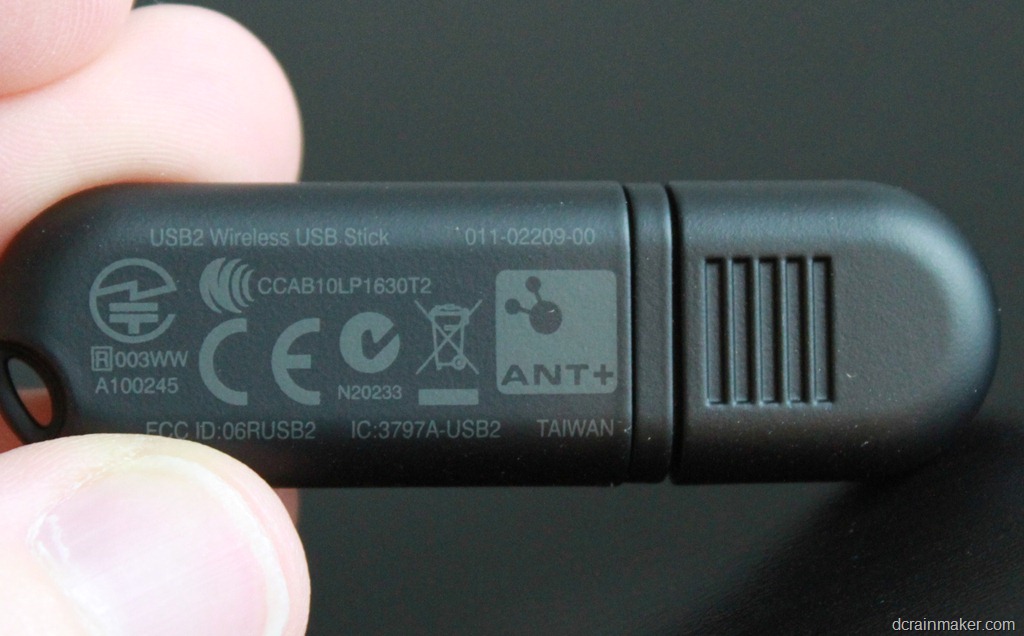
ANT1 had a limited number of channels (4), whereas the newer ANT2 stick has more channels (8). In common scenarios like downloading your data, it doesn’t really matter. But when it comes to applications that may leverage the USB stick for real-time data transfer – such as TrainerRoad – the extra channels become really important if you have multiple ANT+ accessories (like Speed, Cadence, Power Meters, Heart Rate, etc…). Or – if you’ve got multiplayer type applications taking advantage of it. Each channel is limited to one ANT+ accessory.
So the Suunto stick is ANT2, which means that despite being Suunto it’s really just like any other ANT+ stick under the covers. Thus it doesn’t look any different to the Garmin software than Garmin’s own stick.

Using the mini-USB stick
All you do is simply plug in the stick, give it a few seconds to grab the USB drivers from Windows Update (I’ve tried it on Windows Vista and Windows 7) – and you’re good to go! You’ll note that initially when it first starts looking for drivers, it calls it the Suunto Movestick Mini (it normally comes with the Suunto Quest watch).

Once it finishes up being installed – it’s the same old ANT USB Stick 2 (ANT2).

For all you Mac folks, I was able to also download workouts without issue using the Garmin ANT Agent and in this case, a Garmin FR610 (but again, any Garmin watch will work).

Like the Mac, on Windows once you’ve got the drivers automatically installed, you’ll use the Garmin ANT Agent software just as you normally would. It’ll simply download from any device you have (i.e. FR610, FR310XT, FR910XT, FR60, FR405, FR410, FR70, etc… – no problems!).

In short, plug it in, forget about it.
Now, I do want to point out that while this is a Suunto ‘accessory’, it’s the only Suunto accessory that will work with other ANT+ devices (like your Garmin). The remainder of the accessories (i.e. heart rate straps) are using Suunto’s proprietary ANT variant which aren’t compatible with anything else. And, while I’m at it – since I know a few of you have asked about the new Suunto Ambit GPS integrated watch – yes, I will definitely be reviewing it and should have a unit in my hands as we get into the first week of March. Looking forward to it!
3rd Party Compatibility:
Now the cool part with being the standard ANT2 stick is that all of the 3rd party applications that use the ANT+ USB sticks support it just fine.
Take for example TrainerRoad (where I heard about the stick, and yes, a review is coming) – it easily works with the Suunto Movestick Mini seamlessly – you’d never know the difference:

Next up we have the Tacx Trainer – which also works just fine. Just be sure to be on software version 3.7 or 3.8 (latest versions) – which added support for the ANT2 USB sticks out of the box (prior to that you had to jump through some hoops). If you’re on the 3.5 or 3.6 – simply click the update button that’s been blinking at you for the past month or so.

And for those developers/testers in the house – yup, it works with the ANT+ simulator perfectly fine too (you may remember this from my ultra-long battery tests).

There are undoubtedly many more apps it works with, but these were just a few that I could think of that I had handy.
About the only downside I can think of is that if you do take it out of your computer and place it somewhere…there’s probably a good chance you’re going to have to search longer to find it since it’s about 20% of the size of the original one.
But, that’s a risk I’ll take…mostly because it’s never leaving my laptop. Others have simply put a dot of epoxy on it to ensure it never leaves its home (though, it’s pretty darn snug in the port already).
Pricing
The Suunto Movestick Mini stick runs between $35 and $39 depending on tidal patterns and other random pricing metrics. If you purchase the USB stick via Clever Training using the DCR reader coupon code of DCR10BTF then you’ll get 10% off your cart, as well as support the site.
Enjoy, and thanks for reading!

















Just a little correction, Suunto USB is not the only Suunto accessory that will work with other ANT+ devices – the new Suunto Foot Pod Mini works via ANT+ too, I use it with Garmin Fit Android App. It’s a shame that Suunto ignores ANT+ otherwise.
Thank you so much for posting this!!! I have gone through 2 Garmin Ant+ sticks–they just stop working, not sure why–but I’m hoping this will have a longer life, and I was sold when I saw the lower profile of the Suunto stick. I was afraid I was never going to be able to connect again and not be able to analyze my data at the level provided by Garmin Connect, but as we speak (figuratively), my 405 is sending data through the Suunto Ant stick!
This comment has been removed by the author.
I believe credit to Chilli (Australia) for alerting DC about this back in November 2011.
Refer link to dcrainmaker.com
Speaking of ultra-long-battery tests, any update on when you are going to test more devices to see how long they last with the GPS turned off?
Hi
Any idea if this will work with Win XP?
Thanks!
Does anyone know if Garmin HR strap (ant+) will pair with a suunto watch (M5)?
Yes it does. I have mine paired with an Ambit
The M5 is different than the Ambit. The Ambit had an update last fall to allow ANT+ devices (heart rate straps) to connect to it. The M5 didn’t get such update.
Note that this is different than using the Movescount stick to connect to the Suunto Ambit (that doesn’t work).
Ray, before I buy this, is this compatible with the Ambit2 R? If not, is there a stick for the Ambit2 R (or Ambit2 series)? thanks!
No, the Ambit 2R (any of the Ambit’s actually) only transfer via USB cable. Sorry!
Excellent! Thanks for the review–I’m so sad that I just bought a Garmin stick. The next question: How long will it take Garmin to catch-up??
This would be great when Garmin fixes the issue I have with my 310XT that constantly downloads over and over, including during a workout (breaking the workout up). As is, if I want to run on the home treadmill or use the bike trainer, I need to unplug the USB stick. :(
Their support folks are helpful, and getting data from me. It appears from their forums I’m not the only one seeing this either.
Steven,
I’m struggling with the same issue. Have you found a solution to the problem? I use a mac, and have a usb1 version of the any stick. I can’t figure out why the any stick just keeps dropping off the radar, and am going to order one of the sunnto ones to see if that can be a cheaper fix….
Thanks,
Illya
Anyone know if a Garmin 610 will pair with two ANT+ sticks? i.e. if I put the Garmin stick on my work computer in the office for lunchtime runs and this Suunto stick on my home computer for weekend/evening runs?
Hi GBP-
Yes, just ensure to not have either computer set to erase the watch upon completion of the download.
Enjoy!
Thanks for the review. I have the Ant+ stick connected to the home Mac and the workouts for my wife and I are uploaded to the same Garmin Connect acct…. very troubling.
Do you know if you are able to use a single Ant+ stick and upload data to 2 different Garmin Connect accts?
Thx.
Aaaaarrrgh, wish I’d not seen this!
Having just moved to a 910xt from an entry level suunto, I ebay’d my movestick mini AND the footpod understanding that suunto ant was not compatible ant.. have been lamenting how clumsily large the stick is, and the cost of a new footpod.
Hi Nilserik-
No, unforutnately the ANT Agent is tied to a single account, regardless of how many sticks or devices you use. One option is to have it not upload automatically to any given Garmin Connect account, but instead just sign into connect.garmin.com and select to manually upload – thus uploading to the correctly logged in account.
I don’t think this is correct (or I mis-understood the question).
On my PC at home I use one Windows Login and a single Garmin ANT+ stick. Once I plug it in it sucks data off of my 610, 910xt, Swim and puts them on my Garmin Connect account. It also pulls data from my girlfriend’s 610, 310xt and Swim and uploads to her account separately.
I think it asks for the account info when pairing the watch… Perhaps this is a newer feature of the ANT Agent, but I am pretty sure I have been doing it this way for around 2 years.
Good Find. Though I like many others ordered this new smaller ant stick after seeing this post hopefully Garmin will update their ant stick on future watches.
And Suunto ANT network key is getting support in Android:
You can use your Suunto ANT kit, and your ANT+ sensors, with a convergent Android app.
link to newwell.fi
link to thisisant.com
Could you check the system log on your Mac using Console.app? One problem that I (and others) have been having is that with the Garmin ANT+ stick plugged in to our computers, we’re getting repeated kernel error messages every 2 seconds that look like this:
kernel: USBF: 321438. 88 AppleUSBEHCI[0xffffff800b76f000]::Found a transaction past the completion deadline on bus 0xfd, timing out! (Addr: 4, EP: 1)
(see link to forums.garmin.com). The problem has been going on for awhile with no word from Garmin. I’d be interested to see if the Suunto gives the same error.
I end up keeping my stick unplugged until I need it, but this might help narrow down the problem.
I know this is a year stale but I’ve been curious about this as well. I get those same errors with my Garmin ANT+ stick and I finally decided to buy the Suunto stick to see if the problem existed with it as well. Sadly, it does. I get the same errors in system.log, and if I leave the stick plugged in for more than a few hours it locks up the computer completely.
Machine is an Early 2008 Mac Pro, and it doesn’t seem to matter if I plug in to USB ports directly on the computer or if I plug into ports on an external USB hub.
Hi Lyen-
With the mini stick plugged in, I am not seeing any such errors in System.log. The ANT Agent recongnizes the stick as plugged in, so I would expect to see it bubbling if it were having an issue.
Hope this helps!
Great post. However I’m surprised that a USB stick is even needed. Most laptops have Bluetooth already so would just need some driver software. I understand that there are different Bluetooth chipsets so would need slightly different drivers.
ANT+ is different than BT (or BTLE), so the two aren’t compatible. Sorta like USB vs Firewire. iPhone vs Android. Boxers vs Briefs. Tacos vs Burritos. Coke vs Pepsi. Nutella vs Fluff. Oh wait, actually those two are definitely compatible.
You say “ANT+ is different than BT (or BTLE), so the two aren’t compatible. Sorta like USB vs Firewire. iPhone vs Android. Boxers vs Briefs. Tacos vs Burritos. Coke vs Pepsi. Nutella vs Fluff. Oh wait, actually those two are definitely compatible.”
This is no answer at all. It isn’t like Coke vs Pepsi, for example, because they both serve the same function – hydration. The question is HOW and/or WHY BT and the ANT gadget are different. I have a Garmin fitsmartHR, If I choose to link the data to my laptop, which has bluetooth, can I, or not? Suppose I have a device that wants to see an ANT. Will it also work with BT? If not, why not? Why create a separate device (ANT) which seems to do what BT does?
It was a perfect answer to his question. It wasn’t a dissertation on the topic, since that’s not what he asked about.
BT and ANT serve the same function, just like Coke and Pepsi. They are merely competing standards. ANT+ came before Bluetooth Smart (which is very different than regular Bluetooth). These days, ANT+ and Bluetooth Smart are both low-power protocols – and competing sensor systems. They don’t talk to each other. So you can’t use a BT device to talk to an ANT+ device. Or vice versa.
Many companies now create dual-sensor systems, such as Wahoo Fitness, that just broadcast on both ANT+ and Bluetooth Smart. There are benefits to both systems, depending on what you want to do. Right now, ANT+ is ubiquitous in cycling for example.
I went and bought one of these immediately after reading this post. So pleased to be able to leave it in my laptop all the time without tripping over as I walk past. The huge Garmin one can stay in the carry case with the Garmin kit in case I need to download on another PC…perfect!
The ANT agent did tell me several times it had uploaded tonight’s run from my 610 though it only appeared on Connect the once, so not sure if that’s a problem yet.
Awesome tip: I cannot count the number of times I went on a trip and forgot to bring a stick. Ordered one immediately and will indeed leave it in the laptop 24/7
It arrived today. Can confirm it works like a charm (link to dailymile.com), and quite a bit cheaper too!
Hi, anyone knows if the Garmin USB Stick works with Suunto watches? Specially with the new Suunto Ambit? tks.
Is this Suunto Movestick Mini compatible with the Suunto Monitor program like the discontinued PC POD did?
Also, can I use this with FirstBeat Athlete? The last I check only PC POD and the larger version of Movestick works.
Thank you.
Thanks for the feedback–ordered one on Amazon thru the link on your page.
Hi DC,
Will the Suunto USB work with the Garmin Forerunner 305?
If so, where can I purchase the Suunto USB?
Thanks,
Arthur CHat
Hi DC,
Does the Suunto USB work with the Garmin Forerunner 305?
If so, What does the Suunto USB cost? and where can I purchase it?
Thanks,
Arthur
No, the FR305 is USB-download only.
The unit costs about $35 – see the links at the end of the post. Enjoy!
Just ordered the Suunto Mini Stick to work with my Forerunner 405 my bro in law gave me without the ANT stick… I hope it will work for me :-D
This Suunto USB seems great. I am looking to get one USB ANT+ stick to read heart rate data using a Suunto belt device for my research.
Can someone confirm that it is possible to create a Windows application that can communicate with a Suunto belt device using this USB ANT+ stick (Suunto movestick mini) ?
If it is possible to communicate using ANT protocol to a Suunto belt device, it would be useful to know if multiple Suunto belts can communicate to a single application.
Thanks !
I installed my Suunto ANT+ stick, followed the instructions and everything worked perfectly with my Garmin forerunner 405.
Lyen and all others who are interested in using the Suunto Stick with OS X:
Using ANT Agent 2.2, I still get the same errors as with the original Garmin USB2 stick. So the Suunto one does not fix the problem of constant USB errors in the console :(
The Adidas MiCoach USB dongle is also Garmin compatible, and much smaller than the Garmin dongle. I can leave it in place when I zip my laptop into its form-fitting case!
The Garmin synchronization software even trumps the MiCoach software – in order to synch the MiCoach in my football boots, I need to close Garmin Ant Agent.
Same! MiCoach USB dongle works perfectly with the Garmin FR 610.
Have you tested range of these two?
This comment has been removed by the author.
Are you sure that Suunto Movestick Mini is ANT+? There is just ANT mark on back of package cover.
And I can not just make it working with GSC 10.
110% sure. I use it (using it right now), plus, everyone else here is using it. ;)
Range, hmm, at least across the room (living room sized) if not further depending on what’s in the way.
When you say not working with cadence sensor – which application are you using?
Hi,
ctANT, usb stick is detected, but i can not pair (is just searching and serching …) it with GSC 10.
Hi, can you perform one test for me?
I would know if GSC 10 works with Garmin ANT+ or SUUNTO Movestick Mini using cnANT.
Hi,
doest the Suunto Movestick Mini (link to amazon.com) mentioned in the article, work correctly with the Garmin Premium Heart Rate Monitor (link to buy.garmin.com)?
As far as I can tell from using this device for well over 6 months it is a straight swap out for the Garmin unit. I have Wahoo, Garmin, Adidas, Bkool devices and it pairs and works with them all. It works with any software that expects a Garming ANT+ USB dongle.
Have you explored using this ANT 2 with Beltone or GN Resound hearing aids or accessories? “GN ReSound – is using the Nordic … core and 8-channel ANT protocol stack in a compact 5x5mm QFN package.
thanks bill a
Hi,
Very much enjoy reading the site. Question: With Ambit firmware 2.0 promising ant+, will the movestick mini now work with the ambit?
Thanks, Allan.
Currently it’s not supported. Technically they could do it – it’s just not there today (in 2.0). The technology that’s used to do that is ANTfs, which allows file transfers.
I recently purchased a Garmin 650t GPS which uses ANT+ to communicate to other Garmin GPSes. We can share tracks, waypoints, etc. Do you think I could use the Suunto MoveStick Mini to transfer those same files wirelessly to my computer instead of to other GPS devices?
Joel
Unfortunately, it takes two to tango. In this case, it takes software on the PC to understand how to transfer those files to it. In theory, one could write an app to do so (either for PC using the stick or for phone using an adapter). But I’m not aware of anything that does that today unfortunately for those devices types and file types (they all just use FIT file transfer).
Sorry!
I find your reviews hugely helpful – would now never buy technology without checking with you first. (You sold me my 310XT, also later the Polar HRM belt to go with it!) Please can you tell my if the Suunto “ANT” stick will work with XP? I daren’t buy it until I’m sure. Thanks.
According to Suunto, it should work on XP. See it within the FAQ here: link to movescount.com
Enjoy!
Thanks so much for your speedy reply.
I have a Samsung SIII on which I have the Endomondo App running. I am looking for HRM and Cadence Monitor which are compatible with the Samsung SIII and Endomondo. The Endomondo web site does sell HRM’s but do not have Cadence Monitors. Can anyone help a techincally challenged mountain biker.
Thanks
Andreas
Hi Andreas-
You can pickup any Speed/Cadence ANT+ sensor and they’ll work with Endomondo. Here’s more information on them:
link to dcrainmaker.com
And here’s a well known one:
Speed/Cadence Combo: link to amazon.com
Hi Ray
Thanks for the site, I love it. I have a quick question I’ve not been able to find an answer to on the web.
I use a Garmin Forerunner 610 and can upload runs and rides to my home computer no problem, but the IT policy at work won’t let me install the communicator plugin or ANT software to my work laptop. I come straight to work from cycle training, so I can’t upload to Garmin Connect (or, more importantly, onward to Strava) until late evening, which is rather annoying.
Do you (or anyone else reading) know if there is any way I can get the ride file off the watch without using the ANT dongle? I tried using the charger cable and plugging it in to the USB port of my laptop, hoping that the Garmin Connect site might see the watch without the plugin, or that I might be able to access the watch like a USB drive and take off a TCX file manually, but that didn’t seem to work.
Any ideas much appreciated. My back up option is to buy the 810, but I’m not all that enthused by it and I get all the data I need from the 610 – when I’m actually on the move all I really need is speed, distance and time, which I use a cheap Cateye computer for. $500 seems like a lot to shell out just for the phone function.
Thanks
Ben
If you have an iPhone you could use the Wahoo Fitness iPhone key to upload from the FR610:
link to dcrainmaker.com
Looks like the Suunto Movestick Mini does not see any of the Edge 500 bundle devices.
Neither the HRM1G Heart rate monitor nor the GSC10 are found by the software.
Isn’t that strange because both are ANT+ devices ?
No, it wouldn’t. The mini stick has to be leveraged by an application – such as the ANT Agent, or Trainer Road. In the case of the ANT Agent, it’s to connect to supported ANT+ devices (as noted above). In the case of TrainerRoad, you can connect to the GSC10, etc…
In order to transfer files from a devices to your computer, the devices has to support what are known as FIT transfers via ANTfs. Today, the Garmin Edge units don’t support that.
Do you have a guide as to how to make the two pair? Are you saying that having something like trainer road eliminates the need for the Edge and the sensors can be picked directly by the USB?
I have :
1. Suunto Mini Stick
2. an Edge 500, Garmin cadence and speed, and a Garmin HRM strap.
Correct on Trainer Road.
You need an application – TrainerRoad, PerfPro, etc… to leverage that USB stick to connect to your ANT+ sensors. By itself, the USB stick won’t do much.
Thanks for replying. I actually use an android phone, but can’t seem to find an equivalent product. Do you know of any? Thanks again, Ben.
I should have said it’s a Samsung Galaxy S2 I have. By the look of it, there’s nothing on the market to let that phone read ANT. Hmmm.
Check out my post from last Thursday from CES on what’s coming up for the Samsung phones…
“Check out my post from last Thursday from CES on what’s coming up for the Samsung phones…”
I can not find this post… Only thing from Thursday was the Leiker post. Day before you had the two posts about goodies you had and goodies you expected soon.
In this post, under ANT+: link to dcrainmaker.com
I have been reading your reviews, and they are great…thanks!
Quick question, I just upgraded to a 910XT from a FR405. Can I use the old FR405 USB ANT+ stick with my new 910XT as well as the USB ANT+ stick that came with my watch? I was thinking of keeping the old one in my travel kit, so I could just upload with that stick when I am on the road.
If I can do this, would I have to repair the watch each time that I came home and/or went traveling?
Thanks in advance for your help.
No problems at all with that. And no need to re-pair the watch. My wife and I regularly use each others ANT+ USB sticks, and for the most part, I have a big pile here and it’s probably rare that I actually grab the same stick twice.
I used the Garmin ANT agent to discover both the HRM1G and the GSC10.
The problem was not the Suunto stick but the software.
Trainerroad for example works perfectly!
Ray,
I picked up the Suunto Movestick Mini yesterday and tried to use it with the Lemond Revolution Power Pilot. I downloaded the latest version of the Garmin ANT+ software and set the Power Pilot to pairing but it never showed up in the Garmin ANT+ console. Any suggestions?
Unfortunately the LeMond Revolution as it stands today doesn’t support direct ANT+ “in the clear” transmission of power (or downloading of files). It does do speed/cadence and HR (via strap).
However, to display some of that data via that ANT+ stick, you’ll still need some piece of software – such as Trainer Road or Golden Cheetah.
Hi DC
Regarding the install.
It works fine as you write and show, on XP and Vista.
But now i got a Windows 8 machine and it just wont install.
It knows its there but has no driver.
And no driver can be found.
Do you have any helpful advice?
Thanks Johnny
Strange, it works on my W8 boxes (have a few of them). Nonetheless, a trick to get the drivers is to grab the Garmin ANT Agent software download (it’s free). And install that. That has the driver package as part of it, and is pretty tiny. Then just turn off the ANT Agent. I’d have to think of you could uninstall the ANT Agent and whether or not it’ll un-install the drivers.
One minor note, if you have Windows RT (such as Microsoft Surface), the ANT stick (of any flavor) won’t work today. I’ve been working with some folks to try and get those drivers inbox via Windows Update so it will work so that folks like TrainerRoad can develop against it – but for now, not quite yet.
Is it just my impression or is the transfer speed of the Suunto Movestick Mini slightly slower than Garmin’s?
Thanks DCRainMaker – as always you seem to have the inside track on this stuff – I knew someone had to have a smaller ant+ stick than that silly garmin one its so big and goofy – now I can just leave this in my laptop
Does it work with Garmin Fenix?
No, the Fenix doesn’t transfer activity files over ANT+, rather, over USB and Bluetooth Smart.
From reading the comments above, should the MoveStick Mini detect a Garmin HR strap, or speed/cadence sensor? I tried the MoveStick in both a Windows 7 laptop and a Mac, the Garmin Ant agent doesn’t detect/pair with those Gasrmin Ant+ devices. I didn’t want to pay for the trainerroad app/service unless I was sure the Movestick was working. Any advice would be welcome.
Thanks
No, the ANT+ stick simply replaces the existing ANT+ stick. You’ll still need some software (TrainerRoad, Golden Cheetah, etc…) to communicate with a HR strap directly.
When I asked Suunto, they say that the Movestick Mini will only work with their products. Are they joshing me? I have a Garmin Forerunner 405.
They’re wrong. It works fine with the FR405.
works good for me. FR70, FR610, and 910xt… Now I wish my Edge810 uses this technology instead of USB for data transfer,,,
Hey DC,
Just figured I’d let you know when using hte Suunto Movestick Mini with ctANT+ (HR and Cadence) my cadence keeps fluctuating from accurate to 50% accurate. I swapped out the suunto for a garmin unit and the problem went away. I’m still testing to see if I can figure out exactly what the issue is.
Hi.
Don’t know if this is the right place for the question but here it goes.
I’ve been thinking about buying a footpod and i’ve seen that the suunto and garmin footpods are produced by the same company and use the same protocols of comunication but the garmin is cheaper. Do you know if i could use the garmin footpod whith my sunto t4d???
thanks
No, the T4D doesn’t support ANT+, which is what’s required (only the Suunto Ambit does). The Suunto footpod broadcasts in ANT+ as well as proprietary Suunto-ANT, whereas the Garmin just does the open ANT+.
Hi,
Garmin got his own mini stick right now: 010-01058-00
link to gps-info.nl
Indeed, I’ve been using it since the fall. Good stuff! Pretty much just like the Suunto one, just a bit aerodynamic. ;)
Well my computer illiteracy has managed to bomb out my Suunto mini. Suunto claim that it won’t work with my Garmin 610 and won’t help with troubleshooting, so I deleted all the Suunto files i could find on my computer (I downloaded drivers as pointed out in the manual, not auto detected by windows).
Now I can’t re-download the Suunto driver and my 610 isn’t being read…
Make sure you follow Rays instructions to a T or you’ll end up like me, with nothing!
Perhaps try forcing the driver to one use from ANT…? (i.e. download it and when ‘installing’ the device point it to these files)
There is a link to one for Windows here: link to thisisant.com
I gave it a shot Tim, but Windows keeps determining that the drivers are up to date.
Rolled the drivers back, and even deleted completely to the point where there were no drivers, however it wasn’t recognizing the ANT USB Driver – Windows files (I tried all 3 – AMD64, IA64 and X86.
Not sure where I am going wrong!
Make sure you go into your Garmin and turn it on to “Initial Pairing” – “On” under Settings.
Any update on drivers for ANT on Windows RT? It’s very frustrating not being able to upload my run data directly from my Surface RT.
Nothing. :( I’ve poked a few times on both sides of the equation, but no significant progress.
Anything yet? Any workaround? It has been a few months since you last commented on it! I really want the Garmin vivofit band, but the only devices I have are a Nokia Lumia windows phone and a Surface RT!
No, there’s no progress there. Ultimately, I don’t expect any based on what I’m hearing at this point. Sorry!
Not sure whether this has been mentioned yet, but my Forerunner 910XT, which I received today directly from Garmin (exchanged on warranty for defective unit), features a Garmin branded USB stick which looks very similar to the Suunto one pictured in your post. The old watch (bought 6 weeks ago from Amazon) still included the older, bigger unit…
Nice, good to see they’re starting to slip out. They hit the distributor catalogs a month or so back, but hadn’t seen them actually go out through normal channels yet.
I confirm that, my new 310XT came with ANT+ mini stick similar to Suunto mini stick. Finally they got the message.
I got one of the new garmin sticks with a new 910xt. There is a slight hitch for people for whom this is the first or only stick ….
While the stick works fine with ant agent, antware II etc, and Golden Cheetah, it is not recognized by the Sport Tracks 3 Live Recording plugin or Virtual Runner (Treadmill simulator), both of which are fine with the original garmin stick or the movestick mini. Presumably there is something subtle in the initialisation which is done differently in these two apps – obviously there may be others in the same boat.
I am fairly sure I did come across something which didn’t work with the movestick, but it escapes me at the moment.
Anyone have problems with this not working? It was working fine with my Forerunner 310XT and I just went to sync my weekend rides and it the Garmin ANT Agent continues to say “inactive, please connect…” It has never done this before. It has always just worked. The wife found my Garmin stick–which SHE lost— yesterday so I plugged it in and everything synced fine. ????
Can anyone confirm that Adidas micoach PC/Mac adapter is USB2 which would allow me to use HRM through Apps with non-builted ANT+ chip android phones?
link to micoach.adidas.com
Hi DC,
just bought an Ambit S2 and I need to know if my old ant+ garmin usb dongle can work with moveslink and ambit s2.
Until now I could not make it work :´(
Neither the Ambit nor Ambit 2/2S uses ANT+ for uploading, they only use the USB cable method.
I purchased this today online via your suggestion. I am dual booting Linux on my computer and I have downloaded some things that are said to work with Garmin USB ANT+ sticks, so we’ll see if it treats this adapter the same way. Otherwise, I’ll just have to boot into Windows to upload; not a huge deal. I’ll make sure to come back and report about how it works on Linux.
Ray…I read all the comments & have scoured the innerwebs & I can’t find an answer, so I am coming to you as the expert. If I have the regular Garmin ANT+ stick plugged in my desktop at home 24/7 & then keep the Suunto Mini in my MacBook Air 24/7, will my watch sync with both whenever I am in range?
Basically is the watch-stick partnership 1:1 or 1:many?
It’ll sync to both. The partnership is between the computer and your watch, but your watch can be paired to multiple computers.
Note however that it may result in duplicate uploads to Garmin Connect however.
Thanks Ray! I was hoping that was the answer.
Also, an easy solution to the duplicate data problem can be found in the Garmin ANT Agent Preferences. The very first section is a checkbox that reads “Erase data on my device after a successful transfer to computer.” Since I never look at my data on my watch after it’s in Connect anyway, I don’t care if it’s wiped off after it’s uploaded.
Drew and Ray,
I got the suunto mini to replace my lost garmin ant stick. I went to the movestick web site but how do I upload the drivers to my macbook pro? Igot a message from on the screen that it doesn’t recognize the developers. The stick didn’t auto load the drivers like my garmin ant. Thanks
I have just purchased the suunto mini movestick and it is ant not ant+
I presume it is old stock, so readers need to be aware that they specifically purchase the ant+ variant of the suunto mini movestick and not the ant variant.
I’ve never one heard that. Where did you purchase it and how do you know it’s not ANT+ (note, it doesn’t say ANT+ on it).
Hi,
The one I purchased specified ant not ant+ on the rear of the packaging.
Additionally, page 2 of the product q&a from this link:
link to suunto.com
asks if the movestick is ant or ant+ and suunto reply with confirmation that the movestick is ant and not ant+
It won’t say ANT+ on the package, as it’s not what Suunto intended it for from a marketing standpoint. Suunto initially put it out as for just their proprietary Suunto-ANT piece.
Have you tried it and are you actually seeing any issues?
Suunto support can’t generally spell ANT+ (with the +), they only know of Suunto ANT.
Hi,
I bought it to originally use with a tanita bc1000, however, i since ordered the withings, BUT, I am now wanting to use my garmin HRM chest belt with my android phone and pc. I am awaiting a usb otg to arrive so i can use an ant+ stick with my android … as selfloops.com suggest.
I have the suunto here, but it is repackaged waiting for me to send it back but if my usb otg cable arrives i might unpack it and try it on my phone.
It would be good if it absolutely is ant+ but is a bit disappointing choose to not display or advertise it as such…very confusing.
Sorry, I meant to write:
Disappointing if SUUNTO choose not to display or advertise it as ant+
I hear ya. They haven’t historically displayed ANT+, because up until November, no Suunto devices even supported ANT+. Now, the Ambit’s do, so that’s progress.
I assure you, it’ll work with the OTG dongle (in fact, that’s how I use it). Enjoy!
hi,
ok that is interesting, I will unpackage it and explore further and see the results once the otg cable arrives.
Would be brilliant if so, ok then, thanks for the replies, can appreciate you must deal with hundreds if not thousands.
I will get back to you and update this with my findings and then at the very least, it may help others in my position.
Thanks again.
No problem. Btw, once your OTG arrives, you can start with this guide for getting it all setup on Android (and other platforms): link to dcrainmaker.com
It’s using the same stick – though this one was branded differently, but same exact unit (I swap them back and forth between the Suunto, Garmin, and ANT+ branded one).
Hi,
Oh superb stuff, thank you very much indeed for the heads up, really appreciate that!
Hi Again,
So, the usb otg cable arrived this morning, connected to galaxy s3 (after having installed the relevent ant+ apps and stuff) put my ant+ garmin heart rate chest belt on and it worked lol
Brilliant stuff, really weird suunto choose not to display or advertise this as ant+ Thanks for persevering with me lol
Awesome, great to hear!
The stick itself is not ANT+ it is just ANT. ANT+ is all about defined protocols for using ANT. e.g. it’s all about the software using the ANT radio system. As the stick has no software of it’s own then it can not be described as ANT+. It can of course be used by apps that implement the various ANT+ profiles.
Can an ANT+ exercise foot pod communicate with the Suunto USB device directly? What if I want to bypass the watch and let the pod send a signal directly to the pod?
Yes and no. Yes, it technically works, but you have to find an application to do so. Meaning that you’d have to get an app to connect directly to the foot pod and read the values in realtime.
I have a Movestick Mini and I was wondering if there is a way to use it to display heart rate information on a PC monitor in real time. It seems to be designed for uploading information after a workout.
You need some sort of 3rd party application to do so. An example would be TrainerRoad for indoor cycling trainers to display HR (and other metrics).
I recently bought this as my Garmin stick has gone AWOL. I assume a dog ate it but cant be sure :(
I find it connects with my 310XT equally as well as the garmin stick (ie poorly) but if I leave the SUUNTO plugged into the usb port my pc wont boot up. Sometimes it stops at the black screen with just a cursor, sometimes at the windows logo. The instant I pull out the suunto it resumes the startup without issue.
It sounds like in your PC you have a setting in the BIOS attempting to boot to USB. That in and of itself is semi-normal, however the fact that it tries to actually boot off of a non-mass storage device isn’t normal. You can disable boot to USB in your BIOS settings if you’d like, to solve it.
I’ve had the Suunto Mini in my MacBook Air for about a month now & it has never once given me a problem. I set my up MBA & the Garmin ANT Agent with the official Garmin ANT+ stick. When I plugged the new stick in, the computer recognized the Movestick Mini immediately the same way it recognized the Garmin ANT+ stick. I just leave it plugged in my MBA 24/7 & when I run during the day at work, my Garmin 410 syncs up with my MBA & when I come home, it does not sync again with my mac at home. So no no issues with duplicate entries in Garmin Connect.
hey mate, i recently bought a garmin 410 on the cheap but in the box was no ANT stick so i’m considering getting the suunto stick mentioned above, but is it possible to use any USB stick with the watch? cheers,
Yup, totally compatible.
Will it work with Timex Ironman?
Not, the Timex lineup doesn’t use ANT+ to transfer workouts, only to connect to sensors.
Just got the Movestick, plugged it in but no icon appears on my desktop (Macbook). Also get the message: ‘please connect the ANT USB stick to continue’ in Garmin ANT agent.. Just mailed Suunto, but maybe someone here knows what could be wrong.
Thx!
E
Working! Appearantly sometimes ANT agent doesn’t recognize USB sticks. Reinstalled it, works like a charm. Greetings from Norway and thank you for the tip.
Hi DC, would any USB 2 stick work? I’ve found this one in the UK MICRONEXT – MN-WD552B – DONGLE, USB 2.0, NANO SIZE.
Thanks in advance
Steve
Hmm, I’m not sure about that one honestly.
Thanks for the reply. I got an e mail from the supplier and they said it wasn’t.
I’ve just unboxed my shiny new 310XT bought from Amazon, and… it sports a nice USB dongle, similar to the one from Suunto. Yay!
Please can somebody tell me if the suunto mini ant+ stick work with the new rotor power software ??? And does anybody like it ?
Yes, it does.
Hi Mr Rainmaker,
Just bought a new Garmin 910xt and I believe they upgraded their ANT+ USB stick to one that is very similar to the Suunto one… very small and compact ;)
Hello Ray,
Isn’t the new Garmin one better ? It says ANT USB-m Stick which is supposed to be faster.
I wonder if it’ll work with my Virtual Training Desktop from Cycleops and TR or if I should go for the Movestick mini from Suunto.
Any advice there ?
Thanks,
Nico
Yeah, this post was written previous to the Garmin unit coming out (by over a year). Honestly though, in using them both day to day interchangeably (including the Garmin mini one for about 6 months prior to coming out), they’re basically equal for day to day use.
I’d be wary – as noted in comment #99 above, my new garmin stick doesn’t work with two of the pc apps that I use, despite being fine with Ant Agent and others.
Just in case anyone wants further detail, (i.e. ignore this and just read what ray said if you want simple) the Suunto Movestick Mini and Adidas MiCoach Connect stick are both AP2 Ant+ sticks. AP2 Ant+ sticks are the ones that were out right before the ANTUSB-m sticks (the new mini Garmin stick)
Outside of the compatibility issues Dan mentions the ANTUSB-m stick is the newest and best version (has all the features) but doesn’t look like anyone is using those new features yet so its main advantage is size.
Also if you want a Ant+ stick that works with Android make sure it is a AP2 or newer stick. (the older AP1 sticks don’t work)
Please can people tell me which is the best one to use with rotor power sofwear
I can personally validate that later this week, probably tomorrow.
The Suunto Moviestick Mini is perfect on my Apple laptop. Bought it, plugged it in and it worked immediately with my Garmin 910. (My Garmin stick was taped together and I had to hold it, to get it to transfer.) The Suunto is so small it is perfect to leave on my Apple laptop. Thank you for the info!
I can not get the movestick mini to work witn my Garmin 910/ Garmin site on the MacBook Pro :(
I called Suunto, they said the mini is a an aNT where garmin requires ANT +
Any ideas? Did you do anything besides the mini movestick instillation?
Will this work for my Garmin forerunner 110?
No, the FR10/110/210/220/620 requires USB to transfer workouts. Sorry!
I tried to pair the suunto mini with my garmin 910 but nothing happened. I have a macbookpro and did bypass the does not recognize step to install the software. There was no automatic download, the movestick.com site indicates that you have to enter whichwhich suunto device you are piring with, but that just brings up the installer. I went to the garmin site and tried to upload with the 910 next to my computer and the movestick mini in the slot of my computer. Help!
I just got my 310xt which came with the new smaller USB clip. Since my computer gets used a lot with various externals, equipment, etc, is there any way people have used to make sure they don’t lose it?! I’m already worried about having it go missing. There’s no loop for a lanyard or anything. Can it be inserted into a larger casing sold separately?
No, the best way is to honestly just leave it in your computer full time – which, is what I do.
hi Ray
I recently purchased a Wahoo Kickr and wish to use Trainer Road.
Based on what I have read in your reviews the Suunto USB Ant stick seemed the way to go for connecting to the Kickr and other devices.
I have not been able to connect it to any devices at all. I doesn’t pick up the Kickr, Garmin heart rate monitor or cadence devices.
I can get to the point where my computer indicates that it has been installed and is ready to use, ie USB Ant Stick ready to use screen; but I cannot bring up the next screen which should attempt to detect devices.
My computer tells me it is working properly and the Ant Agent goes searching but finds zero.
I don’t have a Garmin watch and really only want to use it with the Kickr and Trainer Road.
Do I need to connect to Trainer Road first so that the stick will connect.
Any advice from you or anyone else will be highly appreciated.
Cheers
Dennis
Yes, you need to use TrainerRoad to connect to your KICKR. The Garmin ANT Agent will actually need to be disabled in this setup.
Does anyone know if 2 programs can access the Garmin stick simultaneously? IE: can you run TrainerRoad and CycleOps Virtual Training at the same time to record the same workout with one stick?
Thanks for any insights or workarounds.
Hello, do you know if this USB will work with Tanita Wireless Scales, Tanita’s BC-1000 and BF-2000 to be specific?. Dude, your article and blog are really cool. Keep it up!.
Yes, compatible there (with the Tanita software of course).
Hi:
Great reviews. Went thru all the comments, googled but cannot seem to find a list of android phones that work with Suunto’s Movestick. Can you point me to some link or list?
Thanks
All Android phones that support an OTG adapter, can support the Suunto Movesstick. But you’re phone needs the OTG adapter.
Check out this post here for a bit more detail: link to dcrainmaker.com
I did look into that post. To support USB otg cable, the smartphone has to support “USB Host Mode” and it is not always clear which phones do. The expensive smartphones (iphone, experia Z, samsung Galaxy note..) support the otg cable.
I wish I could help there, but there’s honestly so many different handsets and tiny variations within them. Sorry!
Well, if you come across any info, please post it in an article and not in comments–will useful not just for me but a lot of others as well.
If Windows won’t automatically find the Suunto drivers these instructions should do the trick without going the Garmin route.
link to dm4.movescount.com
I should have asked this first: will Suunto’s Movestick work with Android devices that can support USB otg cable (USB host mode)?
Does it require drivers in Android?
Yes, no problem there.
What Android version does it require?
Idea is to get a small tablet with a mini-USB port and use it rather than search for a phone less than $200 that supports USB otg. What do you think of this?
I’m not a deep Android person. You’re probably better off asking on this thread here: link to dcrainmaker.com
Sorry if this is a silly question, but….
If I have a phone that has ant+ (sony experia ray) can I use that connected to a computer without having to buy an extra usb stick? Or even better, connect devices to the phone and then have the phone connect to the computer via bluetooth?
Yup, that’s correct. Check out this post: link to dcrainmaker.com
You can ignore the hardware pieces there since you’re good to go, instead, just focus on the Android software apps.
Awesome, thanks a lot
Thanks DC. Just ordered one in preparation of getting my IDT and setting up the pain cave. PS I also found the Suunto online much cheaper than the Garmin Variant
Is the Suunto Movestick also compatible with the Suunto Ambit2 ?
The Suunto website says that the Movestick is only compatible with the Suunto Ambit, Quest, M5, t6, t4, t3
No, the Ambit/Ambit2 doesn’t transfer via ANT+ using the USB stick.
Hey DC, I am thinking about giving up on the Elite my training app & moving to Trainerroad for inspiration. I take it this Suunto ant receiver will be compatible with the speed sensor I have bought to pair to the turbo muin (same one I see in the photo that elite sent you)?
Given the issues I have been having with stretching the cable to read cadence I would probably use this set up which I hope you can validate:
1. Garmin GSC for cadence
2. Garmin HRM
3. Elite speed sensor
So those 3 different sensors can be connect simultaneously to the Suunto & communicate with trainer road?
Cheers mate.
peter
Hi Ray,
Will you advise which Forerunner models come with USB2 Ant+ sticks (compatible with Android OTA)?
Is it true that models since year 2009 (60/310/410/610/910) most likely will have compatible stick?
Honestly, it’s near impossible to tell at this point. The challenge is that Garmin (for good) updates the unit packaging to included the latest sticks. So for example, if you buy a brand-new FR310XT from Garmin themselves right now, you’ll get the new tiny stick. But, if you buy one from a small retailer that may have been sitting on a shelf for 9 months, it won’t have that. I wish I had a clear answer, but it’s a shot in the dark.
Thanks for the answer!
But I assume that some older big sticks are also OTG compatible (if they marked as USB2…), aren’t they?
Do you remember from your experience when they started to provide USB2?
Correct, if marked USB2. I don’t remember when though exactly unfortunately. I’m sorry!
Does the Mini work with the Computrainer heartrate ant+ update?
Hello Ray,
any idea whether USB2 ANT+ sticks work on machines supporting only USB 1.1 ?
I wanted to get that Suunto stick for Golden Cheetah, but my plan was to use an old laptop specifically for that task, and that doesn’t support USB 2.0.
Eek, I’m not sure on that piece. I was trying to find a USB1.1 port around my house, but all are 2.0. Sorry!
No problem, USB 1.1 is really old stuff. Thanks for the quick reply!
Should I go for Suunto’ Movestick or Dynastream’s ANTUSB-m?
This is for an Android phone
I tired the Suunto Movestick mini this past weekend using a laptop with W8. I downloaded Garmin ANT Agent and it states that it recognizes the Movestick, but it never picks up the signal from the Powertap G3 hub. I gave the wheel a few spins to make sure it was awake, but ANT Agent never stops searching.
I also had Golden Cheetah open with the training mode and device searching and no signal was picked up from the G3.
Not a hug deal to me since I record my training on either a Garmin 500 or 800 and upload to WKO, but so far I have not found a solution or reason why ANT Agent is not picking up the signal.
The ANT Agent definitely won’t find a PowerTap, it wasn’t designed to. It was simply designed to transfer files from Garmin watches. You’ll want to quit/disable it so it doesn’t run.
If it’s running, it’ll block Golden Cheetah from finding things from the stick.
Thanks so much for the reply and letting me know that Agent was blocking GC from picking it up. In haste I did not read close enough what Agent was really used for.
Jesse, where you ever able to get you Suunto working with your Powertap? I’m looking to purchase one for use with my Powertap and was curious to see if it worked. Also, have you tried it with an Android device?
Thanks
I have a computrainer, and heart rate has always been the weak link in their software. They recently added an ant+ patch that requires an ant+ usb stick. It specifically says 8 channel usb2 required. I have both a polar and a garmin ant+ heart strap. Does anyone know if the suunto ant+ movestick will work with the computrainer software and either of those heart straps?
Can I use one Mini USB ANT to load activities from several watches or deviceS? or each should have it own? thanks
Yup, no problem. I’ve got an entire desk full of watches, all sharing the same stick. Enjoy!
I broke my Garmin stick while in my laptap and need a new one. Is the Suunto still recommended, or is the new Garmin M Stick a better choice? The Suunto is cheaper than the Garmin.
It’s honestly a wash. I use them interchangeably.
This may sound off the wall, but your comments about the number of channels and the look of the Suunto struck me as very similar to my Logitech wireless mouse stick.
It may be too good to be true, but just to make sure, might the wireless mouse stick suffice to pick up readings from my Garmin cadence and distance sensor, or my heart rate chest strap?
Thanks,
John
No, the Logitech mouse isn’t using ANT/ANT+ unfortunately. Sorry!
Oh well, worth a question . . . thanks and thanks also for the good information on the Suunto – – not to mention all the other great information as well!
John
I didn’t know these existed! I just ordered one on Amazon Prime for $29 shipped to replace my Garmin one that I misplaced. Thanks DC Rainmaker!
So I bought this and ultimately ended up returning it. It only detected my Garmin 310XT about 1 time in 5, and even in the end just stopped detecting it altogether. FWIW I’m running WIndows 8.1 64 bit and had the latest version of ANT Agent installed (2.3.4).
And not only that, it ended up getting stuck in my USB port!! I removed the dongle but the metal casing remained inside. After much fiddling with a tweezers I got it out and put it straight into an envelope and returned to Amazon.
Maybe I just got unlucky…
I thought the suunto mini could connect with ant+ but its suunto foot pod is only ant. Also it isn’t cross compatible with garmin ant+ foot pod and I’m very disappointed. The suunto ant foot pod won’t work for the outdoor interactive simulator online unless it is ant+.
Why do you say that?
It does indeed, as many people have used it without problem. In fact, I’ve used it with Outside Interactive (assuming you have the iPad adapter).
As for the ANT+ USB stick, it has never connected directly to the footpod (Suunto or Garmin). Rather, it requires an application to leverage that USB stick. For example, the Outside Interactive app on a PC. In that case, you just need to simply ensure the drivers are there.
Finally, despite what the packages say, the Suunto footpod is dual ANT/ANT+.
I have the Suunto Mini and it works. I’m having some dropout problems with TrainerRoad/KICKR in sprints — maybe my appalling form is shaking things up. Does anybody know if the older Garmin USB2 stick had a better antenna?
Alternatively i might put the suunto on the end of one of those active extension cables and bring it closer to the bike itself.
Strange. The antenna portion is the same from my understanding. I’d buy one of the cheap extension cables. You can usually find them on Amazon for about $5: link to amazon.com
I am starting to have similar dropout issues using Bluetooth 4.0 with Kickr/traineroad. I was searching to see if ANT+ would have better results … apparently not. Adam, did you find a solution yet? I emailed support at Wahoo, and they are having me troubleshoot the kickr which seems to be getting nowhere. I found a blog with people talking about this issue and they recommended a ANTUSB-m doggle. Only problem is that I don’t know exactly what that is.
The ANTUSB-m one is simply the mini one (M being for Mini), as seen here by Suunto, but also Garmin’s new one.
so much packaging for such a small device…
Does anyone know if this will work with a Garmin FR60 Black version? I got as a door prize not long ago at a fundraiser, but it is not much more than a HR monitor unless I can get the ANT+ key. I believe that the watch actually does operate as a GPS tracker for workouts, but can’t get that unless the ANT+ key is working with it.
Thanks
Yup, it does.
Rob, the FR60 does not have GPS. You can get distance and speed by pairing it to a foot pod, but you won’t get route / position information. And the ANT+ USB stick will let you download the HR and (if you get a foot pod) distance info to a Mac/PC.
I have been unable to get this to work. I “just plugged in” the Suunto movestick mini, and no data transfer will occur. Do I need to install some kind of software? I have a Mac and a Garmin 910XT
I have also been unable to get it to work….I plugged it in but nothing happened! I am using a Macbook Air btw. Angeline did you manage to solve your pb?
Are you using the right software the uses ant+? link to www8.garmin.com
Could anyone recommend me a HRM to work with my Suunto movestick mini and my Bontrager node1.1 computer please? I’m using TrainerRoad with the Suunto movestick for speed and cadence (Duotrap).
Ideally I would like an ANT+ HRM (to use with other gym kit) so long as it will work with the Suunto movestick mini although seems to be some conflicting guidance on whether this will work or not?
Any ANT+ strap would be what you want for use with that stick, the Node and TrainerRoad, so you could do a Garmin HRM3 strap just fine. Probably the easiest to find: link to amazon.com
Thanks very much, purchased the Garmin Premium HRM and it works perfectly with Suunto stick and Bontrager Node 1.1
Sorry for the noob question or if this has been discussed already (I haven’t read through the entire thread)…it seems the Suunto Movestick (PC POD) has been discontinued and only the Movestick Mini is now available. The key differences being size, and the ability to read & record HR info from the belt directly onto PC via the Movestick (up to 3 belts simultaneously), something lacking in the Movestick Mini. Is there any way around this? I have already bought the Movestick Mini following bad advice from a supplier, and it’s worthless to me if I can’t get the HR info without a wrist unit.
I can officially confirm that the Movestick mini works for the Garmin 910xt, which I am delighted about as it’s really small and convenient and cost 2/3 of the Garmin Ant Stick.
I was a little bit nervous to spend the money and find it didn’t work, so I called Garmin South Africa who could NOT confirm for me that it worked. Strange that. Obviously brands want to keep it within the brand. Suunto couldn’t confirm it for me either so trusted DCRainmaker and glad I did. Setup easy. Worked a treat. All data uploaded to Garmin Connect through Ant Agent.
Going to get new Trainerroad account tomorrow and see if it connects nicely to my Power2max Power Meter. Excitement abounds.
Thanks DC for your solid research / advice as always.
I can officially confirm that Suunto Movestick mini works with Garmin 910xt watch.
Great little device and 2/3 of price of Garmin Antstick.
Interestingly, neither Suunto nor Garmin would confirm for me whether it worked. Obviously try and stay as “in brand” as they can. Pretty frustrating really.
Thanks DC for putting this out there. Just created a TrainerRoad account last night and will test whether it connects to my Power2max Power Meter tomorrow. Holding thumbs.
Thanks DC.
Having a lot of difficulty pairing my 310xt. I constantly have to re-pair and or restart either the 310 or ant agent and it will eventually work. Although i haven’t got it to work on my new mac mini. And, I can’t seem to pair it directly to Garmin Connect. I have to use the ant agent. My wife’s corded fr10 works fine. What is the deal with the pairing issues with the 310 and why hasn’t Garmin resolved them. From reading threads on other forums, I know I’m not the only one having this problem. Any suggestions? Thanks
-Mat
Mathew: have you tried completely uninstalling Garmin ANT Agent, including getting rid of all the files within ~/Library/Application Support/Garmin as well as factory resetting the 310xt before reinstalling ANT agent and re-pairing? I remember needing to do something like that a couple years ago for my 610. No guarantees, but if won’t make it any worse.
For what its worth the Suunto stick has been working great with my 2012 mac mini that I bought this summer as a refurb. My 610 reliably xfers workouts when I get home whether it’s immediately after a run or if I ran earlier in the day.
If I use this on my PC with Trainer Road I know it will pick up my Wahoo Kickr but will it also read the Garmin HR strap and cadence monitor? Thanks
Hi !
Did any one try to connect PowerCal or any other Cycleops sensor to PC with suunto stick ? or GARMIN stick ?
(basically i would like to try ZWIFT VR when it starts) ….
Tnx.
V.
Have you ever tried to update the firmware in the Movestick Mini? I’ve tried everything. It is v.1 as delivered (2 weeks ago), and it is hit-or-miss using it to update firmware on Quarq cranks; Garmin claims v 1.2 devices are more stable. Suunto shows the latest firmware as v. 1.2.4. But I can’t get it. It isn’t even listed by Suunto as a “device”, only the watches and HR straps are.
Thx, Jeff
^^correction to above^^ QUARQ says v.1 is less stable. I have not discussed the Movestick Mini with Garmin.
Jeff
I lost my Tanita bc-1000 garmin usb stick. Will this work as well?
Thanks.
Yup, no problem.
Two ANT+ sticks use a PC?
example)
1st ANT+ : use A Program
2nd ANT + : use B program
is Possible?
So Ant + will work to sync the activities from Fenix 2 too? (As Garmin Connect upload via iphone has not been workign for weeks and it shows to be very unreliable…)
No, the Fenix series doesn’t sync over ANT+, only via the USB cable or via Bluetooth Smart to your phone.
Hi,
I have a question. Can I use a “Suunto Movestick Mini” with a MacBook Pro to “control” a Wahoo Kickr?
Thank you in advance for your help.
Steve
Yup, no problems at all. You’ll just need an app to go with it. Here’s the options: link to dcrainmaker.com
Thank you very much !!!
will this or and the garmin stick work on the powerbeam pro and virtual trainer, my origional stick seems will not be recognised any more?
Yes, it works there.
Which would you recommend for the powerbeam pro, garmin or movestick
It’s all the same stick under the covers these days.
thanks for that, I will go for the one that is not too expensive
Apologies for the noob type question, but can anyone tell me whether it’s possible (via Third Party software) to leverage Heart Rate data from a Suunto Ant HR belt using this Movestick mini please?
Not the Suunto belt, no. Other 3rd party belts, easily, but not Suunto’s.
I bought one of these recently, particularly as your review was so good. And it worked a charm with my Forerunner 410.
However, since Garmin Express had an update on 27th Feb, my data no longer transfers to Connect. Garmin support have suggested it could be a compatibility issue with the Sunnto ANT stick and the new Express.
Does your stick still work OK with Garmin software? If not then it might be wise to update your post so people don’t buy something that no longer works.
Have you tried a reboot by chance? I’ll double-check tomorrow (my stick is in my desk drawer at the office).
But I’ve seen cases where the app will run two instances, causing an issue as it blocks itself. Silly…but true.
Tried resetting the watch and reinstalling Garmin software and still no good.
Ended up going back to previous version of Garmin Express (3.2.29.0) and its working fine again.
This is probably a temporary thing though and I’m sure I’ll end up having to buy a Garmin product, at least they make smaller (overpriced) ANT sticks now!
Hi DC, is it possible to use 2 ANT+ devices on one 910xt so I can have one ony laptop at home and one on my pc at the office?
Yup, no issues there.
I know this post is pretty old but I’m hoping someone sees this. I have ordered the Suunto mini from Amazon but have a question while I’m waiting for it. The instructions here and the comments all mention ant agent. When Garmin Express came out, I was told that ant agent had to be removed to use Garmin Express. Does that affect how the stick needs to be installed or how it will work?
Yup, no problems at all using with Garmin Express.
However, it is correct that ANT Agent and Garmin Express do conflict. Generally when you install Garmin Express it’ll ask you to remove ANT Agent.
Great thanks. Yes ant agent was uninstalled. The stick should be here in a couple days, looking forward to not having to plug/unplug every day. It matches the size of my Rocketfish Bluetooth adapter.
This was answered a few years back but not sure if there have been any developments since? My wife and I have separate Garmin Connect accounts but all her data gets uploaded to my Garmin, Strava and Training Peaks accounts. To avoid this do you still have to manually load up activities to the respective accounts? How is this done? I can’t work out how to do it manually from the ant stick? Cheers.
There’s no much you can do there to be honest. If you have separate devices, then within Garmin Express you can associate a given device to a given Garmin Connect account. But if you share devices…there’s not much on the side of options.
Does this unit come with any software for installation?
Anyone know if it is compatible through a Mio 505 / laptop and sensors/HR monitor to Zwift at all?
I see the advice is that it will upload data once installed but that it installs via a pre existing Garmin USB agent…. I dont have that, so is it a no? lol, sorry for dump series of questions… somethings just aren’t idiot proof!
how to disable or unhijack the port for the suunto dongle
Hi, I’ll admit I’m very green when it comes to this type of technology but will forge on….
Looking to run Zwift through my Mac, have a Garmin 510, speed/cadence sensors hooked up ready to go but now I need a dongle. Are u saying that a Suunto would also work, as I’m assuming by all these comments that it’s far superior to the Garmin ANT+ USB2 dongle? Any advice would be appreciated!
Kym, I am using Zwift through a similar setup. GSC 510 and a Suunto dongle on a Windows machine.
Thanks for your response, Abhi BikesZone, I’m confident in giving it a try!
Is this will work with the Tack Bushido (Tablet version)?
Hello,
With the release of windows 10 being tomorrow, I thought I’d ask if anyone knows whether this Suunto stick is supported by windows 10?
Thank you,
Oisín
NO does not support Windows 10
I made the mistake of installing Windows 10 and the Suunto stick does NOT work anymore. Worked before Win 10 and works on my Windows 8 machine. Suunto support has been very disappointing. Takes weeks to return emails, and when they do they are vague and don’t address the issue. I feel like we communicating in the Twilight Zone. My Question “When will you support Windows 10 with your Movestick? It does not work on my Windows 10 Machine” Answer “We no longer support Garmin Products, Please contact Garmin directly” When I responded again, their mailbox was full. Great product with Windows 8, but Lousy support.
my Suunto stick works just fine with Windows 10…
I use it with Trainerroad, no problems.
Before I installed Windows 10 I consulted Teainerroad support. They (as always) responded immediately and confirmed that their such stick works fine too.
I agree, also on Windows 10 without issues and that stick. If it’s not working download the Garmin Express software to get the drivers.
Will it work fine with Garmin Edge 510?
I have both HRM and cadense/speed sensors and i plan to use it for TrainerRoad, will this stick pair?
Thanks.
I’m buying a new computer that comes with Windows 10 already installed. This stick works fine in my Windows 8 computer but I see some people mention issues with Win10. Should I plug in the stick first and download drivers and then install Garmin Express or install Garmin Express first?
Hi,
I just brought a mini stick and I’m running Mac El Capitan. I can’t seem to get stick to be recognised? Do I need additional drivers or something.
I’m trying to connect Zwift with my Stages Power Meter.
Thanks in advance
Do you know if this ANT+ stick will work with a ANT-only heart rate monitor, like this one link to suunto.com
I’m using TrainerRoad with this ANT+ stick, and this combination doesn’t pick up the heart rate monitor. I’m not sure if it’s because limitation of the TR software or ANT stick
No, ironically the Suunto HR strap (any of them) isn’t ANT+, and just private-ANT. So actually, no device can pick it up except a small number of Suunto watches. :(
So smal usb stick from Suunto is just ANT or ANT+?
Want to buy it to use with tacx NEO and garmin HRT as is much cheaper than Garmin ANT+…. I think they are the same…?
The USB stick is actually dual ANT/ANT+ (well, technically it’s just a vehicle for any sort of ANT).
It’ll work perfectly fine with the NEO, and I often use my Suunto one with it. I just grab out of the desk whatever is lying around.
Great, so it’s same as Garmin 8channels…?
I have a question, i want to train with Zwift in my trainer. So here’s the setup:
– Typical Roadbike
– Minoura B60-R
– Garmin GSC-10 Speed/cadence sensor
– Fenix 3
Is it possible with this setup? If so, what is the best option for the usb dongle?
Thanks in advance.
I am completely confused. I use a computrainer and have a Garmin 920XT. I upload all of my workouts to training peaks. To capture my heart rate in the Computrainer program. it is asking me to pair my Garmin HR monitor to my ANT+. I called Garmin and they said that there is not such thing. So then Racermate(computrainer) told me to purchase the ANT Suunto Mini Stick. My question is if I purchase this and down load the driver, will it pick up my heart rate if pair with the stick? Can I even pair my Garmin HR monitor to the stick? If not, how do I get my watch to upload to Computrainer and then to Training Peaks so I have my power meter, HR and work out all in one file instead of three?
Thanks.
hello person someone could give me a hand
I have a muin turbo elite and use with a cadence sensor and speed ant +
I want to use the app to track my elite training on notbook screen this ant Suunto will work to capture my training .
I have recently bought a New Wahoo KICKR, a new Garmin USB ANT+ Stick, a 3m extension. I would like to connect power, speed, cadence and heart rate sensor, but so far I have been unable to get my computer to recognise my ANT+ device. Am I missing something or doing something wrong??
It’ll recognize the ANT+ stick, but you’ll still need some application to see that data (i.e. TrainerRoad, Golden Cheetah, etc…)
Note however that if you have Garmin Express or one of the Garmin apps, it may be blocking the ANT+ stick from being seen by other 3rd party apps.
Thank you for the quick response. Uninstalled Garmin Express….everything works perfect.
Just out of curiosity my Garmin Edge should be good to connect to the ANT Stick right for the purpose of loading workouts?
Thanks! You just saved me 20 euro’s for a replacement garmin ant+ stick which just stopped working.
I think you are lucky because the Suunto Movestick Mini is only ANT. I bought it after reading your article because I wanted to upgrade the firmware of my Rotor Inpower. Installed good (found the drivers somewhere hidden on the Suunto site) but connection was short (Windows 7 and Windows 8.1). Even tried it without succes on the iMac. Logged a case by Suunto and they said:
We are very sorry for the delay in responding your inquiry.
Suunto Movestick Mini is ANT device, not ANT+. This wireless device works only with Suunto watches such as Suunto Quest and Suunto M4/ M5.
Should you have any other questions, please do not hesitate to contact us.
Sincerely,
Fukuta
Suunto Customer Support Team
See also link to thisisant.com to discover the difference between ANT and ANT+
They’re wrong.
As noted in the post (and some 284 comments to date), it works just fine. The reason you use the drivers I noted in the post (as opposed to those from Suunto), is that it’ll show as an ANT+ stick.
Sorry but probably overlooked the 284 comments… which driver did you use to get it working? The Garmin driver?
Yup, the Garmin driver.
Thanks. Gonna try that one!
Tried all, no succes
Odd thing about the over-sized packaging is the 4 copies of the same instruction guide. They are even numbered with dots (one dot, two dots,.etc.). What’s with that?
Device was plug-n-play on my Windows 10 Home HP laptop.
So I bought one if these a year or two ago after reading this and finally decided to get it out today :). Couple questions I didn’t see answered above in all replies.
1. My PC was recently upgraded to Windows 10. Will it work? Saw one reply saying no but that was it. Figured you’ve tried by now.
2. How many ANT+ devices can one stick read. Is it just one? We use with multiple trainers so could have many ANT+ devices going at once and wondering how many it will read.
3. I saw you said it did not work with PoeerTap but isn’t the PowerTap just ANT+? Wanted to possibly use my wife’s Powertap for her power instead of the CompuTrainer power while using ErgVideo. Thoughts/Suggestions?
Hi. I have just got a Garmin 610 second-hand, and it works perfectly, but there was no ANT stick. From reading the Garmin site, my old Mac (running 10.6.8 Snow Leopard on an old MacPro 1.1) won’t support the software/drivers that come with the official Garmin stick, but it seems that the Suunto one you recommend here does (based on a post on Amazon under the Suunto product page itself (“I plugged it into my Macbook, and it just worked. I’ve used this on the Macbook and a Mac Mini running various MacOS versions, from Snow Leopard to Yosemite without issue”). Just wondering if you or any of your readers could confirm this before I go and buy a stick that doesn’t work. And yes, I know I need a new computer… but that’s why I bought a second-hand Garmin! Just a shame the watch doesn’t show up on the desktop like the old Forerunner 10; nothing wrong with drag and drop – they should have left that system in place. Cheers.
Hi
Does a ANT+ USB stick (Adidas MiCoach) work with Suunto Quest?
Hi I just bought the Tacx flux , i have a suunto ambit sport 3 watch with HR belt and a Garmin Ant+ stick (like the old one you have in your pic above from an old forerunner 410). How do i make these all work together? I have no idea how all this Ant+ stuff works-im hoping to use it with Zwift:) Thanks for the help.
For what it’s worth, I went ahead and got the Suunto and it works fine with my old Mac set-up
If you want/need cheap ($11) compatible ANT+ usb pens just search then on aliexpress. I ordered a couple and they work perfectly with all ant+ sensors I own.
I bought the mini after reading your article…my ant+ stick for the Garmin forerunner 410 broke.
My Mac doesn’t seem to recognize that the mini stick is even plugged in to try to see if my watch will connect to transfer running data. I have Garmin Connect on my computer- does this need to be deleted?
Can anyone help me with how to proceed?
I’m not great with technology & have been trying to read comments
G’day from Australia Ray!
I have an issue with ANT sticks that I can’t find elsewhere, the USB port on my computer (Macbook) has become loose over time so I intermittently lose connectivity, incredibly frustrating during interval trainer sessions! Have you seen or heard of this before and got a fix?
Mike
Hi Michael-
Honestly, I’ve never heard of that before. I suspect it may just be that specific port on your MacBook has either had a long and enduring life and is no longer as ‘snug’, or maybe had a defect from the beginning.
Alternatively, if you’re got a much older stick (the longer ones), then those are more susceptible to being bent compared to the littles ones.
Sorry!
Try VirtualHere USB you will need a deive wirth a working USB port (i.e. suitablle old device, Raspberry Pi etc..)
You should be able to connect the dongle to the device (i.e. Raspberry Pi) and share it across the network to the computer running Zwift. I haven’T tried it, but it should work. Cheaper than a new Mac.
Yeah, yeah, I know this post is 12 years old (today), but I need a new ant+ stick and it seems the movestick mini is no longer in production. What works well in 2024?