There are two questions which reign supreme around these parts: Which watch to get, and which bike computer to get. No other topic or subject area gets anywhere near as much debate or concentration as these two areas.
This post is all about bike computers, and in particular the most popular two bike computers out there right now: The Garmin Edge 520 and the Wahoo ELEMNT BOLT. It’s a bit of a showdown between the two units where I’m going to dive into all the details that you might want to consider (and then a bunch you probably never considered).
Of course, if you’ve got more questions about either one there’s always the full posts on both to give you total detail overload. Not to mention the product comparison tool as well. And failing all that, both full posts have nearly 2,500 comments between the two of them. No, that’s not a typo. There are some 2,550 comments published to those posts that go into extreme discussions about the most minute of things. Geek heaven.
The units I’m not including:
Before we dive too deeply, a lot of folks will ask about why I’m excluding other units. Some will probably get all bent out of shape. The simple answer is that I’m comparing what I think are the two market leader models, and based on your commentary over the last 5 or so months, so do you. Still, there are other units out there, so let me just list them off real quick.
Garmin Edge 820: Yup, it’s basically an Edge 520 with a sometimes finicky touch screen added and proper navigation. But it also costs another $100 above the Edge 520, at $399, making these comparisons even less valid. Further, as I discuss a bit more in the navigation section, its mapping is actually quite different than the BOLT. I use the Edge 820 on all my rides, but I also prefer the Edge 520 (which is also on all my rides). And for the Edge 1000? While still technically the highest end Garmin cycling unit, I think most would agree that it’s due for a refresh (albeit there’s little competitive reason to do so).
Hammerhead Karoo: It’s not released yet, nor do I think that’ll happen imminently. I’m definitely looking forward to it, but again, not here today.
Lezyne (various models): They’ve done good (great?) work in the past few years, but like the M460 below it’s just not in the same category here. But if you’re looking at sub-$200 options – then great – definitely a solid performer.
Polar M460:A very solid option, really solid, priced really well. But it’s simply not in the same ballpark as the BOLT or Edge 520, mainly due to features. But again, for $170, it’s by far the best bike computer out there at that price (or anywhere near it).
Polar V650: C’mon now. Stop laughing. Polar doesn’t seem to care about this unit for updates, so why should you? Which is too bad, because I think they were onto something.
Wahoo ELEMNT: If you want a bigger screen – go forth and substitute everything I said here and just remove the word ‘Bolt’. Heck, it’s even the same price right now with the rebate thingy. It runs identical software to the BOLT.
Got all that? Good. If I didn’t list something here, then it’s because nobody has shown any interest in whatever model I didn’t list this year. Or, it’s because it didn’t hit my mental radar as I wrote this. Which is usually a good indicator it doesn’t much matter in the big scheme of things. Brutal honesty is something simpler, no?
The Basics:
Here’s the thing – insofar as being a GPS bike computer goes, both these units do a pretty darn good job. Meaning that you’re unlikely to run into any stumbles with the basics like tracking where you’re going or how fast you’re going. Same goes for connecting to basic sensor types. All that works well on both.
But each company has taken their own twist on things. For example, with Garmin the experience on the Edge is heavily driven by your interactions with the Edge itself. Meaning that settings, configuration, and other aspects are all done on the Edge 520. Whereas with the BOLT, Wahoo pushes much of the configuration aspects to your phone. You’ll use the smartphone companion app to adjust many settings like data fields, whereas on the Edge you’d do that on the device itself.
There are pros and cons to this approach, and some people simply prefer one method over the other. Where it gets more noticeable tends to be in the area of navigation…which I discuss in full detail in a dedicated section below.
Both companies allow you to sync your workouts after the fact to 3rd party platforms like Strava and TrainingPeaks. In total, the number of sync’d platforms is actually pretty similar, albeit just different. For example, Wahoo syncs to Dropbox, whereas Garmin doesn’t. Yet Garmin syncs to a number of additional smaller sites (like Final Surge or Cycling Analytics) that Wahoo doesn’t. But for the biggies like Strava, TrainingPeaks, Today’s Plan, SportTracks, and MapMyFitness – they’re all the same.
When it comes to data fields and the ability to customize your unit, both companies are also pretty similar in the end. They just go about it in different ways. With Garmin, you’ll customize your data fields on the unit itself, whereas with Wahoo it’s via the phone. But the number of fields and ways you can tweak them are essentially a wash. Where you do see some differentiation though is that Garmin allows 3rd parties to create data fields/graphs via Connect IQ, for which Wahoo has no equivalent.
If we look at the mounting situation, the units use almost identical mounts. But the differences are important here. Since Wahoo’s units won’t fit into most 3rd party mounts designed for Garmin units, you’ve got fewer options on the market. Sure, big players like Barfly and K-Edge have mounts, but not all the more boutique options like the 3T integrated stems for Garmin head units. On the flipside, Wahoo does have their aerodynamically friendly mount.
Now – one distinctly different area is structured workouts. The Garmin Edge series allows you to create and/or download structured workouts onto your Edge which include targets and instructions. Whereas Wahoo doesn’t have that functionality at all. Wahoo says it’s coming, likely soonish, but they’ve also had it on the radar for well over a year as well.
Finally, when it comes to size and weight, they’re almost identical here as well. As you can see above, the sizes are quite similar, and the weights are nearly identical: 63g for the Edge 520, and 61g for the Wahoo BOLT.
Before we dive deep into the details, I’m going to do a bit of a ‘What I love’ and ‘What I hate’ for each section, including the basics. The goal here to is to distill down some of my personal preferences in each portion:
The Basics: Edge 520 Things I love: It just works. Seriously, it just works – every time, zero issues. By and large, you just don’t hear people complaining about the Edge 520 or issues with it. Then there’s the quarter-turn mount, which is widely used by 3rd parties, making it easy to find the mount you like. Finally, while it doesn’t support Bluetooth Smart sensors, it has far broader support of every other sensor out there than Wahoo. Also…apps. Love me some good apps. The Basics: Edge 520 Things I hate: There’s no coordination with other Garmin wearables you may own. So if you use a Fenix 5 for the rest of your day, but want to ride with your Edge, the two don’t really talk at all. Of course, Wahoo doesn’t do this either since they lack a wearable – but Garmin should make this seamless. Most of my Edge 520 hate though stems out of the navigation section, with a small side dish for the sensors section. Note that while some people want configuration of data fields from the phone, and that would be nice, I generally prefer the Garmin config-on-unit option over the must use phone option.
The Basics: BOLT Things I love: It also just works. Further, it has dual ANT+ & Bluetooth Smart sensor support, making it ideal if you have a Bluetooth Smart HR strap. Solid integration on things like BestBikeSplit and Strava (more on that later). The navigation piece is far better here than on the Garmin (also more on that later), even if you compare it to the Edge 820 – it’s just simpler to get going on the BOLT. Next, I love the ease of setting up partnerships, specifically Dropbox, on the unit. I like knowing that a copy of all my BOLT rides is sitting unfettered on a Dropbox folder in case I want them. I’m sure it might sound geeky, but why can’t Garmin be geeky too? The Basics: BOLT Things I hate: No apps. While Wahoo has taken the approach of partnering with specific companies to develop better 1st party experiences. But that simply locks out the hundreds of other developers/companies. Next, as much as some people like the whole expandomatic data field increasing thing, I just want my fields to always be exactly X number of data fields and the way I left them. I know, some people love it…some people hate it. To each their own. And finally, no structured workouts, as noted above.
With that, let’s dive into the details on some core areas!
Navigation:
If there’s any category that shows how different these devices are, it’s navigation. But it’s also a really complex set of differences. All is not as it seems here, and they’re some really important details in the nuances. It’s the only section I’m going to briefly discuss the Edge 820/1000, because it’s also important to understand how those fit into the big picture (as many people will and do ask).
Oh, and one more thing: Some might say that it’s ‘not fair’ that I’m comparing the Edge 520 which doesn’t claim to have navigational capabilities with that of the BOLT (which does claim it). To that I say: Life’s not fair. Garmin’s unit is more expensive than the BOLT, and they selected the price point and features they wanted to for that unit. Wahoo one-upped them with both a lower price point and more mapping/navigational features. Consumers like you absolutely compare these two units, so this being a core selling point should absolutely be included. Garmin made this bed, so they can lie in it.
Let’s just start off with a chart, and then I’m going to explain some things, as I think it might be easier this way:
Navigation Showdown: Edge 520 vs BOLT
Feature/Functionality
Edge 520
Wahoo BOLT
Can follow breadcrumb trail routes
Yes
Yes
Has useful maps included
No
Yes
Can download useful maps for free
Yes (limited size)
Already included
Can warn you of upcoming turns
Yes
Yes
Can display turn by turn directions ('Left on Maple Street')
Only with 3rd party apps
Yes
Can create routes on your mobile phone and use on device
No
Yes
Can re-route you if you get off-course
No
No
No navigate using device only to address/POI
No
No (with phone yes)
Has recently announced "Taco Mode"?
No
No
So here’s the one paragraph version of the above: The Wahoo BOLT includes the ability to give you turn by turn directions for routes from RouteWithGPS, and it does those on a global map that they include for free. The Edge 520 can give you breadcrumb style directions overlaid onto downloaded maps from a 3rd party (for free). Neither can re-route you on the fly using street names. The BOLT will also let you use your phone to route to any point on the map, Garmin does not have this.
Let’s dive into each one a bit more, both the strengths and limitations:
Wahoo Bolt: The BOLT’s navigation works in a few different ways. The ‘best’ way though is to use RideWithGPS (Free or Premium service) to create your routes. When you do so and sync it with the BOLT, it receives the turn by turn directions for your entire ride. The BOLT then takes that information and overlays it onto a map. As you ride, it’ll give you directions like ‘Turn Left on Maple Street’, and so on. However, there are limitations here. First is that if you get off-course, it won’t use street-names to re-route you, instead you’ll basically have to figure it out yourself. Second is that Strava routes don’t get turn by turn information, just breadcrumb style overlaid onto the unit. And third, you cannot enter in an address/location to route to on the unit itself. This HAS to be done via the phone or RideWithGPS/etc…
Edge 520: Now remember the Edge 520 doesn’t really claim navigational capabilities, but again, life’s not fair. With the Edge 520 you can follow a route using a breadcrumb trail. This means that it’ll tell you as you approach a turn to ‘Go Left’ or ‘Go Right’, or Southeast. But it won’t tell you to ‘Turn left on Maple Street’ unless you use RideWithGPS and then a 3rd party app or manual file copy to the Edge. Additionally, unlike Wahoo, Garmin doesn’t provide any maps with it (technically Garmin disagrees with this, but their global ‘base map’ has like three streets for all of Paris, a map on the back of a menu from a Chinese takeout restaurant has more streets listed). On the bright side, you can actually download maps for the Edge 520 for free, and these maps are more detailed than Wahoo’s maps. You can’t fit a very big region on the Edge 520 though, whereas Wahoo has the whole world. Like the BOLT, the Edge 520 doesn’t allow you to route to random places either from the device.
How’s this all different than the Edge 820 or Edge 1000? Well, that’s where things get interesting.
Edge 820/1000: For the purposes of navigation, these devices are essentially the same. With these Edge units they have maps on them for your region, including street names and points of interest. This means that it actually knows exactly what street you’re on, just like a car GPS does. It also has a huge list of entities (restaurants, hotels, gas stations, etc…), just like your car GPS does. And you can re-route on the fly if you miss a turn, just like your car GPS, telling you which streets to take to get back on track. Oh, and again, it has maps of your region (and you can download others), and you can even get really fancy and download satellite maps or crazy custom maps. And of course, if screen size is your thing, the Edge 1000 is far larger.
(Above, left to right: Edge 520, Wahoo BOLT, Edge 820)
With that in mind, there’s basically three levels of mapping here:
Garmin Edge 520: Simple breadcrumb routes with basic turn directions/notifications on a blank screen, or if you download 3rd party maps, you’ll see those behind the route on a color map. If you miss a turn, it just gives basic orientation back to your route. You cannot randomly route to an address/place of interest using the device or phone.
Wahoo ELEMNT/BOLT: With RideWithGPS routes you’ll get legit turn by turn directions with actual street names listed for each turn, overlaid onto a black and white map for the whole world. If you a miss a turn, it just gives basic orientation back to your route. You cannot randomly route to an address/place of interesting using the device, but you can with the phone app (which then tells the device how to get there).
Edge 820/100: You’ll get legit turn by turn directions overlaid onto a full-color map with street names listed for each turn. The maps are included for your region, and you can download free ones from a 3rd party. If you miss a turn, it’ll give you detailed turn by turn directions back to the course so you can continue on. You can randomly select any address or place of interest using the device, though you can’t use your phone to tell it the same. From a purely navigational standpoint, the Edge 820/1000 is really the top of the food chain in the cycling world.
(Side note: Some folks do have trouble with turn by turn directions on the Edge 820/1000, specifically for re-routing upon a missed turn. Totally get that, though, it’s not a problem I tend to have. The common thread here seems to be how one created their route, with those using 3rd party services generally having more trouble than not. While not central to this post, just wanted to mention it here.)
Got all that? Phew. Let’s cut to the chase below then:
Navigation: Edge 520 Things I love: Umm, not really much to love here. I guess if I had to find something, it’d be that you can download 3rd party maps for free. I guess. Navigation: Edge 520 Things I hate: The fact that it doesn’t do any navigation, or that you can’t at least just do basic phone-driven navigation (like Lezyne and Wahoo both have), where on the phone I can pick a point and then the bike computer will tell me how to get there
Navigation: BOLT Things I love: Certainly the fact that it has navigation at all is big for this price point, but even more so I love the ability to quickly stick in a spot using the phone and then have it route me there. Simple and functional. Navigation: BOLT Things I hate: Re-routing mostly sucks. Since it doesn’t actually know street names on the maps or the context of your route, you’re kinda out of luck.
Sensors and Trainers:
Of course, for most people that get these bike computers you’ve likely got some sort of accessory that you’re looking to connect to it. Be it a power meter, a heart rate strap – or perhaps even a trainer or an action camera.
At first glance, it’d be easy to say that either of the two options is the ‘winner’, because they kick each other’s asses…but in different ways. Take Garmin for example, it supports far more sensor/accessory types than the BOLT does. Things like bike lights, radar, FE-C trainers, heads up displays, handlebar remote control, and so on. All things Wahoo doesn’t.
But then you turn around and remember that Garmin doesn’t support Bluetooth Smart sensors on the Edge units, which can be a big selling point if you’ve got a Bluetooth Smart heart rate strap or other sensors. Similarly, while the Wahoo units don’t support ANT+ FE-C trainers (only Wahoo trainers), they do have what I feel is a better trainer control interface than Garmin does. [Update: As of late August 2017, they now do.]
To make this more clear, here’s a nifty little table of what sensors are supported where:
Sensor Showdown: Edge 520 vs BOLT
Sensor Type
Garmin Edge 520
Wahoo BOLT
ANT+ Heart Rate Sensor
Yes
Yes
ANT+ Speed/Cadence Sensors
Yes
Yes
ANT+ Power Meters
Yes
Yes
ANT+ Lighting Control
Yes
No
ANT+ Bike Radar
Yes
No
ANT+ E-Bike Standard
No
No
ANT+ Weight Scales
Yes
No
ANT+ Gym Fitness Equipment
No
No
ANT+ Trainer Control (FE-C)
Yes
Wahoo Trainers only
ANT+ Secondary Display (i.e. Heads Up Display)
Yes
No
ANT+ Remote Control
Yes
No
ANT+ Muscle Oxygen
With Apps
Yes (Natively)
ANT+ Gear Shifting (SRAM/Campagnolo)
Yes
Yes
Shimano Di2 Shifting
Yes
Yes
Action Camera Control
Yes (Garmin only)
No
Bluetooth Smart Heart Rate Strap
No
Yes
Bluetooth Smart Speed/Cadence Sensors
No
Yes
Bluetooth Smart Power Meters
No
Yes
Bluetooth Smart Trainer Control Standard
No
No
Finally, there are some nuances to even the above. For example take the gear shifting pieces, where most people say Garmin does this support better than Wahoo – so if that’s something that really matters to you, then it could be a decider (in the same way that I feel Wahoo does trainer control better than Garmin, albeit only their own trainers).
Ultimately – I expect to see Garmin expand to support Bluetooth Smart sensors in more devices down the road. Right now they just started doing it with the new Fenix 5 and Forerunner 935 watches, largely due to new hardware in them. It’s unclear whether or not Garmin could do so in the Edge 520/820 with the current hardware (it requires different chipsets in most cases to allow concurrent smartphone and sensor connectivity across multiple protocols).
And finally – one thing to keep in mind here is that even if Garmin doesn’t natively support a sensor (take an aerodynamic sensor for example), 3rd party companies can very easily build in support for those sensors with Connect IQ, as we’ve seen some do already. This is simply not possible on Wahoo. But more on 3rd party apps in the next section.
Sensors: Edge 520 Things I love: It supports basically everything I use, especially 3rd party trainers like those from Tacx and Elite. And while it doesn’t support Bluetooth Smart sensors, virtually all cycling sensors these days are dual ANT+/Bluetooth Smart anyway, so that doesn’t matter a ton here. Sensors: Edge 520 Things I hate: It doesn’t support the GoPro or Bluetooth Smart sensors. The lack of GoPro control makes sense given it’s a direct competitor to Garmin’s VIRB action camera lineup, but still…a guy can dream, right?
Sensors: BOLT Things I love: It supports dual ANT+ & Bluetooth Smart, and you can do pairing and renaming of sensors via the companion phone app – which can be handy for organizing lots of sensors. Sensors: BOLT Things I hate: It doesn’t support ANT+ FE-C trainers [Late Aug 2017 – Does now], only supporting the Wahoo KICKR/KICKR SNAP trainers.
Strava & 3rd Party Apps:
Ahh yes, Strava – the epicenter of some cyclist’s lives. Like quinoa, people either love it or hate it. Now Strava is of course just one 3rd party platform that Garmin and Wahoo support, and even within that there are different levels of support and integration.
What we’re really talking about is two different things here:
1) On-device integration: Meaning, the app/whatever runs on your bike computer to show you information from that app in real-time. 2) Backend web/mobile app integration: Meaning your app or device connects to a 3rd party platform behind the scenes for things like file uploads
When it comes to the second one, both these companies have taken pretty similar routes. But it’s the first one where strategies differ significantly.
With Garmin, they’ve rolled out Connect IQ, which is an app platform that any developer (3rd party) can develop apps for. Be it Strava, Xert, TrainingPeaks, or the thousands of apps from developers that are definitely not household names. Just like on a phone, this allows anyone to do cool stuff with almost all of Garmin’s bike computers and wearables.
Whereas Wahoo has taken more of a ‘curated’ approach where they want to work with very specific companies to come up with the best experience for that integration point. Take BestBikeSplit for example, they worked with them to come up with a very integrated approach to that platform so that it feels like a natural extension of the BOLT. Same goes for Strava.
Of course, you can argue which approach is better all day long – to each their own. With Garmin, developers get the flexibility to not depend on Garmin for integrations, they can just do it themselves. Be it a new sensor (like an aerodynamic sensor, e-bike, or advanced lighting), or simply a better way to get routes onto your device – that’s totally within the realm of 3rd parties. Whereas with Wahoo they’re trying to make the absolute most polished experience for consumers for that 3rd party partner.
But what about Strava? Which one does it better?
Well first is to understand what ‘it’ is. In this case, I’m talking “Strava Live Segments”, which is the feature for Premium Strava members that allows these devices to show the current Segment you’re trying to best in real-time against your PR, KOM, or people you follow. It’ll also usually show things like distance remaining, estimated completion time, and so on.
For this function, I give Wahoo the win here, mostly because of the way you can handle overlapping segments (very common on long climbs or populated areas). Also, with the recent tweaks to how they handle pacing on these segments, you’ll now get more accurate competitive information against the record holder.
On the flipside, Garmin does integrate with Strava’s Beacon service (live tracking), should you prefer that. I’ve talked about this in the past and largely view it as a duplication of Garmin’s own live tracking service. And neither of them are as good as Wahoo’s just rolled out last week live tracking service. But, since it’s 3rd party integration – I figured I’d mention it.
Note that for simple sync to Strava after the fact, all these services are the same. They all upload your ride upon completion using the exact same API and methods – so there’s no difference there.
Apps: Edge 520 Things I love: Openness, anyone can develop an app and make it available, meaning that companies are free to develop cool shit on their own timetables, not Garmin’s. Take for example Xert. They were able to develop not just one, but multiple apps that make their entire platform fairly cohesive. Wahoo doesn’t partner with them at all, whereas Garmin enables them to build whatever they’d like. Apps: Edge 520 Things I hate: There’s not much I really ‘hate’ here, but I just wish the unit could handle overlapping Strava segments.
Apps: BOLT Things I love: One word: Strava. Apps: BOLT Things I hate: Well, basically there aren’t any 3rd party apps except the couple of ‘curated’ partnerships (Strava/RideWithGPS/BestBikeSplit). Thus, no app store of sorts.
Comparison Charts:
What’s that? You want more data?!? No problem, here’s the full comparison chart between these two models. Of course, as always you can make your own comparison charts with all the other units in the database here.
But here’s the thing: Both of these are great bike computers. And both companies have sold boatloads of them with customers on either side largely being pretty darn happy.
What’s most important is deciding which features are most useful to you. For example, if you use structured workouts (like the ability to transmit from TrainingPeaks to the Edge), then the Edge 520 makes more sense. Same goes if you use accessories like the Garmin Varia Radar, or the Bontrager or Garmin ANT+ lights – all of which are compatible with the Edge. And still further, same with the VIRB Action Cams. Or perhaps you control your Tacx or Elite trainer with your Edge device to re-ride outdoor routes. Or if you use any number of the smaller 3rd party platforms (via AutoSync), or boatloads of apps that integrate with Garmin. Those are all good reasons to pick the Edge over the BOLT.
Meanwhile, if you do more navigation, then the BOLT is a better bet. It handles turn by turn routing from RideWithGPS, all overlaid onto an included global map. Same goes for the ability to enter in an address on the Wahoo companion app and have the BOLT route me there. Super quick and easy. And then the recently introduced Wahoo Live Tracking is a heck of a lot better, especially with the ability to show your planned route as well as your progress atop that. And then you’ve got the ability to connect to Bluetooth Smart sensors as well as native Muscle Oxygen sensors. And if you have a Wahoo trainer, then I prefer Wahoo’s trainer control layout over Garmin’s.
As you can see – it’s all about the nuances between them. There is, of course, a price difference. The Edge 520 is $299, while the Wahoo BOLT is $249. Though I suspect for most people it’ll be more about features than a fifty. Either way – you won’t go wrong.
I wanted to use some Xert Connect IQ apps, so I looked at the Edge 820 to the 520. As you have noted, the Edge 1000 was simply too old. In the end, I picked the 820 because it is a year younger than the 520. The end of updates for my Edge 810 convinced me that I needed to go with Garmin’s very latest. However, the finicky touchscreen on the 820 may result in a premature end of its life cycle. I don’t know how Garmin can correct this problem that appears to be related to the hardware they have selected.
I went with the 520 for Xert. Works great, although the remote player stuff gets messed up sometimes wiith the garmin app. Could never go back to having a bike computer without this stuff. Haven’t tried What’s my FTP but it looks really cool.
Does the Wahoo “navigation to a pin-drop” feature use the quickest most direct route (i.e., bike unfriendly) or does it use Strava Heat Maps for bike friendly routes.
No Strava leveraging, but rather just a maps API (looks like Mapbox, but not 100% certain). It does appear to be more bike friendly (even if not always faster).
It picks the most bike friendly route, even if that means going off-road onto dirt trails that are still technically bike paths. Not so good for road bikes.
Yeah, it will also take you on a load of back routes and through multiple turns on residential areas if it thinks it is faster. Most of the time this means I miss a turn and get lost, and sticking to the larger roads would have been faster and easier.
As others have noted, I don’t usually find it the ‘best’ (read: fastest) route that I personally would have chosen, but it’s fine in areas I don’t know. If you look at the photo above with the cell phone you can actually see a great example of it. Every cyclist in Paris would have simply taken the river route (which has dedicated bike lanes and then a further 2 miles of totally closed roadways, only for cyclists), and it’d be far faster. This selected a more scenic artsy-shop route.
Since firmware v12 on the 520 the prompts for turns on the 520 have improved.
Plus once you figure out a routine for creating routes that works then the 520 navigation isn’t quite as bad as you suggest.
If you create a route on http://www.gpsies.com including left / right waypoints etc. then upload a TCX of ‘track and waypoints’ to Garmin/NewFiles, then you do get the prompt with the text of the waypoint and the correct symbol along with a countdown from a distance from the waypoint that is based on speed. It is quite frankly very good…
However, there is still no way to add waypoints in Garmin Connect (!!!) and, like you, I had zero issues with my 520 until update 12, but now it crashes during sleep a lot – I’ve been through this with Garmin support and now have to regularly delete the NewFiles, Activities and Courses…
As for entering the data fields on the 520, gararhgagrhgarhgagargggh!!!! Its just hideous… Lets say I have:
3s Power,
Lap Time,
Lap Power,
Cadence
HR Zone
Lap Distance
Xert FTP estimator
And I want:
3s Power,
Lap Distance,
Lap Time,
Lap Power,
Cadence,
HR Zone
Xert FTP estimator
i.e. I just want lap distance nearer the top.
That will take roughly eleventy-billion clicks on the 520 to achieve…
Yeah, I think a good middle-ground is being able to do both (on-device and on-site/app). I’d agree though that on-device is probably more important on a watch than a bike computer (since more likely to have phone handy mid-ride). Personally I’d like to see someone like Garmin make it so that I could share my data field settings across devices, or even share them with friends.
I’ve always felt that Garmin has really missed an obvious marketing opportunity to let people (i.e. cycling pros) share their layouts. For example, a week or two ago Team Cannondale shared all their Garmin data field layouts in text on a team blog post. What if you could just tap to download that same layout to your device?
From Rays last “Week In Review”, Interesting Stuff on the Interwebs 5): (Let me see if I can link correctly…) What’s on Team Cannondale-Drapac’s bike computers? Ask and you shall receive. Each rider lists what data fields/pages they use. (via Harald)
You mention the hammerhead karoo. I preordered one after your short preview and it’s said to be arriving in late august. Do you have extra info about it being delayed as you say it won’t arrive anytime soon?
It’s been a month since last update. Perhaps they’ll hit August, but my gut says mid-September for shipments.
They might disagree with me (and that’s totally cool), but since I haven’t seen a unit since April and given the gap in updates, it’s just…well…my long history in judging bike computer readiness that puts it further down the road in my mind. Still looking forward to it, but it’s ultimately not here today and thus I don’t have anywhere near enough hands-on time to include it in something like this.
It’s just as well the Karoo couldn’t be considered for comparison (yet) because I think the Karoo is going to set a new standard in regard to navigation features and ease-of-use.
Hey DC, thanks for the comparision and as usual keep up the great work (I am checking your site daily…..don’t judge me). BTW I recently pinged Wahoo about structured workouts and then said ‘Then you should stay tuned’. Of course that could be a quite generic stay tuned as in 2018 lol but I hope not.
I suspect it’ll be sooner than that, and I’m really looking forward to seeing how they implement it. They’ve done a good job of one-upping Garmin for each of these features they implement (Strava, navigation, live tracking) – no matter if they were a wee bit behind the curve on getting there.
Hopefully as part of this it’ll be easy to get workouts from key training platforms as well as being able to quickly create and store workouts.
If sooner, I hope that I can create workouts based on my hearth rate LTH-% instead of Max-%, like I used to do with my Garmin 820 (which I sold to buy the Wahoo Bolt).
Has Wahoo yet provided even a hint of an ETA on FE-C control? I bought American-built CycleOps smart trainers instead of their KICKRs, and am anxious to be able to re-ride rides using my ELEMNT.
Here’s some nitpicks for the Bolt that I sent to Wahoo. I used it for a couple weeks then sent it back opting for the 820 instead. Really was looking for better nav. For me I’m guessing I would buy the Bolt again in 9 months to a year presuming the things that bug me would be fixed by then. Here’s my note:
—-start note—-
For the navigation turn prompts, it’s hard to read the distance to go (see where it says 80FT in the image below) because there’s no black border beneath the numbers. Of course it’s easy to read in this photo, but from where I’m normally viewing it’s hard to make out.
When on the map screen the turn prompt appears at the top of the screen obscuring the actual upcoming turn. I use my map in ‘Track Up’ mode. For me the preferred location would be the bottom of the screen where my location is always shown so there’s no confusion there about what is being covered up. I haven’t tried riding with the map in ‘North Up’ mode, maybe the prompt at the top works better in that mode (all other pages show the prompt at the bottom of the page). A possible solution would be placing the prompt in different location depending on whether a track up or north up display is being used.
For differentiating the course on the map chevrons are used. For me they’re too thick and too frequent so tend to obfuscate the map with all the twisty roads we have around here. It’s a tricky problem that I don’t have a proposed solution to. The easiest fix I can think of would be to make the chevrons thinner and appear less frequently. Maybe using a dashed line for the course?
On the climbing page it would be awesome if the profile used exaggerated grades to make breaks in the grade, etc. more obvious. (I can explain more thoroughly about what this looks like if you’d like) I have another cycling computer that does it and found it confusing at first, but after using it for awhile it makes perfect sense. As it stands currently, for me, there’s not much benefit looking at the climbing page because the details of the climb can’t be worked out. I love the fact that the profile can be zoomed in and out of though.
Another thing I noticed is many off course false positives when using a route. Would be good if the threshold for being off course were increased or allowed to be set by the end user. On that note, the mute function is a great feature, but would be good if it could be muted for a preset time like the Do Not Disturb feature.
I haven’t confirmed this yet, but it seems like the distance to next turn when using a course might be using a direct to distance (‘as the crow flies’) instead of the actual course distance. I noticed the distance increasing when the road went around a golf fairway. If I had ridden across the fairway I would have been at the turn in 100ft, but the road went around the fairway making the distance much further and as I went around the fairway the distance to next kept increasing until the road curved around to head back towards the area with the actual turn. Like I said, I haven’t confirmed this, observed it after a bit of a climb and it’s possible that my mind wasn’t working as well as it should have been at that moment. ;^)
FWIW, just got back from a short bike tour in the western US where there was often no cell signal. About to do some testing here to see how the Bolt might have helped us in that situation. Would love to be able to do route planning on computer or phone and transfer to Bolt without wifi or cell. Also, as we were on road bikes one of the biggest challenges of route planning was choosing one that was 100% paved.
Nice summary Ray, have you talked to Chip (or any of the wahoo guys) about their long term plans for 3rd party app support (and I guess ant+ FEC too). Since the whole motivation behind the kickr was to be able to use a trainer however you wanted and have it talk to your devices it seems odd that they don’t have these “open” functionalities as a priority…
Edge 820 and 1000 navigation issues have been tracked down to a loop route returning to the same start point. If we change the routes to end 100 yards before the start all is good.
Nope. I know people claim that fixed the problems, but I NEVER create routes with overlapping/crossing tracks to avoid any Garmin confusion, and for years I have always left at least a few hundred meters between start and finish, and still the 820 navigation crashes. And again, the 800 handled these same duties fine, so clearly the 820 is doing something new/different that just isn’t as reliable (I’m guessing the switch to the new cheap open source maps hasn’t helped?)
Lol, yeah, I have no idea why Ronnie posted his comment… sorry, but I figured I should address his comment, since it’s just one of the many “magic fixes” floating around out there for the various Edge 820 navigation problems.
I’d also be curious on an ETA for the Bolt to support other trainers than Wahoo. I’m about to buy a new trainer (either the Flux or the Elite Directo which was recently (p)reviewed here). Not being able to ‘re-ride’ existing tracks however is a deal breaker for me. The navigation etc for the Wahoo Bolt are good enough for me but it just seems silly not to allow the Bolt to speak to non-Wahoo trainers, especially when they don’t have any trainers comparable to the Flux/Directo.
What also annoys me whenever I use Garmin “Connect” that there is really no good connection between the usage of a watch and a bike computer. Will this ever be changed by Garmin?
I have a Garmin 520 which I bought son after it hit the market and have found battery life pretty disappointing. Its battery life in the last 6 months (2 years in??) is very poor, lasting no more than 5 hours. I’ve tried various fixes of the usual type found in the net and on garmin’s pages. I’m keen to replace it with a more advanced garmin cyclocomputer with better battery. Any idea when a 520 replacement model is likely to arrive?
What backlight settings are you using? At some point mine ended up switched to max brightness and on all the time and this resulted in 4-5 hour battery life…
My wife’s Edge 520 had less than half the runtime on one charge of her new ELEMNT BOLT, and she kept her backlight turned permanently off since she doesn’t ever ride in the dark.
That is with backlight off, glonass off, BT off, scrolling screens off. I have a power meter connected and di2 via ant+ as well as a HR strap. I have wondered whether connecting devices via ant+ somehow uses power. I suspect with age the battery is slowly dying.
The battery life on my 520 has become sucky. I get a low battery warning after about 3 hours, with no backlight. The unit was fine when I first got it. Anyone else have this problem?
I just got the BOLT last week (replacing my old Edge 800) and I have had zero issues with setting it up as I want. All fine and dandy!
However, I have a single issue I can’t figure out how to solve…
When I go riding with my local Club, the route for the day has always been shared online beforehand on GPSies (e.g. link to gpsies.com). From here it is possible to download the route in different formats (GPX, TCX etc.). But how on earth do I get the route on my BOLT the easiest and/or best??? I used to just drop the file directly on my Garmin and it would be imported on next startup.
Sign up for a free RideWithGPS account and just sync your routes to that account and your ELEMNT to that account. All of the routes with cues on your RideWithGPS account will automatically sync over the air to your cell phone ELEMNT app or over WiFi to your ELEMNT directly, automatically. It’s easy as 1-2-3.
Yeah, I think the best/only way would be to export the GPX from the other site, import it into your RideWithGPS account (click the UPLOAD link at the top of any page), then sync it to the Bolt. Yes, it’s not as direct as with a Garmin, that’s for sure…
Arrgh. That’s just plain idiotic. If I do that it with be uploaded as a Ride and not a Route. I will then have to create a Route from the Ride (not quite sure how to do it) and then delete the Ride. AND hope the Ride hasn’t been synced somewhere already. :(
Does GPSies have TCX export (rather than GPX)? That may be the ticket. Sorry for my lack of familiarity with GPSies; I do all of my route creation in RideWithGPS, in conjunction with Strava Heatmaps.
Actually, if the GPX just contains navigation data, then RideWithGPS does import it as a Route and not a Ride. If the GPX contains speed and other ride data, it will be uploaded as a Ride. But still, creating a route from a ride is very easy, just click the “copy to my routes” link in the Overview tab of the ride, then you can delete the ride and the route will show up in Routes.
While it will show up under his routes that way, it won’t have turn-by-turn cues, and will only work in breadcrumb mode when loaded up on his ELEMNT. In order for that new route to have cues, need to edit the route, click Prepare for Tracing, then trace the route by hand to create the cues, finally saving the route with cues in order to get turn-by-turn cues onto the ELEMNT. Unfortunately, last I checked, Prepare for Tracing is not a function available to free accounts–have to pay for premium account to get that.
Oh man, I didn’t know about the tracing requirement. What a pain! I guess this is one of the limitations in terms of the Elemnt still not having “real” navigation… I always just used GPX files (with no cues) on my Edge 800 and 820 and still got turn-by-turn since the Edge clearly takes care of this internally.
Sorry, but I HATE my Edge 820. I had the 800 for years and the screen worked perfectly and the navigation was almost 100% rock solid. The Edge 820 has been a disaster (and every time I google a problem I’m having, I see LOTS of discussions online about the exact same problems, so it’s NOT just me!). First, the most important thing, the navigation, is super unreliable. It will be working perfectly, then I stop for 10 minutes to refill my water bottles, putting the unit to sleep. Upon waking, it will then refuse to continue navigating. It will show the breadcrumb trail on the map, but turn-by-turn and the all-important x-KM until the next turn and x-KM until end fields no longer update. Even turning the unit on and off again and stopping and starting the course again will fail to restart navigation. Same thing with leaving the course for a few minutes for a water refill, navigation will often crash. These problems are WELL documented. On long solo rides/races, these failures are very stressful and annoying and pretty much never happened with the 800. I’ve used course navigation about 20 times since I’ve owned the 820 (since the day it came out) and it has failed about 12 of those times. Also, I’ve had the unit simply crash and shut down during navigation a few times, again, well-documented (the screen just fades away and shuts off). You say that it’s due to using 3rd party services, but come on, who doesn’t use RideWithGPS?? It’s by FAR the best, and the GPX files exported from there are very standard and have worked perfectly for years with the Edge 800. And yes, I’ve tried TCX as well and no better (but much larger since they’re padded with more junk data that isn’t needed). And this is for navigation in the 100km range for the most part… NOT super large or complicated files (yes, I’ve learned to break up large rides into small chunks to make it easier on the unit).
The 820 also just seems underpowered. It’s very slow to respond and do anything regarding navigation. I got lost once recently and tried to enter a town name to navigate to but after fighting the unit (and screen) for 10 minutes I gave up and just used my phone and memorized the route.
Finally, despite the MANY updates addressing the issue, the touch-screen is HORRIBLE. The screen on the 800 was reliable and smooth. The 820 screen simply NEVER seems to work well. Presses sometimes won’t register the first time, won’t register at all, or semi-register where the button darkens but doesn’t actually activate (who the heck programmed that behaviour?!?). And if it’s raining it’s even less reliable (if that’s actually possible).
All in all, a super frustrating unit and not one I would EVER recommend. My son needed a new computer to replace his old 500 recently and I got him the Wahoo Bolt and it has been GREAT (and yes, the Strava Live Segments is way better on the Bolt).
Seriously, aside from having to use it for the BOLT, I don’t use it. Just not my cup of tea.
I prefer Strava Routes, and somewhat grudgingly Garmin Connect Route Creator (since it’s currently the only thing that natively syncs with an Edge).
Which isn’t to put down RWGPS, it’s fine and dandy. But prior to Wahoo leveraging them, I saw almost no comments about it here. Meaning, I don’t think there’s a large lot of people (in the grand scheme of percentages of cyclists with GPS devices) using it. Again, it’s great, etc…
What I meant was, RWGPS and other sites don’t create GPX files with any real problems or differences, and you shouldn’t have to use Garmin’s crummy systems just to get navigation to work reliably (and it still doesn’t). And yes, RWGPS is VERY popular and used by most everyone I know who does serious route planning (for long solo rides, adventures, races, etc). I don’t think I’ve ever had a race or fondo or group ride supply a course via a Garmin or Strava link to a course. And personally, I don’t see how you can do serious navigation planning with Strava since it doesn’t allow the use of Google Street view — a super useful tool for checking the quality of roads (and to see if they’re appropriate for cycling, so you can avoid super busy/multi-lane roads for example).
The benefit for me in leveraging Strava for routes is that it’s the biggest repository of where people actually ride, which is in turn used by the routing engine when selecting routes to ride.
Ah, yes, I’ve tested the Strava “popularity” routing but never found it to be especially helpful… well, I guess it could be if Strava also still used Google Maps to allow Street View so I could double-check certain roads (I still can’t understand why they ditched Google Maps, was it just a cost issue for them?)
This is a fair point–in fact, this is why I keep Strava Heatmaps up on one tab in my browser as I craft my latest route in a second tab in RideWithGPS.
HOWEVER, I am with Paul on using satellite view as final review of the route (in lieu of pre-driving it), to ensure that the route I’ve created is actually road-bike-appropriate (because Strava Heatmaps has routed me, during a road bike ride, onto, “roads,” that I would’ve fared much better on using my gravel bike or even my plus hardtail). Despite my…stellar…bike handling skills, the 32mm tubeless slicks on my race bike are not doing me any good in deep sand, and here in South Jersey, deep sand is de facto anywhere that’s not paved.
All the bike clubs in the DC region use ridewithGPS for courses. PPTC (has a club membership), Oxon Hill, BBC and even have links off their ride schedules to the course. All the bike tours I’ve done use it too (Bike Virginia, Bike Ride Across Georgia, Bike Florida)
Sure hardly anyone uses ridewithgps to upload their riding, but courses? yes
BTW why use GPX files on a 520? Use TCX for the custom cue sheet entries for better turn directions.
Have to agree with the other guys commenting on this list about RWGPS. Guess they don’t use RWGPS overseas where you’re at, but everyone I know in the USA does.
I’ve personally been a RWGPS member since 2010 and used it for creating routes and uploading rides ever since. I created my routes for PBP in 2015 using RWGPS and downloaded those free maps of France which worked flawlessly on my Edge 1000.
I rarely see another ride organizer in the USA sending out links from any of the other mapping sites.
Guess you’re out of touch with what’s going on here these days :-)
I used to use Strava for route planning, but tried RWGPS after I got an Elemnt to try turn by turn navigation and now I can’t stand using Strava’s rather user unfriendly route builder. You realise how very clunky it is after using RWGPS, particularly as I often need to rejig a complex route part way through planning or after the fact. It’s frustrating that I still need to use Strava route builder to initially do a route for some Strava related riding.
Lots of cyclist here in UK seem to use it for route planning.
As it happens a lot of my route building takes me where people don’t ride.
I second your comments on the Edge 820. A complete waste of money. It is SLOOOW, navigation routing ridiculously so, and the touchscreen, ooooh, the touchscreen. It does not register touch when you want it, but god forbid a drop of sweat hits it, AHA, you touched it and it does things in the middle of the ride. Basically the human-computer interface is so bad, it can barely be used. I find myself continuously frustrated every time I use it.
Seriously, stay away from the 820.
Now, if Wahoo could make a BOLT COLOR, I’d be game.
I’m suprised by Ray’s comment. Almost everyone I know (me inclusief) uses RWGPS over any other platform. Streetview, the diffrent map types and all the other stuff makes it so much easier then other routebuilders.
Also the Strava mapping UI hurts my brain. They have so much money, can’t believe they don’t spend some time in a normal mapping tool.
Out of approximately 500,000 comments on the site here, RWGPS has been mentioned approximately 232 times. Of which, roughly half of that has been related to the Wahoo ELEMNT/BOLT in the last 18 months or so (with virtually no mentions otherwise/elsewhere these days, save the occasional export question on a random Edge post).
Previous to that, that leaves about 8 years of commenting time for roughly 115 comments, so basically once per month (though usually comments come in a starring of 3-4 at a time, so basically once every quarter someone brings it up)….compared to 136 or so comments per day on average (and that’s averaging over the entire time period, whereas these days it’s more per day than 8-10 years ago. Of course, giveaways dork with numbers too). Anyway…
Again, not saying it’s not doing cool stuff, etc… Just saying that in the grand scheme of integration with devices, it’s not really coming up as often as one might think.
Color wouldn’t do it for me. When Wahoo stops thinking that they get to choose my map, then I might be interested. When they provide (or allow me to install OSM maps) that provide street names, place names, POI’s, and topography, then I might get a Wahoo device. Until then, no way. My 10 year old Edge 705 can do that, so why not an ELEMNT?
Um, stats aside, this site isn’t really about mapping races or adventure rides. It’s about gadgets, so nobody is talking about the topic much at all, regardless of service/product. From the comments here, and if you really dig deep into the marketplace, I think it’s pretty clear that RWGPS is currently where it’s at both in the marketplace, and in terms of functionality. It’s fine that it might not meet your particular needs or preferences, but it really is a vastly superior product for detailed and accurate mapping of complicated/long rides compared to Strava or Garmin (or any of the older products which used to have a large market share like MapMyRide).
Gotta agree with the RwGPS comments. Everyone in the USA is using it. Strava has been falling behind in a lot of areas. Their heat maps are awesome, but everyone just uses it in tandem to create the routes in RwGPS. The tools are just ten times better. It just needs a more “facebook” like front end and a few cosmetic changes on the calendar and it’ll probably replace Strava entirely.
Probably for the same reason I would not want instantaneous power–other power meters, like mine, will just show massively variable power output that would be of no use due to lack of built-in smoothing (or intentionally not smoothing, leaving the receiving end to handle it).
power2max is less expensive than other products. What quality can I expect?
Exceptional quality is our top priority and we don’t compromise in this regard. We offer you exceptional features at a very attractive price:
designed2fit – maximum compatibility with frames and chain rings
simple2use – switch on, start pedaling, and it works
built2resist – power2max power meters resist all weather conditions and are fully water proofed
Precision of at least ±2% – state of the art
Designed, engineered and made in Germany
ANT+ Standard – the popular and reliable standard that gives maximum compatibility
Left-right balance
How long is the warranty for power2max?
power2max power meters carry a 2 year warranty from date of purchase.
2. Functioning and quality
How does power2max work?
Our power meters work in the same manner as other crank-based systems on the market. Power2max replaces the spider between the crank arm and chain rings with a unit that measures torque, and thus power. The power2max spider uses strain gauges to measure torque and transmits data wirelessly via ANT+.
How accurate is power2max?
We calibrate our power meters with a torque sensor that has an accuracy of ±0.1%. We achieve precision of ±2% or better including all environmental influences.
Which values does power2max measure?
power2max measures power, cadence and left-right balance and transmits the values to ANT+ compatible head units.
How “old” are the power values I see on the screen?
The values are about 2 seconds old and are updated every second.”
Nothing there says it’s smoothed at 2-seconds (which means every 2 seconds is averaged). It simply says that it’s 2 seconds old by time you see it, and that it updates it every second.
Just got the Bolt. It has been a difficult pick because navigation is important to me but I intend to use trainer control in the future as well. Hoping Wahoo comes through with their promise to include trainer control outside their own as well.
Navigation could do with the re-routing option. I had to take a significant detour and skipped a navigation section (x km until the next…) because of it but zooming out on the Bolt only shows the nav section where you deviated from so I actually had to check my phone all the time to check where the route goes beyond that section. So please Wahoo, make sure the map actually shows the entire route when zooming out…
Having owned both and now using the Bolt exclusively, the one item I miss from my 520 is the ability to sync starred segments over bluetooth. I usually star segments while getting ready to ride (from my car) and don’t have access to a wifi signal (which the Bolt requires) . I have discovered that using my phone’s hotspot will allow the Bolt to connect and sync the starred segments. So it’s doable but the 520 just made it easier.
Thanks for the great comparo!
Simply go to ride section of Elemnt App and choose route you want to use and it will sync route to your Bolt via bluetooth. The app can even sort by location, so the route you want should be top of list if you are near your start point.
Syncing via wifi on phone is pretty easy though. Same as using Bluetooth.
I sync my Elemnt before leaving home, so l know I have the data I want on device already. Just in case phone has a problem/gets lost etc.
DCR, you have an error above: the 520 indeed CAN display what you refer to as rich turn-by-turn directions (‘LEFT ON MAPLE STREET’), just like the Bolt does.
Upload a .tcx file from RideWithGPS (just like the Bolt), but be sure to have enabled ‘course points’ on the 520 settings.
This isn’t live re-routing, or anything, but it’s the same functionality as included on the Bolt (they’re both reading course points that RWGPS bakes into the .tcx file).
Doesn’t change the fact that there is an insane amount of online faffing to get proper base maps onto the Edge 520, and heaven forbid you live in a highly populated region with lots of roads like I do; the miniscule memory capacity of the Edge 520 forces routine base map swaps. Base map isn’t even a remote concern on the ELEMNT/ELEMNT BOLT. Might be okay if you live and ride in a very sparse region, where you can set and forget your Edge 520’s base map, but living in the NYC-Philly-DC metropolitan corridor like I do, the memory of the Edge 520 simply cannot cover more than maybe a third of my home riding region, forcing constant base map swaps.
I was sorta drawing the line at 1 degree of separation. If I have to use one service to draw the route and then a different service to sync the route (or can’t sync at all via phone), and then a third device to view the route, to me…that’s where I dock a product.
For sure, I agree on the maps point (it’s quite annoying!) but my comment wasn’t related to base maps; rather it was provided to address an inaccuracy in DCR’s post about “left on maple street” turn-by-turn notifications.
The “rich” turn by turn as noted by DCR in his comparison: that functionality exists on the 520 and works even if you don’t install any maps. It’s the _exact_ same functionality (and same number of required steps) that the Bolt uses. Each device is merely reading the ‘course points’ from the .tcx file; that’s it.
DCR – use your RWGPS file you noted above for turn-by-turn for the Bolt, and upload that file to the 520, being sure to enable course points (a one-time setting). Voila!
Rob, while what you’re saying is true, the deficiency of requiring a cable (as far as I am aware) to get routes onto the Edge 520 is a massive hassle. Case in point, many of the paid, organized rides that my wife and I do, they do NOT publicly publish the route/cue sheets online, and only provide the route/cue sheet to people who paid to do the ride, and very often, if weather is sketchy, my wife and I do not register until morning of. In that event, with her Edge 520, there was almost no way to get the cue sheet with turn-by-turn onto her computer without somebody having a laptop and cable available. I was always able to pull the cue sheet up on my iPhone browser over the air and add it to my routes in RideWithGPS (which is the site that 90-95% of all ride organizers I deal with in my home region use to create routes/publish cue sheets) and immediately sync it to my ELEMNT; no fuss, no cables, easy as 1-2-3.
Needless to say, we went with me being the only with the turn-by-turn cues for our paid/organized rides for 80% of events to both of us having the luxury of turn-by-turn cues, once she switched to the ELEMNT BOLT (not to mention her no longer having battery anxiety because the ELEMNT BOLT’s battery runs twice as long as the Edge 520’s on one charge!).
Check out routeCourse for really nice wireless syncing on your Edge 520. Gathers your routes from all the route services you might use into one location. Single tap on your phone will download and launch the course. It’s pretty sweet. Found it just before I bought a Bolt. link to apps.garmin.com
Ray, sorry I feel its flat out wrong to say 520 doesn’t have turn-by-turn. Both Wahoo and 520 simply display the text from a tcx course point. No course points, no turn-by-turn on both Wahoo and 520. Same same. Syncing and turn-by-turn are separate issues. Would I like auto syncing of courses via Bluetooth, like I have with GC workouts? Absolutely, its really annoying in 2017 to sync some stuff by BT and other stuff by USB cable.
On the fly routing? Nice feature for some, but I can’t think of a single time in the last year where this would be handy. Likely because I don’t travel more than a couple hours for a ride, and RWGPS has a ton of rides for Northern California (Sierras, Central Valley, and coastal mountain ranges). Strava routes are useless, they don’t have turn-by-turn. Occasionally I look at the Strava heat map, and then head to RWGPS to find a proper tcx file. There are a lot of club rides on RWGPS, and our local club has a RWGPS account that provides free turn-by-turn export of our rides in Sierra foothills.
Once on a ride I find it a little harder to follow the black&white chevron course on the Wahoo, versus the color coded route on 520.
Thanks, Sean; this is useful for my friends that are still on an Edge 520. I, luckily, was able to sell our Edge 520 for so much money that it paid for the ELEMNT BOLT my wife changed over to.
The problem here is that it’s simply not fair to compare what Wahoo is doing out of the box versus what Garmin is doing on the Edge 520.
To recap on Garmin, here’s the steps you need to do to get turn by turn in any cohesive manner that rivals that of Wahoo:
1) On your Edge 520, download maps from a 3rd party site. Feel comfortable deleting basemap on your Edge 520 as well. Do all that via USB cable.*
2) Go to RWGPS and create route
3A) Export route to file, then manually plug in USB cable and place in NewFiles folder
4A) Or…download yet another 3rd party app, this time for Connect IQ
4B) Then configure said app for your RWGPS accounts, and then pull in files.
5) Turn on Edge and hope that all these moving pieces actually work.
On the BOLT:
1) Create course on RWGPS
2) Setup RWGPS account using Companion App, done. Ride.
That’s why I’m giving Garmin a hard time. And less you think it’s all that much better on the Edge 820 – it’s not.
As for on the fly routing, I’m constantly using my phone for routes despite having all these GPS devices on my handlebars because the workflow sucks. Even you note it yourself in that your’re going sometimes to Strava to figure out a heat map, and then trying to find a route using that on RWGPS.
The problem here is that far too often people forgive these companies for the complexity of simple things. It’s like the whole Epix debacle all over again, or for that mater even my opinions on the 5X. When I can create a route in an smartphone app in a matter of seconds it shouldn’t take an hour of futzing to get it on my bike computer.
*I can’t imagine anyone wants turn by turn overlaid onto a blank map, which is basically what the Edge 520 is unless you get 3rd party maps. Nevermind in the past month I’ve had to download four different sets of maps for my Edge: One first for the Netherlands, then again for Italy, then again for Chamonix (southern France), and finally again for Paris. How many times did I do this on the BOLT? Zero.
Ed, I agree that Wahoo route/course syncing is superior. I know some riders that give up and don’t bother loading the route before a group ride. Why isn’t Garmin’s mapping and route creation available within a phone app? Hello Garmin, its 2017 and we are no longer rocking Motorola RAZR flip phones and desktop computers.
Wahoo lacks features I use on every ride (Varia rear radar), and features I use 3+ times a week (structured workouts). Its not a slam dunk for me to swap out a 520 for an Elemnt/Bolt. Even if I did swap, for longer rides outside the area I’d still download route to RWGPS app on my phone and record the ride on both bike computer and RWGPS. The primary reason? When stopping to take pictures on my phone, or lost, it is FAR easier to review route on my phone than either Wahoo or Garmin.
Garmin owns all the pieces to make a seamless experience for recreational, club, and enthusiast users, they will either respond to the competition or lose this large segment of the market.
Totally read ya’ on the Varia; my clubmates have it, and I am absolutely fascinated by that piece of kit. Would own it by now as well, were it not for my complete and utter hatred for the Edge 520.
I also read you on the structured training. Personally, I keep my structured training to indoors/pain cave, as the roads in the area where I live are completely inconducive to structured training out in the open. WAY too many stop signs, traffic lights, cars, lawncare company pickup trucks, people walking their dogs, soccer moms running with strollers, etc. I generally ride outdoors for social reasons or the experience, and keep the hammerfests and hard training sessions to the safety, privacy and uninterruptibility of the basement.
No one computer is perfect; at least there are reasonable options for most. Just have to weigh your priorities.
Ray, you should give Garmin a hard time. The user experience of **loading** a RWGPS route on Garmin sucks, I can’t imagine my wife ever dragging a tcx file to NewFiles. Loading routes with Wahoo is like moving from Motorola RAZR to iPhone back in 2007. Huge difference.
If Garmin lets me load workouts via Bluetooth, why can’t they let me load tcx routes? The Connect IQ app mentioned above is an app, and it records the ride. With that app my 520 isn’t recording the ride, tried it and not going to use it. Garmin needs to fix course loading in firmware update, and/or provide an API for Connect IQ apps to load courses. And where is Garmin’s mapping app for mobile? Why must I use a computer to create a course in Garmin Connect?
Back to your article – 520 has turn-by-turn, however loading a route is a hassle, and once on the road it works about the same as Elemnt/Bolt. Personally I find Garmin’s colored route easier to see than Wahoo chevrons – Wahoo, this needs to be fixed.
The overall navigation experience sucks less on Wahoo, but both Wahoo/Garmin suck compared to RWGPS app on my phone. I’m not giving up the ease of using phone app to review route during a ride, usually after stopping to take a picture. Airplane mode allows battery on phone to outlast the 520, and at least match Wahoo battery life.
Personally, I load a route while reviewing it on my laptop. Because the night before a ride in a new area I pull up RWGPS route in a browser and take 10-15 minutes to review the route, making note of major climbs, turns, and water stops. Since I’m already on my laptop its not a big deal to connect the 520, export, and drag/drop to NewFiles.
Is my use case typical? Probably not. From a straw poll I’d argue that few people on club rides bother to review the ride (and they follow others for directions). They are better off with Wahoo or doing what many recreational riders do – mounting phone in top-tube bag or handlebar case because they don’t care about HR or power or cadence.
Wow, what a detailed comparisson.
Based on your earlier reviews i decided to pick the Bolt, as my successor to the Edge 500. The Bolt arrived me yesterday, so no rides with it so far…
A big evolution in my oppinion is the app based setup and configuration. It took me just a couple of minutes to get things started.
Also the Live Tracking is a feature i found very smart. So my wife needn´t have to worry where i´m crusin around. Instead she´ll get an email with an link to my route. ;-)
The first ride with the Bolt will upcoming weekend, so i´m looking forward to it.
Using the “routeCourse” app from the Dynamic Watch guys (dwMap) makes both creating routes on mobile and sending them to the Edge 520 much more friendly:
For: “CAN CREATE ROUTES ON YOUR MOBILE PHONE AND USE ON DEVICE”
Fair, although with routeCourse once you BT sync the course via the phone it runs the native navigation (and native sport profiles, etc…). :)
So you get Phone creation (using Dynamic.watch site) as well as the ability to sync Starred Strava Routes and RWGPS Routes all via BT to the device.
It’s been quite handy because I agree that Garmin is just poor in general here:
-Their route creator has always been behind
-Syncing from other sites has seemed to need a usb cable and just the right formatted file
-Even once on the device it was unclear or impossible to get correct warnings and text
Cue sheet text has always worked. Guidance is shaped based – 520 tries to identify turns based on the shape of the route – and only reliable since a firmware update 9+ months ago. Before that update I had this option disabled. I have two data fields on the 520 map page: distance to next course point, and speed for group rides to keep pace when I get to the front and pull.
Converted from 520 to Bolt a while ago, and mostly really happy with the BOlt, but I have some “hates” that I would like to see fixed.
Di2 integration.
-Not possible to configure buttons on top of Di2 hoods, for different uses. Espesially to go back and forth in menues. Annoying having to click through 5 pages to get back when looking at another screen.
-And no beeps/warnings of next shift triggers FD shift in Syncro mode.
Strava Live Segments.
-Not possible to push lap when starting a segment.(to use lap page for pacing)
-Or possible to choose autolap for Strava Live Segments.
Something I have missed, or the only one with these 1st world problems?
Hey, Ray; great comparison as usual. Just one small item: BarFly’s direct mount for 3T/Fizik stems works with Wahoo’s ELEMNT and ELEMNT BOLT; they came out with the necessary mounting plates a while ago for their stem direct mounts. I’ve been using a 3T Arx II Pro stem with the BarFly direct mount that screws into the slot in the front of the replacement stem face plate for a long time now (and no, I’m not just half-ass screwing the computer into the Garmin plate; it’s a separate Wahoo-compatible plate). It’s a stronger and cleaner setup than the F3 FormMount I am using on my other bike. I also use the GoPro mount on the underside in conjunction with a 3D printer adapter to attach my NiteRider Lumina headlamps to the direct stem mount. It’s a great setup! I’ve attached a pic for your reference.
Also, to note–my wife dumped her Edge 520 for an ELEMNT BOLT because of the HUGE difference in battery life. She went from having lots of issues with incomplete recordings (on the Edge 520, due to running out of battery) to never ever running out of juice, and even doing multiple rides on one charge with her new ELEMNT BOLT. Difference is not small, it’s night and day. May want to mention battery life for riders who do longer rides.
Ah, this fancy thing…right. Fair enough. Similar issue with my new RedShift ShockStop stem…RedShift makes a computer mount that integrates with it, but it does not support the ELEMNT.
That being said, if we think ELEMNT mount support is lacking, the lack of support for Lezyne computers is WAY worse. I think I’ve asked Bar Fly like six times now when they will release the Lezyne mounts (which they said is in the pipe–must be a VERY long pipe). I’ve completely given up even on the idea of using the Lezyne GPS I bought a while ago, but would be nice to include it when I gift the thing to a friend who currently has no computer at all.
Your comment about the Polar V650 made me chuckle, as I ditched the Polar ecosystem (I have an M400 watch) and bought an ELEMNT because of Polar’s lethargic software update cycles.
My edge 500 is starting to drop ANT+ power data which is driving me crazy when doing intervals. Same behavior on 3 different powermeters. Ray, can you comment on which unit has better ANT+ range/reliability. A good way to test would be to put the unit in the back pocket instead of mounted on the bars.
I’m getting the same dropouts on my old 800, and it’s so frustrating during TrainerRoad workouts. I couldn’t get Zwift to work at all…I even tried using a USB extension cord to have the ANT stick super close to my Stages crank arm.
I’ve seen no appreciably difference in reliability between them on ANT+.
The advantage that Wahoo has though is that it can connect on Bluetooth Smart as well, which for Stages in particular can be useful/compelling as the dropouts seem less there.
This describes my situation exactly. I have to use the extension cable directly under the bottom bracket for intervals, but the head unit 18 inches above cannot keep a reliable connection.
Make sure your ANT extension cord does not run parallel with power cords (computer, Kickr etc.) of any kind. The electrostatic field generated around power cables can and does interfere with signal cables, even shielded ones. If they must run parallel in the same vicinity, separate them by at least 3-4 inches. Also, if they must cross, make sure they are at right angles to each other for minimum interference. Sometimes the tangle behind the computer is the culprit so route cables accordingly.
The dreaded Stages power dropouts,
I’ve spent a lot of time researching this issue with a setup of a Garmin edge 520 and a stages PM. the only thing that have worked for me is to mount the computer directly on the stem and not on any front mount. From what I understand the issue seem to be with the Garmin antenna location or the amount of frequent transmission when communicating with the Stages PM. It is by far one of my biggest grips with Garmin 520/stages setup.
Hi DC, since you’ve mentioned it here have you seen better success with Quarq PM and front mount?
I’ve also noticed that Elevation and Gradient Percentage accuracy are issues on the Garmin, was wondering if you saw that on the Bolt?
I’ve had no issues with Quarq out-front, or in any other position. It really is Stages focused for the most part.
I haven’t seen any elevation differences between the Bolt or Garmin, both are good for me. If you’re seeing elevation issues on the Garmin, it’s very likely the little altimeter ports have mud/etc in them. Try dunking the unit in a bowl of warm soapy water for 15 minutes or so, giving it a bit of a light shake in there.
Hi,
Information that can be useful: The Bolt isn’t compatible with all SRM, old Shimano for exemple, Wahoo AND SRM know that issue but no firmware update solved that. Tickets are open but no result.
Finally my Wahoo is unused.
I don’t believe it’s accurate to say it’s “all SRM”. My understanding from watching the forums is that it’s a very specific circuit board from a certain version of SRM PM’s that’s problematic.
Though, I do agree that it seems like that thread has been out there forever.
App based configuration is a great thing, but to me it limits the lifespan of the device. For how many years the company will support the update of their configuration app on the always updating IOS/Android platforms?
On my old Edge 800 using OSM maps, the 800 is able to reroute me if I go off course from my desired destination… Why wasn’t that capability carried over to the newer generation devices?
one common use case is someone publishes a route on strava/ridewithgps/etc (anywhere but garmin connect)… and many garmin users do not know how to get this on their device; not to mention it’s cumbersome having to plug the device into your computer.
i haven’t used wahoo, but since ridewithgps will import gpx/tcx/fit/etc as a course… i assume you can easily sync it to your device without having to plug it into a computer. **wahoo should get 1++ usability points for this alone**
on a sidenote, the lack of import on garmin connect really bites if you have a fenix since it only support .fit course files… you have to convert on a 3rd party site like gpsies and then copy to the device in an unsupported way. :( boo garmin!
disclaimer i have an 820 and live with it; but i suspect when there is a bolt2 with color i will convert.
This is exactly how it works on ELEMNTs; I never ever have to plug my ELEMNT into a PC–all of it is handled online. All of the routes with turn-by-turn cues that I create or import are kept in my RideWithGPS account, and my ELEMNT is synchronized to my RideWithGPS account, so any routes that are modified, deleted, added etc. in RideWithGPS automatically sync to both, my ELEMNT app on my iPhone (anywhere I have WiFi or at least cell reception) and to my ELEMNT (either over WiFi or by manually pushing from the ELEMNT app on my iPhone, via Bluetooth).
My wife’s old Edge 520, on the other hand, required physical USB connection to a laptop in order to import routes and base maps.
Sean – that app takes over the 520 and records the ride, might be fine for some but I didn’t like that.
Johnathan – totally agree, although in my case I always spend 10-15 minutes reviewing the route on my laptop, so its easy to connect 520 and copy the route to it.
What Garmin doesn’t seem to understand is that computers are disappearing from homes, and everyone is using smartphones. Garmin is stuck in the past, forcing the use of a computer for loading routes and basemaps, and creating a route in GC. And 99% of the time the route is on RWGPS (Levi’s Gran Fondo official route is on Strava, that is only exception in my riding). I need a couple more Wahoo updates before switching (workouts, apps like Xert, rear radar). Will Garmin wake up and join the rest of the world before then?
Bsquared, sounds like you haven’t tried it. It just transfers the route to your 520. It will autoselect that route for you so you don’t have to look in Saved Routes if you so desire. Doesn’t ‘take over the 520’.
Sean – thanks, my bad. I was thinking of Xert app.
However when routeCourse loads on of my RWGPS routes, it strips out cue sheet as if it is downloading GPX (and not TCX). The 520 shaped based routing is much improved in last 6 months, but I still want cue sheet and related info. I’m sending an email to developer asking if they plan to fix that.
Marcus the routeCourse developer responded to my email within 5 minutes! He replied that a) supporting cue sheet has been a frequent request, b) Connect IQ doesn’t support tcx, and c) he is investigating how to implement cue sheet type functionality in .fit file (no commitment or timeline). I’m going to purchase premium for $10/year to support the app and dev.
I have the Elemnt Bolt, but also have other Garmin watches and wearables, so I have been uploading rides to Garmin Connect, as I find it nice to have everything in one place.
But since last week (18th July) the rides will not show on Garmin Connect, I can upload the files and they will show on the activities overview, but when I select the actual ride, I just get a “:-( Sorry, we’re having trouble with this page”.
Anyone else have this problem ? Or know of a solution ?
I have the same problem. From what I read in the Google Wahoo group, it could be caused by the latest Wahoo update writing FIT2 data. Garmin has not updated to supporting FIT2 data yet. I guess we’ll have to wait for Garmin to support FIT2 data.
Garmin Connect supports .FIT V2 data, they were actually the first to do so. In fact, the FR735XT was one of the first watches, which in turn broke Strava, and a few other sites when it did so.
What I suspect is going on here is that there’s something in Wahoo’s .FIT files that’s either not per spec, or Garmin’s not doing some parsing to spec. That said, I believe someone on the Wahoo side is looking into it.
For Garmin, it appears the 820 is the unit everyone wants, but is plagued with touch screen issues which is too bad. As an 810 user, I can’t see a reason to upgrade to the 520. The only option that I miss is syncing texts to my Garmin unit.
The primary allure of the Bolt is that its not a Garmin. Those frustrated with Garmin’s bugs are going to be drawn to Wahoo, who seems to be ahead of the curve. However, this is software, and I’m sure Wahoo will have their issues as well.
Interested to see if anything comes of the Garmin 1030.
Thanks for the head to head comparison. Honestly, what I would like is my 820’s features on a Wahoo device. It just seems MUCH more user friendly. I can deal with black and white. The Garmin interface does suck when compared to Wahoo’s.
Any word on when WAHOO will offer support for taco mode? I’m about to drop a 510 for an ELEMNT, but would like some reassurance before pulling the trigger. It’s strange that Limits is the only one to deliver on taco mode thus far.
Thanks for the thorough review – I’ve used both of these units myself this year and have a couple of thoughts to add:
– Wahoo’s overall software felt more user friendly, and it was incredibly easy to set up using my iPhone. The Garmin experience involves pushing buttons dozens of times and isn’t as slick, modern or intuitive. There’s no reason why Garmin can’t borrow Wahoo’s set up approach, and I’d argue they should do so as quickly as possible.
– The Garmin hardware is sturdier. It has better buttons and a better screen, and it mounts on all my bikes. And there are no quality issues – more on that below.
The bottom line for me, surprisingly enough, was hardware quality. My first Wahoo ELEMNT Bolt had lots of glue markings under the screen. I contacted Wahoo support, who said they would send me a new one, but not for many weeks due to product shortages. So, I went back to my LBS and exchanged it for a new one (the only other ELEMNT Bolt they had in stock). Unfortunately, the second one also had a few glue marks under the screen that weren’t visible until the screen was backlit. On both computers, the top screen would discolor when I pushed the buttons. Additionally, the ELEMNT Bolt is light, but appears to be made from incredibly cheap plastic. Worse, the top screen looked like it was reclaimed from a 1980’s Casio warehouse.
After cycling through too ELMNT Bolts, with none left at my LBS to exchange and a long wait to get a replacement unit from Wahoo, I switched to the Garmin 520. I’ve had zero issues so far. If Wahoo can get their quality control issues under control (and upgrade the quality of their screen and plastics), I think they have a clear winner. Until then, I’ll stick with Garmin.
While it won’t help you, since you already have one, for anyone on the fence, with the $80 rebate right now from Clever Training on the original ELEMNT, if you cheap plastic is a concern, get the the old ELEMNT. I have the original, large ELEMNT, and when we bought my wife’s ELEMNT BOLT, I immediately noticed that the plastic on the ELEMNT BOLT isn’t nearly as soft tough or high quality/scratch resistant as my ELEMNT’s–I chalked it up to being part of the $80 difference.
Second that. I started with the Bolt and replaced it with the Elemnt within 2 weeks. The plastic used on the Bolt looks very cheap, where the Elemnt looks more sturdy. Not that this was the only reason (for me the Bolt screen was just to small), but definitely an important one.
Lived with an 800 for a few years and never found the navigation particularly useful, you could never rely on it in an emergency ! You never really knew if it was going to totally reroute you – or would just give up on your ride.
Last 18 months with a 520 and have a love-hate relationship with it. The display/recording side is fine, it’s really down to the navigation.
I have settled on a reasonable workflow to get RWGPS routes on it, with course points and it usually works fine. Annoyances are the limited space for maps and because the storage is so slow it’s a pain to change them.
Garmin could increase the usefulness of the 520 by simply putting some much needed effort into their abysmal course creator – do a mobile version – allow remote (wireless) loading of maps – allow automated course points etc.
I feel like an advertisement for routeCourse, but check it out for the Edge 520 (ConnectIQ).
It can import RWGPS routes and Strava routes to your Dynamic.Watch profile, and you can also use their map creator (also works on mobile).
Once you have a route from any of the above sources (all in the cloud), the connect IQ app on your Edge uses the BT connection to the phone to list them and allow you to download them to the device.
Once on the device you can run them in native course mode (using whatever native riding profile you have setup).
To me it solves one of the biggest pains I have with the 520 — how to create and load routes either “on the rode” or at least without a silly USB cable and PC.
I haven’t played enough with the sources to say which may create the most useful turn warnings / course points (maybe none), however.
using routeCourse here and it works well – but garmin should just put that functionality in the 520 automatically – and the garmin route creator should be as fully featured as RWGPS
garmin could do themselves a favour and BUY RWGPS !
With a 520 and a ridewithgps course that has a cue sheet if you use a TCX file it should give you the custom cue sheet entry for the turn so more then just turn left or right
3. Decline the option to “Navigate to the beginning of the course?” – this was deadly, if somehow you missed the exact start point the E520 would keep trying to get you back there. So even with “Turn Guidance” off, this is where the “Go Northwest” type instructions were coming from.
Thanks for the great post. I got a Bolt a couple of weeks ago, and love it, but there seems to be a strange thing with live segments.
I use a local small mountain for training, and use a big Strava segment that is 4 climbs of that mountain as my standard workout. The Bolt looks like it’s just extrapolating based on “distance percentage complete”. Given that the segment is 4 climbs and 3 descents, that means the Bolt is fluctuating between being way ahead of, and way behind pace. Is this just lazy math, or is it because the live segment sync does not include detailed data about the past efforts?
Chris, I think that’s how the live segments work. I had the same issue using the Strava iPhone app – unless the grade is constant, pace is not meaningful as it takes % distance and compares to % time.
Are you using the latest firmware? A recent (a month or so ago) update improved this – it previously extrapolated based on distance, but now appears to be more accurate with point-in-time comparisons. I can’t fully vouch for it as most of my favourited segments are single climbs or flats, but it looks a lot better to me.
Great review, Ray! Thanks for the amount of detail. As a former Edge user (710, 800, 1000, 520) I now use a Wahoo and I really love the tight integration with my smartphone (which I always take with me), the very, very easy setup and especially the ease of navigation. I can name some disadvantages too: the bolt’s gps has more trouble with cycling in a dense forest than the edge and the dutch translations are horrible sometimes: what to think of “don’t forget not to charge you’re elemnt”?
I just bought my first di2 bike today :-) and read that the Wahoo integration is less then the edge, I will see how the Bolt handles that.
I have the 520, 820, ELEMNT and BOLT. I gave away the 520 and use the BOLT now. Here’s how I compare them:
Garmin 820:
Pros –
– Good battery life.
– Good screen (clarity and layout)
– Works with all my PMs.
I enjoy looking at this this screen the most. I like the fields (10s power especially).
Cons –
– Touch screen sucks.
– Unit freezes periodically (but does recover).
– Loading maps is much more difficult than it should be.
– Setup of fields etc is a nuisance.
– Uploads are buggy and don’t always work.
– Misses some elevation, specifically smaller climbs. I climb a lot and this drives me crazy. I like to get credit for the climbing I do.
Wahoo ELEMNT / BOLT:
Pros –
– Terrific battery life. Better than Garmin. I’ve done 12+ hr rides and had 20% battery life left.
– Ease of setup. Can adjust screens and fields so easily.
– Simple to load routes, whether from Strava or RidewithGPS.
– Picks up satellites very quickly.
– Ability to pair via Bluetooth
– BOLT buttons are great. An improvement over the original ELEMNT
Cons –
– Doesn’t have 10s power.
– Doesn’t work with my older SRM PMs (PM6?)
– Average power is off when used with 4iiii PMs
– Don’t love the layout as much as garmin.
– BOLT is an upgrade over the original ELEMNT, but form factor could be better. Someone commented on the cheap plastic appearance above. I couldn’t agree more. I hope the hammerhead is better. In general, I prefer a larger screen, but the BOLT works.
I am a gadget guy and I end up trying one of everything. Overall, there is no question in my mind that the BOLT is the way to go. I am not a Garmin hater (rarely have trouble losing data for example) but the Wahoo is better out of the box and improving more quickly. Garmin would have to come out with spectacular improvements to their software to catch up. And even then, I suspect Wahoo will have another, newer unit in a year or two.
With more people doing gravel and adventure rides where navigation is important if not imperative, I can’t imagine recommending Garmin. The BOLT costs less and does more, more easily.
The Bolt does require internet connectivity (via the phone) for routing though, so you need to be sure you’ll have some where you’re going. Was on a short bike tour in Idaho and Wyoming this summer and had very little access to cell signal. Usually had wifi at stops though…
I’m also curious if there is any difference in the accuracy of the altimeters between the 2 units. I’ve had an Elemnt since they were first released (on my 2nd unit as it was replaced under warranty). While I had some issues with the Elemnt in the early days I’m pretty happy with it now apart from one problem: the elevation often under-reads. This doesn’t seem to be an issue when I’m climbing one long climb but if I do a ride with many smaller elevation changes it seems to miss a reasonable amount of elevation gain. I also have an 510 which seems more consistent in recording this. The previous Elemnt seemed to have the same issue before being replaced for another fault. I haven’t read of many others suffering from the same problem so maybe it’s just my Elemnt but curious if anyone is having this issue with the Bolt.
Peter, I have a similar issue with my ELEMNT where the elevation ascended is usually off; 90% of the time, it records less climbing than I actually did, but every once in a while, it records more.
Interestingly enough, I have found that my wife’s ELEMNT BOLT has been much more accurate than my old ELEMNT with regards to barometric altitude measurement. I wonder if I just have a miscalibrated or dud barometric sensor in my unit.
I usually just use the correct elevation function in Strava to deal with it, so it doesn’t exactly kill me.
Hmmm. I think you mean it needs a signal to pull down the route initially? Otherwise it should be fine without cell service. I spent the last two weekends with the ELEMNT way out of cell range and the navigation worked great.
Thanks for the detailed comparison! A couple of thoughts:
1) Battery life: This is a huge differentiator among the Elemnt Bolt and all of Garmin’s devices. If you are using the devices for navigation, your Garmin will power-off in 4-6 hrs. You Elemnt will go for 10-15 hours. If you take long day-trips with navigation enabled, that’s a HUGE difference.
2) Regarding Re-routing on the Wahoo:
– It’s not automatic, but if you have a smartphone with you, you can navigate back to your route (with turn-by-turn and street names) using Wahoo’s app-based routing. Just click on a point from your route.
– I generally been annoyed, rather than happy, with the rerouting feature on other navigational devices I’ve used. So I don’t consider this missing feature to be a major con. I’d rather just go back to my missed turn than be confused by the terrible new route it’s charted for me.
Great read! Bought the wahoo bolt, got sick of Polar and their tactics so the V650 got handed down to the girlfriend. Still sitting with an V800 but atleast that I can sync with my samsung galaxy S8 (needed an software update which the V650 never will get).
Love the wahoo bolt after my first impression, their support have gotten many positive reviews aswell.
I want to upgrade to a Bolt from my V650, which protocol is for powermeters better, ant+ or bluetooth? I have both caps for my Powertab G3. Are there any differences? Batterie, reliability?
I recently spoke with Wahoo support on this–they specifically recommend ANT+ for power meters and BTLE for everything else on the ELEMNT. I found this odd, but it is what they told me and I have the support ticket documented in my email, because I submitted as query regarding issues with picking my Stages back up after idle/standby.
Thanks for the review DC, just got my Bolt and could not be happier, upgraded from an Edge 510, what a difference! One thing you forgot to mention with Strava segments, is that you can see your times on all the segments you have passed through on your ride, you do not have to wait until you upload it to Strava, I find this amazing, sometimes you don’t get a chance to see what your time was and you had to wait until you finished your ride to have it uploaded to Strava, on the Bolt you just check the Segment tab and that’s it. Another thing I noticed is that if you have electronic shifting, and the shimano d-fly, you can see your gears in the app in your summary of the ride, and it also tells you your favorite gear, pretty awesome! Downside of the gear integration, you can only see the number of the gear you are in, 1-2 instead of 34-25, or whatever your gears are, that they could probably fix in the near time.
I must say I have an 820 and absolutely love it and recently was in the Pyrenees and uploaded an entire map of France and the turn by turn guidance and routes created on RideWithGPS were flawless and I had zero natigation, screen sensitivity or pairing/sensor issues…I love the size and the fact that everything uploads wirelessly to sites like strava thru wifi etc.
Hi ray, let me make the conclusion for you (of which I think you definitely agree after reading above..) I had a 520 and moved to the Bolt. Definitely I say Bolt is best. Easier configuration, better battery and for me more than good enough navigation. I now realize color screen doesn’t make things better at all and riding live Strava segments with the Bolt is addictive. furthermore; I believe this Bolt will improve faster with all the updates as the Garmin does.
One aspect of the navigation – I went from an Edge 1000 to the Bolt, and I find the black and white route display is hands down easier to see relative to Garmin’s approach of a purple road instead of a blue road… especially in the bright sunlight.
Totally agree on the Wahoo B/W screen (e-ink?) readability. Coming from the Garmin Edge 800, I couldn’t believe the difference. It’s not just a big difference, it’s huge … ;-)
Same here; I found the screen to be heavily washed out all the time on my wife’s Edge 520 in bright sunlight, whereas the black and white screen on my ELEMNT and her new ELEMNT BOLT does not suffer this. Contrast range beats gamut range in bright sun!
With my 50+ year old eye sight, and without progressive lenses in my cycling glasses, I find the chevrons blend into the road on Wahoo map. At least for my eyes, its easier to quickly look down and see the color road on 520. Agree with you that 520 display can be washed out in certain angles, even with screen brightness at 80% (plenty of bright sunlight in Northern California!). I’m certain the Wahoo would be better if I upgraded my cycling lenses to progressives, but new prescription lenses cost more than the Bolt!
Looks like Dual Eyewear is still around. I’ve been using their glasses for years. They’re not progressive, and you can definitely see the bifocal lens, but they’re cheaper than prescription and work fine. You do need to have near 20/20 vision somehow for them to be effective (years ago it was contacts for me, and then a few years ago cataract surgery fixed that problem). There are other companies that have similar glasses with a bifocal on the bottom.
How does the Edge 520 show when the route doubles back on the same piece of road? While I don’t 100% love the appearance of the chevrons on the ELEMNT, it is very obvious and clear when the route doubles back on the same piece of road because of how the chevrons overlap and point in the direction of travel. This has saved me from being confused numerous times now compared to some of my clubmates who aren’t on ELEMNTs and are on a ride where the course doubles back on a road.
I have a set of Tifosi reader glasses for about $40 with a +1.5 optical insert (+2.0 also available) at the bottom of the lenses that work great at reading displays or making repairs.
Ed – I don’t recall how 520 looks when route double backs. On group rides that include double back segment(s), I’ve never been confused, likely for the following reasons: a) map page has ‘distance to next course point’ so that I can easily anticipate time to next turn, b) the RWGPS cue sheet displays turn notification, c) my RWGPS routes are exported with 100 meters advance turn notice, for additional time to anticipate next turn.
One bit I didn’t see reviewed (though could have missed it) are the buttons. I just don’t get the 520. The lap button is in front, forcing you to a) scoot the unit further out in front of the stem in an anti-aerodynamic direction, and b) try to wiggle your figure into that crevasse while cross eyed deep into your third set of 30″ on/30″ off intervals.
I bought the 520, took one look, and remounted my 500.
Is it correct that the Bolt has “solved” this problem by putting the buttons on the sides and top?
Yeah, I talked about this a bit within the Bolt Aero testing that was linked. In short, it’s near-negligible when we tested it in the wind tunnel. CDA of .072 vs .073: link to dcrainmaker.com
Regarding buttons: yes, I also feel that Garmin’s moving the lap button on the 520/820 away from the top (where it is on the Edge 800 and the Wahoo units) was a terrible decision. It makes it very difficult to hit the lap button quickly and often while doing intervals, and it makes it almost impossible with my old flush mounts… I ended up having to move to an ugly new mount that moves the unit up above the stem. Also, hitting one side like that tends to rotate the unit if you’re not careful, risking popping it out of the mount when you hit the lap button at 1000 watts and 60 km/hr bouncing around on a rough road…
All of the buttons on the ELEMNT and ELEMNT BOLT are accessible when the computer is mounted directly against the stem faceplate (as close as possible to the rider). Wahoo also thoughtfully offset the buttons on the sides of the ELEMNT so that you can use both sides of the computer to leverage your hand and squeeze the buttons without accidentally squeezing a button on the opposite side.
One thing I saw Wahoo improve on the ELEMNT BOLT versus the original ELEMNT design is the placement of the USB/charging port–on the original ELEMNT, the charging port is not accessible when the computer is on the computer mount. With the ELEMNT BOLT, they moved the charging port to a spot that allows you to keep the computer plugged into a battery pack while mounted on the bike, so if you tend to do extremely long rides as I sometimes do (and I do mean extremely long, since the battery life will serve at least 12 hours in actual, real-world use), you can keep it charged while riding. When I did a double-century ride earlier this year with my normal ELEMNT, I had to do part of my ride with the computer mounted upside-down (rotated 180) so that I can access the USB port while mounted to keep it charged for the earlier part of the ride. Had I used my wife’s ELEMNT BOLT, I wouldn’t have this issue.
I find it a bit strange that the mapping & navigation features are discussed so much in every bike computer review. Especially when reviewing devices with such small screen as 520 and bolt. Personally I use the computer only for storing the information of my training rides and controlling my interval workouts; I have never used any of the map & nav features since they were introduced many years ago. Of course everyone uses these devices differently and I am sure that the mapping features would be very nice when having a bike vacation abroad, for example.
Although my 520 is quite nice with its automatic upload of the files etc., I still consider it as a temporary device before I get a good one (I got it for very, very good price from the Black Friday sale). At the moment it seems that very good bike computers do not exist.
Thanks for the awesome comparison Ray!
I have a single question remaining; as I have a lot of Garmin stuff (watch, sensors) I have all my stats uploaded to Garmin Connect. Does the Elemnt also sync with Garmin Connect?
It doesn’t sync with Garmin Connect (anymore). You can upload your ride data (fit file) from Dropbox, or you could sync between Strava and Garmin Connect. Just a reminder: with the current Wahoo update, writing FIT2 data, Garmin Connect uploads don’t function properly anymore until Garmin starts supporting FIT2 data. Just so you know.
Garmin Connect supports .FIT V2 data, they were actually the first to do so. In fact, the FR735XT was one of the first watches, which in turn broke Strava, and a few other sites when it did so.
What I suspect is going on here is that there’s something in Wahoo’s .FIT files that’s either not per spec, or Garmin’s not doing some parsing to spec. That said, I believe someone on the Wahoo side is looking into it.
As noted in another reply: The best workaround is using the Tapiriik (link to tapiriik.com) service to (automatically, if you donate > $2) sync Strava with Garmin Connect.
Hi Ray, Thanks for the comparison! Something completely different, do you use screen protectors on your bike computers? For road only use, i don’t think that scratching the display will be an issue, but I use it also on the MTB in wet/muddy rides. The screen protector which I use now is letting loose on the edges, so was looking for one which is fitting better. Thanks!
Thanks for the thoughtful comparison. It is indeed navigation that leaves me debating between an Edge 520, BOLT or spring for the fancy 820. Or Lezyne. Who knows.
The question is, I spent some time with a 520 loaded with an area map using your instructions – could just about fit my entire country into one, though that speaks more for the size of the country. However, one really nice thing about the maps was off-road routes: I found tons of great, hidden singletrack everywhere thanks to those.
Does the Wahoo have a similar option for 3rd-party maps (OSM like your Garmin tips, perhaps)? If not, how detailed are those maps for A) places a bit more remote than Paris, and B) off-road tracks?
Generally it’s possible to upload .FIT files to GC. Though it sounds like there may be some sort of temporary problem there after the latest update. Not sure, haven’t tried it to GC.
As for prices in the EU, since there’s no MAP policies in Europe (unlike the US), you’ll see a lot more variability in discounting. Also, since Wahoo is far more strict with retailers/distributors, they can control price more in Europe (mostly due to being newer in the space).
Thanks for a great review, Ray. My beef with the Garmin 520 is that there is no default option to use one’s own PRs for Strava Live. Surprisingly the Garmin insists on comparing the current effort against the following times (in this order): Goal (if you have one set for the segment) > Rival (next person above you that you’re following on the leaderboard) > PR > KOM/QOM.
Sure you can manually switch the effort to be compared against in advance or even during the segment. But you have to make the change segment by segment (a real pain if you have a lot of segments!) and it resets every time there is a software upgrade. And who wants to be fiddling around with settings when you’re trying to get a PR?!
This bug has been known for a while, and I’m disappointed that Garmin has neglected to fix it.
I started using an element bolt after an edge 500. I was uploading to garmin connect for continuity. Recently wahoo changed the file format to fit2 and uploads will not open in connect to analyze. Any solutions out there?
You can use fit file repair tool on the FIT files from Wahoo to massage them back into a format that Garmin Conect will accommodate now or wait a while until the issue is resolved. It’s unclear right now, at least outside of Wahoo and Garmin, where the issue lies – Wahoo’s creation of the FIT file or with Garmin Connect’s parsing of the FIT file? If it’s with Wahoo it’s likely to get fixed relativley quickly, if it’s with Garmin Connect we may be in for a longer wait. I understand that Strava made some changes durring the recent beta phase of the latest Wahoo update to correctly accomodate parsing the Wahoo FIT files which suggests that Strava, at least, thought the FIT files from Wahoo were in compliance with the FIT 2.0 specification.
Just to mention it, because in this comparison Ray omitted it: the Bolt is also tightly integrated with komoot, which has a very good route editor and a huge library of user generated routes too (especially in the Alps).
You need to unlock (I.e. pay) the region you want to route through but other than that it pretty much works like RWGPS (including turn-by-turn) notifications.
The 820 is a mess when you miss a turn, and I only ever use Basecamp! I think it’s the maps that are casuing the issues. I have been speaking to Garmin for months on the subject, my old 800 never failed to reroute after missing a turn
I have a question about Ant+ FE-C on the Wahoo, do you know if this in the pipeline for the Bolt?
I want to use my bike computer with a (future) smart trainer (particularly for Ergo mode) and wondering if going down the Wahoo path will be a limitation? I like that the 520 has the ability to control a trainer power setting but have just about had it with shelling out cash to Garmin for their lousy touchscreen 800 series of which I have three failed units.
Ray, I am a huge fan.
But the sensors section? Specifically, BLE Sensor support? Really? Ray, the only thing even you seem to mind mentioning is “If you have a BLE HR strap”. Well okay… if thats the USP of BLE sensor support… We all know how good our Power Meters read when broadcasting via BLE…
But probably I am missing on some huge sensor innovations only broadcasting via BLE…?!?
Yes, future use… I guess we all use our headunits for min. 10years… not.
FWIW I’ve been using am Ambit3 with Mio Link, Geonaute HR and DZero power meter for over 2 years and 2200 workouts and have had very few issues (once every few months the Mio Link takes 1-2 mins to connect rather than instant – but the other sensors have been first time every time and reliable throughout the workouts).
I also have used a 310XT, FR60 and Edge 520 with various ANT+ sensors – I’ve probably had a similar level of issues with those too (i.e. not many).
The advantage of sensors with Bluetooth is that if my head unit fails I can still record the workout on any old mobile phone (yes, I know some phones support ANT+).
The big downside that I think needs fixing is no-one has implemented multi-master mode yet.
So why’d I only mention BLE HR straps? Because quite simply there’s no BLE-only power meters on the market these days. All are dual. The only BLE-only power meter ever made was Polar’s, and that failed so miserably that I’ve yet to see one in the wild (or even hear of any reader buying one).
Whereas there’s actually many BLE-only HR straps out there (for example the fairly popular Polar H6/H7, and now H10). Plus plenty of other 3rd party brands. And as for BLE-only cycling sensors?
It too is actually really rare, since the vast majority sold these days are dual ANT+/BLE.
Said differently, I actually dove deeper than the surface comparison of BLE vs NOT, but instead analyzed whether or not that feature really mattered in this specific case.
Yup, and see above in the comments why I’m giving Garmin a hard time on it. I give them credit for having an app platform to fill the gaps, but they don’t get extra credit for having those gaps and crappy experience in the first place.
But Connect IQ was specially desinged for this purpose. Isn’t?
For example, Wahoo doesn’t have structured workouts, and where are abolutely no options to bring them on the device. Garmin in stock doesn’t have route planning on the mobile device, but with Connect IQ App and some clicks you are ready to go. It is really big difference. Difference between “impossible” and “possible”.
Anybody get the Wahoo Elemnt on the July $80 rebate offer? On application for the rebate, I got a text confirming, then a few days later a text saying required information was missing and to check for email and reply within 7 days. I got no email (InBox, Spam, nothing) and there’s no reply to a return text. I wrote Wahoo Support and haven’t heard back…
One issue I have been experiencing on ELMNT is the way power metrics are treated by 3rd party software. I get weird NP, TSS and even average power specially if there are stops along the ride.
Example: I used ELMNT and Edge 820 side by side on a recent 6 hours ride including a 20 minute “cafe” stop. Both units had same FTP settings and AUTO PAUSE was off.
At the end of the ride both units were very similar:
ELMNT: TSS 204.9, IF 0.58, NP 204 W, Work 3338 kJ, Average Power 153 W
EDGE: TSS 202.3, IF 0.583, NP 204 W, Work 3296 kJ, Average Power 154 W
However on the analysis software it was quite different:
ELMNT
Training peaks: TSS 181.9, IF 0.62, NP 216 W, Work 3739kJ, Average Power 153 W
Today’s plan: TSS* 235, IF* 0.63, NP* 219 W, Work 4171 kJ, Average Power 194 W
EDGE
Training peaks: TSS 202.1, IF 0.58, NP 204 W, Work 3294 kJ, Average Power 154 W
Today’s plan: TSS* 202, IF* 0.58, NP* 203, Work 3267 kJ, Average Power 151 W
So while EDGE file is consistently treated by analysis software and numbers also match what I see on the head unit the ELMNT file although similar to EDGE on the head unit gets a very inconsistent treatment by the analysis software. So much that in my opinion its hard to use it.
One of the reasons might be that while file EDGE reports “Power = 0” during the stopped time, ELMENT file reports “Power = –” during that time.
Did anybody see similar issues?
(* – T-Score, Intensity and Adjusted Power on Todays Plan)
I have reached out to Wahoo about this issue and got the following reply:
Thank you for reaching out to us! I asked the developers about what you’re seeing and this has to do with the way 0 power readings are calculated into the data. I have marked your ticket with them as a bug. They are working towards a fix for this – keep an eye out for updates as the fix will be released once they have it ready. Let us know if you have any further questions in the meantime!
I had contacted Training Peaks and got the following message from then:
“Thanks for the message. This is a current known issue with the Elemnt. We have spoken with their developers, and it sounds like they’ve identified the issue, but we have yet to hear back from them as to when it will be fixed. We did let them know it is rather important so hopefully it will be sooner rather than later.”
If an actual Bolt owner could chime in on this it would be much appreciated.
Trying to steer my girlfriend toward a Bolt but need to figure out one thing : she usually grabs her club ride from Ridewithgps. Will the Bolt offer turn-by-turn navigation from those already created route with only a free RWGPS account ?
The way I understand it at the moment is that you need to “create” the route in RWGPS to get turn-by-turn on the Bolt. Am I getting this correctly ?
The type of account used to create the route and the type of account used to sync/load the route to the ELEMNT does not matter–the only thing that matters is that the route itself has actual cues.
My wife is on a free RWGPS account and I am on a premium account. When our bike club sends us links to the routes (with cues), we are both able to import them into our mutual accounts and then load them to our mutual ELEMNTs (I an original and she a BOLT) and we both have turn-by-turn cues.
Yes, the Wahoo can sync rides from RWGPS on the free account. If they have turn by turn it’ll sync that in, too. There are not any limitations that I’ve run into between free and premium that I’ve found yet. You can create piles of routes, copy other peoples routes, set privacy on them and everything else, etc.
If I’m not mistaken, and things have not changed, the Prepare to Trace function on RideWithGPS is only available to paid members. This is the function that takes a route from a pre-recorded ride (has no cues) and converts the recording into a blank route with the original recorded route in grey, allowing you to trace over it with the mouse, thereby creating turn-by-turn cues. Unless at some point this became a function available to free members, I originally became a paid member specifically to get this function.
It is possible to process imported routes that won’t have turn prompts, i.e. from Strava etc.
Enter the Edit page for your route. Using ‘Add/remove Control Point, add control points with a mouse at various strategic points e.g. before and after turns. Then, left click and hold with the mouse pointer, pull a control point slightly along the route – you can return it to its’ original position afterwards. This should highlight a section before and after the selected control point. When you release the control point RwGPS will produce turn markers.
Be careful to examine the route RwGPS produces. It has a habit of taking illogical detours. Recently it has had a habit of routing into and out of petrol station forecourts. Sometimes you have to fight it to get a straight route – even with ‘Use Roads’ selected.
A little late to this party but if you can further clarify, I would greatly appreciate it….
I still do not own a GPS unit but am seriously researching and I have read many conflicting reports of whether or not a free RidewithGPS account can use existing event maps for anything other than previsualization. And the greatest factor for utilization of turn-by-turn is whether or not the event/course creator has them “unlocked”, but this still doesn’t necessarily indicate any success rate of being able to navigate other course upoloads, or whether it requires any sort of monthly payment to RideWithGPS.
I know most of the comments have been focused on navigation but I’m with Ray’s first complaint.
The Basics: Edge 520 Things I hate: There’s no coordination with other Garmin wearables you may own. So if you use a Fenix 5 for the rest of your day, but want to ride with your Edge, the two don’t really talk at all.
I use the 520 because I like having a bike computer, primarily for the display and ease of operation. I find it ridiculous that the screen on my 935 indicates my fitness is down because I didn’t record a 75 mile bike ride on it too.
This is an in-house problem that should be fixed (yesterday)!
Great review. Late to the party here but if you get this…the day before leaving for a ten day bike trip to France, I drove off with my Garmin on top of my car – there because it was having issues uploading inside the house. After punishing myself by riding blind for a few weeks, it’s time to purchase a new computer. I like the idea of the Bolt or Element, but I have an integrated Garmin mount on front of my Canyon Aeroad. Reading above it sounds like the Wahoo computers will not fit in to that mount – is that correct? Cheers
A little off topic bu to anyone else that participated in the rebate from wahoo, they have been putting me through hell. First they denied my “receipt” for the unit i purchased because it did not say “receipt” and now that are making up rules and terms that do not exist anywhere in print over the trade in. The trade in criteria is spelled out as a working undamaged unit other than wear and tear. Now they are telling me it must be a wireless model trade in. They write poor terms and conditions.
I am in the market for a bike computer and I am wondering if either the Garmin or the Elemnt provide a bike mount that would be compatible to the Cervelo S5 aero bar?
If you need a non-standard mount for aero bars, then Garmin is more likely to have someone produce something you can use. As Wahoo are new to market with their GPs units, it isn’t so well supported by third party manufacturers.
Almost 6 years ago I made the following suggestions to improve course navigation on Garmin units: link to forums.garmin.com None of them have been implemented which is a pity but It seems that at least the folks at Wahoo have implemented most of them (plus the smatphone interaction to transfer them on the fly which is great and convenient)
Just a few of observations regarding the Bolt (and my Edge 810)
I had the unit crash twice on my first ride. It does attempt to automatically recover the ride – implying that it knows it has crashed, unlike my Garmin 810 that it was supposed to replace and also the Edge 200 and 500 that I also own. This may have been linked with the issue I had with compatibility with my Android phone. Initially, it would not work with my phone at all, my work phone was fine.
After a fair amount of contact with Wahoo support, the phone started working OK. I have no real explanation for this, maybe an update sorted something out – I did sent the error log to support.
As you say, Strava integration with the Bolt is good. However, I have over 400 routes on my Strava account, so I have to enable/disable at various times to avoid an extensive synchronisation process. Of course, with Strava not enabled, segments don’t appear.
On issue I haven’t resolved yet concerns Ride with GPS. As you need to either produce a route from RwGPS directly, or import and tweak another route for turn-by-turn navigation prompts, it would be good if RwGPS were reliable. What I find, is that RwGPS is quite happy to route you across a ploughed field, or through a forest trail. This despite selecting ‘Use Roads’ – not desirable using a road bike. Despite thinking I have checked the produced route for stupidity – it is still possible to get caught out.
Which brings me to another weakness of the Bolt. Should you find that the route is wrong, it is not easy to use the map display to re-route yourself back to a good part of the route. When following a route, the display is anchored to your position at the bottom of the screen. Unlike the Edge 810 which you can zoom in/out and pan around.
It is true that you can use the phone app and third-party sites e.g. Komoot to produce a new route – but only if you have a data connection. I was in Sardinia recently and there ain’t no data connection away from towns. Likewise, in the rural districts around me, data connections are intermittent. It’s not a perfect situation. On the Edge 810, I can select a point and it will produce a route to it on the fly.
Consequently, I am using both the Bolt and Edge 810 simultaneously. If only because I lead a lot of club rides and I need to ensure I have something that works. Unfortunately, the 810 crashes fairly frequently, particularly on longer rides. Today it crashed at 137km into a 145km route. Which is the reason I got the Bolt.
Thanks for your excellent reviews and general awesomeness. Loved the Garmin 360 content – shame it’s so darned expensive.
One irritating thing I have noticed is that the Bolt consistently produces a dataset that is shorter, slower and with less ascent that that produced by my Edge 810. It is around 0.5% less. Given that my target this year is 12000km, that 0.5% is going to be significant. It could be that the 810 is more generous, but for the same ride time, I’d expect the average speed to be very close – not so.
Whether this is to do with the relatively long time it takes to recognise you have stopped or the sometimes apparent insensitive GPS receiver I’m not sure; under trees and in steep valleys it frequently tell me I’m off track, which may produce shortened distance data etc.
Well, here’s hoping you look at this one. I didn’t see a comment about how, somewhat absurdly to me, according to Garmin a 520 will only pick up Stages signals mounted on top of the handlebars.
On my bike that’s turned out to be true. Now, Stages also broadcasts to its own iphone app, and the iphone picks up the signal anywhere you can hold a phone, in front of the bars, a couple of feet above your head, on the right side of the bike, etc.
The only reason I can think of that Garmin can’t handle being set up in a forward mount is that there must be some sort of hardware issue with the 520. I understand that an iphone may have better hardward, but still.
Incidentally, a call by by LBS to Garmin resulted in them blaming Stages, but I believe the iphone test shows that the Stages signal easily reaches the front of the handlebars.
Any thoughts on this? Is the next gen 520 going to feature better hardware?
And you are correct, the issue is with the Garmin (520/500) and not the stages PM as mentioned in my last post, I’ve read another post from an engineer that attributed the issue to either a poor antenna location in the Garmin units or a low signal frequency because of the location of the antenna within the Garmin units.
I had so many signal dropout when I was doing my workout that I’ve replaced my stages PM 3 times and my Garmin once for that exact reason.
They will both point at each other as the cause but the issue is the Garmin unit and there is no chance Garmin will change their hardware because such a small incompatibility (they might in future products).
Lastly, the reason that your iPhone works is because it’s communicating on Bluetooth and not ANT+, hence the reason why Wahoo Element which can connect to your stages PM through Bluetooth will work a better then a Garmin unit.
On the Garmin side you are probably out of luck at the moment.
One can only hope for a better rendition of the Garmin hardware in the future but since the issue is ONLY with Stages PM for what I’ve seen, I highly doubt it.
Plus the Varia radar only works with Garmin units as far as onscreen functionality. so if you like to keep that functionality then you’ll have to stay with the Garmin Brand.
On the other hand the Wahoo Bolt will pickup all the devices you’ve mentioned above except the Radar on-screen functionality. Additionally it will work better with the Out-front mount and Stages PM since the it has PM Bluetooth pairing capabilities.
One last thing to consider, if you are using the structured workouts mode in your Garmin unit that feature is not yet available in the wahoo bolt.
While it’s easy to blame Garmin for the Stages connectivity, the reality is that it does take two to tango.
And ultimately, there’s no power meter that this issue comes up with more than the Stages. Actually, it almost doesn’t come up at all with any other power meter.
(Fwiw, i have no issues with either of my Stages units and the Edge 520’s)
agreed. point taken.
I still love my Garmin 520 unit and think it’s a great product which works perfectly with the Stages PM if positioned in the right place.
I just find it too bizarre that moving the Garmin unit four inches makes a difference. It reminds me of early (circa late ’80’s) computers – there were all sorts of bizarre bugs that today would seem laughable but then were part of the experience.
It sounds like all you need is for the Garmin to pick up the Stages Bluetooth signal. So maybe that’s next.
I like the Varia radar too much to switch so that’s that. :)
I wish I could read this blog earlier than I decided to buy a Garmin 820 compared to 520.
My friends’ 520 is quite handy compared to my 820. The touch screen on 820 is too far away from usable and the speed of the processor doesn’t like a current technology should be. It is more like something from last century especially when I do something related to the maps.
The only thing left to make this perfect (as far as structured workouts) is for them to include ANT+ FE-C trainer control, so that one can run structured indoor workouts right off the ELEMNT with another company’s smart trainer, like my CycleOps Hammer!
Just saw that too. Had pretty much decided to go with the Bolt, but now that the 520 is 20 less than the Bolt I am back on the fence. I do most of my training on my Kickr using Teainer Road or Sufferfest, so navigation isn’t critical. Although easier navigation would be nice for any occasional vacations that I bring my bike on. I have Vector2 pedals and a 920XT and was looking for a bike computer because I would like not to have to do switching from bike to run with my watch anymore in a tri in an attempt to make my transitions even cleaner.
Ray, should I hold off in buying a computer until after the bike shows? Would I be better with the 520 because I have the Vector pedals? I have a Gran Fondo coming up that a computer would be nice for, but that is it until 2018 probably.
This post is only a couple weeks old, and I think these two are still at present the two best overall bike computers (without getting into the higher Edge units). But again, kinda covered that all in the post.
I currently have a Edge 500 and looking to replace it with one of these devices mainly used for XC. I’ve struggled to find a photo where the three devices sizes are compared next to each other, width and height easy, but thickness, the Bolt looks very thick. Does any one have this size comparasing in a photo? thanks in advance.
Question: I have a 2nd generation Pioneer powermeter (2014) and I’ve been told that the older versions don’t pair with all computers. The Bolt is definitely on my radar. Would you know or be able to recommend where I would go to answer whether or not it will pair with the Pioneer before launching.
I get really bad GPS accuracy with the Bolt. Previously used Iphone 7 and did not have problem with bad GPS accuracy. Now with the Bolt I often see on the map in Strava that it looks like I ride beside the path.
Segments that end more than 10 meters before a road does not stop even when I reached the road sometimes with the Bolt. Never experienced this with Iphone (previously also used Iphone 5 and 6). All have been mounted to the stem.
Look at the attached pic of a segment. Way of path. I stopped on the other side of the street on the right but segment timing did not stop. Guess I was at least 25 meters past the end of the segment.
I ride mountainbike so there are trees to interfere with the GPS signal but I thought a dedicated GPS should be better or at least as good as a phone.
Anyone have the same experience or could my unit be faulty?
I have the same experience with accuracy issues when riding mountainbike.
On my road bike it seems all OK (not really good but tolerable), but in the woods and hills with the MTB, there are massive problems with measuring distance (and sometimes also elevation data).
Compared to my Suunto Ambit3Peak, the track measured with the Suunto is much,much more accurate than the track of the Elemnt Bolt. I discussed the problem in many emails with the Wahoo support. They sent me another Bolt – same problem. They sent me a speed sensor – same problem after uploading to Strava. Now they promise, that there will be an update – we will see.
My conclusion: The quality of the GPS accuracy of the bolt is really, really bad. I am wondering about the positive reviews – in my opinion the device is unusable for biking in the woods, and also on roads there are devices with much more accuracy on the market.
I had the “doesn’t like being under tree’s” experience. Yesterday, several times, the Bolt reported me being off track and the recorded track deviated from the map, when riding along roads with overhanging trees. Now, it could be an error on the map. But as it only seems to happen under trees, I’m going to say not.
And the Bolt still reports everything lower; distance, speed, elevation.
Which is surprising, as I use a speed sensor, so it should, surely, agree with my Garmin.
The distance calculated by the Bolt (and any other head unit) will depend on the wheel circumference. You have the option of using the auto-calculated circumference or manually entering a circumference (if you measure the circumference yourself).They have default values for different tire sizes that you can select.
I do note that the location accuracy is lower under trees. I compared a route I this weekend with the Bolt against the same route last year with a Garmin 800, and the Garmin is definitely closer to the roads in some areas where there are overhanging trees. But once they are in the open, things are pretty much spot-on.
Just got a final response from Wahoo. “The BOLT works just as well in the woods as any other GPS computer”. No mention of an update or anything. Will go back to phone or buy Garmin instead.
“… just as well in the woods as ans other GPS computer”? No, definitely not. Compared to (for example) an Ambit3, there is a huge difference in accuracy. If they really don’t work on this problem, then I will try to get my money back – in my opinion a useless unit for mountainbikers.
I have switched from a Garmin 800 to a Wahoo Bolt in the last 3 months. For the most part, I love the Bolt. One thing that you don’t really emphasize that I think is great is the wireless syncing of rides and routes. The reason I had to ditch the 800 finally was that the wired USB connector was finally getting too loose (albeit after about 5 years). But I hated having to do all the syncing with a cable to my computer. Now it does multiple syncs (for me: Strava, RideWithGPS, Training Peaks, and Drobox) all at the same time. That is such a great time- and effort-saver.
I concur with the commenter about the problems with the elevation profile display. I would love dearly to have 2 things that Garmin has for elevation profiles: ability to change the vertical scaling and actually indicating what the vertical and horizontal bars represent (eg, 200 feet vertical per bar, 0.5 miles horizontal per bar). Because the elevation profile is restricted to about 20 or 30% of the screen, it’s hard to tell what’s on the profile and when the changes in slope are.
Otherwise, the high tempo of software fixes and additions by Wahoo have been terrific. It helps that they are just focused on this market and have few products to support for the moment.
Yeah, these days wireless connectivity is kinda the baseline for both Garmin and Wahoo (each have nuances into how it works). In your case coming from the Edge 800 – that’s three generations behind, so a bit different.
Upgraded my Garmin 510 to a Garmin 520. Was going to buy the Elemnt Bolt but realized I’d need to buy more Out Front mounts so stayed with Garmin.
My issue is that monthly Climb is something I watch, and the 520 is unbelievably stingy on Total Ascent numbers. How is the Elemnt Bolt in this regard?
I’ve also commented on this earlier. I find the Bolt gives lower numbers for everything – in comparison to my Edge 810.
It may be that the Bolt is more accurate, I can’t say it isn’t, but it records rides shorter (this may be because the GPS is less sensitive and is more inclined to lose the signal under trees, in valleys or around buildings), less elevation and slower average speed. The speed average is probably linked to the shorter distance recorded. Regarding elevation. It is well known that routes planned in Strava will differ from recorded elevation. Both the Bolt and 810 have barometric pressure sensors that should agree, but apparently they don’t.
As I say, I have no way of knowing if the Bolt is actually more accurate. But I have done comparative tests between Garmin 810, 500 and 200, and they all produce different figures. Which aren’t consistent between the models. One day one will be higher for speed, for example, another day lower, comparatively.
But consistently, the Bolt is recording lower figures. My personal goal for this year. With the Bolt, I will need to ride another couple of rides to achieve the same target. A 0.5% lower distance figure isn’t much on a single ride, but over a year, I will need to get at least another two hour ride in somewhere.
late to the party but i never had issues having to push buttons to set up my 520, it is what it is.and the zoom feature on the bolt is good but you can just set up different screens on the garmin and scroll through if needed.
switch to wahoo for me is like dumping my iPhone for android. just not sure i can do it lol
am i the only one who doesn’t find setting up garmin screens that difficult? as far as zoom goes you can just have multiple screens with more or less options.
I guess the hype around the bolt is that its something new, my 520 has never once had an issue
Just wanted to add that the garmin appears to have a more accurate gps. This may not make much difference on the road, but on mtb trails garmins seem to pick up approximately 10% more distance and better follow the trail maps than the wahoo. A garmin will also accurately measure a hike, whereas the wahoo can drop signal and only records ~50% of the distance despite displaying a route that appears accurate.
Just to add – the avg watts on the Wahoo Bolt/Elemnt do not correctly show power. It is something they are aware of. It works with some powermeters but not others. From personal experience, it seems single source powermeters work correctly while dual sensor (pedals/Pioneer, Stages l/r, others like that) Will show NP correctly but not average watts. When it transfers into Strava the avg power is correct, in Training Peaks it is not, in WKO4 it is correct.
The average power summary provided by my wahoo bolt using a powertab G4 also differs with that and strava. The integration and usability of the wahoo has been really nice, but running into problems with gps accuracy (or at least how it calculated distance from gps data) and power averages has been a let down. A different peak power is also recorded between the wahoo and strava . . .
I prefer the Bolt to the Garmin head units EXCEPT I train with Non-zero averaging for my Watts power, and Bolt does not offer this value. I communicated with Wahoo about this, and they assured me that Non-zero averaging would be developed. They have since shelved this firmware update (they said it is very low on their priority, and they may never get around to offering it). Am I alone in using Non-zero averaging for my training? Does anyone else miss this data?
Thanks!
Barb
I and everyone I know uses zero averaging for training with power. Unless your power meter frequently cuts out and reads 0 I can’t think of a reason you wouldn’t want 0’s included. If everything is working then the only time your power meter should read zero is when you aren’t pedalling.
To include not include zeros in your average power would be like trying to set a pb on a 10km run, but pausing the stopwatch every time you take a break. In a race the only time that matters is the time from start to finish, including any breaks you take.
Unless you had been taking breaks in your intervals or have a power meter that drops out frequently it shouldn’t change your numbers.
I’m not sure I agree with this. When I am riding a time-trial it makes no difference whatsoever because I start, ride and stop. My AP in the Bolt is the same as my upload to WKO4 and Strava. Ditto if I use it on the turbo for structured training. But if I am riding outside and I am subject to a lot of stops (like traffic lights) I start to see big AP differences between Bolt AP, and WKO4, Strava and rubitrack, which all appear to remove 0’s. It’s a bit like cadence – I’m interested in my average when I’m pedalling, not when I’m forced to stop. To have the option (like the cadence setting) would be the optimum solution as far as I can see
I agree. I only want to know the averages when I am actually doing something. Has Wahoo added this yet? I’ve been planning to get a Bolt but this may push me over to the 520 – aaargh!!
Hi DC RainMaker,
Just wanted to say a big thanks for your recommendations re garmin bike computers.
I was humming and hawing for weeks about what to replaced my beloved (but fading) Garmin Edge705, and trusted friend for many 10 of thousand of km. I didn’t know to go 1000, 1030, 820, 520 etc. I had been leaning toward the 520, but just couldn’t be sure.
So I consulted you, and your opinion made me finally decide on the 520.
I have just finished setting it up and have gone for my first ride, and I just wanted to say thanks! Set up the maps, as per your help, Set on both bikes and on the turbo trainer. All works a dream.
It was exactly what I was looking for, and is a absolute treat to setup and use.
So thanks again,
Fin.
If you connect your Strava (or RideWithGPS) account to Wahoo, then any route that you “favorite” will be synched with the Wahoo unit. I have been using this for many months with RideWithGPS.
Hi,
as always in-depth review digessting it all so we don’t have to, so thanks!
Unfortunately I’m still none the wiser as to what to go for… I suppose my biggest question is: does the compatibility with 3rd party trainers etc now sway it in favour of the Bolt, or not quite and still in the balance.
My heart says Wahoo but my head says Garmin- I’ll be using a Tacx Genius Smart indoors and just riding outdoors…
Thoughts appreciated!
Thanks for your thorough reviews, DC Rainmaker – always the first source to check! Keep it coming… :-)
I have been a Garmin faithful for over 15 years but after taking the BOLT for a couple of rides now, I must say I am amazed – finally (cycling) function over form – well done Wahoo.
It is in a different class to 520 for the following reasons:
1) great navigation – world maps loaded, no extra cost or downloading of free maps (this is very limited on 520 anyway)
2) painless connection with other services (e.g. RWGPS for routing)
3) very functional display (even for someone long-sighted, like me). I had no problems reading even without back light in very overcast conditions. I generally find b&w better for navigation – I think that Garmin went down a blind alley trying to emulate complex (=memory and power hungry) colour screens of car GPS units – totally unnecessary for cycling. Equally, touchscreens are just a terrible idea for cycling.
4) battery life – a huge plus – virtually the whole day of cycling. Finally no need for a bike computer (E500/520 in my case) plus a reliable navigation tool (such as an Etrex) for any long ride.
5) price – a lot of bang (function; all that you need, really) for the buck.
I cannot comment on advanced training features, Strava segments or turbotrainer integration (yet), but for me Wahoo wins hands down with anything Garmin has on offer as a reasonably-priced all-round cycling computer.
I know its superficial but I simply cant get over those b&w screens on the Wahoo’s. I’l definitely check out their first full colour computer should it arrive
The B&W screens on the Wahoo units are SO practical, though. They are way higher contrast than color and can be seen perfectly in even the brightest of direct light. From an actual user standpoint, B&W all day every day.
I totally understand that color has sex appeal, though.
Regarding firmware updates I still hope Wahoo will have one that fixes the bad GPS accuracy/reception but there does not seem to be any. I would stay away from Wahoo since both speed and Strava segment times is not correct.
Thanks for the review. I currently haver a 520, and i am considering switching to the Bolt.
I have few questions:
1. Navigation: in general, I like the navigation on the 520 (used it in US, Canada, France, Italy w/o problems). In particular, when I lost myself, I like the fact I can see my “previous” path, which is helpful to come back on track. Is that the same with the Bolt? Or does Wahoo have something similar?
2. Turn-by-turn: when I download RidewithGPS route on the 520, I have decent turn-by-turn with rad/street name. What are the additional/better features than Bolt have?
3. Battery life: one of my biggest concern with the 520 is the poor battery life in low temperature (less than 50 F- 10 C). I can barely get 7 hours (and I am not even using navigation). Is the Bolt better in this area?
4. Long distance recording: with the 520 (and other Garmin I owned), I lost/corrupt my data if I am recording long course (more than 600km) while using navigation. Do you know if the Wahoo Bolt will be better – more reliable – for long distance/brevet recording?
Thanks
1) the ELEMNT shows a trace of where you already rode, so the same.
2) the ELEMNT, on top of doing what the Edge 520 does, will also allow you to upload new routes on-the-fly from your phone to the ELEMNT over BT, so if you’re out on a ride, and decide to change your route, you can do this with your phone and immediately load the new route up, with turn by turn; to the ELEMNT right away, without the need of a PC/a laptop/USB cable
3) the ELEMNT will run twice as long under the same usage.
4) sorry, I don’t know the answer. The longest ride I’ve done was 202miles/14.5 hours including stops on one charge. THAT BEING SAID, I have turned the computer off and then back on dozens of times in the middle of an activity without ever getting corrupt or losing data, so if you like to shut down to go to sleep and then resume the ride when you awaken and keep it all in a single recording, the ELEMNT has absolutely no issues with this.
HELLO, I JUST PURCHASED A BOLT, AND I HAVE TO MOUNT IN ROTOR 2INPOWER. SOMEONE CAN TELL ME IF YOU PROBLEMS THE 2INPOWER WITH THE BOLT?
PROBLEMS WHEN TRANSFERRING THE DATA IN AVERAGE POWERS AS IS THE CASE OF THE ASSIOMA PEDALS. AND WHAT BEST CONNECTION TO CHOOSE, BLUETOOH OR ANT +. THANK YOU VERY MUCH
I have found a helpful website with useful reviews here.
In this case it helped to decide to buy … none of the above. I read “battery life” … measured in hours. And read various previous comments regarding battery life. Then I asked, “can the batteries be replaced?” Wahoo says no & “you void the warranty if you open the device”. Youtube has a video of battery replacement on the Garmin, where it appeared to me that this wasn’t a designed in and intended maintenance.
But rechargeable batteries degrade in capacity over time, and one of the conditions of that 15 hour battery ‘life’ (charge!!) spec is that it’s a new-ish battery. I have my current cell phone rather than the claimed latest and greatest model at the time of purchase, because most phone manufacturers choose not to have replaceable batteries anymore. I’m not buying electronics gadgets just to throw the entire thing away a year later. This is not a throw-away world, replacing batteries is bad enough. And I hope product managers at Garmin or Wahoo read comments like these: one almost-customer says that battery replacement is a hard requirement.
My experience with owning a Garmin 800 and now the Wahoo Elemnt Bolt is that they may have non-replaceable rechargeable batteries, but they don’t degrade in a year. I have had the Garmin for close to 5 years and it was still able to record a 6-7 hour ride with relative ease. You don’t use these things with the intensity of a cell phone and they don’t draw the kind of power a cell phone does. I think you will find you will get years of use without significant degradation. And by not having the batteries be replacible, they can make the units more weatherproof. I think the issues you should focus on are the features, speed, and accuracy of the units.
On behalf of Wahoo: i had bolt And now i have element. Both have problems with meassuring grade And temperature. The change in grade comes after Maby 10 seconds And i am not Sure If the Numbers are correct…
Temperature meassuring is catastrophical… And company Wahoo knows About it. This is my chat with Wahoo:
“Why is the temperature measuring so inaccurate on wahoo ELEMNT? It measures less as it actualy is (2-4 degrees Celsius).”
“Unfortunately this is a known issue that our developers are looking into. The issue may potentially be fixable with a software patch, however it is unclear when such a fix will be implemented. “
I’ve been researching both these devices and can’t speak for other locations, but in the UK the Edge 520 is about £20 cheaper than the Bolt. Does the Bolt have a virtual parner feature like the Garmins?
No: it doesn’t have a virtual partner feature, but it will tell you if there are other Elemnt users nearby if you are both are broadcasting: there is a Find a Friend feature: link to support.wahoofitness.com
If you have, say, a four mile segment, and within that three or four smaller segments I find that my edge 1000 will only record one or another of these, not live, but just recording them and sending to Strava.
How does the elemnt bolt treat this scenario??
Thanks
1) A company wanting to invest a lot of money into software development to make a single cohesive app to replace *everything* listed above
2) People wanting to put large phones on their handlebars (most don’t)
3) Native ANT+ support is still a big blocker for many with older accessories.
Not to mention the lack of a screen that can be seen in direct sunlight, an integral mounting system, and a battery that will last more than a few hours with the screen always on. My iPhone stays in my pocket, my Edge 1000 goes on the handlebars.
I just purchased the Wahoo Element Bolt and it does allow my Training Peaks Workouts to download to the computer. It works great. The custom pages i can create also rock!
I have used the rider 530 and have to say it is just not great. The battery life is superb but mine hase broken down twice in a year. The Bryton custommer service is not verry helpfull and their app/website are underdeveloped.
How about battery life? I switched from Garmin EDGE 1000 to Wahoo ELMNT Bold just -and only- because of that. I did not regret the switch. I’m perfectly happy with my Wahoo (in combi with RidewithGPS)
A days use with all sensors paired will give me about 40% of battery life left with the Bold. With the Garmin it was without juice in about 5 hours….. Heard more people complaining about Garmins batteries?!!
Has anyone had any problems with the Bolt displaying the incorrect grade% on a climb? I have a Edge 520 and the Grade% is always off. I was on a 9% grade climb yesterday and the 520 showed 0% or 2% for 10 minutes.
I’ve been using a Wahoo Bolt and RwGPS for a few months now and while I’m very happy with most features I am
annoyed at the inaccuracy of the RwGPS route planning so far as elevation is concerned. In a nutshell, when creating a route using RwGPS the elevation sampling is every 10m in the US while in Europe it is every 30m. Consequently the data on a planned route can be as much as 25 – 30% less than the actual data recorded by the Wahoo device. To get near to the actual climbing data for a ride you have to use something like plotaroute but there’s no way to download the plotaroute navigation info to wahoo. I think quite strongly that accurate elevation data when planning is just as important as distance. Apologies if someone else has commented about this.
I have just purchased an Elemnt bolt after years of using Garmin Edges. I am very dissapointed to see there is no option to auto lap by GPS, which my 3 years old Garmin edge 510 had. When I race on a Criterium track, this is a very important feature to gauge the pace of the last lap, know what speed the bunch is going, and thus what speed I would need to hold on a break away. It also makes post race analysis easier.
It is neither feasible or safe to be hitting the lap button each lap during a race when going hard. Setting it by distance is not an option because drift on the GPS will cause the start/end points to move lap by lap, even if the length is know accurately. When racing on a new track, the distance also will not be known.
Additionally there is not the option to set up different activity profiles which the garmin edges series has. This is important for instance if you have a road bike with a power meter, and a MTB without. You don’t want blank fields for the missing sensors. Setting up a different page is possible, but Garmin handles this more efficiently by activity and bike profiles which you select at the start of the ride, with different sets of pages for each activity. I for instance had sets of pages for training, racing, MTB’ing and Time Trialing on the edge and I cannot really replicate this on the bolt.
These are very important differences between the two units which you should highlighting in your review and I unfortunately did not find out until after purchase.
Anyone else having reliability issues with their Bolt’s screen? The 90% of my screen’s background is darkened. Making hard to read in low light and or certain angles.
Now more recently, when riding in cold weather, my finger accidently pressed on the screen when I went to push the left hand button. I now have a black spot in that location. I need something with a more robust LCD screen.
Thanks for all the great detail. Looking at the navigation functions in the 520 Edge Plus, would you recommend that over the Bolt or would it still be a toss up?
So, I’ve had my Bolt for nigh on two years and on the whole it has worked fine. I find the distance measurement, speed and elevation are all less than my Garmin 810. The elevation varies quite significantly but is generally lower. Distance is pretty consistently 0.5% low, average speed around 4% low. The Switch covers on left and right side have become unglued and are currently held, ‘sort of in place’ with clear tape – but this is cosmetic and I could probably make a better job of sorting it out.
This weekend the Bolt decided to really screw up. I had a long ride event (140 miles) planned, so really needed the Bolt for navigation. Switched it on with five minutes to go before leaving the house, only to find the Bolt had completely reset itself; no maps, no routes, pages all reset to default. Had no time to fix it then and started the ride. After twenty miles I had a chance to make another attempt to re-pair it to my phone. Tried for about fifteen minutes, couldn’t get the app to recognise the Qcode. Had to follow someone else around all day as I no longer had the route. Of course, when I got home it paired pretty much straight away and I’ve spent a couple of rides getting the pages sorted to my preferences and reloading the maps. No idea what went wrong, but it’s driven by software.
I’m wondering if the Roam will be any better in the long run.
Dear Ray – my Garmin Edge 520 just broke down (button came right off). Is the Wahoo Element / Bolt still worth buying or you think the new 530 is a better bet? Thanks.
I swim, bike and run. Then, I come here and write about my adventures. It’s as simple as that. Most of the time. If you’re new around these parts, here’s the long version of my story.
You'll support the site, and get ad-free DCR! Plus, you'll be more awesome. Click above for all the details. Oh, and you can sign-up for the newsletter here!
Here’s how to save!
Wanna save some cash and support the site? These companies help support the site! With Backcountry.com or Competitive Cyclist with either the coupon code DCRAINMAKER for first time users saving 15% on applicable products.
You can also pick-up tons of gear at REI via these links, which is a long-time supporter as well:
Alternatively, for everything else on the planet, simply buy your goods from Amazon via the link below and I get a tiny bit back as an Amazon Associate. No cost to you, easy as pie!
You can use the above link for any Amazon country and it (should) automatically redirect to your local Amazon site.
While I don't partner with many companies, there's a few that I love, and support the site. Full details!
Want to compare the features of each product, down to the nitty-gritty? No problem, the product comparison data is constantly updated with new products and new features added to old products!
Wanna create comparison chart graphs just like I do for GPS, heart rate, power meters and more? No problem, here's the platform I use - you can too!
Think my written reviews are deep? You should check out my videos. I take things to a whole new level of interactive depth!
Smart Trainers Buyers Guide: Looking at a smart trainer this winter? I cover all the units to buy (and avoid) for indoor training. The good, the bad, and the ugly.
Check out
my weekly podcast - with DesFit, which is packed with both gadget and non-gadget goodness!
Get all your awesome DC Rainmaker gear here!
FAQ’s
I have built an extensive list of my most frequently asked questions. Below are the most popular.
You probably stumbled upon here looking for a review of a sports gadget. If you’re trying to decide which unit to buy – check out my in-depth reviews section. Some reviews are over 60 pages long when printed out, with hundreds of photos! I aim to leave no stone unturned.
I travel a fair bit, both for work and for fun. Here’s a bunch of random trip reports and daily trip-logs that I’ve put together and posted. I’ve sorted it all by world geography, in an attempt to make it easy to figure out where I’ve been.
The most common question I receive outside of the “what’s the best GPS watch for me” variant, are photography-esq based. So in efforts to combat the amount of emails I need to sort through on a daily basis, I’ve complied this “My Photography Gear” post for your curious minds (including drones & action cams!)! It’s a nice break from the day-to-day sports-tech talk, and I hope you get something out of it!
Many readers stumble into my website in search of information on the latest and greatest sports tech products. But at the end of the day, you might just be wondering “What does Ray use when not testing new products?”. So here is the most up to date list of products I like and fit the bill for me and my training needs best! DC Rainmaker 2024 swim, bike, run, and general gear list. But wait, are you a female and feel like these things might not apply to you? If that’s the case (but certainly not saying my choices aren’t good for women), and you just want to see a different gear junkies “picks”, check out The Girl’s Gear Guide too.

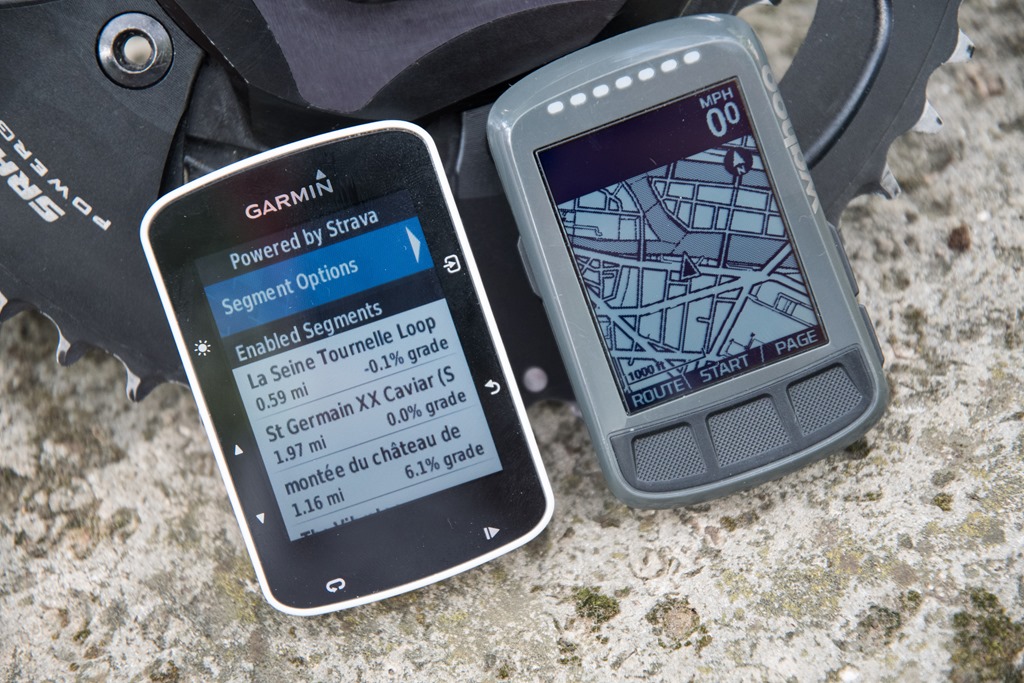
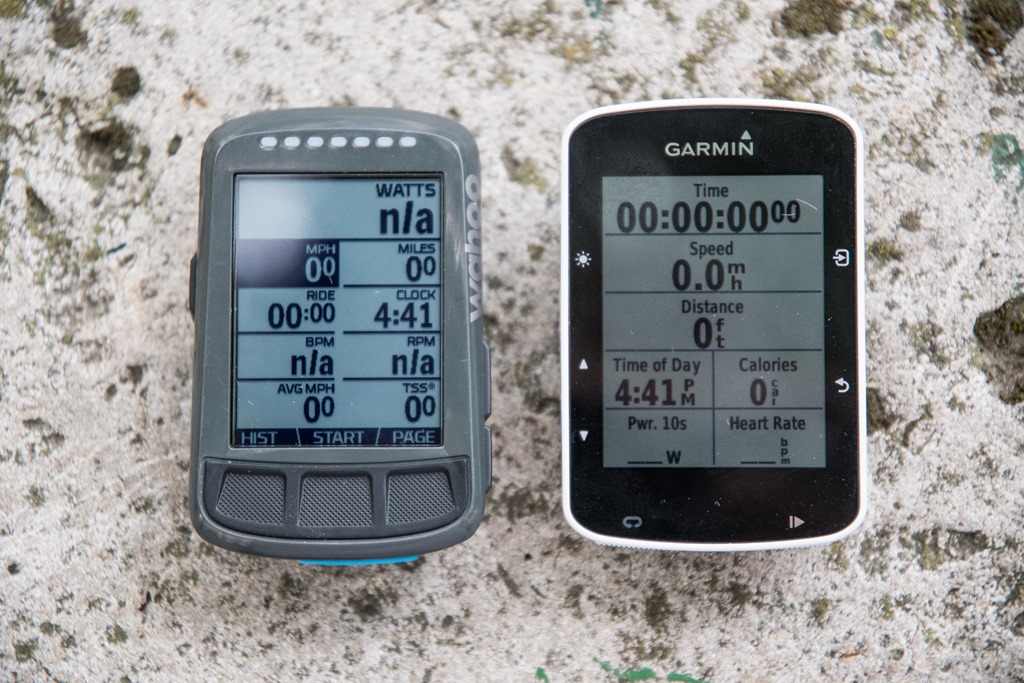
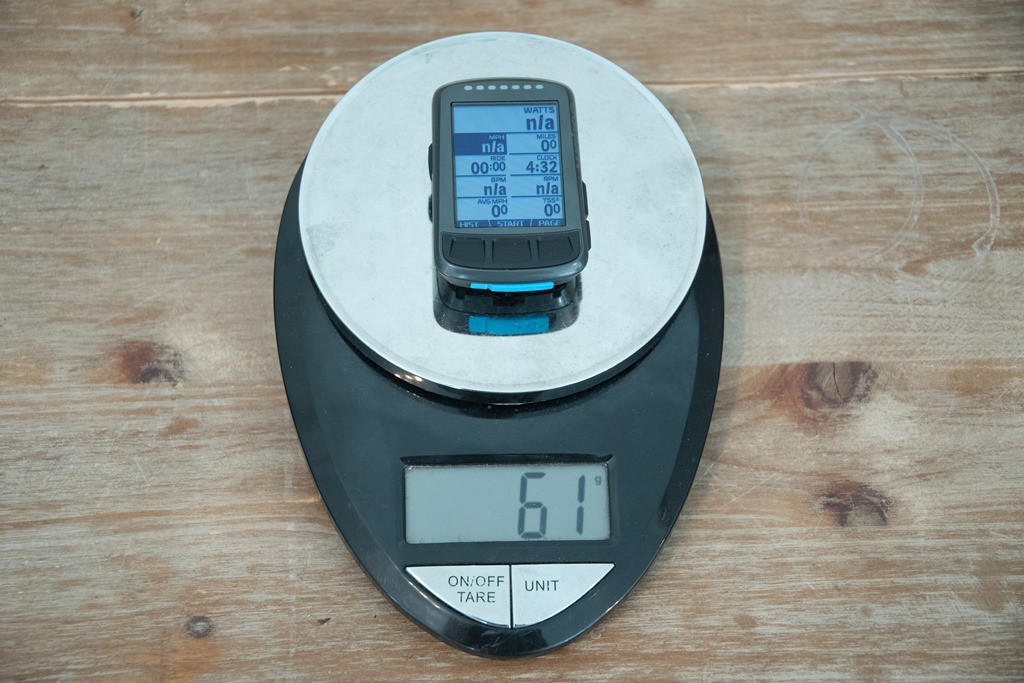
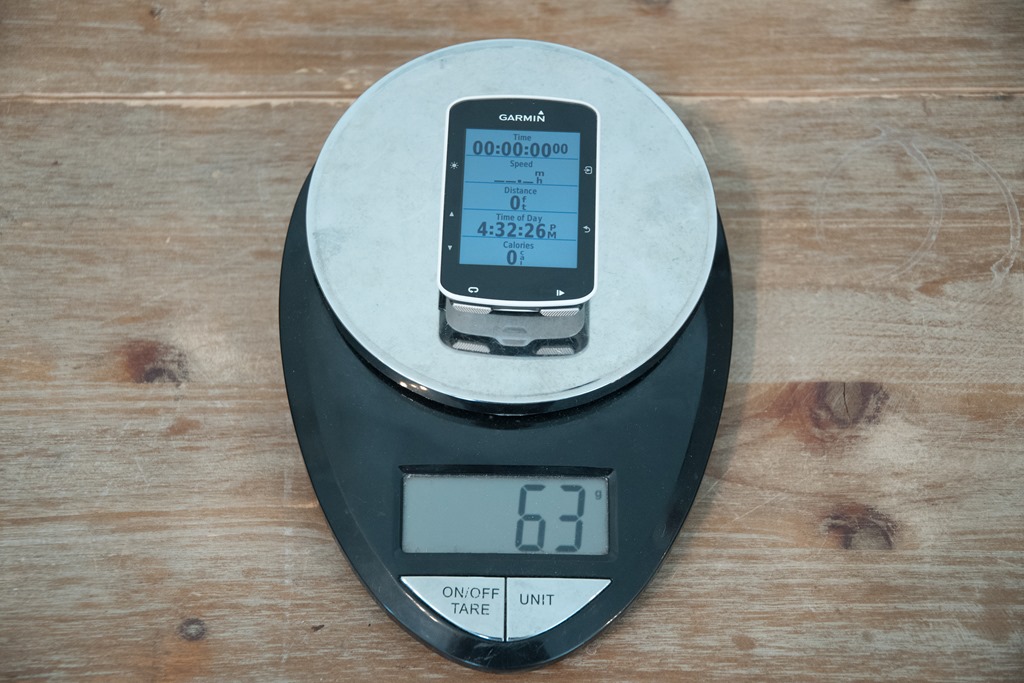
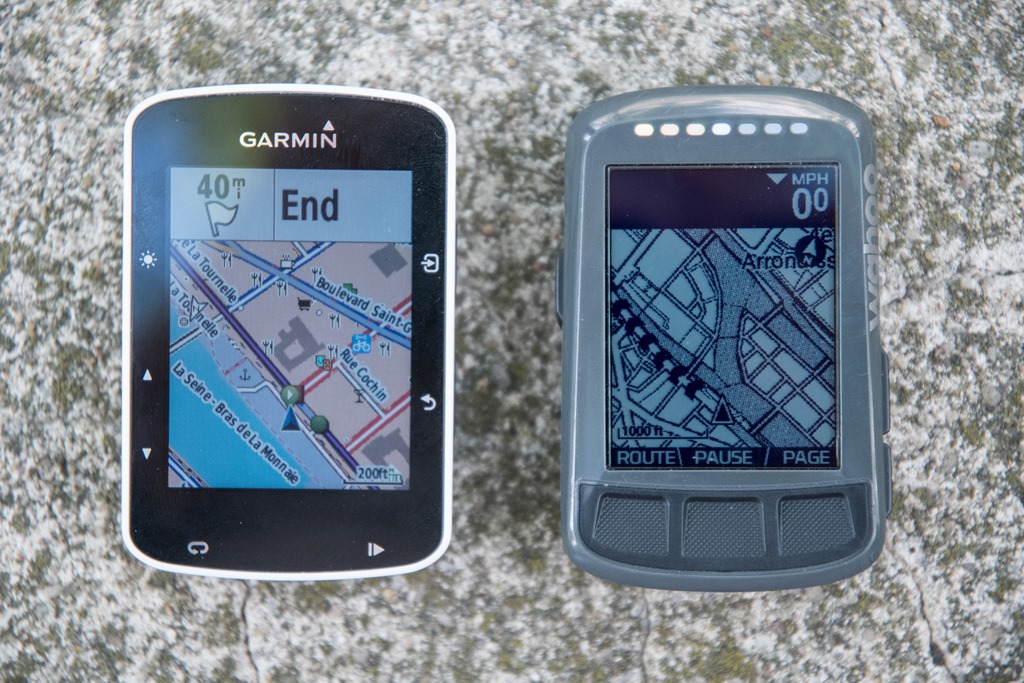
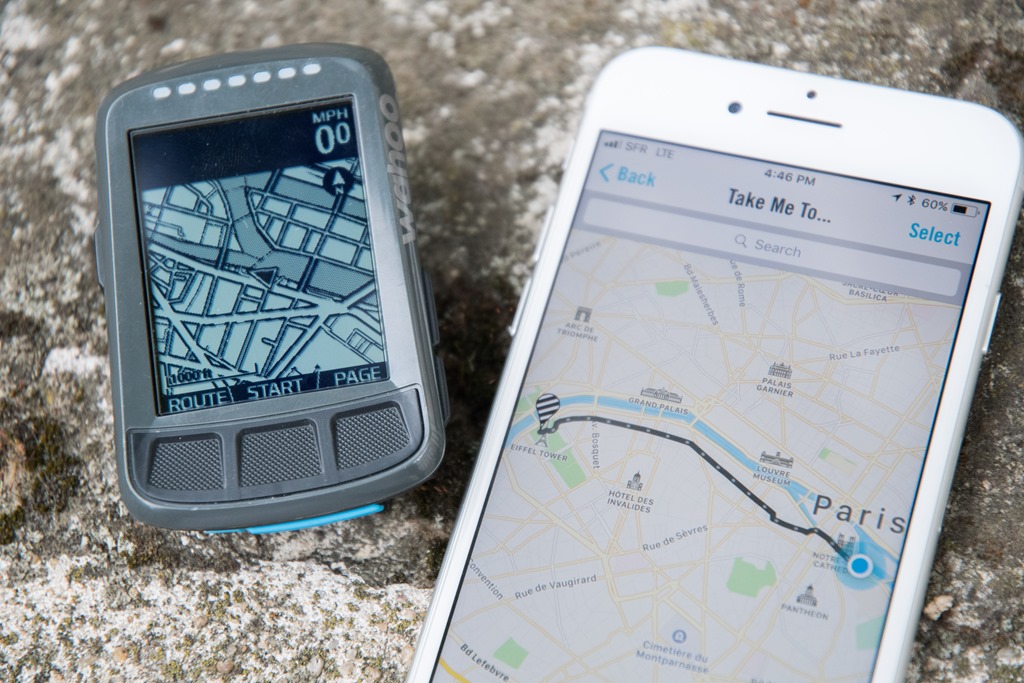
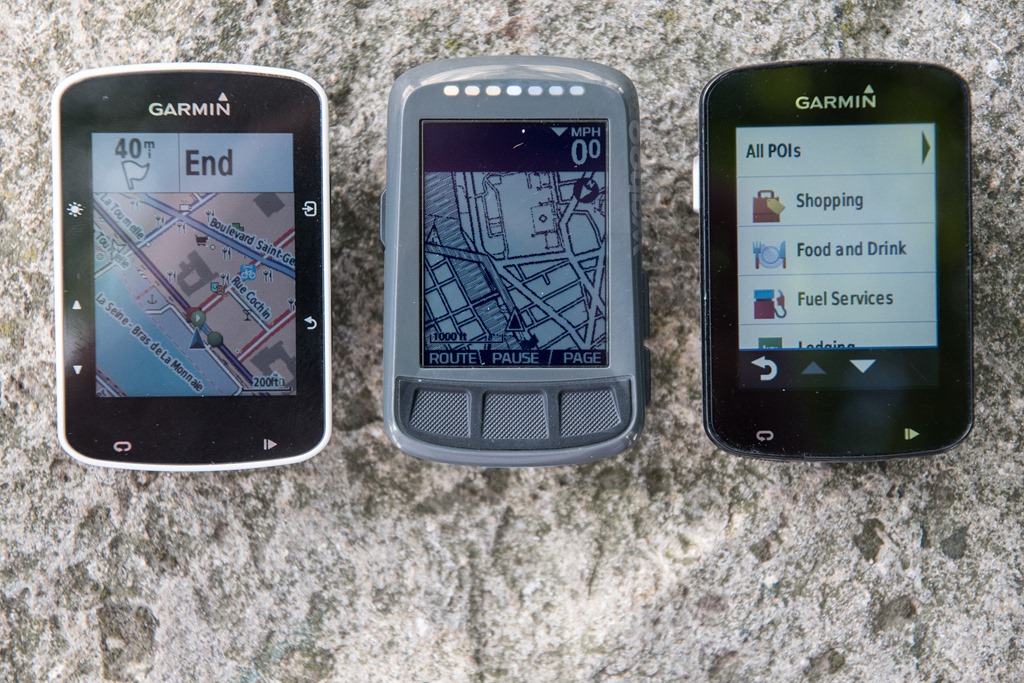
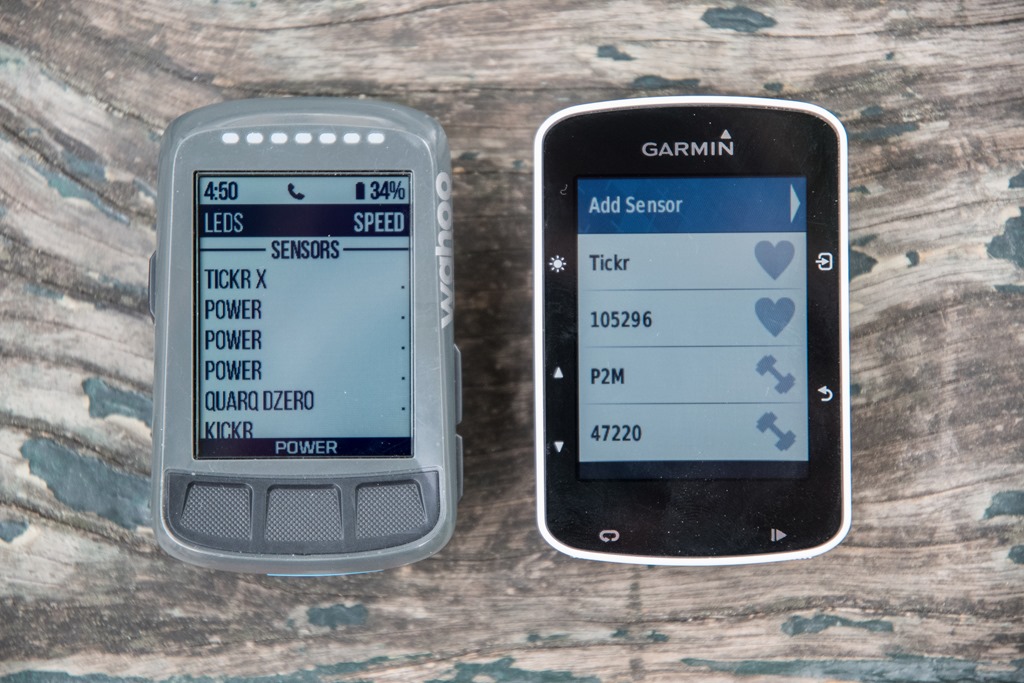
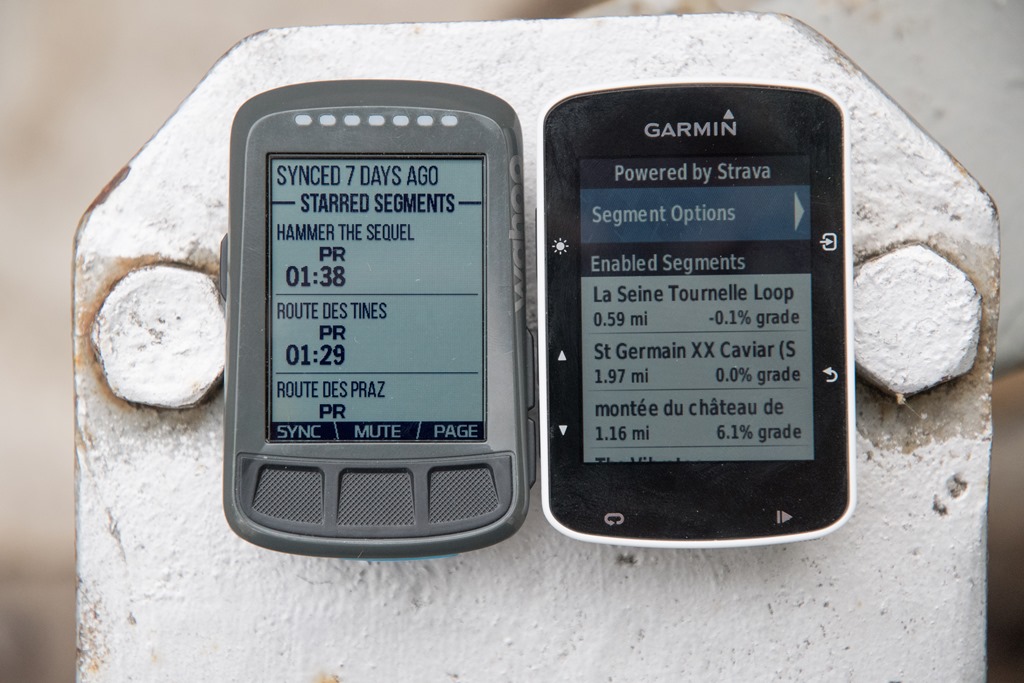
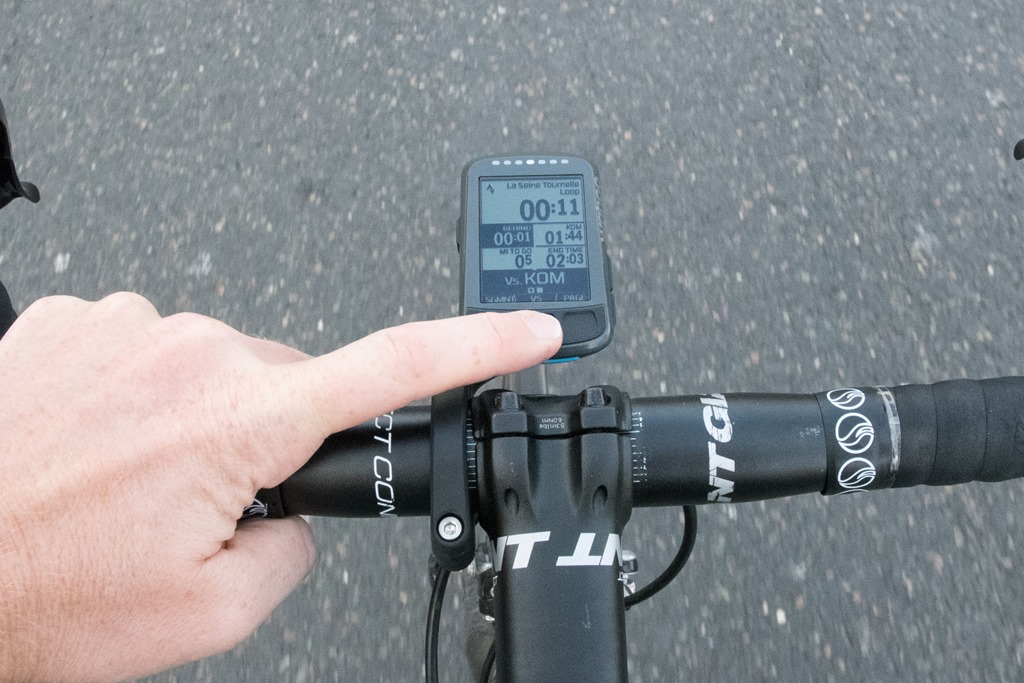
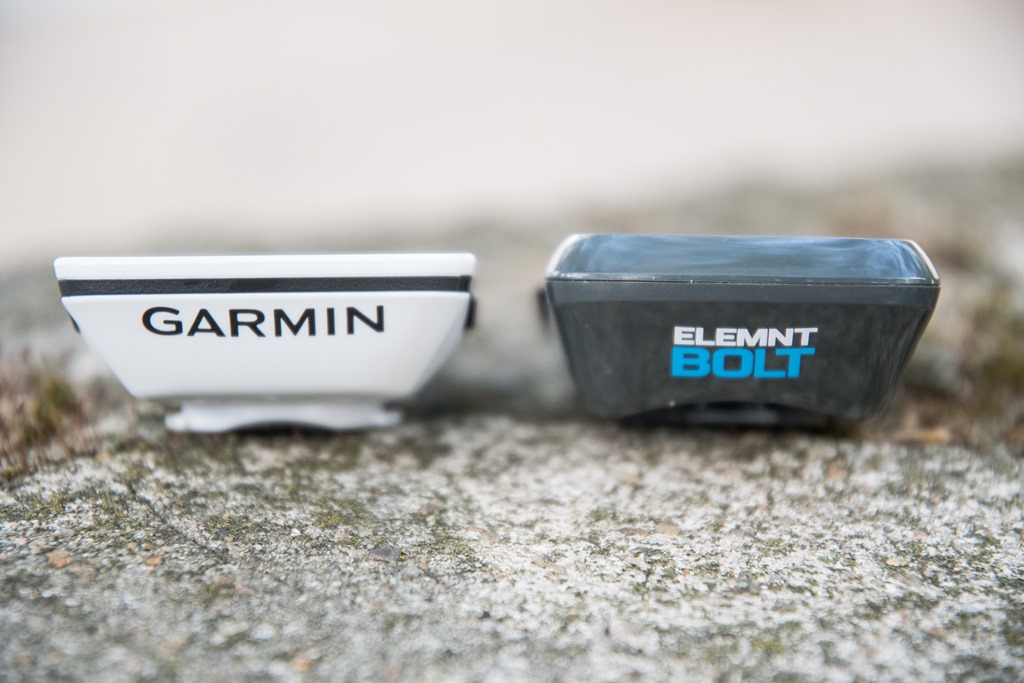



















btw, did you ever look at the Bryton Rider 530 or the new Giant NeosTrack? I wonder how they are compared to the Bolt and 520.
I wanted to use some Xert Connect IQ apps, so I looked at the Edge 820 to the 520. As you have noted, the Edge 1000 was simply too old. In the end, I picked the 820 because it is a year younger than the 520. The end of updates for my Edge 810 convinced me that I needed to go with Garmin’s very latest. However, the finicky touchscreen on the 820 may result in a premature end of its life cycle. I don’t know how Garmin can correct this problem that appears to be related to the hardware they have selected.
I went with the 520 for Xert. Works great, although the remote player stuff gets messed up sometimes wiith the garmin app. Could never go back to having a bike computer without this stuff. Haven’t tried What’s my FTP but it looks really cool.
Xert works fine on my 3 year old Edge 1000
Does the Wahoo “navigation to a pin-drop” feature use the quickest most direct route (i.e., bike unfriendly) or does it use Strava Heat Maps for bike friendly routes.
No Strava leveraging, but rather just a maps API (looks like Mapbox, but not 100% certain). It does appear to be more bike friendly (even if not always faster).
It picks the most bike friendly route, even if that means going off-road onto dirt trails that are still technically bike paths. Not so good for road bikes.
Yeah, it will also take you on a load of back routes and through multiple turns on residential areas if it thinks it is faster. Most of the time this means I miss a turn and get lost, and sticking to the larger roads would have been faster and easier.
Is it possible to change the result of companion app? Like using the mid-waypoints?
No, as it’s only a single end-point.
As others have noted, I don’t usually find it the ‘best’ (read: fastest) route that I personally would have chosen, but it’s fine in areas I don’t know. If you look at the photo above with the cell phone you can actually see a great example of it. Every cyclist in Paris would have simply taken the river route (which has dedicated bike lanes and then a further 2 miles of totally closed roadways, only for cyclists), and it’d be far faster. This selected a more scenic artsy-shop route.
Since firmware v12 on the 520 the prompts for turns on the 520 have improved.
Plus once you figure out a routine for creating routes that works then the 520 navigation isn’t quite as bad as you suggest.
If you create a route on http://www.gpsies.com including left / right waypoints etc. then upload a TCX of ‘track and waypoints’ to Garmin/NewFiles, then you do get the prompt with the text of the waypoint and the correct symbol along with a countdown from a distance from the waypoint that is based on speed. It is quite frankly very good…
However, there is still no way to add waypoints in Garmin Connect (!!!) and, like you, I had zero issues with my 520 until update 12, but now it crashes during sleep a lot – I’ve been through this with Garmin support and now have to regularly delete the NewFiles, Activities and Courses…
As for entering the data fields on the 520, gararhgagrhgarhgagargggh!!!! Its just hideous… Lets say I have:
3s Power,
Lap Time,
Lap Power,
Cadence
HR Zone
Lap Distance
Xert FTP estimator
And I want:
3s Power,
Lap Distance,
Lap Time,
Lap Power,
Cadence,
HR Zone
Xert FTP estimator
i.e. I just want lap distance nearer the top.
That will take roughly eleventy-billion clicks on the 520 to achieve…
Yeah, I think a good middle-ground is being able to do both (on-device and on-site/app). I’d agree though that on-device is probably more important on a watch than a bike computer (since more likely to have phone handy mid-ride). Personally I’d like to see someone like Garmin make it so that I could share my data field settings across devices, or even share them with friends.
I’ve always felt that Garmin has really missed an obvious marketing opportunity to let people (i.e. cycling pros) share their layouts. For example, a week or two ago Team Cannondale shared all their Garmin data field layouts in text on a team blog post. What if you could just tap to download that same layout to your device?
Where are the Cannondale data field layouts? Google doesn’t find those?
Where are these Cannondale fields? :)
From Rays last “Week In Review”, Interesting Stuff on the Interwebs 5): (Let me see if I can link correctly…) What’s on Team Cannondale-Drapac’s bike computers? Ask and you shall receive. Each rider lists what data fields/pages they use. (via Harald)
+1 my google fu is (apparently) weak
Funny that so many pro riders have the speed field on their screen. The speed does not have very much value for them really.
You mention the hammerhead karoo. I preordered one after your short preview and it’s said to be arriving in late august. Do you have extra info about it being delayed as you say it won’t arrive anytime soon?
It’s been a month since last update. Perhaps they’ll hit August, but my gut says mid-September for shipments.
They might disagree with me (and that’s totally cool), but since I haven’t seen a unit since April and given the gap in updates, it’s just…well…my long history in judging bike computer readiness that puts it further down the road in my mind. Still looking forward to it, but it’s ultimately not here today and thus I don’t have anywhere near enough hands-on time to include it in something like this.
It’s just as well the Karoo couldn’t be considered for comparison (yet) because I think the Karoo is going to set a new standard in regard to navigation features and ease-of-use.
Hey DC, thanks for the comparision and as usual keep up the great work (I am checking your site daily…..don’t judge me). BTW I recently pinged Wahoo about structured workouts and then said ‘Then you should stay tuned’. Of course that could be a quite generic stay tuned as in 2018 lol but I hope not.
I suspect it’ll be sooner than that, and I’m really looking forward to seeing how they implement it. They’ve done a good job of one-upping Garmin for each of these features they implement (Strava, navigation, live tracking) – no matter if they were a wee bit behind the curve on getting there.
Hopefully as part of this it’ll be easy to get workouts from key training platforms as well as being able to quickly create and store workouts.
If sooner, I hope that I can create workouts based on my hearth rate LTH-% instead of Max-%, like I used to do with my Garmin 820 (which I sold to buy the Wahoo Bolt).
Has Wahoo yet provided even a hint of an ETA on FE-C control? I bought American-built CycleOps smart trainers instead of their KICKRs, and am anxious to be able to re-ride rides using my ELEMNT.
-Ed
I haven’t heard of any timelines for FE-C since the last times I heard, which were last summer…then last fall…then…before next trainer season.
Here’s some nitpicks for the Bolt that I sent to Wahoo. I used it for a couple weeks then sent it back opting for the 820 instead. Really was looking for better nav. For me I’m guessing I would buy the Bolt again in 9 months to a year presuming the things that bug me would be fixed by then. Here’s my note:
—-start note—-
For the navigation turn prompts, it’s hard to read the distance to go (see where it says 80FT in the image below) because there’s no black border beneath the numbers. Of course it’s easy to read in this photo, but from where I’m normally viewing it’s hard to make out.
When on the map screen the turn prompt appears at the top of the screen obscuring the actual upcoming turn. I use my map in ‘Track Up’ mode. For me the preferred location would be the bottom of the screen where my location is always shown so there’s no confusion there about what is being covered up. I haven’t tried riding with the map in ‘North Up’ mode, maybe the prompt at the top works better in that mode (all other pages show the prompt at the bottom of the page). A possible solution would be placing the prompt in different location depending on whether a track up or north up display is being used.
For differentiating the course on the map chevrons are used. For me they’re too thick and too frequent so tend to obfuscate the map with all the twisty roads we have around here. It’s a tricky problem that I don’t have a proposed solution to. The easiest fix I can think of would be to make the chevrons thinner and appear less frequently. Maybe using a dashed line for the course?
On the climbing page it would be awesome if the profile used exaggerated grades to make breaks in the grade, etc. more obvious. (I can explain more thoroughly about what this looks like if you’d like) I have another cycling computer that does it and found it confusing at first, but after using it for awhile it makes perfect sense. As it stands currently, for me, there’s not much benefit looking at the climbing page because the details of the climb can’t be worked out. I love the fact that the profile can be zoomed in and out of though.
Another thing I noticed is many off course false positives when using a route. Would be good if the threshold for being off course were increased or allowed to be set by the end user. On that note, the mute function is a great feature, but would be good if it could be muted for a preset time like the Do Not Disturb feature.
I haven’t confirmed this yet, but it seems like the distance to next turn when using a course might be using a direct to distance (‘as the crow flies’) instead of the actual course distance. I noticed the distance increasing when the road went around a golf fairway. If I had ridden across the fairway I would have been at the turn in 100ft, but the road went around the fairway making the distance much further and as I went around the fairway the distance to next kept increasing until the road curved around to head back towards the area with the actual turn. Like I said, I haven’t confirmed this, observed it after a bit of a climb and it’s possible that my mind wasn’t working as well as it should have been at that moment. ;^)
FWIW, just got back from a short bike tour in the western US where there was often no cell signal. About to do some testing here to see how the Bolt might have helped us in that situation. Would love to be able to do route planning on computer or phone and transfer to Bolt without wifi or cell. Also, as we were on road bikes one of the biggest challenges of route planning was choosing one that was 100% paved.
—end of note—
Nice summary Ray, have you talked to Chip (or any of the wahoo guys) about their long term plans for 3rd party app support (and I guess ant+ FEC too). Since the whole motivation behind the kickr was to be able to use a trainer however you wanted and have it talk to your devices it seems odd that they don’t have these “open” functionalities as a priority…
Edge 820 and 1000 navigation issues have been tracked down to a loop route returning to the same start point. If we change the routes to end 100 yards before the start all is good.
Nope. I know people claim that fixed the problems, but I NEVER create routes with overlapping/crossing tracks to avoid any Garmin confusion, and for years I have always left at least a few hundred meters between start and finish, and still the 820 navigation crashes. And again, the 800 handled these same duties fine, so clearly the 820 is doing something new/different that just isn’t as reliable (I’m guessing the switch to the new cheap open source maps hasn’t helped?)
Why are these in the reply to my comment? They literally have nothing to do with what I asked.
Lol, yeah, I have no idea why Ronnie posted his comment… sorry, but I figured I should address his comment, since it’s just one of the many “magic fixes” floating around out there for the various Edge 820 navigation problems.
I’d also be curious on an ETA for the Bolt to support other trainers than Wahoo. I’m about to buy a new trainer (either the Flux or the Elite Directo which was recently (p)reviewed here). Not being able to ‘re-ride’ existing tracks however is a deal breaker for me. The navigation etc for the Wahoo Bolt are good enough for me but it just seems silly not to allow the Bolt to speak to non-Wahoo trainers, especially when they don’t have any trainers comparable to the Flux/Directo.
Sorry – I saw that and could not delete and post it to the correct one.
What also annoys me whenever I use Garmin “Connect” that there is really no good connection between the usage of a watch and a bike computer. Will this ever be changed by Garmin?
Ray
I have a Garmin 520 which I bought son after it hit the market and have found battery life pretty disappointing. Its battery life in the last 6 months (2 years in??) is very poor, lasting no more than 5 hours. I’ve tried various fixes of the usual type found in the net and on garmin’s pages. I’m keen to replace it with a more advanced garmin cyclocomputer with better battery. Any idea when a 520 replacement model is likely to arrive?
What backlight settings are you using? At some point mine ended up switched to max brightness and on all the time and this resulted in 4-5 hour battery life…
My wife’s Edge 520 had less than half the runtime on one charge of her new ELEMNT BOLT, and she kept her backlight turned permanently off since she doesn’t ever ride in the dark.
-Ed
That is with backlight off, glonass off, BT off, scrolling screens off. I have a power meter connected and di2 via ant+ as well as a HR strap. I have wondered whether connecting devices via ant+ somehow uses power. I suspect with age the battery is slowly dying.
The battery life on my 520 has become sucky. I get a low battery warning after about 3 hours, with no backlight. The unit was fine when I first got it. Anyone else have this problem?
Hi Ray.
I just got the BOLT last week (replacing my old Edge 800) and I have had zero issues with setting it up as I want. All fine and dandy!
However, I have a single issue I can’t figure out how to solve…
When I go riding with my local Club, the route for the day has always been shared online beforehand on GPSies (e.g. link to gpsies.com). From here it is possible to download the route in different formats (GPX, TCX etc.). But how on earth do I get the route on my BOLT the easiest and/or best??? I used to just drop the file directly on my Garmin and it would be imported on next startup.
Thanks
René
Sign up for a free RideWithGPS account and just sync your routes to that account and your ELEMNT to that account. All of the routes with cues on your RideWithGPS account will automatically sync over the air to your cell phone ELEMNT app or over WiFi to your ELEMNT directly, automatically. It’s easy as 1-2-3.
-Ed
I already created a RideWithGPS account and setup sync with my BOLT.
However, my question was, how do I easily get a route from GPSies to BOLT? It might be that the solution is via RideWithGPS.
Yeah, I think the best/only way would be to export the GPX from the other site, import it into your RideWithGPS account (click the UPLOAD link at the top of any page), then sync it to the Bolt. Yes, it’s not as direct as with a Garmin, that’s for sure…
Arrgh. That’s just plain idiotic. If I do that it with be uploaded as a Ride and not a Route. I will then have to create a Route from the Ride (not quite sure how to do it) and then delete the Ride. AND hope the Ride hasn’t been synced somewhere already. :(
Does GPSies have TCX export (rather than GPX)? That may be the ticket. Sorry for my lack of familiarity with GPSies; I do all of my route creation in RideWithGPS, in conjunction with Strava Heatmaps.
-Ed
Actually, if the GPX just contains navigation data, then RideWithGPS does import it as a Route and not a Ride. If the GPX contains speed and other ride data, it will be uploaded as a Ride. But still, creating a route from a ride is very easy, just click the “copy to my routes” link in the Overview tab of the ride, then you can delete the ride and the route will show up in Routes.
While it will show up under his routes that way, it won’t have turn-by-turn cues, and will only work in breadcrumb mode when loaded up on his ELEMNT. In order for that new route to have cues, need to edit the route, click Prepare for Tracing, then trace the route by hand to create the cues, finally saving the route with cues in order to get turn-by-turn cues onto the ELEMNT. Unfortunately, last I checked, Prepare for Tracing is not a function available to free accounts–have to pay for premium account to get that.
-Ed
Oh man, I didn’t know about the tracing requirement. What a pain! I guess this is one of the limitations in terms of the Elemnt still not having “real” navigation… I always just used GPX files (with no cues) on my Edge 800 and 820 and still got turn-by-turn since the Edge clearly takes care of this internally.
There is a much easier way to get a route like that onto the Elemnt.
1) Download the file on your phone’s mobile browser (or email the .gpx or .tcx to yourself)
2) Tap to open the file, it should ask you what app you want to open it with
3) Choose to open it with the Elemnt companion app
4) It will be added to your list of routes on the Companion app
5) Sync it to your device the same as any other route the next time it’s paired with the device.
Does this load the route WITH turn-by-turn cues, or is it breadcrumb-only?
-Ed
Thanks, codyish!!!
Sorry, but I HATE my Edge 820. I had the 800 for years and the screen worked perfectly and the navigation was almost 100% rock solid. The Edge 820 has been a disaster (and every time I google a problem I’m having, I see LOTS of discussions online about the exact same problems, so it’s NOT just me!). First, the most important thing, the navigation, is super unreliable. It will be working perfectly, then I stop for 10 minutes to refill my water bottles, putting the unit to sleep. Upon waking, it will then refuse to continue navigating. It will show the breadcrumb trail on the map, but turn-by-turn and the all-important x-KM until the next turn and x-KM until end fields no longer update. Even turning the unit on and off again and stopping and starting the course again will fail to restart navigation. Same thing with leaving the course for a few minutes for a water refill, navigation will often crash. These problems are WELL documented. On long solo rides/races, these failures are very stressful and annoying and pretty much never happened with the 800. I’ve used course navigation about 20 times since I’ve owned the 820 (since the day it came out) and it has failed about 12 of those times. Also, I’ve had the unit simply crash and shut down during navigation a few times, again, well-documented (the screen just fades away and shuts off). You say that it’s due to using 3rd party services, but come on, who doesn’t use RideWithGPS?? It’s by FAR the best, and the GPX files exported from there are very standard and have worked perfectly for years with the Edge 800. And yes, I’ve tried TCX as well and no better (but much larger since they’re padded with more junk data that isn’t needed). And this is for navigation in the 100km range for the most part… NOT super large or complicated files (yes, I’ve learned to break up large rides into small chunks to make it easier on the unit).
The 820 also just seems underpowered. It’s very slow to respond and do anything regarding navigation. I got lost once recently and tried to enter a town name to navigate to but after fighting the unit (and screen) for 10 minutes I gave up and just used my phone and memorized the route.
Finally, despite the MANY updates addressing the issue, the touch-screen is HORRIBLE. The screen on the 800 was reliable and smooth. The 820 screen simply NEVER seems to work well. Presses sometimes won’t register the first time, won’t register at all, or semi-register where the button darkens but doesn’t actually activate (who the heck programmed that behaviour?!?). And if it’s raining it’s even less reliable (if that’s actually possible).
All in all, a super frustrating unit and not one I would EVER recommend. My son needed a new computer to replace his old 500 recently and I got him the Wahoo Bolt and it has been GREAT (and yes, the Strava Live Segments is way better on the Bolt).
“but come on, who doesn’t use RideWithGPS?”
Me.
Seriously, aside from having to use it for the BOLT, I don’t use it. Just not my cup of tea.
I prefer Strava Routes, and somewhat grudgingly Garmin Connect Route Creator (since it’s currently the only thing that natively syncs with an Edge).
Which isn’t to put down RWGPS, it’s fine and dandy. But prior to Wahoo leveraging them, I saw almost no comments about it here. Meaning, I don’t think there’s a large lot of people (in the grand scheme of percentages of cyclists with GPS devices) using it. Again, it’s great, etc…
What I meant was, RWGPS and other sites don’t create GPX files with any real problems or differences, and you shouldn’t have to use Garmin’s crummy systems just to get navigation to work reliably (and it still doesn’t). And yes, RWGPS is VERY popular and used by most everyone I know who does serious route planning (for long solo rides, adventures, races, etc). I don’t think I’ve ever had a race or fondo or group ride supply a course via a Garmin or Strava link to a course. And personally, I don’t see how you can do serious navigation planning with Strava since it doesn’t allow the use of Google Street view — a super useful tool for checking the quality of roads (and to see if they’re appropriate for cycling, so you can avoid super busy/multi-lane roads for example).
The benefit for me in leveraging Strava for routes is that it’s the biggest repository of where people actually ride, which is in turn used by the routing engine when selecting routes to ride.
Ah, yes, I’ve tested the Strava “popularity” routing but never found it to be especially helpful… well, I guess it could be if Strava also still used Google Maps to allow Street View so I could double-check certain roads (I still can’t understand why they ditched Google Maps, was it just a cost issue for them?)
This is a fair point–in fact, this is why I keep Strava Heatmaps up on one tab in my browser as I craft my latest route in a second tab in RideWithGPS.
HOWEVER, I am with Paul on using satellite view as final review of the route (in lieu of pre-driving it), to ensure that the route I’ve created is actually road-bike-appropriate (because Strava Heatmaps has routed me, during a road bike ride, onto, “roads,” that I would’ve fared much better on using my gravel bike or even my plus hardtail). Despite my…stellar…bike handling skills, the 32mm tubeless slicks on my race bike are not doing me any good in deep sand, and here in South Jersey, deep sand is de facto anywhere that’s not paved.
-Ed
All the bike clubs in the DC region use ridewithGPS for courses. PPTC (has a club membership), Oxon Hill, BBC and even have links off their ride schedules to the course. All the bike tours I’ve done use it too (Bike Virginia, Bike Ride Across Georgia, Bike Florida)
Sure hardly anyone uses ridewithgps to upload their riding, but courses? yes
BTW why use GPX files on a 520? Use TCX for the custom cue sheet entries for better turn directions.
Have to agree with the other guys commenting on this list about RWGPS. Guess they don’t use RWGPS overseas where you’re at, but everyone I know in the USA does.
I’ve personally been a RWGPS member since 2010 and used it for creating routes and uploading rides ever since. I created my routes for PBP in 2015 using RWGPS and downloaded those free maps of France which worked flawlessly on my Edge 1000.
I rarely see another ride organizer in the USA sending out links from any of the other mapping sites.
Guess you’re out of touch with what’s going on here these days :-)
I used to use Strava for route planning, but tried RWGPS after I got an Elemnt to try turn by turn navigation and now I can’t stand using Strava’s rather user unfriendly route builder. You realise how very clunky it is after using RWGPS, particularly as I often need to rejig a complex route part way through planning or after the fact. It’s frustrating that I still need to use Strava route builder to initially do a route for some Strava related riding.
Lots of cyclist here in UK seem to use it for route planning.
As it happens a lot of my route building takes me where people don’t ride.
I second your comments on the Edge 820. A complete waste of money. It is SLOOOW, navigation routing ridiculously so, and the touchscreen, ooooh, the touchscreen. It does not register touch when you want it, but god forbid a drop of sweat hits it, AHA, you touched it and it does things in the middle of the ride. Basically the human-computer interface is so bad, it can barely be used. I find myself continuously frustrated every time I use it.
Seriously, stay away from the 820.
Now, if Wahoo could make a BOLT COLOR, I’d be game.
I’m suprised by Ray’s comment. Almost everyone I know (me inclusief) uses RWGPS over any other platform. Streetview, the diffrent map types and all the other stuff makes it so much easier then other routebuilders.
Also the Strava mapping UI hurts my brain. They have so much money, can’t believe they don’t spend some time in a normal mapping tool.
Out of approximately 500,000 comments on the site here, RWGPS has been mentioned approximately 232 times. Of which, roughly half of that has been related to the Wahoo ELEMNT/BOLT in the last 18 months or so (with virtually no mentions otherwise/elsewhere these days, save the occasional export question on a random Edge post).
Previous to that, that leaves about 8 years of commenting time for roughly 115 comments, so basically once per month (though usually comments come in a starring of 3-4 at a time, so basically once every quarter someone brings it up)….compared to 136 or so comments per day on average (and that’s averaging over the entire time period, whereas these days it’s more per day than 8-10 years ago. Of course, giveaways dork with numbers too). Anyway…
Again, not saying it’s not doing cool stuff, etc… Just saying that in the grand scheme of integration with devices, it’s not really coming up as often as one might think.
Color wouldn’t do it for me. When Wahoo stops thinking that they get to choose my map, then I might be interested. When they provide (or allow me to install OSM maps) that provide street names, place names, POI’s, and topography, then I might get a Wahoo device. Until then, no way. My 10 year old Edge 705 can do that, so why not an ELEMNT?
Um, stats aside, this site isn’t really about mapping races or adventure rides. It’s about gadgets, so nobody is talking about the topic much at all, regardless of service/product. From the comments here, and if you really dig deep into the marketplace, I think it’s pretty clear that RWGPS is currently where it’s at both in the marketplace, and in terms of functionality. It’s fine that it might not meet your particular needs or preferences, but it really is a vastly superior product for detailed and accurate mapping of complicated/long rides compared to Strava or Garmin (or any of the older products which used to have a large market share like MapMyRide).
Gotta agree with the RwGPS comments. Everyone in the USA is using it. Strava has been falling behind in a lot of areas. Their heat maps are awesome, but everyone just uses it in tandem to create the routes in RwGPS. The tools are just ten times better. It just needs a more “facebook” like front end and a few cosmetic changes on the calendar and it’ll probably replace Strava entirely.
“I don’t think I’ve ever had a race or fondo or group ride supply a course via a Garmin or Strava link to a course.”
You’ve obviously never ridden Levi’s Gran Fondo in Santa Rosa, CA. 5,000 cyclists did last year, but they got their routing cues from Strava Routes:
link to levisgranfondo.com
Missed wahoos lack of instant power and bike odometer. The odometer is a huge miss.
Out of curiosity, why would you use instant power over 3s power?
My pm, P2M classic, does 2sec(?) internal averaging of power before broadcasting the value. Why would I want a 3sec avg of the 2sec avg?
Probably for the same reason I would not want instantaneous power–other power meters, like mine, will just show massively variable power output that would be of no use due to lack of built-in smoothing (or intentionally not smoothing, leaving the receiving end to handle it).
Glass half full or half empty?
-Ed
I’m not aware of P2M doing a 2-second average. I’ve never heard of that before.
50hz sample rate; 2 second delay; smoothed power number updated every second of the prior 2 seconds. Ant+ broadcasts at 4hz intervals
link to forum.slowtwitch.com
link to power2max.de
“1. General
power2max is less expensive than other products. What quality can I expect?
Exceptional quality is our top priority and we don’t compromise in this regard. We offer you exceptional features at a very attractive price:
designed2fit – maximum compatibility with frames and chain rings
simple2use – switch on, start pedaling, and it works
built2resist – power2max power meters resist all weather conditions and are fully water proofed
Precision of at least ±2% – state of the art
Designed, engineered and made in Germany
ANT+ Standard – the popular and reliable standard that gives maximum compatibility
Left-right balance
How long is the warranty for power2max?
power2max power meters carry a 2 year warranty from date of purchase.
2. Functioning and quality
How does power2max work?
Our power meters work in the same manner as other crank-based systems on the market. Power2max replaces the spider between the crank arm and chain rings with a unit that measures torque, and thus power. The power2max spider uses strain gauges to measure torque and transmits data wirelessly via ANT+.
How accurate is power2max?
We calibrate our power meters with a torque sensor that has an accuracy of ±0.1%. We achieve precision of ±2% or better including all environmental influences.
Which values does power2max measure?
power2max measures power, cadence and left-right balance and transmits the values to ANT+ compatible head units.
How “old” are the power values I see on the screen?
The values are about 2 seconds old and are updated every second.”
Nothing there says it’s smoothed at 2-seconds (which means every 2 seconds is averaged). It simply says that it’s 2 seconds old by time you see it, and that it updates it every second.
Any news on when we might see the Garmin Edge 1030?
Eurobike possibly?
Just got the Bolt. It has been a difficult pick because navigation is important to me but I intend to use trainer control in the future as well. Hoping Wahoo comes through with their promise to include trainer control outside their own as well.
Navigation could do with the re-routing option. I had to take a significant detour and skipped a navigation section (x km until the next…) because of it but zooming out on the Bolt only shows the nav section where you deviated from so I actually had to check my phone all the time to check where the route goes beyond that section. So please Wahoo, make sure the map actually shows the entire route when zooming out…
Having owned both and now using the Bolt exclusively, the one item I miss from my 520 is the ability to sync starred segments over bluetooth. I usually star segments while getting ready to ride (from my car) and don’t have access to a wifi signal (which the Bolt requires) . I have discovered that using my phone’s hotspot will allow the Bolt to connect and sync the starred segments. So it’s doable but the 520 just made it easier.
Thanks for the great comparo!
Simply go to ride section of Elemnt App and choose route you want to use and it will sync route to your Bolt via bluetooth. The app can even sort by location, so the route you want should be top of list if you are near your start point.
Syncing via wifi on phone is pretty easy though. Same as using Bluetooth.
I sync my Elemnt before leaving home, so l know I have the data I want on device already. Just in case phone has a problem/gets lost etc.
DCR, you have an error above: the 520 indeed CAN display what you refer to as rich turn-by-turn directions (‘LEFT ON MAPLE STREET’), just like the Bolt does.
Upload a .tcx file from RideWithGPS (just like the Bolt), but be sure to have enabled ‘course points’ on the 520 settings.
This isn’t live re-routing, or anything, but it’s the same functionality as included on the Bolt (they’re both reading course points that RWGPS bakes into the .tcx file).
Doesn’t change the fact that there is an insane amount of online faffing to get proper base maps onto the Edge 520, and heaven forbid you live in a highly populated region with lots of roads like I do; the miniscule memory capacity of the Edge 520 forces routine base map swaps. Base map isn’t even a remote concern on the ELEMNT/ELEMNT BOLT. Might be okay if you live and ride in a very sparse region, where you can set and forget your Edge 520’s base map, but living in the NYC-Philly-DC metropolitan corridor like I do, the memory of the Edge 520 simply cannot cover more than maybe a third of my home riding region, forcing constant base map swaps.
-Ed
I agree with Edward here.
I was sorta drawing the line at 1 degree of separation. If I have to use one service to draw the route and then a different service to sync the route (or can’t sync at all via phone), and then a third device to view the route, to me…that’s where I dock a product.
Guys, I’m so sorry but you’re both missing it.
For sure, I agree on the maps point (it’s quite annoying!) but my comment wasn’t related to base maps; rather it was provided to address an inaccuracy in DCR’s post about “left on maple street” turn-by-turn notifications.
The “rich” turn by turn as noted by DCR in his comparison: that functionality exists on the 520 and works even if you don’t install any maps. It’s the _exact_ same functionality (and same number of required steps) that the Bolt uses. Each device is merely reading the ‘course points’ from the .tcx file; that’s it.
DCR – use your RWGPS file you noted above for turn-by-turn for the Bolt, and upload that file to the 520, being sure to enable course points (a one-time setting). Voila!
Thanks. I’ve tweaked the wording. But I’d still argue it’s not quite the same as the automatic sync and integration of BOLT for these services.
Rob, while what you’re saying is true, the deficiency of requiring a cable (as far as I am aware) to get routes onto the Edge 520 is a massive hassle. Case in point, many of the paid, organized rides that my wife and I do, they do NOT publicly publish the route/cue sheets online, and only provide the route/cue sheet to people who paid to do the ride, and very often, if weather is sketchy, my wife and I do not register until morning of. In that event, with her Edge 520, there was almost no way to get the cue sheet with turn-by-turn onto her computer without somebody having a laptop and cable available. I was always able to pull the cue sheet up on my iPhone browser over the air and add it to my routes in RideWithGPS (which is the site that 90-95% of all ride organizers I deal with in my home region use to create routes/publish cue sheets) and immediately sync it to my ELEMNT; no fuss, no cables, easy as 1-2-3.
Needless to say, we went with me being the only with the turn-by-turn cues for our paid/organized rides for 80% of events to both of us having the luxury of turn-by-turn cues, once she switched to the ELEMNT BOLT (not to mention her no longer having battery anxiety because the ELEMNT BOLT’s battery runs twice as long as the Edge 520’s on one charge!).
-Ed
Check out routeCourse for really nice wireless syncing on your Edge 520. Gathers your routes from all the route services you might use into one location. Single tap on your phone will download and launch the course. It’s pretty sweet. Found it just before I bought a Bolt. link to apps.garmin.com
Ray, sorry I feel its flat out wrong to say 520 doesn’t have turn-by-turn. Both Wahoo and 520 simply display the text from a tcx course point. No course points, no turn-by-turn on both Wahoo and 520. Same same. Syncing and turn-by-turn are separate issues. Would I like auto syncing of courses via Bluetooth, like I have with GC workouts? Absolutely, its really annoying in 2017 to sync some stuff by BT and other stuff by USB cable.
On the fly routing? Nice feature for some, but I can’t think of a single time in the last year where this would be handy. Likely because I don’t travel more than a couple hours for a ride, and RWGPS has a ton of rides for Northern California (Sierras, Central Valley, and coastal mountain ranges). Strava routes are useless, they don’t have turn-by-turn. Occasionally I look at the Strava heat map, and then head to RWGPS to find a proper tcx file. There are a lot of club rides on RWGPS, and our local club has a RWGPS account that provides free turn-by-turn export of our rides in Sierra foothills.
Once on a ride I find it a little harder to follow the black&white chevron course on the Wahoo, versus the color coded route on 520.
Thanks, Sean; this is useful for my friends that are still on an Edge 520. I, luckily, was able to sell our Edge 520 for so much money that it paid for the ELEMNT BOLT my wife changed over to.
-Ed
Bsquared-
The problem here is that it’s simply not fair to compare what Wahoo is doing out of the box versus what Garmin is doing on the Edge 520.
To recap on Garmin, here’s the steps you need to do to get turn by turn in any cohesive manner that rivals that of Wahoo:
1) On your Edge 520, download maps from a 3rd party site. Feel comfortable deleting basemap on your Edge 520 as well. Do all that via USB cable.*
2) Go to RWGPS and create route
3A) Export route to file, then manually plug in USB cable and place in NewFiles folder
4A) Or…download yet another 3rd party app, this time for Connect IQ
4B) Then configure said app for your RWGPS accounts, and then pull in files.
5) Turn on Edge and hope that all these moving pieces actually work.
On the BOLT:
1) Create course on RWGPS
2) Setup RWGPS account using Companion App, done. Ride.
That’s why I’m giving Garmin a hard time. And less you think it’s all that much better on the Edge 820 – it’s not.
As for on the fly routing, I’m constantly using my phone for routes despite having all these GPS devices on my handlebars because the workflow sucks. Even you note it yourself in that your’re going sometimes to Strava to figure out a heat map, and then trying to find a route using that on RWGPS.
The problem here is that far too often people forgive these companies for the complexity of simple things. It’s like the whole Epix debacle all over again, or for that mater even my opinions on the 5X. When I can create a route in an smartphone app in a matter of seconds it shouldn’t take an hour of futzing to get it on my bike computer.
*I can’t imagine anyone wants turn by turn overlaid onto a blank map, which is basically what the Edge 520 is unless you get 3rd party maps. Nevermind in the past month I’ve had to download four different sets of maps for my Edge: One first for the Netherlands, then again for Italy, then again for Chamonix (southern France), and finally again for Paris. How many times did I do this on the BOLT? Zero.
Glad to know I’m not the only one who simply hates the base map fafffest that is the Edge 520!!!
-Ed
Ed, I agree that Wahoo route/course syncing is superior. I know some riders that give up and don’t bother loading the route before a group ride. Why isn’t Garmin’s mapping and route creation available within a phone app? Hello Garmin, its 2017 and we are no longer rocking Motorola RAZR flip phones and desktop computers.
Wahoo lacks features I use on every ride (Varia rear radar), and features I use 3+ times a week (structured workouts). Its not a slam dunk for me to swap out a 520 for an Elemnt/Bolt. Even if I did swap, for longer rides outside the area I’d still download route to RWGPS app on my phone and record the ride on both bike computer and RWGPS. The primary reason? When stopping to take pictures on my phone, or lost, it is FAR easier to review route on my phone than either Wahoo or Garmin.
Garmin owns all the pieces to make a seamless experience for recreational, club, and enthusiast users, they will either respond to the competition or lose this large segment of the market.
Totally read ya’ on the Varia; my clubmates have it, and I am absolutely fascinated by that piece of kit. Would own it by now as well, were it not for my complete and utter hatred for the Edge 520.
I also read you on the structured training. Personally, I keep my structured training to indoors/pain cave, as the roads in the area where I live are completely inconducive to structured training out in the open. WAY too many stop signs, traffic lights, cars, lawncare company pickup trucks, people walking their dogs, soccer moms running with strollers, etc. I generally ride outdoors for social reasons or the experience, and keep the hammerfests and hard training sessions to the safety, privacy and uninterruptibility of the basement.
No one computer is perfect; at least there are reasonable options for most. Just have to weigh your priorities.
-Ed
Ray, you should give Garmin a hard time. The user experience of **loading** a RWGPS route on Garmin sucks, I can’t imagine my wife ever dragging a tcx file to NewFiles. Loading routes with Wahoo is like moving from Motorola RAZR to iPhone back in 2007. Huge difference.
If Garmin lets me load workouts via Bluetooth, why can’t they let me load tcx routes? The Connect IQ app mentioned above is an app, and it records the ride. With that app my 520 isn’t recording the ride, tried it and not going to use it. Garmin needs to fix course loading in firmware update, and/or provide an API for Connect IQ apps to load courses. And where is Garmin’s mapping app for mobile? Why must I use a computer to create a course in Garmin Connect?
Back to your article – 520 has turn-by-turn, however loading a route is a hassle, and once on the road it works about the same as Elemnt/Bolt. Personally I find Garmin’s colored route easier to see than Wahoo chevrons – Wahoo, this needs to be fixed.
The overall navigation experience sucks less on Wahoo, but both Wahoo/Garmin suck compared to RWGPS app on my phone. I’m not giving up the ease of using phone app to review route during a ride, usually after stopping to take a picture. Airplane mode allows battery on phone to outlast the 520, and at least match Wahoo battery life.
Personally, I load a route while reviewing it on my laptop. Because the night before a ride in a new area I pull up RWGPS route in a browser and take 10-15 minutes to review the route, making note of major climbs, turns, and water stops. Since I’m already on my laptop its not a big deal to connect the 520, export, and drag/drop to NewFiles.
Is my use case typical? Probably not. From a straw poll I’d argue that few people on club rides bother to review the ride (and they follow others for directions). They are better off with Wahoo or doing what many recreational riders do – mounting phone in top-tube bag or handlebar case because they don’t care about HR or power or cadence.
Wow, what a detailed comparisson.
Based on your earlier reviews i decided to pick the Bolt, as my successor to the Edge 500. The Bolt arrived me yesterday, so no rides with it so far…
A big evolution in my oppinion is the app based setup and configuration. It took me just a couple of minutes to get things started.
Also the Live Tracking is a feature i found very smart. So my wife needn´t have to worry where i´m crusin around. Instead she´ll get an email with an link to my route. ;-)
The first ride with the Bolt will upcoming weekend, so i´m looking forward to it.
Using the “routeCourse” app from the Dynamic Watch guys (dwMap) makes both creating routes on mobile and sending them to the Edge 520 much more friendly:
For: “CAN CREATE ROUTES ON YOUR MOBILE PHONE AND USE ON DEVICE”
I’d change to “With Apps” :)
For this line-item I was somewhat aiming for a native solution.
Fair, although with routeCourse once you BT sync the course via the phone it runs the native navigation (and native sport profiles, etc…). :)
So you get Phone creation (using Dynamic.watch site) as well as the ability to sync Starred Strava Routes and RWGPS Routes all via BT to the device.
It’s been quite handy because I agree that Garmin is just poor in general here:
-Their route creator has always been behind
-Syncing from other sites has seemed to need a usb cable and just the right formatted file
-Even once on the device it was unclear or impossible to get correct warnings and text
Thanks for the solid comparison
Cue sheet text has always worked. Guidance is shaped based – 520 tries to identify turns based on the shape of the route – and only reliable since a firmware update 9+ months ago. Before that update I had this option disabled. I have two data fields on the 520 map page: distance to next course point, and speed for group rides to keep pace when I get to the front and pull.
Converted from 520 to Bolt a while ago, and mostly really happy with the BOlt, but I have some “hates” that I would like to see fixed.
Di2 integration.
-Not possible to configure buttons on top of Di2 hoods, for different uses. Espesially to go back and forth in menues. Annoying having to click through 5 pages to get back when looking at another screen.
-And no beeps/warnings of next shift triggers FD shift in Syncro mode.
Strava Live Segments.
-Not possible to push lap when starting a segment.(to use lap page for pacing)
-Or possible to choose autolap for Strava Live Segments.
Something I have missed, or the only one with these 1st world problems?
Hey, Ray; great comparison as usual. Just one small item: BarFly’s direct mount for 3T/Fizik stems works with Wahoo’s ELEMNT and ELEMNT BOLT; they came out with the necessary mounting plates a while ago for their stem direct mounts. I’ve been using a 3T Arx II Pro stem with the BarFly direct mount that screws into the slot in the front of the replacement stem face plate for a long time now (and no, I’m not just half-ass screwing the computer into the Garmin plate; it’s a separate Wahoo-compatible plate). It’s a stronger and cleaner setup than the F3 FormMount I am using on my other bike. I also use the GoPro mount on the underside in conjunction with a 3D printer adapter to attach my NiteRider Lumina headlamps to the direct stem mount. It’s a great setup! I’ve attached a pic for your reference.
-Ed
Also, to note–my wife dumped her Edge 520 for an ELEMNT BOLT because of the HUGE difference in battery life. She went from having lots of issues with incomplete recordings (on the Edge 520, due to running out of battery) to never ever running out of juice, and even doing multiple rides on one charge with her new ELEMNT BOLT. Difference is not small, it’s night and day. May want to mention battery life for riders who do longer rides.
-Ed
For the 3T reference I was actually talking about their fully integrated stem: link to 3tcycling.com
Ah, this fancy thing…right. Fair enough. Similar issue with my new RedShift ShockStop stem…RedShift makes a computer mount that integrates with it, but it does not support the ELEMNT.
That being said, if we think ELEMNT mount support is lacking, the lack of support for Lezyne computers is WAY worse. I think I’ve asked Bar Fly like six times now when they will release the Lezyne mounts (which they said is in the pipe–must be a VERY long pipe). I’ve completely given up even on the idea of using the Lezyne GPS I bought a while ago, but would be nice to include it when I gift the thing to a friend who currently has no computer at all.
-Ed
Your comment about the Polar V650 made me chuckle, as I ditched the Polar ecosystem (I have an M400 watch) and bought an ELEMNT because of Polar’s lethargic software update cycles.
My edge 500 is starting to drop ANT+ power data which is driving me crazy when doing intervals. Same behavior on 3 different powermeters. Ray, can you comment on which unit has better ANT+ range/reliability. A good way to test would be to put the unit in the back pocket instead of mounted on the bars.
I’m getting the same dropouts on my old 800, and it’s so frustrating during TrainerRoad workouts. I couldn’t get Zwift to work at all…I even tried using a USB extension cord to have the ANT stick super close to my Stages crank arm.
I’ve seen no appreciably difference in reliability between them on ANT+.
The advantage that Wahoo has though is that it can connect on Bluetooth Smart as well, which for Stages in particular can be useful/compelling as the dropouts seem less there.
This describes my situation exactly. I have to use the extension cable directly under the bottom bracket for intervals, but the head unit 18 inches above cannot keep a reliable connection.
Make sure your ANT extension cord does not run parallel with power cords (computer, Kickr etc.) of any kind. The electrostatic field generated around power cables can and does interfere with signal cables, even shielded ones. If they must run parallel in the same vicinity, separate them by at least 3-4 inches. Also, if they must cross, make sure they are at right angles to each other for minimum interference. Sometimes the tangle behind the computer is the culprit so route cables accordingly.
The dreaded Stages power dropouts,
I’ve spent a lot of time researching this issue with a setup of a Garmin edge 520 and a stages PM. the only thing that have worked for me is to mount the computer directly on the stem and not on any front mount. From what I understand the issue seem to be with the Garmin antenna location or the amount of frequent transmission when communicating with the Stages PM. It is by far one of my biggest grips with Garmin 520/stages setup.
Hi DC, since you’ve mentioned it here have you seen better success with Quarq PM and front mount?
I’ve also noticed that Elevation and Gradient Percentage accuracy are issues on the Garmin, was wondering if you saw that on the Bolt?
I’ve had no issues with Quarq out-front, or in any other position. It really is Stages focused for the most part.
I haven’t seen any elevation differences between the Bolt or Garmin, both are good for me. If you’re seeing elevation issues on the Garmin, it’s very likely the little altimeter ports have mud/etc in them. Try dunking the unit in a bowl of warm soapy water for 15 minutes or so, giving it a bit of a light shake in there.
Hi,
Information that can be useful: The Bolt isn’t compatible with all SRM, old Shimano for exemple, Wahoo AND SRM know that issue but no firmware update solved that. Tickets are open but no result.
Finally my Wahoo is unused.
I don’t believe it’s accurate to say it’s “all SRM”. My understanding from watching the forums is that it’s a very specific circuit board from a certain version of SRM PM’s that’s problematic.
Though, I do agree that it seems like that thread has been out there forever.
App based configuration is a great thing, but to me it limits the lifespan of the device. For how many years the company will support the update of their configuration app on the always updating IOS/Android platforms?
On my old Edge 800 using OSM maps, the 800 is able to reroute me if I go off course from my desired destination… Why wasn’t that capability carried over to the newer generation devices?
It is. But the Edge 520 isn’t like the Edge 705/800/810/820/1000. It’s more akin to the Edge 500/510 with some added stuffs.
What’s then 130, 500/510 in smaller body?
No, it’s basically a new category half-way between the Edge 25 and an Edge 520.
one common use case is someone publishes a route on strava/ridewithgps/etc (anywhere but garmin connect)… and many garmin users do not know how to get this on their device; not to mention it’s cumbersome having to plug the device into your computer.
i haven’t used wahoo, but since ridewithgps will import gpx/tcx/fit/etc as a course… i assume you can easily sync it to your device without having to plug it into a computer. **wahoo should get 1++ usability points for this alone**
on a sidenote, the lack of import on garmin connect really bites if you have a fenix since it only support .fit course files… you have to convert on a 3rd party site like gpsies and then copy to the device in an unsupported way. :( boo garmin!
disclaimer i have an 820 and live with it; but i suspect when there is a bolt2 with color i will convert.
This is exactly how it works on ELEMNTs; I never ever have to plug my ELEMNT into a PC–all of it is handled online. All of the routes with turn-by-turn cues that I create or import are kept in my RideWithGPS account, and my ELEMNT is synchronized to my RideWithGPS account, so any routes that are modified, deleted, added etc. in RideWithGPS automatically sync to both, my ELEMNT app on my iPhone (anywhere I have WiFi or at least cell reception) and to my ELEMNT (either over WiFi or by manually pushing from the ELEMNT app on my iPhone, via Bluetooth).
My wife’s old Edge 520, on the other hand, required physical USB connection to a laptop in order to import routes and base maps.
-Ed
See link to apps.garmin.com for wireless route sync solution on the 520…
Sean – that app takes over the 520 and records the ride, might be fine for some but I didn’t like that.
Johnathan – totally agree, although in my case I always spend 10-15 minutes reviewing the route on my laptop, so its easy to connect 520 and copy the route to it.
What Garmin doesn’t seem to understand is that computers are disappearing from homes, and everyone is using smartphones. Garmin is stuck in the past, forcing the use of a computer for loading routes and basemaps, and creating a route in GC. And 99% of the time the route is on RWGPS (Levi’s Gran Fondo official route is on Strava, that is only exception in my riding). I need a couple more Wahoo updates before switching (workouts, apps like Xert, rear radar). Will Garmin wake up and join the rest of the world before then?
Bsquared, sounds like you haven’t tried it. It just transfers the route to your 520. It will autoselect that route for you so you don’t have to look in Saved Routes if you so desire. Doesn’t ‘take over the 520’.
Sean – thanks, my bad. I was thinking of Xert app.
However when routeCourse loads on of my RWGPS routes, it strips out cue sheet as if it is downloading GPX (and not TCX). The 520 shaped based routing is much improved in last 6 months, but I still want cue sheet and related info. I’m sending an email to developer asking if they plan to fix that.
Marcus the routeCourse developer responded to my email within 5 minutes! He replied that a) supporting cue sheet has been a frequent request, b) Connect IQ doesn’t support tcx, and c) he is investigating how to implement cue sheet type functionality in .fit file (no commitment or timeline). I’m going to purchase premium for $10/year to support the app and dev.
I have the Elemnt Bolt, but also have other Garmin watches and wearables, so I have been uploading rides to Garmin Connect, as I find it nice to have everything in one place.
But since last week (18th July) the rides will not show on Garmin Connect, I can upload the files and they will show on the activities overview, but when I select the actual ride, I just get a “:-( Sorry, we’re having trouble with this page”.
Anyone else have this problem ? Or know of a solution ?
I have the same problem. From what I read in the Google Wahoo group, it could be caused by the latest Wahoo update writing FIT2 data. Garmin has not updated to supporting FIT2 data yet. I guess we’ll have to wait for Garmin to support FIT2 data.
(As noted elsewhere)
Garmin Connect supports .FIT V2 data, they were actually the first to do so. In fact, the FR735XT was one of the first watches, which in turn broke Strava, and a few other sites when it did so.
What I suspect is going on here is that there’s something in Wahoo’s .FIT files that’s either not per spec, or Garmin’s not doing some parsing to spec. That said, I believe someone on the Wahoo side is looking into it.
The best workaround is using the Tapiriik (link to tapiriik.com) service to (automatically, if you donate > $2) sync Strava with Garmin Connect.
Great review again as usual Ray.
For Garmin, it appears the 820 is the unit everyone wants, but is plagued with touch screen issues which is too bad. As an 810 user, I can’t see a reason to upgrade to the 520. The only option that I miss is syncing texts to my Garmin unit.
The primary allure of the Bolt is that its not a Garmin. Those frustrated with Garmin’s bugs are going to be drawn to Wahoo, who seems to be ahead of the curve. However, this is software, and I’m sure Wahoo will have their issues as well.
Interested to see if anything comes of the Garmin 1030.
The best workaround is using the Tapiriik (link to tapiriik.com) service to (automatically, if you donate > $2) sync Strava with Garmin Connect.
Sorry, replied to the wrong post. My bad :-(
Thanks for the head to head comparison. Honestly, what I would like is my 820’s features on a Wahoo device. It just seems MUCH more user friendly. I can deal with black and white. The Garmin interface does suck when compared to Wahoo’s.
Hi,
Does anyone know if the ELEMNT Bolt can upload to Suunto Movescount?
I do not see that as a third party site which it can currently directly sync to with my ELEMNT.
-Ed
I’m not aware of any device/platform/anything that can upload inbound to Suunto’s platform.
They do sync outbound to a couple platforms (i.e. Strava).
Any word on when WAHOO will offer support for taco mode? I’m about to drop a 510 for an ELEMNT, but would like some reassurance before pulling the trigger. It’s strange that Limits is the only one to deliver on taco mode thus far.
To me, these companies have something to learn from Lyft.
It’s almost too weird to believe.
Thanks for the thorough review – I’ve used both of these units myself this year and have a couple of thoughts to add:
– Wahoo’s overall software felt more user friendly, and it was incredibly easy to set up using my iPhone. The Garmin experience involves pushing buttons dozens of times and isn’t as slick, modern or intuitive. There’s no reason why Garmin can’t borrow Wahoo’s set up approach, and I’d argue they should do so as quickly as possible.
– The Garmin hardware is sturdier. It has better buttons and a better screen, and it mounts on all my bikes. And there are no quality issues – more on that below.
The bottom line for me, surprisingly enough, was hardware quality. My first Wahoo ELEMNT Bolt had lots of glue markings under the screen. I contacted Wahoo support, who said they would send me a new one, but not for many weeks due to product shortages. So, I went back to my LBS and exchanged it for a new one (the only other ELEMNT Bolt they had in stock). Unfortunately, the second one also had a few glue marks under the screen that weren’t visible until the screen was backlit. On both computers, the top screen would discolor when I pushed the buttons. Additionally, the ELEMNT Bolt is light, but appears to be made from incredibly cheap plastic. Worse, the top screen looked like it was reclaimed from a 1980’s Casio warehouse.
After cycling through too ELMNT Bolts, with none left at my LBS to exchange and a long wait to get a replacement unit from Wahoo, I switched to the Garmin 520. I’ve had zero issues so far. If Wahoo can get their quality control issues under control (and upgrade the quality of their screen and plastics), I think they have a clear winner. Until then, I’ll stick with Garmin.
While it won’t help you, since you already have one, for anyone on the fence, with the $80 rebate right now from Clever Training on the original ELEMNT, if you cheap plastic is a concern, get the the old ELEMNT. I have the original, large ELEMNT, and when we bought my wife’s ELEMNT BOLT, I immediately noticed that the plastic on the ELEMNT BOLT isn’t nearly as soft tough or high quality/scratch resistant as my ELEMNT’s–I chalked it up to being part of the $80 difference.
-Ed
Second that. I started with the Bolt and replaced it with the Elemnt within 2 weeks. The plastic used on the Bolt looks very cheap, where the Elemnt looks more sturdy. Not that this was the only reason (for me the Bolt screen was just to small), but definitely an important one.
Lived with an 800 for a few years and never found the navigation particularly useful, you could never rely on it in an emergency ! You never really knew if it was going to totally reroute you – or would just give up on your ride.
Last 18 months with a 520 and have a love-hate relationship with it. The display/recording side is fine, it’s really down to the navigation.
I have settled on a reasonable workflow to get RWGPS routes on it, with course points and it usually works fine. Annoyances are the limited space for maps and because the storage is so slow it’s a pain to change them.
Garmin could increase the usefulness of the 520 by simply putting some much needed effort into their abysmal course creator – do a mobile version – allow remote (wireless) loading of maps – allow automated course points etc.
I feel like an advertisement for routeCourse, but check it out for the Edge 520 (ConnectIQ).
It can import RWGPS routes and Strava routes to your Dynamic.Watch profile, and you can also use their map creator (also works on mobile).
Once you have a route from any of the above sources (all in the cloud), the connect IQ app on your Edge uses the BT connection to the phone to list them and allow you to download them to the device.
Once on the device you can run them in native course mode (using whatever native riding profile you have setup).
To me it solves one of the biggest pains I have with the 520 — how to create and load routes either “on the rode” or at least without a silly USB cable and PC.
I haven’t played enough with the sources to say which may create the most useful turn warnings / course points (maybe none), however.
using routeCourse here and it works well – but garmin should just put that functionality in the 520 automatically – and the garmin route creator should be as fully featured as RWGPS
garmin could do themselves a favour and BUY RWGPS !
simon – well said!!!
With a 520 and a ridewithgps course that has a cue sheet if you use a TCX file it should give you the custom cue sheet entry for the turn so more then just turn left or right
1. Turn “Turn Guidance” off. I guess this is the E520’s attempt at live navigation, for what we want to do here TURN IT OFF.
Training=>Courses=>Course Options=>Turn Guidance=>Off
2. Turn “Course Points” on – these are the cues that are embedded in the TCX file, you want them! (I wish you could set the default to “No”)
Training=>Courses=>Course Name=>Settings=>Course Points=>On
3. Decline the option to “Navigate to the beginning of the course?” – this was deadly, if somehow you missed the exact start point the E520 would keep trying to get you back there. So even with “Turn Guidance” off, this is where the “Go Northwest” type instructions were coming from.
link to forums.garmin.com
These are probably the better directions:
link to ridewithgps.com
Thanks for the great post. I got a Bolt a couple of weeks ago, and love it, but there seems to be a strange thing with live segments.
I use a local small mountain for training, and use a big Strava segment that is 4 climbs of that mountain as my standard workout. The Bolt looks like it’s just extrapolating based on “distance percentage complete”. Given that the segment is 4 climbs and 3 descents, that means the Bolt is fluctuating between being way ahead of, and way behind pace. Is this just lazy math, or is it because the live segment sync does not include detailed data about the past efforts?
Chris, I think that’s how the live segments work. I had the same issue using the Strava iPhone app – unless the grade is constant, pace is not meaningful as it takes % distance and compares to % time.
Are you using the latest firmware? A recent (a month or so ago) update improved this – it previously extrapolated based on distance, but now appears to be more accurate with point-in-time comparisons. I can’t fully vouch for it as most of my favourited segments are single climbs or flats, but it looks a lot better to me.
Great review, Ray! Thanks for the amount of detail. As a former Edge user (710, 800, 1000, 520) I now use a Wahoo and I really love the tight integration with my smartphone (which I always take with me), the very, very easy setup and especially the ease of navigation. I can name some disadvantages too: the bolt’s gps has more trouble with cycling in a dense forest than the edge and the dutch translations are horrible sometimes: what to think of “don’t forget not to charge you’re elemnt”?
I just bought my first di2 bike today :-) and read that the Wahoo integration is less then the edge, I will see how the Bolt handles that.
I have the 520, 820, ELEMNT and BOLT. I gave away the 520 and use the BOLT now. Here’s how I compare them:
Garmin 820:
Pros –
– Good battery life.
– Good screen (clarity and layout)
– Works with all my PMs.
I enjoy looking at this this screen the most. I like the fields (10s power especially).
Cons –
– Touch screen sucks.
– Unit freezes periodically (but does recover).
– Loading maps is much more difficult than it should be.
– Setup of fields etc is a nuisance.
– Uploads are buggy and don’t always work.
– Misses some elevation, specifically smaller climbs. I climb a lot and this drives me crazy. I like to get credit for the climbing I do.
Wahoo ELEMNT / BOLT:
Pros –
– Terrific battery life. Better than Garmin. I’ve done 12+ hr rides and had 20% battery life left.
– Ease of setup. Can adjust screens and fields so easily.
– Simple to load routes, whether from Strava or RidewithGPS.
– Picks up satellites very quickly.
– Ability to pair via Bluetooth
– BOLT buttons are great. An improvement over the original ELEMNT
Cons –
– Doesn’t have 10s power.
– Doesn’t work with my older SRM PMs (PM6?)
– Average power is off when used with 4iiii PMs
– Don’t love the layout as much as garmin.
– BOLT is an upgrade over the original ELEMNT, but form factor could be better. Someone commented on the cheap plastic appearance above. I couldn’t agree more. I hope the hammerhead is better. In general, I prefer a larger screen, but the BOLT works.
I am a gadget guy and I end up trying one of everything. Overall, there is no question in my mind that the BOLT is the way to go. I am not a Garmin hater (rarely have trouble losing data for example) but the Wahoo is better out of the box and improving more quickly. Garmin would have to come out with spectacular improvements to their software to catch up. And even then, I suspect Wahoo will have another, newer unit in a year or two.
With more people doing gravel and adventure rides where navigation is important if not imperative, I can’t imagine recommending Garmin. The BOLT costs less and does more, more easily.
The Bolt does require internet connectivity (via the phone) for routing though, so you need to be sure you’ll have some where you’re going. Was on a short bike tour in Idaho and Wyoming this summer and had very little access to cell signal. Usually had wifi at stops though…
I’m also curious if there is any difference in the accuracy of the altimeters between the 2 units. I’ve had an Elemnt since they were first released (on my 2nd unit as it was replaced under warranty). While I had some issues with the Elemnt in the early days I’m pretty happy with it now apart from one problem: the elevation often under-reads. This doesn’t seem to be an issue when I’m climbing one long climb but if I do a ride with many smaller elevation changes it seems to miss a reasonable amount of elevation gain. I also have an 510 which seems more consistent in recording this. The previous Elemnt seemed to have the same issue before being replaced for another fault. I haven’t read of many others suffering from the same problem so maybe it’s just my Elemnt but curious if anyone is having this issue with the Bolt.
Peter, I have a similar issue with my ELEMNT where the elevation ascended is usually off; 90% of the time, it records less climbing than I actually did, but every once in a while, it records more.
Interestingly enough, I have found that my wife’s ELEMNT BOLT has been much more accurate than my old ELEMNT with regards to barometric altitude measurement. I wonder if I just have a miscalibrated or dud barometric sensor in my unit.
I usually just use the correct elevation function in Strava to deal with it, so it doesn’t exactly kill me.
-Ed
Hmmm. I think you mean it needs a signal to pull down the route initially? Otherwise it should be fine without cell service. I spent the last two weekends with the ELEMNT way out of cell range and the navigation worked great.
You need internet connectivity to plan a route, find a convenience store, etc.
Thanks for the detailed comparison! A couple of thoughts:
1) Battery life: This is a huge differentiator among the Elemnt Bolt and all of Garmin’s devices. If you are using the devices for navigation, your Garmin will power-off in 4-6 hrs. You Elemnt will go for 10-15 hours. If you take long day-trips with navigation enabled, that’s a HUGE difference.
2) Regarding Re-routing on the Wahoo:
– It’s not automatic, but if you have a smartphone with you, you can navigate back to your route (with turn-by-turn and street names) using Wahoo’s app-based routing. Just click on a point from your route.
– I generally been annoyed, rather than happy, with the rerouting feature on other navigational devices I’ve used. So I don’t consider this missing feature to be a major con. I’d rather just go back to my missed turn than be confused by the terrible new route it’s charted for me.
Keep up the good work!
Great read! Bought the wahoo bolt, got sick of Polar and their tactics so the V650 got handed down to the girlfriend. Still sitting with an V800 but atleast that I can sync with my samsung galaxy S8 (needed an software update which the V650 never will get).
Love the wahoo bolt after my first impression, their support have gotten many positive reviews aswell.
I want to upgrade to a Bolt from my V650, which protocol is for powermeters better, ant+ or bluetooth? I have both caps for my Powertab G3. Are there any differences? Batterie, reliability?
I recently spoke with Wahoo support on this–they specifically recommend ANT+ for power meters and BTLE for everything else on the ELEMNT. I found this odd, but it is what they told me and I have the support ticket documented in my email, because I submitted as query regarding issues with picking my Stages back up after idle/standby.
-Ed
hi Ed,
thanks! Good to know!
best,
max
Thanks for the review DC, just got my Bolt and could not be happier, upgraded from an Edge 510, what a difference! One thing you forgot to mention with Strava segments, is that you can see your times on all the segments you have passed through on your ride, you do not have to wait until you upload it to Strava, I find this amazing, sometimes you don’t get a chance to see what your time was and you had to wait until you finished your ride to have it uploaded to Strava, on the Bolt you just check the Segment tab and that’s it. Another thing I noticed is that if you have electronic shifting, and the shimano d-fly, you can see your gears in the app in your summary of the ride, and it also tells you your favorite gear, pretty awesome! Downside of the gear integration, you can only see the number of the gear you are in, 1-2 instead of 34-25, or whatever your gears are, that they could probably fix in the near time.
I must say I have an 820 and absolutely love it and recently was in the Pyrenees and uploaded an entire map of France and the turn by turn guidance and routes created on RideWithGPS were flawless and I had zero natigation, screen sensitivity or pairing/sensor issues…I love the size and the fact that everything uploads wirelessly to sites like strava thru wifi etc.
By far the best bike computer on the market INHO.
Hi ray, let me make the conclusion for you (of which I think you definitely agree after reading above..) I had a 520 and moved to the Bolt. Definitely I say Bolt is best. Easier configuration, better battery and for me more than good enough navigation. I now realize color screen doesn’t make things better at all and riding live Strava segments with the Bolt is addictive. furthermore; I believe this Bolt will improve faster with all the updates as the Garmin does.
Entering Taco Mode… 3… 2… 1… NOM!
I hope someone somewhere is making this happen. And also cake mode.
Just so you know someone appreciated the giggle, Ray…?
One aspect of the navigation – I went from an Edge 1000 to the Bolt, and I find the black and white route display is hands down easier to see relative to Garmin’s approach of a purple road instead of a blue road… especially in the bright sunlight.
Totally agree on the Wahoo B/W screen (e-ink?) readability. Coming from the Garmin Edge 800, I couldn’t believe the difference. It’s not just a big difference, it’s huge … ;-)
Same here; I found the screen to be heavily washed out all the time on my wife’s Edge 520 in bright sunlight, whereas the black and white screen on my ELEMNT and her new ELEMNT BOLT does not suffer this. Contrast range beats gamut range in bright sun!
-Ed
With my 50+ year old eye sight, and without progressive lenses in my cycling glasses, I find the chevrons blend into the road on Wahoo map. At least for my eyes, its easier to quickly look down and see the color road on 520. Agree with you that 520 display can be washed out in certain angles, even with screen brightness at 80% (plenty of bright sunlight in Northern California!). I’m certain the Wahoo would be better if I upgraded my cycling lenses to progressives, but new prescription lenses cost more than the Bolt!
Looks like Dual Eyewear is still around. I’ve been using their glasses for years. They’re not progressive, and you can definitely see the bifocal lens, but they’re cheaper than prescription and work fine. You do need to have near 20/20 vision somehow for them to be effective (years ago it was contacts for me, and then a few years ago cataract surgery fixed that problem). There are other companies that have similar glasses with a bifocal on the bottom.
sigh, nearsighted and need glasses to see road hazards up ahead.
How does the Edge 520 show when the route doubles back on the same piece of road? While I don’t 100% love the appearance of the chevrons on the ELEMNT, it is very obvious and clear when the route doubles back on the same piece of road because of how the chevrons overlap and point in the direction of travel. This has saved me from being confused numerous times now compared to some of my clubmates who aren’t on ELEMNTs and are on a ride where the course doubles back on a road.
-Ed
I have a set of Tifosi reader glasses for about $40 with a +1.5 optical insert (+2.0 also available) at the bottom of the lenses that work great at reading displays or making repairs.
Ed – I don’t recall how 520 looks when route double backs. On group rides that include double back segment(s), I’ve never been confused, likely for the following reasons: a) map page has ‘distance to next course point’ so that I can easily anticipate time to next turn, b) the RWGPS cue sheet displays turn notification, c) my RWGPS routes are exported with 100 meters advance turn notice, for additional time to anticipate next turn.
One bit I didn’t see reviewed (though could have missed it) are the buttons. I just don’t get the 520. The lap button is in front, forcing you to a) scoot the unit further out in front of the stem in an anti-aerodynamic direction, and b) try to wiggle your figure into that crevasse while cross eyed deep into your third set of 30″ on/30″ off intervals.
I bought the 520, took one look, and remounted my 500.
Is it correct that the Bolt has “solved” this problem by putting the buttons on the sides and top?
Yeah, I talked about this a bit within the Bolt Aero testing that was linked. In short, it’s near-negligible when we tested it in the wind tunnel. CDA of .072 vs .073: link to dcrainmaker.com
Regarding buttons: yes, I also feel that Garmin’s moving the lap button on the 520/820 away from the top (where it is on the Edge 800 and the Wahoo units) was a terrible decision. It makes it very difficult to hit the lap button quickly and often while doing intervals, and it makes it almost impossible with my old flush mounts… I ended up having to move to an ugly new mount that moves the unit up above the stem. Also, hitting one side like that tends to rotate the unit if you’re not careful, risking popping it out of the mount when you hit the lap button at 1000 watts and 60 km/hr bouncing around on a rough road…
All of the buttons on the ELEMNT and ELEMNT BOLT are accessible when the computer is mounted directly against the stem faceplate (as close as possible to the rider). Wahoo also thoughtfully offset the buttons on the sides of the ELEMNT so that you can use both sides of the computer to leverage your hand and squeeze the buttons without accidentally squeezing a button on the opposite side.
One thing I saw Wahoo improve on the ELEMNT BOLT versus the original ELEMNT design is the placement of the USB/charging port–on the original ELEMNT, the charging port is not accessible when the computer is on the computer mount. With the ELEMNT BOLT, they moved the charging port to a spot that allows you to keep the computer plugged into a battery pack while mounted on the bike, so if you tend to do extremely long rides as I sometimes do (and I do mean extremely long, since the battery life will serve at least 12 hours in actual, real-world use), you can keep it charged while riding. When I did a double-century ride earlier this year with my normal ELEMNT, I had to do part of my ride with the computer mounted upside-down (rotated 180) so that I can access the USB port while mounted to keep it charged for the earlier part of the ride. Had I used my wife’s ELEMNT BOLT, I wouldn’t have this issue.
-Ed
I find it a bit strange that the mapping & navigation features are discussed so much in every bike computer review. Especially when reviewing devices with such small screen as 520 and bolt. Personally I use the computer only for storing the information of my training rides and controlling my interval workouts; I have never used any of the map & nav features since they were introduced many years ago. Of course everyone uses these devices differently and I am sure that the mapping features would be very nice when having a bike vacation abroad, for example.
Although my 520 is quite nice with its automatic upload of the files etc., I still consider it as a temporary device before I get a good one (I got it for very, very good price from the Black Friday sale). At the moment it seems that very good bike computers do not exist.
There’s a typo: Lezeyne → Lezyne
Thanks.
Thanks for the awesome comparison Ray!
I have a single question remaining; as I have a lot of Garmin stuff (watch, sensors) I have all my stats uploaded to Garmin Connect. Does the Elemnt also sync with Garmin Connect?
It doesn’t sync with Garmin Connect (anymore). You can upload your ride data (fit file) from Dropbox, or you could sync between Strava and Garmin Connect. Just a reminder: with the current Wahoo update, writing FIT2 data, Garmin Connect uploads don’t function properly anymore until Garmin starts supporting FIT2 data. Just so you know.
Garmin Connect supports .FIT V2 data, they were actually the first to do so. In fact, the FR735XT was one of the first watches, which in turn broke Strava, and a few other sites when it did so.
What I suspect is going on here is that there’s something in Wahoo’s .FIT files that’s either not per spec, or Garmin’s not doing some parsing to spec. That said, I believe someone on the Wahoo side is looking into it.
Thanks for setting things straight. Seems I was misinformed, although that doesn’t fix the problem ;-)
Good to hear that Wahoo is looking into it.
As noted in another reply: The best workaround is using the Tapiriik (link to tapiriik.com) service to (automatically, if you donate > $2) sync Strava with Garmin Connect.
Hi Ray, Thanks for the comparison! Something completely different, do you use screen protectors on your bike computers? For road only use, i don’t think that scratching the display will be an issue, but I use it also on the MTB in wet/muddy rides. The screen protector which I use now is letting loose on the edges, so was looking for one which is fitting better. Thanks!
No, I don’t use them. Just never really had any issue.
We want news about Garmin Edge 1030!
Wahoo has no segments limit, whereas Garmin has a limit of only 100 segments, afaik.
Hi Ray,
Thanks for the thoughtful comparison. It is indeed navigation that leaves me debating between an Edge 520, BOLT or spring for the fancy 820. Or Lezyne. Who knows.
The question is, I spent some time with a 520 loaded with an area map using your instructions – could just about fit my entire country into one, though that speaks more for the size of the country. However, one really nice thing about the maps was off-road routes: I found tons of great, hidden singletrack everywhere thanks to those.
Does the Wahoo have a similar option for 3rd-party maps (OSM like your Garmin tips, perhaps)? If not, how detailed are those maps for A) places a bit more remote than Paris, and B) off-road tracks?
Cheers
If the Wahoo is using a FIT file, is it possible to upload it’s data to Garmin Connect?
And just for your info… In EU the Garmin is cheaper then Wahoo, perhaps the demand set those prices…
Generally it’s possible to upload .FIT files to GC. Though it sounds like there may be some sort of temporary problem there after the latest update. Not sure, haven’t tried it to GC.
As for prices in the EU, since there’s no MAP policies in Europe (unlike the US), you’ll see a lot more variability in discounting. Also, since Wahoo is far more strict with retailers/distributors, they can control price more in Europe (mostly due to being newer in the space).
What retailer is that?
Thanks for a great review, Ray. My beef with the Garmin 520 is that there is no default option to use one’s own PRs for Strava Live. Surprisingly the Garmin insists on comparing the current effort against the following times (in this order): Goal (if you have one set for the segment) > Rival (next person above you that you’re following on the leaderboard) > PR > KOM/QOM.
Sure you can manually switch the effort to be compared against in advance or even during the segment. But you have to make the change segment by segment (a real pain if you have a lot of segments!) and it resets every time there is a software upgrade. And who wants to be fiddling around with settings when you’re trying to get a PR?!
This bug has been known for a while, and I’m disappointed that Garmin has neglected to fix it.
As Goal time is the first one used, you could always set goals on Strava for the segments you want and manage it on a computer.
I think I read somewhere that Garmin 520 can only store about 50 Strava live segments. Is there any limitation for the Bolt?
I started using an element bolt after an edge 500. I was uploading to garmin connect for continuity. Recently wahoo changed the file format to fit2 and uploads will not open in connect to analyze. Any solutions out there?
You can use fit file repair tool on the FIT files from Wahoo to massage them back into a format that Garmin Conect will accommodate now or wait a while until the issue is resolved. It’s unclear right now, at least outside of Wahoo and Garmin, where the issue lies – Wahoo’s creation of the FIT file or with Garmin Connect’s parsing of the FIT file? If it’s with Wahoo it’s likely to get fixed relativley quickly, if it’s with Garmin Connect we may be in for a longer wait. I understand that Strava made some changes durring the recent beta phase of the latest Wahoo update to correctly accomodate parsing the Wahoo FIT files which suggests that Strava, at least, thought the FIT files from Wahoo were in compliance with the FIT 2.0 specification.
Just to mention it, because in this comparison Ray omitted it: the Bolt is also tightly integrated with komoot, which has a very good route editor and a huge library of user generated routes too (especially in the Alps).
You need to unlock (I.e. pay) the region you want to route through but other than that it pretty much works like RWGPS (including turn-by-turn) notifications.
The 820 is a mess when you miss a turn, and I only ever use Basecamp! I think it’s the maps that are casuing the issues. I have been speaking to Garmin for months on the subject, my old 800 never failed to reroute after missing a turn
Hi Ray,
Great review here among many others on your site.
I have a question about Ant+ FE-C on the Wahoo, do you know if this in the pipeline for the Bolt?
I want to use my bike computer with a (future) smart trainer (particularly for Ergo mode) and wondering if going down the Wahoo path will be a limitation? I like that the 520 has the ability to control a trainer power setting but have just about had it with shelling out cash to Garmin for their lousy touchscreen 800 series of which I have three failed units.
Ray, I am a huge fan.
But the sensors section? Specifically, BLE Sensor support? Really? Ray, the only thing even you seem to mind mentioning is “If you have a BLE HR strap”. Well okay… if thats the USP of BLE sensor support… We all know how good our Power Meters read when broadcasting via BLE…
But probably I am missing on some huge sensor innovations only broadcasting via BLE…?!?
Yes, future use… I guess we all use our headunits for min. 10years… not.
FWIW I’ve been using am Ambit3 with Mio Link, Geonaute HR and DZero power meter for over 2 years and 2200 workouts and have had very few issues (once every few months the Mio Link takes 1-2 mins to connect rather than instant – but the other sensors have been first time every time and reliable throughout the workouts).
I also have used a 310XT, FR60 and Edge 520 with various ANT+ sensors – I’ve probably had a similar level of issues with those too (i.e. not many).
The advantage of sensors with Bluetooth is that if my head unit fails I can still record the workout on any old mobile phone (yes, I know some phones support ANT+).
The big downside that I think needs fixing is no-one has implemented multi-master mode yet.
So why’d I only mention BLE HR straps? Because quite simply there’s no BLE-only power meters on the market these days. All are dual. The only BLE-only power meter ever made was Polar’s, and that failed so miserably that I’ve yet to see one in the wild (or even hear of any reader buying one).
Whereas there’s actually many BLE-only HR straps out there (for example the fairly popular Polar H6/H7, and now H10). Plus plenty of other 3rd party brands. And as for BLE-only cycling sensors?
It too is actually really rare, since the vast majority sold these days are dual ANT+/BLE.
Said differently, I actually dove deeper than the surface comparison of BLE vs NOT, but instead analyzed whether or not that feature really mattered in this specific case.
Hi Ray! For Garmin Edge I use very useful Connect IQ app from dynamic.watch, which can create routes on your mobile phone and use on device.
This has been said like 20484883 times in the comments so far.
Yup, and see above in the comments why I’m giving Garmin a hard time on it. I give them credit for having an app platform to fill the gaps, but they don’t get extra credit for having those gaps and crappy experience in the first place.
But Connect IQ was specially desinged for this purpose. Isn’t?
For example, Wahoo doesn’t have structured workouts, and where are abolutely no options to bring them on the device. Garmin in stock doesn’t have route planning on the mobile device, but with Connect IQ App and some clicks you are ready to go. It is really big difference. Difference between “impossible” and “possible”.
Garmin: max 2 data fields on the map.
Bolt: max 6.
For me a pretty vital difference.
Anybody get the Wahoo Elemnt on the July $80 rebate offer? On application for the rebate, I got a text confirming, then a few days later a text saying required information was missing and to check for email and reply within 7 days. I got no email (InBox, Spam, nothing) and there’s no reply to a return text. I wrote Wahoo Support and haven’t heard back…
One issue I have been experiencing on ELMNT is the way power metrics are treated by 3rd party software. I get weird NP, TSS and even average power specially if there are stops along the ride.
Example: I used ELMNT and Edge 820 side by side on a recent 6 hours ride including a 20 minute “cafe” stop. Both units had same FTP settings and AUTO PAUSE was off.
At the end of the ride both units were very similar:
ELMNT: TSS 204.9, IF 0.58, NP 204 W, Work 3338 kJ, Average Power 153 W
EDGE: TSS 202.3, IF 0.583, NP 204 W, Work 3296 kJ, Average Power 154 W
However on the analysis software it was quite different:
ELMNT
Training peaks: TSS 181.9, IF 0.62, NP 216 W, Work 3739kJ, Average Power 153 W
Today’s plan: TSS* 235, IF* 0.63, NP* 219 W, Work 4171 kJ, Average Power 194 W
EDGE
Training peaks: TSS 202.1, IF 0.58, NP 204 W, Work 3294 kJ, Average Power 154 W
Today’s plan: TSS* 202, IF* 0.58, NP* 203, Work 3267 kJ, Average Power 151 W
So while EDGE file is consistently treated by analysis software and numbers also match what I see on the head unit the ELMNT file although similar to EDGE on the head unit gets a very inconsistent treatment by the analysis software. So much that in my opinion its hard to use it.
One of the reasons might be that while file EDGE reports “Power = 0” during the stopped time, ELMENT file reports “Power = –” during that time.
Did anybody see similar issues?
(* – T-Score, Intensity and Adjusted Power on Todays Plan)
I have reached out to Wahoo about this issue and got the following reply:
Thank you for reaching out to us! I asked the developers about what you’re seeing and this has to do with the way 0 power readings are calculated into the data. I have marked your ticket with them as a bug. They are working towards a fix for this – keep an eye out for updates as the fix will be released once they have it ready. Let us know if you have any further questions in the meantime!
I had contacted Training Peaks and got the following message from then:
“Thanks for the message. This is a current known issue with the Elemnt. We have spoken with their developers, and it sounds like they’ve identified the issue, but we have yet to hear back from them as to when it will be fixed. We did let them know it is rather important so hopefully it will be sooner rather than later.”
If an actual Bolt owner could chime in on this it would be much appreciated.
Trying to steer my girlfriend toward a Bolt but need to figure out one thing : she usually grabs her club ride from Ridewithgps. Will the Bolt offer turn-by-turn navigation from those already created route with only a free RWGPS account ?
The way I understand it at the moment is that you need to “create” the route in RWGPS to get turn-by-turn on the Bolt. Am I getting this correctly ?
Thank you
The type of account used to create the route and the type of account used to sync/load the route to the ELEMNT does not matter–the only thing that matters is that the route itself has actual cues.
My wife is on a free RWGPS account and I am on a premium account. When our bike club sends us links to the routes (with cues), we are both able to import them into our mutual accounts and then load them to our mutual ELEMNTs (I an original and she a BOLT) and we both have turn-by-turn cues.
-Ed
Yes, the Wahoo can sync rides from RWGPS on the free account. If they have turn by turn it’ll sync that in, too. There are not any limitations that I’ve run into between free and premium that I’ve found yet. You can create piles of routes, copy other peoples routes, set privacy on them and everything else, etc.
If I’m not mistaken, and things have not changed, the Prepare to Trace function on RideWithGPS is only available to paid members. This is the function that takes a route from a pre-recorded ride (has no cues) and converts the recording into a blank route with the original recorded route in grey, allowing you to trace over it with the mouse, thereby creating turn-by-turn cues. Unless at some point this became a function available to free members, I originally became a paid member specifically to get this function.
-Ed
It is possible to process imported routes that won’t have turn prompts, i.e. from Strava etc.
Enter the Edit page for your route. Using ‘Add/remove Control Point, add control points with a mouse at various strategic points e.g. before and after turns. Then, left click and hold with the mouse pointer, pull a control point slightly along the route – you can return it to its’ original position afterwards. This should highlight a section before and after the selected control point. When you release the control point RwGPS will produce turn markers.
Be careful to examine the route RwGPS produces. It has a habit of taking illogical detours. Recently it has had a habit of routing into and out of petrol station forecourts. Sometimes you have to fight it to get a straight route – even with ‘Use Roads’ selected.
A little late to this party but if you can further clarify, I would greatly appreciate it….
I still do not own a GPS unit but am seriously researching and I have read many conflicting reports of whether or not a free RidewithGPS account can use existing event maps for anything other than previsualization. And the greatest factor for utilization of turn-by-turn is whether or not the event/course creator has them “unlocked”, but this still doesn’t necessarily indicate any success rate of being able to navigate other course upoloads, or whether it requires any sort of monthly payment to RideWithGPS.
link to ridewithgps.com
Anything you can add is appreciated. Thx!
I know most of the comments have been focused on navigation but I’m with Ray’s first complaint.
The Basics: Edge 520 Things I hate: There’s no coordination with other Garmin wearables you may own. So if you use a Fenix 5 for the rest of your day, but want to ride with your Edge, the two don’t really talk at all.
I use the 520 because I like having a bike computer, primarily for the display and ease of operation. I find it ridiculous that the screen on my 935 indicates my fitness is down because I didn’t record a 75 mile bike ride on it too.
This is an in-house problem that should be fixed (yesterday)!
Great review. Late to the party here but if you get this…the day before leaving for a ten day bike trip to France, I drove off with my Garmin on top of my car – there because it was having issues uploading inside the house. After punishing myself by riding blind for a few weeks, it’s time to purchase a new computer. I like the idea of the Bolt or Element, but I have an integrated Garmin mount on front of my Canyon Aeroad. Reading above it sounds like the Wahoo computers will not fit in to that mount – is that correct? Cheers
Correct, they use a different mount type. (kinda annoying, but maybe Garmin has a patent or something?)
Good to know, thanks – Garmin it is then.
There is an 3D adapter from Garmin to Wahoo on Thingiverse
If you turn it around it will fit
A little off topic bu to anyone else that participated in the rebate from wahoo, they have been putting me through hell. First they denied my “receipt” for the unit i purchased because it did not say “receipt” and now that are making up rules and terms that do not exist anywhere in print over the trade in. The trade in criteria is spelled out as a working undamaged unit other than wear and tear. Now they are telling me it must be a wireless model trade in. They write poor terms and conditions.
I am in the market for a bike computer and I am wondering if either the Garmin or the Elemnt provide a bike mount that would be compatible to the Cervelo S5 aero bar?
If you need a non-standard mount for aero bars, then Garmin is more likely to have someone produce something you can use. As Wahoo are new to market with their GPs units, it isn’t so well supported by third party manufacturers.
Almost 6 years ago I made the following suggestions to improve course navigation on Garmin units: link to forums.garmin.com None of them have been implemented which is a pity but It seems that at least the folks at Wahoo have implemented most of them (plus the smatphone interaction to transfer them on the fly which is great and convenient)
Just a few of observations regarding the Bolt (and my Edge 810)
I had the unit crash twice on my first ride. It does attempt to automatically recover the ride – implying that it knows it has crashed, unlike my Garmin 810 that it was supposed to replace and also the Edge 200 and 500 that I also own. This may have been linked with the issue I had with compatibility with my Android phone. Initially, it would not work with my phone at all, my work phone was fine.
After a fair amount of contact with Wahoo support, the phone started working OK. I have no real explanation for this, maybe an update sorted something out – I did sent the error log to support.
As you say, Strava integration with the Bolt is good. However, I have over 400 routes on my Strava account, so I have to enable/disable at various times to avoid an extensive synchronisation process. Of course, with Strava not enabled, segments don’t appear.
On issue I haven’t resolved yet concerns Ride with GPS. As you need to either produce a route from RwGPS directly, or import and tweak another route for turn-by-turn navigation prompts, it would be good if RwGPS were reliable. What I find, is that RwGPS is quite happy to route you across a ploughed field, or through a forest trail. This despite selecting ‘Use Roads’ – not desirable using a road bike. Despite thinking I have checked the produced route for stupidity – it is still possible to get caught out.
Which brings me to another weakness of the Bolt. Should you find that the route is wrong, it is not easy to use the map display to re-route yourself back to a good part of the route. When following a route, the display is anchored to your position at the bottom of the screen. Unlike the Edge 810 which you can zoom in/out and pan around.
It is true that you can use the phone app and third-party sites e.g. Komoot to produce a new route – but only if you have a data connection. I was in Sardinia recently and there ain’t no data connection away from towns. Likewise, in the rural districts around me, data connections are intermittent. It’s not a perfect situation. On the Edge 810, I can select a point and it will produce a route to it on the fly.
Consequently, I am using both the Bolt and Edge 810 simultaneously. If only because I lead a lot of club rides and I need to ensure I have something that works. Unfortunately, the 810 crashes fairly frequently, particularly on longer rides. Today it crashed at 137km into a 145km route. Which is the reason I got the Bolt.
Thanks for your excellent reviews and general awesomeness. Loved the Garmin 360 content – shame it’s so darned expensive.
One irritating thing I have noticed is that the Bolt consistently produces a dataset that is shorter, slower and with less ascent that that produced by my Edge 810. It is around 0.5% less. Given that my target this year is 12000km, that 0.5% is going to be significant. It could be that the 810 is more generous, but for the same ride time, I’d expect the average speed to be very close – not so.
Whether this is to do with the relatively long time it takes to recognise you have stopped or the sometimes apparent insensitive GPS receiver I’m not sure; under trees and in steep valleys it frequently tell me I’m off track, which may produce shortened distance data etc.
Hey Ray!
is there any news on Wahoo including FE-C for other smart trainers, with a firmware update?
Well, here’s hoping you look at this one. I didn’t see a comment about how, somewhat absurdly to me, according to Garmin a 520 will only pick up Stages signals mounted on top of the handlebars.
On my bike that’s turned out to be true. Now, Stages also broadcasts to its own iphone app, and the iphone picks up the signal anywhere you can hold a phone, in front of the bars, a couple of feet above your head, on the right side of the bike, etc.
The only reason I can think of that Garmin can’t handle being set up in a forward mount is that there must be some sort of hardware issue with the 520. I understand that an iphone may have better hardward, but still.
Incidentally, a call by by LBS to Garmin resulted in them blaming Stages, but I believe the iphone test shows that the Stages signal easily reaches the front of the handlebars.
Any thoughts on this? Is the next gen 520 going to feature better hardware?
Thanks so much.
Hi Hank,
I’ve discussed this issue with DCR here: link to dcrainmaker.com
And you are correct, the issue is with the Garmin (520/500) and not the stages PM as mentioned in my last post, I’ve read another post from an engineer that attributed the issue to either a poor antenna location in the Garmin units or a low signal frequency because of the location of the antenna within the Garmin units.
I had so many signal dropout when I was doing my workout that I’ve replaced my stages PM 3 times and my Garmin once for that exact reason.
They will both point at each other as the cause but the issue is the Garmin unit and there is no chance Garmin will change their hardware because such a small incompatibility (they might in future products).
Lastly, the reason that your iPhone works is because it’s communicating on Bluetooth and not ANT+, hence the reason why Wahoo Element which can connect to your stages PM through Bluetooth will work a better then a Garmin unit.
Hope this helps.
Thanks! So the follow up question is whether any other head units have better reception.
Its completely possible, of course, that no one head unit works with everything.
I run (1) Garmin Varia radar, (2) Garmin strap HR, (3) Camply EPS (which transmits gear selection) and (4) Stages which transmits power and cadence.
One would expect next generation head units would become better and better at this.
Hi Hank,
On the Garmin side you are probably out of luck at the moment.
One can only hope for a better rendition of the Garmin hardware in the future but since the issue is ONLY with Stages PM for what I’ve seen, I highly doubt it.
Plus the Varia radar only works with Garmin units as far as onscreen functionality. so if you like to keep that functionality then you’ll have to stay with the Garmin Brand.
On the other hand the Wahoo Bolt will pickup all the devices you’ve mentioned above except the Radar on-screen functionality. Additionally it will work better with the Out-front mount and Stages PM since the it has PM Bluetooth pairing capabilities.
One last thing to consider, if you are using the structured workouts mode in your Garmin unit that feature is not yet available in the wahoo bolt.
Hope this helps.
Yaniv
While it’s easy to blame Garmin for the Stages connectivity, the reality is that it does take two to tango.
And ultimately, there’s no power meter that this issue comes up with more than the Stages. Actually, it almost doesn’t come up at all with any other power meter.
(Fwiw, i have no issues with either of my Stages units and the Edge 520’s)
agreed. point taken.
I still love my Garmin 520 unit and think it’s a great product which works perfectly with the Stages PM if positioned in the right place.
I just find it too bizarre that moving the Garmin unit four inches makes a difference. It reminds me of early (circa late ’80’s) computers – there were all sorts of bizarre bugs that today would seem laughable but then were part of the experience.
It sounds like all you need is for the Garmin to pick up the Stages Bluetooth signal. So maybe that’s next.
I like the Varia radar too much to switch so that’s that. :)
I wish I could read this blog earlier than I decided to buy a Garmin 820 compared to 520.
My friends’ 520 is quite handy compared to my 820. The touch screen on 820 is too far away from usable and the speed of the processor doesn’t like a current technology should be. It is more like something from last century especially when I do something related to the maps.
I don’t know if that’s the same worldwide, but here in Canada, the 520 just had a massive price drop.
Used to be CA$440 and is now CA$320, placing it 20 bucks cheaper than the BOLT at CA$340.
Now that’s interesting !
Also, Wahoo Customer care just told me that the Structured Workout would be integrated to the Bolt this month!
The only thing left to make this perfect (as far as structured workouts) is for them to include ANT+ FE-C trainer control, so that one can run structured indoor workouts right off the ELEMNT with another company’s smart trainer, like my CycleOps Hammer!
-Ed
Just saw that too. Had pretty much decided to go with the Bolt, but now that the 520 is 20 less than the Bolt I am back on the fence. I do most of my training on my Kickr using Teainer Road or Sufferfest, so navigation isn’t critical. Although easier navigation would be nice for any occasional vacations that I bring my bike on. I have Vector2 pedals and a 920XT and was looking for a bike computer because I would like not to have to do switching from bike to run with my watch anymore in a tri in an attempt to make my transitions even cleaner.
Ray, should I hold off in buying a computer until after the bike shows? Would I be better with the 520 because I have the Vector pedals? I have a Gran Fondo coming up that a computer would be nice for, but that is it until 2018 probably.
Hi Ray,
The Edge 520 is already 2 years old which is à long time for électronic devices.
Is it stil the 2017 Best choice?
Thank you
This post is only a couple weeks old, and I think these two are still at present the two best overall bike computers (without getting into the higher Edge units). But again, kinda covered that all in the post.
I currently have a Edge 500 and looking to replace it with one of these devices mainly used for XC. I’ve struggled to find a photo where the three devices sizes are compared next to each other, width and height easy, but thickness, the Bolt looks very thick. Does any one have this size comparasing in a photo? thanks in advance.
Question: I have a 2nd generation Pioneer powermeter (2014) and I’ve been told that the older versions don’t pair with all computers. The Bolt is definitely on my radar. Would you know or be able to recommend where I would go to answer whether or not it will pair with the Pioneer before launching.
Structured workouts are far more important to me than navigation rerouting.
When you have 20 people relying on you to get around a route.
Then it’s very important!
Ray, do you know how much memory the Bolt has? I couldn’t find it on Wahoo’s site. Thanks.
I get really bad GPS accuracy with the Bolt. Previously used Iphone 7 and did not have problem with bad GPS accuracy. Now with the Bolt I often see on the map in Strava that it looks like I ride beside the path.
Segments that end more than 10 meters before a road does not stop even when I reached the road sometimes with the Bolt. Never experienced this with Iphone (previously also used Iphone 5 and 6). All have been mounted to the stem.
Look at the attached pic of a segment. Way of path. I stopped on the other side of the street on the right but segment timing did not stop. Guess I was at least 25 meters past the end of the segment.
I ride mountainbike so there are trees to interfere with the GPS signal but I thought a dedicated GPS should be better or at least as good as a phone.
Anyone have the same experience or could my unit be faulty?
I have the same experience with accuracy issues when riding mountainbike.
On my road bike it seems all OK (not really good but tolerable), but in the woods and hills with the MTB, there are massive problems with measuring distance (and sometimes also elevation data).
Compared to my Suunto Ambit3Peak, the track measured with the Suunto is much,much more accurate than the track of the Elemnt Bolt. I discussed the problem in many emails with the Wahoo support. They sent me another Bolt – same problem. They sent me a speed sensor – same problem after uploading to Strava. Now they promise, that there will be an update – we will see.
My conclusion: The quality of the GPS accuracy of the bolt is really, really bad. I am wondering about the positive reviews – in my opinion the device is unusable for biking in the woods, and also on roads there are devices with much more accuracy on the market.
I had the “doesn’t like being under tree’s” experience. Yesterday, several times, the Bolt reported me being off track and the recorded track deviated from the map, when riding along roads with overhanging trees. Now, it could be an error on the map. But as it only seems to happen under trees, I’m going to say not.
And the Bolt still reports everything lower; distance, speed, elevation.
Which is surprising, as I use a speed sensor, so it should, surely, agree with my Garmin.
The distance calculated by the Bolt (and any other head unit) will depend on the wheel circumference. You have the option of using the auto-calculated circumference or manually entering a circumference (if you measure the circumference yourself).They have default values for different tire sizes that you can select.
I do note that the location accuracy is lower under trees. I compared a route I this weekend with the Bolt against the same route last year with a Garmin 800, and the Garmin is definitely closer to the roads in some areas where there are overhanging trees. But once they are in the open, things are pretty much spot-on.
Just realized that my distances with the Bolt is 10-15% shorter than my friends when we ride in the woods. None of us wheel measuring, only GPS.
The main problem for me as a Strava addict :) is that the segment timing does not work as it should. Useless unit for me.
Since it seems to be bad GPS accuracy that is the problem, could an update really fix it?
Ray, you should really look in to this to help other mountain bikers from buying the wron unit.
Just got a final response from Wahoo. “The BOLT works just as well in the woods as any other GPS computer”. No mention of an update or anything. Will go back to phone or buy Garmin instead.
“… just as well in the woods as ans other GPS computer”? No, definitely not. Compared to (for example) an Ambit3, there is a huge difference in accuracy. If they really don’t work on this problem, then I will try to get my money back – in my opinion a useless unit for mountainbikers.
I have switched from a Garmin 800 to a Wahoo Bolt in the last 3 months. For the most part, I love the Bolt. One thing that you don’t really emphasize that I think is great is the wireless syncing of rides and routes. The reason I had to ditch the 800 finally was that the wired USB connector was finally getting too loose (albeit after about 5 years). But I hated having to do all the syncing with a cable to my computer. Now it does multiple syncs (for me: Strava, RideWithGPS, Training Peaks, and Drobox) all at the same time. That is such a great time- and effort-saver.
I concur with the commenter about the problems with the elevation profile display. I would love dearly to have 2 things that Garmin has for elevation profiles: ability to change the vertical scaling and actually indicating what the vertical and horizontal bars represent (eg, 200 feet vertical per bar, 0.5 miles horizontal per bar). Because the elevation profile is restricted to about 20 or 30% of the screen, it’s hard to tell what’s on the profile and when the changes in slope are.
Otherwise, the high tempo of software fixes and additions by Wahoo have been terrific. It helps that they are just focused on this market and have few products to support for the moment.
Yeah, these days wireless connectivity is kinda the baseline for both Garmin and Wahoo (each have nuances into how it works). In your case coming from the Edge 800 – that’s three generations behind, so a bit different.
Upgraded my Garmin 510 to a Garmin 520. Was going to buy the Elemnt Bolt but realized I’d need to buy more Out Front mounts so stayed with Garmin.
My issue is that monthly Climb is something I watch, and the 520 is unbelievably stingy on Total Ascent numbers. How is the Elemnt Bolt in this regard?
I’ve also commented on this earlier. I find the Bolt gives lower numbers for everything – in comparison to my Edge 810.
It may be that the Bolt is more accurate, I can’t say it isn’t, but it records rides shorter (this may be because the GPS is less sensitive and is more inclined to lose the signal under trees, in valleys or around buildings), less elevation and slower average speed. The speed average is probably linked to the shorter distance recorded. Regarding elevation. It is well known that routes planned in Strava will differ from recorded elevation. Both the Bolt and 810 have barometric pressure sensors that should agree, but apparently they don’t.
As I say, I have no way of knowing if the Bolt is actually more accurate. But I have done comparative tests between Garmin 810, 500 and 200, and they all produce different figures. Which aren’t consistent between the models. One day one will be higher for speed, for example, another day lower, comparatively.
But consistently, the Bolt is recording lower figures. My personal goal for this year. With the Bolt, I will need to ride another couple of rides to achieve the same target. A 0.5% lower distance figure isn’t much on a single ride, but over a year, I will need to get at least another two hour ride in somewhere.
late to the party but i never had issues having to push buttons to set up my 520, it is what it is.and the zoom feature on the bolt is good but you can just set up different screens on the garmin and scroll through if needed.
switch to wahoo for me is like dumping my iPhone for android. just not sure i can do it lol
am i the only one who doesn’t find setting up garmin screens that difficult? as far as zoom goes you can just have multiple screens with more or less options.
I guess the hype around the bolt is that its something new, my 520 has never once had an issue
Great review as always
Just wanted to add that the garmin appears to have a more accurate gps. This may not make much difference on the road, but on mtb trails garmins seem to pick up approximately 10% more distance and better follow the trail maps than the wahoo. A garmin will also accurately measure a hike, whereas the wahoo can drop signal and only records ~50% of the distance despite displaying a route that appears accurate.
Just to add – the avg watts on the Wahoo Bolt/Elemnt do not correctly show power. It is something they are aware of. It works with some powermeters but not others. From personal experience, it seems single source powermeters work correctly while dual sensor (pedals/Pioneer, Stages l/r, others like that) Will show NP correctly but not average watts. When it transfers into Strava the avg power is correct, in Training Peaks it is not, in WKO4 it is correct.
The average power summary provided by my wahoo bolt using a powertab G4 also differs with that and strava. The integration and usability of the wahoo has been really nice, but running into problems with gps accuracy (or at least how it calculated distance from gps data) and power averages has been a let down. A different peak power is also recorded between the wahoo and strava . . .
I prefer the Bolt to the Garmin head units EXCEPT I train with Non-zero averaging for my Watts power, and Bolt does not offer this value. I communicated with Wahoo about this, and they assured me that Non-zero averaging would be developed. They have since shelved this firmware update (they said it is very low on their priority, and they may never get around to offering it). Am I alone in using Non-zero averaging for my training? Does anyone else miss this data?
Thanks!
Barb
I and everyone I know uses zero averaging for training with power. Unless your power meter frequently cuts out and reads 0 I can’t think of a reason you wouldn’t want 0’s included. If everything is working then the only time your power meter should read zero is when you aren’t pedalling.
To include not include zeros in your average power would be like trying to set a pb on a 10km run, but pausing the stopwatch every time you take a break. In a race the only time that matters is the time from start to finish, including any breaks you take.
Unless you had been taking breaks in your intervals or have a power meter that drops out frequently it shouldn’t change your numbers.
Hope that helps!
Philip
I’m not sure I agree with this. When I am riding a time-trial it makes no difference whatsoever because I start, ride and stop. My AP in the Bolt is the same as my upload to WKO4 and Strava. Ditto if I use it on the turbo for structured training. But if I am riding outside and I am subject to a lot of stops (like traffic lights) I start to see big AP differences between Bolt AP, and WKO4, Strava and rubitrack, which all appear to remove 0’s. It’s a bit like cadence – I’m interested in my average when I’m pedalling, not when I’m forced to stop. To have the option (like the cadence setting) would be the optimum solution as far as I can see
I agree. I only want to know the averages when I am actually doing something. Has Wahoo added this yet? I’ve been planning to get a Bolt but this may push me over to the 520 – aaargh!!
Hi Ray,
You might want to update this article as Wahoo have updated to support FE-C trainers:
“ELEMNT can now connect to FE-C trainers via ANT+”
link to support.wahoofitness.com
Otherwise, nice post!
w.
Hi DC RainMaker,
Just wanted to say a big thanks for your recommendations re garmin bike computers.
I was humming and hawing for weeks about what to replaced my beloved (but fading) Garmin Edge705, and trusted friend for many 10 of thousand of km. I didn’t know to go 1000, 1030, 820, 520 etc. I had been leaning toward the 520, but just couldn’t be sure.
So I consulted you, and your opinion made me finally decide on the 520.
I have just finished setting it up and have gone for my first ride, and I just wanted to say thanks! Set up the maps, as per your help, Set on both bikes and on the turbo trainer. All works a dream.
It was exactly what I was looking for, and is a absolute treat to setup and use.
So thanks again,
Fin.
Just wondering if Wahoo did any firmware updates so that I can create a route on Strava and use that on the Bolt with turn by turn instructions??
If you connect your Strava (or RideWithGPS) account to Wahoo, then any route that you “favorite” will be synched with the Wahoo unit. I have been using this for many months with RideWithGPS.
Hi,
as always in-depth review digessting it all so we don’t have to, so thanks!
Unfortunately I’m still none the wiser as to what to go for… I suppose my biggest question is: does the compatibility with 3rd party trainers etc now sway it in favour of the Bolt, or not quite and still in the balance.
My heart says Wahoo but my head says Garmin- I’ll be using a Tacx Genius Smart indoors and just riding outdoors…
Thoughts appreciated!
Thanks for your thorough reviews, DC Rainmaker – always the first source to check! Keep it coming… :-)
I have been a Garmin faithful for over 15 years but after taking the BOLT for a couple of rides now, I must say I am amazed – finally (cycling) function over form – well done Wahoo.
It is in a different class to 520 for the following reasons:
1) great navigation – world maps loaded, no extra cost or downloading of free maps (this is very limited on 520 anyway)
2) painless connection with other services (e.g. RWGPS for routing)
3) very functional display (even for someone long-sighted, like me). I had no problems reading even without back light in very overcast conditions. I generally find b&w better for navigation – I think that Garmin went down a blind alley trying to emulate complex (=memory and power hungry) colour screens of car GPS units – totally unnecessary for cycling. Equally, touchscreens are just a terrible idea for cycling.
4) battery life – a huge plus – virtually the whole day of cycling. Finally no need for a bike computer (E500/520 in my case) plus a reliable navigation tool (such as an Etrex) for any long ride.
5) price – a lot of bang (function; all that you need, really) for the buck.
I cannot comment on advanced training features, Strava segments or turbotrainer integration (yet), but for me Wahoo wins hands down with anything Garmin has on offer as a reasonably-priced all-round cycling computer.
do you know about battery drain problem after upgrade to latest firmware of 520’s?
thanks for news
Thanks for the detailed comparison! Just wondering if Wahoo did any firmware updates? Thank you
Thank you!
I know its superficial but I simply cant get over those b&w screens on the Wahoo’s. I’l definitely check out their first full colour computer should it arrive
The B&W screens on the Wahoo units are SO practical, though. They are way higher contrast than color and can be seen perfectly in even the brightest of direct light. From an actual user standpoint, B&W all day every day.
I totally understand that color has sex appeal, though.
Oh, and of course, B&W sure helps with battery life.
Regarding firmware updates I still hope Wahoo will have one that fixes the bad GPS accuracy/reception but there does not seem to be any. I would stay away from Wahoo since both speed and Strava segment times is not correct.
Thanks for the review. I currently haver a 520, and i am considering switching to the Bolt.
I have few questions:
1. Navigation: in general, I like the navigation on the 520 (used it in US, Canada, France, Italy w/o problems). In particular, when I lost myself, I like the fact I can see my “previous” path, which is helpful to come back on track. Is that the same with the Bolt? Or does Wahoo have something similar?
2. Turn-by-turn: when I download RidewithGPS route on the 520, I have decent turn-by-turn with rad/street name. What are the additional/better features than Bolt have?
3. Battery life: one of my biggest concern with the 520 is the poor battery life in low temperature (less than 50 F- 10 C). I can barely get 7 hours (and I am not even using navigation). Is the Bolt better in this area?
4. Long distance recording: with the 520 (and other Garmin I owned), I lost/corrupt my data if I am recording long course (more than 600km) while using navigation. Do you know if the Wahoo Bolt will be better – more reliable – for long distance/brevet recording?
Thanks
1) the ELEMNT shows a trace of where you already rode, so the same.
2) the ELEMNT, on top of doing what the Edge 520 does, will also allow you to upload new routes on-the-fly from your phone to the ELEMNT over BT, so if you’re out on a ride, and decide to change your route, you can do this with your phone and immediately load the new route up, with turn by turn; to the ELEMNT right away, without the need of a PC/a laptop/USB cable
3) the ELEMNT will run twice as long under the same usage.
4) sorry, I don’t know the answer. The longest ride I’ve done was 202miles/14.5 hours including stops on one charge. THAT BEING SAID, I have turned the computer off and then back on dozens of times in the middle of an activity without ever getting corrupt or losing data, so if you like to shut down to go to sleep and then resume the ride when you awaken and keep it all in a single recording, the ELEMNT has absolutely no issues with this.
-Ed
Thanks Ed – very helpful!
Other than size and weight and $50, is there a reason to get a bolt or 520 over the edge 1000 at closeout at $299.95? Any thoughts appreciated.
HELLO, I JUST PURCHASED A BOLT, AND I HAVE TO MOUNT IN ROTOR 2INPOWER. SOMEONE CAN TELL ME IF YOU PROBLEMS THE 2INPOWER WITH THE BOLT?
PROBLEMS WHEN TRANSFERRING THE DATA IN AVERAGE POWERS AS IS THE CASE OF THE ASSIOMA PEDALS. AND WHAT BEST CONNECTION TO CHOOSE, BLUETOOH OR ANT +. THANK YOU VERY MUCH
I have found a helpful website with useful reviews here.
In this case it helped to decide to buy … none of the above. I read “battery life” … measured in hours. And read various previous comments regarding battery life. Then I asked, “can the batteries be replaced?” Wahoo says no & “you void the warranty if you open the device”. Youtube has a video of battery replacement on the Garmin, where it appeared to me that this wasn’t a designed in and intended maintenance.
But rechargeable batteries degrade in capacity over time, and one of the conditions of that 15 hour battery ‘life’ (charge!!) spec is that it’s a new-ish battery. I have my current cell phone rather than the claimed latest and greatest model at the time of purchase, because most phone manufacturers choose not to have replaceable batteries anymore. I’m not buying electronics gadgets just to throw the entire thing away a year later. This is not a throw-away world, replacing batteries is bad enough. And I hope product managers at Garmin or Wahoo read comments like these: one almost-customer says that battery replacement is a hard requirement.
Mike:
My experience with owning a Garmin 800 and now the Wahoo Elemnt Bolt is that they may have non-replaceable rechargeable batteries, but they don’t degrade in a year. I have had the Garmin for close to 5 years and it was still able to record a 6-7 hour ride with relative ease. You don’t use these things with the intensity of a cell phone and they don’t draw the kind of power a cell phone does. I think you will find you will get years of use without significant degradation. And by not having the batteries be replacible, they can make the units more weatherproof. I think the issues you should focus on are the features, speed, and accuracy of the units.
David
Hi,
On behalf of Wahoo: i had bolt And now i have element. Both have problems with meassuring grade And temperature. The change in grade comes after Maby 10 seconds And i am not Sure If the Numbers are correct…
Temperature meassuring is catastrophical… And company Wahoo knows About it. This is my chat with Wahoo:
“Why is the temperature measuring so inaccurate on wahoo ELEMNT? It measures less as it actualy is (2-4 degrees Celsius).”
“Unfortunately this is a known issue that our developers are looking into. The issue may potentially be fixable with a software patch, however it is unclear when such a fix will be implemented. “
Great review. Extraordinary,relevant detail. Exceptionally engaging writing style.
I’ve been researching both these devices and can’t speak for other locations, but in the UK the Edge 520 is about £20 cheaper than the Bolt. Does the Bolt have a virtual parner feature like the Garmins?
No: it doesn’t have a virtual partner feature, but it will tell you if there are other Elemnt users nearby if you are both are broadcasting: there is a Find a Friend feature: link to support.wahoofitness.com
If you have, say, a four mile segment, and within that three or four smaller segments I find that my edge 1000 will only record one or another of these, not live, but just recording them and sending to Strava.
How does the elemnt bolt treat this scenario??
Thanks
DC Rainmaker, Whats stopping an iPhone form being the best cycling computer?
Three things:
1) A company wanting to invest a lot of money into software development to make a single cohesive app to replace *everything* listed above
2) People wanting to put large phones on their handlebars (most don’t)
3) Native ANT+ support is still a big blocker for many with older accessories.
Not to mention the lack of a screen that can be seen in direct sunlight, an integral mounting system, and a battery that will last more than a few hours with the screen always on. My iPhone stays in my pocket, my Edge 1000 goes on the handlebars.
Battery, fragility, weather resistance, and screen in direct sunlight.
I just purchased the Wahoo Element Bolt and it does allow my Training Peaks Workouts to download to the computer. It works great. The custom pages i can create also rock!
I have used the rider 530 and have to say it is just not great. The battery life is superb but mine hase broken down twice in a year. The Bryton custommer service is not verry helpfull and their app/website are underdeveloped.
How about battery life? I switched from Garmin EDGE 1000 to Wahoo ELMNT Bold just -and only- because of that. I did not regret the switch. I’m perfectly happy with my Wahoo (in combi with RidewithGPS)
A days use with all sensors paired will give me about 40% of battery life left with the Bold. With the Garmin it was without juice in about 5 hours….. Heard more people complaining about Garmins batteries?!!
Has anyone had any problems with the Bolt displaying the incorrect grade% on a climb? I have a Edge 520 and the Grade% is always off. I was on a 9% grade climb yesterday and the 520 showed 0% or 2% for 10 minutes.
I’ve been using a Wahoo Bolt and RwGPS for a few months now and while I’m very happy with most features I am
annoyed at the inaccuracy of the RwGPS route planning so far as elevation is concerned. In a nutshell, when creating a route using RwGPS the elevation sampling is every 10m in the US while in Europe it is every 30m. Consequently the data on a planned route can be as much as 25 – 30% less than the actual data recorded by the Wahoo device. To get near to the actual climbing data for a ride you have to use something like plotaroute but there’s no way to download the plotaroute navigation info to wahoo. I think quite strongly that accurate elevation data when planning is just as important as distance. Apologies if someone else has commented about this.
I have just purchased an Elemnt bolt after years of using Garmin Edges. I am very dissapointed to see there is no option to auto lap by GPS, which my 3 years old Garmin edge 510 had. When I race on a Criterium track, this is a very important feature to gauge the pace of the last lap, know what speed the bunch is going, and thus what speed I would need to hold on a break away. It also makes post race analysis easier.
It is neither feasible or safe to be hitting the lap button each lap during a race when going hard. Setting it by distance is not an option because drift on the GPS will cause the start/end points to move lap by lap, even if the length is know accurately. When racing on a new track, the distance also will not be known.
Additionally there is not the option to set up different activity profiles which the garmin edges series has. This is important for instance if you have a road bike with a power meter, and a MTB without. You don’t want blank fields for the missing sensors. Setting up a different page is possible, but Garmin handles this more efficiently by activity and bike profiles which you select at the start of the ride, with different sets of pages for each activity. I for instance had sets of pages for training, racing, MTB’ing and Time Trialing on the edge and I cannot really replicate this on the bolt.
These are very important differences between the two units which you should highlighting in your review and I unfortunately did not find out until after purchase.
Anyone else having reliability issues with their Bolt’s screen? The 90% of my screen’s background is darkened. Making hard to read in low light and or certain angles.
Now more recently, when riding in cold weather, my finger accidently pressed on the screen when I went to push the left hand button. I now have a black spot in that location. I need something with a more robust LCD screen.
Thanks for all the great detail. Looking at the navigation functions in the 520 Edge Plus, would you recommend that over the Bolt or would it still be a toss up?
So, I’ve had my Bolt for nigh on two years and on the whole it has worked fine. I find the distance measurement, speed and elevation are all less than my Garmin 810. The elevation varies quite significantly but is generally lower. Distance is pretty consistently 0.5% low, average speed around 4% low. The Switch covers on left and right side have become unglued and are currently held, ‘sort of in place’ with clear tape – but this is cosmetic and I could probably make a better job of sorting it out.
This weekend the Bolt decided to really screw up. I had a long ride event (140 miles) planned, so really needed the Bolt for navigation. Switched it on with five minutes to go before leaving the house, only to find the Bolt had completely reset itself; no maps, no routes, pages all reset to default. Had no time to fix it then and started the ride. After twenty miles I had a chance to make another attempt to re-pair it to my phone. Tried for about fifteen minutes, couldn’t get the app to recognise the Qcode. Had to follow someone else around all day as I no longer had the route. Of course, when I got home it paired pretty much straight away and I’ve spent a couple of rides getting the pages sorted to my preferences and reloading the maps. No idea what went wrong, but it’s driven by software.
I’m wondering if the Roam will be any better in the long run.
Dear Ray – my Garmin Edge 520 just broke down (button came right off). Is the Wahoo Element / Bolt still worth buying or you think the new 530 is a better bet? Thanks.