

There was no doubt when the Nike+ GPS Sportwatch was announced back at CES 2011 in January it caused many heads to turn. After all, it triggered a bit of a departure from Nike’s traditional role with Apple via the iPod/iPhone and the Nike+ experience based on those devices. More importantly however, it sounded a bit of a warning call to the rest of the industry that they better wake up in the GPS fitness watch category. But how would this new entrant compare to some of the existing powerhouses? And would it meet all the fanfare associated with it?
Like all my reviews, they tend to be pretty in depth (perhaps overly so) – but that’s just my trademark DC Rainmaker way of doing things. Think of them more like reference guides than quick and easy summaries. I try and cover every conceivable thing you might do with the device and then poke at it a bit more. My goal is to leave no stone unturned – both the good and the bad.
Because I want to be transparent about my reviews, I want to be clear that I paid for the Nike+ Sportwatch GPS myself. Though, after my initial paid unit arrived, another trial unit from Nike/Tom-Tom PR arrived. However, that PR trial unit will be heading back shortly. Simple as that. Sorta like hiking in wilderness trails – leave only footprints. If you find my review useful, you can use any of the Amazon links from this page to help support future reviews.
Lastly, at the end of the day keep in mind I’m just like any other regular triathlete out there. I write these reviews because I’m inherently a curious person with a technology background (my day job), and thus I try and be as complete as I can. But, if I’ve missed something or if you spot something that doesn’t quite jive – just let me know and I’ll be happy to get it all sorted out. Also, because the technology world constantly changes, I try and go back and update these reviews as new features and functionality are added – or if bugs are fixed.
While Nike+ Sportwatch GPS is the new kid on the GPS athletic device block, how does it stand up to real world pounding and day to day use? For that…onto the review…
Unboxing:
When you first get ahold of the Nike+ Sportwatch GPS box, you’ll find a very compact design cleverly packs everything inside like levels in an apartment.


In many ways you see Nike taking some cues from Apple on device packaging, with everything neatly organized and without layers upon layers of useless plastic:

Once you’ve unboxed the unit the watch itself will be standing on a small platform, with the included footpod sitting snugly behind it:

Below that level sits the USB extension cable:

As I’ll discuss later in more detail, the watch band itself is actually the USB plug, so the cable is merely for extension purposes.

Next we have the small paper manual. It’s offered in approximately 925 different languages…and includes exactly four pages per language.


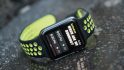
Finally, we have the watch itself:


Now that we’ve got it all unpacked, let’s see how it sizes up.
Size comparison to other watch sizes:
The Nike+ Sportwatch is interesting size-wise in that it has a thinner width than most GPS watches today, but it makes up for it in its depth (thicker). I’ve put together my trademark kitchen rolling pin comparison between a number of the most popular watches on the market today, to help you get a better view of them side by side:

(Left to right: Garmin FR60, FR110/210, FR610, Nike+ Sportwatch, FR310XT)


One area of concern for many is how it fits on ones wrist. For me as a guy with relatively small wrists (skinny runner dude), it actually fits pretty good:

But for my fiancée, a 5’2” petite runner, she found it simply too big and uncomfortable. It had to be on its very last setting to fit, and yet still had some room to float around:


That said, unlike many of the other watches out there, this one is quite functional as a day to day watch – and some might even say a bit more stylish than others. Though I have found that it doesn’t quite mesh with a business suit. And yes, I tried.
Running:
Now that we’ve got it all unboxed, it’s time to get it out for a run! Once you head outside you’ll select to start a run…by pressing the run menu option:

After thats complete it’ll bring you to the run options page, which allows you to choose which sensors you’ll be using for the run. This includes GPS, Footpod and Heart Rate strap. You simply tap to enable/disable each sensor for that run. It’ll remember these settings for next time:

Additionally, if it’s your first run with those sensors, you can select to ‘Add sensors’ and add a new footpod or heart rate strap:

Once that’s done you’ll select to start searching for satellites.
This is sometimes pretty quick, but in general I found it takes 1-2 minutes to complete after its started searching. This is a bit longer than most other watches take.

Once it has completed satellite acquisition (or linking, as it calls it), then you’re ready to run! So, off we go!

As you’re running the main display will show the overall distance of the run. The upper display rotates through a list of data fields that include heart rate, distance, calories, clock, elapsed time and clock. You can see this below during my run:

Depending on how you’ve configured the watch you can tap (or slap) to create a split/lap. To do this, you simply tap/whack the top of the watch and it’ll automatically demark a lap:


While in theory this is very cool, I’ve found that it’s not quite perfected. On the first Nike+ GPS Sportwatch I had it worked flawlessly. However the second unit I have it’s super-sensitive and often triggers while I’m running along and hit a bump – such as stepping down from a sidewalk to the road to cross a street. I’m optimistic this can be tweaked with a bit of firmware work, given it seems to work well on some units and not so well on others (though they are currently running the same firmware version).
If you want to pause, you can do so at any time by pressing the little neon green button, which temporarily stops the counter:

Once you’re complete, you just tap ‘end’ to finish up the run. At this point, it’ll give you a bit of encouragement about the run – including if you hit a new record:

Following which, you’ll get a summary page regarding the run:

Accuracy:
This is a good time to discuss accuracy. Based on my testing, after the first firmware update accuracy of the device is on par with the Garmin units I’ve tested, and on par with measured routes that I have. Here’s a few snippets of runs where I ran with the Nike+ Sportwatch and Garmin GPS unit to compare distances. Due to the nature of GPS accuracy (usually allotted about 2.5%), I’d never expect them to exactly align – so I was happy that they were ‘close enough’:


I did find that my one longer run saw a bit more differential than I expected, but not beyond the 2.5% per mile:

I’ve done running both in the trees and on the road, and it didn’t seem to affect GPS accuracy compared to other devices that are considered ‘known goods’.
If you’re interested in some of the past GPS accuracy tests I’ve done, check out my two part series here. I’ll be testing the Nike+ Sportwatch GPS unit more in depth later this spring as part of a roundup of other new GPS devices on the market.
Breakage:
As you may have previously read around these parts – I had a bit of bad luck initially (Day 3) when the watch fell out of my bag and onto the floor. Upon impact, the glass immediately cracked.

While the watch continued to work just fine, it did get a bit of fogging during some runs in the rain, but each time cleared out.
The good news here is that the Nike support folks were great and offered to let me return it, including the prepaid postage. They had no idea who I was, as I just called the generic support line. They were super friendly and apologetic as well.
Ideally a slightly raised rubber bezel would resolve the issue, which also affects the Garmin FR310XT as well, as it has a glass screen that’s directly exposed to impact.
Cycling:
Like virtually any GPS unit, it can almost always be used for uses not originally intended. And in the case of the Nike+ Sportwatch GPS, cycling is one of those activities. While I’ve taken it out for some pretty long rides (50+ miles), you’ll start to run into some issues in the first few hundred feet.
First up is that as of this writing the Sportwatch doesn’t contain any cycling mode, which means it can’t show you speed in MPH/KPH, but rather instead shows it in Minutes/Mile (or Minutes/Kilometer) – as if you were running [Update: This has been added in a firmware update, speed can now be shown]. I see this as an area that could be easily modified in a future firmware update, and doing so would make quite a bit of sense without taking significant effort.
The second area that’s problematic is the lap function for creating splits. As I’ve noted elsewhere, within the software you have two basic options for creating splits. One is to have it automatically create laps/splits every X miles (such as every 1 mile). The second is to allow you to manually create laps/splits by simply taping/whacking the unit.
The problem is that the second option is easily triggered by cracks and bumps in the road. I found on a typical road ride that it was triggering as often as every few hundred feet – making the splits/laps essentially useless. While I could certainly look to go back to auto-lap splits, that doesn’t meet my typical objective – which is to demark parts of the ride. I often use splits to later analyze a given portion of the ride such as the warm-up, main sets, or cool-down.
As the Sportwatch wasn’t specifically marketed for cycling, it’s hard to fully blame them for these oversights. But at the same time, looking at competitive offerings in the market, all of them offer the ability to switch to a basic cycling mode that shows MPH/KPH.
Swimming/Waterproofing:
While the Nike+ Sportwatch wasn’t designed with swimming in mind, it has no issues playing around in the water. The unit itself is fully waterproofed to 5 ATM’s. Wait, you don’t know what ATM’s are? No worries, neither does the rest of the world.
ATM’s are simply Atmospheres, and it’s one method of stating a specific waterproofing level. Typically speaking 5ATM’s is equivalent to about 50 meters, or about 165 feet (though I’ve found slightly varying calculations – but this puts it in the general ballpark). Of course, they could have just simply stated that depth in feet or meters on the back of the unit, instead of stating ‘5 ATM’s’. No worries though, it just means its simply well waterproofed (and better than the IPX7 level typical of most Garmin units).
I’ve taken it swimming a few times doing a few thousands yards of laps each time without any issues at all in the waterproofing department.

The only challenge to using it while swimming is that you can’t engage any simple timer mode – like a normal stopwatch. So you’d have to get it started in either GPS, Footpod or Heart Rate mode (with those accessories) before you used it as a standard stopwatch.
As for day to day water, I’ve got more than my fair share of wet runs in lately. In fact, I think every time I wear it out for a run…it rains.

The good news is the unit performs without issue in the rain – no matter how light or hard the rain is. And even better is that even if you do manage to crack the glass, I found that it still works just fine in the rain and didn’t die despite being soaked.
Accessories:
The Nike+ Sportwatch offers two accessories that are compatible with it, both of which have previously been on the market and are compatible with existing Nike and Apple products.
Footpod
First up is the Nike+ footpod. Within every Nike+ Sportwatch box is one footpod (you only need one per pair of shoes). The footpod enables you to track speed and distance indoors on a treadmill, or outdoors if you choose to turn GPS off.

The footpod is easily paired by selecting to add a sensor through the menu on the watch. Once you’ve linked the footpod it’ll remember that particular sensor for future use. You can choose to enable/disable a sensor prior to any given run, as it’s the last display screen before starting the run. This makes it easy to switch back and forth should you need to.
Because I lack a fancy Nike shoe, I just use this $5 footpod holder.

Additionally, if you’re in a situation where you don’t have time for the unit to locate the required satellites, you can utilize the footpod to start running in ‘Quickstart’ mode, which will use the speed from the footpod to determine distance.

Once satellite reception is acquired, it’ll switch back over to GPS speed/distance.
It should be noted that the footpod does not record or display foot cadence (turnover) in any user consumable method.
Heart Rate Strap
Nike has partnered with Polar to offer a heart rate strap that’s compatible with the Nike+ Sportwatch. The strap is dual-frequency, which is pretty cool. On one channel they support standard 5kHz, for use with existing Polar watches and exercise equipment, and the other channel is for the Nike+ using Nike’s proprietary 2.4gHz frequency.

The strap itself is made out of a soft fabric, and contains a small plastic transmitter that you snap into place:


To pair the strap with the watch you simply go into the options menu and choose to add a new sensor.

At this point it’ll search for your heart rate strap and a few seconds later it’ll find it and add it. Like the footpod, you can choose to enable/disable it on a per run basis.
Once the strap is enabled and used on a run you’ll have both heart rate data during the run on the display, as well as after the run on the site. After you’ve uploaded the run you’ll see heart rate graph depicting your heart rate during that activity:

The only problem with the heart rate graph and data provided by the Sportwatch is that it heavily generalizes your heart rate data. Most heart rate monitors will give you feedback in data blocks as frequent as one-second. In the case of the Sportwatch, that data is averaged over longer time periods such as laps or entire runs. As you can see, there isn’t really that much detail offered compared to most heart rate monitors.
When the Polar Heart Rate strap is attached, the unit will utilize heart rate based calorie calculations to generate calorie numbers. Otherwise, it will utilize weight/height/age based calorie calculations with simple distance/time formulas.
Downloading to your computer:
The Nike+ Sportwatch turns the typical athletic watch downloading experience upside-down on its head. Normally most devices have a cradle or dock, something that sits in between it and the computer. In the case of the Sportwatch though, the watch band itself is the connection straight into the computer. Yup, the band is actually a USB plug. Check it out:

From there you literally just plug it into your computers USB port:

Of course, it’s possible that your computer doesn’t have an easily accessible port (such as behind a desktop computer deep under your desk), so in this case they’ve included a handy dandy little USB extender cable that you can plug the Sportwatch into instead:

Once the watch is plugged in, the Nike+ Connect software will automatically launch. This software will immediately begin downloading your data from the watch to the computer, and then from the computer to the Nike+ site:

The whole process takes about 30-60 seconds for a typical run. After it’s done uploading your workout/run, it’ll automatically check for any updates on the watch itself. This is great, as it helps to ensure that your watch stays current:

In the event an update is available, it will only take a minute or two to download and install. This includes both firmware updates as well as simple updates to device data such as satellite updates:

I’ve already seen that the firmware updates do indeed make a difference. When the device was first made available I saw some initial issues with satellite accuracy in distance measurement, however the first firmware update fixed that up right away.
Changing Configuration Settings:
Now that you’ve got the watch plugged in, you can take this opportunity to modify a few of the devices configuration settings. You do this directly within the Nike+ Connect desktop software, and the changes are made immediately on the watch.
The configuration options are divided into four pages. The first page covers your profile, which allows you to modify things such as weight and height:

The second page covers time and date. This enables you to either set a given time zone, or simply have the watch sync with your PC. I love this second option as I travel constantly and can just update the time zone on my PC and the watch follows suit. Very cool.

The third page covers display customization. This controls the data displayed on the unit while you’re running, sounds, as well as whether to enable run reminders.

In addition to the display stats shown below (Pace, Distance, Time Elapsed, Calories and Clock), The Nike+ team tell me that Average Pace is on its way in a firmware update shortly – perhaps within a week or so.

What are run reminders you ask? Well, if you don’t run for a few days the watch will remind you that it’s time you start running. Since I have a few of the Nike+ Sportwatch’s around my place right now, I left the broken one off to the side for a few days and noticed it displaying a message telling me to ‘Run again soon’!.
As for the fourth configuration page, it covers lap and interval configuration options. This includes whether to use automatic laps on a pre-set mileage, or to instead use the automatic tap-to-lap capability (aka: Smack to lap).

Additionally, you can setup a basic interval workout here with simple work (run) and rest (walk/lie on the ground) intervals. You’re unable however to configure a warm-up or cool down, should you want to include that.
Nike+ Website:
Once you’ve uploaded your run the software will automatically open up your Internet browser and display the run you’ve just completed:

From here you can start to dig into the run by clicking on ‘See GPS route’, which will show you the below map of your run:

While it’s showing your run route played back as a small animation, it’ll show your instant pace, duration and distance on the right hand side, corresponding with the dot on the map at that point.
Down along the bottom you can choose to display more stats about the route, including splits for each mile – even if you didn’t manually create them during the run:

You may have noticed above that you can select to go into Nike+ Beta mode, which will launch a separate site that offers a bit more information about your run. I’ve found the beta mode pretty cool, though it seems to still be a work in progress as it was occasionally unavailable (hence, the beta part).

Once this releases I’ll swing back to this section and update it accordingly.
The bigger draw of the Nike+ website for many though is the community features. This includes everything from goal setting of run paces to calorie burn, allowing a way to motivate you to reach your goals:

Meanwhile, the Challenges section gives you ways to encourage you to complete a given run or workout. You can also create your own Challenge.

Additionally, there are built-in coaching plans to different events and distances This part is really pretty cool, and unlike anything that any other sports device is including out of the box. The below plan would take me from today until the New York Marathon in 15 weeks. I also like that you can download the PDF for easy reference offline.

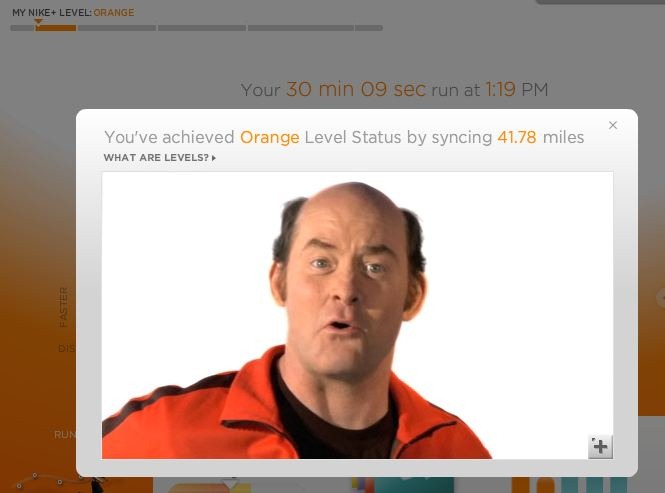
Finally, as you go along you reach different ‘levels’ within the Nike+ site, based on how much you run.
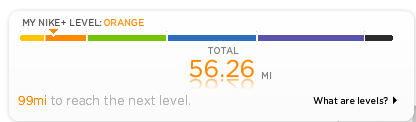
Each level has a different meaning, and as you cross levels you get small video messages of encouragement from various celebs:
Now much of the websites infrastructure has been in place for quite some time supporting the various Apple driven Nike+ components such as those involving the footpod and the running app that’s previously been so popular. So it’s important to keep in mind that they’ve been doing this for quite a while on the web front – and thus they do it really well.
The only complaint I have with the site is around data, and it’s two fold. Firstly is that the data displayed is very high level, and doesn’t allow you to really zoom in to any detail. It’s pretty much at the mile-split data height. Anything under that gets lost in the graphing. So you can’t zoom in and see minute by minute changes in pace or heart rate. What’s interesting here though is that Nike+ team has confirmed to me that the data is actually recorded at 1-second intervals – so the data’s there at a deeper level, it’s just not visible at at that level. Nor do they have any plans to change that level of granularity shown.
The second is the lack of ability to export out the data. There’s no way to get my data out of the site and into either another program, or even a simple Excel sheet. At the end of the day, it’s my run and my data – and no matter how much I may love the site, I get fairly annoyed if my training log is completely locked up into Nike’s site forever. I’d highly encourage them to consider an export function, after all – every single other GPS sports device vendor out there – allows their users to export their run data. Nike+ should too.
Feature Comparison Chart:
The Nike+ Sportwatch GPS is more comparable to the Garmin FR110 from a feature set standpoint, so I’ve decided to stack rank the two side by side to allow you to get a feel for how the two differ:
| Function/Feature | Nike+ GPS Sportwatch | Apple Watch SE3 | Garmin Vivoactive 6 | COROS APEX 4 | Garmin Forerunner 570 | ||||||||||||||||||||||||||||||||||||||||||||||||||||||||||||||||||||||||||||||||
|---|---|---|---|---|---|---|---|---|---|---|---|---|---|---|---|---|---|---|---|---|---|---|---|---|---|---|---|---|---|---|---|---|---|---|---|---|---|---|---|---|---|---|---|---|---|---|---|---|---|---|---|---|---|---|---|---|---|---|---|---|---|---|---|---|---|---|---|---|---|---|---|---|---|---|---|---|---|---|---|---|---|---|---|---|---|
| Copyright DC Rainmaker - Updated December 30th, 2025 @ 5:46 am New Window | |||||||||||||||||||||||||||||||||||||||||||||||||||||||||||||||||||||||||||||||||||||
| Price | $165.00 | $249/$299 (cellular) | $299 | $429 | $549 | ||||||||||||||||||||||||||||||||||||||||||||||||||||||||||||||||||||||||||||||||
| Product Announcement Date | JAN 7, 2011 | Sept 9th, 2025 | April 1st, 2025 | Oct 15th, 2025 | May 15th, 2025 | ||||||||||||||||||||||||||||||||||||||||||||||||||||||||||||||||||||||||||||||||
| Actual Availability/Shipping Date | APR 2011 | Sept 19th, 2025 | April 1st, 2025 | Oct 15th, 2025 | May 21st, 2025 | ||||||||||||||||||||||||||||||||||||||||||||||||||||||||||||||||||||||||||||||||
| Case Size | 40mm/44mm | 42mm | 42mm/45mm | 42mm/47mm | |||||||||||||||||||||||||||||||||||||||||||||||||||||||||||||||||||||||||||||||||
| Display/Scren Size | 1.2" | 1.2"/1.3" | 1.2"/1.4" | ||||||||||||||||||||||||||||||||||||||||||||||||||||||||||||||||||||||||||||||||||
| Display Type | AMOLED | AMOLED | MIPS | AMOLED | |||||||||||||||||||||||||||||||||||||||||||||||||||||||||||||||||||||||||||||||||
| GPS Recording Functionality | Yes | Yes | Yes | Yes | Yes | ||||||||||||||||||||||||||||||||||||||||||||||||||||||||||||||||||||||||||||||||
| Data Transfer | USB | Bluetooth Smart | USB, BLUETOOTH SMART, WiFi | Bluetooth Smart (smartphone) | USB, Bluetooth Smart, WiFi | ||||||||||||||||||||||||||||||||||||||||||||||||||||||||||||||||||||||||||||||||
| Waterproofing | 50 Meters | 50m | 50 meters | 50m | 50 Meters | ||||||||||||||||||||||||||||||||||||||||||||||||||||||||||||||||||||||||||||||||
| Dive/Snorkel Feature | No | No | Sorta | No | |||||||||||||||||||||||||||||||||||||||||||||||||||||||||||||||||||||||||||||||||
| Battery Life (GPS) | 9 hours | 7 hours GPS | 21 hrs (just GPS) | Up to 65 hours | Up to 18 hours | ||||||||||||||||||||||||||||||||||||||||||||||||||||||||||||||||||||||||||||||||
| Battery Life (Daily Smartwatch | 18 hours | 11 Days | Up to 30 days | Up to 11 days | |||||||||||||||||||||||||||||||||||||||||||||||||||||||||||||||||||||||||||||||||
| Solar Charging | No | No | No | No | |||||||||||||||||||||||||||||||||||||||||||||||||||||||||||||||||||||||||||||||||
| Recording Interval | 1-second | Varies | 1s or Smart Recording | 1-second | 1-second, Smart, UltraTrac | ||||||||||||||||||||||||||||||||||||||||||||||||||||||||||||||||||||||||||||||||
| Dual-Frequency GNSS | No | No | Yes | Yes | |||||||||||||||||||||||||||||||||||||||||||||||||||||||||||||||||||||||||||||||||
| Alerts | Audio/Visual | Vibration/Audio/Visual | Vibrate/Visual | Audio/Visual/Vibration | VIBRATE/SOUND/VISUAL | ||||||||||||||||||||||||||||||||||||||||||||||||||||||||||||||||||||||||||||||||
| Ability to download custom apps to unit/device | No | Yes | Yes | No | Yes | ||||||||||||||||||||||||||||||||||||||||||||||||||||||||||||||||||||||||||||||||
| Flashlight | Display Only | No | No | No | Voice Integration | Nike+ GPS Sportwatch | Apple Watch SE3 | Garmin Vivoactive 6 | COROS APEX 4 | Garmin Forerunner 570 | |||||||||||||||||||||||||||||||||||||||||||||||||||||||||||||||||||||||||||
| Has Mic/Speaker | Yes | No | Yes | No | |||||||||||||||||||||||||||||||||||||||||||||||||||||||||||||||||||||||||||||||||
| Can make/receive calls | Non-cellular editions with phone/Cellular Editions without phone | No | Yes | No | |||||||||||||||||||||||||||||||||||||||||||||||||||||||||||||||||||||||||||||||||
| Voice Assistant | Apple Siri | No | No | No | Music | Nike+ GPS Sportwatch | Apple Watch SE3 | Garmin Vivoactive 6 | COROS APEX 4 | Garmin Forerunner 570 | |||||||||||||||||||||||||||||||||||||||||||||||||||||||||||||||||||||||||||
| Can control phone music | Yes | Yes | Yes | Yes | |||||||||||||||||||||||||||||||||||||||||||||||||||||||||||||||||||||||||||||||||
| Has offline music storage and playback | Yes | Yes | Yes | Yes | |||||||||||||||||||||||||||||||||||||||||||||||||||||||||||||||||||||||||||||||||
| Streaming Services | Apple Music | Spotify, Amazon Music, Deezer | No (MP3 files only) | Spotify, Amazon Music, Deezer | Storage | Nike+ GPS Sportwatch | Apple Watch SE3 | Garmin Vivoactive 6 | COROS APEX 4 | Garmin Forerunner 570 | |||||||||||||||||||||||||||||||||||||||||||||||||||||||||||||||||||||||||||
| Total Size | 32GB | 8GB | Payments | Nike+ GPS Sportwatch | Apple Watch SE3 | Garmin Vivoactive 6 | COROS APEX 4 | Garmin Forerunner 570 | |||||||||||||||||||||||||||||||||||||||||||||||||||||||||||||||||||||||||||||
| Contactless-NFC Payments | Yes | Yes | No | Yes | Connectivity | Nike+ GPS Sportwatch | Apple Watch SE3 | Garmin Vivoactive 6 | COROS APEX 4 | Garmin Forerunner 570 | |||||||||||||||||||||||||||||||||||||||||||||||||||||||||||||||||||||||||||
| Bluetooth Smart to Phone Uploading | No | Yes | Yes | Yes | Yes | ||||||||||||||||||||||||||||||||||||||||||||||||||||||||||||||||||||||||||||||||
| Phone Notifications to unit (i.e. texts/calls/etc...) | No | Yes | Yes | Yes | Yes (with connected phone) | ||||||||||||||||||||||||||||||||||||||||||||||||||||||||||||||||||||||||||||||||
| Live Tracking (streaming location to website) | No | With 3rd party apps | Yes | Yes | Yes (with connected phone) | ||||||||||||||||||||||||||||||||||||||||||||||||||||||||||||||||||||||||||||||||
| Group tracking | No | No | No | Yes (with connected phone) | |||||||||||||||||||||||||||||||||||||||||||||||||||||||||||||||||||||||||||||||||
| Emergency/SOS Message Notification (from watch to contacts) | No | Yes | Yes | Yes | Yes (with connected phone) | ||||||||||||||||||||||||||||||||||||||||||||||||||||||||||||||||||||||||||||||||
| Built-in cellular chip (no phone required) | No | Yes (with cellular version) | No | No | No | Cycling | Nike+ GPS Sportwatch | Apple Watch SE3 | Garmin Vivoactive 6 | COROS APEX 4 | Garmin Forerunner 570 | ||||||||||||||||||||||||||||||||||||||||||||||||||||||||||||||||||||||||||
| Designed for cycling | No (Speed only mode) | Yes | Yes | Yes | Yes | ||||||||||||||||||||||||||||||||||||||||||||||||||||||||||||||||||||||||||||||||
| Power Meter Capable | No | Yes | No | Yes | Yes | ||||||||||||||||||||||||||||||||||||||||||||||||||||||||||||||||||||||||||||||||
| Power Meter Configuration/Calibration Options | No | N/A | No | Yes | |||||||||||||||||||||||||||||||||||||||||||||||||||||||||||||||||||||||||||||||||
| Power Meter TSS/NP/IF | No | No | N/A | NP only | Yes | ||||||||||||||||||||||||||||||||||||||||||||||||||||||||||||||||||||||||||||||||
| Speed/Cadence Sensor Capable | No | No | Yes | Yes | Yes | ||||||||||||||||||||||||||||||||||||||||||||||||||||||||||||||||||||||||||||||||
| Strava segments live on device | No | No | No | No | |||||||||||||||||||||||||||||||||||||||||||||||||||||||||||||||||||||||||||||||||
| Crash detection | Yes | Yes | No | Yes | Running | Nike+ GPS Sportwatch | Apple Watch SE3 | Garmin Vivoactive 6 | COROS APEX 4 | Garmin Forerunner 570 | |||||||||||||||||||||||||||||||||||||||||||||||||||||||||||||||||||||||||||
| Designed for running | Yes | Yes | Yes | Yes | Yes | ||||||||||||||||||||||||||||||||||||||||||||||||||||||||||||||||||||||||||||||||
| Footpod Capable (For treadmills) | Yes | With 3rd party apps | Yes | Yes | YES (Also has INTERNAL ACCELEROMETER) | ||||||||||||||||||||||||||||||||||||||||||||||||||||||||||||||||||||||||||||||||
| Running Dynamics (vertical oscillation, ground contact time, etc...) | No | Yes | YEs | Yes | Yes | ||||||||||||||||||||||||||||||||||||||||||||||||||||||||||||||||||||||||||||||||
| Running Power | Yes | YEs | Yes (Built-in) | Yes | |||||||||||||||||||||||||||||||||||||||||||||||||||||||||||||||||||||||||||||||||
| VO2Max Estimation | No | Yes | Yes | Yes | Yes | ||||||||||||||||||||||||||||||||||||||||||||||||||||||||||||||||||||||||||||||||
| Race Predictor | No | No | No | Yes | Yes | ||||||||||||||||||||||||||||||||||||||||||||||||||||||||||||||||||||||||||||||||
| Recovery Advisor | No | No | Yes | Yes | Yes | ||||||||||||||||||||||||||||||||||||||||||||||||||||||||||||||||||||||||||||||||
| Run/Walk Mode | No | With 3rd party apps | Yes | No | Yes | ||||||||||||||||||||||||||||||||||||||||||||||||||||||||||||||||||||||||||||||||
| Track Recognition Mode | Yes | No | Yes | Yes | Swimming | Nike+ GPS Sportwatch | Apple Watch SE3 | Garmin Vivoactive 6 | COROS APEX 4 | Garmin Forerunner 570 | |||||||||||||||||||||||||||||||||||||||||||||||||||||||||||||||||||||||||||
| Designed for swimming | No | Yes | Yes | Yes | Yes | ||||||||||||||||||||||||||||||||||||||||||||||||||||||||||||||||||||||||||||||||
| Openwater swimming mode | N/A | YEs | Yes | Yes | Yes | ||||||||||||||||||||||||||||||||||||||||||||||||||||||||||||||||||||||||||||||||
| Lap/Indoor Distance Tracking | N/A | Yes | Yes | Yes | Yes | ||||||||||||||||||||||||||||||||||||||||||||||||||||||||||||||||||||||||||||||||
| Record HR underwater | No | Yes | Yes | Yes | Yes | ||||||||||||||||||||||||||||||||||||||||||||||||||||||||||||||||||||||||||||||||
| Openwater Metrics (Stroke/etc.) | N/A | Basic stroke type only | Yes | Yes | Yes | ||||||||||||||||||||||||||||||||||||||||||||||||||||||||||||||||||||||||||||||||
| Indoor Metrics (Stroke/etc.) | N/A | Basic stroke type only | Yes | Yes | Yes | ||||||||||||||||||||||||||||||||||||||||||||||||||||||||||||||||||||||||||||||||
| Indoor Drill Mode | N/A | No | No | No | Yes | ||||||||||||||||||||||||||||||||||||||||||||||||||||||||||||||||||||||||||||||||
| Indoor auto-pause feature | N/A | Yes | No | - | No | ||||||||||||||||||||||||||||||||||||||||||||||||||||||||||||||||||||||||||||||||
| Change pool size | N/A | Yes | Yes | Yes | Yes | ||||||||||||||||||||||||||||||||||||||||||||||||||||||||||||||||||||||||||||||||
| Indoor Min/Max Pool Lengths | N/A | 1y/m to 1,500y/m+ | 13M/15Y TO 150Y/M | 15y/m-300y/m | 14M/15Y TO 150Y/M | ||||||||||||||||||||||||||||||||||||||||||||||||||||||||||||||||||||||||||||||||
| Ability to customize data fields | N/A | Yes | Yes | Yes | Yes | ||||||||||||||||||||||||||||||||||||||||||||||||||||||||||||||||||||||||||||||||
| Captures per length data - indoors | N/A | Yes | Yes | Yes | |||||||||||||||||||||||||||||||||||||||||||||||||||||||||||||||||||||||||||||||||
| Indoor Alerts | N/A | Yes (goals) | Yes | Yes | Yes | Triathlon | Nike+ GPS Sportwatch | Apple Watch SE3 | Garmin Vivoactive 6 | COROS APEX 4 | Garmin Forerunner 570 | ||||||||||||||||||||||||||||||||||||||||||||||||||||||||||||||||||||||||||
| Designed for triathlon | No | Yes | No | Yes | Yes | ||||||||||||||||||||||||||||||||||||||||||||||||||||||||||||||||||||||||||||||||
| Multisport mode | N/A | Yes | No | Yes | Yes | Workouts | Nike+ GPS Sportwatch | Apple Watch SE3 | Garmin Vivoactive 6 | COROS APEX 4 | Garmin Forerunner 570 | ||||||||||||||||||||||||||||||||||||||||||||||||||||||||||||||||||||||||||
| Create/Follow custom workouts | No | Yes | Yes | Yes | Yes | ||||||||||||||||||||||||||||||||||||||||||||||||||||||||||||||||||||||||||||||||
| On-unit interval Feature | Yes | Yes | Yes | Yes | Yes | ||||||||||||||||||||||||||||||||||||||||||||||||||||||||||||||||||||||||||||||||
| Training Calendar Functionality | No | Yes | Yes | Yes | Yes | Functions | Nike+ GPS Sportwatch | Apple Watch SE3 | Garmin Vivoactive 6 | COROS APEX 4 | Garmin Forerunner 570 | ||||||||||||||||||||||||||||||||||||||||||||||||||||||||||||||||||||||||||
| Auto Start/Stop | No | Yes | Yes | Yes | Yes | ||||||||||||||||||||||||||||||||||||||||||||||||||||||||||||||||||||||||||||||||
| Virtual Partner Feature | No | Yes | No | No | Yes | ||||||||||||||||||||||||||||||||||||||||||||||||||||||||||||||||||||||||||||||||
| Virtual Racer Feature | No | Yes | No | No | Yes | ||||||||||||||||||||||||||||||||||||||||||||||||||||||||||||||||||||||||||||||||
| Records PR's - Personal Records (diff than history) | Yes | No | Yes | No | Yes | ||||||||||||||||||||||||||||||||||||||||||||||||||||||||||||||||||||||||||||||||
| Tidal Tables (Tide Information) | No | No | No | No | No | ||||||||||||||||||||||||||||||||||||||||||||||||||||||||||||||||||||||||||||||||
| Weather Display (live data) | No | Yes | Yes | No | YEs | Navigate | Nike+ GPS Sportwatch | Apple Watch SE3 | Garmin Vivoactive 6 | COROS APEX 4 | Garmin Forerunner 570 | ||||||||||||||||||||||||||||||||||||||||||||||||||||||||||||||||||||||||||
| Follow GPS Track (Courses/Waypoints) | No | Yes | Yes | Yes | Yes | ||||||||||||||||||||||||||||||||||||||||||||||||||||||||||||||||||||||||||||||||
| Markers/Waypoint Direction | No | Yes (Backtrack) | No | Yes | Yes (Up Ahead support) | ||||||||||||||||||||||||||||||||||||||||||||||||||||||||||||||||||||||||||||||||
| Offline Maps | No | Yes | No | Maps but not routable | No | ||||||||||||||||||||||||||||||||||||||||||||||||||||||||||||||||||||||||||||||||
| Back to start | No | Yes (Backtrack) | Yes | Reverse course | Yes | ||||||||||||||||||||||||||||||||||||||||||||||||||||||||||||||||||||||||||||||||
| Impromptu Round Trip Route Creation | No | With 3rd party apps | No | No | No | ||||||||||||||||||||||||||||||||||||||||||||||||||||||||||||||||||||||||||||||||
| Download courses/routes from phone to unit | No | Yes | Yes | Yes | Yes | Sensors | Nike+ GPS Sportwatch | Apple Watch SE3 | Garmin Vivoactive 6 | COROS APEX 4 | Garmin Forerunner 570 | ||||||||||||||||||||||||||||||||||||||||||||||||||||||||||||||||||||||||||
| Altimeter Type | GPS | Barometric with real-time watch face | GPS | Barometric | Barometric | ||||||||||||||||||||||||||||||||||||||||||||||||||||||||||||||||||||||||||||||||
| Compass Type | N/A | Magnetic | - | Magnetic | Magnetic | ||||||||||||||||||||||||||||||||||||||||||||||||||||||||||||||||||||||||||||||||
| Optical Heart Rate Sensor internally | Yes | Yes | Yes | YEs | |||||||||||||||||||||||||||||||||||||||||||||||||||||||||||||||||||||||||||||||||
| SpO2 (aka Pulse Oximetry) | Yes | Yes | Yes | Yes | |||||||||||||||||||||||||||||||||||||||||||||||||||||||||||||||||||||||||||||||||
| ECG Functionality | No | No | Not Medically Certified | No | |||||||||||||||||||||||||||||||||||||||||||||||||||||||||||||||||||||||||||||||||
| HRV Recording | Yes | Yes | Yes (Manual) | Yes (nightly and on-demand) | |||||||||||||||||||||||||||||||||||||||||||||||||||||||||||||||||||||||||||||||||
| Heart Rate Strap Compatible | Yes | Yes | Yes | Yes | Yes | ||||||||||||||||||||||||||||||||||||||||||||||||||||||||||||||||||||||||||||||||
| ANT+ Heart Rate Strap Capable | No | No | YEs | No | Yes | ||||||||||||||||||||||||||||||||||||||||||||||||||||||||||||||||||||||||||||||||
| ANT+ Speed/Cadence Capable | No | no | Yes | No | Yes | ||||||||||||||||||||||||||||||||||||||||||||||||||||||||||||||||||||||||||||||||
| ANT+ Footpod Capable | No | No | Yes | No | Yes | ||||||||||||||||||||||||||||||||||||||||||||||||||||||||||||||||||||||||||||||||
| ANT+ Power Meter Capable | No | No | No | No | Yes | ||||||||||||||||||||||||||||||||||||||||||||||||||||||||||||||||||||||||||||||||
| ANT+ Lighting Control | No | Yes | No | Yes | |||||||||||||||||||||||||||||||||||||||||||||||||||||||||||||||||||||||||||||||||
| ANT+ Bike Radar Integration | No | Yes | No | Yes | |||||||||||||||||||||||||||||||||||||||||||||||||||||||||||||||||||||||||||||||||
| ANT+ Trainer Control (FE-C) | No | No | FTMS (Bluetooth) only | Yes | |||||||||||||||||||||||||||||||||||||||||||||||||||||||||||||||||||||||||||||||||
| ANT+ Remote Control | No | No | No | No | No | ||||||||||||||||||||||||||||||||||||||||||||||||||||||||||||||||||||||||||||||||
| ANT+ eBike Compatibility | NO | No | Yes | No | Yes | ||||||||||||||||||||||||||||||||||||||||||||||||||||||||||||||||||||||||||||||||
| ANT+ Gear Shifting (i.e. SRAM ETAP) | No | No | No | No | |||||||||||||||||||||||||||||||||||||||||||||||||||||||||||||||||||||||||||||||||
| Shimano Di2 Shifting | No | No | No | No | |||||||||||||||||||||||||||||||||||||||||||||||||||||||||||||||||||||||||||||||||
| Bluetooth Smart HR Strap Capable | No | Yes | YEs | Yes | Yes | ||||||||||||||||||||||||||||||||||||||||||||||||||||||||||||||||||||||||||||||||
| Bluetooth Smart Speed/Cadence Capable | No | No | Yes | Yes | Yes | ||||||||||||||||||||||||||||||||||||||||||||||||||||||||||||||||||||||||||||||||
| Bluetooth Smart Footpod Capable | No | No | Yes | Yes | Yes | ||||||||||||||||||||||||||||||||||||||||||||||||||||||||||||||||||||||||||||||||
| Bluetooth Smart Power Meter Capable | No | No | No | Yes | Yes | ||||||||||||||||||||||||||||||||||||||||||||||||||||||||||||||||||||||||||||||||
| Temp Recording (internal sensor) | No | No | No | Yes | Yes | ||||||||||||||||||||||||||||||||||||||||||||||||||||||||||||||||||||||||||||||||
| Temp Recording (external sensor) | No | No | Yes | No | YES (TEMPE) | Software | Nike+ GPS Sportwatch | Apple Watch SE3 | Garmin Vivoactive 6 | COROS APEX 4 | Garmin Forerunner 570 | ||||||||||||||||||||||||||||||||||||||||||||||||||||||||||||||||||||||||||
| Desktop Application | Nike+ Connect | None | Garmin Express | No | Garmin Express | ||||||||||||||||||||||||||||||||||||||||||||||||||||||||||||||||||||||||||||||||
| Web Application | Nike+ Site | None | Garmin Connect | No | Garmin Connect | ||||||||||||||||||||||||||||||||||||||||||||||||||||||||||||||||||||||||||||||||
| Phone App | Nike+ App | iOS only | iOS/Android/Windows | iOS/Android | iOS/Android | ||||||||||||||||||||||||||||||||||||||||||||||||||||||||||||||||||||||||||||||||
| Ability to Export Settings | No | No | No | No | No | Purchase | Nike+ GPS Sportwatch | Apple Watch SE3 | Garmin Vivoactive 6 | COROS APEX 4 | Garmin Forerunner 570 | ||||||||||||||||||||||||||||||||||||||||||||||||||||||||||||||||||||||||||
| Amazon | Link | Link | Link | Link | Link | ||||||||||||||||||||||||||||||||||||||||||||||||||||||||||||||||||||||||||||||||
| REI | Link | Link | Link | DCRainmaker | Nike+ GPS Sportwatch | Apple Watch SE3 | Garmin Vivoactive 6 | COROS APEX 4 | Garmin Forerunner 570 | ||||||||||||||||||||||||||||||||||||||||||||||||||||||||||||||||||||||||||||
| Review Link | Link | Link | Link | Link | |||||||||||||||||||||||||||||||||||||||||||||||||||||||||||||||||||||||||||||||||
As you can see – both are very similar. The areas they tend to differ are in the software components and the flexibility pieces. Both offer heart rate, yet only the Nike+ watch offers footpod compatibility – and actually includes it in the box (the more expensive Garmin FR210 offers footpod compatibility). On the flip side, the FR210 offers a cycling mode, whereas the Nike+ watch does not. Both are $199.
Summary:
I think the Nike+ Sportwatch represents a great addition to the GPS-based runners watch market. It differentiates itself by including some accessories that are usually extra (the footpod for treadmill use) and brings with it new ways of doing old tasks (the slap to lap feature). The watch also steps up the game when it comes to style, offering a bit of edginess that many may find appealing.
At the same time, I felt like the watch is limiting when it comes to software options. By restricting users to only using the Nike+ website, they are significantly limiting how we can use our own data. After all, it is my run. Like most new watches, it has some minor software bugs – but that’s no different than most other devices out there in the first few firmware releases (Garmin and Timex units most definitely included here), so I’m not as worried about that as I feel these will be resolved pretty quickly.
I also see the potential for new features to be added as the product team gathers feedback from users, and understands better the direction of the product that the community wants it to go in. As of today though, the Sportwatch GPS is primarily aimed at the runner wanting a very basic data experience in running – whereas over time I could see the watch broadening its reach to different market segments.
Pro’s/Con’s:
Finally, last but not least – here’s the list of pro’s and con’s as I see them today. If and when things change, I’ll update this section accordingly.
Pro’s:
– Easy to use GPS sports watch
– Fairly fashionable design
– Completely waterproof
– Tap to lap is pretty cool
– Nike+ website is great for new runners, and to keep you motivated with running
– Watch is very easy to configure, ‘just works’
– Software is simply to install and allows configuration of the watch from the computer
Con’s:
– Glass susceptible to breakage
– Limited data field display/selection
– Tap to lap occasionally misfires
– No cycling mode (MPH) [Update: Added in a later firmware update]
– Unable to export your own data from website in supported way
– Data views/graphing are very high level compared to most watches
Found this review useful? Here’s how you you can help support future reviews with just a single click! Read on…
Hopefully you found this review useful. At the end of the day, I’m an athlete just like you looking for the most detail possible on a new purchase – so my review is written from the standpoint of how I used the device.
The reviews generally take a lot of hours to put together, so it’s a fair bit of work (and labor of love). As you probably noticed by looking below, I also take time to answer all the questions posted in the comments – and there’s quite a bit of detail in there as well. If you found this review helpful in your purchasing decision, you can support future reviews like this by using any of the Amazon links (accessories above), or for the actual Nike+ GPS Sportwatch unit.
Alternatively (and a better deal), is to use the DCR10BTF discount with Clever Training for a 10% discount on your entire shopping cart. Plus, within the US shipping is free on anything over $75.
– Nike+ Sportwatch GPS – Clever Training
Thanks for reading! And as always, feel free to post comments or questions in the comments section below, I’ll be happy to try and answer them as quickly as possible. Further, you can always e-mail me at the address on the sidebar. And lastly, if you felt this review was useful – I always appreciate feedback in the comments below. Thanks!
Finally, I’ve written up a ton of helpful guides around using most of the major fitness devices, which you may find useful. These guides are all listed on this page here.

















How long is the battery life without gps, heart rate strap or footpod connect?
It’s a good choice for everyday use when you are not doing sports?
Very useful review! Thanks!
Nike website says this can be used as a pedometer. Do you have any details on how to use this watch as a pedometer? Also, does Garmin FR10 have the pedometer functionality? I’m looking to replace my wife’s pedometer(which she uses to calculate her daily steps) with this watch so that she will have single device for total steps and tracking her runs.
Thanks for the in-depth review. Just one follow up question. I have a Garmin FR70. Will the Nike Plus watch work with a Garmin strap at all or do I have to buy the Polar strap only?
No, the Nike straps don’t really work with anything except Nike products.
hi,
thx for the review,
Would you still recommend this watch in 2013, or should i go for a forerunner 10/110/210.
I read on some places about lags with the program for the pc, what is your experiences about the program these days? Does it still works good, and does nike still supports it?
I’d look at the FR210, the Timex Run Trainer, the TomTom unit, or others.
Primarily because those watches tend to offer more flexibility with other software platforms, as well as in some cases, more functionality.
Yep, it happens to me as it has happened to many others. 5 ATM is only when you buy it, but after a year, I started to see steam stick to the glass inside the watch :-(
I did what I use to do with my old Casio in the 80’s, put it under the sun or in a warm place and wait for the water to get out of it…
After that, of course I tried not to put it on water anymore. But with the time the sweat of a run was enough to get water inside. And then the GPS started to take longer to lock (water and microwaves are not good friends, neither water and electronics), and the batter was lasting less and less.
Last week the watch just switched off during a short run :-(
I was starting to think about buying a new one… and going through the forums I started to be more and more frustrated. I looks like we are buying a watch that last for a year. I was not willing to pay another 160€ to buy a new watch that will last only 1 year.
So I tried to repair it.
First comment: yes the water gets into the watch through the USB connector. This is the very first thing I thought when I bought it in April 2012. In fact the four wires coming from the strap are not well sealed. With the time it gets loose and the water and sweat (this is worst because it’s salty) pass through it into the the watch.
How to repair it:
1. remove the 6 screws and the back cover. The back cover contains the battery but it has no cables to the rest of the watch.
2. Unscrew the 2 screws and remove CAREFULLY the whole electronic. Do it carefully. Pay attention to the GPS (the small square block that is in one of the strap, on the side where you had the 4 screws). The whole electronic with remain connected to the strap and the box by a band with 4 wires impressed that are getting into the watch band and ending in the USB connector. Also pay attention to the screen. It is not fixed, it is hold by the pressure done by the screws. Try to keep all together and put it in a safe place. Do not touch the surface of the screen or the inside part of the glass. Otherwise you will let your fingerprints there. Avoid also any dust.
3. You can dry carefully the water. And I would suggest that you let the whole thing for 24 hours in a warm, clean and dry place so the water will completely disappear.
4. You may find some rests of the salt of the sweat in some points. Clean it carefully.
5. Probably at this point you have noticed that the USB band gets into the watch through a whole under the cover you have removed. This band is protected by a little black plastic block. In fact this is the weak point. With the time, and probably because of the movement you do when you remove your watch, open the strap and plug it to the computer, this little black thing gets loose and allows the water that gets through the joint of the strap with the back cover to get into the watch.
6. You have to seal all this with glue. I have used contact glue with neoprene. You have to do it very very carefully. I have used a little stick to take a little drop of glue and extend it. Repeat it several times all around the black block. If it moves, you can push it a little out of its place so the glue will get into the whole where it fits.
7. Now mount again the electronic. Be sure that the screen is well mounted, and that there is no dust inside. Put the two screws in its place. At this point, before you on, you want to be sure that all works fine. Put the back cover, hold it with your hand and connect the USB cable. You should see the charging screen. Let it for a few seconds, and then disconnect and try the 3 buttons.
8. Now that all works find again, remove again the back cover. I have added some more glue to all the rubber that sails the back cover (just in case of), and also put some more glue under on the side of the back cover where there are 4 screws. Just to be sure there is not point where there could be some water getting in.
9. After closing the back cover, fixing the 6 screws the watch is ready for use again.
Today I run 17 km from South West of Paris to Versalles and back. 33ºC so my wrist was quite wet. GPS locked very quickly and no problem during all the run. No steam in the screen anymore, no resets…
For sure, I will not use it for swimming or even in the shower, but it works again. It is a pity, this is a sport watch so it is suppose to be used under certain stress.
Note: if you decide to repair your watch, you do it at your own risk. I am not responsible of it.
Same issue! Moisture under the glass screen. I have never worn it swimming, only for running, but I guess sweat has built up in there, just very slightly. I bought my friend the GPS sports watch as a gift and he wore it swimming a couple of times and it died. He had his for only 3 months. I’ve had mine for a year and it decided to stop working today.
Bottom line is I don’t think this is a quality product. It worked great until today when the screen basically has failed. You can Google other sites with users experiencing the same problems after 12-15 months. If the problem occurs after the warranty period, Nike tells you you’re out of luck. Within the warranty period you will need the original receipt and they will send a replacement.
All I’m saying is this watch was great but you’ll probably be buying a Garmin in a year because some component is going to fail on it. I will probably be replacing this with the Garmin 220 or 620, which is what I should have purchased in th first place. Buyer beware!
Hi great review!! Just wondering though with my watch that I bought last year, it doesn’t say on the back that it is 5ATMs (in Australia). haven’t used it for swimming yet but want to see if it will work with tri-athlons. Could you please clarify if all models have the same waterproofing?? Thanks
Same waterproofing.
So there is no way to use the standard wearlink Polar HR transmitter with this Nike+ gps watch? You have to buy the one that says Nike+ on it?
Correct, different protocols unfortunately.
Hi,
I have a few questions about the nike gps watch (in belgium it costs 169 euro and the HRM costs 65 euro so a total of 230 euro, while the FR210 costs 199 euro but with the food pod it is 250 euro):
– Can you see your heart rate without the “run program” on the nike? I think you can with the garmin. I want to use it for my training in other sports to (for example hockey)
– Are there heart rate zones on the nike (and are they visible without the run program)?
And one question about the FR210:
Do you need the foodpod on the garmin to see the pace or does it work fine withe the gps?
Do you know if nike is bring out a new version anytime soon??? I don’t want to buy it then a new 1 comes out!!! Many thanks
I’m not aware of anything on the radar.
I understand the new firmware now allows for use when riding a bike. What information is displayed while in bike mode?
Hi! Been reading your reviews for several watches and recently choose the Nike+ Sportswatch GPS. However, on the website, mine does not look like yours based on the screenshots, and yours looks a lot better! How do I get the software that includes the page such as the screenshot of yours that reads “I want to run 6 miles…”?
Thank you!!
For better or worse, the site changes over time, and with this being 2+ years old, things look a bit different these days.
Hi,
I’ve been reading through a lot of your reviews and I’m torn between the Nike+ stopwatch and the Garmin 210. As a runner, I run both intervals and long distances. My intervals are somewhat like this:
I) distance: 800 m
2)Pace per 100m: 20 s
3)Set time: 4 min
4) no. of sets: 4
Given this, which watch would be more suitable?
Thanks a ton! :)
I was wondering if this watch will provide running cadence information? It doesn’t look like it from the screenshots and I read through all the comments but didn’t see the answer.
No, it does not unfortunately.
Darn, I was wondering the same thing. I was hoping the TomTom might replace my broken MotoACTV, which also has internal accelerometers and uses them to monitor arm-swinging for running cadence.
Sounds like a feature that could come as a software fix from TomTom (if they wanted to do it).
Thanks! I guess I will be saving my money for Garmin 610, then.
I read this review, and had almost set my mind on buying this unit. I mostly bike, and plan to run occasionally – although, that would be secondary. I thought this would be a brilliant option considering I could use the pod on a full day basis to do what something like a fitbit does.
However, I read on another site that if you bike with this, and your speeds are really good, they are dropped, because you can technically not run as quickly – this is pretty stupid I think. I need to explore more on this, and see if, even if I cannot get it to display on nike’s site, I can get it to show on maybe some other site like endomondo.
Here’s the link – link to discussions.tomtom.com
Hi great review! I bought the Garmin 410 on the strength of that review, its a great watch however a bit too complex for me to use on every run. This Nike watch seems more user freindly and looks more modern too.
My question is regarding the use of the Nike+ running which I use on my iphone each time I run. Will this watch update the app data each time it synchs with Nike+ on my laptop? I need both the Nike+ app on iphone and the data on the watch to essentially match up.
If this is the case then Ill sell my garmin 410 and purchase this one.
Thanks
I have one major issue with the Nike Sportwatch: I have it set up showing my current pace and it always shows a faster pace than I’m actually running. I check it quite often while running and yesterday during a half marathon it continually showed a pace of roughly 3:50-3:55 mins/km. I ended up with 4:03 average in the total race.
Not good.
So I’m going back to Garmin, never had any issues with any of the Garmin watched I owned. :)
Do Not buy this watch!!! I got this watch a year ago for about 200$. And it lasted one year!! The GPS worked have of the time and the USB connector broke and I couldn’t use the watch anymore. When I ask NIKE to replace it they said that there were not going to because it was not part of the warranty. So do not buy this product
Is it right? The watch has no data field that show the interval pace. Only the interval time or the interval distance were display.
Thanks Onkel
Hey great review, very impressed! One question though- What is your wrist size(in inches)? I’m skinny as well and I would like a good fit, thanks.
My wrist size is 17cm (or about 6.5 inches).
I have noticed a big discrepancy between actual pace when running vs actual pace when i upload the watch to Nike+.com. Is this common?
I just bought a sportwatch and it didn’t have that USB cable. Do they still package them with that, or was it removed after the first version of the sportwatch?
Hi, i have the Nike + sports watch, i use it for my sprints and running etc. although i am looking at buying the heart rate monitor for my workouts in the gym.
would you know if this is accurate to use for heart rate purposes without even running? is the display accurate on the watch or do you only see your heart rate for that workout once you have plugged it in and uploaded your workout on to nikeplus.com?
hope you can help thanks!
I love this watch. Well, loved this watch. I never had any problems, wore it all of the time, for about a year, until one day I wore it in the pool, and it was dead. Called Nike and they told me it was not “waterproof” but “water resistant” and all that really means is that the occasional splash of water will not break the watch. So, if I was in a water pistol shootout and a drop of water hit my watch, then I was okay. Anything more, not okay. Thanks for nothing, Nike.
I love this site and I’ve done a lot of research into looking to find my first GPS watch. I decided to choose this one. Thank You for all the info you compiled here, it really helps.
Does the Nike+ come with an auto-lap feature? You allude to this, and maybe I missed the explicit part. I would prefer my 1 mile splits to be automatically noted without having to remember to take a lap split. Thanks!
Thanks for this great review – the issue of waterproofing come up. Many comments suggest that this watch is not waterproof. I am considering purchasing it and consider this a major bonus.
I have used a nike+sports band for a number of years. I stopped using the Nike Website for uploads its too slow and doesnt have all the graphic abilities. I starting using Smashrun which imports runs from Nike and analyses all your runs and also gives you badges. Fantastic website!
Hi. Thanks for all your great reviews.
I have had so much trouble with the Nike watch. I think I’m on my fourth — or is it fifth? — one! Yes, I really do WANT them to work. So I’m wondering if you’ve heard/seen problems.
The one I have now just doesn’t sync sometimes. on a run in place where it’s had no trouble syncing before. And when it can’t, it can’t — as in, you can try and try again for an hour. It will not sync.
Same watch — couple days later — no problem! Syncing and working.
I ordered a new one from REI and tried it on a run. At the one mile it beeped. OK, normal. But then it beeped again. And again. Over and over and over! Like a crazy person. I ended the run. Started a new run. At the first mile, guess what? Yup, crazy beeping — and kinda embarrassing on a trail. That one went back.
My first one worked for some months and then one day — black screen. Yup, just black.
Do I keep getting lemons? More worrying to me than the obvious flaws is my feeling that the watch is off when it comes to average pace. It seems always to be low. I say that because I will be looking and looking at my pace during a run, get home, and find that my average pace is slower than any readout I ever saw for my current pace. Is this a common problem with GPS watches. Obviously, the average can be calculated later based on elapsed time.
I recently ran my first marathon. Because of the problems above, I wore both the Nike watch and a Garmin Forerunner 10 as backup. In the end, you know what I relied on? A printed pace band and elapsed time. And my miles were within a few seconds of each other according to the timing mats in NYC. But my watches were unreliable. The Garmin seemed on point until about halfway through when it started giving me ridiculous readouts like 7:50/mile. Well, I’d love to run that fast — but I was running sub 10-minute miles.
What is my problem? Am I “unwatchable”? Do other people have better accuracy with current pace?
Hi. Great review, thanks! :-)
I want to ask, does the watch beep/blink to signal the end of an interval? I’m thinking of using it for run-walk intervals.
Thanks in advance for your reply :-)
I know it’s been some time since you wrote this review, so there’s a chance you may not see this, but I thought I’d ask anyway!
I’ve been using my Sportwatch for about a year now primarily for indoor treadmill runs, and have noticed that its accuracy is hugely off based on what the treadmill shows. I typically do a 5K run at a snail’s pace of 12 minutes/mile, but the watch seems to think I’m going around 9:30/mile. I have tried calibrating the watch by doing an outdoor run, but this doesn’t seem to ameliorate the problem. I’m wondering: do you think the watch and foot pod are way off, or is it possible that the treadmill is inaccurate? I’m on the shorter side, so I tend to run with shorter, quicker strides.
Thanks for your input!
It’s hard to say honestly. Treadmills often easily get out of whack, more so than most think. One way to check it is to try another treadmill (if at gym). If at home, it’s a bit more difficult.
Just picked up this watch on ebay – wanted to have something different than my heavy iPhone hanging on my forearm. Great shape, no scratches, no fog, charges nicely, connects to my mac nicely. Well, I ran 5 or 5.33 miles this morning in 20 degree weather (brrrr!), depending on which unit I looked at. Used both my iPhone and Nike GPS watch to compare side-by-side. My iPhone’s mapmyrun app had 5.33 miles, a pace of 8:09 a mile, and 1009 calories burned. My Nike+ sport watch had 5.0 miles, a pace of 8:27 a mile, and 720 calories! :-) So far my iPhone’s app makes me feel more macho and athletic, hardcore, and willing to eat like a pig to compensate for the 281 extra calories I burned! heh heh. Granted I did pause once or twice to stretch, paused the watch, and the phone is set to auto-pause, but that was only for a few seconds, and the side-by-side maps don’t show a lot of discrepancy in the route, though the mapmyrun’s trail seems a little less clean and the watch’s trail as it overlaid the satellite map was cleaner as it followed the road. So, it will take a little more testing to see why there is such a discrepancy between the two. firmware seems to be up-to-date so that can’t be the problem. Anyone else ever notice a discrepancy when testing? Oh well, we’ll see how it goes. Nice review. Thanks.
Is it possible to use it to cronograph the time between my series in the gym? I need it to show the number of series I already did and the time between the series at the same time. In my iphone I can do this, but is not so practical as in a watch.
Thank`s a lott,
Juliano
I have been using the Nike Sports watch for about a year and a half to monitor three types of exercise: i) stand up paddle boarding ii) cycling and iii) running. While the watch is designed for only one activity – running, I keep track of different activities by “show name”. I also use it in conjunction with the Polar HR monitor. Here is my issue. In the winter months I take a lot of spin classes and use the watch with my HR monitor so I can keep track of calories and HR but when down loaded to Nike+ it never records the event as an activity so when I look at my history on the web site it looks as though I’ve been sitting on my butt on those days when I take spin classes. Do you know of any fix for this?
Would really value your quick opinion and after readingn both articles, I couldn’t remember what was what…so much detail! Which watch do you recommend for all sports training for a triathlon? Looks like i have a set budget within 100-200 bucks.
Would you get the Nike+ or the TomTom Runner?
Hi Shane-
I’ve funneled all my recommendations from just a few weeks ago into this post: link to dcrainmaker.com
Enjoy!
My mom just purchased a garmin forerunner 10 for Christmas and I’m just trying to figure out whether it’s the best one for me or not. Min getting more into working out, but also have asthma so I tend to run inside so the temperature doesn’t change. I’m looking for more of the indoor features and one that works for cycling. Any suggestions?
The FR10 won’t track anything indoors, so I wouldn’t suggest that for you. Check out my overall recommendations from about a month ago, which highlights all the units on the market. I’d suggest looking at the FR210 which is on sale these days and does indoor tracking: link to dcrainmaker.com
Elephant in the room alert on all these comments on Nike+ sportwatch: for 99 cents you can get the app on your smart phone, so why 160+ for the big armband thing, which is (a) less easy to read, no voice feedback, (b) has you often “walking around” or waiting for gps or futzing with shoe pod insert (who needs stuff stuck in his/her shoe?), (c) does not hold a charge very well e.g. overnight, shut down (d) is not really super accurate or reliable, (e) loads you up with even more nonsense on calories (never accurate or useful) and useless connections and useless info and advice. Take the cheap route with nike+ app or map-my-run, go a bit more luddite by eschewing useless accoutrements! Go back to a stop watch for most runs! Man up! Suck it up!
Hmm…ok.
The reason the app wasnt good enough is because my phone battery doesnt last a whole run (fully charged with all apps killed) also my phone automatically shuts down in extreme low temps. Having the watch fixed both problems.
Thanks for the awesome reviews! I need something with indoor abilities and am on a bit of the budget. Amazon has the Nike+ watch for $123 and the 210 will cost about $200 with the foot pod. Knowing there is about an $80 difference in this scenario, would you still recommend the 210? What about an extra $170 for the newer 220?
I haven’t had a watch before, so I’m not tied to any particular ecosystem at this point.
The USB Cable is mostly for an extension option but it should be used to minimize whatever small chance you do have of shorting out the USB connection on the computer/laptop with direct contact as its not a fully enclosed USB port on the watch.
Hi, I would like your toughts about a decision I have to make.
Im between this nike smartwatch and the garmin 310xt. Wich one would you recomend me.
I will use ir mainly to run, and apreciate the HR sensor, so I can train in the right zone. Also its nice to configure training sessions with different intensity.
I actually run using my samsung galaxy s3 with endomondo, but i found its very unaccurate. Last run i did 5km and the gps never got signal.
Hope you can help me!
I’d personally go with the FR310XT over the Nike Smartwatch, but obviously, the FR310XT isn’t a good day to day watch, more just of a sport watch.
I was extremely happy with your review – and almost bought this. But I like to research a little on my own before I plop down $140 for something. Apparently, Cycling is not supported! I read on the nike site that any 1 mile laps faster than 4 minutes are automatically ignored. I am just a amateur cyclist, and I usually do 1 mile easily faster than 4 minutes, which would mean most of my laps would get dropped! Wish Nike fixed this by allowing a “cycling” mode. I know it’s more of a runner’s watch, but I just wish they would. Thanks for the rest of the review though – great work.
I wanted to know…is this watch good to generally work out with? Like, lift weights, push ups, Insanity workouts, the like?
This watch was just discounted by most retailers over the past few days. Is this an indication a new model is due and to wait if interested I the latest and greatest or that they are just discounting for the spring season?
Always hard to say. In general, when a bunch of retailers see a random sale, it’s usually either because of a new model, or because they got relief from MAP (minimum advertised price) policies.
I haven’t heard any rumors about a new model though, fwiw.
If you go back to this watch to update the online data review, you will find tht the plot of pace is incorrect. Any decisions based on the data diplay online is going to be faulty. I have notified NIKE, and sent plots, but they evidently don’t care.
Hi, does the Nike+ allow a full metric display?
ie can i set it to show min/km pace and distance set in km?
Yup, you can switch to metric.
Great review, very detailed.
I have been using this watch now for about 4 month, 2-3 times a week. It have never failed me and it get the feeling that is “just works”. I like that the watch is very easy to use both during runs and after a run uploading the data.
Only con as I see it is when running in the evening and you want the screen lit for you to view pace, distance etc. you automatic create a lap-time when you touch the screen. There should be a double-tap function for background light.
And for updating your review. There is a stopwatch feature incorporated.
Thank you
Daniel, Denmark
Can you let me know if the watch will beep at every kilometres run?
Yes, if you switch to metric you can setup an auto-lap every 1KM.
DC Rainmaker,
First of all, Thanks for the in depth review. I have the watch and recently purchased the Polar wearlink+ transmitter from the link you provided. I’m able to pair the heartrate monitor with the watch. However, I don’t see bpm on the watch during my runs and I don’t see heart rate data after syncing the watch with the laptop either. Am I missing anything in the settings after pairing the heartrate sensor?
I bought this watch 1 year ago. Used for just 1200 km running in good weather. Had totally very bad experience. Don’t believe guys what any Nike+ review says. This watch is absolutely NON waterproof! It has failed recently just due to my normal hand sweating. And it happened just accurate after the warranty has expired. I opened it and checked inside. It was full of corrosion on electronic parts.
The fact is Nike+ GPS watch has good design but bad quality.
Actually for any portable GPS equipment good waterproofing and shock resistance is the first priority. So, don’t waste your money for this stuff.
Nike Files majority of Fuel Band team…
link to outsideonline.com
finally got this watch a few weeks ago, probably able to return, is the firing of the team reason to bail out now and go with a Garmin or other vendor? the article says they plan to support and sell the devices for now but i would assume updates for the watch to will stop with this knowledge. Thoughts, recommendations?
You can share your training data in Endomondo by configure the nike+ acess, and in Endomondo them you can export to GPX file.
hey! thanks for your in depth review, I would like to know if I can use this watch without anything else than the watch, I mean without the footpod and the heart rate thing.. What if i use only gps, would i be as functional as always??
Thanks
Yes, GPS is perfectly fine (and preferred) for distance.
I went to the Nike Store to purchase a new footpod as my old one died after a year. Linking via GPS to the Sat always took 10-15 mins for me and was less accurate than the footpod. Anyways, the employee told me they don’t carry it any more because they are discontinuing the footpod after 2015 (still can buy it online though). I emailed Nike to confirm this and they said the same thing and that they are opting for users to run with their phone or device that supports their Nike+ Run app. Seems low to sell a watch which uses and footpod and then decide to stop producing the footpod.
Have you heard anything about this?
Hey dude could you let me know the circumference of your fiances wrist?
Cheers
Her wrist size is 14cm (or 5.5 inches).
very informative post ! i am looking to buy a new gps watch since my smartphone took a dive off my phone holder on the bike… :)
i’d like to add that endomondo now has the feature to connect to your nike+ account and import your data.
maybe like this you’ll get the more detailed view ?
Maybe you have any advice on a good sportwatch ?
I run in the offseason to get in shape, I bike to work, and I play badminton in competition… and ofcourse i would like to track it all.
thanks !
Hi Niels-
I’ve put together all of my recommendations here: link to dcrainmaker.com
Cheers!
Can I use the watch when swimming in the sea??
Yes, it’s safe in the seawater, but it won’t track distance while swimming with it on your wrist.
I bought this watch based on Ray´s review and during a year and a half and more than 2500km (1550 m) I returned the 2nd unit and will now buy a Garmin Forerunner 620 also based on Ray´s review. After 3 months I returned the 1st unit with moisture issues. This last one had various issues: moisture ingress (killed the screen) only the light remained on; did resets frequently; killed the battery with GPS in off mode; inaccuracy, in Luxemburg Marathon only counted 39km; would loose signal frequently; … Returned it and told the store it was crap ! They just refunded me, no problem at all. In Europe it´s 2 year guarantee.
Hey I was curious are there any watches that come with the auto start/stop function?
Yes. The mid-range Garmin watches tend to. I don’t have a handy list of all of them offhand though. Within reviews, look for “Autopause” as the feature.
Great Review like always! Have you heard anything about a new nike watch being release in 2014? I didn’t want to buy one if a newer version is about to be released…which is a problem with any technology today…Thanks for your help!
No news there. And given they recently disbanded the team and said they were getting out of the hardware business, I’m going to take a stab that we won’t see a new watch this year…
Do anybody know if any gps watch compatible with nike+ connect software? Tomtom or garmin?
So, Can the nike sport watch track your swimming distance??
No, it will not track your swim distance – neither in the pool nor outside in openwater. You can place it in your swim cap however, but that’s about it.
O, so by putting the watch in your cap. and so, what will the watch do then? does it only tells the time/ is there something else? :-) tks
It will track your GPS distance for looking at later (outdoors, not indoors). That’s it.
For swimming, check out my 2014 recommendations post which outlines some options: link to dcrainmaker.com
:-o tks rainmaker, u really help me a lot
Yes, it’s waterproof, so you can swim, and you can track your swim….
hi zolee, i just read the rainmaker’s reply justnow. He said that it can’t track your swimming distance, but you said that it could. can it really do that?? . TKS
Look, I just thinking, didnt tried it out. If it’s waterproof, than you can swim with it…. Never tried it out for swimming.
Actually you can find better sportwatches for swimming. Nike+ is for running.
hi, i heard that the watch isn’t really sweatproof, and it will broke instantly with a contact of sweat. Is that true rainmaker?. Tks
No, it’s not true. It’s waterproofed to 5ATM (50 meters). Sweat isn’t an issue.
While you’ll no doubt here of random cases where a watch flooded due to water, that’s pretty much true of every watch on the market. Occasional manufacturing defects happen (or, people drop it like I did, which eventually leads to water ingress some time later).
Not true. Mine failed after 10 months, and it was most definitely due to sweat since I never swam or showered in it. Maybe it was a manufacturing problem, but it was most definitely not waterproof.
Sigh. Lots of folks have used it in the water just fine (for long periods of time), just because yours breaks for an unknown reason after 10 months doesn’t make every other unit not waterproof.
Can i wear the watch on my wrist or should it be inside your cap?
if i wear the watch on my wrist will it broke it?
Info please rainmaker :0. Tks
It will not break on your wrist. But, for swimming, you’ll only get accurate data within your swimcap.
:-o thanks rainmaker
rain maker, excellent in-depth review!
i’ve got 1 question to ask; I have read some of the discussion above. and i read that one of the person said that its not completely waterproof and the watch’s display will slowly blurred in time, which makes it more and more difficult to read. is that true?? tks
Hi Poppy/Tom/Bobby/etc…
Please use the same name when posting comments, since you’re the same person. I’ve answered your note about on waterproofing, in your previous question.
Cheers.
Can the footpod be inside the water? or it will break it? tks
I believe the footpod has IPX7 rating, which means it can withstand rain just fine and even light submersion (up to a few feet), but not long term underwater usage.
what is better? tomtom runner/ nike sportwatch?
Hi, i think you should consider part replacement is one of the con’s for the watch.
I am from Malaysia and recently the plastic clasp of my Nike+ GPS watch had broken into 2 pieces (Only used less than a year and for running sessions only). I contacted Nike for part replacement and to my surprise; the customer service told me that the part is not available for replacement.
If you are staying in humid country like Malaysia, wear and tear as well as part replacement are the points that you should consider before buying the watch.
hi rain maker!, i have read your reviews(breakage section)
What do you do about it?
Do you get the replacement for the glass?
Yes, I called up Nike+ support and had it swapped out free of charge. Though, I’m reasonably certain from what I’ve heard they don’t do that anymore (I was lucky in that it was still in the ‘early days’ of the device).
what does the “INVERTED SCREEN” words written in the customize settings in the nike connect??
Rainmaker, Will the watch battery overload and broke if charged for too long?
Nope.
Hi There im stuck between this nike phone or a garmin 305, im entry level runner and cycle aswell which would be better option i your opinion?
Honestly neither. I’d look at much more recent devices instead. Check out my recommendations here from just two weeks ago: link to dcrainmaker.com
Rainmaker, can the watch make the accurate data if i put the footpod in my pocket?
PS: i dont have any nike+ shoe and wondering if the footpod can be put inside my pocket???
No, it typically won’t work in a pocket. Instead, you can get one of the little footpod holders you see in the review for any shoe. Here’s the same one for $6 (including a random iPhone case too): link to amazon.com
Hello again Rainmaker!
Can we dive with the watch on? will the high water pressure during the jump broke the watch??
Probably not ideal.
So, does that mean that we can dive with the watch on?
I wouldn’t really recommend it. You’re probably fine once or twice, but eventually it’ll likely kill it.
can i make the auto lap beep more louder?, it beeped so small that i could hardly hear it….
IS there a way to make it louder???
No method to change volume.
O Tks. :-)
Rainmaker,
i’ve ran my 10Km from my Gps watch and when i’m uploading it to the Nike+ website, its written 10K. But it wont show the 10K elapsed time in my profile, and it only showed the 5KM, Why??? can u help?
Onail – Please don’t change usernames.
I’m sorry, I’m not sure why. It’s been quite some time since I’ve used mine.
:-) sorry.
So, what’d you do about it? i’ve ran in full effort out there and it cant be uploaded…
how upsetting:(
Which would you recommend out of the Nike watch or the Garmin forerunner 220 – training for a marathon so mainly running but looking at tris next year
Easy. No question the FR220 over the Nike GPS.
That said, for a triathlon watch, neither are great choices. For that, check out something like the Garmin FR310XT/910XT, or the Suunto Ambit2S that’s on sale right now (down to $219). Links at the top of the Suunto Ambit2 review.
Enjoy!
Thanks for the speedy reply :) … I found the Garmin 910XT to be a little bulky I have really slim wrists … I am about a year or so away from a tri so a running watch would suit me for the time being but will check the links out to Suunto Ambit2S thank you.
Another question do you think its worth going to the Garmin 620 over the 220? I am conscious of price but if the 620 is really worth the extra money I would be happy to increase the budget. I just worry that the extra features are not worth it or are they really measured accurately.
Given you’re still a year away from a tri I wouldn’t go with the FR910XT or Suunto Ambit2. A lot changes in a year in the tri watch world, especially this upcoming year. Thus, I think the FR220 is really your best bet for now.
Another question do you think its worth going to the Garmin 620 over the 220? I am conscious of price but if the 620 is really worth the extra money I would be happy to increase the budget. I just worry that the extra features are not worth it or are they really measured accurately.
For the vast majority of runners, no. If you need four data fields per screen, or want a specific bike mode, then go FR620. Otherwise, go FR220.
Ah yes makes sense to hold out on a tri watch due to updates. Thanks so much for your time and advice! I feel like I am making an informed decision and very excited I can get the purple watch ha ha
Hi! rainmaker,
can we jump with the watch on???(by using a start block)? Tks
Technically, though, I wouldn’t recommend it – as over time I think the impact will likely cause water issues.
So, what’d you mean when u said that we can swim with it?
I’ve answered the same question from you a few times now. No, I really don’t recommend diving with it. You can swim with it, but diving with it puts additional pressure on the watch and might exceed the limits.
OK TKS RAINMAKER :-)
Hi rainmaker, why is my watch’s history kept automatically deleting all my run by its self? do you experience this too??, all my history list will automatically deleted in 2 or 3 days??
That seems a bit low, unless you’re doing really long activities.
What do you mean by low??
I purchased this watch early June of this year, was quite happy with the features, I run about 40-60 miles/week so the watch gets a good workout. It was great until about 2 weeks ago the outdoor temperature dropped a bit in the morning to 54 F (from about usual 70s). and I noticed a little fog on the bottom right of the watch. It didn’t effect the data and went away an hour after run completion, so I just ignored it the first time. Following week I did some 1km repeats in pouring rain, watch seemed fine throughout. Then the next morning I went for my regular ~6mile run and full face of the watch fogged up, and it stopped recording my distance, it said I ran a total of 0.32miles, interestingly i uploaded the data and on the map it showed I ran the route, but it said the distance was 0.32 miles and adjusted my pace to read something around a 2h/mile even though my run was 50mins. :)
I have contacted Nike and here is their response:
“Thanks for taking the time to reach out to us. The Nike+ SportWatch GPS is a great device for tracking your runs, so I completely understand your concern with developing condensation underneath the screen of your watch. This is not the experience we want you to have, and I am definitely here to help.
As you have mentioned, the SportWatch is water resistant up to 5 ATM, but not water proof. It should be safe to wear for general everyday use such as showering, washing your hands, or running in the rain. It’s just not recommended to wear the watch while swimming, and we do not suggest to fully submerge your watch in water.
From what you have described, it sounds as though the seal was breached, allowing condensation to develop underneath your screen. For that reason, we will be more than happy to exchange your SportWatch for a new one. For privacy and security reasons, we will need to speak with you over the phone to discuss your exchange options.
At your convenience at 1-800-379-6453 between the hours of 5:00am-10:00pm PST, 7 days a week. When you phone in please give the agent the reference number for this incident so they can pick up where we left off 140809-021568.
Additionally, if you have any other questions or concern please let me know, I am more than happy to assist.”
Nike support was very good, they sent me a UPS label to ship the unit back to them, and I am now in the process of waiting for a replacement/fixed unit. I am however worried now that every 2 months the watch will experience the same fate. I also find it funny that the watch is water resistant up to 5ATM, perhaps I’m not clear on what the difference is between water resistant vs water proof…
I’ve been using the Nike+ system since 2009 and have gone through two sport bands and now the GPS watch, I am a bit attached due to my historical data in the system already, but I really like the things I’m seeing with the Garmin Connect and the FR220/620. Perhaps it is time for a change.
I have also seen some rumors online that Nike is getting out of the hardware watch business, anyone seen anything to confirm this? Just wanted to share my experience. Good Luck! keep running!
Good to hear they helped out!
Funny though that they claim it’s water resistant to 5ATM but not water proof. That’s like saying they’re a vegetarian that loves beef, chicken and especially pork.
As for getting out of the hardware business, yup, that’s true indeed.
I have the nike sports watch and I’m looking for the USB wrist wrap part to replace on my watch since the two little plastic claws that keep the tongue of the watch unloose. Where can you find parts or a place that makes the repairs for the nike watch. Thank you.
Hi there!
First of all, thanks for all your thorough, in-depth reviews which are always interesting (and fun) to read!
I’ve been a regular runner for years and I finally bought myself a Nike+ Sportwatch not too long ago… I already knew the Nike+ site and gear as my little brother had given me a Nike+ iPod sensor kit about 8 years ago which I’d used till it ran out of battery.
I was very happy with the Sportwatch for about a week… until I did my first interval training session: after a fairly intense 30’/30′ the graph line on the website was all smoothed over and did not reflect the intervals at all, although there was a significant speed difference between the high-speed and low-speed intervals!
I figured how to set up the interval mode so I could have at least the data table with my paces during each work/rest interval, that’s better, but… no warmup period configurable? configuration on the computer only, not from the watch?
One of my colleagues had bought the TomTom Runner, doing some research I read your (awesome) review, and the fact that interval training could be set up from the watch AND with vibrations sounded great, so I borrowed it from him and went on a little test drive with both watches on my wrist :)
I did a 25-min warm-up, stead run to compare the watches’ display and data, then two series of intervals, one with the TomTom interval mode (but both watches recording), and one with the Nike interval mode (again, both watches recording). When I got home, I compared 1) the Nike+ site results and TomTom mysports results, and 2) I exported the GPX’s for each run from the Nike and TomTom watches and uploaded them to MapMyRun to compare both watches under the same interface. (I can send you the files if you’re interested :) )
It was very interesting to see how differently the watches calculate instant speed using approximations on distance and time intervals.
Here is a summary of what I found:
During runs:
– During the warm-up run, the Nike+ watch consistently showed me a higer speed than the TomTom Runner (displaying 11.2 km/h when the TomTom was displaying 10.8 km/h for instance). I was definitely not going 11.2, I think the TomTom watch was closer to truth.
– During intervals, the Nike+ watch took much more time to display an updated speed when I sped up or slowed down (showing 14.5 km/h as I was in the rest interval for instance).
After the runs:
– Calculated average pace is slightly different but close
– The Nike+ site looks better, showed data with accurate speeds (not instant calculations but based on data recorded by the watch obviously. HOWEVER, again the line graph is so smoothed over that some points on the line don’t match the Y axis, and intervals barely show. The interval table with pace values for each interval is interesting though.
– The TomTom MySports site looks less fancy, but the line graph is a lot more accurate and reflects speed variations much better. Too well actually: some outlier points (30 min/km) corresponding to stops should have been removed from the line as it tweaks the scale otherwise.
– It is easier to see intervals on the TomTom graph, but there is no data table with interval splits as noted by other reviewers!!
– There is no table showing kilometer splits with times and average pace breakdown per kilometer on the TomTom site, making it hard to compare split paces with the Nike+ site
– After exporting GPX files from both watches to Mapmyfitness, the data table from the site can be used to compare values from both: they’re actually very close (within a few seconds in pace) between watches for each kilometer split.
So it looks like while both watches record GPS data in a consistent way and after uploading GPX data to mapmyfitness it looks quite close, the speed displayed by the Nike+ is consistently overestimated, and the TomTom mysports website is hardly usable without a data table showing splits, which more or less forces one to use Mapmyrun.
I was considering reselling my Nike watch to get a TomTom Runner as I like the vibrations for interval training and I wanted to have a more accurate display of speed. For a $200 budget, is there another choice you would recommend that would have good speed accuracy? Also, I was a little put off to see that speeds displayed where that different between the two watches during runs. Did you notice that with other watches? (I read your part on accuracy comparison from 2010, anything new since?)
Well, thanks for the input and have a good one!
You might also want to check out the Garmin FR15 as a sub-$200 option. And just above at $219 is the Suunto Ambit2S.
In general, most watches will vary on speeds displayed because they all do different levels of smoothing. All GPS watches have to smooth the data that get to make it usable, it’s a question of just how much smoothing one does that can make the difference between something that feels sluggish to respond, or at the other side, too sensitive.
Thanks for your reply — In the meantime I found your very complete post on Summer 2014 Sports Gadget Recommendations that pretty much answered my question :)
I’ll check the Suunto.
In your experience, did you feel the instant speed displayed by the TomTom Runner was as close to reality as the Garmin’s? I know they’re always a bit off, but I was really surprised to see by how much when running with the TomTom and Nike next to each other.
It was in the same ballpark. Environmental conditions will always make things vary a bit, but it was normal enough to me that I didn’t really notice.
Hi, many thanks for a great review. This may be a stupid question but does the watch allow you to preset goal times per km / or for a race? Eg: you want to complete a marathon in a certain time and the device will help you pace yourself?
Thanks, Luke
No, unfortunately not.
Many thanks. Which running watch would you recommend with that functionality?
All my current recommendations are here: link to dcrainmaker.com
That feature is typically known as ‘Virtual Partner’, though ‘Virtual Pacer’ often will work just fine (check out the feature charts on the right hand side under ‘Comparison Tool’).
Hi,
Can speed and heart rate alerts be set?
Hi,
No, you cannot set speed and heart alerts.
Do you know if NIke is staying/leaving the GPS watch market? As in making a new watch, keeping with current one, or phasing it out. I’ve noticed a few software changes, but Nike’s definitely much more quiet than other competitors.
I have a Nike+ watch and am just wandering in case I need to buy another watch in the near future. I’ve been really happy with the Nike watch, but if they’re phasing it out I’d probably switch over to another brand rather than buy something that Nike has no plan to keep in the market
Thanks!
They’re out of the market. Read up a few comments higher. They’ve gotten rid of the team and announced a shift away from hardware.
I have had this watch for a few months now, as a collegiate runner, I use it almost every single day almost always twice a day, and i have had a real problem with how you can not turn on the backlight during a run without also lapping the watch.
so if i am in the middle of a run and want to know my time and it is too dark to clearly see, i would have to tap it for the light, yes? but i would also be “lapping” the timer wherever it was during my run when i did so. this ruins my stats at the end of the run and is a huge inconvenience. I wish nike would fix this.
so far though, this is the only negative thing i have encountered during my time with this watch.
So, great review and I have had my Nike+ GPS since June 2014, and have not been able to get the foot pod to work on any level any suggestions this is the only BIG thing that has let this watch down for me.
Does it have configurable audible alerts – especially per mile/km/minute? The feature I most frequently use on other devices is 5 minute audio alerts (for hydration/nutrition)
Hello
Would you prefer the nike+ sportwatch or the polar rcx3?
Thank you
Honestly, at this point…neither. They’re both fairly old. Check out the newer Polar M400, or the TomTom Runner. The TomTom Runner will be on sale starting Sunday for $99, which is pretty darn good.
Hi DC Rainmaker,
Great review, thanks!
I’ve noticed other people have similar issues to me. I have had my Nike+ sports watch for nearly 18 months now. I bought it to train for my first marathon. A month before the marathon the watch had problems charging and connecting to Nike server. Just my luck the first time the watch started malfunctioning was during my first marathon in Berlin this year, kept pausing by itself over and over without touching it.
So my question is this: Have you ever heard of a way to fix these issues? (nike support just told me to reset the watch which didn’t help as it still won’t connect to the server unless I unplug and plug it in 5 or more times)
If not, which new watch would you recommend as I would like to transfer all my data or at least keep building on it. (my inspiration to run is watching my km add up and wouldn’t like to start from scratch again)
I’m torn between the Nike+GPS and the TomTom Runner. Does anyone know how many runs can be stored on either watch before uploading? (it may not be possible to upload after every run and don’t want to lose any data not uploaded)
I don’t know offhand how much, but it’s certainly a number of runs (not just one). Easily 10+ I’d suspect.
That said, I’d really encourage you to go with the TomTom Runner. At this point don’t expect to see any updates to the Nike watch, since the whole division was laid off back in May. So you might see some minor platform tweaks (web), but even that is increasingly unlikely.
Thank you very much for your helpful reply. Any other recommendations in terms of a watch at that sort or price range (budget)?
Thanks
Yup, check out my recommendations here, from just Monday: link to dcrainmaker.com
Hi, someone knows if this watch run with my polar wearlink of my FT7?
Thanks!!
No, unfortunately not.
Hi there. Been using the watch for cycling. Problem is, it can’t track speed higher than 36 km/h. No solution for that, beware! Cheers
Hi, Thanks for the feedback on this watch.
I have to say that I have been using this watch since it has hit the market – however some of the issues I have come across is that the watch has broken at the band and computer component 2xs now and I am on my 3rd replacement in 2 years. I find that if you dont update the GPS every 24hr or less or I have satellite connection issues
has anyone else have these issues?
Guys I have a Nike GPS and I have run over 7000KM’s over the last 2 years with this watch and not a single complaint.
I went to buy a new Nike GPS today as the strap has split only to be told the Nike is no longer going to either sell or support this product.
I also contacted my local running shop who I have known for many years to be told Nike has taken all GPS watches back into stock…
Appreciate your thoughts!!
Ian
Hey Ian,
I’m in the same boat – had mine for a little under a year. Contacted Nike Support who said I should take it back to the retailer since it’s still under warranty. I contacted them and they took it back and gave me a full refund. The Nike+ Sportwatch seems to now be discontinued product. They didn’t have any of the same in stock – but due to the nature of the breakage, I didn’t want another watch with the same plastic moulded on to the body type strap.
I basically got the watch to use for a year and it didn’t cost me anything – so thankful to Nike and the store.
Based on the reviews here and from friends and the local running community here, I’ve now got a Garmin Forerunner 220 – opted for it over the 210 not only because it’s a newer model and waterproof to 50m, but because it comes with a hinged strap. So if the strap ever breaks, I can replace it with a standard watch strap if need be.
I know it’s a couple months after your post but hope you came right.
I’m in the same boat – had mine for a little under a year. Contacted Nike Support who said I should take it back to the retailer since it’s still under warranty. I contacted them and they took it back and gave me a full refund. The Nike+ Sportwatch seems to now be discontinued product. They didn’t have any of the same in stock – but due to the nature of the breakage, I didn’t want another watch with the same plastic moulded on to the body type strap.
I basically got the watch to use for a year and it didn’t cost me anything – so thankful to Nike and the store.
Based on the reviews here and from friends and the local running community here, I’ve now got a Garmin Forerunner 220 – opted for it over the 210 not only because it’s a newer model and waterproof to 50m, but because it comes with a hinged strap. So if the strap ever breaks, I can replace it with a standard watch strap if need be.
I know it’s a couple months after your post but hope you came right.
One of the worst running watches I ever had. It broke after first rainy marathon in Roma. A lot of problems with gps signal. They are much better positions on the market.
I’ve found that this watch has an issue with accuracy on runs where you are stopping the watch quite a bit for stoplights. It ends up shorting my runs by a bit when this happens. The thing is though, when you extract the gps data using this tool: link to mattstuehler.com, and upload to sites like strava or Garmin, it reads the data much more accurately, so it just seems like an issue with the way Nike’s software on the watch and Nike+ reads/interprets the GPS data rather than it being an actual GPS issue.
Great review, very informative, thank you very much!
Can i view runs on the nike running app for iPhone after uploading runs to the nike+ website using the watch? i.e. Does it all link together?
Hi,
Yes it does — the iPhone app shows the same runs as the Nike+ website.
HI,
Ok great, thank you.
Hello!
Quick question regarding the lap function. When you are running on a track and you are wanting to time your laps, when the watch is in this mode, can it/will it show you your previous one or two lap times?
I have the Garmin Forerunner and it does not do this. This is a big flaw on Garmin, very surprised it does not. After you hit lap, it shows total time only. I know this is a minor feature, but something I need for training.
Thanks!
On most Garmin Foreunner’s, you can configure the ‘Last Lap’ data fields (for most watches, except the FR10/15).
Simply the best in depth review of the Nike Gps watch! Merci de Montreal!
I really like the watch but I dropped it off a coffee table in the living room and when it hit the tile floor the screen broke. I sent it back to Nike and they said it wasn’t covered under warranty. It was just two foot drop. Very disappointed. I wish I could find a replacement screen.
Thanks,
Philip
I recently bought the Sportswatch GPS. I thought of buying either a Garmin FR220 or the Polar M400 but was on a really tight budget so I bought the Sportswatch instead since in my country, it only sold for about $120.
This is my first GPS watch, I would want to track my mileage on the bike using the Sportswatch but I’m afraid that it would create PRs on it everytime I ride out.
Is there a way to remove or cancel a run or does ir always stay with the watch and the Nike+ website?
And yeah, I can’t afford to buy those cycling computers that track distance, cadence and stuff. Best I can do is to track via GPS.
Let me preface this by saying I have been a loyal Nike customer for decades, and I tried my best with this watch. It DOES NOT WORK for 20+ miles. I have lost several long runs on it, despite best attempts. The latest run I lost entirely was the Boston marathon three days ago. That was it — I am done with Nike’s attempt at a GPS running watch. How can a company like Nike make a watch that cannot support marathons? The most frustrating thing is that you don’t know it won’t upload until you try. I have cleaned out my watch every time before a 20+ mile run, tested the GPS satellite synch wherever I am, done the run with it, gotten all the data in my watch, and when it comes time to upload, the computer says NO NEW RUNS TO UPLOAD. After hours with Nike support (trying different computers, resetting it, subsequent run to “push through” the data, reinstalling the software, literally every troubleshoot possible), NOTHING. Goodbye Nike. No one who cares about recording their marathon training should ever buy this watch.
I was using this watch for the last 3 years, it was my first GPS watch so I believe that this performances it was the proper one.
One co-worker just buy a FR15 and start explain me all the advantages of Garmin, so yesterday at night I decide to go out running with both watches. And we have different measurements.
I update my profile in the Nike platform so the firmware of my watch is the lasted released, and my co-worker does the same in the Garmin smartphone app, so I suppose that the FR15 has the lasted firmware version too.
The measurements of the last night run were:
Nike FR15
Rate Time Rate Time
1Ks 5’42’’ 5:42 1Ks 6’31’’ 6:31
2Ks 6’11’’ 11:53 2Ks 6’11’’ 12:53
3Ks 6´07’’ 18:00 3Ks 5´59’’ 18:40
4Ks 5’36’’ 23:36 4Ks 5’37’’ 24:18
5Ks 5’39’’ 29:15 5Ks 5’39’’ 29:52
Total Distance: 5.51K’s Total Distance: 5.38K’s
Total Time: 31:45 Total Time: 31:45
Average Rate: 5´46’’ Average Rate: 5´54’’
We live in a little town in Mexico, Queretaro. Maybe in the region the number of satellites are less…
Now I don’t know which one is the correct measurement, normally I run like 80Ks per month with my Nike GPS Watch but I want to buy a new one and the next month we have a training session in US, so this is the perfect chance to have a good watch a perfect prices.
Which one do you recommend me??? FR15 or FR220 or another one.
Ps. Sorry for my bad English… XD
Nike
Rate Time
1Ks 5’42’’ 5:42
2Ks 6’11’’ 11:53
3Ks 6´07’’ 18:00
4Ks 5’36’’ 23:36
5Ks 5’39’’ 29:15
Total Distance: 5.51K’s
Total Time: 31:45
Average Rate: 5´46’’
FR15
Rate Time
1Ks 6’31’’ 6:31
2Ks 6’11’’ 12:53
3Ks 5´59’’ 18:40
4Ks 5’37’’ 24:18
5Ks 5’39’’ 29:52
Total Distance: 5.38K’s
Total Time: 31:45
Average Rate: 5´54’’
Can this watch compatible with Timex Heart rate monitor?
No, unfortunately not.
Is the watch compatible with the Nike+ app on the Iphone????
I really do want to purchase the watch and I probably will either way but I have many miles, routes and runs already on my nike app on my phone. Is there any way to keep all my miles and routes together once I get the watch?
Is this a badly worded question? (lol) sorry!
Thanks in advance
Hi Bianca,
If you connect your Nike+ Running watch to the same Nike+ account you use on your iPhone then all your running data will be in the same place. However, I wouldn’t recommend the Nike+ Running Watch since they’ve discontinued it – there are a host of other with similar/better featured specs available (have a look at DC Rainmaker’s compare tool).
Hope that helps.
Well, if there was ever any doubt that Nike was really backing away from this technology, it was confirmed within the last 72 hours, when they changed the Nike+ website. Compared to other GPS running watches, the amount of data available online was sparse. Now it’s virtually non-existent.
Thankfully, some of the historical data can be viewed on the Nike+ app I have on my Android phone, but it’s nowhere to be found on the website.
For any real tracking or detail, the website is virtually useless.
It really looks like it’s more of a portal to the Nike sales website.
I refuse to ditch a serviceable piece of equipment while it’s still functioning, so I’m hoping this watch dies soon, so I can justify moving on from Nike.
Even thought it’s an older watch I’m considering the nike due to it’s GPS and location of charging/data connections.
I have skin that becomes very irritated when in contact with metal and the little charging patches are all it takes. My forerunner 305 finally died this year and I was only able to wear it with the quick connect band because it blocked contacts from touching my arm.
Do you know of any other watches with GPS that have charging ports that don’t touch your skin?
I really like this simple and compact watch for simple training runs and it has served me well for the last 5 years, however its battery didn’t hold up much juice anymore. Fortunately at least 2 ebayers have popped up recently selling those really hard to find LP322431 170mAh LiPo batteries and it can still push on (until Nike decides to stop refreshing its satellite data acquired via USB). It’s not a bad choice for a starter as one can find them for as low as 30-40$ on ebay + 7-8$ for a new battery but would never go out and buy it new (if any remain in stock anywhere).
Wow that’s seriously impressive that you’ve managed to have it last that long – mine didn’t even last a year when the strap cracked and broke – because of the USB cable in the strap moulded to the body they couldn’t fix so they refunded me my money and I bought a Garmin instead.
This is an excellent review – thanks. I have had several of these watches over the years. I sent 2 back to Nike after both screens went mysteriously blank. They were replaced free of charge, but now one of the replacements has the same problem, despite being fully charged. In addition, the straps have broken on all 4 models where the main unit meets the strap at the bottom – they are still useable, but irritating when wearing. My questions are: Have they upgraded the watch or strap recently? Do you have any idea why the screen goes blank (sort of misting over as if it has become wet from inside)? None of the watches were ever used for swimming, only for running or cycling.
Does this work with Android? Thanks.
No, there’s no wireless communications in the watch to pair to any mobile phone – iOS or Android.
Hi DC Rainmaker! I’ve been reading your reviews for quite some time and 3 years ago I bought this watch (not only, but also) because of you. Now I am in a tight place… Nike has, simply put, killed this watch. They sent an email to all the users saying that april 30th would be the last day that the watch would be synching to their servers. Now I have a perfectly working watch that doesn’t upload the data. When the watch’s memory gets full it will be unusable – they said so in their email.
I’m really mad about this, not only because I think nike doesn’t give a crap about the users/clients but also because buying a new watch isn’t an option right now.
Sorry about my rant. :(