
A few weeks ago The Girl brought home her new bike, the Trek Speed Concept, which is one of the very few bikes out there that includes the option to add a frame-integrated ANT+ speed/cadence sensor. The sensor kit fits into the frame itself – becoming quite aerodynamic, as well as simply just ‘out of the way’. The goal here is having a speed/cadence sensor that just flows with the bike, allowing you to gather speed (thus distance as well) and cadence data – whether indoors or outside.
Now despite this feature being only available on Trek’s higher end bikes (around $2,000+), it doesn’t actually come with the bike. For that you have to order the separate $59 kit from Trek. The kit is actually made by Bontrager though, which of course makes a variety of bike-related components as well as a few ANT+ enabled products.
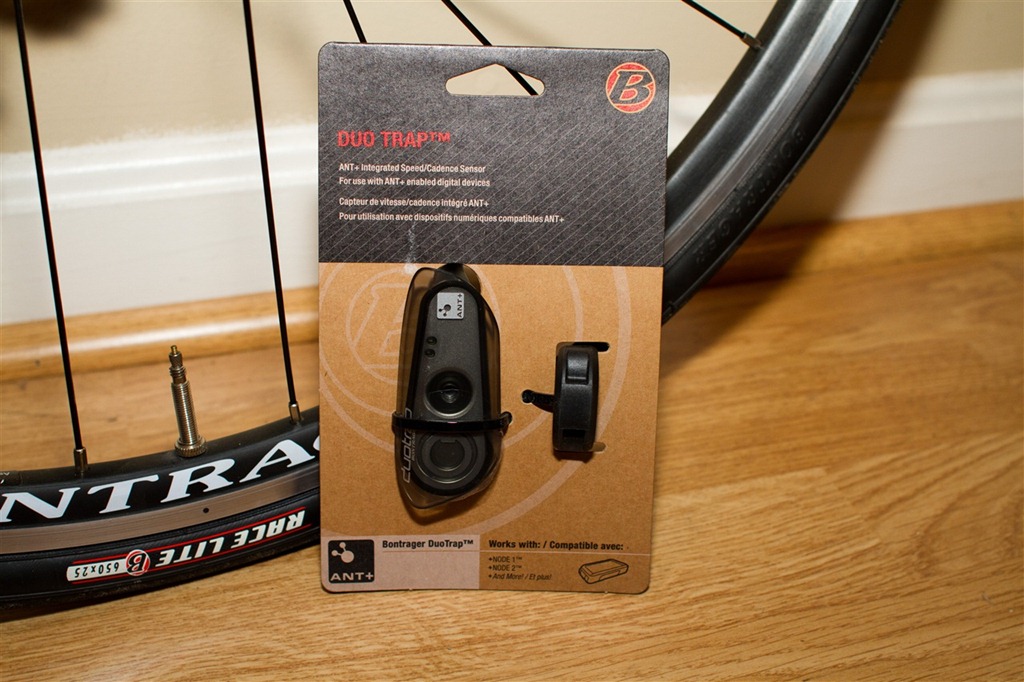
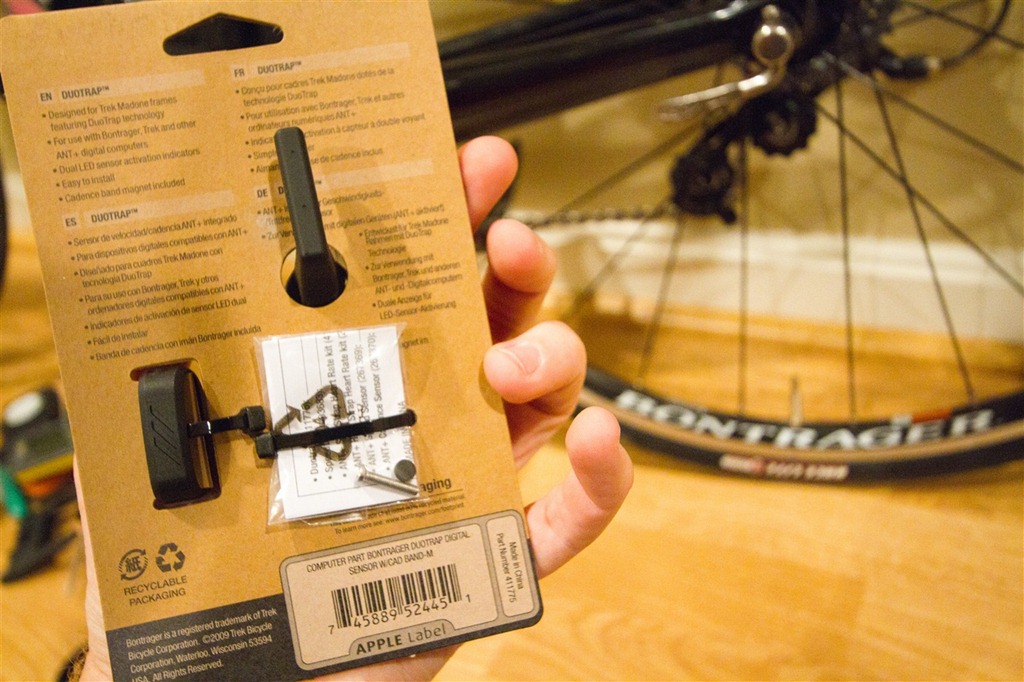
Upon realizing that the bike didn’t come with the kit I went ahead and ordered it – I was probably more eager to play with it myself than The Girl was. But of course if you read here often, you probably figured as such. After ordering it on Trek’s site, it came a few days later. Here’s what it looks like in its package:
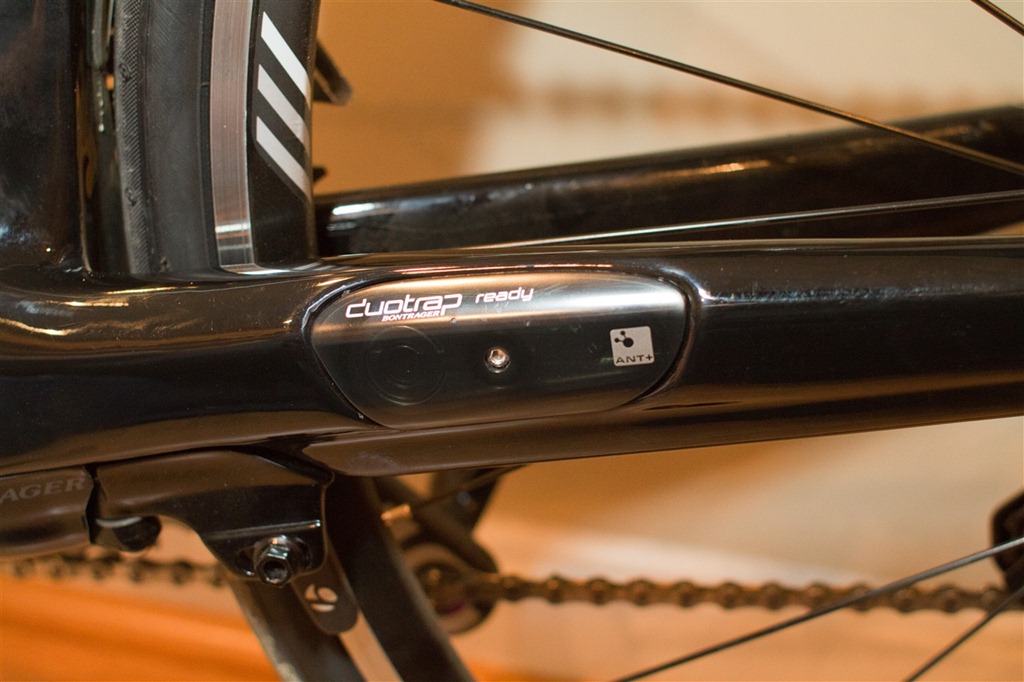
Before we get all started – I should probably show you what’s in the bike prior to installing the above kit. The bike by default comes with a little plastic placeholder kit. From a distance you might assume this is the real deal, but once you get a bit closer your notice the ‘DuoTrap Ready’ wording – indicating the need to buy the actual kit.
Once I was ready to install the real deal I went ahead and got the package all taken apart next to her bike.
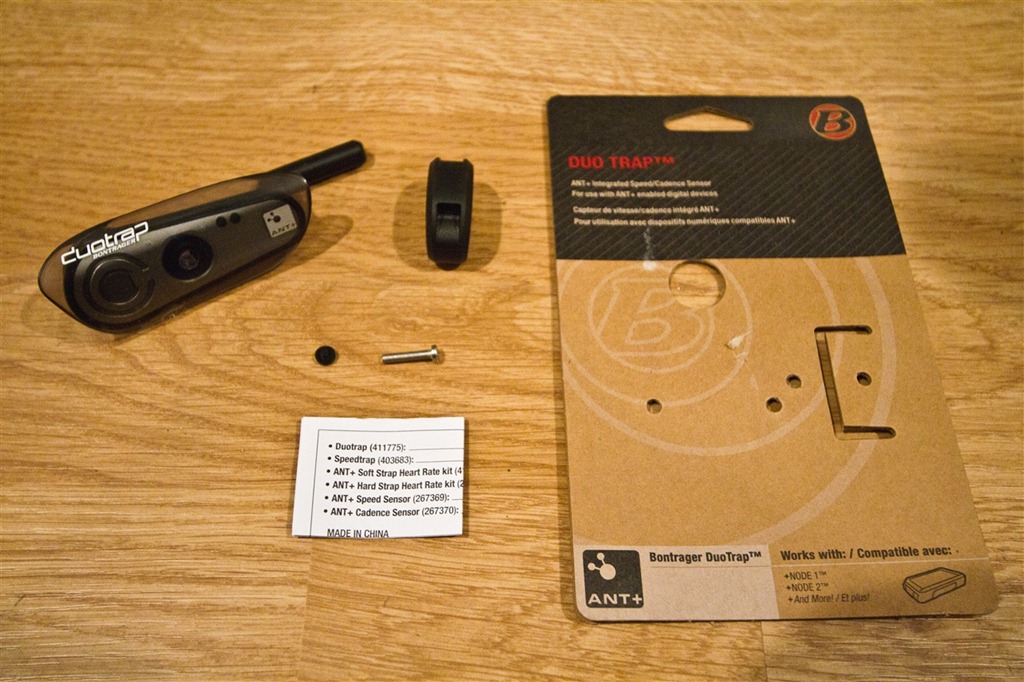
Inside the packaging was the DuoTrap frame sensor, a rubber crank magnet (pretty cool actually), and then a screw and rubber screw cover. In theory it also comes with a small magnet for the wheel (to gather speed), but mine was missing. No worries though, any standard wheel magnet will work – so I just used the one on the wheel from another sensor kit. It’s only a $2 part from a bike store, so I wasn’t about to make a big deal out of trying to get the kit replaced.
And for fun – here’s what the main component looks like up close:
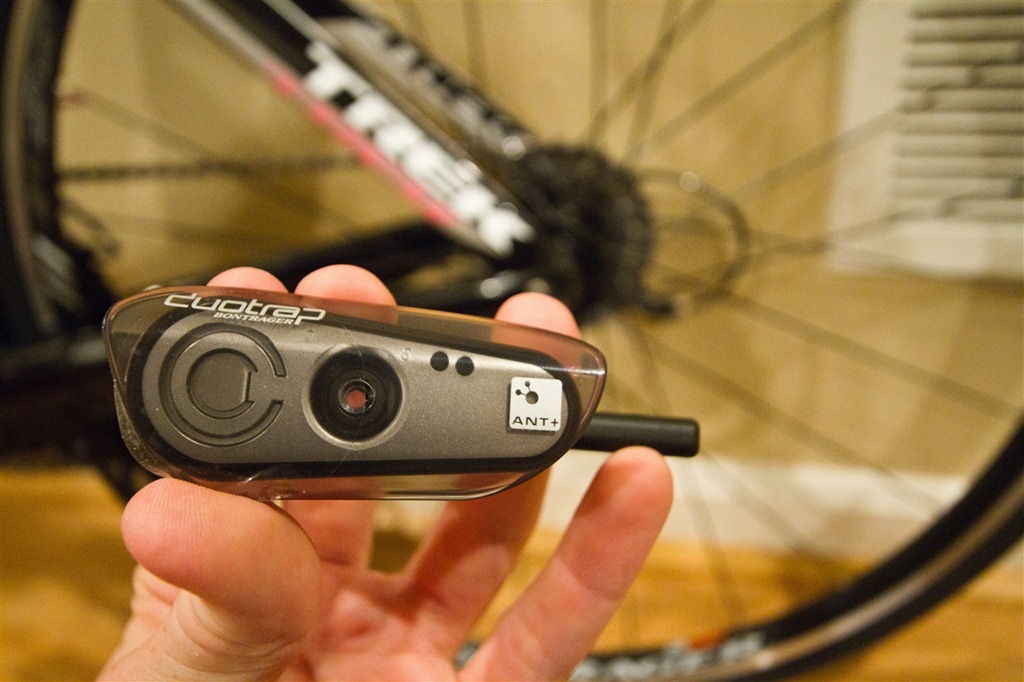
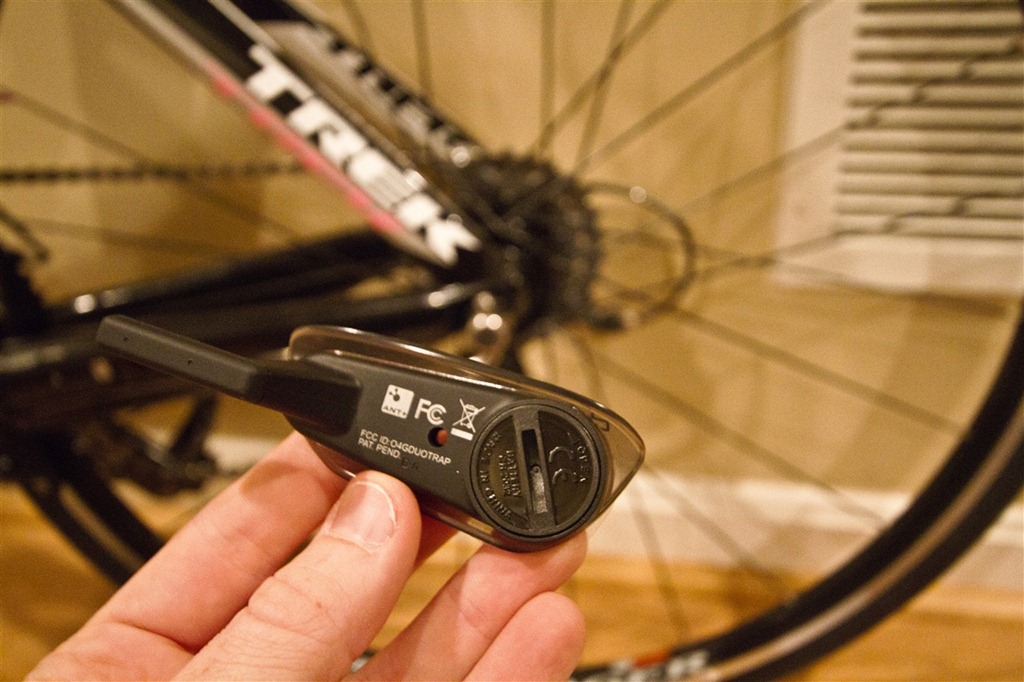
Here’s a general size comparison to the more common GSC-10 speed/cadence sensor:
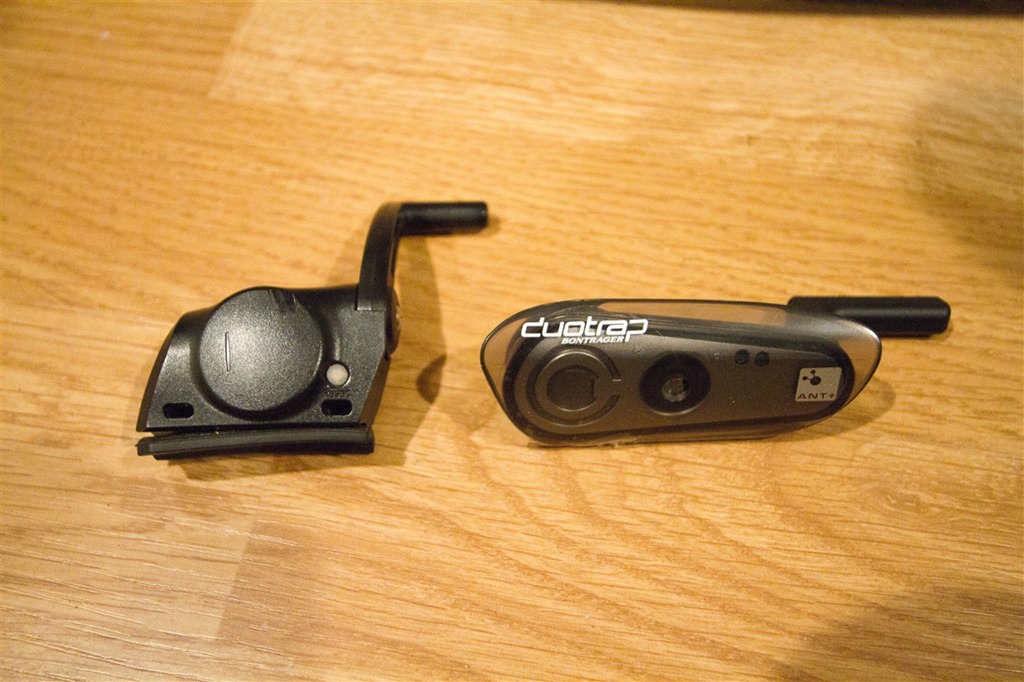
And finally, here’s a comparison between the real and fake one:
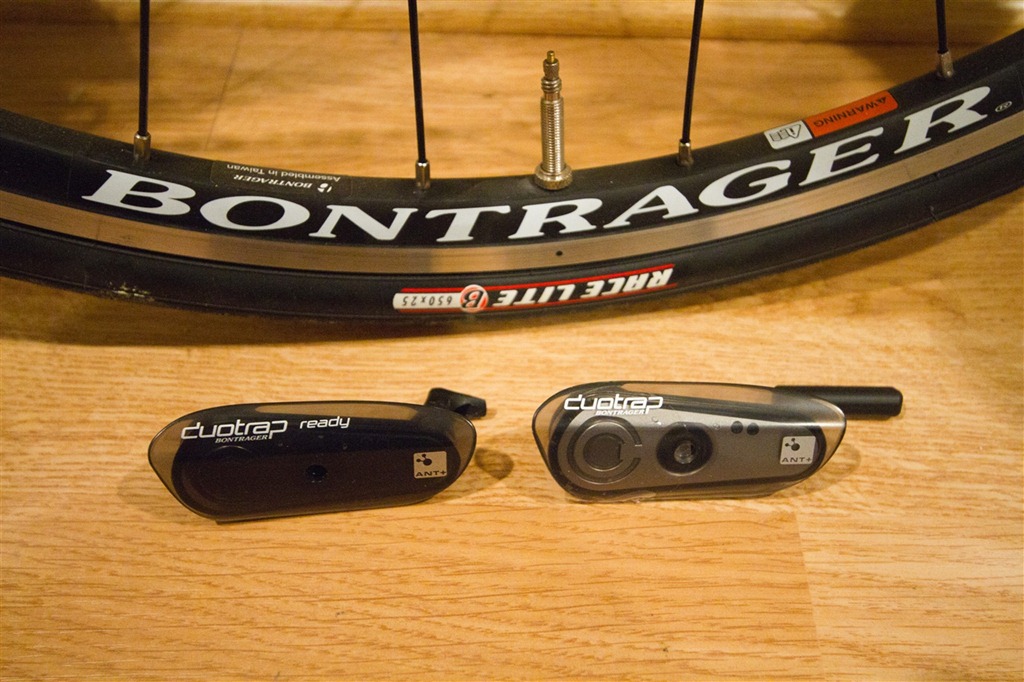
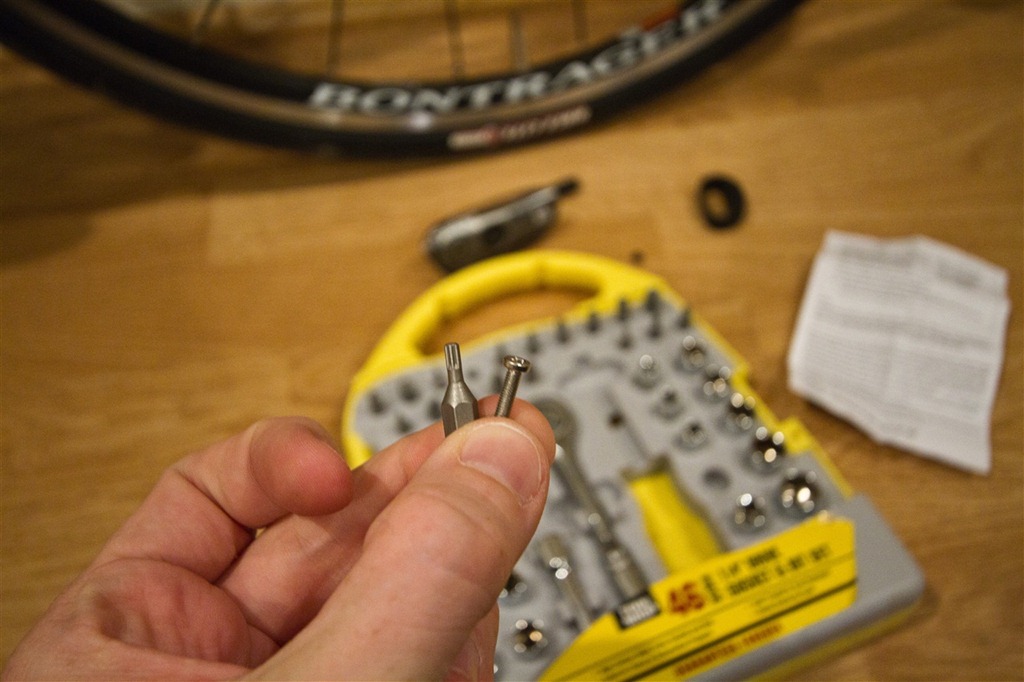
Once I was ready to start I needed to remove the fake plastic DuoTrap. This involves finding the correct hex bit to fit in the tiny screw:
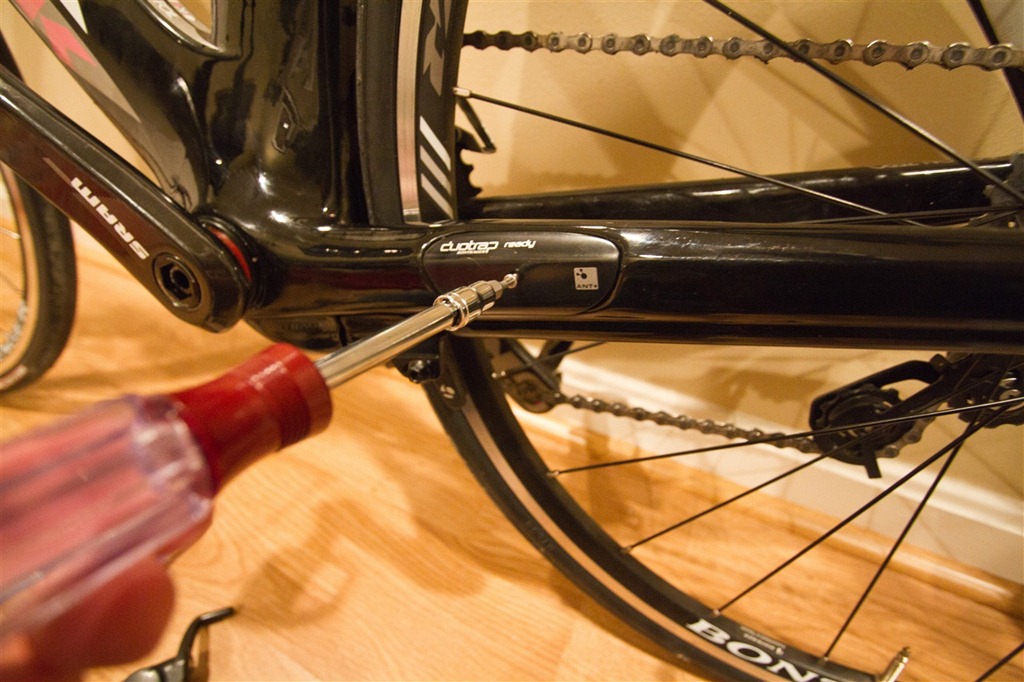
After that’s done you simply unscrew it. Fear not – it only takes one triathlete to unscrew it:
From there you’ll notice that you can actually see through the frame. Like a little window on the world…or rather…the wheel:
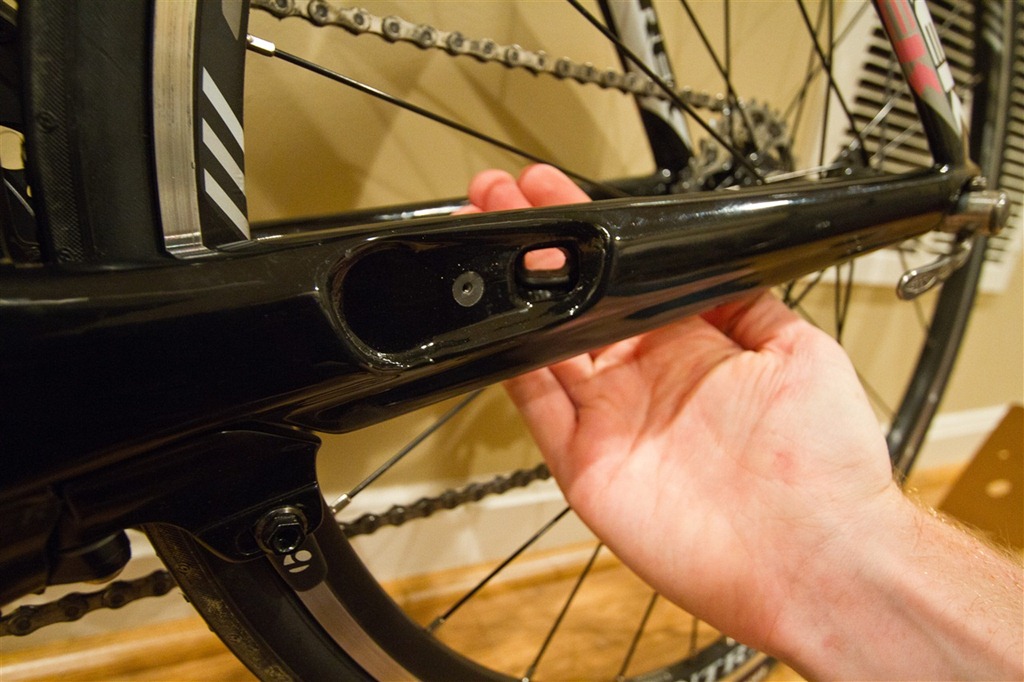
This window allows you to slide the speed sensor portion of the kit through the frame, ultimately putting the magnetic sensor portion close to the wheel magnet:
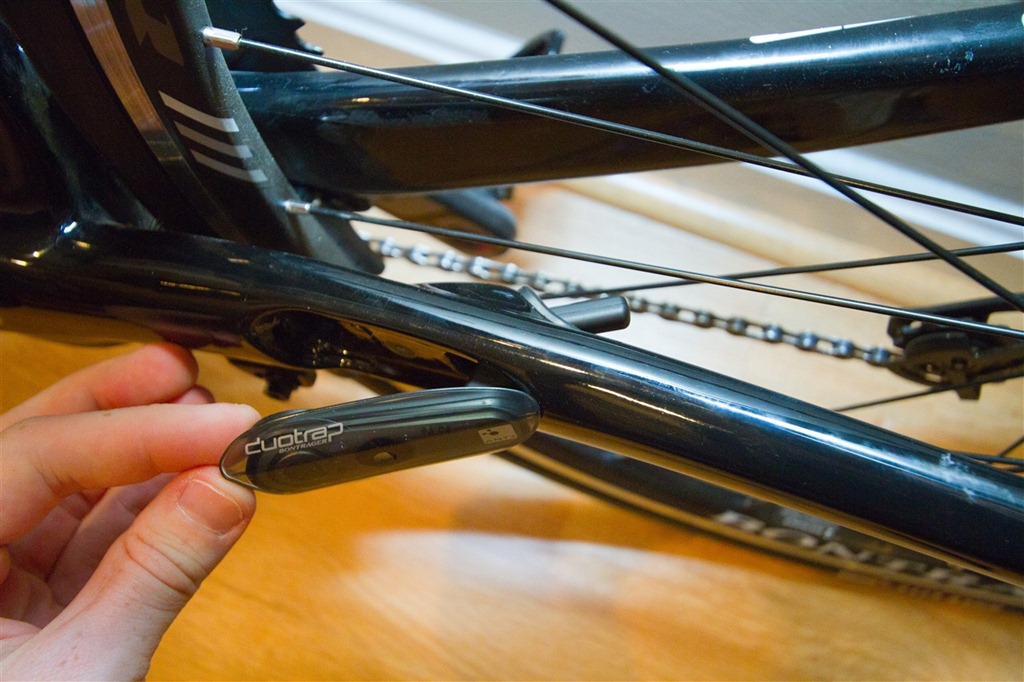
Once you’ve got it slid into the frame, you repeat the same screwdriver process as earlier – this time tightening instead of loosening:
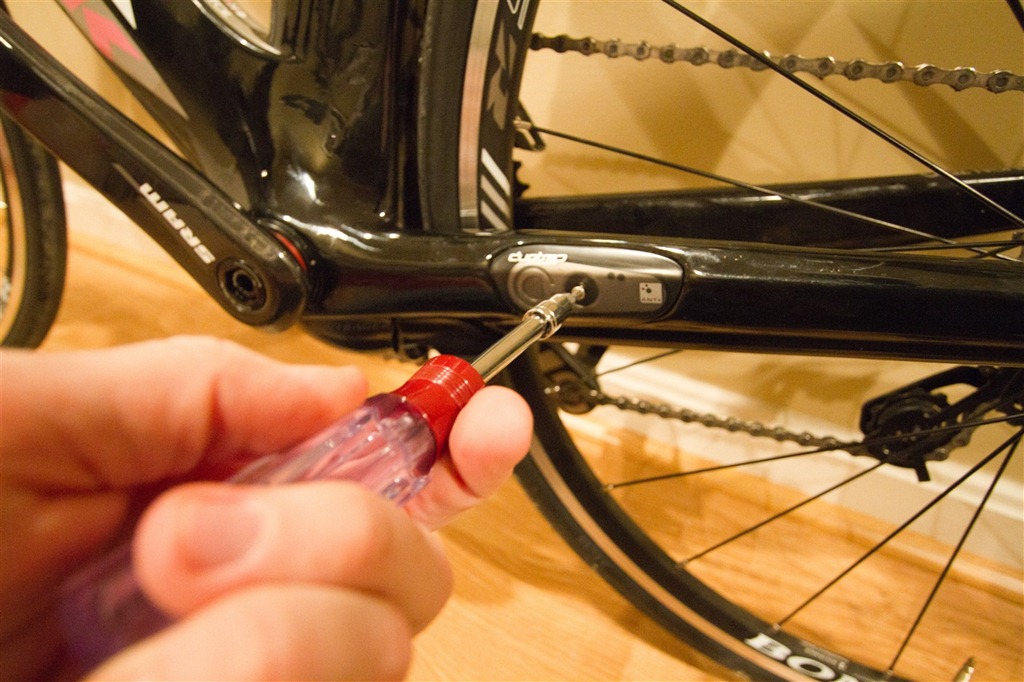
With that, the sensor kit is set. We just need to add your normal spoke magnet onto the wheel. In my case that was all already set (no tools required!), so I moved onto getting the cadence magnet on the crank. However unlike every other cadence magnet ever created on earth – this one doesn’t use zip ties. Nope, it uses a fully integrated rubber band system. Industrial strength rubber though – not like something that rolls up your newspaper.
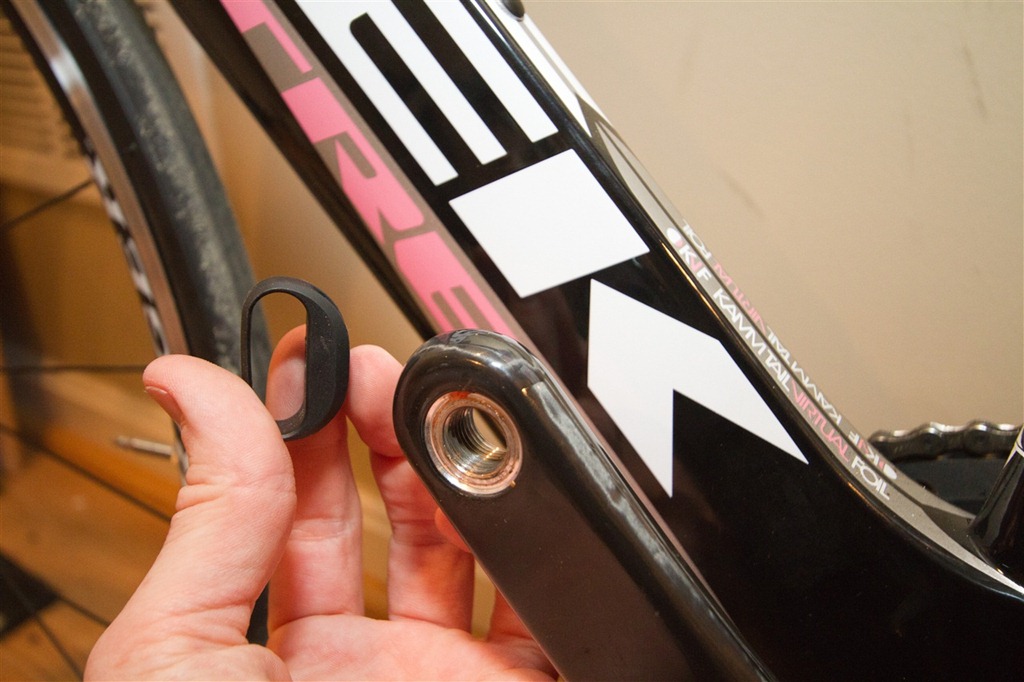
The only tradeoff with not using zip ties is that you’ll have to first remove your pedal though, to be able to slide it over and down the crank:
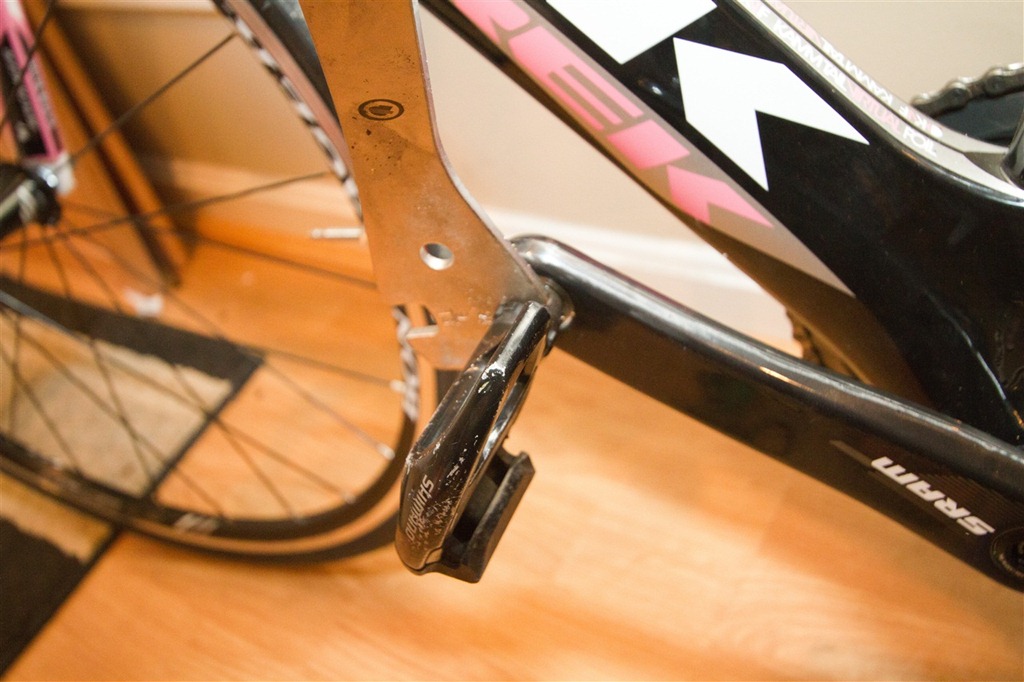
Once you do that, you’ll get your mojo on and push this thing down the crank. It’s an incredibly tight fit – so you don’t have to worry about it sliding around. Again, only one triathlete required…though non-triathlete cyclists may need to find a friend that has arm strength.
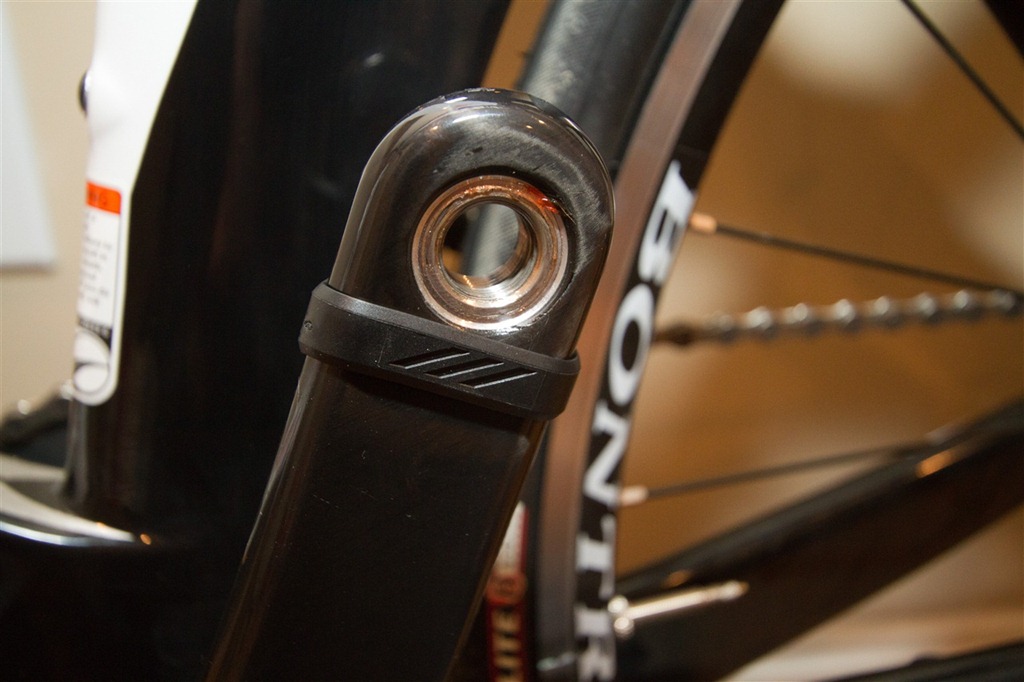
Once that’s on – reattach your pedals and you’re good to go – kit installed!
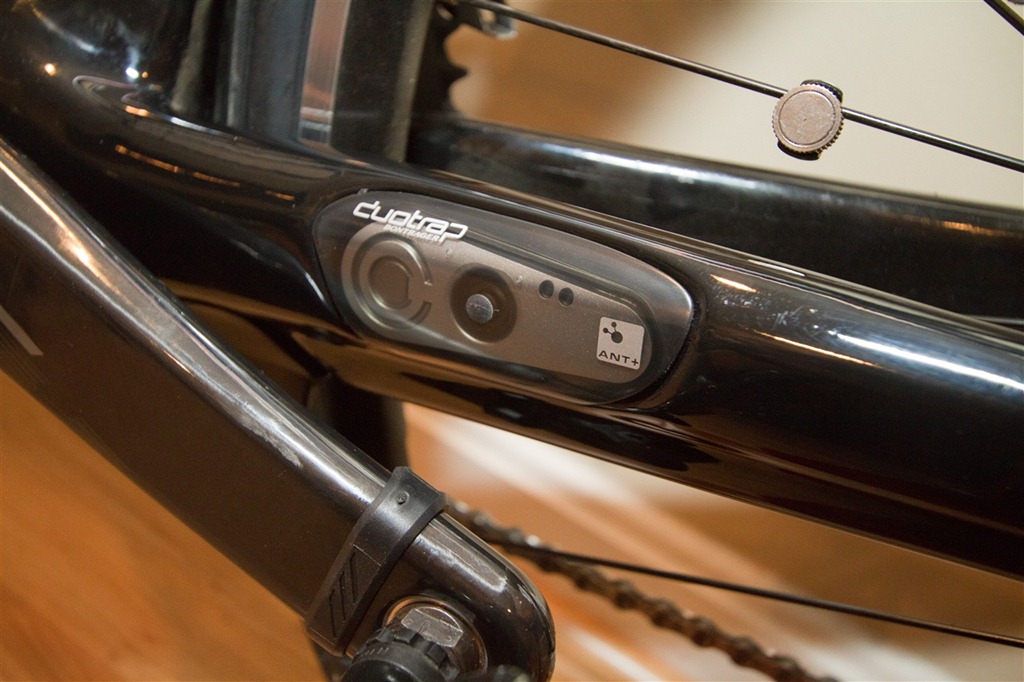
The last step you’ll need to do of course is pair up your ANT+ head unit to the speed/cadence sensor. What’s really cool here is that it uses the standard ANT+ device profile of “Speed/Cadence” – which means EVERY ANT+ cycling focused device out there supports it out of the box (as opposed to some of the newer speed-only and cadence-only ANT+ accessories). Just a few devices off the top of my head that work without issue are:
Garmin: Edge 500/705/800, Forerunner 305/FR310TX/FR405/FR410/FR60
CycleOps: Joule
Timex: Timex Global Trainer
Bontrager: Node 1/Node 2 Computers
Phone: Wahoo Fitness iPhone ANT+ Dongle, Android Sony Ericsson ANT+ enabled phones, Enki Fitness iPhone ANT+ Dongle, Digifit iPhone ANT+ Dongle/Case
(And many more of course, these are just the most common)
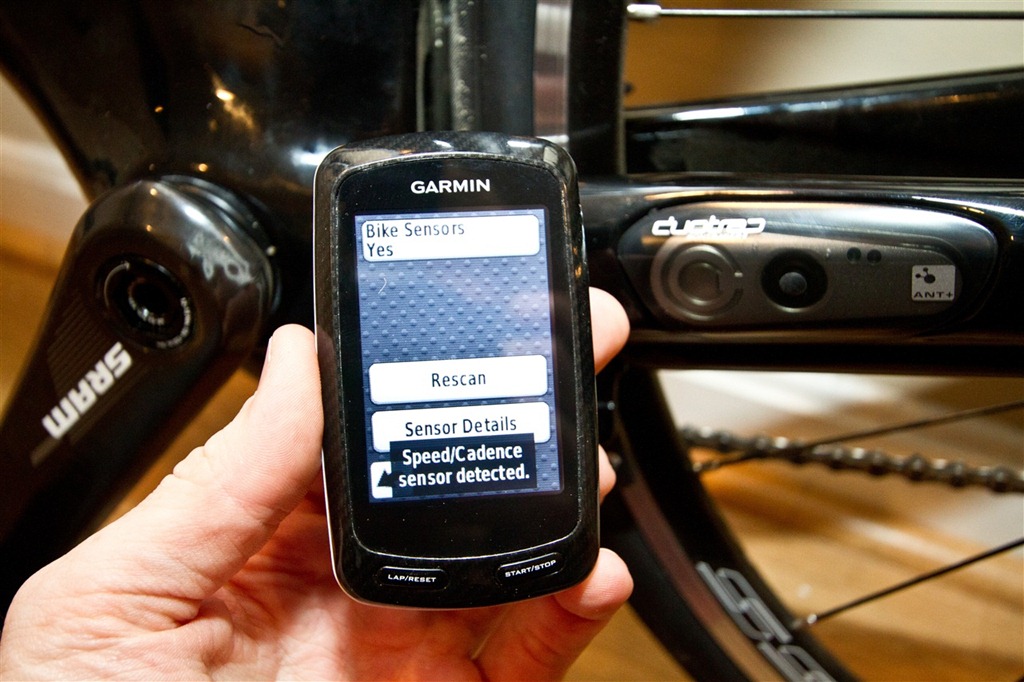
Here’s what it looks like once it’s paired up (using an Edge 800 as an example) – you’ll see the sensor display connected, as well as during normal operation:
Then you simply bike like normal. The speed/cadence information is transmitted wirelessly via ANT+ to your head unit.
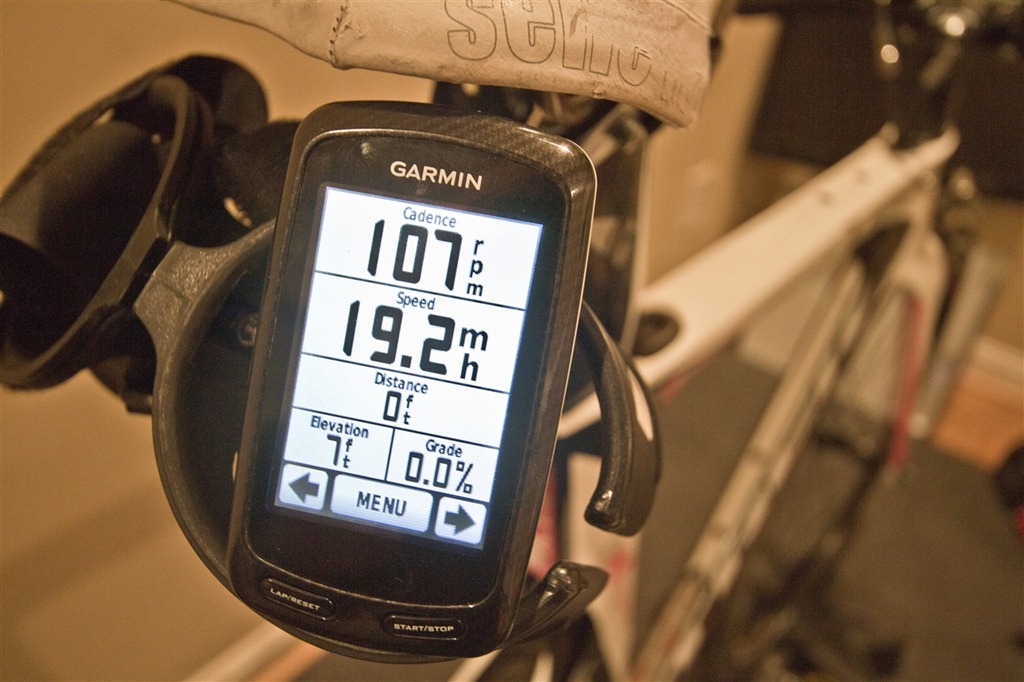
(Normally I’d suggest placing the display near your handlebars, and not the rear cages, but it made for an interesting picture back here. And more importantly – The Girl was away…so I had to crank, watch and shoot all by my lonesome…on a bike small enough for a circus clown).
You’ll want to configure your wheel size on the head unit – thus allowing accurate distance and speed measurements using simple math calculations. Also note that the unit uses a standard coin cell battery, which is replaceable just by removing the DuoTrap and unscrewing the battery compartment.
While overall the DuoTrap is indeed more expensive than the more commonplace Garmin GSC-10 sensor (at $30, compared to the DuoTrap at $60) – I feel that if you’ve got yourself such a nice bike, you might as well pay the little bit extra and have it be fully integrated. Additionally, because there’s no adjustment arms – you don’t have to worry about the occasional never ending re-configuration issues with it moving over time. It just works.
FOUND THIS POST USEFUL? SUPPORT THE SITE!
Hopefully, you found this post useful. The website is really a labor of love, so please consider becoming a DC RAINMAKER Supporter. This gets you an ad-free experience, and access to our (mostly) bi-monthly behind-the-scenes video series of “Shed Talkin’”.
Support DCRainMaker - Shop on Amazon
Otherwise, perhaps consider using the below link if shopping on Amazon. As an Amazon Associate, I earn from qualifying purchases. It doesn’t cost you anything extra, but your purchases help support this website a lot. It could simply be buying toilet paper, or this pizza oven we use and love.

















Nice. I’m getting a speed concept and was wondering about that. I’m sure I’ll end up getting it because….why not?
What has the battery life been like?
I bought and installed my Duotrap in September 2014. The battery lasted until August of 2015,so approximately 11 months, and about 2300 miles.
Actually, the wheel magnet is never included in the set.
currently, TREK site says it comes with wheels magnet (might have changed?)
link to bontrager.com
I just want the cadence magnet!
That’s cool. I’ve got the Garmin GSC-10 and have lost count of the number of times I swore at the thing because it had moved yet again. I’ll wait until that baby is available for affordable bikes, though!
On a completely different note I can’t quite believe you just called your wife-top-be a circus clown!!!
“You’ll want to configure your wheel size on the head unit”.. On the Garmin units I think it computes the wheel size (and hence speed) once you’ve ridden about on it for a bit with a GPS fix.. certainly I’ve never set the wheel size on my 310XT.
Matt.
It does – that’s true, though I generally recommend just simply setting it manually – as it’ll be a touch bit more accurate…and more ‘absolute’.
what did The Girl do with her old tri bike? I am also the size of a circus clown and interested in not spending my life savings on a new tri bike. Let me know if it is for sale and the details. Thanks!
First you call me a squirrel and now you’re calling me a circus clown??? Oh, you’re soooo doing wedding dance lessons now! :)
I have the Madone 6.2 and I love the duotrap. I bought a wheel solely for trainer use and whoops –I forgot the magnet.
are there any problems getting everything lined up say if you were using longer or shorter crank arms, or deeper wheels since the sensor is basically stuck in one location?
The story I was told is that Bontrager provides the magnet with the Node computers instead of the DuoTrap. None of the packages at the store had the magnet in them. This is completely backwards to me, but fortunately Trek/Bontrager was nice enough to mail out a black snap magnet which fits perfectly on the flat spokes of the race lite wheelset.
With regards to battery life, I haven’t had to replace mine in the 9 months I’ve had it.
With 172.5mm cranks, I have about 13/16″ of space between the pedal bolt edge and the edge of the cadence magnet band, so I don’t think there would be much of an issue. I’m not sure about the depth of the rims.
It seems that they have taken note of complaints as I’ve just purchased the kit and it includes the magnet – perhaps we are just lucky here in Australia? Thanks for the great review – am using it to attach mine.
Performance Pedal Wrench, and you bought the Duo-Trap online. Do you ever leave the house to support your local bike shop? (other then to buy the fastest tri bike out there) … Oh, PS … Trek is the ONLY bike brand that currently allows you to have integrated speed/cadence sensors that are ANT+ compatible on the market. Support your local Bike Shops! – Disclaimer: I’m not an employee of Trek or any bike shop. Just a passionate cyclist that supports their local business’s.
Hi Sara-
RE: Her old bike
She’s keeping it…she loves it very much and would be sad to see it leave the family. Sorry!
Anon and others-
RE: Magnet
Completely agree it’s backwards they didn’t include a magnet. Like selling an icemaker with your Microwave instead of the fridge. Thus far the Garmin GSC-10 magnet works, though getting it ‘just right’ was a PITA. I have a magnet from Wahoo that seems far stronger that might be better. Looking forward to seeing how it works long term.
Anon-
RE: LBS
I actually have two pedal wrenches – one from Performance and a nicer one from an LBS. Prefer the LBS, but it took me 25 minutes for some reason to find either, so I wasn’t going to waste any more time trying to find my nice one.
The bike itself was bought from a LBS here in the DC area.
Thanks all!
Does it get in the way of the computrainer cadence sensor? I’m looking to get cadence sensors for my wife’s and my Quintanaroos, but I’m not sure where they would go not to interfere with the computrainer sensor.
Thanks!
What area on the DuoTrap is the cadence magnet supposed to line up with? Through some trial and error it seems like it should go inline with either of the tiny dots that are above and to either side of the mounting screw. It seems like you line it up with either dot – but NOT centered between the dots. Anyone know for sure??
Couple things I can add
I have a Madone 6.5 and a Speedconcept 7.2. Both have duotrap.TTYe cadence sensor should line up with the large circle on the sensor. Also an FYI for anyone who was wondering about a really deep dish wheel and duotrap. I’m running a zipp 1080 rear wheel, ya have to have the magnet all the way down near the spoke nipple, but it works great, no magnet issue.
Bryan
I would like to use my Garm Edge 705 with DuoTrap but is there any way to have a running odometer reading for my bike?
Within the bike settings there’s an odometer field (on the Edge 705) that you can both set an initial value and track future mileage.
I wish I had found this site before I installed mine. The spoke magnet does NOT come with the kit. You would THINK they would throw in a $2 magnet for the $60 you spend. The spoke magnet obviously lines up with the little blade. The cadence magnet LOOKS like it would line up with the big “C” on the unit (for Cadence?) but it doesn’t; that is where the battery is. I spent one ride thinking it was my Garmin not sensing. No: the magnet was over the “C” and not picking up. Move it towards the pedal until the green light flashes when it goes by. It was a pretty small area AFT of the “C”, between that and the round black area for the screw. At least on mine. The red light flashes when the spoke magnet goes by. It is now in sync with my Garmin 305. Looks very slick. I LOVE the crank magnet band. Others should follow suit. More as I use the unit.
just bought the trek speed concept, and im so glad you have a post on this because i am about to buy the duotrap stuff!
ray, do you know if the duo trap is compatible with a garmin forerunner?
Yes, fully compatible with all Garmin Forerunner and Edge devices (it uses the same ANT+ device profile as the Garmin GSC-10 – so it looks identical to it).
Enjoy!
I have a speed concept. I’m running zipp 1080’s on the back. I had a heck of a time syncing the wheel magnet due to the depth of the rim. I had to rig something that extended the magnet laterally so it was closer to the magnet. Anyone have suggestions on a magnet that would work?
Nice writeup. For NormG, re:moving the magnet laterally. You can get rare earth magnets from many places, and just ‘stack’ an extra one on top to get closer to the frame. They are so strong, no worries about one flying off. I got some extras at Rockler Woodworking for other projects.
One other note. To get the cadence magnet to work, it’s gotta be between the “c” and the screw.
I took my to my local bike shop to get it all installed since I hadn’t read this site yet. I am really surprised at the crappy piece of plastic spoke magnet that bontrager throws in there. For a $140 computer, give me something that doesn’t look like it will fly off within 1 week. The plastic magnet didn’t even work that well, it had to be angled, like that will work. The shop tech put on a new magnet, something more industrial that sticks out a lot more and get’s read every time. I suggest finding one and picking it up, it looked similar to this: link to ebike.org.uk
FYI, it seems Giant now has a (somewhat) integrated speed/cadence sensor in some of their new 2012 frames as well, dubbed RideSense.
I have a 2012 Giant Defy Advance 1 with RideSense by Garmin. The unit came as part of the bike, no charge. I’ve had the bike since early september and now have about 1,400 miles on it. Yesterday my RideSense crapped out on me. This is not new to me. I had the standard issue Garmin GCS-10 on my previous bike and I went through 5 seners in two years and 10,000 miles.
The problem, as I have determined it, is the sensors might be modestly water resistant, but are by no means waterproof. I live about 30 mile south of Seattle, so I bike in pretty wet conditions.
When I popped open the battery door there was a tiny bit of water on the battery. I’m pretty sure water got inside and shorted the cicuitry and drained the battery. I put in a new battery, but it lasted about 30 seconds before it shorted. I’ll put a drop of isopropel alchol in there and let it dry out for a day or two and see if the circuit is totally fried. If yes, I’ll put it with the CSC-10s and order a new RideSense from Garmin. If it’s not, I’ll use some clear silicon in an attempt to seal it and have another whack at it.
Giant Defy guy here. I thought you may be interested in my follow up to the broken RideSense sensor.
First, I don’t know who makes it and neither does my LBS. Second, it is, indeed, broken. Most likely because of water intrusion. My LBS (Tacoma Bike, Tacoma, WA) gladly replaced the broken one without hesitation.
I’m going to smear silcon seal all over the new one and hope for the best.
Does anyone know what size battery the duotrap uses? I think mine is getting low becuase I am not getting a reading on the speed sensor but I am getting a reading on the cadence sensor. I can’t get the magnet to even get a light to go off on the speed sensor.
Great article – thanks!
I have a 2011 Trek Madone 5.2 and am planning to install the Duotrap sensor.
I understand that Wahoo (and maybe other people) now sell a ANT+ antenna for the iPhone.
Question: is anybody using this setup with an iPhone app? If so, which one?
I’d be very interested in viewing my bike data via a Iphone-based GPS app.
Thanks,
SM
I just purchased a Trek FS 7.3 WSD and M considering purchasing the duotrap S. I currently use “Map My Ride” on my iPhone and I love it. I’ve used it for about two years. It runs my phone battery pretty quickly but am told that the Duotrap S will use considerable less battery.
The Duotrap uses a 2032, which could be a CR 2032 or a DL 2032 depending on the mfg. I also had trouble with the duotrap losing pairing, and changed the battery. The problem has continued. To give more background, and address another question, I am using my Duotrap with the Wahoo iPhone bike mount, and then Cyclemeter is the iPhone app I use. If this set up works properly i highly recommend it. But, I m having problems with the pairing. that is, the setup works for a while and then the connection is lost. The last two rides the connection dropped after 7 minutes! i could not get it to pair back up. Am going to check the battery again. The biggest challenge is to figure out what is causing the problem, the duotrap or the Wahoo receiving case.
I have the Speedtrap (front fork, speed only) on my Madone 3.1 and was amazed that it worked perfectly with about a 2cm gap rather than the normal 2-3mm on most computers. It is also clicks each time the wheel passes. Am using a Bryton GPS cadence sensor on the back and a Bryton HR sensor and they work perfectly with the Node 1 computer.
I read online (here: link to store.trekbikes.com ) that Madones need the extra spacer piece. I have a 2013 Madone 3.1 which hopefully isn’t much different than yours. Did you need the spacer?
This is all really useful stuff as I am just about to purchase a speed concept 7.5.
I intend on still using my road bike with my Garmin Cadence sensor. Can I use my Forerunner on both bikes or does it have to be specific to one sensor?
Yup, just create a new bike profile for the second profile and you’ll be good to go!
Great write up. I just ordered my daughter’s bike from the local Trek dealer and was wondering how the Duo Trap worked.
Thanks!!!
This comment has been removed by the author.
Do both lights illuminate (red/green) – meaning, does the wheel magnet passing the sensor cause the light to illuminate?
In case if one decided to switch from Trek to a different brand, how feasible is it to ‘jimmy-rigging’ the duotrap to fit another bike??
Unfortunately not. Well, not without a lot of duct tape. The challenge is that it’s designed to sit in that little well, and without it, it would just be hanging around. Yes, no doubt, in a pinch you could make it work – but I’m guessing eventually it would fall off, fly into the spokes, and blow up into a million little pieces.
many thanks for the tutorial about the fitting of the duotrap, I was just wondering how it was fitted on my bike a madone 5.2 , it is an expensive kit, since I bought the node 1, then the heart band, and I am still waiting for the sensors , they are out of stock when I bought the bike.
Excellent tutorial. I just purchased the sensor and the Bontrager computer and thought that I had lost my mind when I could not find the wheel magnet. The LOCAL store did not inform me that I had to buy one which tells me that they had no idea that it was not included. I am also peaved that the unit does not include a user manual, which I found online.
Hi DC loving the posts and hope Paris is going well.
I’ve got a duotrap and using it in conjunction with a Garmin 910xt. The cadence is being recorded just fine but the speed isn’t (link to connect.garmin.com) and I’m only getting the one light on the duotrap.
Would you say this is faulty or would am I missing a magnet? (I have this one link to lh4.ggpht.com)
Regards,
Rob
Hmm, it definitely sounds like a magnet is missing/not close enough. You did install a magnet on the wheel – right?
If so, grab a fridge magnet (or any other magnet), and swipe it past the back side (nearest the wheel) and see if you can get it to light up. If you can’t (but the front side (cadence) does), then something’s amiss. But if both sides lightup with kitchen magnet, you just need to get a bigger/stronger/better magnet for the wheel (unless it fell off – in which case you’d just need a magnet).
Enjoy!
Joel said…
What area on the DuoTrap is the cadence magnet supposed to line up with? Through some trial and error it seems like it should go inline with either of the tiny dots that are above and to either side of the mounting screw. It seems like you line it up with either dot – but NOT centered between the dots. Anyone know for sure??
March 30, 2011 2:24 PM
Rumpole said…
One other note. To get the cadence magnet to work, it’s gotta be between the “c” and the screw.
September 23, 2011 9:27 PM
I appreciate Rumpole response, but am not sure… I second Joel’s question–where EXACTLY is the cadence sensor? Thank you for your time, Rainmaker!!! :)
i just installed my duo trap for use with my garmin 500. mine did come with a magnet, so i guess they’ve made that change.
something i didn’t see on yours was… on my frame (domane) there was a rubber stopper/plug that was placed on the inside of the frame from factory. so, in short, it was there with the ‘fake’ sensor.
when placing the actual unit in there i couldn’t get it through the hole without removing the rubber piece. is this correct?
figured it was nice to have to stop water, buildup, etc.
thanks in advance.
I just bought the Timex Ironman Global Trainer GPS watch with HR monitor and I’m having a hell of time getting it to pair with my DuoTrap.
Any suggestions on getting it to pair? I get lights on the DuoTrap, but the Timex scans and then nothing. No speed. No cadence.
Just had the DuoTrap installed on my Madone. I use a Garmin Edge 500. The Garmin recognizes the Cadence Sensor, but will not display any RPM’s on the Garmin. This has been a common issue with other riders in my cycle group. Do you know if this is a battery issue with the DuoTrap or a connection issue with Garmin. Thanks, James
I know this sounds like a silly question – but did you install the magnet on the wheel?
I only ask because more often than not when I hear of Duotrap speed issues, the magnet was never installed on the spoke.
Do you know how to calibrate the speed using the timex global trainer? It always shows me traveling around 22kph when I am pretty sure I am going at high 20+kph or even 30kph. In fact, is the speed shown based on the GPS or speed sensor?
My Friend, I’m getting upset with the Bontrager NODE 1.1 display and the duotrap sensor. This is my situation:
Pairing Sensors…
Sensors found 2.
But then…..just the distance, no speed, no cadence.
And of course I’ve installed the magnet for the speed and the rubber strap on the crank for the cadence.
Ideas are welcome.
? by the way, what does it mean the red/green light on the duotrap? They should be always on, just blinking or what?
After purchasing my trek the shop fitted the cadance and set up my edge as part of the service all works perfect…until I put the bike on the cycle ops trainer and realised there was no speed readout, no magnet fitted to the wheel! So I fitted one and it was perfect again, I think?
How do I set the wheel size, do I need to?
I am getting speeds and distance reading but how close to actual I don’t know?
Great kit though and great report!
Thanks guys
You’ll configure it within your Edge unit under bike profiles. Or, if you go outside, after riding about 1/3rd of a mile, it’ll pop-up and say ‘auto configured by GPS’.
Has anyone tried paring with a Garmin Oregon 450 (or any other model of Oregon gps)?
What is your experience with pairing and whether it reports cdence and speed.
The Garmin Oregon 450 will only report cadence, not speed. But it will indeed pair with the Duotrap, since it’s just a GSC-10 in effect.
Detail about cadence-only:
link to buy.garmin.com
RE: Garmin 305 Compatibility- Rainmaker you list that the sensor is compatible with the Forerunner 305. I don’t think the 305 is ANT+. My GSC-10 sensor is dead and I wanted to upgrade to the Duo. Are you saying that the 305 will pick up the cadence/speed via whatever non ANT+ frequency the 305 receives?
This would be sleek.
The FR305 is absolutely ANT+. It won’t connect to any other sensor type besides ANT+. You can see pictures of the FR305 with the GSC-10 in that review.
Bought a Garmin Edge 510, added a Duotrap, I get speed but not cadence, peddled by hand for awhile but it didn’t pick up. I installed the crank magnet just as you show. Any suggestions?
Does the light blink when it goes around? If not, then remove the magnet and pass it right in front of the sensor. If it still doesn’t blink – then something is wrong with the sensor. If it does blink, then it’s a positioning/distance issue.
Thanks for the reply. I have the bike mounted in my trainer. When I moved the crank magnet further away from the pedal and I finally saw the green light blink, red blinks for the speed magnet. Unfortunately even with the 510 still showing me the speed cadence sensor was found, when I pedaled the bike by hand it still only registered speed, not cadence. I will continue to toy with it, hoping this isn’t just a case of operator error.
Once again, I appreciate your expertise. In the end, my problem got solved by resetting the 510, moving the crank magnet then pairing the duo trap speed cadence sensor. Then wahhlah! It works! Thanks again.
Thanks a million for providing this information on how to set it up. The instructions the duotrap came with were not very clear and you made the process simple. Thanks. I am using it on Trek Domane 4.5 and with a Bryton Rider 50.
Hi Andrew
I also have the Bontrager unit on a Trek Madone 4.5. I had used it successfully with a Garmin Forerunner 405 but recently bought a Bryton Rider50. The unit pairs with the Bontrager speed/cadence sensor and my Garmin HRM strap, but when I go out for a ride it:
1. does not record distance or speed,
2. does not record ride time.
This renders it virtually useless. I have been too and fro with the Bryton customer support but am not making any headway. Have you experienced any similar issues or had to do anything in particular to set it up?
Any help would be very much appreciated.
John
I am wondering of Bontrager has any near future plan to make a duotrap Bluetooth 4 compatible. Any info anybody?
I haven’t heard anything there, though eventually I’d expect to see something.
Another vote for a duo trap Bluetooth 4 speed/cadence sensor – my Wahoo Bluetooth 4.0 speed/cadence sensor physically will not fit on my domane 4 because it’s designed for duo trap :(
I’m picking up my trek 5.2 C next week and planning on buying the duo trap. Just want to keep it simple and pair it with the Bontrager Node 1.1. Have there been any problems with that combo.
Will this work with the Suunto Ambit2 and have you tried it yet?
Yes, no problems with Ambit1 or Ambit2.
I’ve been running my DuoTrap without the spoke magnet and simply getting my speed readings from my Edge 500. Is this an acceptable setup or would you recommend using the spoke magnet? If so, how does the Edge know whether it should use the GPS or the spoke magnet for speed?
The Edge will use the wheel spoke for display of speed assuming the speed is greater than zero, but actual recorded speed will always come from GPS unless GPS is off.
Was ab/e to figure out how to get the sensor out and replace the battery. Thanks for the post!
Will the Duptrap work with the Garmin 610?
Yes, no problems there.
hey ray…i cannot for the life of me find which hex bit fits into the screw…no clue how i was able to screw this sucker in and now i need to change the battery and ive been through all my tools and cant find one that fits…any help?
I was hoping to be able to help ya here, but I can’t actually figure out where on earth my gigantic hex set went to. :-/
haha, thanks for checking! i am at my wits end trying to get this damn thing off. will try all the tools again tomorrow before embarassing myself by bringing it to my LBS.
Kim, the hex bit required to remove the Duo Trap is 2.5mm. I bought one of those nifty compact tool things today which folds up really small and it has hex bits down to 2.0mm. Did you get the little instruction sheet with your Duo Trap as its tells you its 2.5mm.
I bought my Duo Trap today, ready for when my Edge 810 arrives tomorrow (hopefully), and have been puzzling over how to get it going for several hours. Thanks to the comments here I think I have it sussed. I can’t believe the instructions that come with it are so inadequate, it’s like we have to be detectives to work it all out.
I conclude that the crank and spoke magnets can be lined up at either of the two dots that are located on the cadence and speed sensors respectively, but not at any other position. This, I think, is a way of providing two different distance settings between the magnet and sensor. My crank is on an angle relative to the Duo Trap so the magnet has a different separation from the sensor at each of the two dot positions. The instructions say that the distance has to be between 3 and 5 mm. I am a bit worried that I can’t get mine any closer than 5mm which is right on the limit. I am wondering why the distance is not closer as should the Duo Trap not be perfectly designed for my Trek Modane 4.5.? The spoke magnet is also 5mm away. Like other people I spent some time with the magnets positioned between the dots before catching on. Despite the 5mm separation it seems to be working, the LED’s flash ok. I have found that I have to wait for about 15min before the LED’s reset after they have flashed 10 times. You can still check the sensors are picking up the magnets though without the LED’s by listening for a clicking sound. My Duo Trap came with an ‘Aero Wheel Magnet’ because it is Part 426618. Part 411775 (which Ray fitting to the girls bike) does not come with a magnet. From what I can tell, this is the only difference between the two Duo Traps. My Duo Trap also came with a Sony battery. I do have one question, does the ‘aero’ in aero wheel refer to the type of wheel or does it refer to the aerodynamics of the magnet. Anyway, as people have said, it does not look all that powerful (with respect to magnet field strength) so it may be a candidate for replacement. Finally I thought it was quite funny that my instruction sheet, even though it lacks all the important detail, specified a maximum torque of 2 Nm when tightening the little hex screw. As if anyone is going to measure that.
I hope this info can be of help to anyone. I am grateful for the help I have got from everyone else’s comments.
Thanks DCRainmaker – your post/comments/replies helped me fix my missing cadence issue.
For those who asked, I just found that my cadence picks up when it is over the dot to the aft of the screw. My cadence had stopped picking up b/c my magnet had slipped up my crank arm so it sat right over the duotrap securing screw (and thus between the two dots).
Incidentally, I guess my LBS wasn’t very careful during installation b/c I noticed that my rubber band has a cut running about half way across the width of the band. Here’s hoping that tear doesn’t spread. Wonder if this is why my magnet moved? Suspect I may have bumped it with my foot or something because it was working, then stopped during a ride (single leg drills with lots of clipping/unclipping). Ride on!
Great article as usual – thanks. One thing. I have a “no glue, no cable tie” crank magnet that just sticks to the end of the pedal shaft. It works great with the Garmin GSC 10 cadence sensor and is really tidy. However, I guess it won’t work with the Duo trap as the sensor can not be moved to line up with the magnet. (you have to move the magnet to line up with the sensor). Please tell me I am wrong!
Unfortunately it won’t work, you’ll need to use the included magnet (or, a different magnet that can align to the sensor).
Hi again – actually my magnet attached to pedal shaft works perfectly. The magnet is very strong, so sensor picks it up. John
Does anyone have experience with 80mm rims – where did you mount the magnet?
My training/ ride friend and me both have these gadgets installed. My friend has a duotrap, a heart rate monitor and a node 2.1, while i only have a bike that fits the speedtrap and a node 1.1. The weird thing is that when we ride together my node picks up his sensors, but his 2.1 does not seem to have that problem. And yes it is a fact! i dont have a cadence or a heart rate sensor but i still get 3 sensors and all the info when we are out riding together! is there any way to lock my node to my lonely speedtrap sensor? I really have no need to keep tabs on my friends heart rate. BTW it seems like his speed sensor wins over mine as well. If we ride together i get a speed reading together with the heart rate and cadence but if we have some distance between us i loose all sensors and have to pair my sensor to the node again to get a signal. annoying but true
After reading this page and yearning for the duo trap, I FINALLY splurged and purchased it with the Node 1.1 for my Trek Domane 4.5. After installing, only the speed sensor worked. Brought it to my LBS and they added an earth magnet to the pedal sensor and it works great! Thanks for your great reviews and website!!
Does the Trek/Bontrager frame integrated DuoTrap ANT+ Speed/Cadence Sensor work with my new Garmin Forerunner 910XT?
Did you get an answer on the compatibility of the Garmin 910xt to the Bontrager Duo Trap. Am putting them on my new Speed Concept, P1. Just awaiting arrival of the 910 mount for the aero bar assembly, it is a specific application. I’m told that TREK and Garmin are working together on this so it should perform like a champ. Any feedback is appreciated.
Yes, it works just fine with the FR910XT. My wife has one, no issues.
I can verify the duotrap works with the Wahoo RFLKT+. I can also confirm that the Bontrager folks don’t include a CR2032 battery with a duotrap — pretty much unlike every other device using that battery I’ve ever bought. So make sure you pick one up before you head home!
And if you Trek people are reading this, at least put a bloody sticker on the box. Either “In order to ensure freshness, please buy a CR2032 along with this sensor” or maybe just “Requires CR2032 battery, not included.”
My DuoTrap came w a battery (with pull tab to engage it). Maybe they’re packaging them differently now?
Hi,
I have Trek Madone 4.5 with Bontrager DuoTrap but I have lost crank magnet.
Unfortunately I can’t buy original (411776) 10mm Crank Cadence Band Magnet DuoTrap Sensor Black anywhere in Poland so here comes my question.
Does anyone know if crank magnet from GSC10 (link below) will work with DualTrap + Garmin 305?
link to buy.garmin.com
Thanks for help in advance!
Best regards,
Wiktor
Yes, it will. They’re all interchangeable.
Sorry to reply to this old report/forum – could you confirm that a normal (garmin) pedal magnet should work with the duo-trap?
Thanks
Yup, it would.
DCR,
Thanks for your in-depth reviews. I have a question though regarding Garmin Forerunner watches and the DuoTrap/ANT+ technology:
I ride a Madone 4.5 with the DuoTrap set up, which sends the readings to my Node 1.1 speedometer that I use. I’m considering buying a FR310 (obviously ANT+ compatible), which I will also run off of the same DuoTrap ANT+ sensor (I want the Node 1.1 to be my normal “during ride” speedometer, giving me speed and cadence as I ride, but I want the FR310 to pick up the speed & cadence so that after my ride I can look at the data on Garmin-Connect, thus being able to incorporate together cadence, bike speed, heart rate, etc.)
So here is my 1st big question: **Can I run both my Bontrager Node 1.1 speedometer AND my Garmin 310XT at the same time, off of the same ANT+ sensor (my DuoTrap)?** Or will having 2 computers (speedometer and watch) picking up the same ANT+ sensor be problematic?
Hopefully this question makes sense! Thanks so much!
Yes, ANT+ sensors can multi-stream to multiple head units without issue.
i am using the duotrap speed/cadence sensor with my garmin 810 and have no problems when i ride outside. however, when using the trainer, the garmin will only register my cadence information – not my speed or distance. my husband, who uses a garmin 810 with the garmin speed/cadence sensor is able to get cadence, speed, and distance while riding his trainer.
the garmin says that the speed/cadence sensor is detected – why am i unable to get more data?
thanks for your help!
I believe there is a setting to choose between GPS and the speed sensor as the source for speed data. Also make sure your wheel magnet is positioned correctly.
I have an Edge 200, and I question the accuracy of the distance measurements and the resulting average speed calculations. Unfortunately I am an engineer, so of course this bothers me to the nth degree. Does anybody have any idea as to a percentage accuracy (say +/- 2% for instance) for distance/avg speed measurements for an Edge 200? I spoke to a dealer about this and he told me he went to a duo trap primarily for the purpose of getting more accurate and consistent distance/avg speed figures. To do this, I would first need to upgrade to an edge 500 and then invest in the duo trap. Probably talking $250 – $300. So here’s my question: how much of an improvement in accuracy and consistency of distance/avg speed figures could I expect by going to an edge 500 + a duo trap?
GPS has jitter, but essentially zero drift. Tire speed sensors (like the duotrap) have essentially no jitter, but tons of drift.
How much drift for a tire rotation sensor? It depends on temperature (air expanding), and how accurately you measure wheel circumference.
How much jitter for GPS? Depends on the device, how nervous the DoD is that day.
I’ve been using my DuoTrap with my Node 1.1 for a few months….WHILE AT THE SAME TIME, using my phone to track GPS (Strava and MapMyRide). There is usually a small difference in distance between the two units…less than 1/10 mile…so nothing I’ve been concerned about.
Thanks for the insight Rich and Karen. Question for Karen – when you say less than 1/10 of a mile difference in distance, over what distance ride are we talking?
I’ve used it for all rides but let’s say up to 30 miles for arguments sake. My husband has a similar set up, uses the Node 1.1 but not the DuoTrap, and feels he gets more accurate distance readings with it, than with his GPS since we have some areas near our home that “blank out” on hilly rides. Does that make sense?
It most certainly does make sense. 1/10 of a mile over 30 miles is roughly 0.3%… not significant. Thanks!
Similar thing happens when I convert Garmin FR910XT file to Nike+ when I run — I lose 1/100 of a mile
link to awsmithson.com –Frank
OK, so here’s my next question : If the duo trap doesn’t offer anything significant in the way of distance/speed accuracy, then the only reason that I can see to buy it would be to get cadence, because you already get speed/distance via GPS. So why not just go with the cadence accessory offered by Garmin? I’m assuming that would be less expensive ???
In my case, I’m hoping to drop the phone use and upgrade to a 800-series Garmin for regular rides…but these things take time and money :o)
However, since I also use a trainer, the Node provides all of the info I need to manually enter my workouts in the other apps.
My duotrap is pairing with my Suunto ambit 2 (bike pod) but is only giving me a readout on the ‘speed’ display but I am not getting any cadence read out… will it show on the watts display or do i have to download a different cycling app for the watch for cadence?
I have tried moving the magnets but to no avail.
Any help would be much appreciated.
Watts requires a power meter. There are some apps that can estimate it indoors on certain trainers (like a Kinetic trainer), however. I’d validate that the Duotrap lights are showing up for both first.
Hey there. I’m new to this and about to buy a Trek Domane 4.7 WSD.
I’m interested in the Duotrap thingy, but I have an iPhone 5 so more interested in BLE rather than ANT+….
Please may I have thoughts/comments/solutions?
Does the duotrap and a Cyclops Joule offer me a solution? What about heart rate monitors….
Confused.com… :)
Thanks
Nicola,
If you use a 4iiii viiiiva, HRM strap, then it can relay any ANT+ sensor data to your iPhone along with its own HR data via its BLE connection: link to dcrainmaker.com
Ray…I’m looking at a Trek Madone 4.3 that is DuoTrap compatible. I just wanted to see how well the device has held up for The Girl after 3 years. Has it died or had to be replaced? I’m typically apprehensive to proprietary technology due to the difficulty or inability to upgrade down the road (especially if the device is discontinued), but in this case, I really like the integrated feel of this, even if it is twice the price of the Garmin GSC-10.
Still works great for her. Obviously, had to swap out the battery once or twice, but all good. The nice part is that down the road, it’s just an ANT+ Speed/Cadence sensor from a tech standpoint. So while the shape is proprietary (all bike parts are), the underlying technology is the same as the GSC-10. To any random Garmin device, the two units look indistinguishable to each other.
That’s great to hear. I’m looking at the Trek’s specifically with this feature, so to know that it has lasted this long & only needed a couple batteries is reassuring. Thanks for the reply!
Just wanted to say thanks to DC for writing this review. I bought my Trek Madone used so I had no idea what the DuoTrap even was. lol! Also thanks to Andrew for his advice on lining up the cadence sensors. The instructions make it look like you line up the sensors BETWEEN the dots, but by doing that I got very inconsistent readings. Now that I lined them up over the dots it’s working perfectly. I have only one dot on my DuoTrap speed sensor arm so I used that. And I lined up the cadence sensor over the rear dot on the case of the DuoTrap. Perfect! Can’t wait to ride on Saturday and try it out.
Hey – Your site is by far the best reference for any beginner like myself for gear. THANK YOU! I am trying to sync it with my Fenix 2 and it isn’t reading it. Any ideas on how to start troubleshooting?
I am having the same problem…. frustrating.
Assuming you’ve got blinking lights (always the first step), are you pairing it (a speed/cadence sensor combo) in the menu and it isn’t finding anything? If no lights, definitely swap out the battery first.
Yup.. Got the green light and red light going… Battery is new.. Using the speed cadence combo and when it says searching I turn the pedals.. Any other suggestions?
I figured out how to get the fenix 2 to connect with the duotap integrated bike cadence sensor. first of all I had my watch initially set up with my road bike with the GSC-10 garmin sensor. In order to pair with a new device you have to reset the watch back to original function and then reconnect the watch with the bike sensor, I lil pain in the butt at the end of the day but worth it.
Just had the duotrap installed, but the candence magnet is touching the sensor a tiny bit every cycle. It touches the rubber cap that cover the tiny screw to fix the sensor. Had to slide passed that rubber cap. Anyway, it just shows how close the magnet is to the sensor … only the thickness of 1 piece of paper fit in between.
Sensor was immediately picked up by my new Garmin 510 and actually worked instantely. Perfect!
For what it’s worth please note that I’m just starting to receive weak signal battery on the Node and sensor error in the middle of my 4th season !!! Started out on my 2011 Madone 5.2 with Node 1 but it failed within a year. My LBS change it under warranty in 2012 for a 1.1. Now tomorrow, I will change the Node battery and the Duotrap battery too while “playing” with batteries … I’ll be set up for a couple good peacefull season battery wise. PS : I’m in Canada, bike season is about 6 months … but never removed the battery ’cause using the bike on a trainer in winter …. Will buy a Garmin Edge 1000 soon ….
Appreciate it! Loads of advice.
can’t get the cadence to work on the fenix 2, any ideas?
Ensure you’re pairing as a speed/cadence combo sensor and not just a cadence sensor.
if you have two bikes as I do. you have to reset your watch to pair a new cadence/speed sensor. I have to do this every time I switch bikes. Either way… try resetting your watch back to factory settings and let the first thing you do is pair with the bike… let me know if that works.
Hi guys will the duotrap sensors be compatible to the cateye strada wireless computer. Many thanks for all your advice
No, the Strada is not ANT+ enabled, and thus not compatible with the Duotrap.
I have paired this with my Timex cycle trainer 2.0 but the speed maxes out around 5 mph. Any suggestions?
Thanks!
It’s fully compatible, so it sounds a bit like the wheel size value might be off. Try something semi-standard like 2096 and see if that works out.
Forgot to mention that your solution worked. Than!
So that’s a no to the DuoTrap being compatible with Cyclemeter on an iPhone?
If you have the Wahoo Fitness iPhone key, then it’d work.
Have a Trek Emonda SL6. Going to get a Garmin 500 or 510 (great review btw). Would you recommend the Duotrap S or the new Garmin speed and cadence magnet-less sensors (another great review, btw). Aesthetic wise they are about the same. Big difference is wheel magnet vs. hub mount for speed. How about functionality/accuracy, or other thoughts? Thanks!!
I know this is an old thread, but wanted to report that Bontrager does now have a combo Bluetooth smart/ANT+ version of the Duotrap. Just installed it in a 2014 Madone 4.3 Aside from the additional protocols, it’s identical to the old version. Part number 508126
With the recent upgrade of Garmin software on my 800 . My duatrap can not connect with the Garmin – any advise my duatrap is 2013 model
Double check that the sensor is still there in the paired devices list. Also double-check that it’s looking for combination speed/cadence sensors, and not just a single sensor type. Also, finally, double check that by coincidence the battery didn’t just die (unsure the lights show up).
Will the gsc-10 fit in the duotrap slot on the Madone 4.5?
No, unfortunately not.
But still mountable to the frame?
It should be, though, I don’t know each frame. But it’s very rare that it doesn’t fit.
FYI, just got the new Bluetooth AND ant+ Duotrap and it works great! Comes with crank and wheel magnets AND includes a battery. So far no issues working with iphone 6 and the wahoo, mapmyride,Strava and racemyghost apps. Nice.
I upgraded the ANT+ DuoTrap on my Domane with the new combined ANT+/Bluetooth version. Merry Christmas to me! :-)
Since Ray’s post here seems to be the de facto DuoTrap installation guide on the interwebs, I thought I’d share a few tips here in the comments to speed things along for the next guy or gal.
“The correct hex bit” for removing/attaching the unit in the chainstay turns out to be a 2.5mm allen, which is naturally one size smaller than any of the three-way wrenches or mini-multitools I had handy. ;-)
Also, the original ANT+-only DuoTrap (part number 426618) that came ziptied to a cardboard hangcard (pictured above) had the CR2023 battery pre-installed. The new ANT+/Bluetooth DuoTrap (part number 508126) comes in a white box with red lettering, and the battery is now in a sleeve inside with the directions. If you are upgrading like I did, your existing speed and cadence magnets will already be setup, but if you get in a hurry and only swap out the chainstay unit and find the sensor lights don’t light up when you first spin the crank, you’ll know why. ;-)
Finally, if you aren’t sure whether your Trek takes the DuoTrap or DuoTrap S, Bontrager has a DuoTrap FAQ page here: link to bontrager.com
Hopefully this speeds up the upgrade process for the next person.
Awesome, thanks for all the part numbers!
Has anyone tried the duotrap with the Cateye Stealth 50? It is ant+ but I heard there may be an issue with the pairing.
Beware… you need to get the correct sensor for your bike. Bike shop personal are not well up on this in general. The web sites do not list the compatibility issues clearly, the component packaging gives no indication of compatibility issues.
There is ..if you search for it,,, a note on the Trek web site. But not in product descriptions or web descriptions of the computer or bikes.
This is a mechanical not an electrical, software or wireless issue.
For those of you that feel the need to silicone the unit in, a little trick I use at work when building speaker boxes. put masking tape on both sides of the joint you want to seal leaving a small gap on either side of the seam. Smear your silicone into the joint then peel the tape off. This makes a clean line of silicone and minimal mess. Silicone will get dirty after time & this helps prevent it from getting ugly around your sensor. Just ordered my Duo Trap and the Node 1.1. I’ll be back with my results later.
I have a trek Domane 4.7 bluetooth duotrap sensor. I’m Using Cyclops fluid 2 turbo. The cadence shows up my iPhone 5s using training apps, wahoo, garmin etc but does not show speed and/miles. Any ideas?
I have a trek Domane 4.7 bluetooth duotrap sensor. I’m Using Cyclops fluid 2 turbo. The cadence shows up my iPhone 5s using training apps, wahoo, garmin etc but does not show speed and/miles. Any ideas? Do I need an Ant+ key?
Did anyone tried to use this with Endomondo on a phone with Ant+ capabilities. I have the Xperia Z3 Compact and not able to detect the Duotrap. Mine is Ant+ only version.
Endomondo on Xperia Z3 Compact was easilt able to see the garmin cadence/speed sensor i tried earlier.
Apreciate any feedback on compatibility of endomondo with phone with Ant+ capabilities.
Strava app on the smartphone does not pair with the ant+ sensors directly and need a cycling computer, which makes it a two step process.
How can this work with iPhone 6? Do you need an adaptor?
You would indeed. Though, I think that Bontrager makes a dual ANT+/BLE one now too (I know what does with their BlueSC).
DC, any upgrade for devices compatibility list of new, bluetooth smart/ANT+ dutrap? Especially new Polar’s devices: V800 and V650.
Anyone has experience?
DC, any upgrade for devices compatibility list of new, bluetooth smart/ANT+ duotrap? Especially new Polar’s devices: V800 and V650.
Anyone has experience?
I haven’t tried the new Duotrap yet.
I just bought a Topeak Ridecase mount for my iPhone 6 and wanted to use the Topeak PanoBike App from the App Store. It’s free. And, one of the great features is that it gives the option for reading elevation and incline, in addition to the usual speed, cadence, and so forth. But the pro gadget guru at the bike shop couldn’t get it to synch with the DuoTrap, even the new one I bought that has Bluetooth in addition to Ant+. Is there a way to make the new DuoTrap work with the PanoBike App?
Unfortunately I haven’t used their app. Some companies will code their apps to just their sensors. I know that the Topeak sensors can be finicky with other 3rd party apps, and have also sometimes failed compatibility tests for standards adoptions. But I don’t know in this case if they are fully compatible on the app side with the standards.
As a former Panobike Cadence/speed sensor user, I can concur with Ray’s assessment. The Panobike died on me and I replaced it with a Wahoo version. Never could get it to pair. The Wahoo unit paired with everything else with no problems. The Trek unit has been just as solid as the Wahoo, if not more so. Have you looked at Cyclemeter as an alternative to the Panobike app?
I just purchased a Trek FS 7.3 WSD and am considering purchasing the duotrap S. I currently use “Map My Ride” on my iPhone 6 plus, and I love it. I’ve used it for about two years. It runs my phone battery pretty quickly but am told that the Duotrap S will use considerable less battery. Not sure how that works.
I don’t know about the Duotrap S but as to battery power, I have an iPhone6 running both MapMyRide and Strava at the same time. I use a Morphie battery inside a Sherpani top-tube bag wired to my iPhone and it keeps the phone charged at 100 percent no matter how long I ride. I’ve been out there six hours and it stays fully charged. I ride a Trek Domane 5.2 with Duotrap that has both ANT+ and Bluetooth senders.
Some how I lost the cadence magnet. Do you know if I can order it seperately? I hate to purchase the whole kit for something so small.
Probably, but honestly, you can walk into any bike shop on the planet and the guys/gals will have a spare magnet in the drawer, many times they’ll just give you if you happen to know the crew and are a good customer.
There’s nothing special about the magnet either. I have chromoly spindles on my pedals and just got a circular rare earth magnet to stick to the end of the axle. I think I bought a ten pack on ebay for less than $5. a 3mm version should fit most axles. Try these for example:
link to ebay.com
Plus, I have 9 more I can use to tack things onto my metal tool chest.
Ray,
I have a new Domane 4.5 Disc with Bonty Duotrap. I’m getting speed and cadence readings but am NOT getting any Power/Watts output or readings. “Calibrate” is also greeted out and not selectable. Any help?
Thanks!
Chris
The Duotrap isn’t a power meter, rather, just a speed/cadence sensor. Thus, you wouldn’t get wattage readings (power), or the calibrate option.
Sorry to inform you, I have just failed to sync Polar V650 to duotrap BLE/Ant+. Both before and after firmware upgrade (1.1.8). Anyone has better experience?
Hi,
I wonder if you can help me. I have a Trek Speed Concept and my Duo Trap used to work fine both on the turbo (inside) and outside (GPS) picking up the speed and power. I have a Garmin 500 and a normal wheel magnet fitted. I also use a Stage power meter.
Recently, the speed sensor does not work on the turbo but the power meter does. I have changed the battery on the Duo Trap but with no success. The speed sensor still continues to work outside as the Garmin is picking up GPS. So frustrating!
Do I require a new Duo Trap?
Regards
Tim
How do I know if my Garmin 500 is using GPS or the sensor?
Will the duo trap speed and cadence sensor work with my garmin fenix 3
Yes.
Think I’ll have to take mine back tomorrow. I can not get any of the parts
to sync with my Droid Turbo, and can not find if I can get an adapter. If anyone has help or info, I would love to keep it.
Hello!
I have a 2015 Émonda S5 with the Duotrap built-in space.
I’m thinking on getting it along with a HR belt and computer/gps.
I use Strava all the time on my Iphone and so far that’s the only info i’m using.
I’ve been checking out the new Garmin Edge 25 and the old 500.
Not sure yet if that’s the best way to go.
In your opinion, is there a better (more economical) match than the Garmins for this Duotrap that would also sync with Strava directly??
Thank you!!!
I don’t have a power meter, but I do look at the strava/garmin reported power from my 510. It is very noisy, which I’ve always assumed come from GPS spatial jumps/errors making the power calculation uncertain. The DuoTrap, of course, is not a power meter. But since it provides a much smoother distance/speed signal than GPS, would the power reported by the 510 clean up?
Actually Garmin doesn’t do power internally, it’s just a Strava thing they do on the backend via algorithms.
I wouldn’t expect any change at all from switching to a DuoTrap there.
I always thought Strava wasn’t doing their best with their estimated power numbers. They could use measured power from other riders on the same route, and interpolate based on weight differences (they know your weight, their weight) and speed differences (ditto). If they wanted to gild the lily, they could look up wind speed and direction for the time/location of your ride and the other rides. This is straight-up predictive analytics. Something else they could bundle with premium membership?
I’ve had a Node 1 for four years – It has more buttons than previous speedos that I’ve used, and usage is not very intuitive.
But, using the product is not its major pain point – That award goes to the speed with which the Node 1 consumes batteries. I know the device is wireless, but surely, there should be some way to power it down (automatically, preferably) – Any suggestions?
Many thanks
Scott
Does anybody tried new Duotrap with Ambit 3 Peak??
Is the Garmin Edge 25 compatible with the DuoTrap? If not then what inexpensive devise would you recommend that displays distance in one hundredths rather than tenths as in the Node 1 which is hard to see in certain light conditions. Thanks!
Yes, it is.
Will the duotrap pair with my Suunto Ambit2 HRM chest strap?
I have a trek duo trap speed cadence sensor on my Trek Silque. I took the plunge and bought a Garmin edge 820. The cadence reads well but the speed is all over the place. Someone told me to take the magnet off because it was getting readings from the satellite as well as the magnet. Thus I would be riding at a steady cadence and the speed would read 15mph one minute and 12mph and then less. In short it was jumping all over the place. I am not particularly tech savvy but why is this happening. Is it the device or user error? I can’t seem to find an answer.
I ride a Trek Emonda ALR, with the Duotrap S, paired to a garmin 130 (firmware 4.30)
I also get erratic speed readings, sometimes even +-10Klm/h!!! I do have a wheel magnet attached to the wheel and i cannot figure it out yet.
Maybe removing the magnet from the wheel, will fix it. Have you tried it?
Thanks.
Hi just after a bit of help. I’ve installed the bit into my frame, took my pedal of, slid the band on and reattached my pedal. However the band is too thick and there isn’t enough distance between the crank and the frame for the band to fit through so I can’t even do one rev. I’ve had to take it off. Any suggestions on how I can alternatively measure my cadence/speed
Mr Rainmaker,
Love your work. I am trying to pair/sync my Suunto Ambit 2 with the duo trap but, for the life of me, cannot do it. Are you able to give me some instructions as to how to do this please?
Speed and cadence PODS are ticked on moves count but the watch doesn’t search for them (I have found this is the best way to get it to work from the rest of the www)
Any info would be helpful, thanks
This was a 2011 review. Are you still a fan of the trek duo tap and do you know of other manufacturers who now 2017 have frame integrated sensors?
To be fair, it’s been updated to broadcast Bluetooth and ANT+. (The product name now has an “S” in it.)
Since it fits into a Trek frame, reliably counts wheel and crank revolutions, doesn’t go through batteries quickly, and, well, just works, it isn’t clear why it needs an update.
If you don’t own a Trek frame, or are asking what other frames have integrated cadence sensors, … then you might look at:
link to giant-bicycles.com
I’m ready to throw the Bontrager duotrap whilst still attached to bike over into next doors garden!!!! Why won’t it work? It did work for a few miles and I was impressed.It stopped and there’s no way i can re-connect. I replaced the battery too. I’m connecting to a Garmin Fenix 5, or was. Whats going on???? I’ve spent the whole day on this and getting nowhere. There must be some explanation in how to start pairing. I’ve turned bike upside down and spun wheel and crank. To be fair, I’ve had a right workout just in my arms alone, spinning the crank, but was hoping to work the legs. Before anyone replies, I can answer yes to…..battery out and in, and spin twice. I can answer yes to….disconnect from watch and re-connect. I can answer yes to…try another device. I can answer yes to…another battery. I can answer yes to…… move magnets to other positions. I can answer no to……another duotrap
!HELP!!
Can I use this sensor on this bike: link to morpheusbikes.com? I think it’s a great tech that is worthy to be tried on.
Thank you so much for your outstanding and incredibly helpful posts!!!
Can the rubber cadence part work on a crank with Watteam power sensors (I want to have both if possible)?
I got me a Trek Emonda back in March. (She SCREAMS!!!!!!!!!!!!!!!!!!!!!!!!!!!!!!!!!!!!!!) Do you have to have a compatible Garmin computer to use the duotap, or could you sync it with an Ant+ app on your phone?
awesome article thank you for all of the pictures.
I don’t suppose anyone knows how to just pair the cadence only? My Lezyne GPS has a problem which the Developers are working on, the refresh rate of the Speedo is to slow so it takes 8 seconds of being stopped before the gps will auto pause – disconnect the duotrap and is the GPS for speed and it’s fine! But, of course, I lose my cadence :-( Any ideas? It won’t pair if I just select cadence, and not getting much help from Trek…
Is there an app on your phone you can use instead of buying the monater from a store?