
For those who train with heart rate monitors often, you probably know all too well know the tell-tale sign that your little device is lying to you about your heart rate. It starts off fairly innocently with a gentle rise in heart rate (HR). But before you know it your HR is blistering through the 150’s, 160’s, and right on through the 200bpm glass ceiling. Sometimes you might even reach into the mid-200’s.
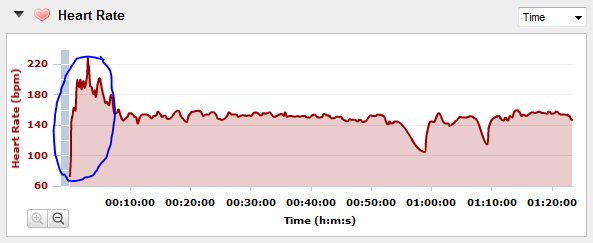
After you finish your activity and get back to your computer, you’ll probably see something like this – a major HR spike, followed by more normal HR activity:
Frustrated, you poke at your HR monitor some, perhaps browse the Internets a bit – but in general forget about it, until it happens again.
Well, let me help ya out and explain why and what it’s doing. And…I can probably even help ya fix it too!
Proper Wearing Methodology:
Let’s first start with how to put the strap on. As the most important thing to do is ensure you’re wearing it correctly. On the Garmin ANT+ straps, you’ll want to ensure the Garmin logo is right-side up, and the electrode side of the strap is against your bare skin. Which side is the electrode side? Well, the side with the little bands, not the shiny side. I’ve circled these in the pictures below:
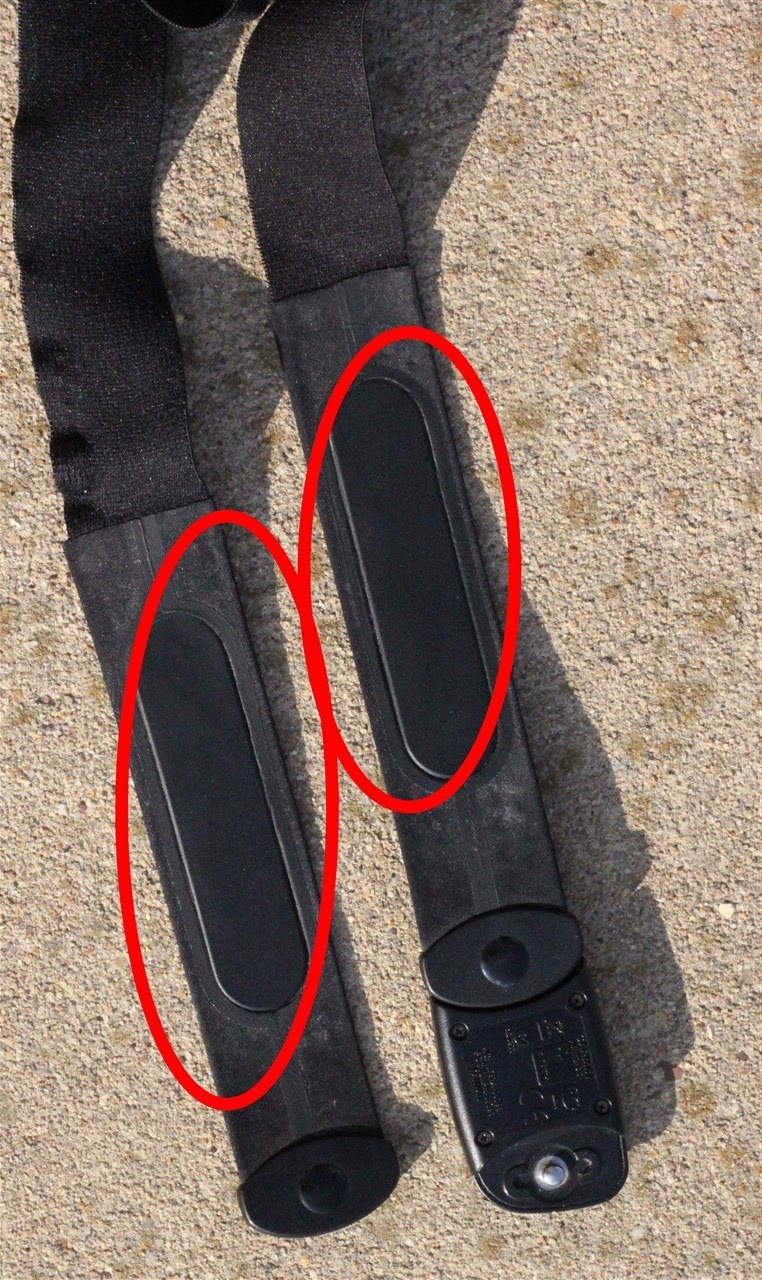
Garmin Premium HR Strap (also called soft HR strap):
And for all you Polar folk, their coded HR strap:
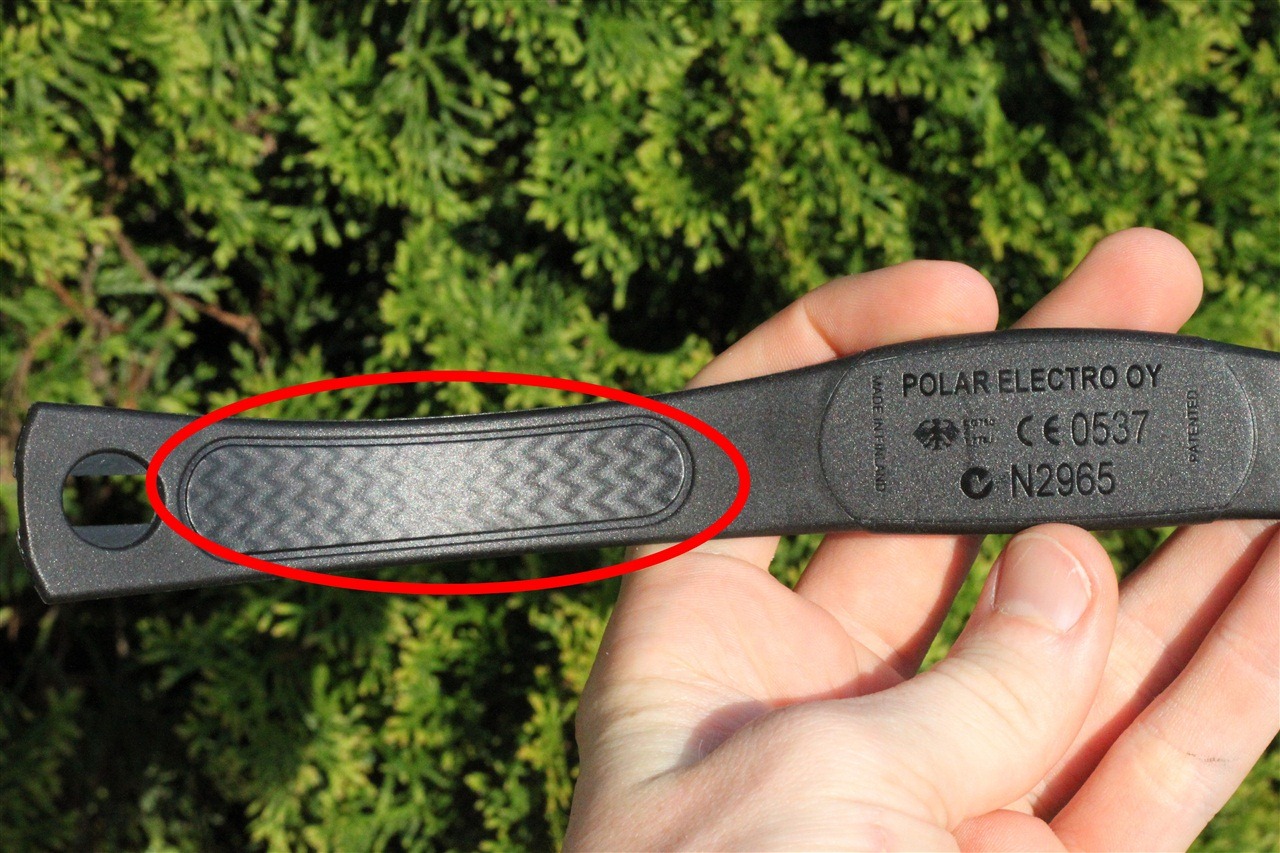
(Minor side note, as you may know, none of the Garmin ANT+ HR straps will read HR underwater more than an inch or two away from the watch, as I showed in my 310XT review while underwater. However, the T31 coded straps from Polar will work underwater with their respective Polar units – just ensure it’s noted as T31 coded. Also note that you cannot mix Polar HR straps/units with Garmin HR straps/units.)
Now, one last important item to note is that it goes UNDER your shirt against your skin. It should not be worn over your clothing. Also, the ANT+ folks note that from a placement standpoint “the strap is worn on the ribcage, below the pectoral muscles or breasts”.
All good and you’re still having issues? Onto the next section we go…
The root of all issues:
So assuming that you’ve got it all correctly ‘installed’, let’s look at what typically causes the spike in HR (if it’s over 200bpm, it’s likely not legit unless you’re a seven year old).
1) No moisture, dry air: During the winter months the air is often fairly cold, and fairly dry. This means that you’re less likely to have moist skin (due to even just skin perspiration), and even less likely to be generating any sweat right from the start of the workout. This in turns lowers your conductivity ability from a readings perspective. Which, means you often get incorrect readings. Simply introducing any moisture at all will usually remedy the situation – at least until you begin sweating enough to let that do its job. We’ll talk about moisture additives in the next section.
2) Synthetic shirts (quick dry/tech shirts): While all of us love not being suffocated in cotton shirts, an unfortunate side effect is that those synthetic shirts (normally called quick dry or ‘tech’ shirts) produce additional static electricity buildup that messes with the readings. This is most common when your skin and air are both rather dry, and very little moisture is present. In almost all cases, simply applying moisture will immediately resolve this issue. You can try rubbing the strap or your shirt with an antistatic agent – the ANT+ folks recommend simply a bounce dryer sheet, as that can help in some cases. As a side note, some of the Polar straps actually have an antistatic component built into them that helps to alleviate this problem to some degree.
3) Wind on the bike: One fairly common issue especially in the spring/fall when you’re wearing simple bike jerseys but the wind and lukewarm air temperature keeps you relatively dry, is that when you go down hills fast, or simply the wind hits the right way, you’ll get incorrect readings. This is often caused when the wind funnels down the front of your bike jersey and either induces additional static buildup as noted before, or introduces false readings through vibrations. I can’t count the number of times where it seemed my HR was directly correlated to how fast I was descending – despite the fact that I was working less. In this case, your best bet is either getting more gel to increase conductivity, or simply twisting the HR strap around towards your side a bit – that usually resolves is for me. I don’t recommend trying to lick the strap while descending at 40MPH…many things can go wrong there resulting in you licking the pavement instead.
4) Electrical Interference (powerlines, train lines, etc…): This isn’t typically reported on the Garmin’s, but more the case on the Polar’s. The Polar’s use electromagnetic signals to send the data from the coded strap to the watch, which can be interfered with by high tension power lines. The Garmin’s on the other hand use the 2.4Ghz frequency and don’t have the power line issues typically.
The fixes:
The good news here is that there are a ton of easy fixes that you can quickly try out to
1) Sweat: This first one is a bit obvious – but will explain why the problem often goes away after just a few minutes of activity. Once you start sweating it introduces moisture which in turn improves conductivity. This in turn makes the HR strap happy and you get better readings. So basically…work harder. :)
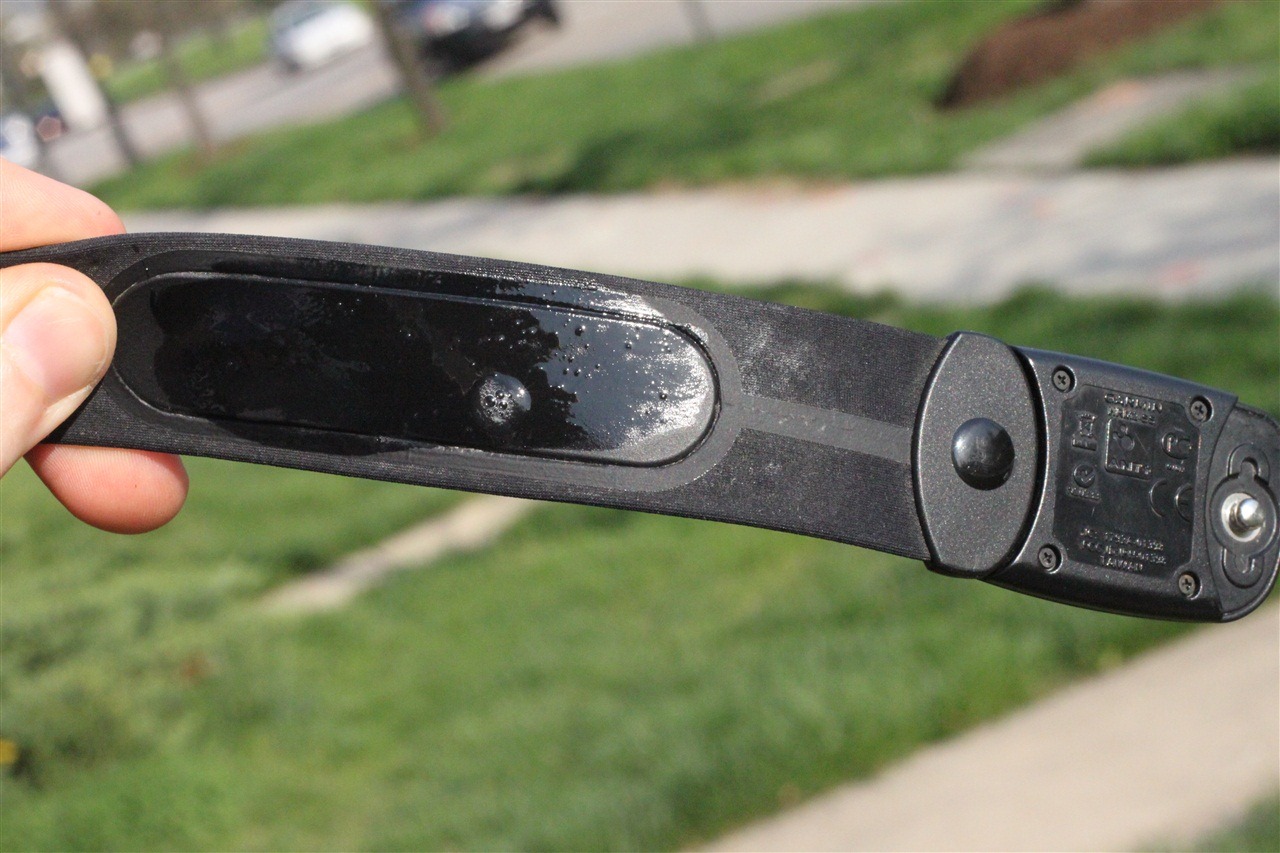
2) Licking it: This is the simplest option – and quite honestly what I do 99% of the time. I just give it a big lick. By ‘it’, I mean the two sensor pads on the back of the strap. This will usually ‘tide me over’ until I start sweating enough to keep everything all happy. And don’t worry folks – a HUGE LONG thread on BT the other day confirms that everyone else does it too. See, here’s my lick-job:
3) Heart Rate Gel: If you suck at licking, then you can instead use electrode gel to improve conductivity. This is what’s typically used in medical situations such as an EKG where you’re trying to get a better reading/conductivity. I actually use the gel mostly during the winter because I’ve found that many times on easy runs I’ll never actually produce a sweat due to the cold, and thus after a short bit of time my lick-job (as noted above), will actually vaporize. The HR gel is designed to last considerably longer on your skin/strap. This stuff is incredibly cheap, and the bottle will last you a long long time. Here’s my bottle I bought two winters ago:
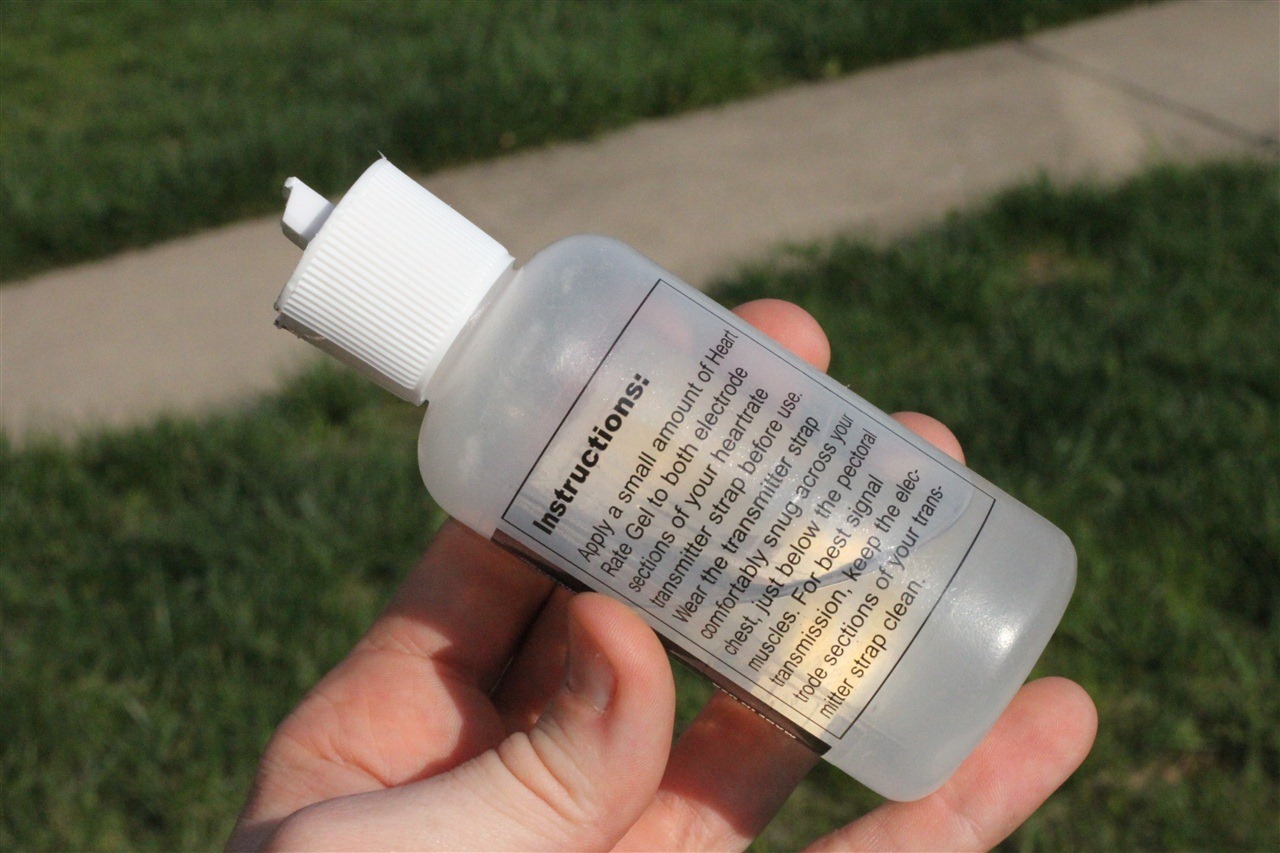
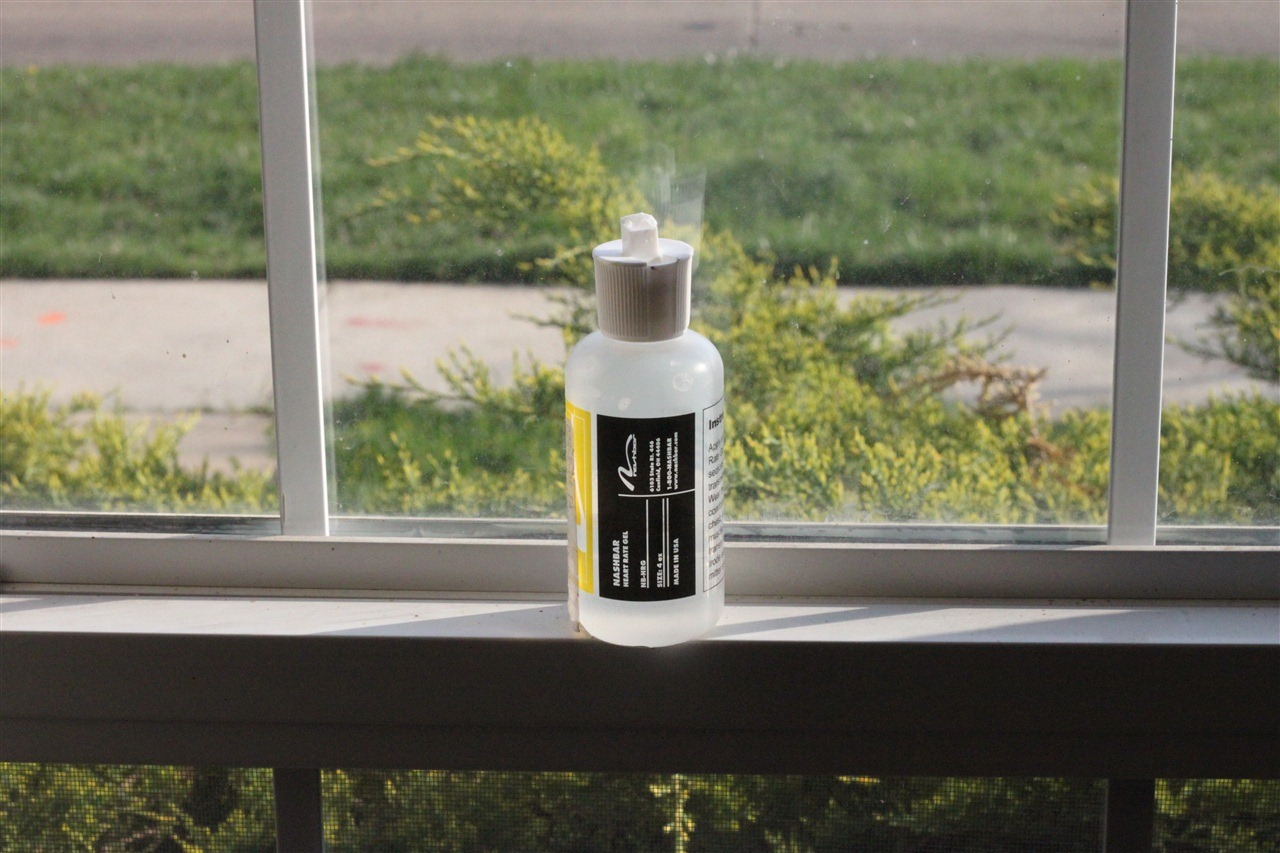
You can pick it up usually as your local running store, or online for about $5-10. P.S., one little tip for those cold winter days (I know, it’s getting warmer now though), is to stick it in a sunny window sill, that will make it nice and warm when you put it against your skin:
4) Changing the strap position: Depending on what may be causing your exact situation, one option is to simply change the position. Try sliding the strap to the right, left, or up/down. Some folks even wear it on their back with great success. In fact, when I’m having a day with lots of issues descending on the bike and the HR being erratic – I’ll simply slide the strap around my side a bit, so the contact portions of the strap kinda straddle my chest and back. Works perfectly!
5) Replacing the batteries: Finally, last but not least – sometimes it’s just the batteries getting old. You can pickup the simple coin replacement battery at virtually any drugstore, and even most grocery stores these days. It only takes a few seconds to open up the back door of the strap and swap out the battery. I usually have at least one spare battery in my tri bag at all times, just in case.
Wrap Up
Hopefully this will help you get through those pesky heart rate reading errors and get on with your workout. If you have any related tips to fixing strange HR readings, feel free to leave them below in the comments!
FOUND THIS POST USEFUL? SUPPORT THE SITE!
Hopefully, you found this post useful. The website is really a labor of love, so please consider becoming a DC RAINMAKER Supporter. This gets you an ad-free experience, and access to our (mostly) bi-monthly behind-the-scenes video series of “Shed Talkin’”.
Support DCRainMaker - Shop on Amazon
Otherwise, perhaps consider using the below link if shopping on Amazon. As an Amazon Associate, I earn from qualifying purchases. It doesn’t cost you anything extra, but your purchases help support this website a lot. It could simply be buying toilet paper, or this pizza oven we use and love.


















I have a Suunto smart strap (my 3rd), which recently started misbehaving in various ways as many have described. This seems to be an issue with most brands. I have tried all the suggestions given, and they have all worked ok, but not for long. Until I thought to try something different, and so far it has worked perfectly. Put a drop of olive oil in each contact point where you snap in the sensor module on the belt. There is lots to see on the net about greasing electrical contacts, so I figured I’d try oil. So far, I have not had an issue. Hopefully this may help someone.
Hi, just a derivative or upgrade: I own and have owned more than 5 belts, majority of them Suunto Smart Belts. After years of occasional frustrations with erratic HRs I went down the rabbit hole, applied some physicochemical backgroud and tried WD40. Applied to both of the contact pins between the sensor and the belt. It works. Repeatibly. Full stop. There is a rationale behind: corrosion, by sweat, oxidation etc. Disclaimer: if your battery is weak, it goes without saying, it does not work ;-). If your belt is really worn down, you have earned a new one (not sensor!).
Enjoy looking at your HRs. Until you can (in case Suunto kills Movescount PC/Mac and just sells your data to TPs, Stravas etc).
Alex
Thanks, Alex the wd40 just worked for me. (After trying everything else.)
My Garmin HRM strap spikes an anoying HR into 240s when I remove it after I’ve ended an activity, and has continued to read a spike over 200 while it and my 945FR lay on the counter, strap contacts facing up. I believe it’s from being sweat-saturated. If I power cycle the watch or wait 1-2 minutes it corrects, or reverts to an accurate watch reading (“–” if I’m not wearing it). The unwelcomed erroneous result scores a daily high HR over 230.
It’s happened with used and new batteries.
Mine is less than a year old, when it began to play up i washed it in warm water with some mild washing liquid and it did seem to fix it but now i realise it hasn’t. I do nearly al my training based on heart rate on the same lap around home so i know exactly how fast i can run up a gradient as stay within say zone 2. Looking at my runs now if i run on perceived effort up any number of the inclines on my route the HRM is reading ~7-8% higher than it did, which is a lot when you’re nearly 60 like me. It can show me being in Zone 5 just plodding up a hill at comfortable talking pace.Its not erratic I should add, its just over reading as if it has a gain error.
I have just gotten a garmin . Wet the strap etc but nothing recording for me..static at 70.. .my partner had tried it and it works perfect for him any help please
Just a note to say the link to the gel on amazon goes to a not found page. Looks like they don’t sell that one anymore
Hello,
I use this gel;
Spectra 360
link to amazon.com
I go through about a tube a year.
Tried all the suggestions on my Garmin 235 heart rate strap and nothing has worked long term. I’m wondering how to tell if it’s the watch or the heart rate monitor that’s on the way out?
Going to try the olive oil suggestion from the comment below. Pray for me. ?
Hi I have a Garmin 520 about 4-5 yrs. Never had an issue with it or my Garmin strap(lets say 1,000 rides) until a few weeks ago and my 520 started giving me a progressively higher reading. That kind of freaked me out, I’m 68 and self-conscious about my heart. However, It’s an on and off thing but persistent. I replaced the strap. So brand new strap and same thing happening. Now I’m looking at the monitor itself. I’m getting ready to send it to the factory. I have to consider have I developed an arrhythmia? I went to the doctor My ECG is normal. Doing a stress test next week. This sucks. Can a Garmin 520 monitor go haywire?
The problem with an ecg is that’s it that moment in time. I’ve had a fib and many ecgs were fine. You could ask them to put you on a portable ecg for a few days then ride and see if the Garmin triggers the high HR and see if the portable ecg shows anything??
Greg Hilton, Hi thanks for your input. I wanted to give you an update and I am even more mystified. I went to a cardiologist, He also performed an ECG/EKG. I also wore a cardiac holter for 24 hours and rode as hard as I could to cause a spike and at that time my Garmin would not register one. So my 24 result was normal. I tried 3 different straps and 3 different Garmins (Borrowed).
They all showed my HR was maxing at 245, but it followed a pattern. I would have a plateau after 20 minutes and if I stopped and waited 3-4 minutes for it to normalize it would not return. Heres the mystery, When the device is spiking my felt pulse with 2 fingers on carotid is normal. I mean when riding it feels about 110-120bpms and I don’t feel dizzy or SOB or weak. The only indication is the device.
I also wondered if Garmin has a max setting for HR.
So I bought a Kardia mobile ECG device by AliveCor. It registers all 6 heart rhythms with a connected Kardia Mobile iphone app. I’ve run at least a dozen ECGs under different set ups
Theres at least 3 good ones recorded when my device was spiking at 245bpm. The last Kardia ECG read 93bpm while I was looking at 245bpm on my Garmin device. My felt pulse also felt like 93bpm. I sent that 30 second record to a Kardia cardiologist. He rated it as a normal heart sinus rhythm. Mind you 245 registered on all 3 Garmin devices with 3 different straps
I was ready to go to another cardiologist. Clearly something is tripping the Garmin devices. However, Now I’m not always getting a spiking reading when I ride now. I figure he’ll also have me wear a holter 24 to 48 hrs. im afraid I won’t be able to trigger a spike and Winter is almost here. I have not been able to trigger it indoors. That’s a mind F**k don’t you agree?
I have had similar issues when I have had connector issues. I wire mine up with ekg connectors. When the connection is loose or when I have had wire breaks it spikes to the max reading (245 bpm on mine). Ensuring a good solid connection with the unit and strap, band isn’t loose, and contacts are wetted would be my best guesses based on personal experience. I agree that a resting test would be good to have as well.
hiya Dan,
Agree on the mind f**k! I have the older “two lead” Kardia and it has picked up Afib whenever I thought I had it as well as very high heart beats.
Sounds like you are doing all the right things, but no idea why 3 straps and devices always give you wacky high HR!! Can you borrow an optical HR from someone to wear on your arm perhaps??
oh and when you said 3 different Garmins and 3 different straps, do you mean different headunits?? Als when trying other straps are you using the same HR capsule with those 3 straps?
Also when I was in A Fib I can feel a fast heartbeat and my cardiolgist could tell it was erratic.
Hey Dan, I thought share my experience as it’s very similar to what you’re going though… and i can totally relate to what a mind f**ck it is. I was pretty regular runner about 5 years ago and I started using a Garmin HR strap at that time. To my surprise, the first time i used it I had spikes up to 245bpm. Like you I didn’t have any dizziness, and my HR would feel appropriate at the time. I could be having a chat my mate beside me while the Garmin HR strap was reporting 200bpm – i obviously wouldn’t be able to chat like that if it was really 200bpm though. I then tried to work out what was going on but as it was intermittent and wouldn’t happen on most runs it was difficult to pin down. I had two Garmin HR straps and the same thing would happen on either strap intermittently while running so i could rule out a particular issue with the individual strap or monitor. I then saw a cardiologist who did heaps of tests which all came back normal. As they couldn’t find anything unusual in the stress test or other tests i then had to be wired up and wear a heart rate monitor for 2 to 4 weeks (can’t remember exactly but showering with the wires was a real pain) while i tried to capture an event while exercising. During this time i would have events on my Garmin HR strap but to my surprise, when the cardiologist checked the results it didn’t show anything abnormal. I then had the Alivecor product you mention (this is 5 years ago though so perhaps an earlier model). I captured a heap of ECG’s while my Garmin HR was spiking. At times the Alivecor ECG printout would report it as “Normal” and at other times “Possible atrial fibrillation” which freaked me out at the time. When the cardiologist reviewed the data he was really quick to confirm it was all normal though and HR was in the normal zone. Definitely no Atrial Fibrillation thankfully. He did note on one of the readouts a thing called Bigeminy which he said was “benign” in my case and not something i should worry about, but he felt that perhaps the Bigeminy was causing the Garmin HR strap to give an incorrect reading and was at times doubling my bpm due to this. He said not to bother wearing the HR strap so i didn’t use it for many years. More recently though I started using it again as i wanted to train in HR zones while running and rowing and so the mind f**k has started again for me. I went for a run yesterday and my HR reading sat at about 200bpm during a very easy run (my mate was sitting on about 130 or 140). I do have the reassurance that the cardiologist gave me the all clear but it still plays on my mind. I only saw your post as i was searching for Polar HR strap reviews. My plan at this stage is to buy a non-Garmin HR strap and see if I also get spikes on that (probably should have done this a long time ago). If not, i might try the Alivecor monitor again either with their cardiologist interpreting it or a second opinion cardiologist on my end.
Hey Nathan, Thank you for the shout out. I appreciate the positive feedback. I’m sure you and I aren’t alone. Theres nowhere else to find info about this. A big shout out to DC Rainmaker. It can be a time consuming and expensive enterprise to discover everything is normal, not to mention anxiety.
During one of my last rides in Dec. a friend and I switched our Garmin straps and monitors. My devices on his bike continued to show normal. His devices on my chest and bike showed spiking HRs. We stopped I waited 3-4 minutes till HR returned to normal (learned during earlier rides). We rode another 1 1/2 hrs at sometimes high HRs (145-155)and no further spikes.
Considering our mutual experience. I have to conclude rather then errant straps. It must be some aspect of heart rhythm is triggering the spikes. If its not A-Fib or tachycardia or some other disease process. It must be this bigeminy rhythm. Garmin devices must be picking this up either strap wise or device wise. Since its not reported with another type of strap. There might be some quality of the Garmin product doing this.
Im ready to go strapless, but as you Im thinking another kind of device. Im hooked up to Strava, I need distance so as long as my alternate device gave me good info. I would ignore the Garmin HR readout.
As a back up. I take baby aspirin (80mg) a few times a week. Lets keep in touch and would love to hear from other athletes having HR issues. Thanks again, Dan
Bumped into this thread while researching something similar. I used to have WPW (Wolf-Parkinson-White) and while on an episode, my optical watch (Fenix 6) would pick a much lower frequency (~120) than my chest strap (~200) or my Kardia (~200). I went through a catheter ablation to correct the issue about 1 month ago and now the reading on the Chest hrm (Wahoo) is most of the time inconsistent with the optical and kardia. Today I rode with both the Fenix 6 (optical) and the 1030 connected to the chest strap. and got the results below (purple is the chest strap). My perceived effort alignes more with the chest strap and at some point I was able to count my pulse on the carotid and it was more close to the chest strap. at around 49 minutes I changed the side of my watch I ALSO felt something like what I used to feel at the end of an episode and suddently the chest and optical were in agreement. I still need to show all this to my cardiologist but it is a mistery to me as well.
My experience with four chest strap heart monitors is that they all read higher than my Fitbit HR4 (optical wrist sensor), sometimes dramatically so. The Wahoo TICKR seems to be “too sensitive” in my particular case and often reads in the 200’s when the others do not.
A suggestion to annoy the cardiologist: Can he explain how heart monitors report a relatively stable heart rate when the actual RR interval between beats varies dramatically? My Kardia shows the same phenomenon as raw RR data from chest straps: actual intervals between heart beats can vary from an implied 50bpm to 150bpm while the chest strap reports a relatively stable value. (See picture of a Polar H9 attached.) RR values can be converted to ‘implied’ hear rates by (1000/RR)*60. An RR of 1,000msec equates to 60pbm. RR of 500ms equates to 120bpm, etc.
The picture is not loading. But now I’m curious because that’s exactly what I was thinking. In my case, I have a small heartblock as a byproduct of the procedure and I am wondering if the chest hrm is picking up on something related to that.
Maybe the web site will not upload pdf files? Trying again with jpg
Yes, jpg files upload. For that particular workout, I wore two heart rate straps: Polar H9 and a CooSpo (Chinese knockoff?). Used the Android SelfLoops app to collect raw data. Calculated implied heart rate using the forumla and then plotted reported heart rate and implied heart rate for both straps on the same graph using Veusz (Windows – free). As the plot illustrates, sometimes I go nearly two seconds between heart beats. I have no explanation for the two straps reporting different rates, sometimes as much as 20-30 bpm.
I would think that a “normal” sinus rhythm would have the implied heart rates matching the reported heart rate.
Hi Jose, Rather then comment on inconsistencies with different devices. Looking at your overall HR ave. I’d say your abelation worked. I’d be much more interested in what your Kardia shows. Hospitals in CA are handing them out to their abelation patients so I’d say they consider it medical grade. Looking at your graph. I see no irregular spikes. Thats great! Learn how to read your Kardia graphs. The chest strap appears more accurate by the way. Good luck!
I just got myself a Polar H10 and a Polar Verity Sense to play with after using a Garmin watch for about 1.5y. I have similar results to yours with one of my strength training workouts. I think I loosened up my Garmin watch closer to the end, which might have coincided with it beginning to match the Polar monitors.
The H10 seems faster to pick up changes in heart rate, though I had some issues with it looking like it was dropping out during a couple upper body workouts. Might have been losing contact with skin, so I’ll have to try tightening the strap more.
The cycling showed all three tracking pretty closely.
Is it possible to check if a HRM is working prior to exercise? For example, should it register testing heart rate correctly if you do all the stuff re wetting the contacts on the strap etc?
Yes, almost all devices will show your current HR prior to starting. Though, whether or not it tracks properly in those first few mins as you warm-up you won’t know till you start.
I’ve had several Garmin HR monitors over the years and they are always troublesome, high spikes, freeze ups etc, tried all the tricks, cleaning the strap contacts, new batteries, even baby oil on the battery contacts (like the cure for Vector 3 pedal problems) all without any improvements. I now have moved over to a Wahoo HRM and have never had a single issue. A superior product in my opinion.
Rod, Dan here appreciate the comment. That has been my friends suggestion as well (try another brand). I’m doing the indoor trainer mostly with lower HRs and am not triggering any anomaly BPM. Will keep in touch.
I have done the same thing – my Garmin straps were sending me to the doctor and making me back off on rides. Local bike shop gave me a Wahoo to try out for a week, no issues, never returned it (just paid for it…) and it’s a month now – no issues…
I have struggled for years with erratic data from Garmin chest heart rate sensors and read your article link to dcrainmaker.com several times trying to find solutions. I recently stumbled across your review of the Polar OH1+ optical heart rate sensor and immediately ordered one. What a great product! It has completely solved my heart rate issues. No more chest straps for me. Suggest you consider adding an addendum to your “troubleshooting your heat rate” article from 2010 and mention the OH1 as another “fix” for heart rate sensing problems. Thanks for your great work.
Rod, I see that you posted this in Feb. How is the Polar OH1 still working for you? I’ve been contemplating it since I’m over the strap issues with my Polar. Looking for a better solution. Thanks in advance! Darryl
I found a good post that shows a test for the strap. Forward to around 5:30. Ok it needs a multimeter
but its the only test I have seen on the web that can identify a faulty strap
link to youtube.com
I tried changing the battery, wearing the belt around my waist/back, and cleaning the contacts with dish soap and water. One of those three things worked! Thank you for your help.
Looking for advice on how to wear multiple chest heart rate monitors at the same time. RR data from Polar H9 and Wahoo TiCKR do not agree, each Bluetooth connected to a different Android phone. I want to wear them plus a Garmin HRM-Dual at the same time while using a recumbent bicycle.
Does it matter if the cases touch? Do the cases have to be exactly in the middle? Any tips on how to accomplish this sincerely appreciated.
3 new HR monitors and I can’t get any of them to work. Brand new, 2 Garmin one Polar. They all work on other people, just not me. This started about 6 months ago, never had a problem before. I’m thinking I have an electrical problem. Anyone else seen this before?
James Weeks, That’s not enough information. Are you talking chest straps? Head units? What models? Is the strap paired to the head unit? Battery check? What previous experience? Did it just happen suddenly? Why would you think its your heart rhythm/electrical activity?
After the glowing report on Garmin HRM Dual, I purchased one and had to return it after I could not get it to work with ANY Android heart rate app. (must have tried 10). Called Garmin support and a VERY nice woman asked, “What Garmin apparatus are you connecting the HRM Dual to?” I own no Garmin equipment. “Oh, dear, the HRM Dual will connect ONLY to Garmin products. The product that connects to smartphones is the HRM Pro ($130 vs. $60). Which Garmins do you have?
I also had trouble with a Polar H9 because I was licking my tongue off on the wrong part of the strap. (I believe people often comment “RTFM”) Once I started using electrode gel in the correct spots, it works like a champ. Some people have dry skin and it takes a long time to get a good connection without water or gel.
Unfortunately, that women is very much incorrect. The entire point of the HRM-DUAL is for 3rd party products, which often use Bluetooth Smart, as all of Garmin’s products already support ANT+.
So now I am even more puzzled. I used two different smartphones and every “HRV” Android app I could find. The phones/apps easily connect to and read from the Polar H9, Wahoo TICKR, and a CooSpo I found on Amazon. Got no response from the Garmin HRM Dual. I was careful to put electrode gel on both the large and small sensor areas on both sides.
I bought the Garmin because the H9 and TICKR gave wildly different results and I wanted a third device for comparison. I can try it again (maybe I got a dud?) It’s only $60.
Thanks for the information.
@crimpon
Are you trying to read your HEART RATE, or your HEART RATE VARIABILITY?
I want both: heart rate reported by the monitor and the actual RR intervals (all of them). I have been using the Android app Self Loops to collect the data and output it in a .csv file that I can analyze. Have no interest in the “magic hrv calculations”. Just need the raw data.
This all started when I discovered that the TICKR often detected about 25% more heartbeats in a given length of time than the Polar H9.
I remain puzzled. Based on “the entire point”, I purchased another Garmin HRM Dual and tried to connect it to 6 HR/HRV applications which work perfectly with Polar H9, Wahoo TICKR, and CooSpo: MyWorkouts, SelfLoops HRV, HR & HRV Logger, hrv Expert by CardioMood, Elite HRV and Kubios HRV. Tried three Android devices: Sony Xperia XZ2 Compact, Moto E, and Samsung Tab S6 Lite.
Every app on every device “found” the Garmin HRM Dual. But not a single one of them retrieved heart rate or RR interval data. NOT ONE. Maybe these apps are faulty, but they work with other heart rate monitors just fine.
Since the Garmin help desk tech is very much incorrect. HOW do I use the Garmin HRM Dual in the same manner as I am using the Polar, Wahoo, and CooSpo? i.e. wear it and collect HR/RR data on an Android app?
@CrimpOn, DC Rainmaker is correct. Im puzzled why Garmin tech support would say otherwise. Also if devices are reading connectedness why not the HR signal? I wonder if your Garmin strap would pair with a Garmin head unit. I can only think a manufacturing defect if it does. There are straps which only connect with Garmin products. I wouldnt keep buy another dual strap until you can locate the issue.
This seems inconsistent
“DC Rainmaker is correct” and
“there are some straps which only connect with Garmin products”
(which is what the Garmin Help Desk said to me)
I have tried 6 Android apps which work with 3 different heart monitors on 3 Android devices. Yet not a single app can read HR and RR data from the HRM Dual.
What I WANT is for someone to point me to an Android app that will connect to the HRM Dual and create a .csv file of HR and RR data. Does that seem too much to ask?
Having purchased the HRM Dual two times, I will not be buying any more of them.
Thank you for participating. (Sometimes I come off more confrontational than I intend.)
I have several Garmin HRM Dual heart rate monitors. I have had no problem at all looking at HRV in the iOS versions of HRV Logger or HRV4Training. Both work flawlessly. I have also connected to Strava, Wahoo Fitness, Zwift, TrainerRoad, and Sufferfest on iOS and Windows 10 over BT with no problems. Also worked on both Ant+ and BT with my Edge 1030, FR945, Wahoo Bolt, Stages Dash L50, and Hammerhead Karoo 2. The heart rate BlueTooth data interface is governed by standards and works with all devices. I have no idea why you are having problems with an Android phone. My only comment is that I know people that use them with Android devices and they never mentioned any issues.
Hi @Crimp On, I had checked on DC Rain Makers statement with Garmin and the newer Garmin HRM straps are interchangeable with other devices.
I’ve been using a Garmin head unit with Garmin strap for 10 yrs and I found the head unit would only sync with a Garmin strap.
Its possible the HRM strap could sync with other products, my apologies. I did find this Garmin notice that even some Garmin straps no longer sync with older Garmin devices.
I looked at the wide array of Garmin straps and all I can say is I miss the days when you could buy a HRM strap for 20$.
link to support.garmin.com
I appreciate that you guys tolerate my ignorance and questions. I am just SO frustrated. Emailed Garmin and they said (a) follow the directions, and (b) check the app web site to see if it is compatible. SelfLoops says this: “Requires a Bluetooth low energy heart rate monitor (Bluetooth Smart, Bluetooth 4.0). For example Polar H7,H6, Wahoo Blue or Tickr, Viiiiva.” SelfLoops worked “out the gate” with Polar H9, the 2020 TiCKR, and CooSpo (Chinese knockoff?).
Did it all again: restarted 2 phones and 1 tablet. Put on HRM Dual (up side up), slathered a liberal application of Spectra 360 conductive gel, “paired” the Garmin with phone (have no idea why that is needed), opened SelfLoops app, searched for bluetooth monitors, found only one, “connected”, and NO DATA. NONE. Unpaired Garmin and moved to next Android device. Same thing.
It bothers me that the HRM Dual is not compatible with Garmin Connect. Honestly, I cannot see what else I can do. What I need is an app that will capture and output the raw HR and RR data. Don’t need fancy “training”, maps, etc.
I am hoping that someone will notice this thread and say, “Here’s how I got a Garmin HRM Dual to work with an Android phone app, without ANY other Garmin equipment at all.”
All is clear now. Garmin HRM Dual does NOT transmit HRV data over Bluetooth. Says so clearly in DC Rainmaker’s review of the HRM Dual and of the Polar H9.
I really am “dumber than dirt” for buying it in the first place.
p.s. I have a suspicion that it does not transmit HRV over ANT+ either, but I’m giving up now.
Interesting that the farming website says it should work! Grounds to return it as defective and get a refund??
link to buy.garmin.com
If you click hrm comparison it says the dual
Transmits real-time heart rate and supports HRV via BLUETOOTH® technology to compatible devices and apps
So I tested this a bit yesterday for fun. On ANT+, it’s definitely transmitting HRV, no issues there.
On BLE however, the HRM-DUAL doesn’t seem to transmit HRV for any of the apps I tried, though interestingly, the newer HRM-PRO does actually do so just fine.
I’ve got an e-mail drafted that I’ll shoot over to ask what’s up, as other people have in the comments section indicated their HRM-DUAL is working with certain HRV apps via BLE. So I’m wondering if there’s been a firmware update somewhere along the way. Good to know on the Garmin specs saying HRV is supposed to work for BLE.
I don’t know what actual data the HRM Dual sends. But it works just fine with HRV logger. And the app creator was quoted as saying that it was approved for use with the app.
I tried one last time using the two Samsung Galaxy tablets. ANT+ Tester says they both support ANT+. Neither myworkouts (HR only) nor SelfLoops HRV (hr & hrv) got any data from the HRM Dual. “See” it just fine. But neither HR nor RR data.
I appreciate that you guys have taken the time to investigate my problem. Whatever is wrong has got to be my fault, and I am simply at a loss for what else to try.
On another note: Can someone direct me to advice on how to wear three heart rate monitors at the same time? I have been doing two as (1) directly under the sternum, and (2) underneath the first one. Is there a reason NOT to wear one higher on the chest? I know it may not be as comfortable and would definitely interfere with many types of exercise, but would it not work?
Thanks
As one who often wears two, I haven’t seen any difference between them in placement. I usually wear one below the nipple and one above the nipple. No issues and usually identical readings.
If I do three, it tends to be two lower, and one upper. The only real issue you face there is simply that the straps don’t slide and overlap at all.
Thanks for the tip. I now wear two straps every time and am puzzled that they do not agree. One is always a Polar H-9 (name brand) and the other varies (TICKR, CooSpo, PwrLabs). I understand that the algorithm used to calculate a Heart Rate to report is a trade secret, but I am surprised that two straps often report differences of more than 15bpm. (see attached sample). I can justify the Reported RR intervals being different as a matter of electrical sensitivity (one sees a “beat” that does not register on the other). If that were the case, then the strap that records more beats should be reporting a higher heart rate, but it isn’t.
Still a very relevant article. Crazy readings from a Powercal bluetooth strap this weekend that I had not seen before. Honestly, I don’t use the Powercal often. I hit 240 bpm which I thought was pretty great for 52 years old. Conditions were just perfect for problems. Readings were erratic for 40 minutes or more. When I went back and looked at my gps plot, the problems started immediately upon turning into the wind on my ride. Cool dry Spring conditions with about a 25 mph head wind. Perfect storm. The wind already sucked and crazy heart rate readings didn’t make me feel any better.
@okrunner I wouldn’t panic just yet. Time to wonder WTF if its replicated and with other straps. Come back if it does.
Dan,
I haven’t had a chance to use the Powercal again since the weekend. However, I’ve ridden Zwift three times since using an old MioLink and it certainly doesn’t appear to be my heart, thankfully. The MioLink appears spot on indoors. Might try the Powercal with Zwift tonight instead of the MioLink to see if there is a problem with the Powercal or it was just environmental. I think it was the conditions. I have a basket of heart rate monitors so it’s no big deal if the Powercal is not the fritz. I leave the MioLink by the Zwift setup and don’t use it anywhere else. I usually ride outdoors with a Wahoo Tickr Fit. I have a Viiiva and a Garmin strap and maybe others. I’ve never really compared accuracy among them but assume the straps are generally more accurate than the MioLink, Tickr Fit, or my couple of Garmin watches. Maybe I’ll pair the Powercal to my phone tonight and compare to the MioLink riding Zwift. Thanks.
I’ve had a Garmin HRM-Dual since August 2020 and use it for both running and cycling. It worked as expected for a couple months, then I started seeing an initial “cliff” pattern at 175 bpm — for roughly 9 minutes. See example picture from a 60 minute run. I see this pattern often, but not always, when running. The frequency of this happening has increased over time (but maybe is related to it having been winter here). Oddly, it never seems to happen while cycling, either indoors or outdoors – although I confess I don’t ride outdoors in the winter.
I always use Spectra 360 gel, by the way. So, in my case, it doesn’t seem moisture is the problem.
Being 68, like other here, I consulted my doctor, assuming the data was correct.
Then it occurred to be perhaps the Garmin was faulty. This was after months of fearing I had heart troubles.
I replaced it with a Wahoo TICKR, and so far it seems to behave more sensibly. I am using the Garmin strap (I like it better than the TICKR strap), so the strap isn’t the issue.
And then I found this post. Which makes me now understand the phenomenon is common.
In any case, it doesn’t seem the problem is as “simple” as a faulty Garmin device.
Hi Larry, I too am 68 and had my Garmin 521 show HR plateau at 240 multiple rides starting last Oct 2020. If I stopped and waited a few minutes it often would not come back on that ride. I too did the cardiologist route. I wore a holter and no results.
I borrowed other monitors and got replacements straps, but the high HR continued. I started to take baby aspirin and also bought the 6 lead Kardia Mobile. It connects to an app which takes a 30 sec graph of all 6 heart rhythms. Well worth the 150$. Its medical grade and hospitals use them to monitor heart patients. That device showed no anomalies.
I too took off for 4 months during winter and my indoor training was much lighter and HR quiet. When I started to ride outdoors again the high HR went away, not to return so far.
Heres the thing Atrial Fibrillation, Tachycardia and Atrial Flutter can all be fairly serious heart conditions and dont really just come and go. Also one should feel some affect of a fast beating HR. I never felt anything. Another rider here told me about a heart bigeminy. Its a quick pre firing spike on a heart rhythm graph. It can be benign or a precursor to a heart condition. I’ve learned to read these HR graphs and I haven’t seen it on my graphs which are cited as normal.
I highly recommend buying a Kardia Mobile and study google HR graphs for how normal HR appear vs other heart conditions. Its not really complicated. You’ll feel less anxious and well you can always start taking a baby aspirin a few Xs a week. Cheers, Dan
After a bit more data collection and research, I now believe my “plateau” or “cliff” phenomenon is a classic case of “cadence lock” — although I am aware most people believe this only occurs with an optical HR.
I run with a Garmin Forerunner 35. I cycle with a Garmin Edge 530. The problem only occurs while running, and never occurs when cycling – even if I use the FR 35 (where it doesn’t measure cadence).
I have the problem with both a Garmin HRM-DUAL as well as a Wahoo TICKR. I have the problem regardless of placement, front or side. I always use electrode gel. The “plateau” happens for roughly 9 minutes at the start of a run, then disappears, Reviewing the data it is very clear that the HR being reported is the same as the cadence (170-180). It is also very clear the readings being reported for HR are false.
Curiously, when I leave the strap off and enable the FR 35 optical HRM, the phenomenon does not occur.
It feels like the issue resides within the FR 35 watch and not the other components. There are some blog posts who have observed and claimed the same thing, with pictures that look identical to mine. In these cases, the commenters usually insist the phenomenon only occurs with optical HRMs.
Is it possibly the case that my FR 35 is defective in some way ? I don’t have another watch to try. If I use my Edge 530 during a run it does not happen, although this device is not designed for running.
Thanks for any comments or suggestions.
I’ve HRM Dual and from yesterday I got weird problem. It still works on my Garmin watch either via ANT+ or Bluetooth, It still works via Bluetooth on two other phones and via ANT+ on my wife’s Samsung phone.
But it suddenly stopped working on my OnePlus 7T for no reason, I can connect to it but see no pulse, just like many Iphone users wrote in Zwift thread(but I can’t see HR data in any monitor app I’ve tried which worked fine). The only thing which happened prior that is that I accidentally accepted prompt to add my monitor on my watch.
First I thought that maybe firmware was updated but I compared with the screenshot of what firmware version I had originally and it’s the same.
I have a feeling that my HRM-Dual got connected to way too many devices and that caused that glitch.
Do anyone have an idea how to remedy this or experienced a similar problem? (And no I didn’t reset my HRM Dual as decided to try all software tricks first).
Hi!
As I’m facing issues with my HRM-TRI recently (hopefully it is HRM strap and not heart) I wonder if I could connect and record two HRM straps on my FR935 to analyze their data later on. Or do I need to record HR data on two devives, e.g. FR935 and EDGE?
Best,
Oliver
Yup, you can use the Connect IQ App called Auxillary HR to do it: link to apps.garmin.com
Enjoy (and, thanks for being a DCR Supporter)!
My HR monitor spikes when I am driving in my car? Both my Garmin and my polar chest strap monitors.
Any idea why? It is a 2020 car with blue tooth etc.
I bought a pre owned Timex Ironman and the strip rubber had mud I cleaned with clorox and now the heart rate is only 30-45 bpm, did I damaged the sensor? Are the rubbers of the sensors??
I bought a pre owned Timex Ironman and the strip rubber had mud I cleaned with clorox and now the heart rate is only 30-45 bpm, did I damaged the sensor? Are the rubbers the sensors??
Hi,
Are all the HR measurements suffering from the inaccuracies, independent of the brand? I am seeing grazy numbers in polar m430 with the breast band (40-203) and considered changing the gear. But is it the same thing about sweat, humidity and sensor placement in any case?
I just found the blog, it’s great and all your comments too! WD-40 and olive oil tips were new to me, must try them out ;-)
BR, Risto
How to get an accurate HR? My new Wahoo tickr seems low (75-80 during HIIT) My Vivoactive 3 seems to give me the opposite # during the same activity (133-160). I do have bradycardia. I’ve had similar trust issues with any number of Garmin chest straps (5). Using a Garmin 520.
Any suggestions before I see another Electrophysiologist, who tell me the instruments are off.
See my reply below about Right Bundle Branch Block.
Since using chest strap (2019, Polar H10) sometimes my pulse rate chart reveals glitches of the kind in the picture below, what do you think?
I do not feel nothing, if was not for the HR monitor I would not notice.
I am cyclist and nothing came out from the specific medical exam performed yearly; next time I will bring the doctor these finding.
It is not easy to find a correlation seems NOT happening in low intensity activities
The glitch pattern seems like this: while cycling at steady state, suddenly Beats Per Minute drops by 10 units for 10-20 seconds; the drop ends up
-(most of the time) restoring the BPM had before the drop
-(sometimes) with a couple of seconds spike (a mild one, I mean is not the 240 BPM clearly sign of malfunctioning)
-(rarely) with persisting high pulse reading (registered two events: one time lasted one minute another time 3 minutes and because me decided to stop cycling!)
update for those came here for same problems: ends up are extrasystoles, so the strap helped me “troubleshooting” a problem would never noticed
I have a Garmin Edge 500 some 6 years old. All of a sudden I noticed my HR went from 130 to 66! Later it went back up but I began having spells where the HR would slowly decline to around 60. Changed battery, washed strap and almost always after 15″ the HR would begin to decline and then sit around 60..Bought a new Garmin 130 and within 10″ the same thing only this time it would go down to 41! Bought a cheap wrist monitor and it showed 144 when the Garmin showed 45! Clothing? Had two polyester base layers and a wool jersey on? Help and thank you.
Maybe the reason is your strap? I’ve HRM Dual and cheap straps which I used when need to dry my original strap from dual. And what I spot that after some time my cheap replacement strap start to give weird readings like pulse jumping to 1000+ HR and then to zero, this never happened with original strap and cheap one was working well but died quickly. So if your cheap HRM monitor has the similar format where you can use your original HRM sensor, you could try to swap them and see where the problem is in the sensor unit or the strap, just an idea.
As for synthetic clothes, I’m using them all the time and readings seems to be consisten but I can imagine that in the certain situations they can indeed create some noise for HRM.
Thank you Dennis. The straps are original Garmin and I assume good quality…..? The new Garmin 130 had a new strap. The cheap monitor I bought was a wrist model and it seemed to work OK – no strap, just the light reading into the wrist. Nice system if just want HR and are willing to carry your phone and a magnifying glass so you can read the numbers.
Regarding polyester clothes… I have a Garmin HRM-Dual and also a Wahoo TICKR. Straps from both. In my case, if I am wearing polyester all the HRMs behave weirdly – bizarre highs and impossible lows. When I wear cotton there are no problems. I have correlated all this with wrist HRMs too.
So it is well known that static electricity can play havoc with HRM straps. For me, an old(er) man with a hairy chest, this is a consistent result. Hair + friction + polyester = trouble.
YMMV
Is the contact point(s) perhaps drying out before get sweaty enough??
After trying all the suggestions, e.g., WD40 in the contacts, wearing only wool, wetting the strap in mid-ride, I decided the computer itself was at fault. Amazon is taking it back and sending me a new one at once. Thank you all for your suggestions and thank you Amazon.
I got a new Garmin and the same thing happened: After 15′ when my HR hit about 135, it began to decline to less than 60. ?? Well, turns out I have minor Right Bundle Branch Block. Some people (me) can then have Rate Dependent Right Bundle Branch Block. When your heart goes into tachycardia (like they all do when you ride hard) it initiates the RBBB. The chest strap monitor appears to be unable to see a clear signal, although my wrist monitor shows the correct HR. It does not appear to have any adverse effect and I don’t experience any symptoms like shortness of breath or lack of strength. It looks like I will not be able to use chest strap heart monitors.
Wow! How did you find it and how dangerous is it?
Actually it does not appear to be dangerous at all. I discovered it by comparing my experience with the HR monitors, my diagnosis with RBBB, and lots of work on the web. The real problem is that the chest straps do not pick up a good heart signal.
Problem is chest monitors are supposed to be more accurate than wrist leds.My latest Wahoo still reads very low compared to my wristwatch. Chest strap was dropping hr after 15 min. Now latest Wahoo, just reads low.
Wrist reads 145 chest reads 65.
How did you find the RBBB?
I researched RBBB a lot once I was told I had it. Sooner or later I ran across references to the Rate Related part and it just fit with my chest strap symptoms: HR appeared to drop from chest strap monitor when my HR went above 130 but stayed up with wrist monitor. I mean a drop slowly from 140 to 60 or less with the strap but no drop with wrist monitor. I did notice that the chest strap and wrist did not always box, but the difference between 140 and 60 was too real to ignore..
Thanks for sharing. With the new Wahoo’s my HR is just low. So even if I feel high RPE it reads in the 70’s sometimes 60’s..
Garmin is set to chest strap, but if I use the wristwatch HR is 111 to 150.
It’s been a year since my pacemaker was installed then re-installed in Oct.2022. EP found heart block 1 as the heart was recorded via a loop, stopping for 6 seconds. 7 months later my HR is finally getting back to 120 with effort. It was running low but no lower than 60 because of pacemaker. So Wahoo strap now reads like I feel and if I pedal at 95 rpm HR responds. Still can’t pedal at 120. ha ha
Took a while to find an EP but without the strap and wrist HR monitor could have passed out permanently.
Here’s a caution for changing the battery on the Garmin soft strap HR monitor: you will need a very small Phillips screwdriver and the screws are very small and black, so take precautions to avoid having them skitter away. There was much swearing when one dropped bounced out of the bowl I was trying to use to contain them, and skittered onto either the granite countertop or the mottled tiles of the floor. I found it, though!
I bought a Garmin HR strap earlier this year as my Fenix 6s stopped auto updating my LT threshold. Wore it a few times and then not again until just recently as I wanted to start doing HR training. It was great for a couple of weeks but now over the last handful of days my heart rate starts at what I think is normal then drops and stays super low for the rest of the run. Same pattern whether its over a 5 km run or 22 km run! The HR strap and watch are connected. The strap is against my skin in the correct position. I dab a bit of tap water on it before I put it on (no licking!). The battery appears to be working. Nothing has changed since it worked and now isn’t. It can slip around a bit on its smallest setting but that’s been my issue all along and not new.
Hey I read about a false statement at the beginning, it’s normal especially downhill to experience an high heart rates because of the adrenaline. Ever see the heart rate of F1 pilots during a race? Always close to the maximum like 180bpm during the full course of a race. Could you prove that I’m wrong?
Interestingly, Polar says the most common cause of a HR strap not working is that it isn’t tight enough. They say the strap should stretch ~eight inches. They also say to not use oil or KY jelly on the electrodes. Read about it at link to polarservicecenter.com.
FWIW, I live in a very dry climate, don’t sweat very much, wear quick dry shirts when I’m running, and frequently see high heart rate values. Interestingly, the heart rate value that is displayed is often my running cadence (~165, my HR is closer to 130). If I roll up my shirt so it isn’t on top of my strap, the problem goes away. Saliva helps, but often doesn’t solve the problem. I’m ordering ECG conductive gel.
My experience with cadence lock, as you’ve described it, is that it seems caused by wearing polyester shirts. If I wear cotton the problem disappears. Given I have a hairy chest, I believe it is caused by static electricity. I have a Garmin HRM-DUAL as well as a Wahoo TICKR, and the behaviors are identical with both, I always use ECG gel and it doesn’t help – wearing cotton does.
My 2 cents for what it’s worth.
Larry
Yeah, undoubtedly caused by my shirt. Interesting (to me) that others experience “cadence lock.”
My goodness, thankyou as this article has resolved a mystery I’ve had about my HR readings for many years. I run but also have a heart condition so am always watching my workout HR averages. These spikes you describe never made sense to me as they’d happen at the beginning of the run (before I was sweating) then drop down to my usual HR average. I showed them to my Cardiologist and she just shrugged. Well now I know what the heck is happening.
Thanks again.
On another note about HR chest straps.
Why is it very important to wear the monitor with the brand name up?
Does it matter whether the strap’s monitor end is going left to right or right to left as when you are putting on a belt for your pants?
I own about a dozen chest type HR monitors of different brands along with their straps. Some work and some do not work. If you put a multimeter on the head unit’s body with the brand name up, will you read 2.5 -3.0 VDC?
This bluetooth thing. I do not understand how it works when the unit is properly mounted on your chest. Can you point me to any article that refers to this question? Your blog is very insiteful.
(I am not a doctor, nor do I play one on TV, but….)
My understanding is that normal heart rhythms begin in the right atrium and then proceed down and to the left toward the ventricles. The sensor on the right side of the body should thus receive electrical signals before the sensor on the left side. If the chest monitor is worn upside down, the signals will not be perceived correctly.
It does not matter how the physical strap is oriented as long as the monitor simply ‘clicks onto’ the strap.
Thanks for the heads up.
Now, all I have to do is to determine what straps will work with what sensors.
Using electrode gel and cleaning the strap with a moist kleenex after a run helps.
I have had in the past several instances where the monitor fails to give a signal at all.
I have had to open it up, remove the coin battery and then short the negative and positive contacts
with a pair of tweesers. Like a “cold boot” with a computer. Some sort of residual voltage still inside
of the electronic circuits.Replace the battery with the positive on the battery facing up, close it up and you are good to go. Also running under high voltage power lined may cause a spike in the readings.
For me, intermittent connection was down to build-up of body grease on the chest contact pads. Wiped them thoroughly with rubbing alcohol and very lightly rubbed them with 400 grade emery paper. Thereafter I don’t even need to wet them even if I am bone dry!
I’ll just keep this a short comment about anomalous heart rate readings. Consider the most important fact is what symptoms are you having? If you have no symptoms, chances are it’s not your heart. After problems with high read outs suddenly appearing, I bought a Kardia Mobile and it supported my lack of symptoms. Cheers, Dan M.
I hate to contradict you Dan but “weird” spikes* helped me “troubleshooting” a problem would never noticed without chest strap (I mean absolutely have no symptoms)
*ok are not the spikes of the article look post #344
Thanks Aldo, I did write ‘chances are’. Its true, spikes can indicate an underlying developing heart issue. Spikes are also the leading errant reading on HR monitors. Just about anything can cause a device to read spikes. I would also never recommend ignoring anomalous readings either.
However, in the context of athletes wearing non medical grade heart monitors. Its more likely aberrant readings without symptoms are device related. There are instances of Asymptomatic arrhythmias, which you may be referring to.
When that occurred to me. I stopped riding my bike. Ran to my family doctor then to a cardiologist, had numerous EKGs and wore a heart harness to seek out a diagnosis which was I had a normal heart rhythm.
When high HR readings continued in spite of switching out a number of devices and straps. I cut back my training to light short rides. Until I purchased a (medical grade) Mobile Kardia which revealed my true HR rhythm, which was completely normal.
One of the red herrings the cardiologist mentioned was lack of symptoms for my high HR readings. Doctors like symptoms.
For no particular reason after a year of anomalous HR readings, my original strap and monitor returned to completely normal readings for 2 years now and I’m 70, go figure.
My one piece of advice to athletes is if in doubt after throughly problem solving your equipment. Buy a 6 lead Mobile Kardia before you run to the Cardiologist. These devices are inexpensive (175$) in comparison and being used by doctors and hospitals much more frequently these days to monitor cardiac patients.
I would be interested to read your experience for the sake of public education. Cheers, Dan
Just to weigh in, I was getting high readings on my HR strap back in 2019, despite changing various parts I still got them when going hard on the bike (talking over 210 bpm). Zero symptoms.
Long story cut short is after wearing a hospital provided Holter monitor for 3 days I was diagnosed with atrial fibrillation.
I also got the Kardia (cheaper 2 lead version) and my consultant carried one himself! I now rely on the Apple Watch ECG function which has been very useful as always on/available.
sure: male, 39 years old, cycling regularly since 2015. Since using chest straps (2019) my pulse rate charts revealed glitches of the kind in the picture in post #344. Always ignored (mistaken for interferences since asymptomatic and nothing turned up from yearly specialist examination) until found ONE triggering factor so I could reproduce the “issue” during heart stress test on a bike ergometer. (happening 1-2 minutes after drinking at the bottle WHILE being out of breath, at list a bit)
the end the doctor was pleased to inform me
1. The test performed was exhaustive
2. My heart frequency increased/decreased smoothly with absolutely no variation of the rhythm (no drops no spikes I mean none of the artifacts on my charts) except few extrasystoles occurring in 2 moments: a minute after drinking and during recovering. By the way in his opinion extrasystoles were absolutely not critical and normal in a kind of this stress test……(not in my opinion… it is not beautiful to know that drinking, swallowing, deep breathing can cause it during while heart rate is high). But he paused my “fitness sports” waiting for echocardiography and 24 hours Holter “do not worry 90% will be released”
I really doubt are common extrasystoles, with Strava I can inspect other people charts and NONE has similar to mine artifacts …maybe this is how chest straps (tried many) react to my extrasystoles to my particular body…
24 hours “holter” reported nothing interesting while echocardiography “prolapse of the posterior leaflet of the mitral valve and/or due to broken secondary tendinous rope and with minimium valvular regurgitation” seems quite terrible but I do not think so I was told “can find this in 50 people if you take to the streets” “you made me found the bug at all cost” “you were asymptomatic you made too deep searches and now will never finish and ended up to be doubtful”
Also mitral valve prolapse syndrome “For unknown reasons, MVP patients tend to have a low body mass index (BMI) and are typically leaner than individuals without MVP”
link to en.wikipedia.org
Here I am! Never seen another with a so long neck like me lol (beside be skinny with long finger and arms).
Probably is a genetic disease, not the hearth ruined by efforts and almost all I really doubt those artifacts are correlated with mitral valve issue. For the moment I live with it but put less effort in my training
Collagen Peptide supplement powder caused my anomaly.
I’m 64, and have used a heart rate strap on and off since the mid 1980s. I’ve used a strap on every single ride for the last 20 years: in the last dozen years I’ve ridden about 6,000 miles/yr, plus or minus a thousand. I never had the monitor lose count until 2 weeks ago, when it started dropping count shortly after warmup on every single ride, indoors or outdoors. I tried all the strap tricks, put in a new battery, bought a new strap & transmitter, paired the straps with a Wahoo Roam and an iPad, etc. The sync dropped on 100% of my rides. Once the problem began, the monitor would generally fail to regain a measurement for the remainder of the ride, with the exception of one 80 mile ride that had a stop and an easier pace over the last couple of hours. The problem would start with implausible numbers, sometimes over 220, but more commonly 80 or 90 when I expected 130 or 150. A few times it reported 38 when I expected about 100 beats more than that. (yeah, my HR is much higher than my riding friends, but it has always been that way. I hit 180 on long hard hills, and see low-to-mid 190s when I try to avoid getting dropped on group rides). The measurement anomaly worried me, though I had no symptoms at all. I bought a Kardia 6L, and scheduled an appointment with a cardiologist friend who is a fairly serious rider.
Last weekend I lay awake wondering “what’s changed that correlates with the hr anomaly?”, and realized that my wife and I had started taking 20g twice daily of Vital Proteins Collagen Peptide powder to hopefully strengthen our thinning skin at the same time as the anomaly began. So I stopped the collagen completely on Saturday morning. That day’s ride had the now-usual HR dropout, which never regained sync. But Monday night on the trainer showed steady and plausible numbers for 90 minutes, for the first time in 2 weeks. Searching the web finds a few hits that mention possible heart problems for some people from collagen supplementation. I’m obviously one of the lucky few.
Wet the pads AND THE BACK OF THE PADS! I started doing both and don’t get the drops I used to!!!
Follow up on Collegen Peptide theory: The alternate HR straps I tried, and the new one I bought, were all Wahoo. I also tried the newest Polar strap, which has completely eliminated the problem. I suppose different straps implement slightly different algorithms for detecting heartbeats, and for whatever reason the Polar works much better for me right now. What changed? Was there a firmware update in the Wahoo, or did the collegen supplement affect my cardiac rhythm? Or the conductivity of my skin to detect that rhythm? I don’t know.
Great article, and covers 95% of issues. And I now know that wind/static are an issue on my descents.
But – to add ‘One more’ issue I haven’t seen mentioned in comments is salt build up in the actual strap (theoretically creates a kind of short circuit ).
Warm water soak every 2 or 3 uses takes the salt out if you are getting excessive sweat. Not an issue on current strap, but used to make a big difference on my Garmin.
Was also interested to see WD40 used on old contacts. Makes sense for old/worn equipment.
Hi Ray, can you please comment on cadence lock with Garmin FR?
I run with FR955 and lost count of how many times its oHR goes onto cadence lock. Sometimes it can take OVER 30mins to sync with real HR. Garmin can’t answer why, they say it’s probably because it’s cold, but I wore the watch for 30mins at home before going out.
And even though I’ve pointed out that this tech problem impacts lots of the training data such as performance condition they continue to ignore it.
If it’s not reading HR properly and making an estimate based on cadence, surely they can let the user know the HR figure is “off” while also delaying the calculations for the performance condition…