
Have you noticed that your Garmin 305 (or similar) takes longer and longer to first initiate a data dump to the computer? My guess is it’s probably that your contacts that are dirty. No, not the ones in your eyes – but the ones on the Garmin. Those would be the four little gold things on the back of the watch.
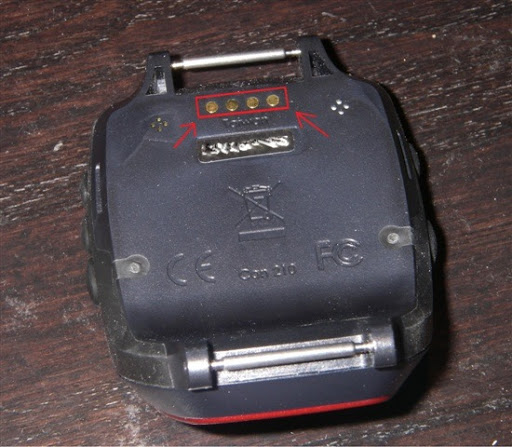
Over time sweat and other things will start to erode them and create a layer of badness over the top – causing the device to fail to connect as well as simply take forever to first initiate the conversation. You may have noticed that when you connect the device and start the download the time between the first set of three little beeps and the second beep takes longer than it used to (before it actually downloads the data). That’s a sign of contacts getting dirtier.
But the fix is easy. It simply involves an eraser. Just take any old eraser (like the top of a pencil) and rub the contacts until you feel they look cleaner. You’ll notice that afterwards connection beep time will be reduced. Or if your device didn’t connect at all – then it will likely work now. However if you’re device is dead for other reasons…it won’t fix that. Massaging an otherwise dead toy does not bring it to life.
It’s a good practice to do from time to time even if you’re device is fine – as it will keep gunk from building up on the contacts and causing said problems later down the road.
FOUND THIS POST USEFUL? SUPPORT THE SITE!
Hopefully, you found this post useful. The website is really a labor of love, so please consider becoming a DC RAINMAKER Supporter. This gets you an ad-free experience, and access to our (mostly) bi-monthly behind-the-scenes video series of “Shed Talkin’”.
Support DCRainMaker - Shop on Amazon
Otherwise, perhaps consider using the below link if shopping on Amazon. As an Amazon Associate, I earn from qualifying purchases. It doesn’t cost you anything extra, but your purchases help support this website a lot. It could simply be buying toilet paper, or this pizza oven we use and love.


















What would we do with your good ideas?
I finally getting the hang of sport tracks. It is not as intuitive as Motion Based.
That’s a good tip! I just cleaned mine. Thanks.
i don’t have a garmin, but i clean all the contacts on all my photo gear with a big ol’ pink eraser!!!
The Forerunner 310XT’s contacts are a bit more difficult to clean. Any ideas?
The Forerunner 310XT’s contacts are a bit more difficult to clean. Any ideas?
Hmm…looking at my 310XT now here…I’d say a small pencil eraser should to the trick. I haven’t run into the issue quite yet though, but I’m sure at some point I will. Time will see.
ive had my 305 for 18 months now, and either been very fortunate or don’t train hard enough…i just had the issue syncing up, and i remembered you had posted this…much appreciated
I’ve sometimes had to resort to using a fingernail file or emery board when a hard eraser didn’t work. That’s never failed.
Garmin tech support actually had me clean them with alcohol on a q-tip when it would talk to the PC. Worked great!
Should have been “wouldn’t talk to the PC”
anyway to clean out the speaker which is silent after years of moisture build up!
do you know how to clean barometer sensor on garmin fenix series?
Best option is putting it in a bowl of warm soapy water for about 15 mins, and then kinda swishing/shaking it around in there, and then rinsing off.