Heads up – Big Garmin sales are out!!! The Garmin Fenix 8 is $250 off, the Forerunner 965 is $150, the Garmin inReach Mini 2 is $249, and a ton of other Garmin gear has substantial discounts! Go check out the full list here!
There’s a new sensor in town, and for a change, this one isn’t ANT+. Instead, it’s a new Bluetooth Smart (aka Bluetooth Low Energy) sensor, one designed to track your speed and cadence information while on a bike. Following the Wahoo Blue HR naming scheme for their Bluetooth Heart Rate strap, they’ve named this the Wahoo Blue SC.
Bluetooth Smart is a subset of the Bluetooth 4.0 specification, which allows super-low energy sensors/devices that can operate on a single coin CR2032 cell battery for a year or more (Wahoo specifies 2 years for the Blue SC). This directly competes with another low-energy standard, ANT+. ANT+ is the child of Dynastream, which is owned by Garmin – though it does have more than 300 companies that use the technology (including every Garmin competitor except Polar). Meanwhile, Bluetooth Smart comes from the Bluetooth SIG, which is a standards and steering entity. This is the same Bluetooth organization that brings you all the other Bluetooth devices you know and love daily.
The key difference though is that these new Bluetooth Smart sensors are NOT backwards compatible with pre-Bluetooth 4.0 devices. For example, within Apple phones only the latest iPhone 4s supports Bluetooth 4.0. On the Android front, there exists a greater number of BT 4.0 compatible phones. But without a phone released sometime after roughly December 2011 – you likely don’t have BT4.0.
So with that primer, let’s good cooking!
Unboxing:
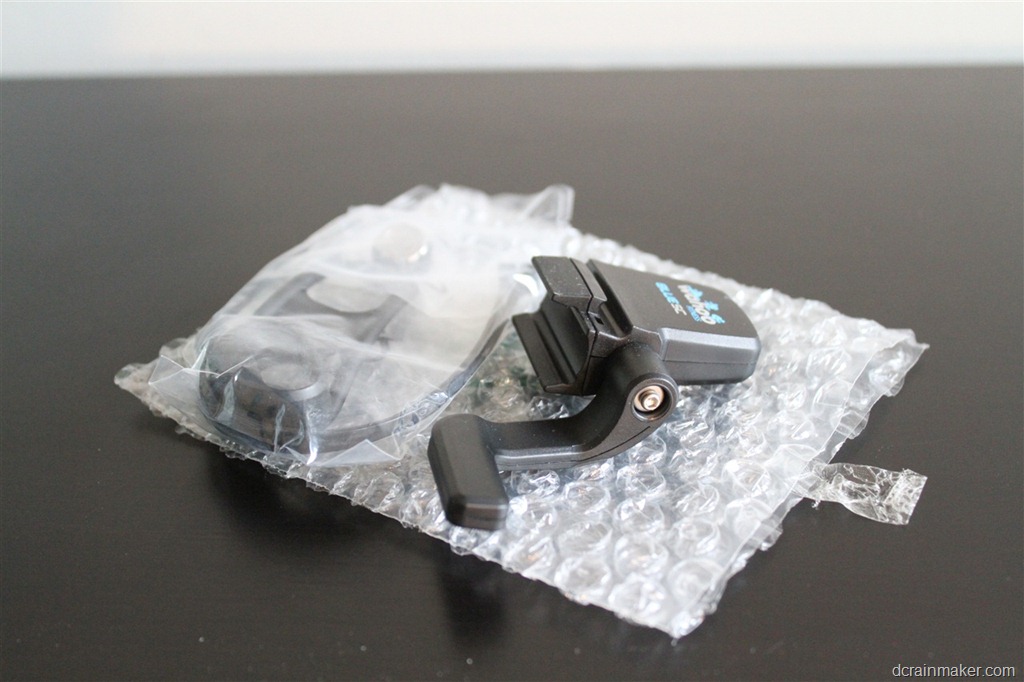
The unit that was sent to me was a pre-production model that didn’t quite have all the fancy packaging with it. Instead, it had more of a lingerie look.
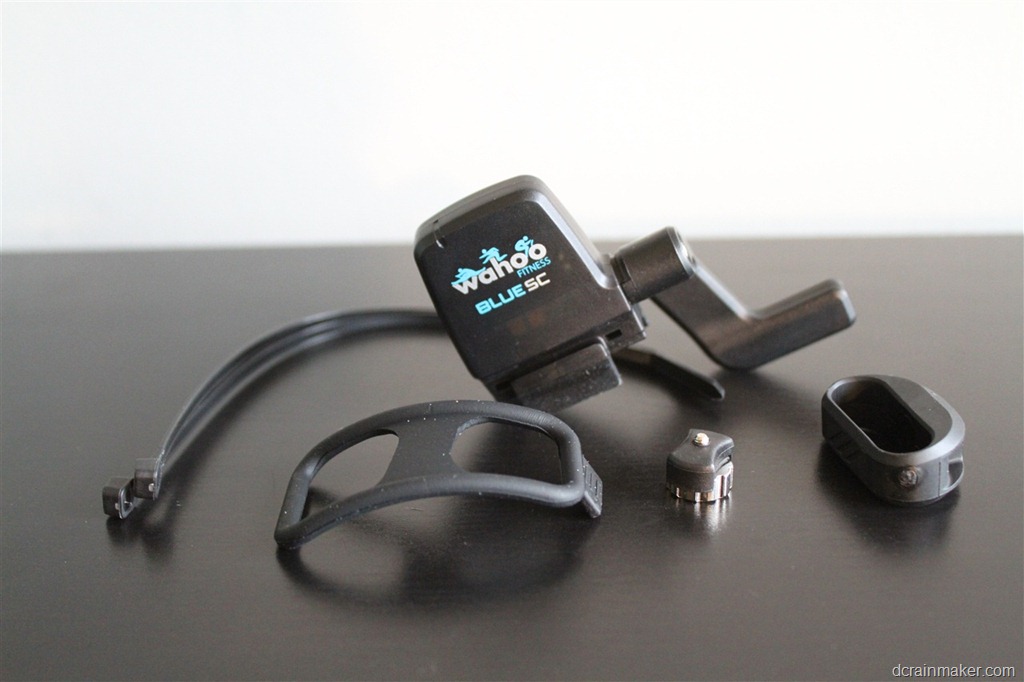
But despite the beta packaging, the contents will be the same for the final retail production units (which cost $59). Here’s the goods at a high level, and then I’ll dive into the components:
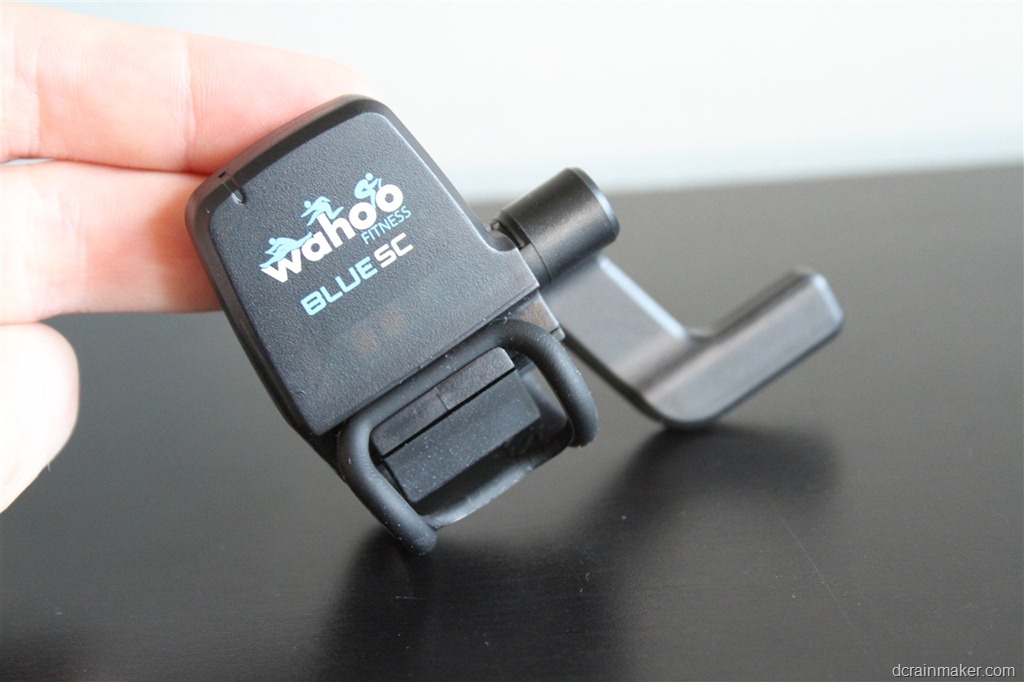
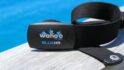
First up, we have the Bluetooth Smart sensor itself:
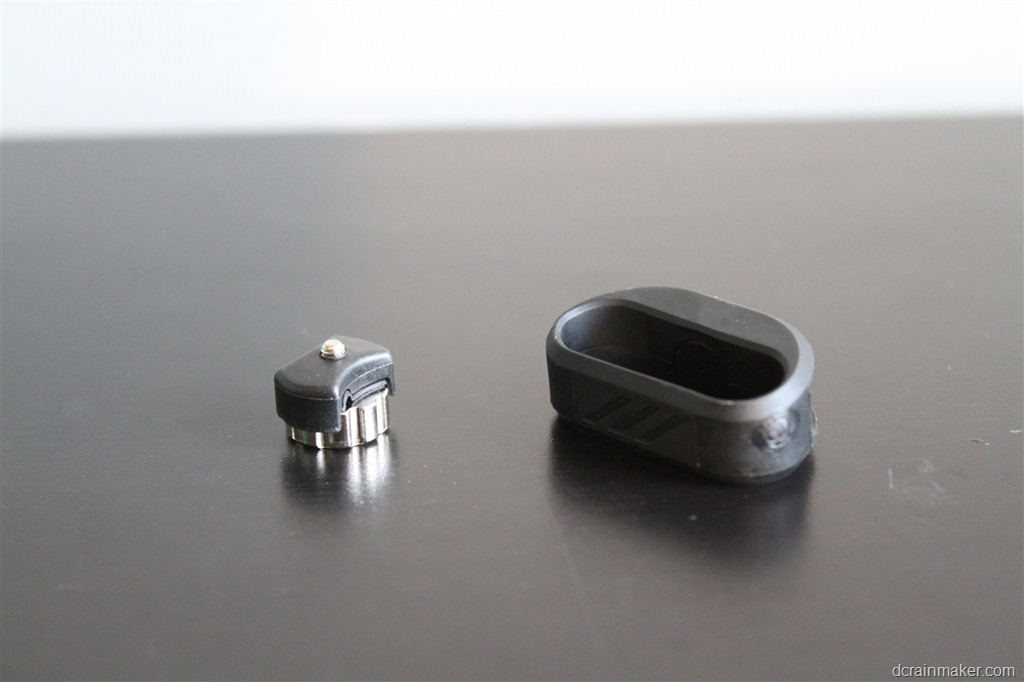
Then we’ve got the two magnets: Speed and Cadence. To the left we’ve got the spoke (speed), and to the right crank (cadence). The spoke magnet separates into two pieces, which tighten back on the spoke.
You’ll notice that gone are the days of clunky zipties holding the cadence magnet on. Instead you just slide it over your crank – which we’ll get to in a second. And the speed magnet you just simply tighten using your fingers onto your spoke. Super-easy and no tools required.
Installation:
If you’ve been around the speed/cadence sensor market lately, you may have seen the recently released Bontrager Speed/Cadence sensor which uses a no-tool mounting system. The Wahoo sensor uses the exactly same casing, which Bontrager has licensed to them.
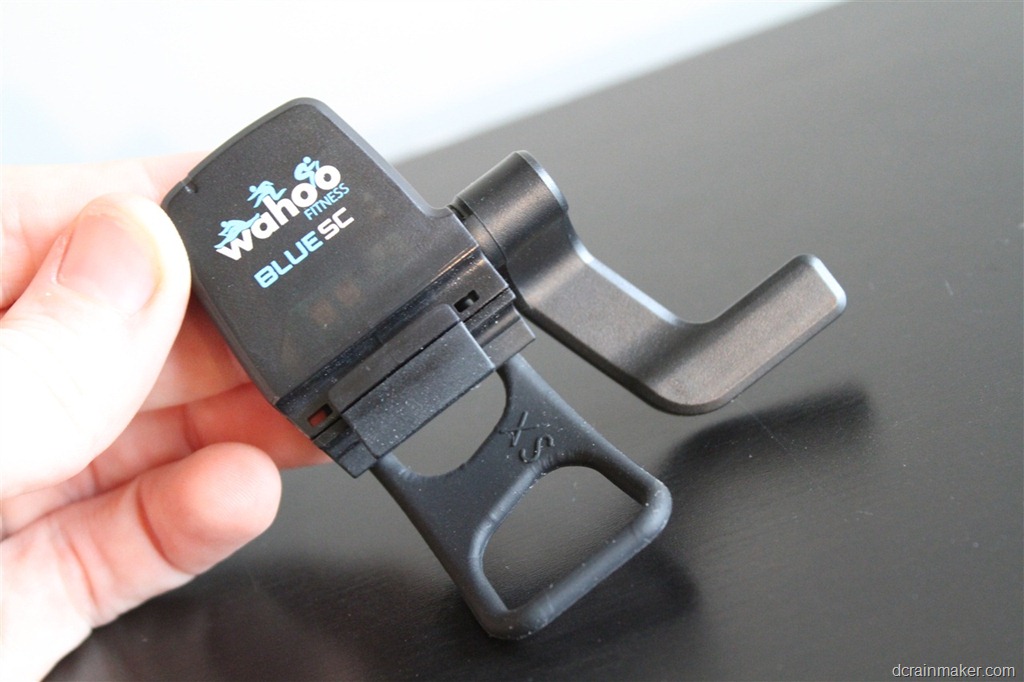
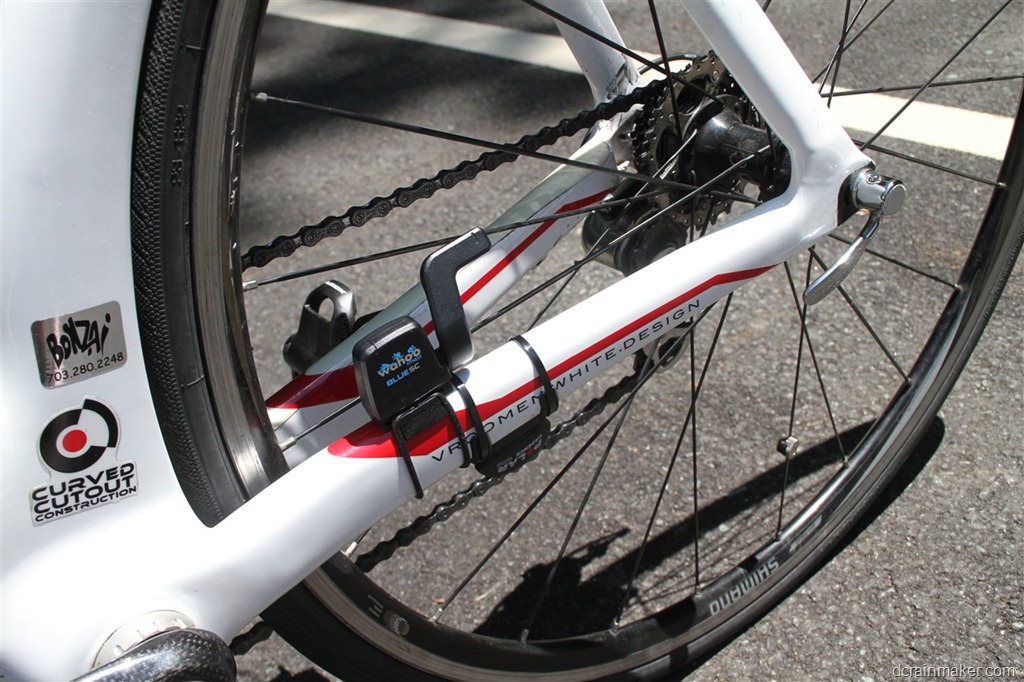
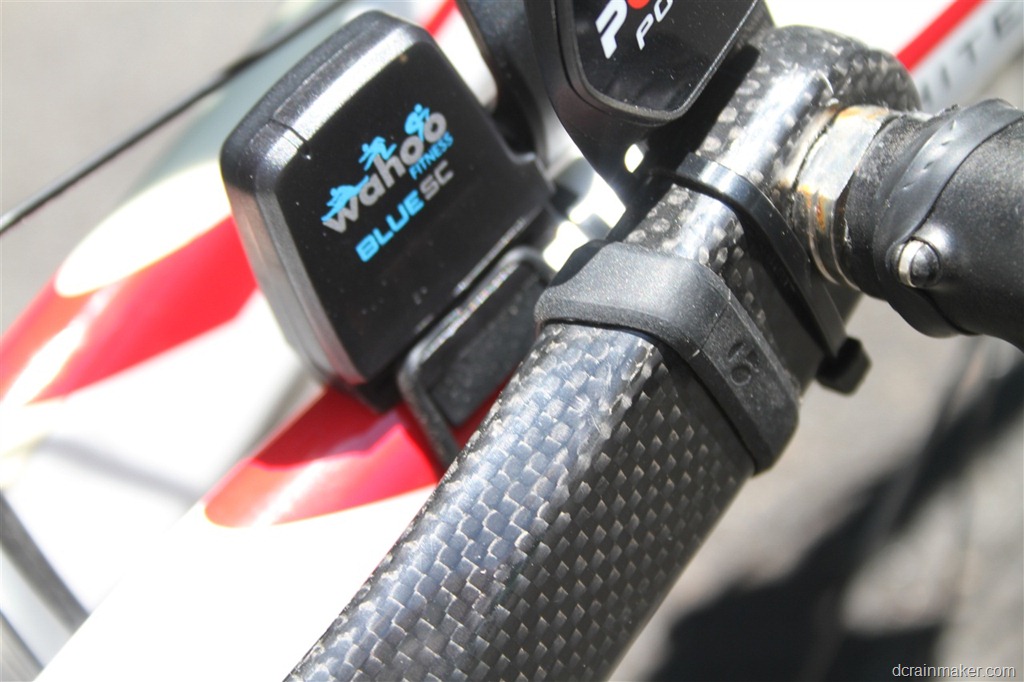
With this new case design comes the easiest installation you’ll ever have – simply pull the single rubber band strap around your bike frame:
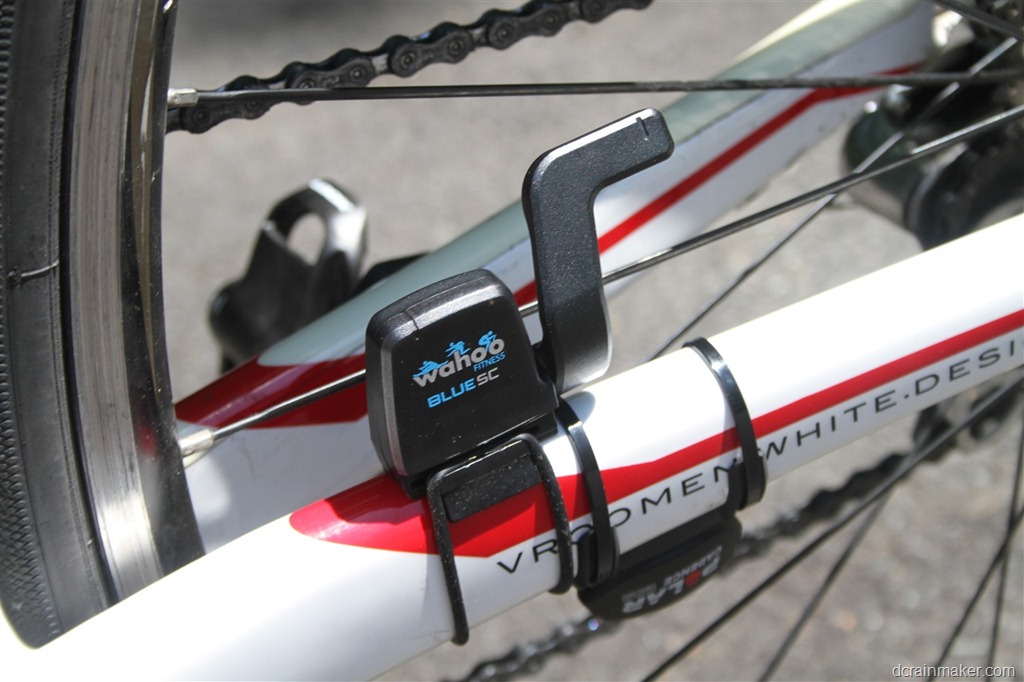
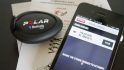
And with that, it’s installed (ignore that Polar sensor hanging out there below it, part of testing…):
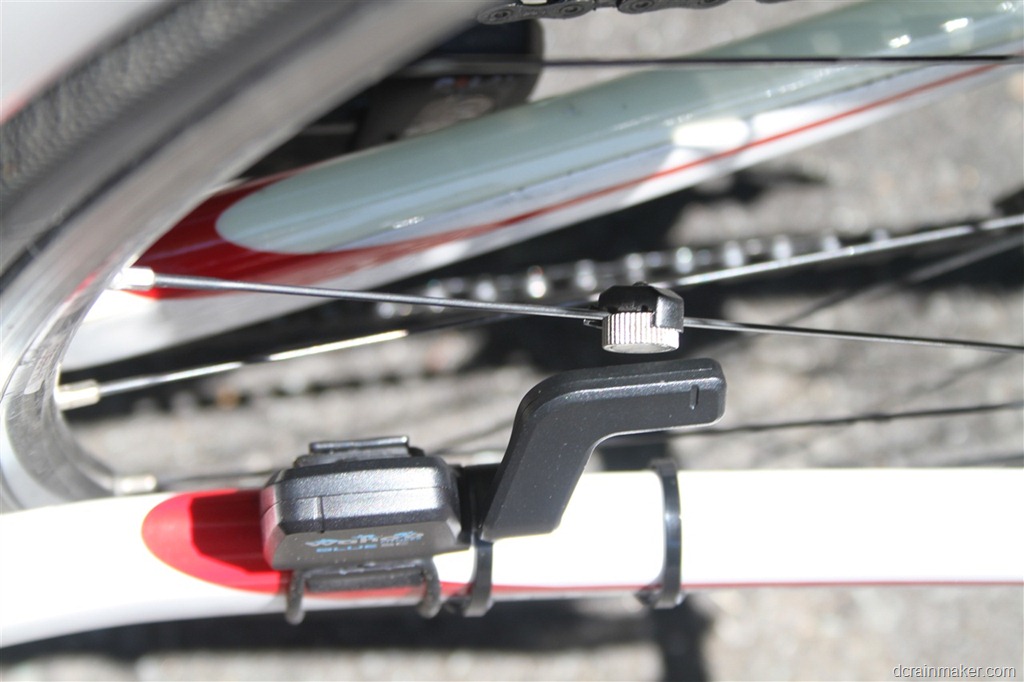
Now, you’ll want to ensure that you’ve got the flexible arm facing towards the spoke magnet (inside). You can mount it upside-down if you wanted to.
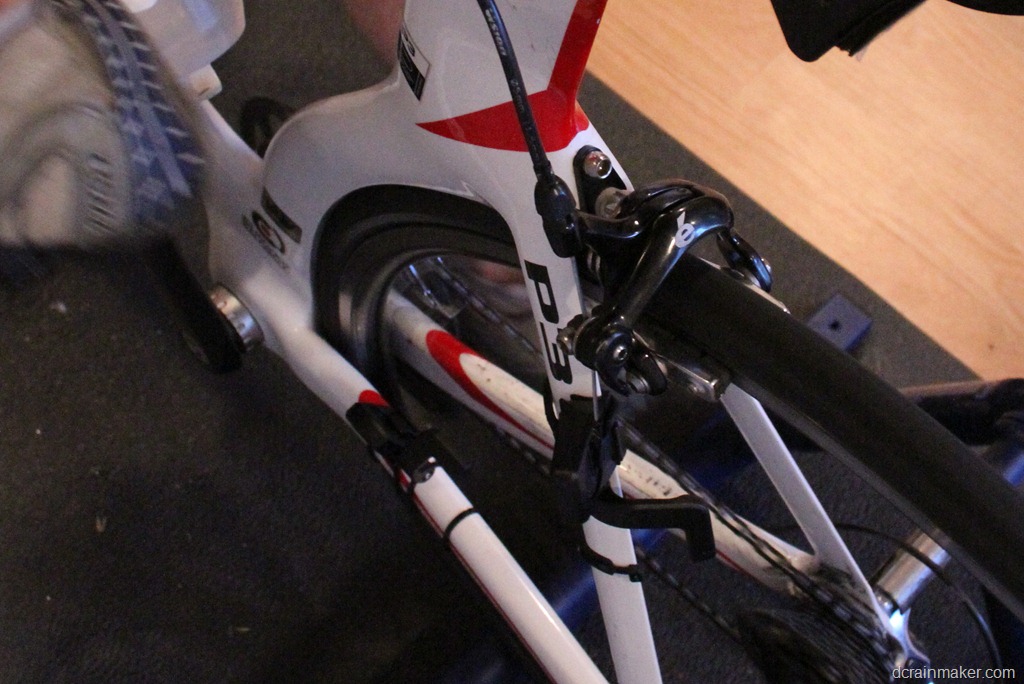
In fact, at one point a few weeks ago I had some other sensors I needed for a test blocking my usual location – so I just went ahead and mounted it up higher. Now of course in this location the cadence portion wouldn’t work any longer, but speed was captured:
It should be noted that while I had some minor arm adjustment issues, I’ve been told that this is unique to the pre-production unit I received. The final retail versions have had this issue fixed (where the arm only worked at certain angles).
Normal use:
As of today (June 6th, 2012), there are currently three apps (plus the Odometer) that can utilize the new Blue SC sensor. The list today includes: Strava, Cyclemeter and the Wahoo Fitness App (plus the Wahoo Odometer).
Each of these applications can utilize the new Blue SC in the same manner as each of them previously handled (and still does) ANT+ sensor data using Wahoo’s ANT+ iPhone adapter. Meaning that the underlying ability for the application to gather speed/cadence data hasn’t changed – instead, you’ve just removed the requirement for an adapter hanging off the bottom off the phone. Now, the phone can go ‘naked’.
Of course, with the inclusion of GPS is 99% of cell phones out on the market today, you may be wondering why you’d want a speed sensor. There are really two reasons – first is the ability to still track mileage when your bike is in motion but your phone may not be with you. And the second is the ability to track speed indoors while on a trainer.
Now as anyone will tell you, speed as displayed while on a trainer is a very fluid measurement. Meaning that you can go from 10MPH to 30MPH without actually increasing your effort – merely by changing gears. By shifting you can maintain the same effort on most trainers while dramatically increasing speed. But, again, it’s still useful to many.
For many though, the cadence measurement is the more useful metric. Cadence is simply a measurement of how many revolutions per minute (as in RPM) your pedal makes. Cadence is normally measured on the left crank, right where the magnet is attached at the point the pedal connects to the crank. Most folks tend to have a natural cadence between about 80 and 90RPM. There exists a number of scenarios why you’d want to train at a higher or lower cadence dependent on your training goals and race scenarios. But that’s an entirely different topic and lively discussion for another day.
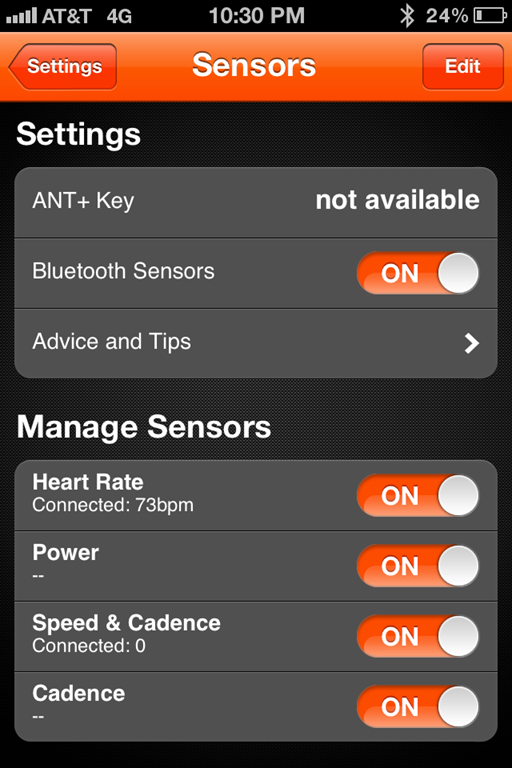
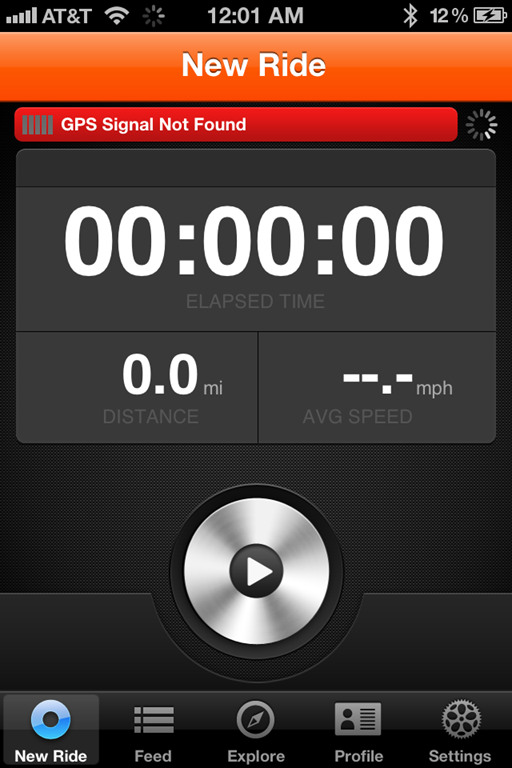
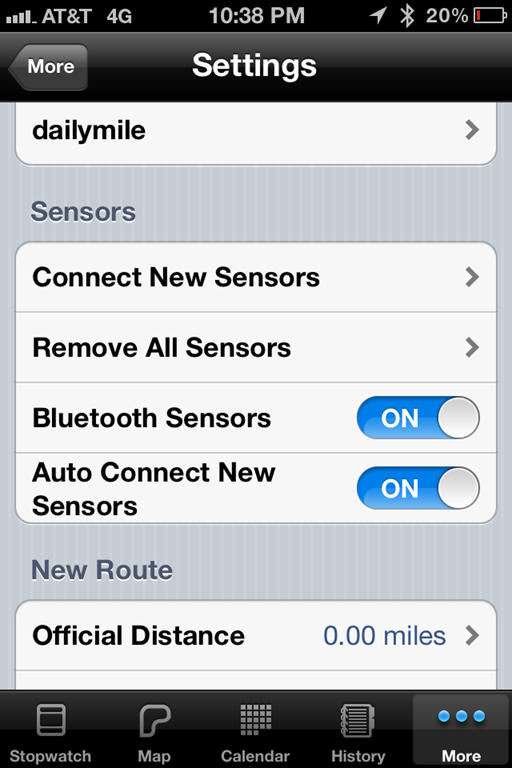
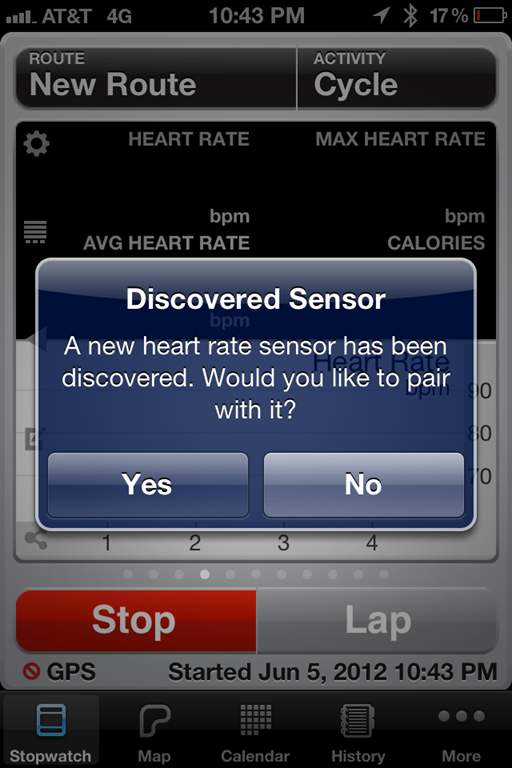
Let’s look at configuring the sensor within apps. Taking Strava for example, to setup the sensor you’ll go into the ‘Biometric Sensors’ and then enable Bluetooth sensors. You’ll notice how you don’t have to have the ANT+ key (though the option remains available), but now the Heart Rate and Speed & Cadence sensors are available to pair. Both of these are available via Bluetooth Low Energy (there are plenty regular non-low energy Bluetooth HR straps as well).
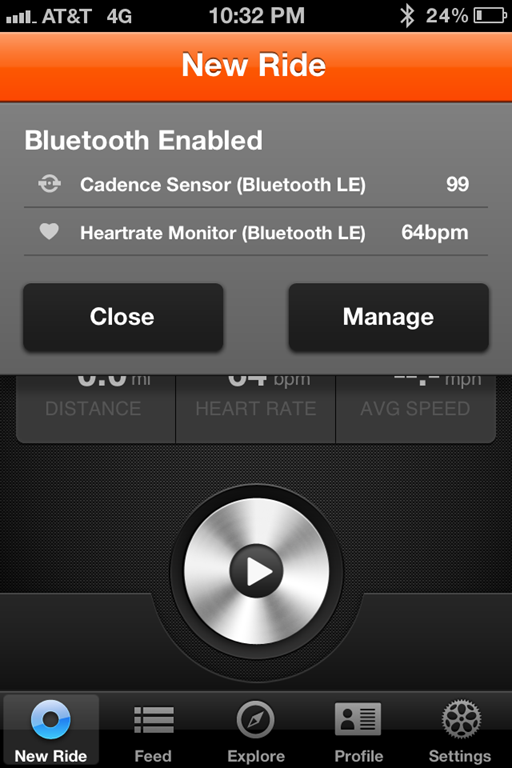
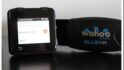
Once you pair them, you’ll see them connected within the main menu. Note that I’ve also paired the Wahoo BlueHR strap in this example (as you can see with my BPM shown).
Now I’m not a big Strava user (yet anyway), mostly because I tend to ride with dedicated devices. So my experience is somewhat limited here. But it should be noted that within Strava, cadence will not be shown on the ride menu. Instead, you’d need to review the data afternoon Here’s the basic free version:
Further, speed data is not recorded from the sensor – but rather only GPS. Even indoors. Quite frankly, the excuses given for not recording this data are lame (I understand the logic implied, but ultimately if you want to become the premier cycling app – you need to give people the data they want). Perhaps they could use some of the $12 million in VC funding to add what every other app developer has otherwise managed to do (in their garages after their normal work).
Moving onto CycleMeter, the sensor settings are handled through the Sensor menu under the Settings page. However, the sensor pairing isn’t quite as straightforward as Strava (or the default Wahoo program). It goes into a pairing mode, but doesn’t give you an indication it’s actually doing anything until it finds something.
Further, even when it does find a sensor, it doesn’t show you the value being transmitted in the setup page (useful for troubleshooting sensor placement). And despite trying, I was unable to get it to pair with the new sensor – instead only the Blue HR heart rate strap:
Finally, within Wahoo’s own app you can easily pair with any of the Wahoo Bluetooth Low Energy sensors as well as ANT+ sensors. And you can mix and match as you see fit.
Quite frankly, as I’ve always said – the Wahoo app is one of the more robust and technically deep apps out there (despite being free). It may not be the prettiest, but it offers the ability to export the data to other platforms such as Garmin Connect and TrainingPeaks. Further, there’s no limitations like there is on the other programs when it comes to display, export or testing of data. It just works.
Odometer Feature:
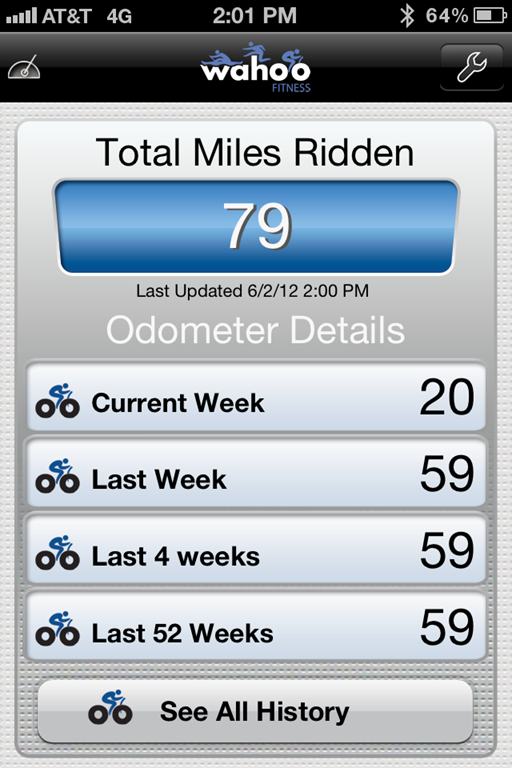
The Wahoo Blue SC is the first dedicated speed/cadence sensor that I’m aware of that includes a built-in digital odometer (without any head unit). This means that anytime you have the sensor attached to your bike, it’ll keep track of your mileage – even when no phone or head unit is around.
Currently, Wahoo Fitness has released a free App (simply called Wahoo Odometer) which gets the data from the Blue SC via Bluetooth Smart (the same wireless protocol used for the rest of the communication). You do have to use the phone app to get the data from the sensor, since there’s no display on the sensor itself.
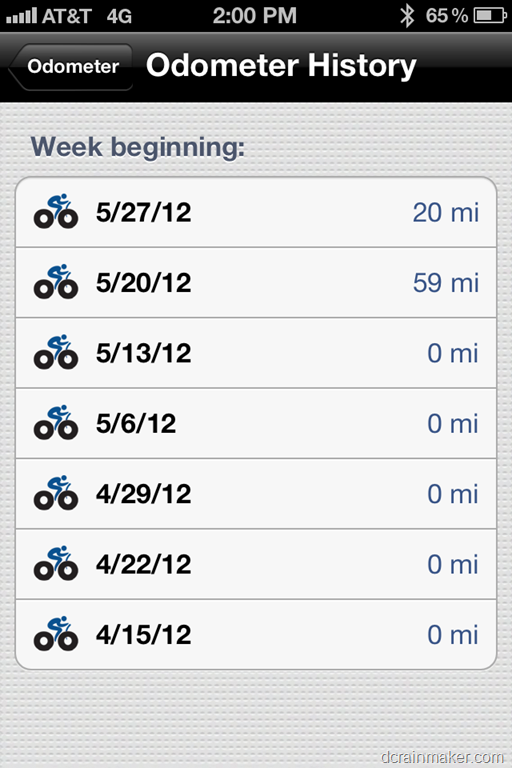
The unit keeps track of history by week, and will show you not only total history, but weekly summaries.
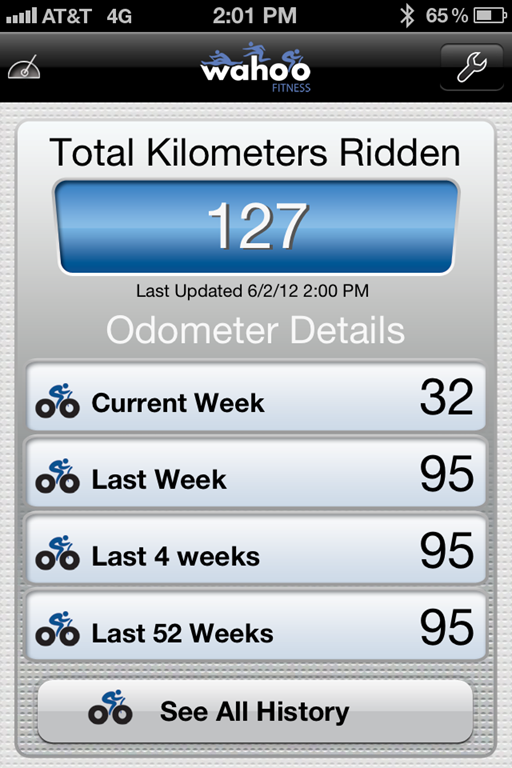
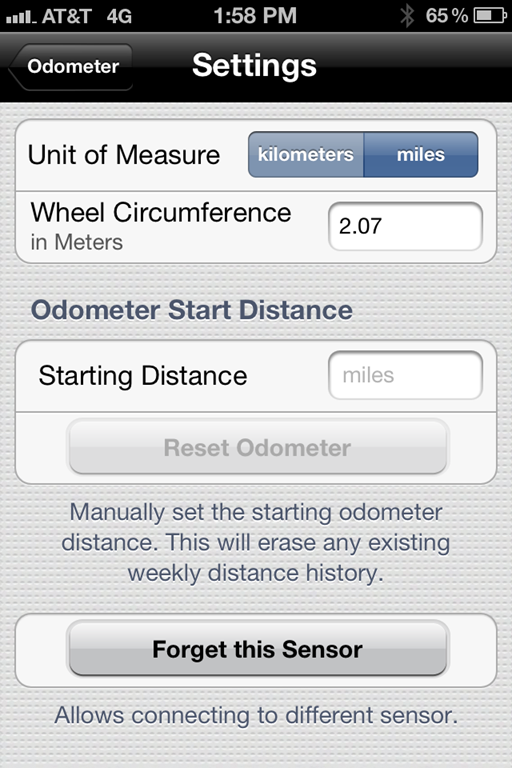
The Odometer app allows you to set the distance in either miles or kilometers:
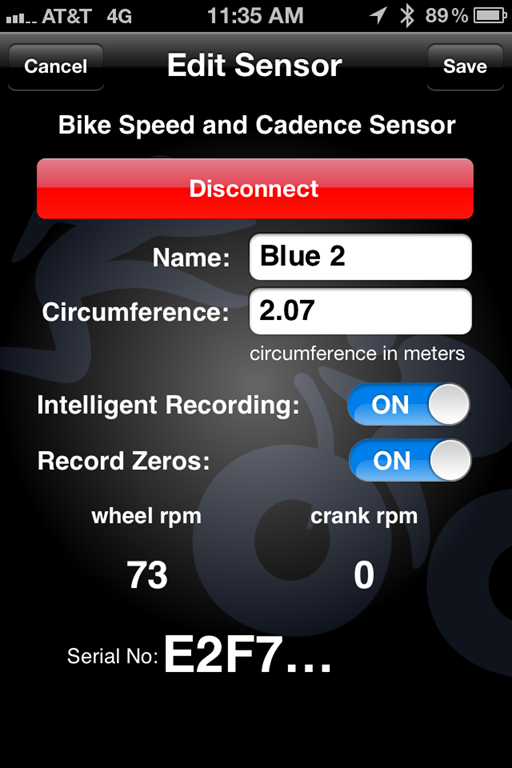
And it also allows you to specify the wheel circumference in meters. For some users, this might be kind of confusing since many are used to using centimeters instead of meters (i.e. 2070cm wheel size instead of 2.07m). But, for those of us not as familiar with the non-Americana system, just add a zero to the end and call the period a comma. Same-same, but different.
And finally, you can reset the odometer as well as go ahead and specify a given starting distance.
When I first heard of this functionality back a few months ago I was a bit skeptical that it would be of anything more than a gimmick. But what I found is that it’s actually turned out to be a kinda neat future. Specifically, I may not bother to run the app on my phone (or any cycling computer) for a quick jaunt around town on my bike. But since the sensor still tracks it, it just keeps on recording what you’re doing anyway – with no additional effort (or battery life) required on your part. In the end, a nice little feature.
Thoughts on the state of Bluetooth Smart:
Many of you have asked about where I see the state of Bluetooth Smart, and how it relates to ANT+. The last time I touched on this subject was some months ago when the Wahoo Blue HR came out in January.
At the time, the market was really just in its infancy. The Blue HR was the first legit HR strap on the market (not just a demo unit in a booth). However, at the time it barely worked with the Motoactv, and outside of that only with the iPhone 4S and a handful of apps. Since then, app support has expanded greatly, and the issues with the Motoactv have been resolved. Further, there exists new phones on the marketplace that support BTLE (a subset of Bluetooth 4.0).
However, as a whole, the sensor marketplace for Bluetooth Smart devices remains extremely fragmented and highly dependent on a handful of apps. Take for example Blue SC. Today there are four apps that support it (two of which Wahoo created). There’s no doubt in the medium term, many of the apps that support devices via the Wahoo Fitness API (meaning, they already support the Wahoo ANT+ dongle) – will broaden support for the BTLE sensor.
But that takes time. Development time. It also takes standards, ones that are just barely being supported for the heart rate device profile (protocol), and are still not fully finalized for the speed/cadence sensor. No other device profiles exist (i.e. nothing for power meters, running footpod in beta, etc….), and the timeline to get the device profiles out of the SIG is very very very long and slow.
But, there are some forces that will help increase device support of Bluetooth Smart in sport – the first of which will likely be Polar (despite the fact that Motorola has had limited support since October 2011). They’ve (Polar) been very vocal in their view that the long term sensor market will be Bluetooth Smart, and not ANT+. To date, in order to support that they’ve released their own Bluetooth Smart HR strap – the H7. This strap is compatible with everything the competing Wahoo Fitness Blue HR strap is compatible with, since they leverage the same API. I do have a Polar H7 I bought, I just haven’t had the time to spend with it. They’ve also noted plans to update their new pedal based power meter to support Bluetooth Smart, possibly in the fall.
Now, in order for Polar to make good on their Bluetooth Smart claims, they’ll actually have to release something aside from simple heart rate straps. To date, no Bluetooth Smart compatible watches or head units have been announced or released by Polar. In other words, it’s a lot of talk. Now, once they do start to walk, I think they’ll be able to help the broader BTLE segment by offering a ‘major name’ in the fitness category – someone on par in brand recognition with Garmin (and depending on audience, greater brand recognition).
Speaking of which, I don’t expect to see Bluetooth Smart supported by Garmin anytime soon – since that would effectively be proclaiming the death of ANT+. And even then, I’m not sure it’s really necessary. There are now chips that allow sport head units to connect to both ANT+ and Bluetooth Smart devices, such as in the Motorola Motoactv. Though, the Motoactv does not yet support the Blue SC.
Summary:
If you’ve got a Bluetooth 4.0 compatible phone (such as the iPhone 4s), and you want to capture speed/cadence data while cycling, the Blue SC is a great option and cheaper ($59) than buying an ANT+ speed/cadence sensor ($35) plus an ANT+ adapter ($79) for your phone. It enables you to get the data you want, without the bulk of an ANT+ adapter hanging off the back.
On the other hand, if you already have ANT+ sensors, and/or you need power meter data or indoor running data, you’re probably best focusing on ANT+ since the support is far broader amongst both apps and devices (basically everything out there supports ANT+ speed/cadence sensors except Polar devices).
Over time I fully expect to see more support for the Wahoo Blue SC, and look forward to many of the apps that utilize the underlying Wahoo Fitness API for ANT+ to also support the Blue SC.
As always, thanks for reading – and if you’ve got any questions, feel free to drop them below. Thanks!
Found this review useful? Support the site!
Hopefully you found this review useful. At the end of the day, I’m an athlete just like you looking for the most detail possible on a new purchase – so my review is written from the standpoint of how I used the device. The reviews generally take a lot of hours to put together, so it’s a fair bit of work (and labor of love). As you probably noticed by looking below, I also take time to answer all the questions posted in the comments – and there’s quite a bit of detail in there as well.
I have partnered with the retailers on the left, and any shopping you do through those links or the ones below, helps support this website. Thanks!
For European/Australian/New Zealand readers, you can also pick up the unit via Wiggle at the links below, which helps support the site too! With Wiggle new customers get 10GBP (or equivalent in other currencies) off their first order for anything over 50GBP by using code [Currently Disabled] at check-out after clicking the links below.
Additionally, you can also use Amazon to purchase the unit. Or, anything else you pickup on Amazon helps support the site as well (socks, laundry detergent, cowbells). If you’re outside the US, I’ve got links to all of the major individual country Amazon stores on the sidebar towards the top.
Thanks for reading! And as always, feel free to post comments or questions in the comments section below, I’ll be happy to try and answer them as quickly as possible. And lastly, if you felt this review was useful – I always appreciate feedback in the comments below. Thanks!
Finally, I’ve written up a ton of helpful guides around using most of the major fitness devices, which you may find useful in getting started with the devices. These guides are all listed on this page here.
and if I have one of those big crankarm… FSA style, is there a larger rubber bands to attach magnet? or have to use a zip tie. and if I have one of those huge chainstays do I zip tie the unit also or are various size rubber bands included with the kit?
The review help me a lot in deciding to buy the Blue SC. It would be either that or the one from Tacx. Unfortunately I missed the discount part of the post before buying it.
Have you ever seen anyone using the BT Cadence sensor from BBB around Europe?
I got the rubber on my FSA crank, tight fit, but works.
My Cervelo also has huge chain stays, the rubber won’t work. I prefer cable ties anyway (compatible), especially of you don’t need to move it between bikes.
I beleive the biggest advantage of using a speed and cadence sensor over GPS is accuracy. Your average speed/distance might nearly be the same, but instant speed is 100 times better with a speed sensor over GPS.
Could you please explain your comment about increasing bike speed on a trainer without increasing effort by just changing gears? This is second time I read this in one of your reviews.
On my trainer (Kurt Kinetic), the resistance seems to be a measure of speed of the flywheel. I.e. the faster the flywheel spins, the more difficult it is to maintain that speed. It doesn’t “care” what gear I am in. I would like to see an explanation of how I can increase my trainer speed without increasing my effort.
I agree with Murray – the biggest advantage of SC sensors is that they work fine in poor gps conditions and if calibrated carefully are more accurate (and definitely more reproducible). Some apps have long polling intervals for gps, and the measurements clip sharp corners badly.
And I agree completely with the comments about the Strava app. They have a great website – but who’s going to buy a 60$ sensor and use an app that doesn’t display the data until after you’ve finished?
Not sure why Cyclemeter caused problems – I’ve been assured it works by Wahoo and Abvio. I’m getting in touch with Kevin at Abvio about it right away – I know that this has been added very recently, after the latest Wahoo SDK release, and I know it worked in beta.
Im not so sure using an iPhone, Droid, etc on the road would be beneficial for a performance rider. Maybe the road enthusiast, but having your phone connected to bluetooth for 3+ hours on a nicer ride does not leave much battery life to give me the confidence to call someone when in need 3 hours into a day. Idk, not quite convinced that its smart to use a phone.
The Biologic and QooQoon are good cases too. I use the Biologic with a simple modification to mount it centrally on my stem.
Using Cyclemeter (which now has superb customisable screens, and the best history data) I can get over 4 hours on a fully charged phone, even with the display on all the time, considerably longer with it off. For longer rides I carry a small portable charger in my back pocket – if I stop I plug it in for a short boost. If not its there as an emergency and can if necessary be simply connected to the phone whilst riding using a standard cable.
Yep, the websites great, but I don’t understand their attitude re the phone app. No sensor data displayed (except hr now), no elevation, no lap marking – much better to use another device or app and upload the tcx, because the website supports all this, its just their app that doesn’t. Especially since their website doesn’t support tcx export either, just a simple gpx with no extensions, so if you use their app you can’t even get all your data out. Crazy.
I find it is really useful for me. Thank you so much for sharing. I will recommend your posts to my friends. Hope more people will appreciate your posts.Pellet machine
Hi Anonymous – Yes, the H7 does connect to the MOTOACTV. However, the Motoactv won’t let you simultaneously utilize ANT+ sensors with Bluetooth sensors. It’s one or the other.. bummer b/c I wanted to use my H7 with my ANT+ footpod and spd/cadence bike sensors and I can’t. Oh well… but if you don’t care about that then you’re in business.
One more thing for anyone that is a Polar user…the H7 will simultaneously transmit a signal to a Polar Watch (on the 5khz frequency) as well as to a Bluetooth Smart device. I just had my Motoactv paired with my H7 and a Polar FT4 and both devices were receiving heart rate data. Cool.
I’ve got my Blue SC to add to my Blue HR now – and I didn’t see any problems in pairing anything at all. Both the HR and SC paired almost instantly on Cyclemeter and Strava as well as Wahoo Fitness.
I am using a Garmin Edge 305 for over 5 years and it gives me 8 hours of recorded ride. Can I get this 8 hours with my iPhone 4S (without external batteries) and a Wahoo Blue HR and SC sensors. I can turn off the screen for 99% of the time and just turn it on a few times to check my distance. If it is possible, I’ll go and make the change.
No, I don’t think you’d quite get there, would fall a bit short.
What I use though is a simple and cheap external battery pack for my iPhone – which I use for travel days as well (like today), or days when I just need more battery.
Agreed, I do the same. I can get 4-5 hours easily, with display on all the time and all networks on (with Wahoo Fitness). I reckon I could get 6 hours or maybe a tad more by switching off WiFi and only flicking the display on when I need it.
So like DCR if I’m going to be out over 4-5 hours I take a small portable charger and charge the phone at a coffee stop – though its also not hard to run a cable from a back pocket or under-saddle bag to the phone.
I had some real difficulty mounting the sensor so that it would read both the crank and spoke sensors. Did not realise the wheel magnet sensor arm could be mounted upside down unit I read this article.
I did mount it upside down, but it will not read the wheel sensor. Much preferred the ANT+ sensor design – much more flexible mounting options.
Personally I much prefer the more compact Blue SC sensor – hope you don’t mind me checking, but do you know that the wheel sensor arm can be adjusted using a small allen key, 2mm I think. Cheers.
Hi. How easy is it to use with more than one bike. Ideally I’d like to install it on 3 different bikes. Does that mean I’d have to buy 3, or could I just buy extra spoke/pedal magnets?
It would be a bit of a pain to move across bikes frequently because you’d have to carefully position the cadence sensor then adjust the speed sensor arm each time. I think you’d need three. No problem at the iPhone end though – if you use Cyclemeter it’ll let you set up three bikes with different settings for the wheel size (at least, it will in the next release coming very soon – its in the current beta). Cheers.
Agree. You could move it between bikes, but it would be a bit of a pain if you didn’t at least buy the extra magnets.
If you bought the extra magnets (especially the crank magnet), then you could do it pretty quickly. Maybe 60-90 seconds all in, including testing and adjustment.
Read your review with great interest as I use my bike on a Kurt trainer during the winter and was interested in the Wahoo LE HRM and SC but because I use a Motorola Atrix HD (MB886) it was not clear if the Wahoo system works on my android phone. Checked with Wahoo and they say no. Wahoo odometer app only seems to be avail for iPhone and the other apps don’t display cadence which I need on the trainer.
My crank arms are real close to the chainstay and the cadence magnet hits the sensor even though the sensor is mounted as forward as I can get (where I have the most clearance).
Is it possible to mount a different magnet on the crankarm or does it have to be the one provide by WAHOO?
You can use any magnet and any fixing you like. I’ve never used the Wahoo supplied ones for either the speed or cadence sensor.
For speed I use a Mavic magnet on my Ksyriums. For cadence I used to just position a round magnet on the inside of the crank at the pedal axle. When I had steel axles, that worked a treat. But now I’ve got Keo Blades with titanium axles, so the magent won’t attach, so I just use a piece of very strong ‘No More Nails’ adhesive strip cut to size to attach it to the crank arm (anywhere). Have never lost a magnet attached to the crank arm by either method.
Now that trainerroad supports bluetooth le on Mac, I’ve decided to give it a whirl. I’ve noticed that when using trainerroad with my blue hr and blue sc connected to the laptop, I cannot get the data on my iPhone in the Wahoo app. Is there a 1:1 relationship here such that only one receiver can connect to a given transmitter at a time?
Yes, Bluetooth Smart via Bluetooth 4.0 is only 1:1. Kinda sucks in that respect. There’s talk about changing that relationship down the road in a future Bluetooth update (i.e. BT 4.1 or 5.0), but most are saying it would be tied to a hardware update (though it doesn’t need to be). Earliest would be 1-2 years away.
Do you know of a way to attach these censors to an indoor spinning bike? I am a blind user who wants to use my iPhone which talks as a bike computer. However, I’m not sure these censors will fit on an indoor cycle.
Unfortunately, no way that I’ve found. And I’ve taken apart a few of them. Ideally some sort of fabric strap would be required to wrap around in the interior frame area and then a way to attach it to the shoe. Nothing out there today in that realm, though, lots of folks asking.
I have a Sunny Pro spin bike. and I attached it. The key is position. It’s at a wired angle and its attached with a rubber band and gaffers tape. But it works. Can’t upload a photo to the comments but you can email me for one aliy@allisonmayer.com
Are there any bike computer heads that run on bluetooth that doesn’t need your phone on you (like the RFLKT). It’s a real pain to carry my phone in my skin suit…lol.
Nope, none today. Wish there were. At present, no Bluetooth Smart capable bike computers or running watches.
*MetaWatch Strata would technically be capable, but lacks any apps for it today that actually take advantage of it. Plus, it doesn’t have GPS, so you’re back to a phone…again. Sigh…
Within BT 4.0 a Bluetooth Low Energy profile (BT Smart) uses a lot less power than conventional BT. As the sensor can operate for a year on a single cell battery the server “central” does not use much power to capture the data as its normally something like a single number every second so no it will not impact on your phone the same way your existing headset, tethering etc that you are used to as it does not use.
@DCRainmaker: Don’t know if you have access to them but there are two video’s that explain how BT LE relationships are formed in the Apple 2012 WWDC video’s. Well worth a watch (no pun intended)
DCR, I’ve read your reviews for MANY products, and getting into this, I’ve wanted a way for my wife to be able to track me(for safety reasons, just in case) and the new Garmin 510 is going to allow that to happen. I then found the Google Latitude app. My question is, from your review I couldn’t tell, but is Strava the only app that uses GPS for the speed, or do the others as well? I don’t have a bike computer now, and will probably never be a real “racer” so I don’t mind having a phone on my bike as a computer. I want my wife to track me, I would like accurate speed measurement, and cadence as well. I don’t forsee going on a long enough ride that would warrant the need for a 17 hour battery, and there are options to recharge an iphone in the need of an emergency. Also, could this program run in conjunction with Google Latitude to your knowledge? Thanks for help, and sorry for the sloppy organization of my reply. Keep up the great work!
Almost all of the apps out there use GPS for speed, virtually all of them. Unless a sensor is attached. Now, one trick with the Google Latitude app (Android), is that as of today, it doesn’t support the BlueSC – because the Android platform is still segmented when it comes to true BLE support. It’s coming…and soon (like weeks away soon, if not sooner), but it’s going to take some time to filter through.
Thanks so much for your review. I was following the instructions found on the Wahoo website for installing the Blue SC that I just purchased. The instructions would not work for my Specialized Roubaix. I looked at your website and all became clear. Thanks again.
No problems at all. I regularly get calls/texts while on the trainer, and the Wahoo App simply goes to the background and still continues to track data/record.
Other 3rd party apps may not be as smooth, but that’s an app thing more than anything else.
One feature I tripped over that I *LOVE* with the bluetooth sensors: you can run more than one app and have them each record. I run Strava and Wahoo simultaneously on an iPhone5, and they’re both happy as clams recording GPS, heart rate (from an Alpha Mio) and S/C data (from the Wahoo Blue SC). So, no, I’m not wedged about Strava not having a real-time display!
However, if Strava got up one morning and decided to support real-time display, how cool would it be to have the app tell you how you’re doing on each segment while you’re in the middle of it? And how cool would it be to know “hey, a Strava rider is on your tail and will catch up pretty quickly. Get the lead out, bucko!”
Hello Rainmaker.
First of all, thank you for sharing the results of your researches and analysis and providing clear and simple responses to the numerous questions that are being posted.
If possible, I would appreciate if you could provide me some guidance in regards to the following. I will ride a the 100-mile distance in the St Louis Tour de Cure and the Chicagoland Tour de cure. I am currently taking spinning classes but, hopefully, the weather will get better and I will soon ride start to ride outside on the country roads to progressively build distance. In the past, I was using Cyclometer on the iPhone (now iPhone 5) but on longer distance was running out of battery before getting back home. This year, I was planning to buy the Garmin Edge 810 which will allow my wife to see where I am (I am riding alone most of the time) and also transfer the Tour de Cure map developed using “RidewithGPS”. I thought this was a good solution but, after reading your article, comments and feedback, I am no longer sure it is the best way to go.
I would really appreciate your thoughts and advice. Thank you in advance for your help.
Notes:
– My bike is the Paris from Pinarello (not sure it makes a difference but I read someone had a problem with a Specialized Roubaix). I only have an “Odometer” (from Specialize) on it.
– I just received the KICKR power trainer which I will use with a different bike
The 810 will still be a good fit for you, it’s just that it’s not quite what I hoped the product would be over past products. If that makes sense. It will easily allow you to transfer the route into it, as RideWithGPS is compatible with it.
If you do a lot of longer rides where you may be on unfamiliar territory, the 800/810 is the way to go. If you tend to ride the same routes over and over again, the 500/510 is a better bet.
For this particular item (the Blue SC), it’s not compatible with the 800/810, but is compatible with the Wahoo KICKR app. So for the 800/810 you’d probably want the Bontrager ANT+ Speed/Cadence sensor (ANT+ enabled, looks identical to the Wahoo one). Whereas for your bike with the KICKR, you’d want this sensor (BlueSC) if you wanted to get speed/cadence onto your iPhone.
Can anyone tell me if this device or any other will work with my Android phone that does support Blutooth 4. Thats what I was given at work no iPhone :( I would love to be able to buy a sensor and use this phone but am unsure..
Thanks for any help in this direction.. Keep up the great work..
No, there isn’t any support today (yet) on Bluetooth Smart standardized profiles such as the BLE HR sensors, BLE SPD/CAD sensors, or the like. It’s coming, and supposedly “any day now”, but I’ve heard that for 4 months now. :-/
Still doesn’t work. I just installed the Wahoo fitness beta app for android and it won’t pair with the Blue SC. And the Wahoo Odometer is not available for android yet.
I was at a bike expo yesterday and talked to the Wahoo rep who was displaying at the show. He said the Android capability would be ready in 8 weeks. That’s on or about June 1st. Not sure I can wait that long for a HR and cadence, as well as speed, etc, so may just go with Garmin 500 bundle.
If Google have done there stuff and sorted out an API for BTLE then most likely it will be anounced at Google I/O on May 15-17. The major thing to bear in mind is that it may only be for the latest Android and not for the older versions. So even if you have a phone that’s capable hardware wise you may have to wait a long time for an update to come along if you ever get one. I know I am expecting to have to get a new phone to add support into IpBike.
Yeah, I won’t really believe it until I see it. Last I heard it wasn’t dependent on Google, but rather on Samsung (since Wahoo worked with them to get it in). It could be at this point it’s been elevated to Google. But that wasn’t the case a few weeks ago.
Thanks for the excellent in depth review, it was reading this that helped me decide between a dedicated bike computer and using my iphone. I’ve decided to go the iPhone route.
One thing that really needs editing in your review though: 2.07m is not 2070cm, so your advice to add a zero and call the period a comma is incorrect.
The correct advice is to just remove the period entirely, I.e. 2.07m is 207cm.
Well, a power meter wouldn’t support the Blue SC per say, since they are two different types of accessories. However, there could be Bluetooth Smart power meters, and Bluetooth Smart Cadence sensors.
Within that context, the Stages power meter is Bluetooth Smart, and works with the Wahoo App just like the Blue SC does.
I would like to use it with the Zephyr Bluetooth HRM and Strava. Is that possible?
I would like to buy one but i can only find the iphone version while i need the android version.
Where can i buy one? I live in the Netherlands and know from previous purchases that Amazon does not ship to here. There is a (cumbersome) method with a middle man to get it here from Amazon but i prefer not to go that route. Can you sent a link from where I can buy it?
No, there’s no computer applications today (Windows, Mac, or otherwise) that can connect to Bluetooth Smart fitness sensors. Down the road you might see such stuff, but not yet today. Windows 8.1 includes support for it, but that won’t be released until later this year.
Tks for all the info. So I am correct in saying that you can pair both a H7 polar heart rate monitor and a wahoo cadence/speed sensor at the same time, ie Bluetooth smart allows multiple simultanuous connections ?
Hello DCRM, excellent blog. Just a question. If order Wahoo BL HR and SC sensor from Clever Training and there is a problem, do I return it to CT or Wahoo?
Outstanding blogs. Very much appreciated. Have read many of your reviews, and wish the equipment manufacturers could be as readable and comprehensive in their documentation.
I have a Specialized Roubaix… There does seem to be some issues fitting SC sensors due to the large chain stay. I believe Wahoo have mentioned installing upside down. Anyone have any local knowledge of the problem?
Hey, Android peeps. They have an android Beta app that is compatible with the Wahoo bluesc device.
The only requirement is that you must be on a BLE enabled device and with Android 4.3 or grater. I think the only device that doesn’t work is the Galaxy 7. Anyway, here’s the link: link to support.wahoofitness.com
Having purchased a Wahoo BlueSC and RFLKT+ two week ago, I’m having some issues with extended periods of cadence dropouts on 7 out of 8 of my activities. Typically in 60 minutes on rollers, I’m seeing one to two cadence dropouts or spikes for 1:05-1:15 minutes each in my data file. At no point on the RFLKT+ do I see anything abnormal and my cadence is constantly fluctuating +/- 5RPMs. My “speed” readings are recording fine.
Perhaps, I’m overlooking the obvious – the setup. Right now I have the respective indicator lines crossing through the middle of “cadence” and “speed” magnets.
Having a look Wahoo Fitness BlueSC Installation Video and the Ray’s picture above, it looks like the “speed” magnet is being positioned to the left of the indicator line. Is this the proper alignment?
Is the “cadence” magnet supposed to be positioned to the right of the indicator line?
I’m not sure why companies can’t include diagram instructions like the old days. Even checked the Bontrager website since their speed/cadence sensor is similar. I’m also not sure why companies ship the battery in their product. I’ve already changed out the battery as Cyclemeter was showing it at 39% and a digital multimeter showed it under 3 volts which is apparently too low according to support.
Generally speaking, whenever I see issues, it’s because it has drifted too far away from the magnet. It needs to be really close – as close as you can possibly get without it hitting. Or, said differently, position it close enough so that it barely taps it each time it goes by. And then just barely nudge it out of position so the tapping sound no longer occurs.
Thanks for the quick reply Ray! Totally unaware if that is a light for the magnet, and not an indicator line.
Either way I repositioned the cadence magnet to be to the right line the line/light(?), as well as, repositioned the speed magnet to be to the left of the line. On a 62 minute ride on rollers today, I had no cadence or speed dropouts/spikes. Both magnets are within 3-4mm of the sensor.
Hopefully I get some clarity from Wahoo Support on my support ticket from mid-week.
A diagram would be worth a thousand instructional words and languages right about now.
Just to follow up, as one would think it is indeed the center of the line for both sensors as instructed by Wahoo support.
I seem to be an isolated case but I was going through batteries approximately every 5 hours with my original and a replacement BlueSC. I ended up returning both and never got to the bottom it. I don’t think my cadence dropout problem was resolved either with the replacement BlueSC. I’m not sure if my Insulin Pump which has bluetooth capabilities that can’t be disabled was the cause of the battery drain and dropouts, or if there was some other form of interference.
While Christmas shopping over the holidays, I found it interesting that a computer shop was selling the identical bluetooth sensor with Runtastic stamped on the side. I suppose the Bontrager ANT+ sensor uses the same case as well. Since I was taking the sensor off the bike a lot, the rubber band did come in handy. However, I never understood why in the design they hid the zip tie slots hidden behind the rubber band. It would of been nice to position the sensor with the rubber band and then secure it in place with the zip ties. I suppose Wahoo might not have much input in the design and it might be in the hands of the overseas manufacturer.
You say the Wahoo sensor will not work picking up a magnet on the Kurt roller. Can you explain why that is? It seems like the sensor is just picking up rotations per minute and if I use the right circumference with the app (of the roller rather than the wheel), this should work. Is there something I’m missing here?
Clever Training has stopped carrying all Wahoo products, as Wahoo decided they didn’t like Clever offering DCR readers a discount across the board. Sorry!
I think ipBike just added support for BLE devices (or, was just about to, one of the two…). In either case, you can also use the new Wahoo Fitness Android beta app, that does support them.
Hello. Interesting! I have a pafers x-spin and the wahoo fitness app. But in only can get cadence. No speed or distance. Is because they are not compatible? Thank you
Read your review of Wahoo BlueHR where you mention Wahoo rewrote the firmware and it has no spikes or drops in HR. Wondering if they did the same with Whaoo BlueSC? Reason I ask is before BlueSC was released I opted to purchase Scosche’s BLE SC unit which looks identical physically to Wahoo’s (same manufacturer?) but both Scosche units on two bikes create many spikes and drops in both Speed (drops to 0) and Cadence (spikes to 160, drops to 0) (many = 12-15 over a 2.5hr ride on a trainer, mostly drops). Presently recording with Spinning Mobile (Mad Dogg) app on the iPhone (whilst I wait for Polar to catch up). When Cadence and Speed increases it takes a long time to show in the app (10-15s) and then it’s a spike, which settles down. Would your hunch be firmware in the SC unit and would the Wahoo be any better assuming they wrote the firmware themselves? Or is it app sampling frequency?
(PS: I’m officially addicted to your reviews) Thank you!!
Hmm, that doesn’t sound normal. I generally use the Wahoo app with the Blue SC, but I’ve used others. If you’re seeing issues, I’m going to guess it’s a hardware thing.
I don’t know of Scosche’s is using the exact same unit (likely), but it’s possible you simply have a bum unit. I’ve never heard the scenario you’ve described happening unless the magnets aren’t close enough. And speed/cadence increases/changes should occur near instantly (within 1-second).
In any case, try pairing their unit to the Wahoo app. If you see the same behavior, then I’m going to guess the Schosche unit is broken.
Thank you, lots of good ideas to try. Magnets are not that close as you suggested in one of your installation suggestions; will also put in fresh batteries. Getting similar results though on both Scosche units on different bikes so will try Wahoo app too. Cheers.
Gave up on waiting for Bt-Smart to work on Windows phone 8.
Getting a Moto G.
Are there any apps and BT-Smart HRM and Speed/Cadence monitors that work on Android?
If I get the wahoo heart rate strap, the blue SC, and the RFLKT, will I still be able to connect a bluetooth headphones? I’m assuming I don’t need RFLKT+ since HR strap and SC sensor is wahoo.
Check out the Bluetooth Smart section of my V800 review, where I cover compatibility there with the V800 (and keep it up to date as new firmware hits).
Certain new Bluetooth capable bike computers like the TomTom Multisport watch and the Polar V800 (and soon Polar V650). Probably a few more coming on the market soon as well.
Is there anything out there that I can use with this to simulate routes? I would like to be able to see on a map the distance I have travelled etc? I think Kinomaps would do it but not sure?
@jhonny you got the “PowerTap Bluetooth Smart Dual Speed/Cadence Sensor” that I’m using that are really good. Don’t know if or which of the sensors that will work best with your watch though.
I’m about 80% sure I’ve tried it already with the BlueSC, and it was fine. But I haven’t sat down to test each combination yet with the final Ambit3 firmware (since it’s not yet available, and there continue to be slight differences version to version with the Ambit3 and BLE compatibility).
Well, I did buy Wahoo Blue SC and it doesn’t seem to work with Ambit3. I tested that the sensor itself works with IpBike and a Nexus 7, but that’s a bit unwieldy combination for actual riding :)
Any experiences on a speed/cadence pod that works with Ambit3?
I’ll see if I can squeeze in testing today before my flight, and if so, will report back results. If it doesn’t work, I’ll hit up the Suunto folks as to why.
So I tried tonight the PowerTap Speed/Cadence BLE sensor (looks identical to Wahoo), and it worked perfectly on a trainer for about 30 seconds or so.
I was going to try the BlueSC next (again), but ran out of time before I had to run to the airport. But I brought it with me and will try it later tonight at the hotel to see if at at least pairs and shows cadence/wheelspeed while using a magnet sitting there (better than no test). I’d be able to test on a real bike in a few days.
IpSensorMan on Nexus 7 just picked up the sensor, but the Ambit3 doesn’t seem to be even trying.
This might be a user error if active pairing is required on the Ambit3. There is no proper manual available yet, it seems, just the quick start guide included in the package. I do have “Bike POD”, “Cadence POD” and “Power POD” enabled for Cycling in Movescount, but on the device itself there is no indication that it is searching for anything besides HR Belt and GPS when I start a Cycling activity.
Indeed user error. A call to Suunto revealed that there is a settings menu with pairing options on the device, and indeed it paired with Wahoo Blue SC just fine.
i bought a Blue SC sensor this morning at the Apple store, I tried very hard to make it work w/ my I phone 5S, after 5 hours i gave up and scraped this damn thing, now the trash was picked up an hour ago and so the sensor:) just being curious why didn’t the sensor pair w/ the I phone any ideas?
Set up:
1. APP was downloaded
2. Sensor was mounted as instructed
3. Cranked the bike for minutes
It sounds like the little CR2032 battery inside of it may be dead. That can occasionally happen in shipping for any sensor type device that’s magnet or motion-triggered. It’s rare, but I hear about it every 1-2 months. If you don’t get any light when you pass the magnet buy the sensor, then it’s likely the battery.
The good news is that’s a quick and cheap couple dollar fix. If not, then I’d ring up Wahoo support and they can swap it out for you (or, just swap it out at the Apple store).
I want it all: I want to be able to use my Garmin 310 sometimes and my bluetooth phone when I don’t have the 310. Do you know if Wahoo will come out with dual bluetooth/ANT+ on this sensor? I thought I remembered you saying that all Wahoo stuff will eventually be dual sensor. That’s got me sold on the Tickr (at least, pending your upcoming review), but the SC seems to be staying bluetooth only.
Sorry for not reading thru all the comments and answeres – could you tell me if there is an garmin edge 810 alternative in using an android phone with bluetooth 4.0 capability and speed/cad BT sensors on the bike + gps from the phone + maps and routing capability of 810 + live tracking in the android app? So is there an app that does all this and could save some money?
Can anyone tell me how to get the speed/sensor Sc to work on my Kickr??? Isee it work on the find a sensor, but once I start a workout, the cadence does not read?? thoughts!!
You’d have to defer to the Wahoo Fitness site at this point: http://www.wahoofitness.com – as Clever Training no longer sells Wahoo Fitness products. Sorry!
I have recently purchased the Wahoo Blue SC, which as stated above is advertised as having Dual-Technology ( Both ANT+ and BLE capabilities). I have unsuccessful in trying to pair to using the Suunto Ant+ MoveStick. I have the Garmin Ant Agent installed on my Macbook Air and am using TrainerRoad to unsuccessfully attempt to pair. Does anyone know if this combination will work?
unfortunately this still didn’t work. I placed the Garmin Ant Agent in the Trash, and restarted TrainerRoad. At this point the Pair button was visible in TrainerRoad. When I placed the Suunto Ant+ MoveStick into the USB drive the Pair button vanished from TrainerRoad and Speed and Cadence were both displayed as 0. This didn’t change even after 3 minutes of turning pedals/wheel. I know the Wahoo Blue SC sensor works with the iPhone app (both cadence and speed are displayed using bluetooth). I think there must be something wrong with the Ant+ signal (if there is one?) from the Wahoo device.
I took the easy option out and bought a Belkin Bluetooth usb adaptor. I should have spotted it beforehand. A third of the cost of the Ant+ adaptor, and also works with my bluetooth HR strap. It worked straight away. I’ll get my money back on the Suunto Ant+ adapter either returning to shop or via ebay. thanks
just received the following reply from Wahoo:
……
Hi Andy,
Sorry about the confusion, only the devices sold directly through our website are the newer versions with ANT+ built in. Wiggle has the older version that is only Bluetooth 4.0.
Unfortunately I get no Support from Wahoo to my requests. I havn’t got a Android or a IPhone device.
I can connect my Ambit3 Peak with Wahoo bluesc. What I Need is a change to configure the weelzize from a Windows device.
Do you know if this comment is still true?
“Further, speed data is not recorded from the sensor – but rather only GPS. Even indoors. Quite frankly, the excuses given for not recording this data are lame (I understand the logic implied, but ultimately if you want to become the premier cycling app – you need to give people the data they want). Perhaps they could use some of the $12 million in VC funding to add what every other app developer has otherwise managed to do (in their garages after their normal work).”
I followed your links, and poked around the web a bit, and it seems unclear. I think this issue has been fixed in the past 2 years, but I’m not sure. One of the main reasons I would consider this product is to make the distance and speed measurements more accurate….if Strava doesn’t actually use this data, then the product is pretty worthless for me.
Is there a possibility of a firmware update from the new Blue SC BTLE/ANT+ from Wahoo that could make this act as an ANT+ to BTLE bridge? I know there is mention of it in their new TICKR, but haven’t heard anything about their new ANT+/BTLE S/C sensors…
Recently purchased this and compared to the Garmin GSC10 I’m finding it to be awful. I’ve done thousands of miles with a GSC10 and I’ve had maybe two or three dropouts (that I suspect were caused by interference with a wireless controller linked to my laptop), but I haven’t been able to do a single five minute section on TrainerRoad without having a dropout (either cadence or power). Usually this only seems to last a second or so, but it’s very frustrating when you’re pushing yourself at your limit.
Unlike dropouts on the GSC10 (where trainer road makes your cadence / power disappear), this seems to act like it’s missed a spin somewhere. I’ve positioned both magnets as close as they could possibly get, as well as changed the orientation of the arm to no effect. I’ve even tried swapping in other, more powerful magnets, but that hasn’t done the trick either.
Hopefully I can return it without any drama… but that still leaves me without a sensor to use with an iPhone. :(
Just to be clear – did you purchase the BlueSC (full Bluetooth Smart variant), or the BlueSCv2 (with dual ANT+/BLE)? And, depending on which version – are you using ANT+ or BLE between TR? And if BLE, how far between your bike and the computer is the adapter?
Your issue actually sounds like a Bluetooth Smart issue to be honest, one that may still impact your computer even if you swap out.
Sorry if this question has been asked. I’m considering buying one of these for a Christmas gift. Just a general question as to the bluetooth connection with a smart phone, during a ride and while it’s sending data to an app, is the phone using data off the phone plan?
I am Suunto Ambit (1st gen) user with some hopes to upgrade to Garmin 920XT during next year.
Have been looking for a cycling speed/cadence sensor that could be supported by both the above for integrity.
There is one WAHOO Fitness product already compliant (acc to thisisant.com): link to thisisant.com
Apparently its newer version already exists = Wahoo Blue SCv2 that is supposed to be compliant with ANT+: link to eu.wahoofitness.com
but I cannot find this in ANT+ DIRECTORY at all.
I contacted thisisant.com and WAHOO has not applied for ANT+ compliance with their latest Blue SCv2.
Is this better to go for the “proven”, but older solution or can I trust that WAHOO’s new product is ANT+ compliant, even if it is not mentioned by thisisant.com officially yet?
This might be a stupid question, but can it simultaneously broadcast/pair with a BLE device and an ANT+ one? I’d like to be able to get data both in my V800 and TrainerRoad (via ANT+).
I have a TomTom Multisport GPS watch, and quite frankly the speed/cadence sensor that came with it is giving me nothing but problems! The TomTom sensor is bluetooth and works with the Wahoo app (well, the speed works, the cadence doesn’t work at all!). I’m wondering if the Wahoo sensor might work with the TomTom watch??
I have looked everywhere for documentation but can’t seem to find any. So you know if the Blue SC is can transmit to both a phone and watch simultaneously? Mine seems to only connect to one or the other. (iPhone 5s w/ wahoo app and TomTom multisport)
For anyone looking for an app that displays distance, speed, cadence, average speed and average cadence (using smart bluetooth sensors) then download ‘Newco Bike Speed and Cadence’ app in the app store. Its much simpler to use although it doesnt record sessions for future review but I find it much better for indoor turbo trainer work outs.
(posted same post in the Garmin Speed/Cadence post, but not all read both, so interested in hitting up those the might have wahoo already)
Anyone with views on this Garmin Speed/Cadence versus the Wahoo BlueSC v2. One of my primary “likes” for the Garmin is that it seems very simply to switch the sensors from one bike to another. Whereas the wahoo, you’ll have to take spoke magnet, the speed sensor, and then remove the pedal to get the cadence sensor off. Having BlueTooth + ATE is nice, not sure how often I will ride either bike with just my phone and not my Fenix. Both are similar in price. I can’t decide. what do you folks think
It really just depends on how often you plan to swap around. If swapping a lot, the Garmin is easier. If swapping only a little, then I’d go more with the Wahoo.
Keep in mind you can also easily get extra magnets for a few dollars online. Heck, most bike shops will even give them to ya from a drawer if you ask nicely. :)
ended up with the garmin. only used it once so far on. Y trainer. both the new garmin and my bontrager showed the same cadence and speed. so far I am pleased. why is it that indoor speed (and thus distance) is skewed on the long side. even with higher resistance my trainer registers 20mph and that’s just not really that correct i think. Wheel size is correct… double checked
I just bought the Garmin 810 bundle… I’ve been using my Wahoo Candence Blue (not the ANT+) with training road on my ipad, but since the 810 doesn’t read this cadence, I’ll have to swap everytime I ride outdoors. Any tips on how to install both?! Or use a system that instead of cable ties I can use rubber bands with my garmin?
No Michael. The circumference you are measuring is the tire, not from hub to spoke magnet. Different tire sizes give you different circumferences so you need to find your tire width and put it into a calculator that identies the given circumference or measure it yourself by rolling the bike’s wheel one complete rotation and then measuring it with a ruler/measuring tape.
Hi Ray,
I just installed my spare bike on the Wahoo KICKR home trainer. I am using a POLAR heart rate monitor and watch which does not connect to the Wahoo Fitness App nor to the KINOMAP Trainer App. On Wahoo website site, I see they have the Wahoo fitness KICKR and KICKR X that would provide heart rate data and the Wahoo Blue SC Cycling Speed and cadence. You wrote a review of the first item in January 2014 and the second in June 2012. Has there been anything new and/or more update since then? Also, there was a link to Clever Training website with a 10% discount code on your review but these items are not listed on the website anymore. Is it simply because of a commercial reason or is it because you no longer endorse these products. Thank you for you feedback and help. I will be using the trainer to train for mountain climbing as I live in Southwest Florida which is pretty flat but will spend one week in northern italy this october biking in the mountains in preparation for my participation in the La Pina (Gran Fondo Pinarello in July 2016). I am using a Garmin Edge 810 on the bike I ride outside.
Bought a dual tech Wahoo Blue SC recently. How does it work when you pair up with a Garmin Fenix 3? When it is running, does the speed reads from the GPS watch or Blue SC?
Hi,
Do you have an idea how does stages sensor transmit cadence values.I checked the BT packets and found just power but no cadence.is it sending just number of revolutions made and cadence is calculated based on that? Thx
Hi i have a Wahoo Blue SC sensor connected with my Iphone and cyclemeter,
I’m interested by the polar V650, do you think that the Wahoo Blue SC sensor is compatible with the V650
Thanks by advance
I use one with a V650 (the V2 with both Bluetooth Smart and ANT+). It works well. Just remember to enter the correct calibration value. Due to a Blutooth Smart limitation it won’t talk to both your iPhone and your V650 at the same time. It will only talk to one or the other.
Are there other devices for indoor cycling that compete with the Wahoo? Or perhaps you have a page of comparisons/recommendations similar to the Wahoo? Looking for system to add to Garmin 230 to track cycling trainer data.
It worked for a couple of days and then stopped. I took out the battery and put it back in and it worked for one more day. I can see the lights flashing, but it won’t show cadence or speed in the workout screen. Is this a battery issue?
Funny thing is I can see it connected on the sensor screen and it shows my cadence/speed there, but as soon as I switch to the workout screen it no longer connects. Tried a new battery and that didn’t work.
I bought the Wahoo Tickr andBlue SC Bluetooth Smart Speed/Cadence Sensor. I can pair it on my windows 8.1 phone but it won’t work on a new Windows 10 Phone (Lumia 550). I can see the device but it won’t pair. Anybody succes in pairing? Anyone ideas to solve the problem?
Thanks!
Ray,
I am looking for an inexpensive way for my girlfriend to be able to track her speed, and cadence during and after rides. She is just beginning to ride with me and we don’t (yet) want to invest in a Garmin and power meter, etc, like I have.
She has an iPhone 5, and I am considering purchasing the Wahoo Blue SC Cycling Speed & Cadence Sensor for iPhone and using it with the Strava App.
Does this sound like the best option for this purpose? Other suggested options?
Will this work with the Free Strava App, or will we need to upgrade to Premium?
Will she be able to see speed and cadence info during rides? And be able to refer to the rides later as well?
Does Strava allow her to post rides to social media like FaceBook?
I don’t have experience with Strava, but the Wahoo app (free) works great on my wife’s iPhone 6 with the BlueSCv2. The app allows you to upload data to Garmin and others really easily.
I just finished a 12-week computrainer class at my local bike shop that was based on FTP/zones compared to speed/cadence. I would like to continue similar style workouts on my trainer at home, however I do not have Internet. I thought the Wahoo Blue SC would be an option because it can connect to my phone and I can maybe download apps with zone/interval workouts or consider doing Zwift since it offers a mobile app as well. Is what I’m thinking correct? Do you have any other suggestions?
If I’m used to hitting zones by % of FTP, how do I switch to speed/cadence/rpm?
Lastly, would I be able to stream info from the wahoo to my iPhone to a laptop or tv screen via an ANT+ stick or am I just crazy thinking!? I’m just thinking that I would want to see a larger visual screen for a workout other than a small iPhone screen.
Thank you! I look forward to hearing from you. Your reviews are very thorough.
Hi
What are the pros and cons of the Wahoo Blue SC speed and cadence sensors versus the Wahoo RPM speed and cadence sensors? Which would be more accurate in measuring speed and cadence?
Thanks
William
Ray ,
Can you think of any way I could hook this up to my spin bike to get both speed and cadence with the wahoo app. If I can do that, I will get the Tickr X so I get heartrate also.
Does anyone know if the dual sensor will broadcast to both a Garmin Edge cycling computer (in ANT+) and a Spartan Ultra (Smart Bluetooth) simultaneously? I’m not sure if the sensor supports both protocols, but only broadcasts in one or the other at the same time.
Yup, it does exactly that. Just ensure you’ve got the Gen2 version of the BlueSC (it’s virtually impossible to buy the older Gen1 version that this review is based on). The *only* difference is that Gen1 does Bluetooth Smart only, whereas Gen2 does both Bluetooth Smart & ANT+ concurrently.
i got garmin edge 820 recently and had already wahoo v2 version speed/cadence sensor supporting bt and ant+. i paired it with garmin, no problem, but noticed distance value is off. on a 20m ride it was off for about 3miles. i checked garmin under settings/sensors and there is no option to manage wheel size. any idea how to adjust wahoo sensor to have correct distance?
I’m trying to find out if the blue sc will work with a wahoo kickr trainer. Clearly the speed option won’t work since the back wheel is off.. but will the cadence work? Will it interfere with the kickr speed info and report 0 speed instead?
Thank you!
Quick question…how’s the battery life in real world scenario? I’m getting about 14 hours, which means a new battery every week…they’re cheap so i don’t mind, the only annoying part is when i push the crank and get no data because i forgot to put in a fresh battery!
Overall the SC has been quite reliable, no signal drops over ANT+ or any other issues.
I have a Garmin Edge 705 which will only take a combined speed/cadence sensor rather than an individual sensor for each parameter. The cadence side of my sensor died recently and left me high and dry as Garmin doesn’t make their combined speed cadence sensor any more. Will this sensor now do the same job via ANT+ to keep my 705 going, or do I use this as an excuse to buy a shiny new (but expensive) bike computer?
I’ve been experiencing sporadic problems with my Wahoo Gen2 sensor (Speed/Cadence). They work when I’m outside on a ride (most of the time) but I can’t get them to work on my trainer. I’ve tried turning off my Garmin Edge 800 GPS and I also have the Spartan Ultra…neither works indoor to show speed/distance. Any ideas I can try? Are there any other Bluetooth/ANT+ Speed/Cadencesensors folks like?
Will someone take the time to measure this for me and also the round magnet without the part that screws on the back. Also does anyone know if any magnet would work or if it has to be the one that comes with this? Thank you! I’m trying to get this to work with my spin bike.
Measure what exactly? The sensor body? Any magnet will work, i bought a stack of neodymium magnets and placed them on the back of pedal so no “magnet holder thingy” needed for cadence, easy to swap between bikes.
I swim, bike and run. Then, I come here and write about my adventures. It’s as simple as that. Most of the time. If you’re new around these parts, here’s the long version of my story.
You'll support the site, and get ad-free DCR! Plus, you'll be more awesome. Click above for all the details. Oh, and you can sign-up for the newsletter here!
Here’s how to save!
Wanna save some cash and support the site? These companies help support the site! With Backcountry.com or Competitive Cyclist with either the coupon code DCRAINMAKER for first time users saving 15% on applicable products.
You can also pick-up tons of gear at REI via these links, which is a long-time supporter as well:
Alternatively, for everything else on the planet, simply buy your goods from Amazon via the link below and I get a tiny bit back as an Amazon Associate. No cost to you, easy as pie!
You can use the above link for any Amazon country and it (should) automatically redirect to your local Amazon site.
While I don't partner with many companies, there's a few that I love, and support the site. Full details!
Want to compare the features of each product, down to the nitty-gritty? No problem, the product comparison data is constantly updated with new products and new features added to old products!
Wanna create comparison chart graphs just like I do for GPS, heart rate, power meters and more? No problem, here's the platform I use - you can too!
Think my written reviews are deep? You should check out my videos. I take things to a whole new level of interactive depth!
Smart Trainers Buyers Guide: Looking at a smart trainer this winter? I cover all the units to buy (and avoid) for indoor training. The good, the bad, and the ugly.
Check out
my weekly podcast - with DesFit, which is packed with both gadget and non-gadget goodness!
Get all your awesome DC Rainmaker gear here!
FAQ’s
I have built an extensive list of my most frequently asked questions. Below are the most popular.
You probably stumbled upon here looking for a review of a sports gadget. If you’re trying to decide which unit to buy – check out my in-depth reviews section. Some reviews are over 60 pages long when printed out, with hundreds of photos! I aim to leave no stone unturned.
I travel a fair bit, both for work and for fun. Here’s a bunch of random trip reports and daily trip-logs that I’ve put together and posted. I’ve sorted it all by world geography, in an attempt to make it easy to figure out where I’ve been.
The most common question I receive outside of the “what’s the best GPS watch for me” variant, are photography-esq based. So in efforts to combat the amount of emails I need to sort through on a daily basis, I’ve complied this “My Photography Gear” post for your curious minds (including drones & action cams!)! It’s a nice break from the day-to-day sports-tech talk, and I hope you get something out of it!
Many readers stumble into my website in search of information on the latest and greatest sports tech products. But at the end of the day, you might just be wondering “What does Ray use when not testing new products?”. So here is the most up to date list of products I like and fit the bill for me and my training needs best! DC Rainmaker 2024 swim, bike, run, and general gear list. But wait, are you a female and feel like these things might not apply to you? If that’s the case (but certainly not saying my choices aren’t good for women), and you just want to see a different gear junkies “picks”, check out The Girl’s Gear Guide too.




















and if I have one of those big crankarm… FSA style, is there a larger rubber bands to attach magnet? or have to use a zip tie. and if I have one of those huge chainstays do I zip tie the unit also or are various size rubber bands included with the kit?
The review help me a lot in deciding to buy the Blue SC. It would be either that or the one from Tacx. Unfortunately I missed the discount part of the post before buying it.
Have you ever seen anyone using the BT Cadence sensor from BBB around Europe?
I got the rubber on my FSA crank, tight fit, but works.
My Cervelo also has huge chain stays, the rubber won’t work. I prefer cable ties anyway (compatible), especially of you don’t need to move it between bikes.
I beleive the biggest advantage of using a speed and cadence sensor over GPS is accuracy. Your average speed/distance might nearly be the same, but instant speed is 100 times better with a speed sensor over GPS.
Could you please explain your comment about increasing bike speed on a trainer without increasing effort by just changing gears? This is second time I read this in one of your reviews.
On my trainer (Kurt Kinetic), the resistance seems to be a measure of speed of the flywheel. I.e. the faster the flywheel spins, the more difficult it is to maintain that speed. It doesn’t “care” what gear I am in. I would like to see an explanation of how I can increase my trainer speed without increasing my effort.
This comment has been removed by the author.
I agree with Murray – the biggest advantage of SC sensors is that they work fine in poor gps conditions and if calibrated carefully are more accurate (and definitely more reproducible). Some apps have long polling intervals for gps, and the measurements clip sharp corners badly.
And I agree completely with the comments about the Strava app. They have a great website – but who’s going to buy a 60$ sensor and use an app that doesn’t display the data until after you’ve finished?
Not sure why Cyclemeter caused problems – I’ve been assured it works by Wahoo and Abvio. I’m getting in touch with Kevin at Abvio about it right away – I know that this has been added very recently, after the latest Wahoo SDK release, and I know it worked in beta.
Cheers, Alan.
Just bought the sensor last night. What are you recommending for a 4S bike case?
The iPad 3 has Bluetooth 4.0 as well. Not so useful on the road but might be nice for use on the turbo trainer.
Im not so sure using an iPhone, Droid, etc on the road would be beneficial for a performance rider. Maybe the road enthusiast, but having your phone connected to bluetooth for 3+ hours on a nicer ride does not leave much battery life to give me the confidence to call someone when in need 3 hours into a day. Idk, not quite convinced that its smart to use a phone.
Highly recommend the Lifeproof case. it is waterproof, and has a bike mounting bracket available.
The Biologic and QooQoon are good cases too. I use the Biologic with a simple modification to mount it centrally on my stem.
Using Cyclemeter (which now has superb customisable screens, and the best history data) I can get over 4 hours on a fully charged phone, even with the display on all the time, considerably longer with it off. For longer rides I carry a small portable charger in my back pocket – if I stop I plug it in for a short boost. If not its there as an emergency and can if necessary be simply connected to the phone whilst riding using a standard cable.
Cheers, Alan.
Ray, you NEED to get on the Strava website bandwagon. We’ll see about the phone app, but the online/website thing is awesome.
Yep, the websites great, but I don’t understand their attitude re the phone app. No sensor data displayed (except hr now), no elevation, no lap marking – much better to use another device or app and upload the tcx, because the website supports all this, its just their app that doesn’t. Especially since their website doesn’t support tcx export either, just a simple gpx with no extensions, so if you use their app you can’t even get all your data out. Crazy.
Ray- Will the Polar H7 strap talk to the motoactv?
I find it is really useful for me. Thank you so much for sharing. I will recommend your posts to my friends. Hope more people will appreciate your posts.Pellet machine
Hi Anonymous – Yes, the H7 does connect to the MOTOACTV. However, the Motoactv won’t let you simultaneously utilize ANT+ sensors with Bluetooth sensors. It’s one or the other.. bummer b/c I wanted to use my H7 with my ANT+ footpod and spd/cadence bike sensors and I can’t. Oh well… but if you don’t care about that then you’re in business.
One more thing for anyone that is a Polar user…the H7 will simultaneously transmit a signal to a Polar Watch (on the 5khz frequency) as well as to a Bluetooth Smart device. I just had my Motoactv paired with my H7 and a Polar FT4 and both devices were receiving heart rate data. Cool.
I’ve got my Blue SC to add to my Blue HR now – and I didn’t see any problems in pairing anything at all. Both the HR and SC paired almost instantly on Cyclemeter and Strava as well as Wahoo Fitness.
Cheers, Alan.
I am using a Garmin Edge 305 for over 5 years and it gives me 8 hours of recorded ride. Can I get this 8 hours with my iPhone 4S (without external batteries) and a Wahoo Blue HR and SC sensors. I can turn off the screen for 99% of the time and just turn it on a few times to check my distance. If it is possible, I’ll go and make the change.
No, I don’t think you’d quite get there, would fall a bit short.
What I use though is a simple and cheap external battery pack for my iPhone – which I use for travel days as well (like today), or days when I just need more battery.
Here’s a ton of options:
=”http://www.amazon.com/mn/search/?_encoding=UTF8&camp=1789&creative=390957&field-keywords=IPhone%20battery%20case&linkCode=ur2&tag=dcr07-20&url=search-alias%3Daps
Mine is the cheap $30 Lenmar one in the list there. Hope this helps!
Agreed, I do the same. I can get 4-5 hours easily, with display on all the time and all networks on (with Wahoo Fitness). I reckon I could get 6 hours or maybe a tad more by switching off WiFi and only flicking the display on when I need it.
So like DCR if I’m going to be out over 4-5 hours I take a small portable charger and charge the phone at a coffee stop – though its also not hard to run a cable from a back pocket or under-saddle bag to the phone.
Cheers, Alan.
I had some real difficulty mounting the sensor so that it would read both the crank and spoke sensors. Did not realise the wheel magnet sensor arm could be mounted upside down unit I read this article.
I did mount it upside down, but it will not read the wheel sensor. Much preferred the ANT+ sensor design – much more flexible mounting options.
Personally I much prefer the more compact Blue SC sensor – hope you don’t mind me checking, but do you know that the wheel sensor arm can be adjusted using a small allen key, 2mm I think. Cheers.
Hi. How easy is it to use with more than one bike. Ideally I’d like to install it on 3 different bikes. Does that mean I’d have to buy 3, or could I just buy extra spoke/pedal magnets?
Thanks – really useful review.
Sam
It would be a bit of a pain to move across bikes frequently because you’d have to carefully position the cadence sensor then adjust the speed sensor arm each time. I think you’d need three. No problem at the iPhone end though – if you use Cyclemeter it’ll let you set up three bikes with different settings for the wheel size (at least, it will in the next release coming very soon – its in the current beta). Cheers.
Agree. You could move it between bikes, but it would be a bit of a pain if you didn’t at least buy the extra magnets.
If you bought the extra magnets (especially the crank magnet), then you could do it pretty quickly. Maybe 60-90 seconds all in, including testing and adjustment.
Read your review with great interest as I use my bike on a Kurt trainer during the winter and was interested in the Wahoo LE HRM and SC but because I use a Motorola Atrix HD (MB886) it was not clear if the
Wahoo system works on my android phone. Checked with Wahoo and they say no. Wahoo odometer app only seems to be avail for iPhone and the other apps don’t display cadence which I need on the trainer.
My crank arms are real close to the chainstay and the cadence magnet hits the sensor even though the sensor is mounted as forward as I can get (where I have the most clearance).
Is it possible to mount a different magnet on the crankarm or does it have to be the one provide by WAHOO?
You can use any magnet and any fixing you like. I’ve never used the Wahoo supplied ones for either the speed or cadence sensor.
For speed I use a Mavic magnet on my Ksyriums. For cadence I used to just position a round magnet on the inside of the crank at the pedal axle. When I had steel axles, that worked a treat. But now I’ve got Keo Blades with titanium axles, so the magent won’t attach, so I just use a piece of very strong ‘No More Nails’ adhesive strip cut to size to attach it to the crank arm (anywhere). Have never lost a magnet attached to the crank arm by either method.
Cheers, Alan.
Now that trainerroad supports bluetooth le on Mac, I’ve decided to give it a whirl. I’ve noticed that when using trainerroad with my blue hr and blue sc connected to the laptop, I cannot get the data on my iPhone in the Wahoo app. Is there a 1:1 relationship here such that only one receiver can connect to a given transmitter at a time?
Yes, Bluetooth Smart via Bluetooth 4.0 is only 1:1. Kinda sucks in that respect. There’s talk about changing that relationship down the road in a future Bluetooth update (i.e. BT 4.1 or 5.0), but most are saying it would be tied to a hardware update (though it doesn’t need to be). Earliest would be 1-2 years away.
Do you know of a way to attach these censors to an indoor spinning bike? I am a blind user who wants to use my iPhone which talks as a bike computer. However, I’m not sure these censors will fit on an indoor cycle.
Hi Tai!
Unfortunately, no way that I’ve found. And I’ve taken apart a few of them. Ideally some sort of fabric strap would be required to wrap around in the interior frame area and then a way to attach it to the shoe. Nothing out there today in that realm, though, lots of folks asking.
I have a Sunny Pro spin bike. and I attached it. The key is position. It’s at a wired angle and its attached with a rubber band and gaffers tape. But it works. Can’t upload a photo to the comments but you can email me for one aliy@allisonmayer.com
Are there any bike computer heads that run on bluetooth that doesn’t need your phone on you (like the RFLKT). It’s a real pain to carry my phone in my skin suit…lol.
k
Nope, none today. Wish there were. At present, no Bluetooth Smart capable bike computers or running watches.
*MetaWatch Strata would technically be capable, but lacks any apps for it today that actually take advantage of it. Plus, it doesn’t have GPS, so you’re back to a phone…again. Sigh…
How about the new SUUNTO Ambit 3 watches? I am considering either the 2 or the 3. The 2 is ANT+. The 3 is Bluetooth.
Yes, it’s BlueSC works with the Ambit3.
Within BT 4.0 a Bluetooth Low Energy profile (BT Smart) uses a lot less power than conventional BT. As the sensor can operate for a year on a single cell battery the server “central” does not use much power to capture the data as its normally something like a single number every second so no it will not impact on your phone the same way your existing headset, tethering etc that you are used to as it does not use.
@DCRainmaker: Don’t know if you have access to them but there are two video’s that explain how BT LE relationships are formed in the Apple 2012 WWDC video’s. Well worth a watch (no pun intended)
Can i use the Wahoo Fitness Blue SC in combination with the Polar H7 and the Wahoo Fitness app?
And in combination with an iPhone 5
No problems with that combo – either on an iPhone 5 or iPhone 4s.
DCR, I’ve read your reviews for MANY products, and getting into this, I’ve wanted a way for my wife to be able to track me(for safety reasons, just in case) and the new Garmin 510 is going to allow that to happen. I then found the Google Latitude app. My question is, from your review I couldn’t tell, but is Strava the only app that uses GPS for the speed, or do the others as well? I don’t have a bike computer now, and will probably never be a real “racer” so I don’t mind having a phone on my bike as a computer. I want my wife to track me, I would like accurate speed measurement, and cadence as well. I don’t forsee going on a long enough ride that would warrant the need for a 17 hour battery, and there are options to recharge an iphone in the need of an emergency. Also, could this program run in conjunction with Google Latitude to your knowledge? Thanks for help, and sorry for the sloppy organization of my reply. Keep up the great work!
Hi Matt-
Thanks!
Almost all of the apps out there use GPS for speed, virtually all of them. Unless a sensor is attached. Now, one trick with the Google Latitude app (Android), is that as of today, it doesn’t support the BlueSC – because the Android platform is still segmented when it comes to true BLE support. It’s coming…and soon (like weeks away soon, if not sooner), but it’s going to take some time to filter through.
Hope this helps!
Thanks so much for your review. I was following the instructions found on the Wahoo website for installing the Blue SC that I just purchased. The instructions would not work for my Specialized Roubaix. I looked at your website and all became clear. Thanks again.
Hello,
I just purchased the Wahoo Blue and I can not get the cadence to work on my Specialized Roubaix.
How did you connect it?
Thank you
Ray
Does anyone know if you receive a call on your phone (in my case iPhone 5) during a ride, do you lose connection and thus lose ride information??
No problems at all. I regularly get calls/texts while on the trainer, and the Wahoo App simply goes to the background and still continues to track data/record.
Other 3rd party apps may not be as smooth, but that’s an app thing more than anything else.
Great, thanks you helped me make up my mind, I was loing at Garmin’s and this is a lot cheaper choice.
One feature I tripped over that I *LOVE* with the bluetooth sensors: you can run more than one app and have them each record. I run Strava and Wahoo simultaneously on an iPhone5, and they’re both happy as clams recording GPS, heart rate (from an Alpha Mio) and S/C data (from the Wahoo Blue SC). So, no, I’m not wedged about Strava not having a real-time display!
However, if Strava got up one morning and decided to support real-time display, how cool would it be to have the app tell you how you’re doing on each segment while you’re in the middle of it? And how cool would it be to know “hey, a Strava rider is on your tail and will catch up pretty quickly. Get the lead out, bucko!”
Just curious, do I have to open the app every time I’m cycling? Or does it pair and start automatically when i’m on my bike?
You’ll need to open the app and start it recording.
Hello Rainmaker.
First of all, thank you for sharing the results of your researches and analysis and providing clear and simple responses to the numerous questions that are being posted.
If possible, I would appreciate if you could provide me some guidance in regards to the following. I will ride a the 100-mile distance in the St Louis Tour de Cure and the Chicagoland Tour de cure. I am currently taking spinning classes but, hopefully, the weather will get better and I will soon ride start to ride outside on the country roads to progressively build distance. In the past, I was using Cyclometer on the iPhone (now iPhone 5) but on longer distance was running out of battery before getting back home. This year, I was planning to buy the Garmin Edge 810 which will allow my wife to see where I am (I am riding alone most of the time) and also transfer the Tour de Cure map developed using “RidewithGPS”. I thought this was a good solution but, after reading your article, comments and feedback, I am no longer sure it is the best way to go.
I would really appreciate your thoughts and advice. Thank you in advance for your help.
Notes:
– My bike is the Paris from Pinarello (not sure it makes a difference but I read someone had a problem with a Specialized Roubaix). I only have an “Odometer” (from Specialize) on it.
– I just received the KICKR power trainer which I will use with a different bike
The 810 will still be a good fit for you, it’s just that it’s not quite what I hoped the product would be over past products. If that makes sense. It will easily allow you to transfer the route into it, as RideWithGPS is compatible with it.
If you do a lot of longer rides where you may be on unfamiliar territory, the 800/810 is the way to go. If you tend to ride the same routes over and over again, the 500/510 is a better bet.
For this particular item (the Blue SC), it’s not compatible with the 800/810, but is compatible with the Wahoo KICKR app. So for the 800/810 you’d probably want the Bontrager ANT+ Speed/Cadence sensor (ANT+ enabled, looks identical to the Wahoo one). Whereas for your bike with the KICKR, you’d want this sensor (BlueSC) if you wanted to get speed/cadence onto your iPhone.
Thank you very much for this quick response and clear/simple advice. This helps a lot.
Can anyone tell me if this device or any other will work with my Android phone that does support Blutooth 4. Thats what I was given at work no iPhone :( I would love to be able to buy a sensor and use this phone but am unsure..
Thanks for any help in this direction.. Keep up the great work..
No, there isn’t any support today (yet) on Bluetooth Smart standardized profiles such as the BLE HR sensors, BLE SPD/CAD sensors, or the like. It’s coming, and supposedly “any day now”, but I’ve heard that for 4 months now. :-/
Still doesn’t work. I just installed the Wahoo fitness beta app for android and it won’t pair with the Blue SC. And the Wahoo Odometer is not available for android yet.
I’d definitely hit up Wahoo Support then, as if it’s a beta issue, I’m sure they’d love to tackle it.
I was at a bike expo yesterday and talked to the Wahoo rep who was displaying at the show. He said the Android capability would be ready in 8 weeks. That’s on or about June 1st. Not sure I can wait that long for a HR and cadence, as well as speed, etc, so may just go with Garmin 500 bundle.
If Google have done there stuff and sorted out an API for BTLE then most likely it will be anounced at Google I/O on May 15-17. The major thing to bear in mind is that it may only be for the latest Android and not for the older versions. So even if you have a phone that’s capable hardware wise you may have to wait a long time for an update to come along if you ever get one. I know I am expecting to have to get a new phone to add support into IpBike.
Yeah, I won’t really believe it until I see it. Last I heard it wasn’t dependent on Google, but rather on Samsung (since Wahoo worked with them to get it in). It could be at this point it’s been elevated to Google. But that wasn’t the case a few weeks ago.
Thanks for the excellent in depth review, it was reading this that helped me decide between a dedicated bike computer and using my iphone. I’ve decided to go the iPhone route.
One thing that really needs editing in your review though: 2.07m is not 2070cm, so your advice to add a zero and call the period a comma is incorrect.
The correct advice is to just remove the period entirely, I.e. 2.07m is 207cm.
(Unless you really do have 20m wheels!) :)
Has anyone tried using this with a hed tri spoke? I do see a possible way of getting the magnet on?
Yup, me (I have a pair of HED3 race wheels)
Pickup this Cateye Cadence magnet. It actually works as it goes around the massive spoke with a zip-tie.
link to amazon.com
Do we know of any power meters that support the Blue SC?
Well, a power meter wouldn’t support the Blue SC per say, since they are two different types of accessories. However, there could be Bluetooth Smart power meters, and Bluetooth Smart Cadence sensors.
Within that context, the Stages power meter is Bluetooth Smart, and works with the Wahoo App just like the Blue SC does.
Thanks for the very useful review.
I would like to use it with the Zephyr Bluetooth HRM and Strava. Is that possible?
I would like to buy one but i can only find the iphone version while i need the android version.
Where can i buy one? I live in the Netherlands and know from previous purchases that Amazon does not ship to here. There is a (cumbersome) method with a middle man to get it here from Amazon but i prefer not to go that route. Can you sent a link from where I can buy it?
Does the wahoo blue work pair up with a computer to download stats without having an iphone?
Thanks!
No, there’s no computer applications today (Windows, Mac, or otherwise) that can connect to Bluetooth Smart fitness sensors. Down the road you might see such stuff, but not yet today. Windows 8.1 includes support for it, but that won’t be released until later this year.
Hi Rainmaker,
Tks for all the info. So I am correct in saying that you can pair both a H7 polar heart rate monitor and a wahoo cadence/speed sensor at the same time, ie Bluetooth smart allows multiple simultanuous connections ?
Tks.
Yup, no problems there. Works great.
Very usefull tool but not universal mount.
Hello Rainmaker,
Have you been able to try/test the Blue SC since the release of Android 4.3 Jelly Bean.
I haven’t. I’ve gotta think about who exactly supports it app-wise. Given it’s a standard profile, I suspect we’ll see adoption happen pretty quickly.
Hello DCRM, excellent blog. Just a question. If order Wahoo BL HR and SC sensor from Clever Training and there is a problem, do I return it to CT or Wahoo?
You can always call Wahoo to troubleshoot it, they’re the first line of defense.
Outstanding blogs. Very much appreciated. Have read many of your reviews, and wish the equipment manufacturers could be as readable and comprehensive in their documentation.
I have a Specialized Roubaix… There does seem to be some issues fitting SC sensors due to the large chain stay. I believe Wahoo have mentioned installing upside down. Anyone have any local knowledge of the problem?
Thanks
Hey, Android peeps. They have an android Beta app that is compatible with the Wahoo bluesc device.
The only requirement is that you must be on a BLE enabled device and with Android 4.3 or grater. I think the only device that doesn’t work is the Galaxy 7. Anyway, here’s the link: link to support.wahoofitness.com
Having purchased a Wahoo BlueSC and RFLKT+ two week ago, I’m having some issues with extended periods of cadence dropouts on 7 out of 8 of my activities. Typically in 60 minutes on rollers, I’m seeing one to two cadence dropouts or spikes for 1:05-1:15 minutes each in my data file. At no point on the RFLKT+ do I see anything abnormal and my cadence is constantly fluctuating +/- 5RPMs. My “speed” readings are recording fine.
Perhaps, I’m overlooking the obvious – the setup. Right now I have the respective indicator lines crossing through the middle of “cadence” and “speed” magnets.
Having a look Wahoo Fitness BlueSC Installation Video and the Ray’s picture above, it looks like the “speed” magnet is being positioned to the left of the indicator line. Is this the proper alignment?
Is the “cadence” magnet supposed to be positioned to the right of the indicator line?
I’m not sure why companies can’t include diagram instructions like the old days. Even checked the Bontrager website since their speed/cadence sensor is similar. I’m also not sure why companies ship the battery in their product. I’ve already changed out the battery as Cyclemeter was showing it at 39% and a digital multimeter showed it under 3 volts which is apparently too low according to support.
I believe the line is actually the light.
Generally speaking, whenever I see issues, it’s because it has drifted too far away from the magnet. It needs to be really close – as close as you can possibly get without it hitting. Or, said differently, position it close enough so that it barely taps it each time it goes by. And then just barely nudge it out of position so the tapping sound no longer occurs.
Thanks for the quick reply Ray! Totally unaware if that is a light for the magnet, and not an indicator line.
Either way I repositioned the cadence magnet to be to the right line the line/light(?), as well as, repositioned the speed magnet to be to the left of the line. On a 62 minute ride on rollers today, I had no cadence or speed dropouts/spikes. Both magnets are within 3-4mm of the sensor.
Hopefully I get some clarity from Wahoo Support on my support ticket from mid-week.
A diagram would be worth a thousand instructional words and languages right about now.
Just to follow up, as one would think it is indeed the center of the line for both sensors as instructed by Wahoo support.
I seem to be an isolated case but I was going through batteries approximately every 5 hours with my original and a replacement BlueSC. I ended up returning both and never got to the bottom it. I don’t think my cadence dropout problem was resolved either with the replacement BlueSC. I’m not sure if my Insulin Pump which has bluetooth capabilities that can’t be disabled was the cause of the battery drain and dropouts, or if there was some other form of interference.
While Christmas shopping over the holidays, I found it interesting that a computer shop was selling the identical bluetooth sensor with Runtastic stamped on the side. I suppose the Bontrager ANT+ sensor uses the same case as well. Since I was taking the sensor off the bike a lot, the rubber band did come in handy. However, I never understood why in the design they hid the zip tie slots hidden behind the rubber band. It would of been nice to position the sensor with the rubber band and then secure it in place with the zip ties. I suppose Wahoo might not have much input in the design and it might be in the hands of the overseas manufacturer.
Would this sensor work with the Kurt kinetic app with a tape on magnet? Or do you have to buy the $200 dedicated sensor?
No, unfortunately not. The reason being that the Kinetic sensor is setup to record that rotation speed differently from the speed/cadence sensor.
Now, you could use that sensor with TrainerRoad to get something similar.
You say the Wahoo sensor will not work picking up a magnet on the Kurt roller. Can you explain why that is? It seems like the sensor is just picking up rotations per minute and if I use the right circumference with the app (of the roller rather than the wheel), this should work. Is there something I’m missing here?
Is this no longer carried by CleverTraining? The link did not work and I could not find it on their site. I sent them an email to inquire.
Clever Training has stopped carrying all Wahoo products, as Wahoo decided they didn’t like Clever offering DCR readers a discount across the board. Sorry!
any news on whether this works with Android 4.3 eg on Samsung Galaxy S3, say with IPBike?
I think ipBike just added support for BLE devices (or, was just about to, one of the two…). In either case, you can also use the new Wahoo Fitness Android beta app, that does support them.
Hello. Interesting! I have a pafers x-spin and the wahoo fitness app. But in only can get cadence. No speed or distance. Is because they are not compatible? Thank you
It sounds like the app needs to add support for cadence info.
Is this the same sensor that Powertap is offering? They look the same.
Yeah, made by the same OEM.
Are the blue SC and blue HR compatible with the Garmin Forerunner 910XT or 310 XT? or any other garmin products for that matter?
No, Garmin products are only compatible with ANT+ sensors, not Bluetooth Smart/BLE sensors.
the blue SC seems to support BLE and ANT+ according to their website. so is it true that the fenix2/fenix3 would pair with this fella?
The V2 version, yes.
Read your review of Wahoo BlueHR where you mention Wahoo rewrote the firmware and it has no spikes or drops in HR. Wondering if they did the same with Whaoo BlueSC? Reason I ask is before BlueSC was released I opted to purchase Scosche’s BLE SC unit which looks identical physically to Wahoo’s (same manufacturer?) but both Scosche units on two bikes create many spikes and drops in both Speed (drops to 0) and Cadence (spikes to 160, drops to 0) (many = 12-15 over a 2.5hr ride on a trainer, mostly drops). Presently recording with Spinning Mobile (Mad Dogg) app on the iPhone (whilst I wait for Polar to catch up). When Cadence and Speed increases it takes a long time to show in the app (10-15s) and then it’s a spike, which settles down. Would your hunch be firmware in the SC unit and would the Wahoo be any better assuming they wrote the firmware themselves? Or is it app sampling frequency?
(PS: I’m officially addicted to your reviews) Thank you!!
Hmm, that doesn’t sound normal. I generally use the Wahoo app with the Blue SC, but I’ve used others. If you’re seeing issues, I’m going to guess it’s a hardware thing.
I don’t know of Scosche’s is using the exact same unit (likely), but it’s possible you simply have a bum unit. I’ve never heard the scenario you’ve described happening unless the magnets aren’t close enough. And speed/cadence increases/changes should occur near instantly (within 1-second).
In any case, try pairing their unit to the Wahoo app. If you see the same behavior, then I’m going to guess the Schosche unit is broken.
Thank you, lots of good ideas to try. Magnets are not that close as you suggested in one of your installation suggestions; will also put in fresh batteries. Getting similar results though on both Scosche units on different bikes so will try Wahoo app too. Cheers.
Gave up on waiting for Bt-Smart to work on Windows phone 8.
Getting a Moto G.
Are there any apps and BT-Smart HRM and Speed/Cadence monitors that work on Android?
hello. already known or wahho speed and cadence sensor will work with polar V800? . greetings from Polish.
Yes, they do.
If I get the wahoo heart rate strap, the blue SC, and the RFLKT, will I still be able to connect a bluetooth headphones? I’m assuming I don’t need RFLKT+ since HR strap and SC sensor is wahoo.
Yes, correct on both.
Does the Wahoo TICKR/TICKR RUN is also working with the Polar V800? Thanks.
Check out the Bluetooth Smart section of my V800 review, where I cover compatibility there with the V800 (and keep it up to date as new firmware hits).
I would loke to know what other devices than a phones will work with it. Something like a bike computer or a gps watch?
Certain new Bluetooth capable bike computers like the TomTom Multisport watch and the Polar V800 (and soon Polar V650). Probably a few more coming on the market soon as well.
Would you go with the Garmin Edge 500 bundle or Wahoo hr monitor, speed/cadence sensor, and smart phone setup?
I personally prefer a dedicated device, but to each their own.
Thanks and everyone here at work enjoy reading your reviews!
Is there anything out there that I can use with this to simulate routes? I would like to be able to see on a map the distance I have travelled etc? I think Kinomaps would do it but not sure?
Yup, using Kinomap or CycleOps Virtual Training are your best bets there.
Great thanks! Will give them a bash!
Will this sensor work with the ambit3?
Or would you recommend another cadence/speed sensor for this?
@jhonny you got the “PowerTap Bluetooth Smart Dual Speed/Cadence Sensor” that I’m using that are really good. Don’t know if or which of the sensors that will work best with your watch though.
Ok I’ll checked that and it seems nice to! But I still don’t know whats best or if it will work with the ambit3.
I’m about 80% sure I’ve tried it already with the BlueSC, and it was fine. But I haven’t sat down to test each combination yet with the final Ambit3 firmware (since it’s not yet available, and there continue to be slight differences version to version with the Ambit3 and BLE compatibility).
Ok, so this is what you should have bought if you could choose from any other sensor?
I want to order this before I get the watch, and I can’t decide what to have, cause I got zero knowledge :)
Again, I really can’t say 100% for certain and I’d hate for you to buy something only to find out at release it’s not compatible.
ok :)
Well, I did buy Wahoo Blue SC and it doesn’t seem to work with Ambit3. I tested that the sensor itself works with IpBike and a Nexus 7, but that’s a bit unwieldy combination for actual riding :)
Any experiences on a speed/cadence pod that works with Ambit3?
I’ll see if I can squeeze in testing today before my flight, and if so, will report back results. If it doesn’t work, I’ll hit up the Suunto folks as to why.
I’m also interested in this. If theres any alternatives to use with the ambit 3.
So I tried tonight the PowerTap Speed/Cadence BLE sensor (looks identical to Wahoo), and it worked perfectly on a trainer for about 30 seconds or so.
I was going to try the BlueSC next (again), but ran out of time before I had to run to the airport. But I brought it with me and will try it later tonight at the hotel to see if at at least pairs and shows cadence/wheelspeed while using a magnet sitting there (better than no test). I’d be able to test on a real bike in a few days.
it´s quite strange if the BlueSC would not work on the a3 though…
IpSensorMan on Nexus 7 just picked up the sensor, but the Ambit3 doesn’t seem to be even trying.
This might be a user error if active pairing is required on the Ambit3. There is no proper manual available yet, it seems, just the quick start guide included in the package. I do have “Bike POD”, “Cadence POD” and “Power POD” enabled for Cycling in Movescount, but on the device itself there is no indication that it is searching for anything besides HR Belt and GPS when I start a Cycling activity.
Indeed user error. A call to Suunto revealed that there is a settings menu with pairing options on the device, and indeed it paired with Wahoo Blue SC just fine.
Ok, so it works then :D
i bought a Blue SC sensor this morning at the Apple store, I tried very hard to make it work w/ my I phone 5S, after 5 hours i gave up and scraped this damn thing, now the trash was picked up an hour ago and so the sensor:) just being curious why didn’t the sensor pair w/ the I phone any ideas?
Set up:
1. APP was downloaded
2. Sensor was mounted as instructed
3. Cranked the bike for minutes
It sounds like the little CR2032 battery inside of it may be dead. That can occasionally happen in shipping for any sensor type device that’s magnet or motion-triggered. It’s rare, but I hear about it every 1-2 months. If you don’t get any light when you pass the magnet buy the sensor, then it’s likely the battery.
The good news is that’s a quick and cheap couple dollar fix. If not, then I’d ring up Wahoo support and they can swap it out for you (or, just swap it out at the Apple store).
Hi Ray,
I want it all: I want to be able to use my Garmin 310 sometimes and my bluetooth phone when I don’t have the 310. Do you know if Wahoo will come out with dual bluetooth/ANT+ on this sensor? I thought I remembered you saying that all Wahoo stuff will eventually be dual sensor. That’s got me sold on the Tickr (at least, pending your upcoming review), but the SC seems to be staying bluetooth only.
Cheers,
Jeff
HI, now the blue SC and blue HR compatible with the Garmin ?
link to wahoofitness.com
The Wahoo BlueSC speed and cadence sensor transforms your phone into a powerful cycling computer. Using Bluetooth 4.0 and ANT+ technology.
Dual-Technology: Both ANT+ and BLE capabilities allow it to connect to both smartphones and select ANT+ enabled devices simultaneously or separately
Are the blue SC and blue HR compatible with the Garmin
Yes, should be compatible as it uses the standard ANT+ Speed/Cadence combination sensor profile. I hope to have one here in a few days.
Sorry for not reading thru all the comments and answeres – could you tell me if there is an garmin edge 810 alternative in using an android phone with bluetooth 4.0 capability and speed/cad BT sensors on the bike + gps from the phone + maps and routing capability of 810 + live tracking in the android app? So is there an app that does all this and could save some money?
Can anyone tell me how to get the speed/sensor Sc to work on my Kickr??? Isee it work on the find a sensor, but once I start a workout, the cadence does not read?? thoughts!!
Within the sport profile, double check that the cadence source is set as the BlueSC, and not the Wahoo KICKR. By default, it’ll show as the KICKR.
link to clevertraining.com link does not work , where else I can buy it for EU?
You’d have to defer to the Wahoo Fitness site at this point: http://www.wahoofitness.com – as Clever Training no longer sells Wahoo Fitness products. Sorry!
I have recently purchased the Wahoo Blue SC, which as stated above is advertised as having Dual-Technology ( Both ANT+ and BLE capabilities). I have unsuccessful in trying to pair to using the Suunto Ant+ MoveStick. I have the Garmin Ant Agent installed on my Macbook Air and am using TrainerRoad to unsuccessfully attempt to pair. Does anyone know if this combination will work?
You need to exit/disable the ANT Agent software, then TrainerRoad will be able to find it.
unfortunately this still didn’t work. I placed the Garmin Ant Agent in the Trash, and restarted TrainerRoad. At this point the Pair button was visible in TrainerRoad. When I placed the Suunto Ant+ MoveStick into the USB drive the Pair button vanished from TrainerRoad and Speed and Cadence were both displayed as 0. This didn’t change even after 3 minutes of turning pedals/wheel. I know the Wahoo Blue SC sensor works with the iPhone app (both cadence and speed are displayed using bluetooth). I think there must be something wrong with the Ant+ signal (if there is one?) from the Wahoo device.
I’d honestly reach out to TrainerRoad. I suspect there’s an issue where something is blocking the sensor searching, rather than a Wahoo issue.
I took the easy option out and bought a Belkin Bluetooth usb adaptor. I should have spotted it beforehand. A third of the cost of the Ant+ adaptor, and also works with my bluetooth HR strap. It worked straight away. I’ll get my money back on the Suunto Ant+ adapter either returning to shop or via ebay. thanks
just received the following reply from Wahoo:
……
Hi Andy,
Sorry about the confusion, only the devices sold directly through our website are the newer versions with ANT+ built in. Wiggle has the older version that is only Bluetooth 4.0.
link to uk.wahoofitness.com
Thanks,
Megan
Unfortunately I get no Support from Wahoo to my requests. I havn’t got a Android or a IPhone device.
I can connect my Ambit3 Peak with Wahoo bluesc. What I Need is a change to configure the weelzize from a Windows device.
Do you know if this comment is still true?
“Further, speed data is not recorded from the sensor – but rather only GPS. Even indoors. Quite frankly, the excuses given for not recording this data are lame (I understand the logic implied, but ultimately if you want to become the premier cycling app – you need to give people the data they want). Perhaps they could use some of the $12 million in VC funding to add what every other app developer has otherwise managed to do (in their garages after their normal work).”
I followed your links, and poked around the web a bit, and it seems unclear. I think this issue has been fixed in the past 2 years, but I’m not sure. One of the main reasons I would consider this product is to make the distance and speed measurements more accurate….if Strava doesn’t actually use this data, then the product is pretty worthless for me.
Is there a possibility of a firmware update from the new Blue SC BTLE/ANT+ from Wahoo that could make this act as an ANT+ to BTLE bridge? I know there is mention of it in their new TICKR, but haven’t heard anything about their new ANT+/BTLE S/C sensors…
It might be possible, but I haven’t heard any talk of it.
Did you had a chance to put a hand on newer version BT & ANT+?
Would like to see a review!
Recently purchased this and compared to the Garmin GSC10 I’m finding it to be awful. I’ve done thousands of miles with a GSC10 and I’ve had maybe two or three dropouts (that I suspect were caused by interference with a wireless controller linked to my laptop), but I haven’t been able to do a single five minute section on TrainerRoad without having a dropout (either cadence or power). Usually this only seems to last a second or so, but it’s very frustrating when you’re pushing yourself at your limit.
Unlike dropouts on the GSC10 (where trainer road makes your cadence / power disappear), this seems to act like it’s missed a spin somewhere. I’ve positioned both magnets as close as they could possibly get, as well as changed the orientation of the arm to no effect. I’ve even tried swapping in other, more powerful magnets, but that hasn’t done the trick either.
Hopefully I can return it without any drama… but that still leaves me without a sensor to use with an iPhone. :(
Just to be clear – did you purchase the BlueSC (full Bluetooth Smart variant), or the BlueSCv2 (with dual ANT+/BLE)? And, depending on which version – are you using ANT+ or BLE between TR? And if BLE, how far between your bike and the computer is the adapter?
Your issue actually sounds like a Bluetooth Smart issue to be honest, one that may still impact your computer even if you swap out.
Sorry if this question has been asked. I’m considering buying one of these for a Christmas gift. Just a general question as to the bluetooth connection with a smart phone, during a ride and while it’s sending data to an app, is the phone using data off the phone plan?
No pulling of data via cellular for that.
Dear DCRainmaker,
I am Suunto Ambit (1st gen) user with some hopes to upgrade to Garmin 920XT during next year.
Have been looking for a cycling speed/cadence sensor that could be supported by both the above for integrity.
There is one WAHOO Fitness product already compliant (acc to thisisant.com):
link to thisisant.com
Apparently its newer version already exists = Wahoo Blue SCv2 that is supposed to be compliant with ANT+:
link to eu.wahoofitness.com
but I cannot find this in ANT+ DIRECTORY at all.
I contacted thisisant.com and WAHOO has not applied for ANT+ compliance with their latest Blue SCv2.
Is this better to go for the “proven”, but older solution or can I trust that WAHOO’s new product is ANT+ compliant, even if it is not mentioned by thisisant.com officially yet?
Thank you for your assessment and help,
Piotr
It’s ANT+ compliant, I’ve had no issues there.
This might be a stupid question, but can it simultaneously broadcast/pair with a BLE device and an ANT+ one? I’d like to be able to get data both in my V800 and TrainerRoad (via ANT+).
Yup, it (v2) dual-broadcasts, one of the great things about it. So you can do exactly as you noted.
Awesome, thank you!
Should have specified – I mean the SCv2. Thanks!
I have a TomTom Multisport GPS watch, and quite frankly the speed/cadence sensor that came with it is giving me nothing but problems! The TomTom sensor is bluetooth and works with the Wahoo app (well, the speed works, the cadence doesn’t work at all!). I’m wondering if the Wahoo sensor might work with the TomTom watch??
It does. I used the Wahoo sensor within my TomTom review. ;)
Awesome! Thankyou!!
Hi Ray,
I have looked everywhere for documentation but can’t seem to find any. So you know if the Blue SC is can transmit to both a phone and watch simultaneously? Mine seems to only connect to one or the other. (iPhone 5s w/ wahoo app and TomTom multisport)
As always – thanks.
For anyone looking for an app that displays distance, speed, cadence, average speed and average cadence (using smart bluetooth sensors) then download ‘Newco Bike Speed and Cadence’ app in the app store. Its much simpler to use although it doesnt record sessions for future review but I find it much better for indoor turbo trainer work outs.
(posted same post in the Garmin Speed/Cadence post, but not all read both, so interested in hitting up those the might have wahoo already)
Anyone with views on this Garmin Speed/Cadence versus the Wahoo BlueSC v2. One of my primary “likes” for the Garmin is that it seems very simply to switch the sensors from one bike to another. Whereas the wahoo, you’ll have to take spoke magnet, the speed sensor, and then remove the pedal to get the cadence sensor off. Having BlueTooth + ATE is nice, not sure how often I will ride either bike with just my phone and not my Fenix. Both are similar in price. I can’t decide. what do you folks think
It really just depends on how often you plan to swap around. If swapping a lot, the Garmin is easier. If swapping only a little, then I’d go more with the Wahoo.
Keep in mind you can also easily get extra magnets for a few dollars online. Heck, most bike shops will even give them to ya from a drawer if you ask nicely. :)
ended up with the garmin. only used it once so far on. Y trainer. both the new garmin and my bontrager showed the same cadence and speed. so far I am pleased. why is it that indoor speed (and thus distance) is skewed on the long side. even with higher resistance my trainer registers 20mph and that’s just not really that correct i think. Wheel size is correct… double checked
Does anyone have a good EU source for the v2 version with both BT and ANT+?
link to eu.wahoofitness.com
Hi Ray,
I just bought the Garmin 810 bundle… I’ve been using my Wahoo Candence Blue (not the ANT+) with training road on my ipad, but since the 810 doesn’t read this cadence, I’ll have to swap everytime I ride outdoors. Any tips on how to install both?! Or use a system that instead of cable ties I can use rubber bands with my garmin?
It’s tricky. I’ve had some luck installing them over/under each other (one upsidedown), but it’s really tricky and doesn’t work terribly well. :-/
This may be a dumb question, but when setting up apps/TrainerRoad etc., do I change the wheel circumference to the distance from my hub to the magnet?
No Michael. The circumference you are measuring is the tire, not from hub to spoke magnet. Different tire sizes give you different circumferences so you need to find your tire width and put it into a calculator that identies the given circumference or measure it yourself by rolling the bike’s wheel one complete rotation and then measuring it with a ruler/measuring tape.
Hi Ray,
I just installed my spare bike on the Wahoo KICKR home trainer. I am using a POLAR heart rate monitor and watch which does not connect to the Wahoo Fitness App nor to the KINOMAP Trainer App. On Wahoo website site, I see they have the Wahoo fitness KICKR and KICKR X that would provide heart rate data and the Wahoo Blue SC Cycling Speed and cadence. You wrote a review of the first item in January 2014 and the second in June 2012. Has there been anything new and/or more update since then? Also, there was a link to Clever Training website with a 10% discount code on your review but these items are not listed on the website anymore. Is it simply because of a commercial reason or is it because you no longer endorse these products. Thank you for you feedback and help. I will be using the trainer to train for mountain climbing as I live in Southwest Florida which is pretty flat but will spend one week in northern italy this october biking in the mountains in preparation for my participation in the La Pina (Gran Fondo Pinarello in July 2016). I am using a Garmin Edge 810 on the bike I ride outside.
Bought a dual tech Wahoo Blue SC recently. How does it work when you pair up with a Garmin Fenix 3? When it is running, does the speed reads from the GPS watch or Blue SC?
Yes, it pairs just fine. When cycling it’ll show speed from the BlueSC.
Hi,
Do you have an idea how does stages sensor transmit cadence values.I checked the BT packets and found just power but no cadence.is it sending just number of revolutions made and cadence is calculated based on that? Thx
It transmits it within the power meter data.
Hi i have a Wahoo Blue SC sensor connected with my Iphone and cyclemeter,
I’m interested by the polar V650, do you think that the Wahoo Blue SC sensor is compatible with the V650
Thanks by advance
I use one with a V650 (the V2 with both Bluetooth Smart and ANT+). It works well. Just remember to enter the correct calibration value. Due to a Blutooth Smart limitation it won’t talk to both your iPhone and your V650 at the same time. It will only talk to one or the other.
Thanks for your help
Sorry I’m sure its been covered but does the Blue sc v2 connect with garmin 910xt on the ant+ ?
Yup, no problem at all with the v2 version and using the 910XT.
Awesome cheers !!
is there a way to hook/pair the wahoo blue sc to a computer without a android ? if so how? i have windows 8.1
No method without an app, such as TrainerRoad or similiar.
I have a Suunto Ambit 3. Can i use this sensor with the Ambit 3?
Greets from Germany
Are there other devices for indoor cycling that compete with the Wahoo? Or perhaps you have a page of comparisons/recommendations similar to the Wahoo? Looking for system to add to Garmin 230 to track cycling trainer data.
Check out my sensor recommendations here: link to dcrainmaker.com
It worked for a couple of days and then stopped. I took out the battery and put it back in and it worked for one more day. I can see the lights flashing, but it won’t show cadence or speed in the workout screen. Is this a battery issue?
Nah, at this point it sounds like a short in the unit. Ring up Wahoo and have it swapped out. It’s just burning through batteries now like firewood.
Funny thing is I can see it connected on the sensor screen and it shows my cadence/speed there, but as soon as I switch to the workout screen it no longer connects. Tried a new battery and that didn’t work.
I bought the Wahoo Tickr andBlue SC Bluetooth Smart Speed/Cadence Sensor. I can pair it on my windows 8.1 phone but it won’t work on a new Windows 10 Phone (Lumia 550). I can see the device but it won’t pair. Anybody succes in pairing? Anyone ideas to solve the problem?
Thanks!
Ray,
I am looking for an inexpensive way for my girlfriend to be able to track her speed, and cadence during and after rides. She is just beginning to ride with me and we don’t (yet) want to invest in a Garmin and power meter, etc, like I have.
She has an iPhone 5, and I am considering purchasing the Wahoo Blue SC Cycling Speed & Cadence Sensor for iPhone and using it with the Strava App.
Does this sound like the best option for this purpose? Other suggested options?
Will this work with the Free Strava App, or will we need to upgrade to Premium?
Will she be able to see speed and cadence info during rides? And be able to refer to the rides later as well?
Does Strava allow her to post rides to social media like FaceBook?
Thanks so much.
Hey Stuart
I don’t have experience with Strava, but the Wahoo app (free) works great on my wife’s iPhone 6 with the BlueSCv2. The app allows you to upload data to Garmin and others really easily.
Mike
Hello,
I just finished a 12-week computrainer class at my local bike shop that was based on FTP/zones compared to speed/cadence. I would like to continue similar style workouts on my trainer at home, however I do not have Internet. I thought the Wahoo Blue SC would be an option because it can connect to my phone and I can maybe download apps with zone/interval workouts or consider doing Zwift since it offers a mobile app as well. Is what I’m thinking correct? Do you have any other suggestions?
If I’m used to hitting zones by % of FTP, how do I switch to speed/cadence/rpm?
Lastly, would I be able to stream info from the wahoo to my iPhone to a laptop or tv screen via an ANT+ stick or am I just crazy thinking!? I’m just thinking that I would want to see a larger visual screen for a workout other than a small iPhone screen.
Thank you! I look forward to hearing from you. Your reviews are very thorough.
Katherine
Hi
What are the pros and cons of the Wahoo Blue SC speed and cadence sensors versus the Wahoo RPM speed and cadence sensors? Which would be more accurate in measuring speed and cadence?
Thanks
William
Ray ,
Can you think of any way I could hook this up to my spin bike to get both speed and cadence with the wahoo app. If I can do that, I will get the Tickr X so I get heartrate also.
Does anyone know if the dual sensor will broadcast to both a Garmin Edge cycling computer (in ANT+) and a Spartan Ultra (Smart Bluetooth) simultaneously? I’m not sure if the sensor supports both protocols, but only broadcasts in one or the other at the same time.
Yup, it does exactly that. Just ensure you’ve got the Gen2 version of the BlueSC (it’s virtually impossible to buy the older Gen1 version that this review is based on). The *only* difference is that Gen1 does Bluetooth Smart only, whereas Gen2 does both Bluetooth Smart & ANT+ concurrently.
Thx! I assume if I use your link to Clever Training or Amazon that it gets me the Gen2. I appreciate the info you share…huge help!!
i got garmin edge 820 recently and had already wahoo v2 version speed/cadence sensor supporting bt and ant+. i paired it with garmin, no problem, but noticed distance value is off. on a 20m ride it was off for about 3miles. i checked garmin under settings/sensors and there is no option to manage wheel size. any idea how to adjust wahoo sensor to have correct distance?
If the model # is WFBTSC01, is it the gen 1 that does blue tooth only… and ending in SC02 is the gen 2 dual/ant+ sensor?
I’m trying to find out if the blue sc will work with a wahoo kickr trainer. Clearly the speed option won’t work since the back wheel is off.. but will the cadence work? Will it interfere with the kickr speed info and report 0 speed instead?
Thank you!
It depends on the head unit. Some will override the speed with 0. Cadence should work though.
Greetings all!
Quick question…how’s the battery life in real world scenario? I’m getting about 14 hours, which means a new battery every week…they’re cheap so i don’t mind, the only annoying part is when i push the crank and get no data because i forgot to put in a fresh battery!
Overall the SC has been quite reliable, no signal drops over ANT+ or any other issues.
Thanks!
Make sure your formate is up to date link to support.wahoofitness.com
Had no idea they could be updated, i’ll check it out and see if that solves the issue.
Thanks.
Hi,
I have a Garmin Edge 705 which will only take a combined speed/cadence sensor rather than an individual sensor for each parameter. The cadence side of my sensor died recently and left me high and dry as Garmin doesn’t make their combined speed cadence sensor any more. Will this sensor now do the same job via ANT+ to keep my 705 going, or do I use this as an excuse to buy a shiny new (but expensive) bike computer?
Thanks,
Tal.
I’ve been experiencing sporadic problems with my Wahoo Gen2 sensor (Speed/Cadence). They work when I’m outside on a ride (most of the time) but I can’t get them to work on my trainer. I’ve tried turning off my Garmin Edge 800 GPS and I also have the Spartan Ultra…neither works indoor to show speed/distance. Any ideas I can try? Are there any other Bluetooth/ANT+ Speed/Cadencesensors folks like?
Will someone take the time to measure this for me and also the round magnet without the part that screws on the back. Also does anyone know if any magnet would work or if it has to be the one that comes with this? Thank you! I’m trying to get this to work with my spin bike.
Measure what exactly? The sensor body? Any magnet will work, i bought a stack of neodymium magnets and placed them on the back of pedal so no “magnet holder thingy” needed for cadence, easy to swap between bikes.