

If you’ve been to any athletic expo in the past few months, you’ve probably seen the Tanita BC-1000 weight scale at one of the booths. It measures more things than your TI-83 graphing calculator from high school calculus, while at the same time recording it and wirelessly sending it to your Garmin Watch, computer and Garmin Connect online. Like that expensive TI-83 calculator, the BC-1000 is also a bit expensive. Would the price justify all the bells and whistles it brings to the table?
Well, I set to find out. Over the past few months I’d been receiving a number of e-mails and comments from ya’ll as to what I thought of the scale and its touted integration with Garmin devices. So back before Christmas I pinged the fine folks from Tanita and they got me all hooked up with a loaner scale.
But that was pre-Christmas. And we all know what happens during Christmas… So what better time to test out a scale than post-holiday cookies, in January? I normally weigh myself every morning anyways, so this would be easy.
Now, this isn’t just a product for serious athletes. It’s really a product for anyone trying to lose weight (or maintain/gain weight). It’s just that some of the features most closely fit into tools and products that many runners or triathletes already have. From a race performance standpoint, weight is hands down one of the biggest factors of speed. For runners, it’s often noted that each pound is 2 seconds per mile while running for example (10 pounds shaved off would mean 9 minutes in a marathon…). And cyclists always struggle to find the perfect balance between weight and muscle mass. Even elite triathletes have to focus on weight to ensure they are at the top of their game. Of course, at the end of the day – some 67% percent of Americans are struggling with being overweight.
Finally, at the end of the day I’m an athlete just like you, I want the same things out of the equipment I buy. I don’t get paid to write these reviews, nor do I keep the units sent to me – they all go back after a period of time ranging between 30 and 60 days (in this case, it goes back next week). I write the reviews merely because I’m interested in them. I work in technology for a living, so I understand how this stuff works pretty well and can relay what I love and hate about the devices – hopefully allowing you to make a better purchasing decision. But, if I’ve missed something or if you spot something that doesn’t quite jive – just let me know and I’ll be happy to get it all sorted out. Also, because the technology world constantly changes, I try and go back and update these reviews as new features and functionality are added – or if bugs are fixed.
So, with that bit of background – let’s get onto the action.
Unboxing & Components:
When the box arrives at your doorstep from one of a few different resellers out there, the first thing you’ll notice is it’s actually fairly heavy.

The second thing you’ll notice is it’s well padded. Even the pads are padded in bubble wrap. They clearly wanted no pre-bathroom accidents here.
 Once you get rid of all that environmentally unfriendly Styrofoam, you’ll be left with the following assortment of items:
 Let’s go ahead and label them all though, just to make it easier:

Of course, you’re pretty much just focusing on four key items:
The scale itself:

The scale’s pads: These little feet fit on the bottom of the scale to lift it slightly off the ground. But they’re only required when on carpeting.

The ANT+ USB stick: This is used to wirelessly receive data from the scale and transmit it to Tanita’s Healthy Edge software on your computer.
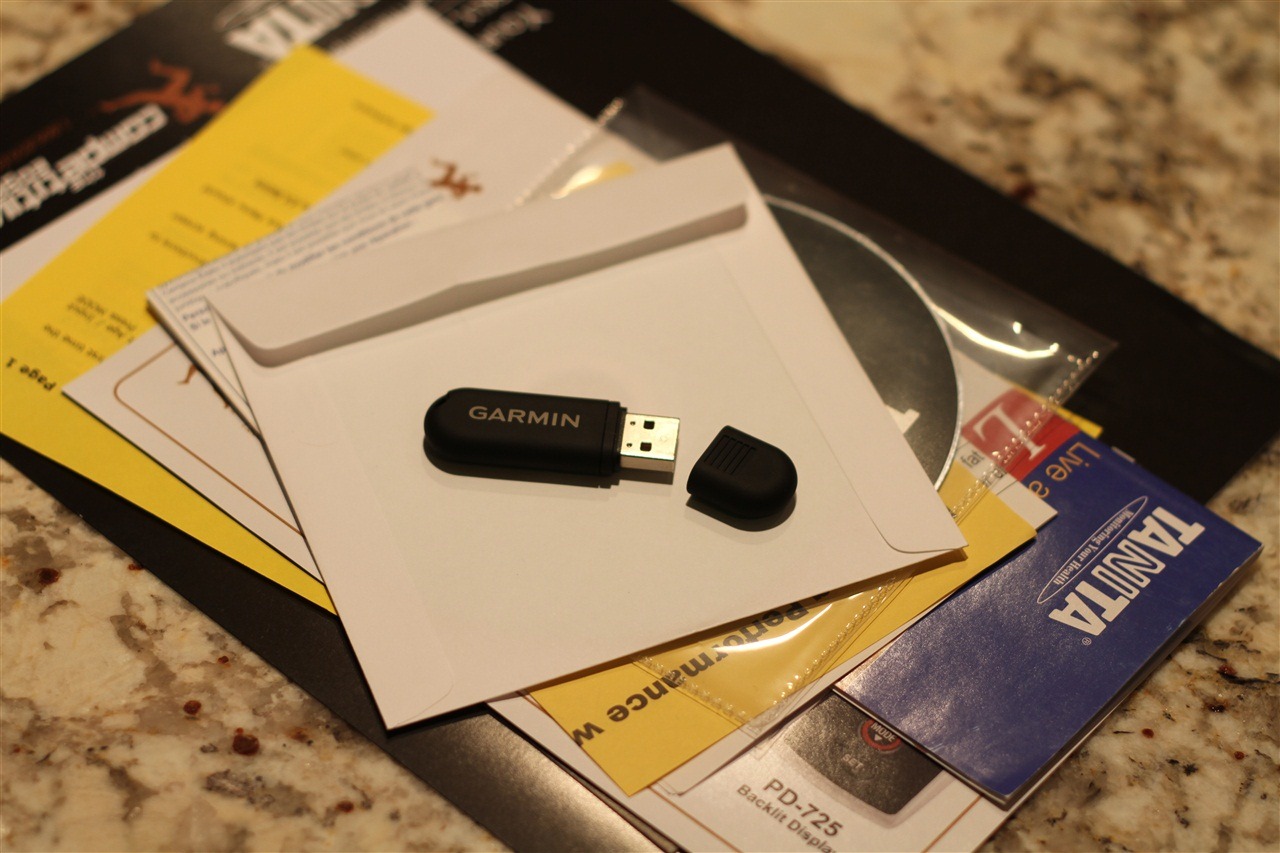
The CD-ROM (above, below stick): On the CD is the Tanita Healthy Edge software, along with Help and Readme information.
Outside of that there’s a whole stack of paperwork. Mostly it’s manuals, manual updates, and information for other Tanita products and accessories.

 (Note: The above Remote Display does not come in the box, it’s an accessory you can purchase separately)
So with everything unboxed, let’s get onto using it.
First Use:
After you’re done connecting all the little rubber feet to the scale and validating the batteries, you’ll be ready to use it. Simply place it on a flat surface, and admire its sleek glass-like appearance:
 It’s pretty thin too – check it out from the side view:
 And, they have a tiny little warning sticker letting you know that if you have a pace maker you should avoid the scale, and that you should always be barefooted when using it. Further, they have an odd symbol to the right that seems to indicate you shouldn’t use the scale as a gas pedal in a car. Go figure…

About the time you’re finished admiring all the etched logos and details you’ll probably notice the lack of any display to show your weight. That’s because the BC-1000 requires either an ANT+ watch (such as the Garmin FR-60 or Garmin 310XT) or a computer that you can plug-in the USB stuck. We’ll start off with the computer aspect and then go from there. Sound good?
Using it with a computer:
Once you slip the CD-ROM into your computers coffee cup holder, you’ll be able to install the Tanita Healthy Edge software. A few minutes later you’ll be set and ready to roll – simply open up the Tanita Healthy Edge Software.
One of the first things you’ll be doing is creating a new user profile. You can create a bunch of users as well, which is pretty useful if you have more than one person using the scale. I created 11 users…and then I got tired of creating users – but I’m guessing you can keep on creating more if you’re re-enacting the latest season of The Biggest Loser.


Once you’ve completed filling out your basic information, you’ll be brought to the main screen from which you can take measurements from:
 This page is fed with information from one of four ways:
1) Via ANT+ Stick direct to scale
2) Via Garmin 310XT
3) Via Garmin FR-60
4) Manually entering in data
Let’s start with using the ANT+ stick to talk to the scale and receive the information. First, insert the ANT+ stick into your computer. The next thing you’ll need to do is to stop the ANT+ agent (which may be running if you have Garmin wireless watches), a reminder message displays this at the bottom of the page. Personally, I think this is a bit of poor coordination between Garmin and Tanita here. This should be cleaned up and streamlined. From the menu choose to get a new measurement from the scale:
 That will launch the initiation sequence with the scale via wireless ANT+. A few seconds later the scale will start to beep and blink green. This is the scales way of telling you it’s time to get a reading. The software also displays a message at the bottom of the application as well:
 Here’s the blinking light:

Once you’ve stepped on the scale, the software let’s you know the measurement has started and to wait just a moment.
 About 2-4 seconds later, the ‘procedure’ is complete and a measurement has been taken. In order to let you know that it has succeeded, the scale will double-beep that it’s done. This is your key to depart the scale. When you’re back at the computer, it’ll show you the updated information:

(You’ll notice the left hand side data is all filled out, but the right side is empty. The ride side is for another scales that you might find in a doctors office, more high tech and expensive stuff. You can also insert notes into the comments field, like I did above.)
Note that the type of measurement is displayed at the top of the page (snippet below) – be it Garmin watch, directly from scale, or manual:


So now that you have your latest health data in the software directly via the ANT+ stick I’ll talk about some of the other options you have for getting the data from the scale. After that I’ll get into the software itself a bit more.
Using it with a Garmin FR-60:
When I mentioned to the Garmin folks that the Tanita folks had hooked me up with a loaner BC-1000 – the Garmin folks in turn hooked me up with a demo FR-60. So what’s the FR-60 you ask? Well, in short it’s a small fitness watch that supports ANT+ wireless devices, and can record data from the BC-1000. You can also use it to record runs, bikes, and anything else athletic you can think of. The coolest and most useful part of the FR-60 to me is that the battery lasts a year. Sweet! I put together an in depth review of it a few weeks ago, which you can check out here.
 In the wireless ANT+ world of devices there is a concept known as ‘pairing’, which basically tells one ANT+ device about other ANT+ devices. In this case, we’re going to have the watch connect to the scale to read information. To do this, we simply hold the top left button (light) down for about 2 seconds. It initiates a pairing process and begins to scan for the scale:
 About 1-3 seconds later, the scale is found.
 The scale beeps, and then starts blinking green. At the same time, the watch display clears to make room for the incoming data:

Now you simply step on the scale, wait a few seconds and the recording is made. A moment or two after that it shows up on your watch:

And that’s it! The data is recorded and you’re done. Super simple.
Now, here comes the cool part. If you had that USB stick in your computer while this was happening, a few seconds later it’ll automatically transfer that data up to Garmin Connect (I’ll talk about that in a second). And at the same time, it’ll put the data in a folder that the Tanita Healthy Edge software can pickup as well. Without a doubt, using the Garmin FR-60 with the Tanita BC-1000 is a perfect match.
And here’s the same thing occurring from the Tanita software once you open it up:

Note that the Tanita Software allows you to use multiple devices, and can mix and match any Garmin device or devices with any number of users. It’s REALLY cool in this respect.
So, just so we all understand what happened here:
1) You stepped on scale and it measured your weight
2) It then transmitted it to the FR-60
3A) It’s now automatically transmitted to Garmin Connect
3B) It’s now automatically available to the Tanita Healthy Edge Software
Pretty cool, ehh?
Using it with a Garmin 310XT:
Like the FR-60 I just walked through, the 310XT is also capable of talking with the BC-1000. And thanks to the latest firmware update (2.70) – the integration is now completely seamless. I wrote before that it was pretty messy, but 2.70 makes the whole shebang simple and straightforward.
First, you’ll want to go in and enable the scale in the settings – under ‘Weight Scale ANT+’:

That’s it – now it’s ready to connect! Just go ahead and tap the power button and it’ll start the initiation sequence looking for it’s floor bound friend:


The scale will start blinking, indicating it’s ready for you to step onboard:

Once you’ve stepped on the scale, a few seconds later the data will show up on the watch:

One little item I thought was sorta interesting is that the 310XT shows you a tiny bit more detail with respect to accuracy than the FR60 does – at least on the device itself (note the decimal places for body fat and hydration):

Like with the FR-60, the data is automatically transmitted to Garmin Connect via the ANT+ agent, as well as made available to the Tanita software.
Software Options:
Tanita Healthy Edge (included):
As I described a bit above, the BC-1000 comes with the Tanita Healthy Edge Software. This software offers basic data logging features, as well as some simple and easy to use graphing and analysis. Since we’ve already walked through how to get the data into the Tanita software via one of the methods above (USB stick, Garmin FR60, Garmin 310XT or manually entered), we’ll jump right into using some of the feature.
Below is the main window which shows all your readings. In the case of the BC-100, all your data will display from the left hand portion of the screen. Advanced medical devices you the middle-right portion, and other Tanita devices such as Blood Pressure monitors can use other portions of the application as well.

Here’s a few those advanced medical devices from within the options menu:

Note that if you do have any of these devices, or simply have the information, you can always enter it in manually – but neither of these pages are supplied by the BC-1000:


Back to my data though…You can easily scroll through all your records by using the back/forward selectors at the top:
 Though, there is no easy calendar picker to simply choose a day (those week/month/year buttons are for the graphs). You have to scroll through them all one click at at time. I have 45 measurements in there so far, and I can see that getting a bit unwieldy after time.
The next page you have is the analysis display, which shows you where you stand based on standardized scales for areas like BMI and Body Fat. You can see the grey line on the colored scales showing the different recommended levels. You can click the navigation buttons at the top to show different days and see the lines change on the analysis page.
 (I found it interesting that because my body fat is so low, it puts me into a ‘warning’ category. Despite the application having a classification for athletic (in user options), it doesn’t seem to adjust the body fat percentages accordingly. Most resources I could find separated body fat percentage ranges for higher level athletes than those for every day use.)
The next tab over is the graphs section, which allows you to graph umpteen different measurements taken, starting off with simply weight and BMI:
 Now you’ll note that my chart kinda bounces all over the place. However, it’s bouncing all over the place within a 3-4 pound range. This is primarily due to my training schedule. I don’t focus my life around waking up every morning at the exact same weight. Instead, I focus on a rough range +/- a pound or two. But, depending on when I did my last workout or how much I ate and how long it’s been, it’ll change these numbers. I normally measure myself in the morning at the same time every day (per their and many other recommendations – consistency is key). But if I did 3000y swim, and then a 13 mile run at 8PM the previous night, followed by a late dinner, then things tend to be a little mysterious weight-wise in the morning. They key with any scale or recording of weight data is trending over time – not a data point on an exact day. At any rate…food for thought (no pun intended).
On the left side you see tons of options for graphing different pieces of data:
 You can look at some of this data and start to notice trends – some more obvious than others. For example, looking at the above, when my body water % goes up, my weight correspondingly goes up as well. Now interestingly, if you look at the below (Body Fat % vs Water %) – you’ll notice that they are inversely proportional to each other. I’m honestly not sure what to make of it quiet yet, but it makes a pretty graphs. ;) I’m working on reading through Racing Weight (a new book highly recommended by a TON of really fast athletes and well known coaches), and it’s starting to explain some of the details around the data.
 On the top you can choose to sort by week/month/year. You can also use your mouse to crop into specific date ranges as well, if you want to take a closer look at something.

From the menu bar you can also print any of the reports that you’d like.:
 You can also print out any of the measurements or analysis pages as well:
 Though, you can’t export out the data, nor print a complete listing of all data points. Both of which I found kinda lame. I’d love a simple CSV format that I could export to and pull into Microsoft Excel and start really analyzing the numbers, especially over the course of a year. Given the data is stored in a mini-database (Microsoft SQL Express for those curious), this would be relatively trivial. Perhaps in a future post I’ll talk about how you could do this (I am a computer person after all)…
So, that’s the wrap-up of the Tanita Healthy Edge software, let’s go onto the Garmin Connect application.
Garmin Connect:
If you already have a Garmin FR-60 or 310XT, then the BC-1000 is a perfect fit when you add in Garmin Connect. Garmin Connect is a free application for Garmin device owners that allows you to track your workouts and health data. I’ve detailed the workout aspects of it extensively in my reviews, such as the Garmin 310XT review.
But here I’ll focus on the health portion instead. However, before we do that, we’ll want to let Garmin Connect know about the scale.
 To do so, we’ll click Getting Started:

After that you’ll want to either create a new account (if you don’t have one already) – or simply use your existing account. Then you choose which wireless device you’ll be using. The setup is basically as simple as that. Assuming you’ve already installed the Garmin ANT+ Agent, it will go ahead and automatically transfer any data from the BC-1000 scale to Garmin Connect (see the earlier section on how that process works).
Note however, that you cannot simply just use the USB stick to get the data on Garmin Connect. While this would be incredibly logical, and useful, you must actually go via one of the Garmin Forerunner watches. In my opinion, this is sorta limiting and stupid. Just to clarify what I’m referring to, you cannot simply plug the ANT+ USB stick in unless you have a FR60 or 310XT to relay the data. It must go through one of those watches to get to Garmin Connect.
Once you’ve logged into GC, you’ll click on the Health tab and see the day’s current stats:

Down below, you’ll see the most recent data collected from the BC-1000:

You can change the graph to show you 7 Days, 30 Days or a year at a time:

Finally, you can also enter in manual data points for dates that you may have extra data for. Though you can’t manually enter in any of the other fields (body fat %, etc…), just weight.
 (As a trick, you can use the manual input to temporarily over-ride any incorrect data points, for your current browser session, after which they go back to whatever they were previously)
One last item to note – if you previously uploaded to Garmin Connect and were getting erroneous data points for weight (like 1,400 points), I fix was introduced to Garmin Connect on March 31, 2010 to address that issue and allow you to permanently fix those data points. Read up on that here.
3rd party software:
Currently no other software applications that I’m aware of directly supports the data readings from the BC-1000. However, I think that’ll change. First, Training Peaks has said that they’ll be doing so shortly – which will be awesome – especially if they make it completely seamless.
Second, the data simply sits in a folder within the ANT+ agent, so getting the data from a Garmin watch to any other application is actually relatively straightforward for most developers with access to the Garmin .FIT Software Development Kit (SDK). So I suspect over the next year or so we’ll see more options in this space.

But for now, it’s limited to Tanita’s Healthy Edge and Garmin Connect. Though you can always manually transpose the data anywhere…
Accessories:
There’s a few accessories that are offered with the BC-1000. Though, I’ve pretty much talked through most of the options here. The one I didn’t though was Tanita’s table-top (or toilet-top) remote display stand.
Tanita Remote Display:
This remote display unit is used to display the data received from the BC-1000 in the event you don’t want to have a computer or Garmin watch nearby. This is handy for a few reasons – first, it removes the need for a computer, but two – it’s also just simply to check out your vital signs without it being recorded on the Internets forever.
So – let’s get to the unpacking first:


Once we’ve got the batteries installed, it’s quick and easy to get turned on. From there you’ll setup a user profile – which includes your age and height. That in turn allows it to determine things like BMI. After that, it’s time to get your weight.
This process is just as simple as with the FR60 or 310XT. You simply tap the up/down arrow once, and then choose set once you’ve found your user number (i.e. – #1 for me, #2 for someone else, #3 for another someone, etc…). The scale then blinks and beeps letting you know it’s ready. Once you step on and get the reading, a moment later it displays on the screen:

In addition, you can go ahead and manually scroll through all of the fields available after reading:


And finally, you can retrieve history on the device as well. Meaning, it acts like a little computer, allowing you to go back and retrieve older data – which is pretty handy.
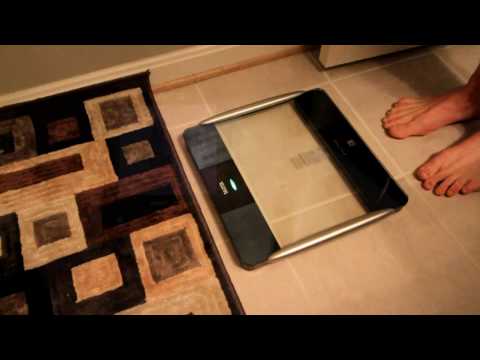
But – why stop with just a few pretty looking photos? Instead, let’s look at how it all works together as one cohesive system, check out my little one-minute video on it:
The remote table top stand is a bit pricey – at $129, but it does include some nice functionality for basic use of the scale without a computer or Garmin watch nearby.
Garmin FR-60 & Garmin 310XT:
As I’ve talked about a bunch already, the Garmin FR60 and Garmin Forerunner 310XT are Garmin’s two watches that support the BC-1000 wirelessly via ANT+.


These watches run from $125-$200 (for the FR60) and between $310-350 (for the 310XT). I’ve written up some pretty detailed reviews here for both of them here:
Garmin Forerunner FR60 In Depth Review
Garmin Forerunner 310XT In Depth Review
ANT+ USB Stick:
Last but not least, if you have multiple computers, or simply lose the little ANT+ USB stick that comes with the BC-1000, you can purchase another one without issue. Also note that if you already have a ANT+ USB stick from one of the other Garmin units, it’s fully compatible with the BC-1000. Though, because the BC-1000 comes with one in the box, there’s no savings to be had there.
That said, if you need an extra one, they’re $45 on Amazon.
Accuracy and Comparisons:
I had really really wanted to get into a hydrostatic tub or BodPod system to put the BC-1000 up head to head with more scientific measurements to see how it would fare. But, the recent 40+ inches of snow in the DC area pretty much killed any hopes of doing that. I do hope at some point in the future once the snow melts around here (August 2012 at the current rate…) to do this and see how things stack up.
With respect to accuracy, I was reading the book Racing Weight last night, and they noted:
“A 2007 study published in the journal Clinical Nutrition that compared measurements obtained from a Tanita body-fat scale and DEXA scanning reported a better than 96 percent level of agreement between the two methods (Thomas et al. 2007).” (from Racing Weight by Matt Fitzgerald)
A few other items the book really keys in on though is that it’s not important that the scale is accurate in comparison to other scales. What’s important is that the scale is consistent and accurate to itself. Meaning, as long as the scale works consistently, you’re focusing on weight loss within the bounds of whatever the scale believes. So at the end of the day, you’re still loosing weight. Whether your actual exact scientific weight is 161.7 or 160.5 is sorta irrelevant (unless you’re specifically targeting certain weight classes of course).
From what I can tell, the scale was consistent within itself. By and large, if I got on and off and on and off and weighed myself, it read the same reading – something I could not necessarily say was true of other scales I had lying around the house.

With respect to comparison of a less expensive bathroom scales, it was within 1% for body weight of my cheaper one I had lying around. However, body fat percentage was quite a bit different – 5% (BC-1000) versus 11% (older one). Clearly I know which reading I’m taking…
The folks at Tanita let me know that the cheaper scale I have shown (BF679W) doesn’t have an athlete mode (while the BC-1000 does), which means it didn’t have the capability to better predict my body fat based on the assumption that my body type is probably a bit more athletic than most users of the cheaper scale. Hence the differences I saw with respect to body fat prediction.

Pros/Cons:
As per the requirements for any review, I’ve included my Pro’s and Con’s list below. Though, I suspect if you’ve made it this far, you probably understand each of these points pretty well by now:
Pros:
- Easy to use (especially when integrated with the FR60 or 310XT)
- Integrated with Garmin ANT+ wireless fitness watches
- Forces consistent data record keeping, doesn’t allow you to cheat
- Clean, stylish design
- Good software (Tanita Healthy Edge) for basic record keeping, included
Cons:
- Expensive – $279
- Doesn’t have a simple LCD on the scale itself telling you your weight, requires extra parts
- Software option don’t allow easy exporting of data
Summary:
In conclusion, I think the BC-1000 offers a really interesting avenue for recording data – and forcing you to keep accurate records. By not including the LCD on the unit itself they essentially record the data, and then tell you what the result is. Sorta like taking a test. The score is what it is. I think this is valuable for anyone trying to track weight, but I also sometimes saw it as a deterrent for using the scale. Sometimes I just wanted a quick weight check (post-run, etc…) and didn’t want to have that recorded anywhere (or have remember to delete it later). In those instances I still used my trusty old bathroom scale to get a quick reading without it taunting me about it later.
At the end of the day I ended up purchasing one (remember, the unit above was a media loaner unit) – especially with hopes of future Training Peaks integration, as it will allow me to really start analyzing how weight and body fat might affect my racing over the course of a season. Given I wear the FR-60 as my day to day watch that’s on me at all times, this offers me the ability to do so quickly and easily.
Found This Post Useful? Support The Site!
Hopefully you found this review/post useful. At the end of the day, I’m an athlete just like you looking for the most detail possible on a new purchase – so my review is written from the standpoint of how I used the device. The reviews generally take a lot of hours to put together, so it’s a fair bit of work (and labor of love). As you probably noticed by looking below, I also take time to answer all the questions posted in the comments – and there’s quite a bit of detail in there as well.
If you're shopping for the Tanita BC-1000 ANT+ Enabled Weight Scale or any other accessory items, please consider using the affiliate links below! As an Amazon Associate I earn from qualifying purchases. It doesn’t cost you anything extra, but your purchases help support this website a lot.
And of course – you can always sign-up to be a DCR Supporter! That gets you an ad-free DCR, access to the DCR Shed Talkin' video series packed with behind the scenes tidbits...and it also makes you awesome. And being awesome is what it’s all about!
Thanks for reading! And as always, feel free to post comments or questions in the comments section below, I’ll be happy to try and answer them as quickly as possible. And lastly, if you felt this review was useful – I always appreciate feedback in the comments below. Thanks!

















Great review. And my FR60, Lola, has been my faithfyl partner since you taught me how to calibrate it.
Great review as always…I like that you are metabolic-ly a 12 year old boy!!
Great review and I just finished Racing Weight!
I have a bathroom body fat scale that is accurate but not precise. And I agree with you that all of the data from the scales are ‘just a number’ and can only be compared to themselves. Last month I had a dexa scan done to give me the offset of my scale. It was alarming. I am a very fit person and my body fat scale reads 8.x in athlete mode and 18.x in normal mode. I would have been happy if it split the difference. I was very frustrated with the results. The Dexa Scan indicated that my body fat was 17.5 percent. I have read further that the dexa scans always read a little higher than other methods.
I am just glad that I now have the offset. I blogged about this here –
link to hubcitytri.blogspot.com
I have the same older model Tanita scale that you do and was interested in your comparison of the two and look for changes in my numbers vs dead on accuracy.
You did not mention the newer scale’s ability to partner with the Garmin 405 – is that an option?
Also, while this may be a minor, anal concern from an overally analytic Virgo, I do have a question. What does that glass scale look like after stepping on and off it over a week or two or three? I was thinking that it might require a great deal of cleaning.
Great review! Is there any chance of getting your hands on a Withings scale? I am trying to decide between the two, and the Withings has more services that it integrates with, but I’ve heard the BC-1000 has better accuracy. Would love to see a comparison!
Great review as always. I really enjoy reading your insights regarding the gear you test, very informative and straightforward. And you guys in DC are having fun despite the weather. Very funny the naked race. Brrrr. If you happen to be competing in Lisbon, Portugal, let me know. We also have some pretty fun races this side of the atlantic. Keep competing and writing.
Ps. You do NOT have an moderate activity level!
After having used my BC-1000 for a couple of months, I’m not so sure it’s worth the money – simply because I don’t trust the output. Or maybe it’s just me who don’t understand it?
Have you heard someone say “It’s not that accurate, but it’s fine for monitoring trends”?
The problem is that the software doesn’t provide you with any trends – just graphs that seems to have a tendency of going haywire in a rather undefined pattern ;) (I think that’s what they’ve dubbed “Tanita proprietary algorithm”…)
I’m creating trend graphs in excel, but still – after over two months of daily measurements – I can’t really say the trends or data provide me with anything useful.
I’ll stick with it for a while to see if I can get some long term value from the data, but right now it doesn’t feel like well spent money.
Many athletes already have a package for logging everything. At the moment there are no intelligent way of importing the Tanita data into for instance SportTracks, so I end up inputting data manually.
If that’s the case for you too – better go buy a model in the ironman series without the costly computer integration.
Maybe you, like me, drool a little over the BC-558 that provides you with segmental body composition. This scale _should_ have been computer connected though – as jotting down all the data every day will probably take the joy away pretty soon!
Jury is still out on whether body composition scales are snake oil or not. Time will show. In the meantime I’ll be manually copying data from Garmin Connect to excel – ugh.
I have this yearning to someday (maybe when I’ve had a brain transplant) understand and be able to process all of the information in one of your awesome reviews. But somewhere around the second graph I’m usually smiling and thinking, “Pretty picture.” Nevertheless – I can tell this one was especially good because I didn’t understand most of the comments either. Peace!
Great writeup. That is a cool toy but 3 Ben Franklins is a bit high for a scale. The one you have doesn’t sound too far off for much less. Finally, I know it’s about trending, but I was surprised to see it swing your BFP 2 points overnight. Especially given that 2 points for you is a 25% swing.
Thanks!
Hello very great review,
my question is U se the BC 558 with segmental mesures, can you use the edge software with thsi tanita as well , do you have any expeince with this one?
as you use the trainingpeaks is there an option to dial in all the data which comes from the tanita..
whqaat woudll you recomend use the trainingpeaks or the tanita software.?
marc
marc@steingrand.com
As always, great review.
Maybe I missed it (and I apologize if I did), but when pairing with the 310, does the 310 become the temporary data store until offloaded to your PC? Meaning, if I keep my 310 in the bathroom for daily morning weigh-ins, can I then transfer all of that data to the PC later? Does the watch store all of the data points output by the scale, or just the few it is displaying on-screen?
Thanks!
I am not sure if its possible, but Tanita and Garmin should thank you. After reading your review I went ahead and purchased both the BC-1000 and the FR60 with footpod. I am not a triathlete like yourself, but I want to know that I am getting the most out of my workouts. Thanks!
Hi all, thanks for the comments, here are some answers:
Spokane Al-
RE: 405 Compatibility
It unfortunately doesn’t partner with the 405 – and not for any technical reasons, just purely a marketing thing, which is too bad. There’s no reason why it couldn’t do that down the road if they (Garmin) wanted to add the feature in via firmware.
RE: Dirtyness of scale over time
Funny about the scale stepping on/off – I was going to include that, but couldn’t seem to find a place to slide it in. It’s actually not the stepping on/off that eventually causes it to look dirty, but rather being in the bathroom near the shower. The water spray slowly makes little droplots that dry and eventually look sketchy. When I moved it to a different bathroom that I don’t use the shower in (and cleaned it), it stopped looking sketchy despite my continued use. A quick wipe of Windex fixes it.
Hi Drew-
I haven’t tried out the Withings scale yet, but I have had it book marked for a while actually. I’ll poke them and see what I can do there.
Hi Paulo-
Thanks!
Hi Borsch-
RE: Moderate activity level
Funny, I had actually changed that later, but didn’t catch it in my screenshot.
Hi Ørjan-
I think at the moment for me it’ll be the integration with Training Peaks that really makes the deal worthwhile – as then I can truly see the impact on racing more easily over time, since TP houses all the data from my training and racing. I think there are potentially some interesting things the folks from TP could do there.
Hi Marc-
RE: BC-558 scale software
The compatible scales with the Healthy Edge software are: BC-100, BC-590BT, HD-351BT, BC-418, TBF-215, TBF-300A, TBF-300WA, BF-350, WB-3000.
As for Training Peaks, my understanding is the importing of data from the BC-1000 is on the radar for development in the near future. In talking with them, they have BC-1000’s and are playing with them.
Hi Greyt Times-
RE: 310XT and temporary data store
Yes, the 310XT becomes the temporary data store until offloaded to your PC, so you can store a lot of days in there if you want. I did that with the FR60 as well, where I strored a bunch of readings, and then transferred them a few days later.
Hi Nick-
RE: Reviews
Thanks, I appreciate the comments. In the case of Garmin products, if you use any of the links in my reviews to Amazon, I get a small bit of referral from Amazon – but nothing from Garmin or Tanita. So, if you found this referral useful, and enough people do – I might be able to cover a local 5K race with the referrals. :)
Thanks all!
PS – The folks from Tanita are sending me a Remote Display Monitor, which I should get in the next few days and be able to review more in depth.
Here is some info from directly Tanita Corporation:
The next version we release this month should have an export or “upload” button that will send your data to either csv or excel. Coming Soon…
Tanita has updated the Healthy Edge Software. If you are already using it, you can go to link to thecompetitiveedge.com and download the upgrade for Healthy Edge. New Screen, Prints in Color with Graphs.
The only way to upload to Excel or CSV is to purchase the Professional Software version called Healthy Ware.
Great review…I am about to pull the plug on one of these….but have a question before I do…
Using one of the Garmin watches, can I track measurements of both myself as well as my wife? …or do we both need a watch?
You would both need seperate watches if using Garmin Connect, as it feeds into individual accounts.
However, using Tanita’s software, you can easily track it all with just a single device.
hi, my bc-1000 did not come with the tanita software, and i havent managed to find on the net either, i have w7 64bit. any tips?
I’ve been using a bc-1000 for about a year now with just the ANT+ stick to my computer (for the previous commenter, I use W7-64, too. I downloaded the software from http://www.thecompetitiveedge.com which is where I bought the bc-1000).
One thing I learned about the scale – don’t use it on carpet, even with the carpet feet. I used mine on the carpet for awhile and eventually accepted that the scale would be off by some 10% on weight (compared to my doctor’s office). One day I wanted to test the range of the ANT+ stick, so I moved the scale out of the office and into the tiled hallway (a solid 10ft) and the numbers I got from it were way off of my previous measurements…but in line with my doctor’s scale. I repeated the measurement several times to make sure the scale was reading correctly and it was consistent.
Carpet screws up the scale even though the carpet feet are supposed to fix that. The carpet in my house is typical plush carpet. It’s not thick shaggy stuff, but it’s also not a tight-weave berber. You might be able to use it okay on carpet if you put it on a solid platform of some sort, but the carpet feet are not enough.
Awesome that I just found this and people have already asked the questions I had (Tanita, 405, export, etc).
Great job and MUCH, MUCH appreciated. I won’t be buying this particular one (I really want .csv and work with my 405), but I’ll check back after the next version comes out (as I’d love to support your link to buy).
Thanks for the painstakingly detailed review and answers.
I am at a loss. I really need to know how to calibrate this scale. HELP! Please…
Thanks so much for your reviews, I now have the 310XT, Edge 800 and BC-1000 as a result.
Could you provide a little advice please – my Healthy Edge app has the 310XT option under the “Garmin Watch” setting, but not the Edge 800.
Otherwise all is fine including my BC-1000 output data on Garmin Connect via the Edge 800. Thanks.
I know this is a stupid question – but is this just a calculator – where it has BMI details inside it and just computes based on your weight, or does it actually do something scientific?
i’m struggling to find information on how it actually works, besides just running your figures vs BMI…
stupid question I know, but thanks
Chris
Thanks for the great review of the Tanita BC-1000. It was your experiences with the system that prompted me to purchase it. I am using the scale and Healthy Edge software on a daily basis to help keep my personal training clients on track with their fitness goals. I’ll continue to monitor your blog for your in-depth and excellent product reviews and other training tips. Have a healthy and fit day!
link to personalbestlex.blogspot.com
I read your review and agree for the most part that it’s convenient and weighs accurately, but I’ve had a problem with the body fat percentage. When I compare it to my old bathroom scale my bathroom scale BF% is always higher. I’m a fatter person, there is no way I’m 13-15% like my Tanita says. I think Tanita has a problem here. I’ve had mine for about a year and it’s lost its appeal.
Thanks for the review, your efforts are much appreciated.
A quick note for UK customers: The UK package does NOT include the healthy edge software or the ANT+ usb stick.
This means that the scales can only be used by one person as you cannot view all the metrics unless you upload to garmin connect.
Thanks for the review!
So, is this scale not at all compatible with the FR210? Is there no way of getting the data into Garmin connect with this watch?
J.
Hi Lochingsoo-
RE: Edge 800
The latest version should now support the Edge 800
Hi Chris-
RE: Calculation of BMI
It’s using electrical impedance to determine BMI, which has its pro’s and con’s.
Hi Rick-
Thanks!
Hi Smedley-
RE: BF%
Is your BC-1000 on athletic mode by chance? You might want to ensure it’s reading the same mode. In my talks with Tanita about this – since I also have a bathroom scale from them, they said that they should be reading the same as long as the BC-1000 wasn’t in athletic mode.
Hi Mark-
RE: UK Customers
Good to know – thanks!
Hi Anon-
RE: FR210
The FR210 does work with it, it’s just that the FR410 does not. I show it working togther in my FR210 review:
link to dcrainmaker.com
Thanks all!
Thanks for the great review. I have a 310Xt and have taken a several measurements at different times of the day and now want to be more consistent with measurement times. I have deleted the old measurements on Garmin Connect but they keep coming back after I upload a new set of data. Is there anyway to permanently delete old measurements?
Also i have looked at your recent posts and note comments about setting the scale on athletic mode – how do you do that? (i am running a Mac)
Thanks in advance
Chris
Hi Ray – I really enjoy your blog and fab product reviews. I found you after I purchased my 310XT and was loking for helpful swim advice, been reading ever since!
I had a question – does Training Peaks have the ablity to upload scale date yet?
I will consider purchasing this scale if I know I can upload the data to TP. Otherwise, it’s just not worth it to me.
Thansk!
After reading this great review I decided to purchase one Tanita BC 1000 and one Garmin FR60 .As soon as I put my order I realized that I don’k know if the instrument is provided with measurments in the metric system as well .I live in Greece and I’m not familiar with the imperial system .It’s too late to cancel my order ,it’s on the way .
When I’m pairing the Tanita scale with the 610 for the first time, it asks me about if I’m a lifetime athlete or not. Depending on my level of fitness the data send from the scale is calculated differently.
So far that’s pretty nice. But I can make this decision only once. After that there seems to be no way to change this setting. (I misleadingly entered the athlete mode which is… errrm… not the whole truth.) Only a hard reset of the 610 will do the trick.
Does anybody have a clue to change this setting after pairing with the scale?
Hi! Thank you so much for the review! It was very helpful. I’m thinking of purchasing this scale for myself because I’m an avid high school track and cross country runner. Now I just have to convince my parents.. Is this scale compatible with the Garmin Forerunner 210 watch? Because that’s what I have. I realize it’s not compatible with the ANT stick, but just the watch and the scale? Are they compatible?
@dragon – yes the scale measures in kg/lb/st-lb universally depending on your watch settings.
@bas – yes, the 610 has to be hard reset to change the Athlete setting. Garmin set it up this way because the scale is the only add-on that uses that data point.
@allie – yes the Garmin 210 is compatible, and the Scale comes with another ANT stick for you to use directly to your PC or Mac if you choose.
Body Composition of Ray Maker:
152 lb muscle, 8 lb bones and 8 lb brain.
Coooool!
enjoyed the review. Has anyone seen or have info on Tanita HD-351ANT Wireless ANT+
@ 149 US$ it’s starting to be in my range.
Brian
Hi Brad-
RE: New Tanita Scale
Hmm, not sure – I just ordered one a second ago, so looking forward to seeing how it works!
yes please, let us know if the new scale H35 ANT is working with Garmin 610 , I noticed that the BC1000 is not at Bestbuy anymore (here in Reston VA)
would be great for 149$ …
Hello, great blog!
I read in it that:
“Now interestingly, if you look at the below (Body Fat % vs Water %) – you’ll notice that they are inversely proportional to each other. I’m honestly not sure what to make of it quiet yet, but it makes a pretty graphs. ;)”
Its quite simple in the end. Say you are a mythical created that weighs 100 kg, and 60 kg of you is made entirely of water, and 40 kg of fat (which for the sake of argument contains no water).
So :
Body water % = 60% (which is 60 kg / 100 kg x 100%)
Body fat % = 40%
Now you go for a drink down to your local bar, and you drink 10 litres (10 kg) of water (very boring place this mythical creature lives in!). Now you weigh 110 kg, but since the fat contains no water, you still only have 40kg or it. But now you have 70 kg of water.
Now:
Body water % = 64% (i.e. (70/110) x 100%)
Body fat % = 36%
So the water and fat percentages are anti-corralated in this example because of your changing hydration level.
In Humans, fat does contain some water, and the percentages are different (+ you normally don’t drink 10 litres of water!), but basically you are the same as the creature described. So what you saw in the data was a record of your hydration level changing day to day.
I don’t have a set of scales yet, so I can’t test my theory but drinking a lot of water and weighing before and after. But maybe you can?? :-)
Greetings,
Recently i have purchased Tanita BC-1000 and i am using it trough with Garmin FR-60 watch,
my question is Tanita is always reading exactly 1 kg less then all other digital scales,
i have tried 3 diffrient digital scales they all shows me 103,0kg after i try Tanita and gives me 102,0kg
always the same results i get , what would it be causing that ? and is there any forum site related to Tanita
so we can have daily read and share openions.
Hi Anon-
RE: HD351
I actually got it all unboxed today – so will start using it sometime this week.
Hi Labjunky-
RE: Water weighing
In my limited tested with it – merely drinking water doesn’t seem to do the trick. But maybe for fun I’ll do some test there. My recent accuracy tests didn’t cover hydration levels merely because the BodPod doesn’t meaure them (though we did record the values on teh scales)
Hi Ferre86-
RE: Differencein weight
Hmm, it sounds like either the scale needs to be reset (TARE/Calibrated – though I’m not clear on how to do that on the BC-1000 offhand), or the other scales are off. In my recent testing, we found that the weight component was actually very accurate on the BC-1000 against a calibrated scale. Body fat, not as much.
First – thanks for all your great reviews! Seriously impressed.
Just now moving from years of manual excel tracking and getting into the easier data tracking game, starting with FR60 (just ordered).
The concept of easily tracking my weight via Ant+/FR60 is attractive to me, but I am just not seeing a lot out there that hits my target.
Body composition is attractive to me, but not using BIA. (My educated opinion is that the BIA measurement methodology of foot-to-foot on scales, and the algorithms used to produce the data are based on way too many assumptions to ever be accurate across a spectrum of body types).
A display of the weight on the scale along with the ant+ is also attractive, so anyone can just walk up, step on, and check their weight. (Analogy: Garmin Watch that can also behave as a normal watch.)
So…. I am in the market for a Garmin compatible (ant+) scale that measures weight and has a display on the scale that is reasonable priced for the average consumer.
From your blog, the new Tanita HD-351Ant is the closest to my target (but still no display, and still overpriced). I do look forward to your comments on that model.
I also did notice this in my search: LifeSource UC-324ANT eHealth Wireless Precision Scale
(This device is weight only, displays the weight on the scale, is Ant+, AND is more reasonably priced ($109 as of today).
Would you happen to know if any device (such as the Lifesource) that is Ant+ get picked up by an Ant+ Garmin (FR60 for example?) and then transferred to computer?
If so, I think I have at least found one product that hits my target…
Yes, any ANT+ scale will work with any ANT+ watch that supports scales (i.e. the Garmin FR60, 310XT, etc…).
For fun, I just ordered the Lifesource scale, says it will arrive Wednesday. Probably won’t get to a review until later this month as next week I have Interbike and then it gets busy.
But, hit me up later in the week via this post and I can give you a few quick first impressions.
Thought I’d check in and see if you had any comments on the Tanita 351 and/or the LifeSource UC-324ANT…
Hi,
One maybe stupid question. My pc is far away and I usually do not carry my garmin with me ( usually attached to the bike).
Do the tanita store all the data (for weeks) and the next time I bring my Garmin will transfer to it? (then to the pc next time I synch)
Thanks
Awesome blog. Really helped with my decision about buying the 610.
I’m also interested to hear your feedback on the UC-324ANT. Any first impressions you have would be great.
Two main questions. Does it work with the 610, and is it ‘accurate’?
Ben
Tanita now has the BC-1500 Ironman Wireless Segmental Body Composition Monitor listed as a new product for delivery in December. Now for a measly $400 you can have all the data segmented data filled in. I guess it beats the $5k+ that the professional segmental body composition monitor is going for. Look forward to seeing another review!
It seems the Healthy Edge software is not Mac compatible and they don’t offer a version that is. Is there another scale on the market that will communicate with my Edge 800 AND allow a direct reading from the scale? I really would like to have my wife use it as well and spending an additional $129 for the display is not an option.
Hi,
What do the ‘O’ ‘+’ and ‘-‘ mean when reviewing results recorded on the D – 1000 and 1100? Example: In your video, under Visceral Fat reading of ‘1’ it has a ‘O’. I have noticed it on other measurements also.
Thanks!
Regarding accuracy, I’ve done the hydrostatic test, and my Tanita provides a similar result, as long as I weigh first thing in the morning, compared to my hydrostatic test which was in the afternoon (this value varies quite a bit, by a few % on the Tanita).
I also measured on the Tanita directly after the hydrostatic test:
Hydrostatic: 7.4%
Tanita: 5.5%
however the next morning first thing I got 8% on the Tanita so now I view that as the correct testing protocol for me personally.
Hi Ray,
2 questions:
If I get a new PC and would like to move all data from Tanita Healthy Edge software, is there any *.dat file I can localize and move, or all historical data will be lost within installation?
Next, if I would like to have same measurements recorded in Tanita Healthy Edge software and in Garmin Connect as well, do I have to do 2 consecutive measurements (one with ANT+ stick to Tanita Healthy Edge software, second with FR 310XT for later Garmin Connect upload)?
Thanks
Well here is a comment from Garmin… this sucks
Unfortunately we are not planning to integrate the Tanita Platform with the Forerunner 405CX. This does not have to do with the price of the watch, but rather with when the watch was released. As the Forerunner 405CX is a few years older than devices such as the Forerunner 210 or FR60, it is not designed to be compatible with the BC-1000. I apologize for any inconvenience this creates.
Hello, I already own the Garrmin FR60 and BC-1000 scale and it works fine. I recently bought the D-1000 desktop monitor as it was being offered at 1/2 price
I am very dispointed that I can not use both the FR60 and the D-1000. The D-1000 only activates the scale if I use it in “Guest” mode !!! Is there a workaround?
Does the D-1100 fix this issue? I see that you used the D-100 in combo with the FR60. Did you have to use the D-1100 in guest mode?
Please help!
Dear Tanita Owners,
I have a same problem (D1000 only activates the scale if I use it in “Guest” mode). Is there a solution to use both my Garmin Edge 810 and D1000?
Thanks in advance!
LOve the reviews – thanks!
Have you had a chance to try the new Tanita BC-1500?
link to tanita.com
Should it also work with the Garmin watches because it supports ANT?
To Steve G,
There is a widget for the Mac. It allows you to view the output and to upload the information to My Tanita. This might be the solution to your query. The only problem is that the scale should be close to your computer when you measure, well in range of the ANT stick.
Hope that helps…
I don’t have the BC-1500 on my radar currently, though, perhaps in the future.
As far as compatibility with Garmin watches – yup – as long as it speaks ANT+, the Garmin unit will work with it.
Enjoy!
Hey Ray,
Love the review, just a +1 for a review of the BC-1500 if it comes near your radar
I just got my new scale and can’t figure out how to put the round feet on it. Do I have to take off the “carpet” feet first? thanks
Great Review. I have used your reviews in the past to purchase my Garmin 410. I currently use my Garmin 410 to track information on the Garmin website. I wanted to try and track more information from my scale. Do you know if I could just purchase the BC-1000 and have it link to the Garmin website? Or do I have to purchase the FR60 as well? Or would the 1000 remote work with the Garmin website? I just want all my information in one place to track my progress.
Great review! This really has me yearning for this unit to couple with my Garmin Edge 800.
It looks like you have had the unit for about 2 years now. So given you have used it for about 2 years now, what is your opinion on it? You still like it? Have you found any quirks or good tips (other than don’t take a measurement right after a 3 hour bike ride).
I am curious how you feel now that the “new afterglow” is gone. Still a buy?
Thanks again for a great review!
I’m also interested in tanita bc-1500 review. Or at least a quick comparison with bc-1000. Is it worth extra $200?
I wodner how the expensive Tanita scales compare to bargain scales like the offer on groupon ($29) Escali BFBW200?
Couple of questions:
1) Do you have a way to export the history data to the computer to use in the software provided, or does the transfer need to be done concomitantly to using the “toilet top” display… or entered manual after?
2) Since you review does mention manual entry in the software, can you tell me if the “toilet top” history recall provide a date and time value? I did not see any date and time value in your video or pictures and you did not mention it either.
I have both the 310xt & the BC-1000. It was working fine until today when they no longer “talk” to the Healthy Edge Software. Any ideas as to what’s gone wrong?
Hi!
I hope you read questions in your old reviews…
I own a FR305 (so, sadly not supported).
Can i upload data to garmin connect using the Ant stick? Or do i have to buy another watch?
Thank you!
Unfortunately, the FR305 doesn’t support ANT+ uploads using the stick. The watches that do, utilize something called ‘.FIT transfer’, which wasn’t around when the FR305 was born. Now that they’ve stopped making it, there’s virtually no chance they’ll add it in (I’ve been pushing them to add it to the Edge 500/800, which are still flagship products).
Sorry!
My wife and I have two Garmin 310XT, you can tell me if we can with just a Tanita use both 310XT.
Please, can you help me
Its odd. Garmin and Tanita appear to have a close marketing tie up but are not working together on approvals. I can buy Garmin Ant connected devices in Singapore (many vendors offer the Garmin 610) but Tanita Asia claim they cant get approvals for the Ant connected BC 1000/1500 series so wont sell them here.
Does anyone know a US vendor that will ship these internationally ?
Also is the a comparison anywhere between the various Tanita products eg BC1000 v BC1500 ?
After purchasing a 2012 Trek Madone 5.9 I decided to get an Edge 800 and the BC100 plus based on your reviews. I couldn’t be happier with the results. (The price of the BC1000 has dropped to $198 on Amazon BTW.) Motivation has always been a big problem for me and seeing the constantly dropping weight and body fat presented in graphic format has done wonders for that problem,
Thanks a lot for excellent reviews.
hi Ray,
txs a lot for your reviews.
i bought a tanita bc1000, but get difficult to sync with pc, because an error on healthy edge, but i prefer to sync with iphone, and tomorrow ill buy the wahoo key.
I want to know which app on iphone, u sync the iphone with tanita ?
and if u know some good app, that can track the register with my 30 athletes, i will be very appreciated.
thanks.
johny
did you figure out how to use BC1000 with iphone? Any hints?
You can use the TactioHealth app to sync with ANT+ scales, as well as the A&D Utility. Both support it. So does Digifit, but I haven’t double-checked it.
All require the Wahoo Fitness iPhone key.
Hope this helps!
Thanks for the awesome review.
Do you know if this scale will work with the Garmin Fenix?
No, unfortunately not. The Fenix doesn’t support any of the ANT+ scales at this time.
Thank you for the great review!
I realize this is about 2 (almost 3) years too late, and you’ve probably figured this out by now but, with regards to the hydration and BF% being inversely proportional:
Basically, the scale sends a small electric current through your lower extremities and determines BF% based on the impediment of the current.
The idea then is that fat-free mass is a better conductor than fat.
So: Increased fat –> increased current impediment –> increased calculated BF%
Conversely: Increased fat-free mass –> decreased current impediment –> decreased calculated BF%
However, problem then comes in the fact that water is a good conductor. Thus, when you have increased hydration, the scale reads decreased BF% (decreased impediment). OR, if you’re really dehydrated, the current won’t travel as well and the scale will calculate a higher BF%.
Thank you for the review ,
Does the tanitaBc-1000 working With the garmin 910xt ?
Yup, works just fine!
Thank you
I got a Tanita BC-554 IronMan scale for X-mass in 2010. Find it odd that if I switch to Athletic mode my bodyfat drops from 15% to 7% immediately. Really? Did I change by flippig a switch? Also if your feet are damp from gettig out of the shower it gives you “better” results. But anyway, here is my problem with it and Tanita. This $120 scale stopped working a few days ago. About 2 years old. I called Tanita and told them what it was doing and the ERROR message. The tech told me it was a bad sensor in the leg and nothng could be done. He asked for the serial number. It was under 3 years old so it was covered!…..WAIT…no it wasn’t. WHY? Because the person who gave me this for a X-mass present didn’t save the receipt! I asked the guy why they need a receipt if they can tell by the serial number how old it is? He said to make sure it’s not stolen! Let’s see, how may scale theives do you think Tanita is thwarting with this rule vs. the number of customers who can’t use their warrenty because they didn’t hold onto their receipt? Is there a big black market for stolen scales that I don’t know about? I asked for a supervisor and was offered 5% off my next purchase. I told him I’d never buy another product, they’re accurate for weight only and the customer service stinks. They effectively found a way to void the warrenty on half their customers. Nice.
I bought the Tanita BC-1500 and I have to say it was the biggest waste of money for measuring body fat. It fluctuates wildly depending on time of day and hydration levels to the point of being useless. If anyone is interested in any of the body fat measuring Tanita devices, buy the cheapest one, since the body fat readings are so inaccurate segmental measures are useless, you are wasting your money going with the more expensive devices. Better yet, get calipers and let a friend measure you…
Having not been updated in over 3 years I guess that either Tanita, Garmin or both have lost interest in this.
Am wondering what the best choice in fitness scales that integrate with Garmin Connect would be today. Wouldn’t want to buy anything so potentially outdated.
To be fair, they’ve (Tanita) released newer scales since. But, I wouldn’t say they are competitive in the marketplace today.
There are options out there however for scales like the Withings scale and people have put together small sites that will spit out data from it into a file you can quickly upload to Garmin Connect to keep it updated.
See it within this post (and comments on that post); link to dcrainmaker.com
Hi DC — as always thanks for the great reviews! I recently bought a Garmin 910XT, thanks to you! I have a friend who works at Garmin, so I did not go through Amazon. =)
However — I am definitely ready to buy the Tanita BC-1000…only I have a question I cannot seem to find the answer to anywhere. What does the “plus” buy me? The link you have about is a $224 model (BC-1000) but Amazon also carries the BC-1000 plus, for $279. Actually, I have 2 questions: (1) What do I get for paying the extra moo-lah and (2)how can I make sure your site gets the credit for the referral?
Looking forward to hearing you answer so I can plunk down the $$$ and further enhance my training — my first Ultra is in a few months!
~ Keith
(Sorry for the delay, trying to catchup after chasing The Tour this week)
That’s funny, I have absolutely no idea what the “Plus” means, though from looking at all the technical specs it appears to just be a branding/marketing item. :)
That said, for getting credit you can buy through Amazon or Clever Training and it helps support the site. In the case of Clever Training, you’ll also receive 10% off items. Unfortunately, Clever doesn’t carry Tanita products. For Amazon though, any of the links in this post automatically supports the blog. I appreciate it!
Thanks DC.
It took me awhile to get back here and see your reply. I did some more looking and was considering the Omron HBF 516b, for almost $200 less…but it (a) has a corded handheld piece which seems so Nintendo64, and (b) has only 7 measurements and (c) has no integration with Garmin Connect.
So — I just bought the BC-1000plus! I’m excited!
Caveat: the links you have above take me to the BC-1000, not the BC-1000plus. So, once at Amazon, I had to then go find the BC-1000plus. In doing so, I hope the “Hey, still give DC the credit for this referral” code stayed with me somehow.
~ Keith
Don’t know if you have found the answer to the ‘plus’ question. but the early scales could not be used close to one another, but the later ones with the ‘plus’ have a serial number that you add to the pairing process and they can be used next to one another, much like your heart strap.
“ That’s funny, I have absolutely no idea what the “Plus” means, though from looking at all the technical specs it appears to just be a branding/marketing item. :)”
Actually Tanita USA also declared in 2025 that there was no difference between the one w/o Plus and Plus. After I had insisted on there must have been some reason maybe referring to the plus sign of ANT+ protocol and mentioned that the big brother BC-1500 was lunched without Plus I got no more answer. :-)
First, thanks for a great review and site in general.
I found your site through researching the BC-1000, but im still not clear on the compability with my garmin connect. I have the Forerunner 610 from Garmin and i love Garmin connect. But am I to understand that i will not be able to easily export my BC-1000 data to Garmin connect either via my FR610 or some export feature?
Thanks in advance.
i purchased some time ago but soon found out it was not compatable with Apple products. luckily i had the garmin 610 and i could use that as my lcd and sink through garmin connect. have they fixed this bug yet?
I’m not sure it’s a bug, it was never advertised to work directly with Apple products.
Hi,
does anyone have info (step by step if possible) on how to get the Healthy Lite software working in Win 7 64-bit.
I’ve tried downloading Microsoft’s 64bit SQL Server Compact but no luck. I’ve tried using both SQL servers at the same time or uninstalling the 32-bit version and a bunch of other links. However, I still get the “Error in RefreshMeasurementsDataset.” Could anyone suggest any help?
Solved this. I needed to go to in Region and Languages in Windows’ control panel. Open Region and Languages and in Formats tab choose English (United States).
I am planning on ordering the BC-1000 tonight, so not sure if Ill hear from you, but just in case… do you know how many users you can program and if it is limited, is there any way to reset the scale each time. I will likely have hundreds of people using it as I am a nutrition coach and plan on using this with my clients.
Thank you! Your review was terrific! All I hoped it would be!
I don’t know offhand (for some reason either 8 or 15 stuck in my head), but I know that Tanita carries a medical variant of the software that supports gazillions of folks.
Both 8 and 15 has its own role in BC-1000’s life.
“The BC-1000plus is designed to connect to your Windows personal computer running the free HealthyEdge Lite Software (limited to 8 users)”
“The BC-1000plus a Tanita bestselling full-body radio wireless full-body body composition monitor, providing up to 15 unique measurements of the body.”
Hi Danielle, hope you found a way using BC-1000 for your clients. It still might help you using the Guest Mode, my app Biometric Explorer is providing, so you do not need to create and delete user profiles for each clients weigh-in. The app would be best used in your use case together with a Garmin cycling computer because of the bigger screen. You can find it here: Biometric Explorer/ [link to apps.garmin.com](link to apps.garmin.com)
Great review!
But I couldn’t figure out how to connect Tanita BC-1000 to Forerunner 610. I had my forerunner 610 fore 2 year and now I bought a Tanita BC-1000.
Unfortunately, the review says nothing about using it with Forerunner 610 (and it seems to be impossible to send info directly to Garmin Connect)
Martin (in a message from August 7, 2013 at 8:02 am) seems to be experiencing a very similar problem.
The review came out previous to the FR610 existing.
I talk about in-depth how to pair to the BC-1000 with the FR610, in the FR610 review: link to dcrainmaker.com
Hi there,
Does it work with Garmmin 610?
Yup.
Quick question about the separate display box. Is the data stored in that unit which can then be transfered over to training peaks/garmin? Or once it’s displayed that’s it?
Also, does it now link directly with TP? And if so, how do you like it? Would you still recommend this scale like you did when originally posted? I work with a coach 1500 miles away and everything we do, beside talk, is on training peaks
Thanks you!! Amazing blog to say the least.
AJ
No, the little box is just between it and the scale. So yup, basically, that’s it.
It doesn’t link directly to TP, you have to go through a watch or the sort.
I wouldn’t recommend this scale anymore, especially as Garmin has announced they’re ceasing support for them going forward (on the newer units). Thus, I’d go with WiFi scales. I like both the Withings and FitBit scales. Both work well.
My wife just got the 610 and I am buying the 910 now. We were going to get this scale based on what we saw on Garmin connect and your original review but your previous comment has us questioning it now. Is Garmin going to stop support for it on Garmin connect or just future watches? The Withings and FitBit scales don’t work with Garmin either so why do you recommend them over the Tanita? Do they have better features or are more accurate?
I enjoy your blog and thanks for the in-depth reviews they have been extremely helpful.
Hi Ray, Just bought one of these very expensive toys but have noticed some strange inaccuracy’s.
If I weigh myself first thing on a morning I always get a Physique Rating of ‘Under exercised’ but this reverts to ‘Thin’ if I take the measurement on an evening.
I’ve just used it with a Garmin ant stick followed immediately by via my Edge 800 and the readings are totally different
ie, Visceral fat is 4 via ant stick but 6 via Edge 800.
Physique rating (in addition to morning and evening differences) is ‘thin and muscular’ via ant but just ‘thin’ via Edge 800
Body fat 5% via ant but 11.6% via the Edge 800 etc etc etc,
The Edge 800 doesn’t send data via ant to either Connect or Healthy edge lite.
Any comments? are these companies getting away with deception. Can we claim compensation?
You are right to ‘not recommend this scale anymore’!!!
Hmm, they should be the same. My only thought is if you’ve toggled the athlete mode in the software (or, have different height settings).
Yes, I had toggled ‘athlete mode’ as that is my category.
I’ll try ‘normal’ and see what difference it makes.
and post the outcome tomorrow.
Hmm indeed, looks like Humble pie for me tonight or humble cup cake if I have a choice!
My profile on the Edge 800 was set to Activity class 7 but I hadn’t ticked ‘Lifetime Athlete’ as I had only been at this level for 30years (out of 56)and didn’t think it applied to me. But having ticked it, almost everything has come into line. Although the Physique rating is still different with Thin via Edge 800 and Thin & Muscular via ant.
Thanks for pointing me in the right direction.
Thanks for the review, I’m a new fan of yours and I got the Garmin F220 based on you review.
I am disappointed that (as far as I can tell) these scales are the only way to add other measurements to Garmin Connect. I would have thought there would at least be BMI and waist measurements…
Anyway, my first question – are there any other, more reasonably priced models of scales, that match with Garmin Connect/the watch. All I saw on their site are at least as expensive as this one. I hate that it doesn’t have a display.
Question 2 – ignoring the Garmin connection, what scale would you recommend for measurement of body fat etc?
Yup, check out the Lifesource scale. I’m not sure how easy it is to find these days, but best bang for the buck: link to dcrainmaker.com
Honestly, most of the scales aren’t so great for body fat. They tend to be consistent, but not as accurate.
Ignoring the ANT+ scales, I’d go with the FitBit Aria or the Withings WS-30 or WS-50.
Hi – Got some confusing data from the scale. Bone mass is varying with each measurement which seems wrong, whereas Body fat is straight lining all the time. I wonder if everybody gets this ‘error’ if so have the manufacturers got them the wrong way around?
Another point not mentioned is that you can only do one reading per day with Connect, it updates to the latest reading in the 24hr period.
Is there an app that would connect this scale with a iPod or iPad via an ant+ dongle?
Tactio Health still connects via the ANT+ adapter I believe.
I’m a bit confused. I’ve been reading a lot of your reviews lately and trying to find a good health/monitoring solution. Something for general activity tracking but also for strength workouts (heart rate), something to wear 24/7 without the need to remove. So, I’m kind of waiting out for the Vivofit. Looking at Fitbit and Withings, they also offer wireless scales which seem great. I guess my main question here is that will the Vivofit be able to work/relay from the Tanita scales? I also notice there is a plus model? Does seem silly that the scales can’t just transmit to Garmin Connect via an iPhone? There is a Tanita Weighchecker iOS application?
The BC-1000 scale would upload to Garmin Connect with some sort of Garmin device, but at present it doesn’t sound like Vivofit will be uploading from the scale.
As for an app to an iPhone, the challenge is that today the iPhone doesn’t do ANT+ (which is how the scale connects), so there isn’t a way to connect to it.
Would this iPhone ANT+ adapter from Garmin work?
link to amazon.com
No, it doesn’t connect to weight scales. The Wahoo Fitness variant does, but not to the Garmin app, only to a handful of 3rd party apps.
Hi,
I did buy the Tanita BC-1500 about 2 years ago, and just now managed to get it to work with the Healthy Edge software. After a number of emails to The Competitive Edge I finally got a reply. It seems like there are some requirements to get this software to work in the settings of your computer, namely that;
– Language is set to English.
– Time format to be 12 hour format and not 24 hour format.
– Date format to be mm/dd/yyyy
If not done the following error occurs;
“error in RefreshMeasurmentsDataset.
There was an error parsing the query. [token line number = 1, token line offset = 131, token in error = , ]”
Before this I have been using the scale with a Garmin 910, which did work. However, not consistently. The most interesting result is that within a short time frame (few days) the bone mass can be changed by +/- 0,4 kg. So when it goes from 3,6 to 3,2 kg, the result is that;
– the metabolic age changes from mid 30 years (correct) to mid 50s,
– Body fat + 6/7 %
– Body water – 6/7 %
– Muscle mass – 6 kg
However, the total weight it shows seems to be correct and consistent.
Thank you Aasen for your comment about the LOCALE settings. That the software doesn’t work with other locale settings than US is really crappy, but I am happy that it doesn’t crash anymore. :-)
Now if I can only figure out how to send the measurements to Garmin Connect automatically, I’ll be happy as a clam in high tide.
Hello,
I don’t believe i have an “athletic” body type, but i DO meet the criteria for the setting. If i set it to standard, my body fat% is around 20% and my muscle mass around 139. If i set it to Athletic, my body fat% is around 13% and my muscle mass around 152. Why are my #’s better if i set it to Athletic?? Also, i have 2 hip replacements and a plate in my ankle…do you think this may throw of the machine??
Hi- Anybody else had problem with the communication between the scale and the ant stick on Healthy Edge lite.
Since I installed the new Garmin Express it stopped communicating.
I’ve just removed Garmin Express and it works again.
I did ask Garmin about it but haven’t had a reply yet.
Hope this stops others blaming it on their ant stick!!!!!!!!!!!!!
The solution is simply to reinstall ANT Agent after the install of GE or after any of its update.
GE install erases ANT Agent
Apparently Garmin express and healthy edge lite don’t talk to each other, has anyone heard if and when this will be resolved?
As someone else pointed out Garmin promotes the tanita scales so it would be nice if they maintained the connectivity to healthy edge lite or dramatically improve their “health’ area of the connect website.
Unfortunately, I don’t expect to see that happen. With Garmin Express effectively being a replacement for the ANT+ Agent, the ‘old rules’ around only having one enabled at a time for the ANT+ USB stick remain.
Adding injury to insult, Garmin has shunned the ANT+ scales on all recent products, so I think any love there is mostly ceremonial. :-/
I’ve been using my BC-1000 for 12 months and around October 2014 Tanita released a new version V2.5.0 of their Healthy Edge Lite software. Since then I was able to have the Tanita software detect my Edge 810 as a watch. This was happening via Garmin Express it seems. So it was great, I could just connect my Edge 810 to the PC and when syncing with Garmin Express it would transfer the weight stats etc to both Garmin Connect and Tanita Healthy Edge Lite. I’ve also been able to store at least 15 days worth of measurements between syncing, not sure if there is a limit.
However since updating Garmin Express to v4.0.8 it seems the syncing to Healthy Edge Lite is not working, my edge 810 is not detected as a watch anymore. I was able to uninstall and re-install v3.2.27 of Garmin Express and it works fine again. So not sure if Tanita was just trying to improve functionality somehow piggy backing on some Garmin Express function. Perhaps Garmin are not interested again with their new v4.x.x Express software or it was an oversight.
Any thoughts Ray?
Cheers,
Ben
Both the Tanita software and the Garmin Express software utilize the ANT+ stick. What can happen is that the Garmin Express software blocks access to the ANT+ stick while running in the background, thus breaking Tanita’s access.
Try closing the Garmin Express application completely using the little icon in the task tray, which usually solves it.
Hi Ray,
I’m not recording my weight stats that way anymore and have done away with using the ANT stick entirely. What I’m doing it capturing weight stats via the function on the Edge 810 directly, then syncing the Edge 810 with PC via USB cable. Once Edge 810 syncs with Garmin Express, it both updates Garmin Connect AND Healthy Edge Lite. Yes.
This stared happening after moving to v2.5.0 of Healthy Edge Lite. But as said, after upgrading GE to v4.0.8 recently, the supposed sync link between GE and Healthy Edge Lite stopped working. Downgrading the GE v3.2.27 restored this functionality.I invite you to try it if you have time. :-)
Cheers,
Ben
What seems to have stopped happening, is that my Edge 810 is no longer being detected as a watch by Healthy Edge Lite.
BUT, this I’ve found stopped working when upgrading to the new version of GE v4 etc.
Maybe it’s a game of cat and mouse between Garmin and Tanita. hehe
BEN
The solution would have been to simply reinstall ANT Agent after the install of GE and also after any of its update.
GE install (and updates) erases ANT Agent from your PC.
Considering the purchase of BC-1500.
BC-1500 is contemplating whether this is worth the purchase.
I would like to hear your opinion about this.
Honestly, I don’t believe it is. Just like, at this point 4 years later, I don’t believe the BC-1000 is the best product to purchase. Check out some of my gadget recommendations here where I detail my thoughts a bit more, including the scales: link to dcrainmaker.com
I am trying to connect the BC-100 with my Samsung Galaxy Note 3 (witch has Ant +).
I have tried many apps (Garmin Conect, TactioHealth, sHealth, Tanita, Weight Logger, etc) but still did not find an app that can activate the scale and record every data.
Did someone have the same problem? What do you suggest?
Thank you in advance!
Try ANT+ weight scale, it allows you to directly get the measures from the scale and upload them to Connect.
link to play.google.com
Use this one : link to play.google.com
Hello there,
I have a FR405, a FR620, an Edge 500 and a TANITA BC1000 scale. What can I do with this stuff so they can communicate itself???
Thanks
On Android I have at least found the following apps with the ANT+ WGT profile:
– MyFitnessCompanion
– Heart rate monitor
– Selfloops
– MedM Health
– ANT+ Demo
– ANT+ Plugin Sampler
At present I do not have an ANT+ weight, but I have other ANT+ sensors that work with these apps on my Sony Xperia Z1.
Kjetil B.
Finnaly an Android app tu fully use my Tanita BC-1000. And it will upload it to Garmin Connect, Strava, Fitbit and trainingPeaks. I am happy. Since I changed my FR610 for the FR620 I wasn´t using my Tanita any more. Now I can.
link to play.google.com
Hi Raymond,
Have you tested your weight with the new garmin activefit?
Sincierly
Dan
None of the new Garmin products support ANT+ scales. However, with the Vivoactive, it supports Connect IQ. And Tanita has noted via Twitter that they plan to release a Connect IQ app, but have no released any other details.
HI DC Rainmaker,
How can I export an pull data to a CSV? Did you write a post about it yet?
Thanks!
Android apps (Google Play): Weight Logger (the best!, free: export: fit, csv, garmin connect, ANT+ Weight Scale Display (export: Garmin Connect, TrainingPeaks, Strava, Fitbit, Jawbone Up, SportTracks – but not free…), HealthPlanet (tanita japan web service app).
Hello,
some one know an APP for iphone that works with Tanita to export from a Fénix 3 ?
I have:
-Tanita BC-1000
-Fénix 3
-Edge 810 – the resolts are not correct when sinc with tanita vs Edge
and I would like to use with GArmin Connect my tanita results.
Some help ?
thanks.
No Connect IQ apps at this point that can save/store data. The earliest that’ll come would be February. There are some that will connect and show the data, but that’s it.
Ok. thanks for the feedback.
I´m working with the TACX USN ANT+ antena with the Tanita and a tanita wiget for MAC, but this is from the Past… :/
I can see that with Tacx usb ant+ the results are better and much more diferente if i sinc. with edge810. This is Strange no? it should give the same results.
Somehow I’ve lost my driver/software cd for my Tanita BC1000, do you have an idea where to source it? Couldn’t find anything on their website….
Thanks and cheers, Chris
The same problem ! I lost cd… Did u find any solutions ?
which one is better bc1000 or rd-901?
Hi,
Has anyone found a way of exporting data from the healthy edge lite software, it seems ridiculous to have to upgrade ($449) to the plus software just to be able to export your data. I have spoken with Tanita who I must say we’re most unhelpful. Rather than pay the upgrade I would probably just move on from the Tanita platform altogether a new scale and software with export feature would be a fraction of the cost.
Just to be clear – you cannot connect any Garmin watch past the 920xt to the scale? Will that just require a software update?
Correct.
Though, I think/thought someone has a Connect IQ app for it.
Technically it would require ‘just’ a software update, but realistically it won’t happen. That ship has long since sailed and Garmin no longer sees value in ANT+ connectivity for scales since WiFi is so prevalent.
There is an Connect IQ app that I’ve found for it but it only downloaded the weight (at least on y 935)… the remainder of the metrics won’t upload to the watches.
I see your comments below about the 520… have you tested it with the 530 or 830? I saw you had it listed as “Yes” for ANT+ Scale Compatible for both the 530 and 830, was wondering if that was a carry over from the 520 or you’ve actually tested it. Would be great to give my BC-1000 new life, a decade later (don’t own an Edge currently, use my MARQ for mapping).
Hi Brad,
Most modern Garmin watches are now able to read the Tanita BC-1000/1500. You don’t have to look out for an older model. You might want to try my app Biometric Explorer to read data and upload it directly to your Garmin account from the Garmin device. You can find it here: Biometric Explorer/ link to apps.garmin.com
Hey Klaus,
I installed your app, it connects to the scale and reads my metrics! But can it load those metrics onto garmin connect by syncing?
Hi Brad,
Great to see you’ve got through the first steps.
Once a year, Garmin asks for an authentication token. Since you’re a new user, you can get one by following the Garmin authentication process via the menu item ‘Renew auth Token’. The token is stored and is reused.
After reading data from the scale, you can review it and, if satisfied, upload by pressing the START button. Note, there’s no bidirectional sync, just upload!
You can double check with the manual for screen flow sequences here: ⧉ link to tinyurl.com
Awesome Klaus! Got that working (thanks for the polite post that could be summed up as RTFM), your app is great and breathes new life into my BC-1000!
Thank you!! If anyone else has been waiting years for a solution to seamless upload from a BC-1000 this is post you’ve been waiting for.
Brad
Danke schön, Klaus.
I guess I already saw you posting on Reddit about your app. It made me like buying a BC-1000. I waited for a couple of weeks and by now I prepared everything, installed SQL Server Compact & Healthy Edge Lite, then searched for my 3 pieces of 910XT, finally saved a link to your app.
Now I feel quite safe to buy this old scale, because I have triple safety.
Thank you for the detailed review on the scale, It is very useful. By any chance do you know if it is possible to pair bc-1000 with galaxy watch and read the data on s-health?
useful and comprehensive as usual. thank you.
does anybody has any ideea if the tanita bc1000 works with fenix 6 ?
damn it! i’d like to ask about compatibility with edge 520…sorry.
I know, 6 months later answering this…but for anyone else’s benefit. It is actually still compatible with the Edge 520, but not the Fenix 6. Garmin basically stopped making wearables compatible with ANT+ scales a number of years back, but Edge units for some odd reason have remained compatible.
You can download the watch app BC-1000 for your Garmin Fenix 6 (link to apps.garmin.com). Your weight and other body metrics are stored in an activity file. Not directly in the health section of Garmin Connect, because Garmin prevents that. The metrics can be typed in a Android app “Ant+ Scale Display” and from that app you can upload the weight and body metrics into your health section in Garmin Connect. You can also use the Android app “Ant+ Scale Display” on a phone that has built in ANT+ support (some Samsung phone) or with an ANT+ stick connected to your phone via an OTG cable.
FYI Ray, this review doesn’t appear under your product reviews / weight scales listing…
Haha…that’s because at a decade old, it predates me even having categories. :)
But more importantly here is the fact that they apparently still sell this thing. Holy moly!!!
Fixed!
I bought this back in 2012 and have been hard pressed to let it go… I’ve long since passed along my Garmin 610 which synced with it but I’ve kept the scale (it came with a free head unit so the scale is still functional but doesn’t update to Garmin anymore).
I noticed the Garmin 520 is listed as officially supporting the scale still (link to support.garmin.com) and I see Ray has “Yes” under Ant+ Scale Support on the Product Comparison Calculator for the 530 and 830 as well….
Does anyone own this scale and a 530 (or 830) and can confirm if this works and updates to Garmin? The Tanita scale had way more detailed readings than the Garmin scale I’m using now…
“ Does anyone own this scale and a 530 (or 830) and can confirm if this works and updates to Garmin? ”
From today yes I do. 530 and therefore presumably 830 have no option to add a weight scale as a sensor.
And it is confirmed by the manual of 530. While the manual of 520 does have a section about Weight Scales, 530 does not.
I am a bit sad, but as I wrote I have 3 pieces of 910XT (2 of them without buttons, so a pen is needed :-) ), thus I can use my BC-1000.
With my Enduro 2 I also tried a ciq app named BC-1000 and it worked as it is said. Unfortunately I cannot use the newer version of this app called Biometric Explorer (Record & Explore Your Biometric Data), because due to some bugs Garmin gave us F7/Enduro 2 owners I am not ready to update the sw of my watch from a year old version.
Anyway I am a happy camper with my Tanita.
“ I see Ray has “Yes” under Ant+ Scale Support on the Product Comparison Calculator for the 530 and 830 as well….”
In other words it is (or just was) an error in the Comparison Tool.
For a $6,500 scale (Model MC-780U)—we purchased the full package—you would expect excellent customer service: WRONG! Through multiple phone calls with the President of Tanita, it became quite apparent that the company has the worst customer service of any organization today. The President was combative, not timely, and disregarded all customer complaints. His response to the software issues, since Tanita has outdated software and firmware, thus disabling the ability to connect to any IoT device that has up-to-date OS software, was that the “company sells thousands of units”. The Tanita company clearly focusses on a bottom line, and without any regard for individual customer service. WE DO NOT RECOMMEND PURCHASING FROM TANITA. The worst company award of 2020, per their awful customer service and outdated software/firmware, should go to Tanita.
Hi,
I was interested in buying the mc-780u plus package and must admit your review has me hesitant to proceed. Could you possible share some more specific details as to exactly what issues took place, does the unit actually work, and what was lacking in service?
Thank you,
Charles