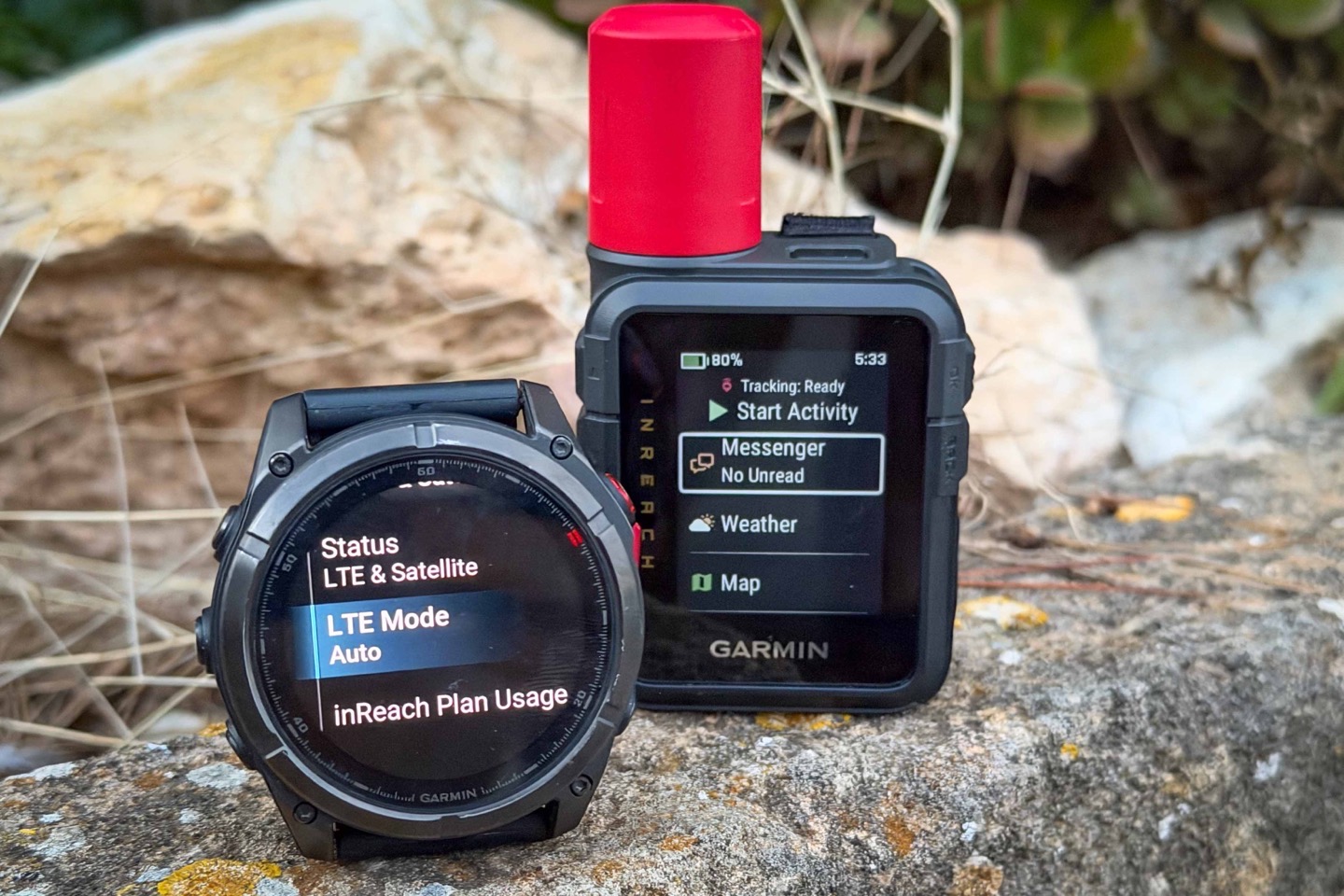
Yesterday Garmin released the inReach Mini 3 & Mini 3 Plus, but along the way, they also expanded support for having multiple inReach devices on a single account – which was a pretty big limiter once the Fenix 8 Pro came out back in September, in not being able to have both an activated inReach device and Fenix 8 Pro on your same account. More on that in a second down below.
However, also noteworthy, at some point in the last…ummm…while, they added the ability to use Garmin LiveTrack instead of Garmin MapShare for inReach devices. And even more interestingly, back in November, they removed the Garmin Connect+ requirement/feature for customized Garmin Connect LiveTrack URLs (e.g., live.garmin.com/finddcrainmaker), as long as you have an inReach subscription. That was one of the features that was launched with Garmin Connect+, but previously didn’t require such premium payment with MapShare to have custom URLs. Now, anyone with an inReach subscription or Outdoor Maps+ subscription can have a custom URL with Garmin Connect LiveTrack.
Anyway, the point is, I never noticed the LiveTrack change till today, so I figured I’d briefly cover it (mostly cause I hated MapShare).
Multi-Device inReach Support:
Garmin Messenger (the app) and the Garmin platform as a whole, now support multiple inReach devices on the same account. When the Fenix 8 Pro came out (which has LTE & satellite messaging), it required you to choose which device was on your subscription plan. Meaning, you couldn’t have both a Garmin inReach Mini 2 or Mini 3 and a Garmin Fenix 8 Pro activated at the same time. That’s important because for many people doing longer treks, the inReach devices are still a better option, due to both satellite coverage/types, as well as the continuous livetrack over satellite capability that the Fenix 8 Pro lacks (it can do it over LTE, but not via satellite).
Point being, it was pretty annoying to have to choose which device to activate, especially because you couldn’t choose to just do LTE on the Fenix 8 Pro and leave inReach on your actual inReach device. It was all or nothing.
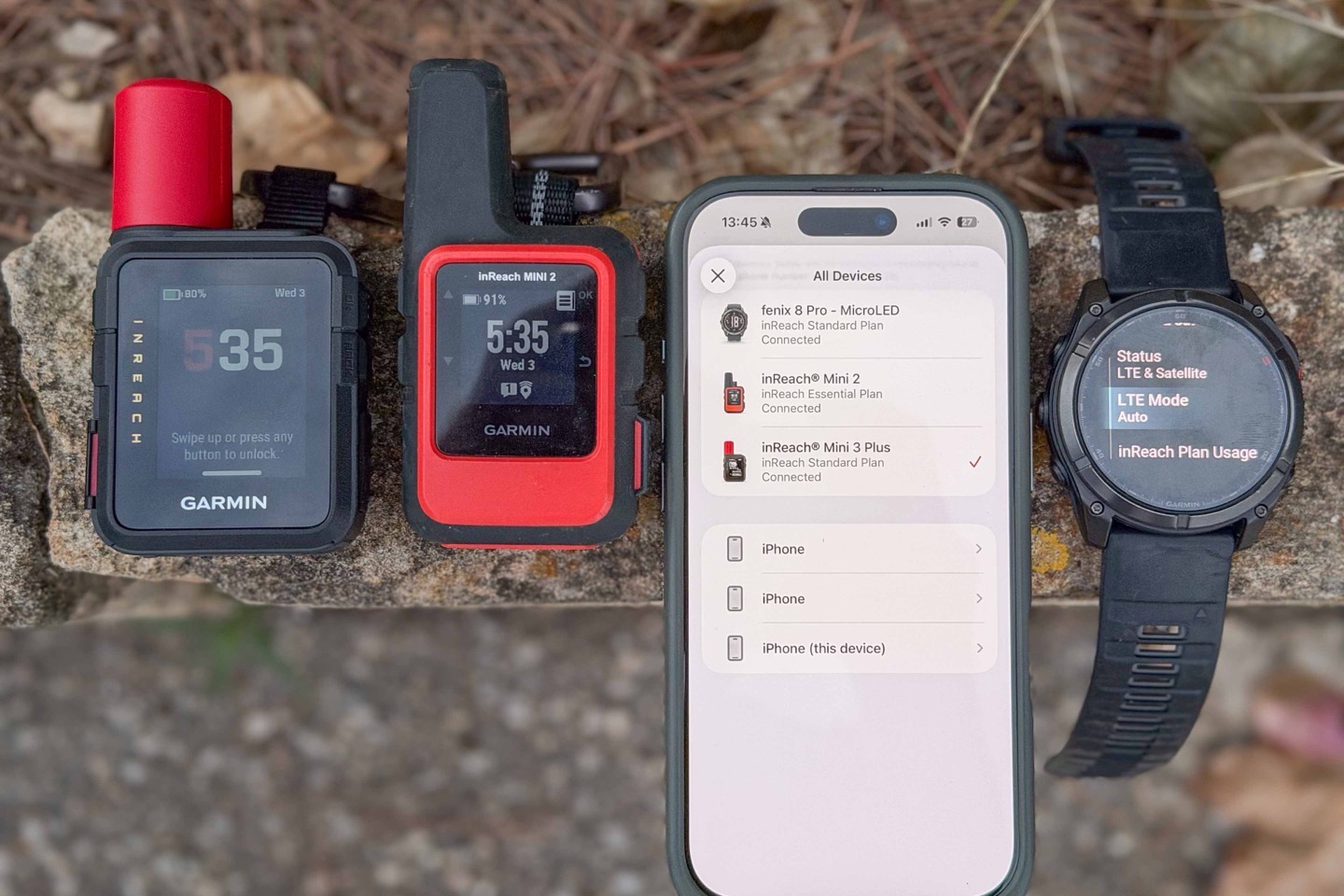
Anyway, that’s been partially solved. All you need to do is ensure you’ve got an updated Garmin Messenger app on your phone, and then you can start enrolling multiple devices. You can see this above where I have a Fenix 8 Pro MicroLED, inReach Mini 2, and inReach Mini 3 Plus all now activated on the same Garmin account. Previously, I’d have needed separate accounts for each one.
Now, as eagle-eyed readers might also notice from the above photo, as of today you need to have different subscription plans for each one. Thus why I have slightly different plans for the different devices. That’s obviously super expensive, as my credit card is currently attesting to – especially with Garmin’s insane $39 activation fee per device (especially for a brand new device).
However, back in September, Garmin stated that by the end of the year, they were going to both allow multiple devices under the same account (which is now done), but also that these would be enabled under a single subscription plan. Here’s the exact quote:
“We are actively working on a solution that will allow customers to have multiple devices active under one subscription plan simultaneously.” [Garmin, September 4th, 2025]
Thus, with at least the technical side partially complete, I figured I’d check back on whether that’s still the plan. Garmin responded today (Dec 3rd, 2025) that “at this time we don’t have anything fully confirmed”. It’s unclear from my discussions with them if they’re sticking to the original plan without an updated date, or if they’re aiming for a new plan that would require multiple subscriptions per device, which…would properly suck.
But, hopefully, they’ll get back to the original plan.
LiveTrack on inReach Devices:
Now, as I said earlier, I’m not sure when the magic option to use LiveTrack instead of MapShare occurred. I see some vague references to it from earlier in May, some from September, and then many more from November. Either way, I hadn’t noticed it – but today I did.
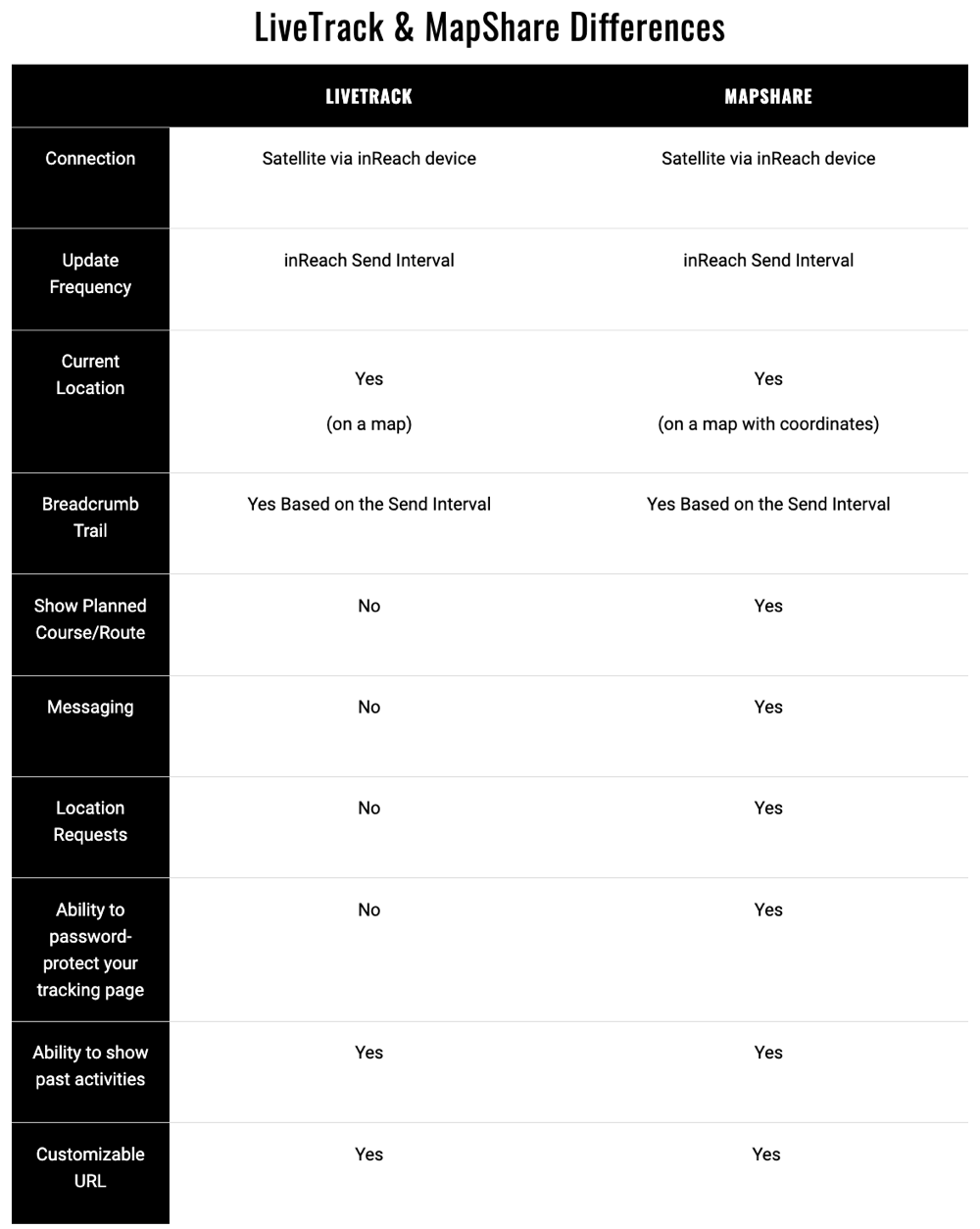
For those who may be a bit perplexed as to the difference between LiveTrack and MapShare, here’s the quick and dirty:
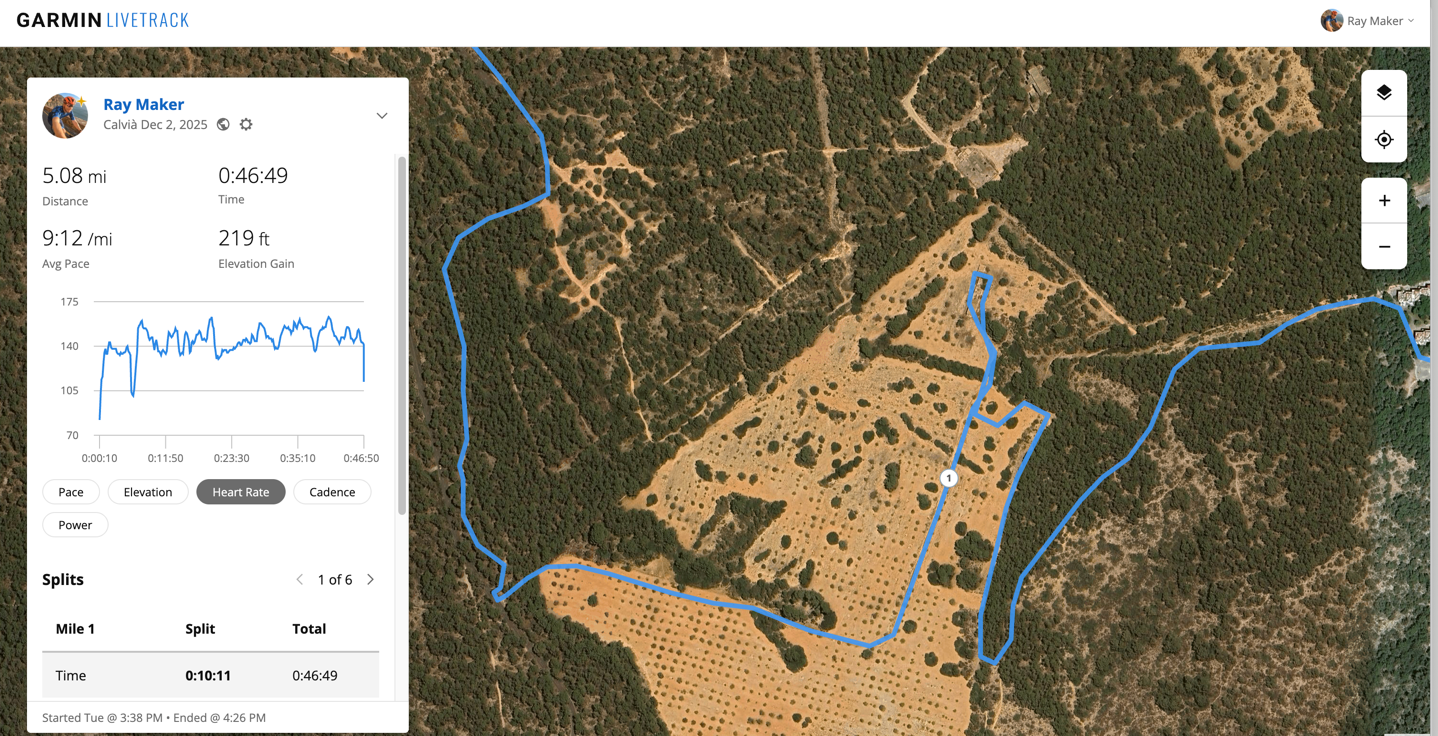
Garmin LiveTrack: This is what you’ve always used with your watches & Garmin Edge devices, to share your current location. For watches with LTE/Satellite, it’ll do it without a phone. For all other watches/devices without, it’ll use your phone’s data connection to send to the interwebs, and your friends/family can follow along. Generally speaking, LiveTrack looks like the screenshot below, and includes sensor data too (heart rate, power, elevation, pace, etc…). It’s easy to use, and ‘just works’, but historically had been a bit more limited in terms of features and such (that’s changed recently).
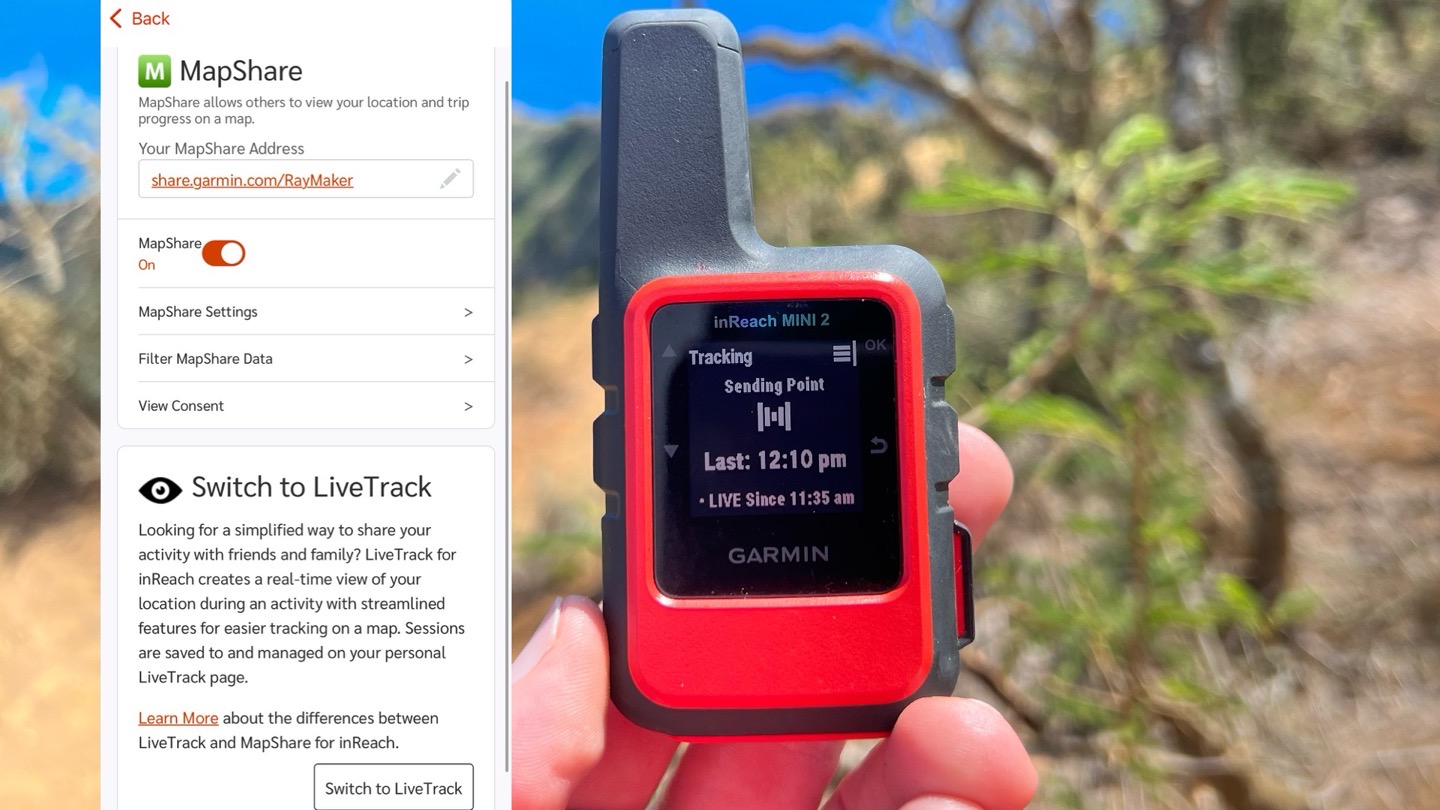
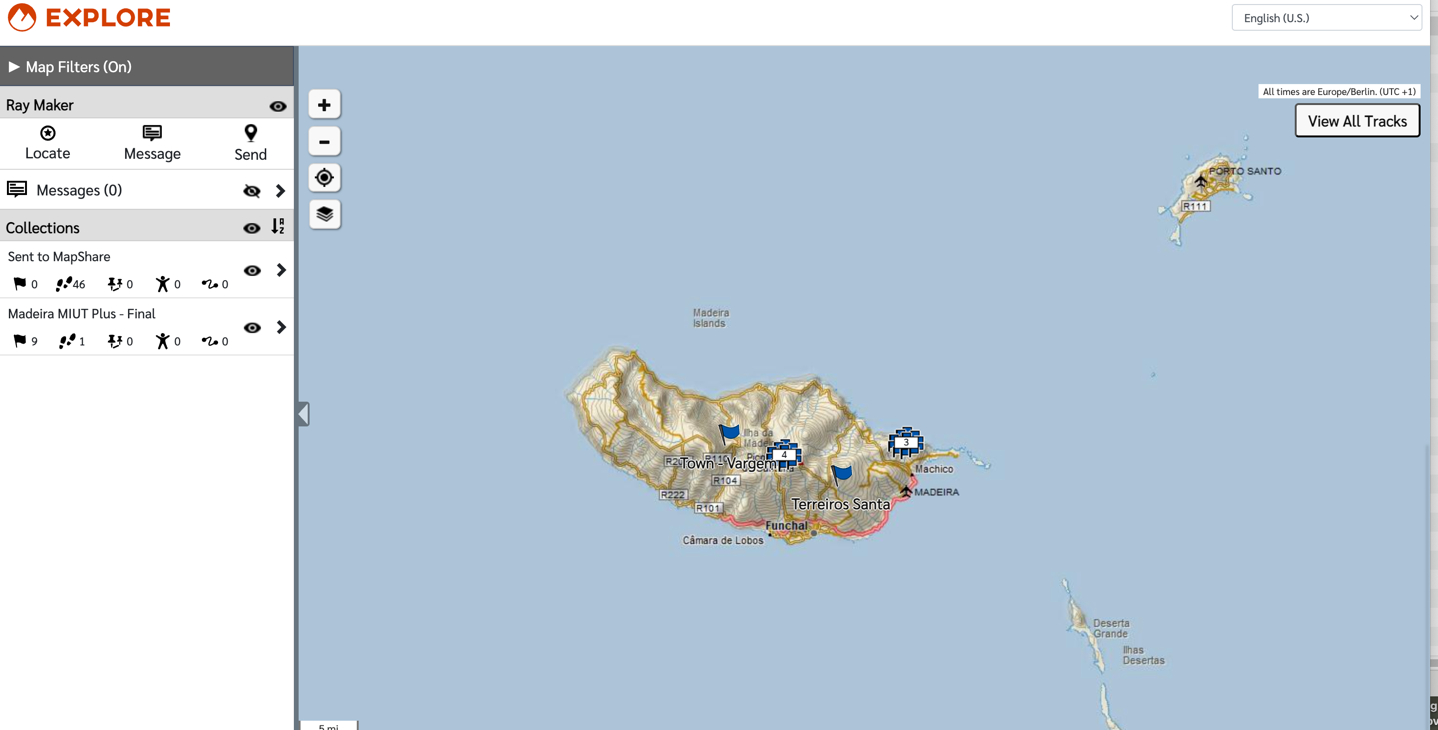
Garmin MapShare: Meanwhile, there was also Garmin MapShare, which was connected almost entirely to Garmin inReach and other handheld devices. This was primarily/historically for satellite/inReach connected devices, and offered a lot of map overlay options. You could share out a URL that worked forever, no matter how many trips you went on. And you could embed it in websites (e.g., for really long treks). But it was also (in my opinion) absurdly complicated, and made it super easy to accidentally post your home/private locations, because it would show anytime you turned the device on, and then save that to the map (requiring you to remember to apply more specific filters). To be clear, it had more powerful filtering/collection and web-based messaging options, but was ‘not beautiful’ in my opinion. Here’s what that looked like:
Again, some people probably still prefer MapShare, but I think that’s a much more limited number of people. And the good news is, you can still continue to use it.
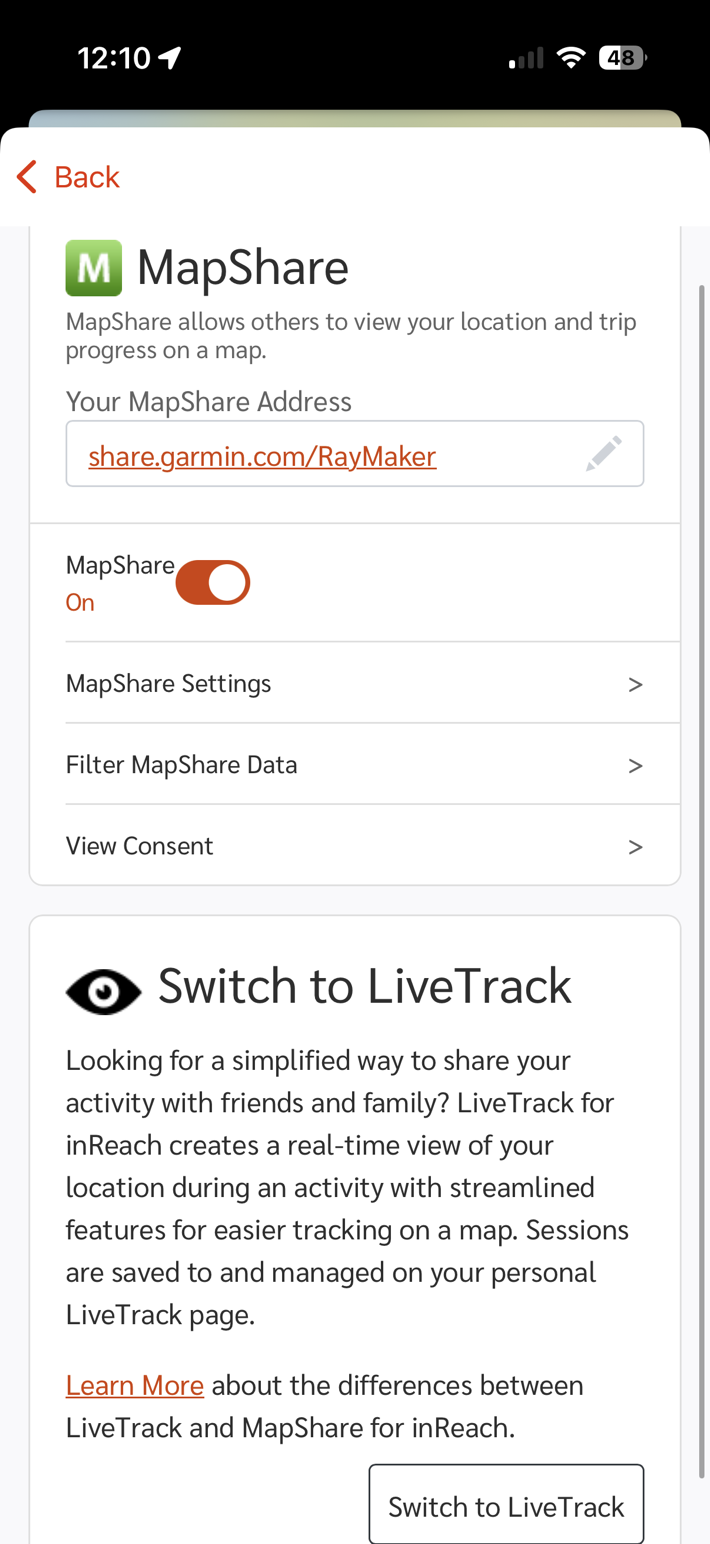
With the updated Garmin Explore app, you can now choose between the two types: LiveTrack and MapShare. To do so, you’ll:
1) Open Explore app, choose your profile picture in upper left
2) Scroll down, choose “MapShare” from settings list (it’ll show “LiveTrack” if you’ve switched already)
3) You’ll now see the below option, to toggle between them (“Switch to LiveTrack”):
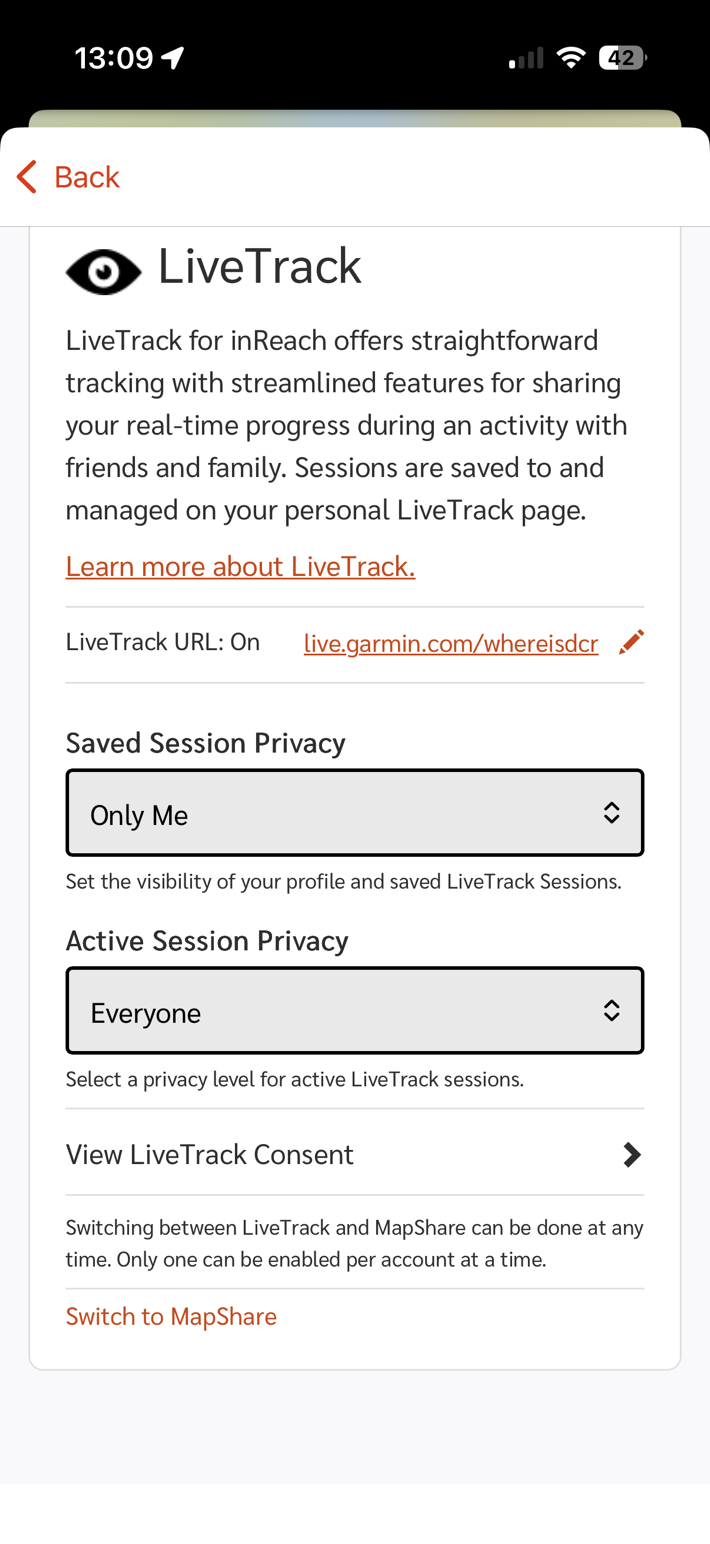
Within the LiveTrack option, you can create a custom URL (just like in MapShare), and you can choose whether or not past activities are private, as well as how current (live) activities are displayed:
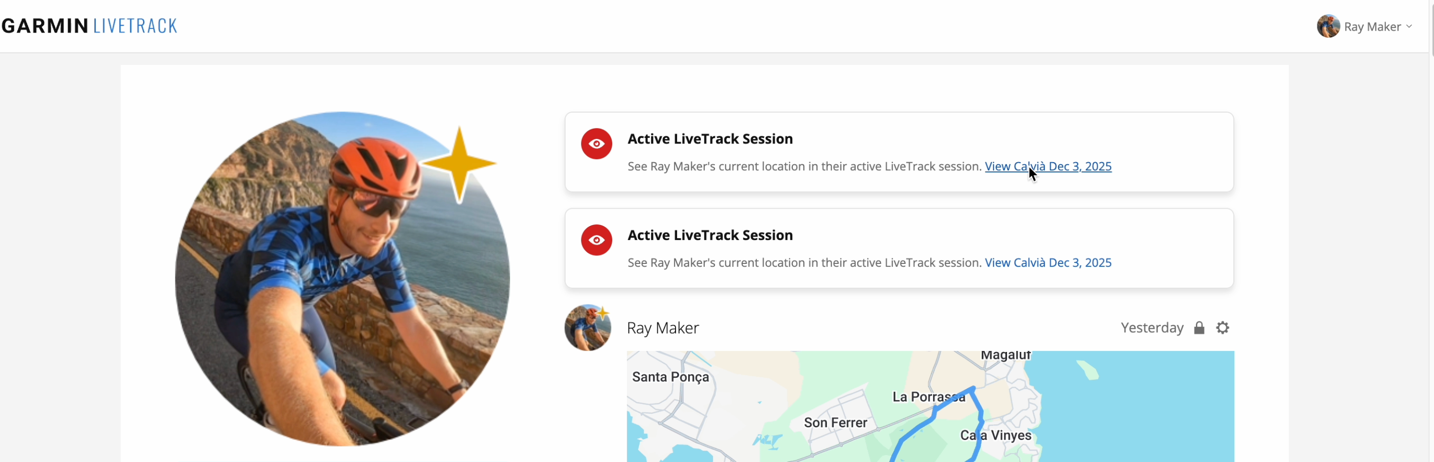
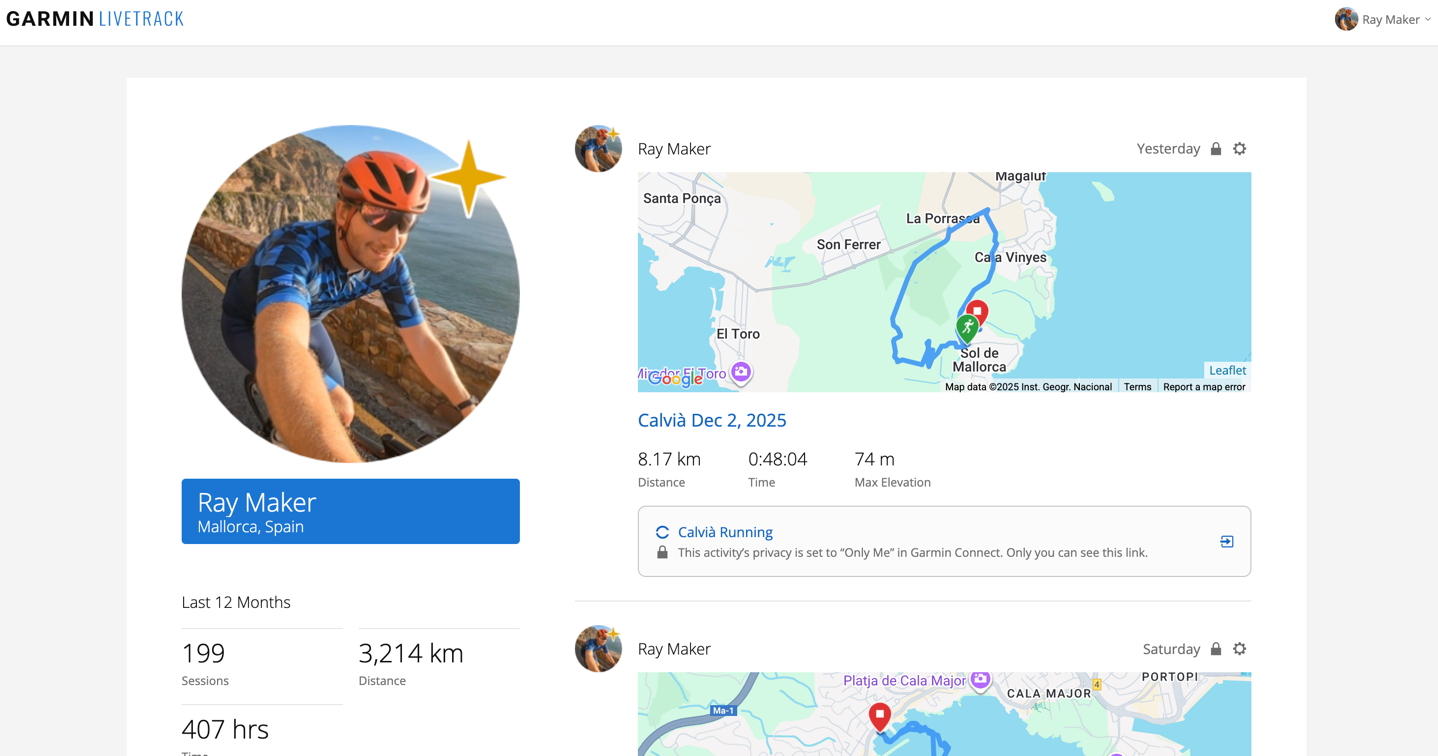
On the LiveTrack side, you’ll see your current activity shown on your custom URL page. Plus of course your contacts will get a link to the activity directly, depending on how you have things configured. Here’s an example of the custom landing page, with an active activity:
If you enable past activity history, you’ll see a big list of those below it, like this (except mine are all locked as private, per the icon):
Meanwhile, if you decide you want MapShare, you can switch back to that at any time, as often as you’d like (see it at the bottom of the screenshots above).
The key differences are:
– MapShare supports adding a custom password atop the shared URL page
– MapShare supports only showing specific filtered Garmin Explore collections (your routes)
– MapShare supports a bunch more message filtering options
– MapShare shows routes with inReach devices, but LiveTrack apparently doesn’t (LiveTrack will show planned routes for non-inReach devices).
Personally, I’d add two more line-items to the above:
– MapShare: Makes it super easy to accidentally share your life history with the world [Yes]
– MapShare: Feels like the 1980’s [Yes]
I know, I’m being hard on the poor MapShare team (which I’m assuming by now has long since retired and is enjoying inReach-orange themed fruity umbrella drinks on a beach somewhere), but I’m super glad to have a single streamlined LiveTrack option. Not really so much for myself, but rather, my friends/family who want to follow my journey. MapShare was just pretty clunky for them.
That said, I feel like with the Messenger Plus, and now inReach Mini 3 Plus, Garmin needs to step it up a bit more on these features. Why can’t I show/post photos/audio notes atop my LiveTrack page? As always, they make incredible hardware, but there’s just so much they could do with software to really drive home the cool new hardware features. But we’ll save that for my inReach Mini 3 Plus in-depth review.
With that, thanks for reading!
Found This Post Useful? Support The Site!
Hopefully you found this review/post useful. At the end of the day, I’m an athlete just like you looking for the most detail possible on a new purchase – so my review is written from the standpoint of how I used the device. The reviews generally take a lot of hours to put together, so it’s a fair bit of work (and labor of love). As you probably noticed by looking below, I also take time to answer all the questions posted in the comments – and there’s quite a bit of detail in there as well.
If you're shopping for the Garmin inReach Mini 2 Satellite Communicator (2-way), Garmin inReach Mini 3 Plus or Garmin inReach Messenger Plus or any other accessory items, please consider using the affiliate links below! As an Amazon Associate I earn from qualifying purchases. It doesn’t cost you anything extra, but your purchases help support this website a lot.
And of course – you can always sign-up to be a DCR Supporter! That gets you an ad-free DCR, access to the DCR Shed Talkin' video series packed with behind the scenes tidbits...and it also makes you awesome. And being awesome is what it’s all about!
Thanks for reading! And as always, feel free to post comments or questions in the comments section below, I’ll be happy to try and answer them as quickly as possible. And lastly, if you felt this review was useful – I always appreciate feedback in the comments below. Thanks!
This explain why we received a lot of fixes for inReach during the last quarter (beta phase). But i di not saw any customers feedback for this purpose :-)
And maybe why they do not fix newly crashes situation that user reports since the begining of this beta phase…
Thanks for your tests, news and explanations provided on your site !!!
I was really hoping they’d go with their original plan of having multiple devices under one subscription, but I’m wondering if that was just a miscommunication (i.e. did they mean “having multiple devices under one account” all along).
I can’t convince myself pay for a subscription for my Fenix 8 Pro (a device I use every day) _plus_ a subscription for an inReach device (a device I’d use 2-3 weeks a year). If this tied under the same plan though… I’d buy an inReach Mini 3 in a heartbeat.
Yeah, I don’t think there was any miscommunication there. Couldn’t be more clear in the wording from both sides. And to be fair, they just haven’t finalized whatever it is they’re finalizing.
Original question from September:
Me: “In the future (EOY) when you can have two inReach-enabled devices on a single Garmin account, will that require a separate sub per account, or, can those share a subscription (e.g. watch + handheld leveraging same account)?
Garmin: “We are actively working on a solution that will allow customers to have multiple devices active under one subscription plan simultaneously.”
I think MapShare is fundamentally a legacy DeLorme thing whereas LiveTrack is the homegrown Garmin thing. MapShare is super fiddly and weird even for someone just viewing the track.
LiveTrack would be uncontroversially better than MapShare if it offered the course route so people could see your dot progressing along the route. How can this not be supported by InReach devices?
I’m also confused about why Live Event Sharing is different from LiveTrack. Live Even Sharing seems to add SMS messaging features to LiveTrack that otherwise require Connect+ but you have to enable it every time you would use it? I admit I have never actually tried this out.
Unless you just set this manually via the website/app, i.e. before a trip, they’re going to need a course that is synchronized “in the cloud” and on the device, which can then be referenced by a short numeric ID to inform the cloud which course you have made active for navigation.
I would imagine that the LiveTrack route plan feature is tied to Connect-managed courses, while the MapShare feature is tied to the Explore-managed routes.
I don’t think it’s going to be feasible to share a route that is prepared offline. Your actual followed track will be streamed incrementally by sending tracking points or other messages with coordinates over Iridium messages. This can be done with the available data, whether you are using the navigation function or not.
But, you wouldn’t want to blast out a planned route that way, right? That would be very expensive and slow. Well, perhaps the “Plus” models could do it with the high bandwidth radio that supports voice and images…?
The exact thing that I have done is put a route in MapShare for an ultramarathon in the back country and share my live track. It’s two things but the point is for my friends loved ones to follow my progress and that I’m on course.
I think that Ray was saying that if you are following a course on LiveTrack using the watch then the course is shared and you see your dot move along the route. If you do this with an InReach they do not see the course. But if you use MapShare then you can have a course and your track in the same folder. They aren’t exactly tied together though in MapShare and you could have a messy MapShare with every course and track you ever did if you don’t curate it.
“I think that Ray was saying that if you are following a course on LiveTrack using the watch then the course is shared and you see your dot move along the route.”
Correct.
Even that aside, the entire architecture of the inReach platform these days is so heavily tied into both the Messenger app and Explore app, that I really see no reason courses can’t be synced over via those apps to the cloud (in the exact same way it does it for MapShare). After all, I’d bet the majority of people are probably either starting within cellular range, or occasionally passing through. The size of a course file is trivial (often sub-100KB). For example, a 25KM trail route is roughly 90KB.
In the scenario I’m envisioning the course exists in Connect and is synced to the watch. Why can’t those courses be synced to InReach anyway? Then you wouldn’t be uploading anything just sending an identifier from the InReach of which course it was following.
I found out about the livestock for inteach change before summer. There has been somebody asking in the forums and Garmin Admin linked the support site.
I don’t use mapshare because I use the InReach only for messaging, but without the planned route in livetrack I think it’s better for expeditions.
But thanks for the info about custom livetrack profile pages.
I laughed a bit at the idea of owning multiple in reach devices, until I read the details about the watch. What I’m after is a better way to share my one in reach device with my wife and son who live in the same house and share the device with me for different hiking, trail running, ski touring or camping adventures. We’re never buying a device for each of us but the current method of having to basically remove your account connection repeatedly to share the device with other family members is idiotic.
Just a thought on sharing devices – what about simply creating a different Garmin account, called something like Snively Family Tracker (aka FindSnively). That way you both have contacts for each other in it, and then aren’t sending messages to your own name, but rather sorta the ‘common’ pot name.
They put the inreach sub change around Nov 19th and I messenged them about it because the quote you mentioned earlier. This is a snippet of the response I got back.
“I spoke to my inReach team, as well as, my team lead and got some clarification today. With this app update it is the update regarding being able to have both Mini 2 and Fenix 8 Pro active at the same time. You are correct that in order to have both devices active at the same time, you would need to purchase an entirely separate plan for the 2nd device.”
I did express my disappointment as feedback for them as the cost does indeed skyrocket for some of their most loyal customers who have multiple devices along with subscriptions. I really thought it would roll into my current plan or a small add-on, not a entire new sub to manage.
I have a Mini and the option to switch to LiveTrack is on my Garmin Explore app. I haven’t tried it because MapShare fits my needs better, but it’s there.
The internet is gradually moving away from passwords as they don’t provide good security. Instead, Garmin generates a randomised URL for each ride which is emailed to the people you’ve chosen. This is more secure than a typical password setup. Also, you can set it so that the link expires as soon as the ride ends.
While passwords don’t provide good security, in this paritcular scenario, they do fill a gap.
Specifically a case where someone wants to share their location wijth a relatively small group of people via a known URL, but in case that known URL is found out, then the password provides one quick step of verification.
This mitigates against what you noted, which is that every single person gets a copy of every single activity, which said persons may not want.
As always, security isn’t black and white, but rather, a give and take between real world requirements and attack vectors.
Previously, you could only have one device active per account. The practical advantage was that if you had two devices, you could switch between them depending on which one you wanted to use. That’s no longer possible, correct?
I mean: for some activities is is perhaps more useful to have only a F8 pro with LTE/NTN active, for another activity a Mini 3+ with iridium (so you don´t have to pay for 2 subscriptions).
Any news on the timing of the F8 Pro review?
It would be great to have a comparison of the pros/cons of iPhone, AWU3, Fenix 8 Pro, InReach/Messenger – though they were kind of covered in the AUW3 review.
It would truly suck if Garmin seeks to charge more than once for inReach if you have multiple devices. It is a major disincentive to buying an F8 Pro as you are always going to have an InReach for serious stuff.
Ray, if you have 2 or more iR devices activated at the same messenger app account, they all have the same phone number (if one has only 1 phone/number). Does that mean, if you write someone a message and he answer, you get the message on both iR devices /same phone number) and that counts twice/you may have to pay for 2 messages???? Sounds like chaos?
Yeah, I get all the messages at once on all devices. Effectively no different though than getting text/WhatsApp messages on my phone/watch/etc all at once.
Rather than playing all this Garmin rigamaroo I’m glad I ended up selling my InReach 2 and using my T-Mobile phone to stay connected in the back country. I get that there are trade offs and sacrifices I made, but, boy it’s a WHOLE lot cheaper and less complicated.
Yeah, I think phones with direct satellite connections are solving the problem for a core audience. For example, my parents, or my father-in-law who goes deep into the Canadian wilderness many many hours (driving) outside of cellular range, and wants that quick piece of mind to call for help.
But inversely, none of the phone options today solve for continual tracking, which is really what inReach/SPOT/etc devices are so good at. The constant shareable trackpoints and such. Sure, a lot of people initially buy them for the SOS-type feature, but ultimately, most use them for the tracking features.
I was on a T-mobile/Google Fi, satellite-texting phone on Tour Divide 2024.
It failed to connect, many, many times.
My InReach Messenger worked flawlessly. One time, during an electrical storm near a summit, my phone completely froze up for about 40 minutes, at the height of the storm. I was not very knowledgable about my Messenger, or practiced at the manual input of texts, at the time, but managed to fire off one message during that storm, while my phone was bricked. It was an important message, to let my family know I was safe.
Maybe T-mobile and phones have improved since then?
Either way, I’d never go deep into the back-country without redundant communication options.
I think things have gotten better for Cell phone satellite connectivity since your experience and are likely to get better over time. Things like data streaming and app integration. I noticed on T-mobile’s website they already link with high latency, low bandwidth versions of apps like AllTrails, OnX, and Google Maps. For what its worth, my 2 weeks in the backcountry worked flawlessly on T-mobile’s satellite connection and it only cost me $10.
There’s a place for all the bell’s and whistles that Garmin offers but I think there’s also a strong case for up and coming market disruptors.
It seems like it should be a no brainer to have multiple devices on the same subscription, but this is Garmin, not Apple or Google, so all bets are off on the value to the user proposition.
Unless they fix the horrible user experience of the Explore app, I see no reason to upgrade my OG Mini. Using the old Earthmate Delorme-era app isn’t worse, although it wold be easier to streamline it all into Messenger, but I’m sure there’s a legacy tech reason why that isn’t already the case.
Fix Explore, if that’s how we fully utilize an inReach Mini. The map issue illustrates this. Pretty sure the Edge 840 has touch and maps, but you need to spend $1,000 on an inReach that does that, same as you need to spend well over $500 to get maps on a watch. Why are they holding that part of their services hostage, other than to coerce users to spend more?
Putting a plug in here for the OG version of the InReach Messenger.
It’s on sale, multiple places, for $199.
If you need a long battery life (plus doubles as a battery pack to back-charge your other devices), dedicated device, and don’t need the voice chat or photo sharing, it is the unsung hero of the lineup, in my opinion.
Typing texts on it, is a pain, but doable.
But that’s only necessary if your phone isn’t available, since it links with it for ease of inputs.
Well as usual it seems Garmin had released something without properly testing it. I’ve switched to Live Track in the Messenger app. But when I try and add notification recipients I just get a blank screen.
Does LTE LiveTrack seamlessly connect to inreach LiveTrack? For example, if I start the LTE livetrack on my watch but then lose connection would it switch over to my inreach? I don’t have an inreach device yet but I’m planning to buy it. I would only use it when I lose cellular connection. If it doesn’t switch automatically can I switch the livetrack manually to inreach and then back to LTE when I get the connection again? Would it be under the same livetrack link?
It also seems that when you use an Inreach device with a phone connected over BT and you are in an area with cellular connection, you don’t get charged for tracking points. This is not documented anywhere but it seems to work that way for me…
Thanks Ray, I look forward to the Mini 3 Plus Review 🙂
This area of outdoor Tec seems to be evolving intermittently. My thoughts:
Have many users ever tried to use a touch-screen phone outside in bad weather? I have, many times and it just doesn’t work in the rain or a whiteout, on the sea in a kayak, or anything like that. So, for me, something else, with buttons, not touch screen, is very important. I use a Fenix watch, with buttons, and it’s setup to ‘just work’. I also have handheld GPS units, with buttons, but I tend to only use the watch these days. Mainly for navigation. On the sea I’m using a Montana, but it’s touch screen, which I can work around, but it’s heavy and a bit of a nuisance. Great big screen is nice in the kayak.
A phone is fine when safely tucked up in a shelter and out of the weather or whatever. In that scenario, for me, we are relaxing in the tent and would like a weather forecast. So a satellite connected phone would be perfect then. Sadly Apple haven’t enabled texting over Satellite here in the UK just yet 😐.
For real emergencies we carry a PLB which is subscription free and will call for SOS help. We’ve never had to use it yet. But it’s supposed to be foolproof. Easy to test once a year and the battery is replaceable.
We don’t communicate with family or friends when on expedition or even day trips. We are there to escape all that 🙂. Many people, I know, don’t have this attitude nowadays. I won’t do any trips with people like this myself. YMMV of course.
“We climb the mountain to see the world, not so the world can see us”.
What would be nice, here in the UK, would be comms for weather, etc when there is no cellphone signal. The InReach Mini 3 Plus would do this nicely, right now. And have built in voice, photos, options, etc. without having to use a phone. I am a bit tempted, but the subscription puts me off as well as yet another bit of kit to carry. When kayaking on the sea in the far NW of Scotland we seem to be able to get a cell-phone signal in about ½ of the places we stop, so it’s not a huge issue at all really.
What is an interesting use-case in my wife leads groups (of quite old, fragile folk) on our hills here in Eryri and often there is no cellphone signal, so an inreach mini 3 plus could be handy if there is ever an incident where she might need help. Here, 2 way Sat comms would trump the PLB Is feel. Being able to share the inreach mini 3 plus between us both and possibly other family members would be important. The fact that is will do everything we need without a phone I guess would get round this issue and use some kind of general, non-specific family login name as Ray suggested.
It will be interesting to watch how this all develops. Garmin do make great hardware, great engineers I feel. But the software has always been a bit hopeless, in my experience 🤔.
While you can’t have multiple devices concurrently on the same subscription, they make it easy to transfer the subscription between devices. A bit of a PITA, but if you mostly use your F8 Pro and only occasionally use your inReach, this is a workable solution.
I agree they really need to make it easier / cheaper to have multiple devices on the same subscription. I can understand not having it be free, but maybe a $5 or $10 “add on” subscription. After all, isn’t this how most watch with lte subscriptions work? You have your phone and you pay a companion fee to add a watch or other device?
If you do happen to have an F8 Pro and inReach device, each with a subscription, can you have satellite functionality seamlessly go through the inReach and LTE go through the watch, if you don’t have a phone along?
Effectively, if I send a message from the F8Pro (again, no phone along), if I’m in LTE range I want that message going over the F8Pro LTE. If I’m out of LTE range, I want it to seamlessly get sent over satellite via the inReach.
If you’re sending from a Fenix 8 Pro with an active LTE/inReach plan, it’ll always use LTE (assuming you haven’t disabled it) to send first. Actually, technically, it’ll use your phone first, but since you mentioned a non-phone case, then yes, LTE first.
However, I’m not aware of the inReach device using your Fenix 8 Pro’s LTE to send the message. I’d assume Garmin’s thinking there is if you’ve got an inReach and a Fenix 8 pro, and are within cellular, you’ve probably got a phone too on cellular. Which, makese sense to me to be honest.
you got my question a bit backwards. If I’m OUT OF LTE range, but use the F8Pro to compose/send a message, can it send it over the inReach’s satellite connection? After all, the real weakness with the F8Pro is its lackluster satellite connection.
You would have to have the inReach paired to the Pro directly of course for this to have any chance of working, rather than simply both being paired to the phone.
I live in an area where LTE coverage is very limited – my house only gets 1 bar of LTE if I’m lucky and most of the close by trails rarely get useable LTE.
If you use the inReach Remote option, then it would. But if you’re using the native satellite message bit on the F8P, then it’s going to stay on that channel (or offload to messenger).
Now, I’d have to test an extended thought of that, which is to use the F8P to send the message, but have your phone with Messenger on it, connected to both F8P & inReach, then may, just maybe it’ll try and send it via the inReach upon failure. But I’d have to give it a whirl.
I was going to add that as an addition question, but figured that was just further muddying up the waters.
I actually seem to remember that scenario not even working with a regular F8. Send a message from MFW, which goes to Messenger App on the Phone, but doesn’t actually try to send via the inReach device.
All sorts of combinations here to try out. I’ll play with it a bit on my end as well.
I have a question about Garmin’s LTE messaging. Is there any way for someone who doesn’t have an Android or iOS phone capable of running the Garmin Messenger app to send a message to you, if you didn’t message them first? e.g. Is there a way to send a message from Garmin’s website/webapp on a web browser instead?
While much of the population has a modern Android or iOS device, there are still some who don’t, so I’m hoping there is a way for such family members to contact me if I buy a Fenix 8 Pro and activate LTE to leave my phone behind.
Unfortunately I don’t think that is possible. I thought that maybe it was possible via MapShare, but I went to my Mapshare page on the explore.garmin.com website and my fenix 8 Pro is listed as not being compatible with Mapshare. With other inReach devices (such as the Mini 3 Plus) friends or family could visit the Mapshare page you share with them and send you messages or ping your location (assuming that you’ve allowed that).
Ray, one question: if you have 2 iR devices at one account, they have the same phone number. If your F8 pro uLed is paired with the messenger app and your Mini 3+ is paired with the iR remote on the pro and someone sent you a pic and message to your phone number, you get the message/pic 4 times: Messenger app, M3+, MFW on the pro and on it remote on the pro. Is this correct? Thanks
Sorta curious which one of these the Utah hiker stuck in quicksand used.. and my childhood movie dears apparently do exist :) link to washingtonpost.com
Thanks for the info here, but as a suggestion, there’s two really key things that seem to be missing from this article. While covered in the Garmin screenshot about the LiveTrack vs Mapshare differences, it’s not touched on in the text: Requesting a user’s location and sending the user a message.
I have an InReach because I’ll often be hiking or mountain biking in back country areas without cell service. It’s very nice to know that, should it be needed, my wife or someone can message me. I also have numerous friends who use these devices when doing solo ultra-endurance events in similar areas, and for their support crews or family, being able to request a location update (instead of waiting for the next interval) and/or send a message is extremely important.
Yes, Mapshare feels a bit old, but personally, until LiveTrack supports those features, I’m not going to switch.
I swim, bike and run. Then, I come here and write about my adventures. It’s as simple as that. Most of the time. If you’re new around these parts, here’s the long version of my story.
You'll support the site, and get ad-free DCR! Plus, you'll be more awesome. Click above for all the details. Oh, and you can sign-up for the newsletter here!
Here’s how to save!
Wanna save some cash and support the site? These companies help support the site! With Backcountry.com or Competitive Cyclist with either the coupon code DCRAINMAKER for first time users saving 15% on applicable products.
You can also pick-up tons of gear at REI via these links, which is a long-time supporter as well:
Alternatively, for everything else on the planet, simply buy your goods from Amazon via the link below and I get a tiny bit back as an Amazon Associate. No cost to you, easy as pie!
You can use the above link for any Amazon country and it (should) automatically redirect to your local Amazon site.
While I don't partner with many companies, there's a few that I love, and support the site. Full details!
Want to compare the features of each product, down to the nitty-gritty? No problem, the product comparison data is constantly updated with new products and new features added to old products!
Wanna create comparison chart graphs just like I do for GPS, heart rate, power meters and more? No problem, here's the platform I use - you can too!
Think my written reviews are deep? You should check out my videos. I take things to a whole new level of interactive depth!
Smart Trainers Buyers Guide: Looking at a smart trainer this winter? I cover all the units to buy (and avoid) for indoor training. The good, the bad, and the ugly.
Check out
my weekly podcast - with DesFit, which is packed with both gadget and non-gadget goodness!
Get all your awesome DC Rainmaker gear here!
FAQ’s
I have built an extensive list of my most frequently asked questions. Below are the most popular.
You probably stumbled upon here looking for a review of a sports gadget. If you’re trying to decide which unit to buy – check out my in-depth reviews section. Some reviews are over 60 pages long when printed out, with hundreds of photos! I aim to leave no stone unturned.
I travel a fair bit, both for work and for fun. Here’s a bunch of random trip reports and daily trip-logs that I’ve put together and posted. I’ve sorted it all by world geography, in an attempt to make it easy to figure out where I’ve been.
The most common question I receive outside of the “what’s the best GPS watch for me” variant, are photography-esq based. So in efforts to combat the amount of emails I need to sort through on a daily basis, I’ve complied this “My Photography Gear” post for your curious minds (including drones & action cams!)! It’s a nice break from the day-to-day sports-tech talk, and I hope you get something out of it!
Many readers stumble into my website in search of information on the latest and greatest sports tech products. But at the end of the day, you might just be wondering “What does Ray use when not testing new products?”. So here is the most up to date list of products I like and fit the bill for me and my training needs best! DC Rainmaker 2024 swim, bike, run, and general gear list. But wait, are you a female and feel like these things might not apply to you? If that’s the case (but certainly not saying my choices aren’t good for women), and you just want to see a different gear junkies “picks”, check out The Girl’s Gear Guide too.




















This explain why we received a lot of fixes for inReach during the last quarter (beta phase). But i di not saw any customers feedback for this purpose :-)
And maybe why they do not fix newly crashes situation that user reports since the begining of this beta phase…
Thanks for your tests, news and explanations provided on your site !!!
I was really hoping they’d go with their original plan of having multiple devices under one subscription, but I’m wondering if that was just a miscommunication (i.e. did they mean “having multiple devices under one account” all along).
I can’t convince myself pay for a subscription for my Fenix 8 Pro (a device I use every day) _plus_ a subscription for an inReach device (a device I’d use 2-3 weeks a year). If this tied under the same plan though… I’d buy an inReach Mini 3 in a heartbeat.
Yeah, I don’t think there was any miscommunication there. Couldn’t be more clear in the wording from both sides. And to be fair, they just haven’t finalized whatever it is they’re finalizing.
Original question from September:
Me: “In the future (EOY) when you can have two inReach-enabled devices on a single Garmin account, will that require a separate sub per account, or, can those share a subscription (e.g. watch + handheld leveraging same account)?
Garmin: “We are actively working on a solution that will allow customers to have multiple devices active under one subscription plan simultaneously.”
I really hope that is still coming. Otherwise, yeah, my messenger plus is a doorstop, and I’ll have to sell it.
I think MapShare is fundamentally a legacy DeLorme thing whereas LiveTrack is the homegrown Garmin thing. MapShare is super fiddly and weird even for someone just viewing the track.
LiveTrack would be uncontroversially better than MapShare if it offered the course route so people could see your dot progressing along the route. How can this not be supported by InReach devices?
I’m also confused about why Live Event Sharing is different from LiveTrack. Live Even Sharing seems to add SMS messaging features to LiveTrack that otherwise require Connect+ but you have to enable it every time you would use it? I admit I have never actually tried this out.
Unless you just set this manually via the website/app, i.e. before a trip, they’re going to need a course that is synchronized “in the cloud” and on the device, which can then be referenced by a short numeric ID to inform the cloud which course you have made active for navigation.
I would imagine that the LiveTrack route plan feature is tied to Connect-managed courses, while the MapShare feature is tied to the Explore-managed routes.
I don’t think it’s going to be feasible to share a route that is prepared offline. Your actual followed track will be streamed incrementally by sending tracking points or other messages with coordinates over Iridium messages. This can be done with the available data, whether you are using the navigation function or not.
But, you wouldn’t want to blast out a planned route that way, right? That would be very expensive and slow. Well, perhaps the “Plus” models could do it with the high bandwidth radio that supports voice and images…?
The exact thing that I have done is put a route in MapShare for an ultramarathon in the back country and share my live track. It’s two things but the point is for my friends loved ones to follow my progress and that I’m on course.
I think that Ray was saying that if you are following a course on LiveTrack using the watch then the course is shared and you see your dot move along the route. If you do this with an InReach they do not see the course. But if you use MapShare then you can have a course and your track in the same folder. They aren’t exactly tied together though in MapShare and you could have a messy MapShare with every course and track you ever did if you don’t curate it.
“I think that Ray was saying that if you are following a course on LiveTrack using the watch then the course is shared and you see your dot move along the route.”
Correct.
Even that aside, the entire architecture of the inReach platform these days is so heavily tied into both the Messenger app and Explore app, that I really see no reason courses can’t be synced over via those apps to the cloud (in the exact same way it does it for MapShare). After all, I’d bet the majority of people are probably either starting within cellular range, or occasionally passing through. The size of a course file is trivial (often sub-100KB). For example, a 25KM trail route is roughly 90KB.
In the scenario I’m envisioning the course exists in Connect and is synced to the watch. Why can’t those courses be synced to InReach anyway? Then you wouldn’t be uploading anything just sending an identifier from the InReach of which course it was following.
I found out about the livestock for inteach change before summer. There has been somebody asking in the forums and Garmin Admin linked the support site.
I don’t use mapshare because I use the InReach only for messaging, but without the planned route in livetrack I think it’s better for expeditions.
But thanks for the info about custom livetrack profile pages.
I laughed a bit at the idea of owning multiple in reach devices, until I read the details about the watch. What I’m after is a better way to share my one in reach device with my wife and son who live in the same house and share the device with me for different hiking, trail running, ski touring or camping adventures. We’re never buying a device for each of us but the current method of having to basically remove your account connection repeatedly to share the device with other family members is idiotic.
Just a thought on sharing devices – what about simply creating a different Garmin account, called something like Snively Family Tracker (aka FindSnively). That way you both have contacts for each other in it, and then aren’t sending messages to your own name, but rather sorta the ‘common’ pot name.
They put the inreach sub change around Nov 19th and I messenged them about it because the quote you mentioned earlier. This is a snippet of the response I got back.
“I spoke to my inReach team, as well as, my team lead and got some clarification today. With this app update it is the update regarding being able to have both Mini 2 and Fenix 8 Pro active at the same time. You are correct that in order to have both devices active at the same time, you would need to purchase an entirely separate plan for the 2nd device.”
I did express my disappointment as feedback for them as the cost does indeed skyrocket for some of their most loyal customers who have multiple devices along with subscriptions. I really thought it would roll into my current plan or a small add-on, not a entire new sub to manage.
I suspect anyone with an inReach Mini(not the Mini2) is out of luck. :-(
I don’t have a Mini 1 handy at the moment, but I’d be surprised ifit doesn’t work – since this is more app-side than device-side.
Also, the support article says it should work: link to support.garmin.com
I have a Mini and the option to switch to LiveTrack is on my Garmin Explore app. I haven’t tried it because MapShare fits my needs better, but it’s there.
Ray, will you release a Mini3/+ review?
Yup, very shortly!
LiveTrack not supporting a password for access is a dealbreaker for me.
I’m not a Instaspam hiker and don’t want public access to my hiking tracks 😇
So if Garmin kills Mapshare in the future they better add a password option.
The internet is gradually moving away from passwords as they don’t provide good security. Instead, Garmin generates a randomised URL for each ride which is emailed to the people you’ve chosen. This is more secure than a typical password setup. Also, you can set it so that the link expires as soon as the ride ends.
While passwords don’t provide good security, in this paritcular scenario, they do fill a gap.
Specifically a case where someone wants to share their location wijth a relatively small group of people via a known URL, but in case that known URL is found out, then the password provides one quick step of verification.
This mitigates against what you noted, which is that every single person gets a copy of every single activity, which said persons may not want.
As always, security isn’t black and white, but rather, a give and take between real world requirements and attack vectors.
Previously, you could only have one device active per account. The practical advantage was that if you had two devices, you could switch between them depending on which one you wanted to use. That’s no longer possible, correct?
I mean: for some activities is is perhaps more useful to have only a F8 pro with LTE/NTN active, for another activity a Mini 3+ with iridium (so you don´t have to pay for 2 subscriptions).
You can transition between devices, though, that triggers the activation fee.
And likewise, you can still spin-up a secondary account if you want to. For example, a share inReach device amongst either family members or friends.
Any news on the timing of the F8 Pro review?
It would be great to have a comparison of the pros/cons of iPhone, AWU3, Fenix 8 Pro, InReach/Messenger – though they were kind of covered in the AUW3 review.
It would truly suck if Garmin seeks to charge more than once for inReach if you have multiple devices. It is a major disincentive to buying an F8 Pro as you are always going to have an InReach for serious stuff.
The comparison table says no messaging in LiveTrack. I assume that means no messaging in the app, not that messaging from the device is disabled?
No messaging from the Livetrack website specifically.
You can still message from the device, Messenger App, etc…
Ray, if you have 2 or more iR devices activated at the same messenger app account, they all have the same phone number (if one has only 1 phone/number). Does that mean, if you write someone a message and he answer, you get the message on both iR devices /same phone number) and that counts twice/you may have to pay for 2 messages???? Sounds like chaos?
Yeah, I get all the messages at once on all devices. Effectively no different though than getting text/WhatsApp messages on my phone/watch/etc all at once.
But the messages count against your free limit or you have to pay for them twice or does they count as only 1 message?
Rather than playing all this Garmin rigamaroo I’m glad I ended up selling my InReach 2 and using my T-Mobile phone to stay connected in the back country. I get that there are trade offs and sacrifices I made, but, boy it’s a WHOLE lot cheaper and less complicated.
Yeah, I think phones with direct satellite connections are solving the problem for a core audience. For example, my parents, or my father-in-law who goes deep into the Canadian wilderness many many hours (driving) outside of cellular range, and wants that quick piece of mind to call for help.
But inversely, none of the phone options today solve for continual tracking, which is really what inReach/SPOT/etc devices are so good at. The constant shareable trackpoints and such. Sure, a lot of people initially buy them for the SOS-type feature, but ultimately, most use them for the tracking features.
I was on a T-mobile/Google Fi, satellite-texting phone on Tour Divide 2024.
It failed to connect, many, many times.
My InReach Messenger worked flawlessly. One time, during an electrical storm near a summit, my phone completely froze up for about 40 minutes, at the height of the storm. I was not very knowledgable about my Messenger, or practiced at the manual input of texts, at the time, but managed to fire off one message during that storm, while my phone was bricked. It was an important message, to let my family know I was safe.
Maybe T-mobile and phones have improved since then?
Either way, I’d never go deep into the back-country without redundant communication options.
I think things have gotten better for Cell phone satellite connectivity since your experience and are likely to get better over time. Things like data streaming and app integration. I noticed on T-mobile’s website they already link with high latency, low bandwidth versions of apps like AllTrails, OnX, and Google Maps. For what its worth, my 2 weeks in the backcountry worked flawlessly on T-mobile’s satellite connection and it only cost me $10.
There’s a place for all the bell’s and whistles that Garmin offers but I think there’s also a strong case for up and coming market disruptors.
It seems like it should be a no brainer to have multiple devices on the same subscription, but this is Garmin, not Apple or Google, so all bets are off on the value to the user proposition.
Unless they fix the horrible user experience of the Explore app, I see no reason to upgrade my OG Mini. Using the old Earthmate Delorme-era app isn’t worse, although it wold be easier to streamline it all into Messenger, but I’m sure there’s a legacy tech reason why that isn’t already the case.
Fix Explore, if that’s how we fully utilize an inReach Mini. The map issue illustrates this. Pretty sure the Edge 840 has touch and maps, but you need to spend $1,000 on an inReach that does that, same as you need to spend well over $500 to get maps on a watch. Why are they holding that part of their services hostage, other than to coerce users to spend more?
Putting a plug in here for the OG version of the InReach Messenger.
It’s on sale, multiple places, for $199.
If you need a long battery life (plus doubles as a battery pack to back-charge your other devices), dedicated device, and don’t need the voice chat or photo sharing, it is the unsung hero of the lineup, in my opinion.
Typing texts on it, is a pain, but doable.
But that’s only necessary if your phone isn’t available, since it links with it for ease of inputs.
Well as usual it seems Garmin had released something without properly testing it. I’ve switched to Live Track in the Messenger app. But when I try and add notification recipients I just get a blank screen.
Does LTE LiveTrack seamlessly connect to inreach LiveTrack? For example, if I start the LTE livetrack on my watch but then lose connection would it switch over to my inreach? I don’t have an inreach device yet but I’m planning to buy it. I would only use it when I lose cellular connection. If it doesn’t switch automatically can I switch the livetrack manually to inreach and then back to LTE when I get the connection again? Would it be under the same livetrack link?
Assuming the 945 LTE doesn’t get this?
It also seems that when you use an Inreach device with a phone connected over BT and you are in an area with cellular connection, you don’t get charged for tracking points. This is not documented anywhere but it seems to work that way for me…
Thanks Ray, I look forward to the Mini 3 Plus Review 🙂
This area of outdoor Tec seems to be evolving intermittently. My thoughts:
Have many users ever tried to use a touch-screen phone outside in bad weather? I have, many times and it just doesn’t work in the rain or a whiteout, on the sea in a kayak, or anything like that. So, for me, something else, with buttons, not touch screen, is very important. I use a Fenix watch, with buttons, and it’s setup to ‘just work’. I also have handheld GPS units, with buttons, but I tend to only use the watch these days. Mainly for navigation. On the sea I’m using a Montana, but it’s touch screen, which I can work around, but it’s heavy and a bit of a nuisance. Great big screen is nice in the kayak.
A phone is fine when safely tucked up in a shelter and out of the weather or whatever. In that scenario, for me, we are relaxing in the tent and would like a weather forecast. So a satellite connected phone would be perfect then. Sadly Apple haven’t enabled texting over Satellite here in the UK just yet 😐.
For real emergencies we carry a PLB which is subscription free and will call for SOS help. We’ve never had to use it yet. But it’s supposed to be foolproof. Easy to test once a year and the battery is replaceable.
We don’t communicate with family or friends when on expedition or even day trips. We are there to escape all that 🙂. Many people, I know, don’t have this attitude nowadays. I won’t do any trips with people like this myself. YMMV of course.
“We climb the mountain to see the world, not so the world can see us”.
What would be nice, here in the UK, would be comms for weather, etc when there is no cellphone signal. The InReach Mini 3 Plus would do this nicely, right now. And have built in voice, photos, options, etc. without having to use a phone. I am a bit tempted, but the subscription puts me off as well as yet another bit of kit to carry. When kayaking on the sea in the far NW of Scotland we seem to be able to get a cell-phone signal in about ½ of the places we stop, so it’s not a huge issue at all really.
What is an interesting use-case in my wife leads groups (of quite old, fragile folk) on our hills here in Eryri and often there is no cellphone signal, so an inreach mini 3 plus could be handy if there is ever an incident where she might need help. Here, 2 way Sat comms would trump the PLB Is feel. Being able to share the inreach mini 3 plus between us both and possibly other family members would be important. The fact that is will do everything we need without a phone I guess would get round this issue and use some kind of general, non-specific family login name as Ray suggested.
It will be interesting to watch how this all develops. Garmin do make great hardware, great engineers I feel. But the software has always been a bit hopeless, in my experience 🤔.
While you can’t have multiple devices concurrently on the same subscription, they make it easy to transfer the subscription between devices. A bit of a PITA, but if you mostly use your F8 Pro and only occasionally use your inReach, this is a workable solution.
I agree they really need to make it easier / cheaper to have multiple devices on the same subscription. I can understand not having it be free, but maybe a $5 or $10 “add on” subscription. After all, isn’t this how most watch with lte subscriptions work? You have your phone and you pay a companion fee to add a watch or other device?
If you do happen to have an F8 Pro and inReach device, each with a subscription, can you have satellite functionality seamlessly go through the inReach and LTE go through the watch, if you don’t have a phone along?
Effectively, if I send a message from the F8Pro (again, no phone along), if I’m in LTE range I want that message going over the F8Pro LTE. If I’m out of LTE range, I want it to seamlessly get sent over satellite via the inReach.
If you’re sending from a Fenix 8 Pro with an active LTE/inReach plan, it’ll always use LTE (assuming you haven’t disabled it) to send first. Actually, technically, it’ll use your phone first, but since you mentioned a non-phone case, then yes, LTE first.
However, I’m not aware of the inReach device using your Fenix 8 Pro’s LTE to send the message. I’d assume Garmin’s thinking there is if you’ve got an inReach and a Fenix 8 pro, and are within cellular, you’ve probably got a phone too on cellular. Which, makese sense to me to be honest.
you got my question a bit backwards. If I’m OUT OF LTE range, but use the F8Pro to compose/send a message, can it send it over the inReach’s satellite connection? After all, the real weakness with the F8Pro is its lackluster satellite connection.
You would have to have the inReach paired to the Pro directly of course for this to have any chance of working, rather than simply both being paired to the phone.
I live in an area where LTE coverage is very limited – my house only gets 1 bar of LTE if I’m lucky and most of the close by trails rarely get useable LTE.
Ahh, gotchya.
If you use the inReach Remote option, then it would. But if you’re using the native satellite message bit on the F8P, then it’s going to stay on that channel (or offload to messenger).
Now, I’d have to test an extended thought of that, which is to use the F8P to send the message, but have your phone with Messenger on it, connected to both F8P & inReach, then may, just maybe it’ll try and send it via the inReach upon failure. But I’d have to give it a whirl.
I was going to add that as an addition question, but figured that was just further muddying up the waters.
I actually seem to remember that scenario not even working with a regular F8. Send a message from MFW, which goes to Messenger App on the Phone, but doesn’t actually try to send via the inReach device.
All sorts of combinations here to try out. I’ll play with it a bit on my end as well.
I have a question about Garmin’s LTE messaging. Is there any way for someone who doesn’t have an Android or iOS phone capable of running the Garmin Messenger app to send a message to you, if you didn’t message them first? e.g. Is there a way to send a message from Garmin’s website/webapp on a web browser instead?
While much of the population has a modern Android or iOS device, there are still some who don’t, so I’m hoping there is a way for such family members to contact me if I buy a Fenix 8 Pro and activate LTE to leave my phone behind.
Unfortunately I don’t think that is possible. I thought that maybe it was possible via MapShare, but I went to my Mapshare page on the explore.garmin.com website and my fenix 8 Pro is listed as not being compatible with Mapshare. With other inReach devices (such as the Mini 3 Plus) friends or family could visit the Mapshare page you share with them and send you messages or ping your location (assuming that you’ve allowed that).
Ray, one question: if you have 2 iR devices at one account, they have the same phone number. If your F8 pro uLed is paired with the messenger app and your Mini 3+ is paired with the iR remote on the pro and someone sent you a pic and message to your phone number, you get the message/pic 4 times: Messenger app, M3+, MFW on the pro and on it remote on the pro. Is this correct? Thanks
Sorta curious which one of these the Utah hiker stuck in quicksand used.. and my childhood movie dears apparently do exist :) link to washingtonpost.com
Thanks for the info here, but as a suggestion, there’s two really key things that seem to be missing from this article. While covered in the Garmin screenshot about the LiveTrack vs Mapshare differences, it’s not touched on in the text: Requesting a user’s location and sending the user a message.
I have an InReach because I’ll often be hiking or mountain biking in back country areas without cell service. It’s very nice to know that, should it be needed, my wife or someone can message me. I also have numerous friends who use these devices when doing solo ultra-endurance events in similar areas, and for their support crews or family, being able to request a location update (instead of waiting for the next interval) and/or send a message is extremely important.
Yes, Mapshare feels a bit old, but personally, until LiveTrack supports those features, I’m not going to switch.