
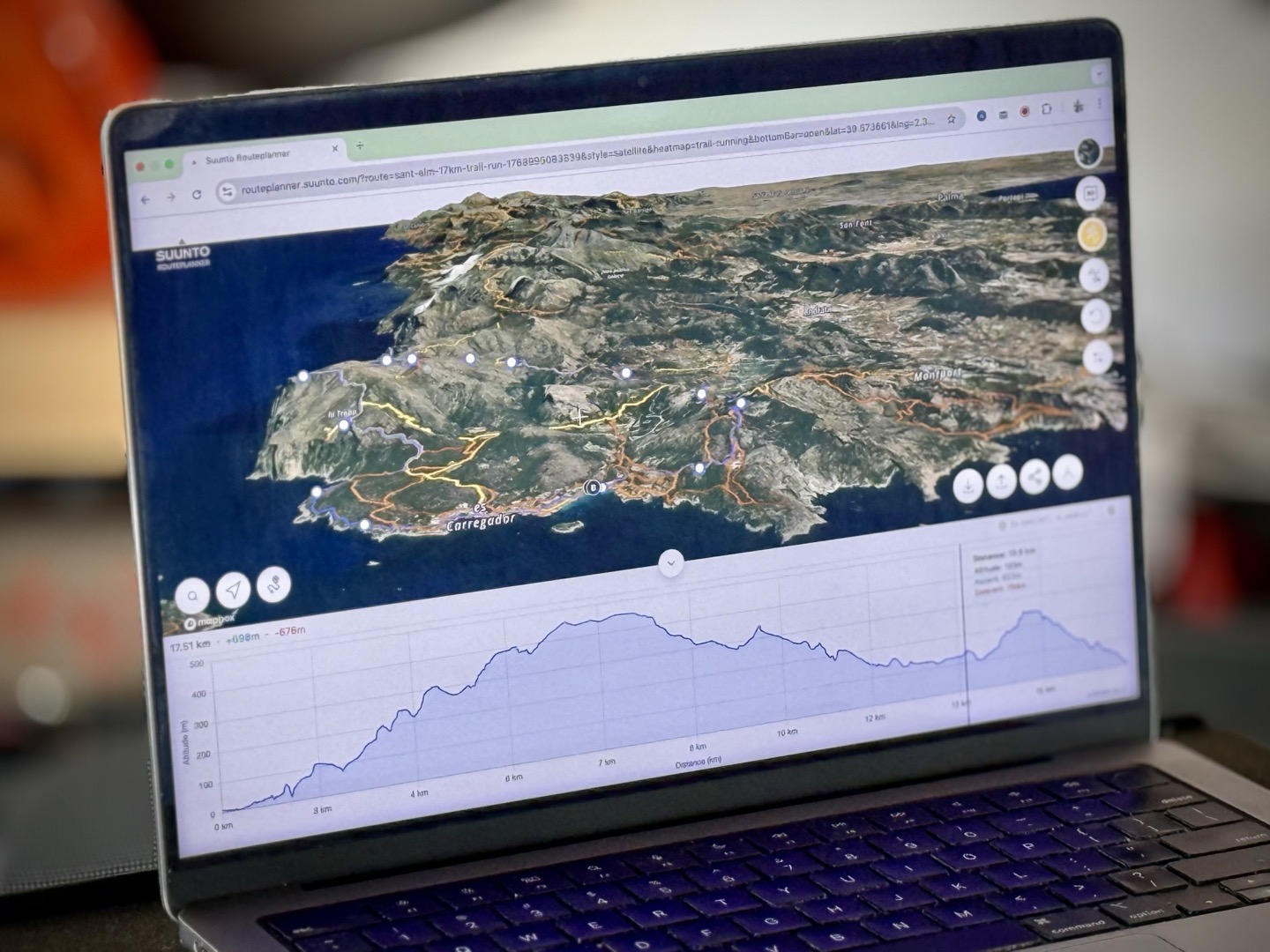
It seems rare in 2026 (or anytime this decade) for a new web platform to be launched that allows you to create routes, save those routes as files, and more…all without paying for it. Or, even more notably, without creating a single account. But here we are – with Suunto’s Routeplanner that was launched in December. I’ve been playing with it since launch, and it’s actually pretty darn cool.
It effectively gives you the core functionality of Strava Routes & Komoot Routes, but for free. And sure, if you have a Suunto or Hammerhead device, you can link up your account, and then it’ll magically flow to those devices. But for everyone else, you can simply save and export the routes as a GPX file, and then import them into your watch or bike computer.
In short, the website does all the following without even creating an account:
A) Create new routes using variety of map types
B) Can optimize routes for either running/hiking/pedestrian activities or cycling activities (leverages that heat map data)
C) Can see heat map data for roughly a dozen sport types
D) Can see elevation profile, and ascent/descent metrics
E) Can save/export routes as GPX files
F) Can share routes as a URL (for others to download), valid for 6 months
G) Can open up existing routes (GPX/FIT files)
H) Can modify existing GPX/FIT file routes
I) Can save any of the above to your Suunto account for automatic device sync (optional)
I’m sure I’m missing other tiny ancillary features, but that’s the gist of it, which is a pretty cool gist. But, as noted, I just want to quickly run though things. And note that this doesn’t take away from the existing suite of tools in the dedicated Suunto App, though that’s for actual Suunto device users/owners. But of course, this leans heavily on the backend infrastructure, which they share.
Creating a Route:
So, starting off is easy, simply navigate to https://routeplanner.suunto.com and boom – a map is there, ready to do cuddle your creation. Note that if you permit your browser tab to see your current location, it’ll be centered on your location. But of course, that’s not required. On the right side are two options to let you control the map imagery. The first one controls the map itself, including layers for: Outdoor (seen below), Satellite (seen next), Light, Dark, Winter, Avalanche Terrain, and Finland Terrain. Yes, there’s actually a dedicated Finland Map option. Perhaps Greenland is also considering requesting a Greenland Map option that would hide the terrain.
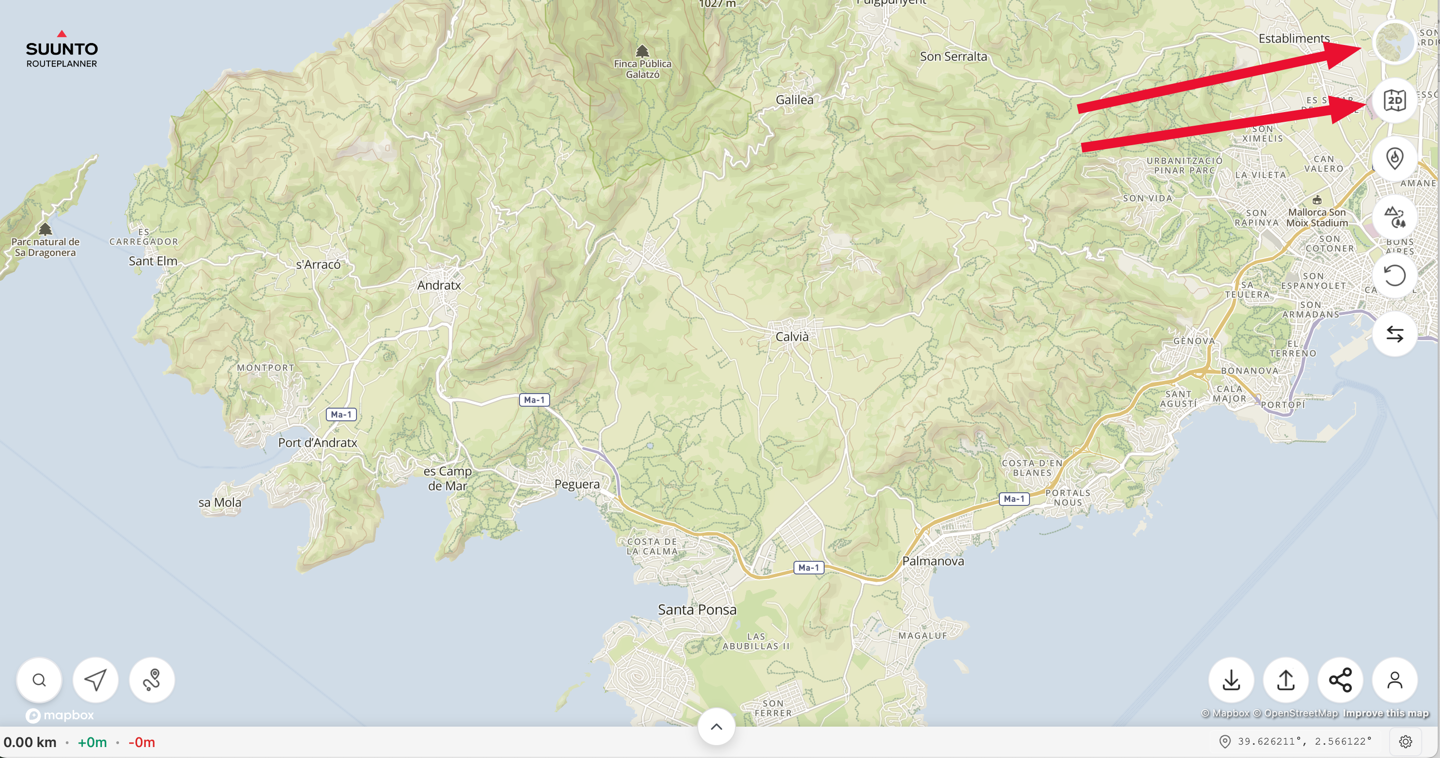
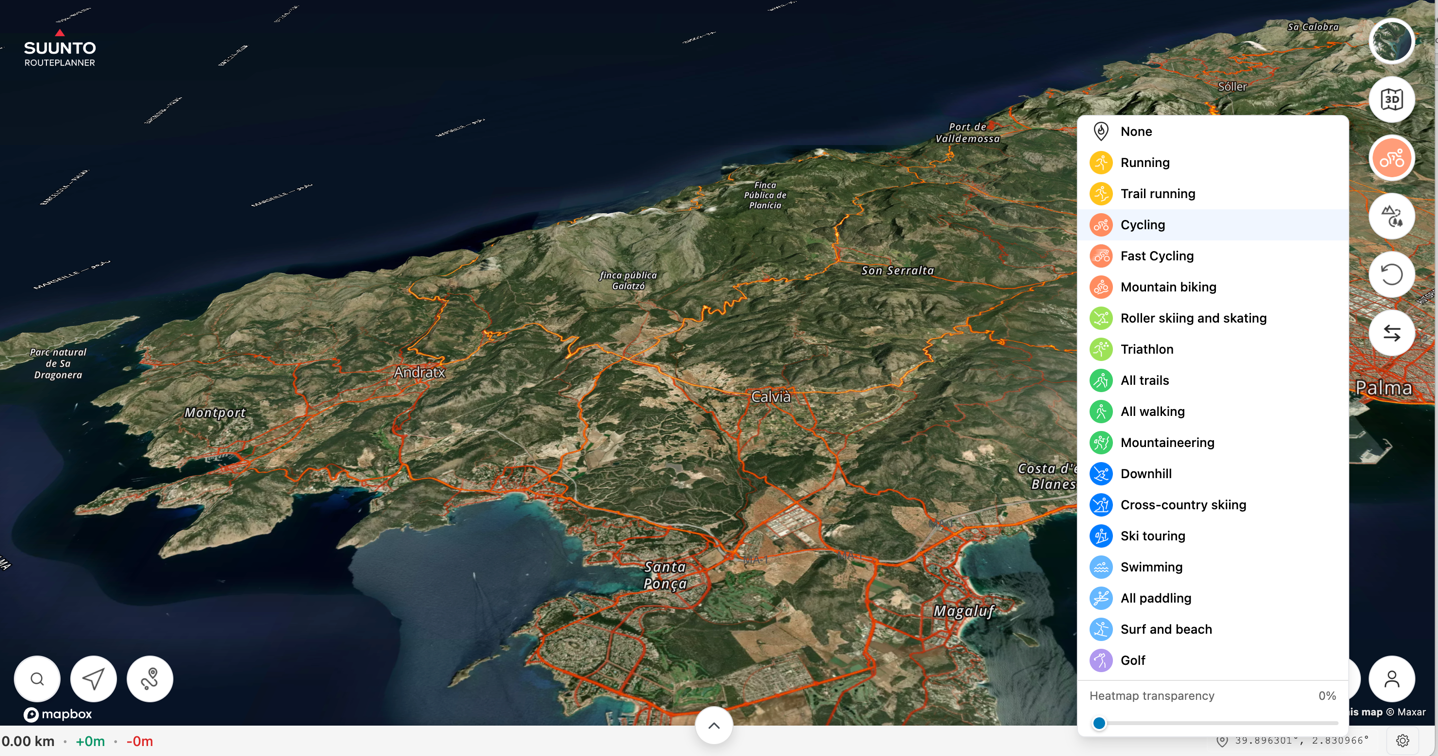
In any event, the second option switches from 2D (shown above) to 3D (shown below), and then the third option lets you toggle on heatmaps for all the sports you see below. You can also adjust the transparency level. For probably close to a decade, one of the best features of Suunto’s platforms/apps has been the heatmaps. Specifically, the per-sport option, and more specifically the swimming option. In a place like Mallorca (shown below), it’s less important. But in many areas that might have openwater swim restrictions (e.g., the greater Washington DC area), seeing where people openwater swim frequently is incredibly helpful.
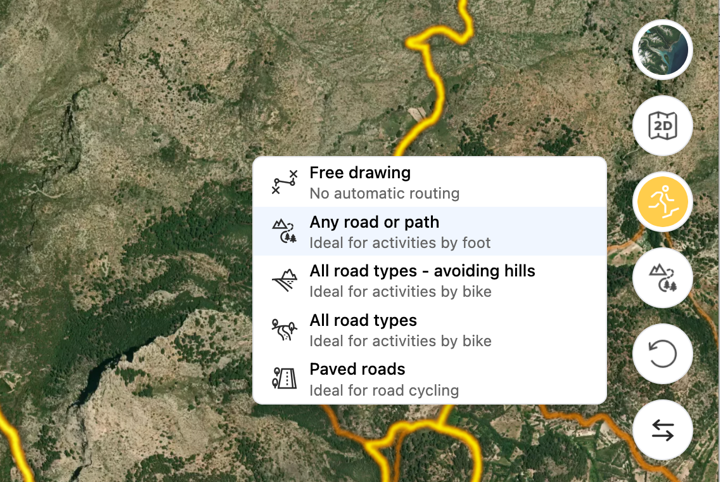
Finally, on the options front, below that you’ve got routing preferences:
Ok, with that set, let’s create a route. In my case, we’re going to go with trail run, but I’ve created road runs, trail runs, road rides, and more without any issues.
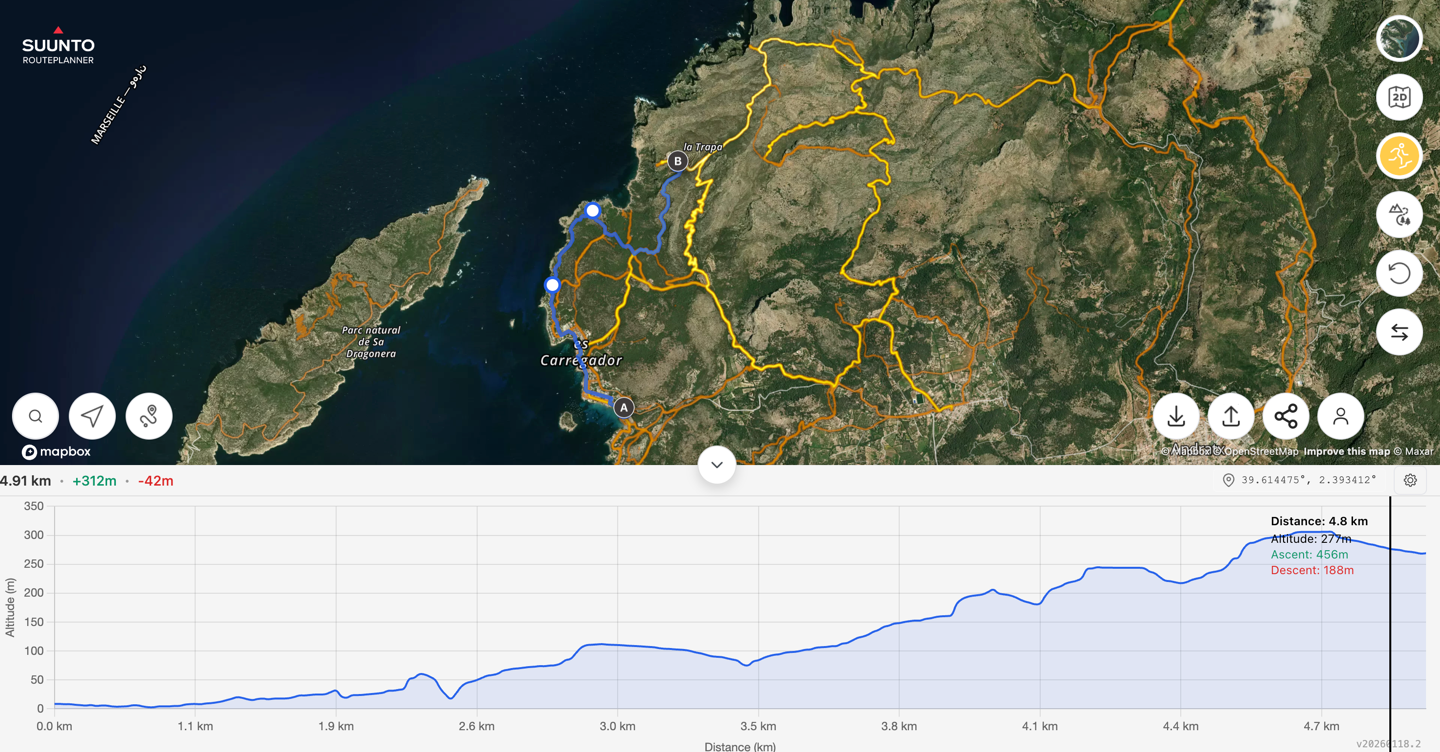
To do so, I literally just start tapping. It’s not that difficult. Tap-tap-tap, and off it goes, creating a route. Just like every other route planner on earth. Down at the bottom, you can expand out a chart to show the elevation profile (and also see the exact gains/distances/etc…). Now in this case, I’ve left the heat map on (specified for trail run), and I’m following a route I know fairly well (most recently done back a month or so ago).
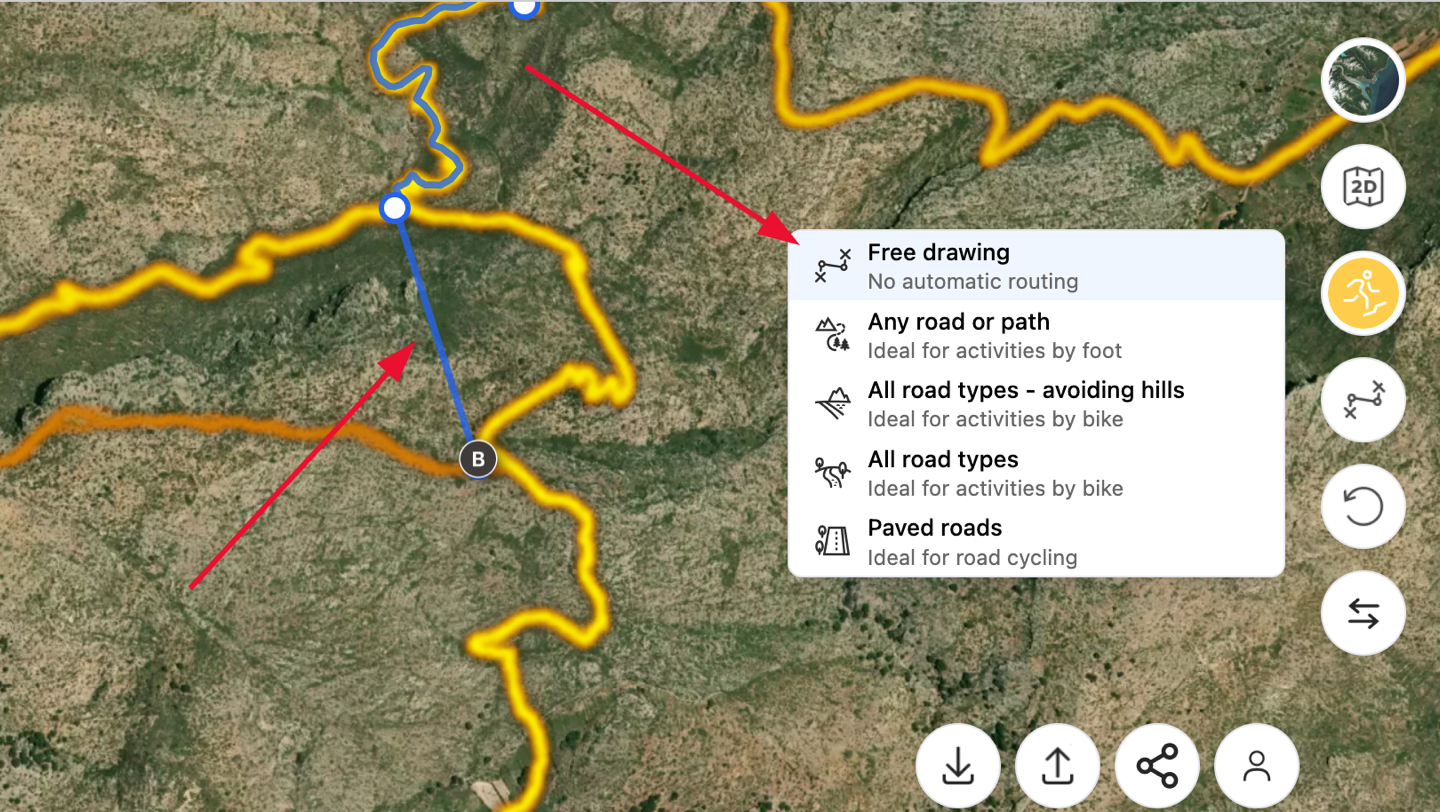
Of course, it also supports free-drawing mode, in the event you need to short-circuit something, or the routing isn’t quite what you want. For example, pretend I want to go bushwhacking here to scratch up my legs and regret my life choices (thankfully, there are no deadly snakes in Mallorca to worry about – Australia this is not). I can simply toggle the option for Free Drawing, and then connect the two points directly. After that, I can resume back to ‘Any road or path’, and get back on the trail.
Once done, I’ve got this pleasant 17KM route, complete with elevation profile and all. In fact, about the only complaint I’d have here is that the thin blue line can be a bit tough to see against the heatmap. Sure, I could reduce the heatmap a bit, but I would prefer to just make the route line thicker/more visible.
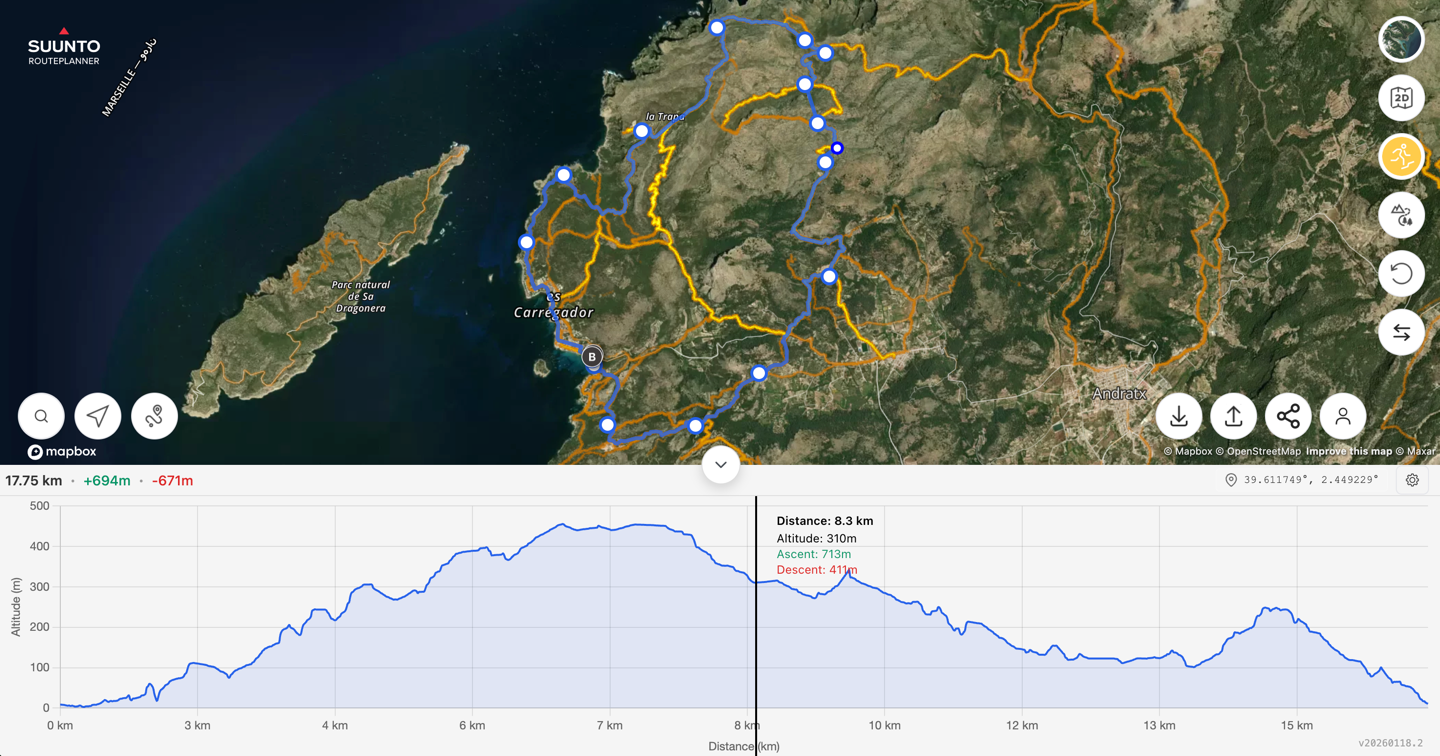
You can always undo points, as well as re-draw points to add distance/changes, as well as reverse a route too (the two options in the lower right side). The lower left options are searching for a location, centering the map on you, and then zooming the map to fit your whole route.
Now comes the good part, which are the options along the bottom right. These are for exporting/saving a route, plus importing a route. Oh, and that little settings icon? It lets you change to about 20 languages, change from metric to statute, and change among another 15 or so different GPS grid formats. In any case, let’s save this route (again, we still haven’t created any account here). Just tap the ‘down’ icon, and that will save it as a GPX file, which you can name whatever you want.
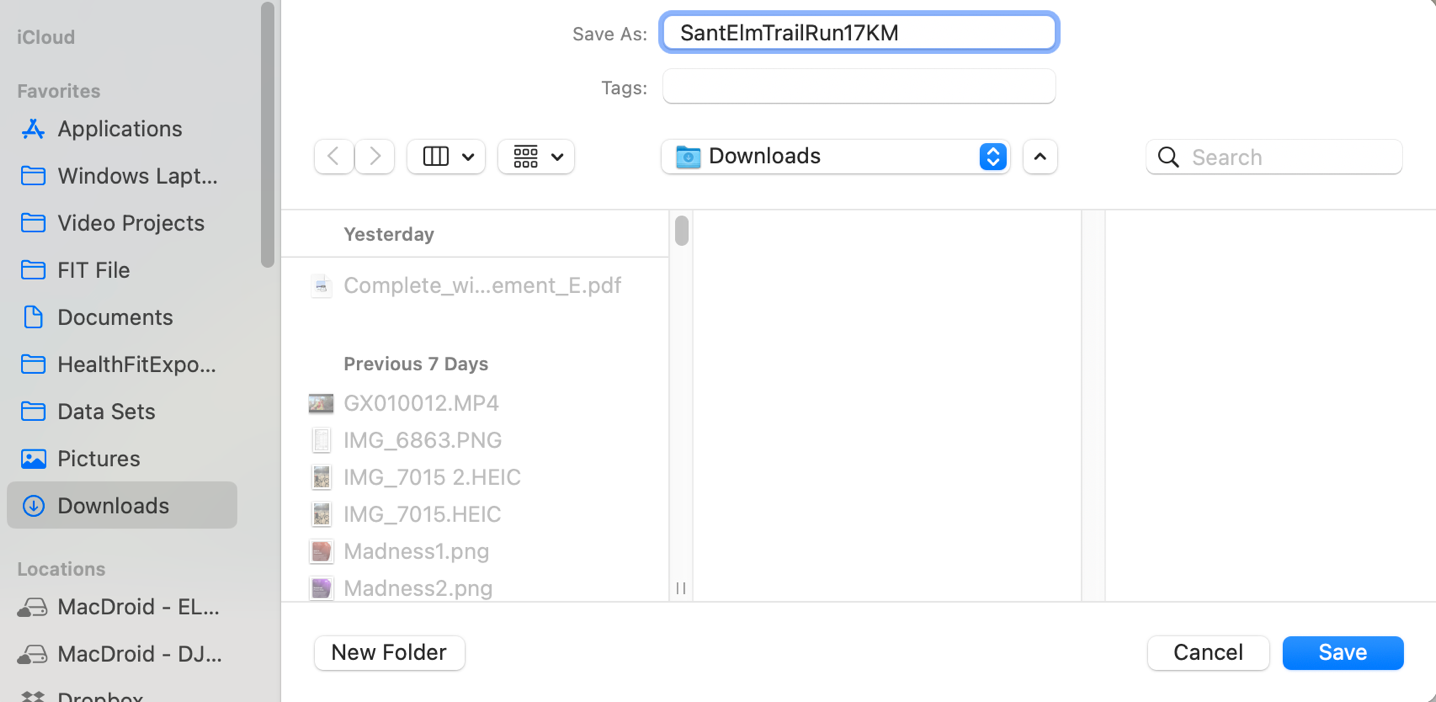
And with that, you’re ready to use it on any device you want. It’s that simple, just a GPX file.
However, perhaps even cooler is that you can also create a shareable link, which lasts for 6 months. People can’t modify the route, but you can quickly share it with friends/teams/groups/etc…
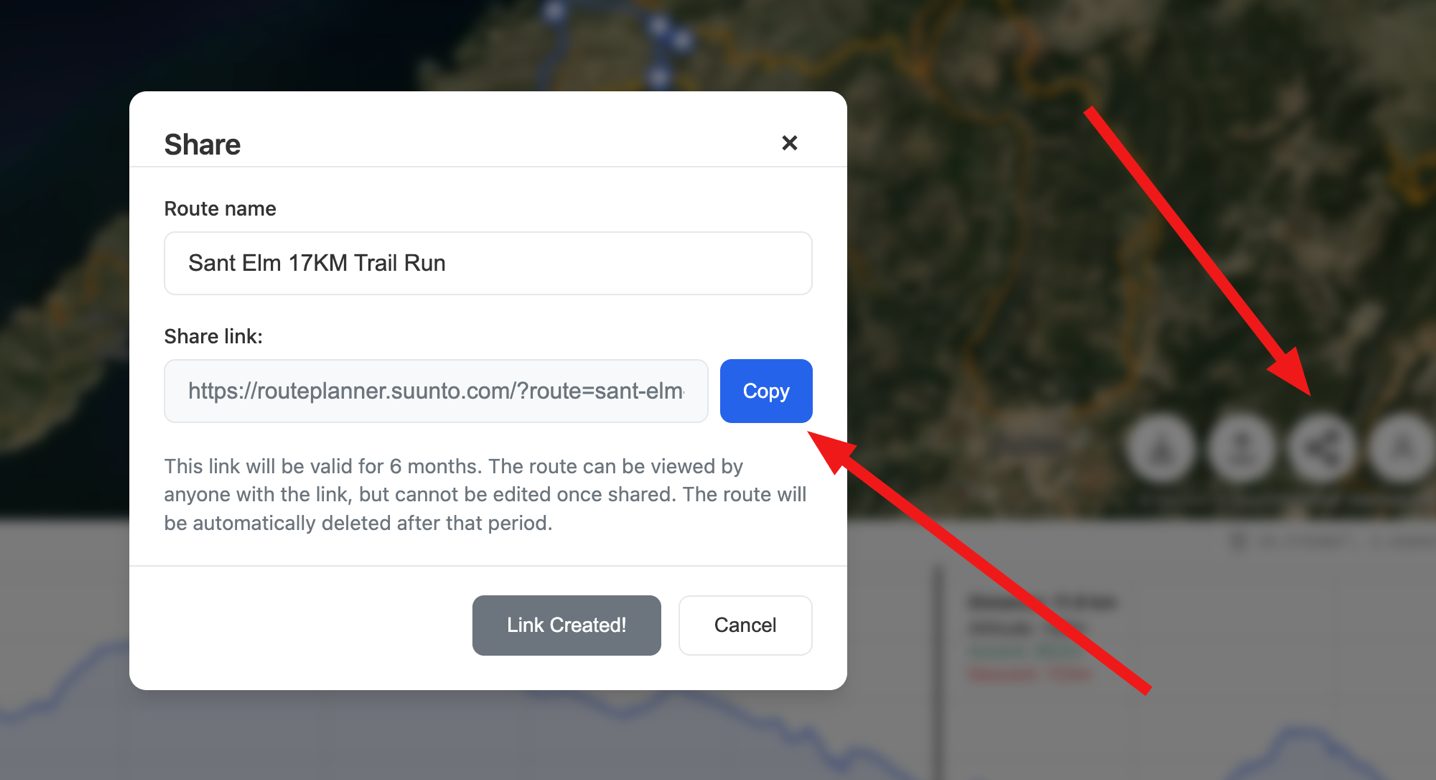
Here’s that exact route link, in case you want to look at things. What’s neat is that it even saves your settings (trail running heatmaps, satellite view, etc…) within the link properties. Nice touch!
The last two options here are:
1) Linking your Suunto account, to save it directly into your Suunto route profile/devices
2) Uploading a GPX/FIT file to look at/share/tweak.
To me what’s interesting about the Suunto account linking is that this is kinda going full-circle for Suunto. Way-back-when, Suunto Movescount was a website first, then became the ‘Suunto App’, and Movescount was even blended/something’d with SportsTracker for a time period, before ultimately Suunto ditching the website and going full-on app. I think they’ve come to realize that many people, especially for route planning, really prefer a larger desktop experience. I know I do. Sure, I can make routes just fine on my phone. But for longer/more complex routes, having a larger screen and such just makes for a better experience.
Finally, for those who want a bit more geekery, Suunto actually has a number of little easter eggs in there. Notably, you can create links to just specific points, simply to show someone something. For example, here’s a link to the Ironman World Championships location in Kona (Hawaii), with the triathlon heat map enabled, and the zoom/angle/map situated to show most of the entire course. That’s pretty neat.
Even more, here’s all the parameters you can pass in the URL currently/today, if you want:
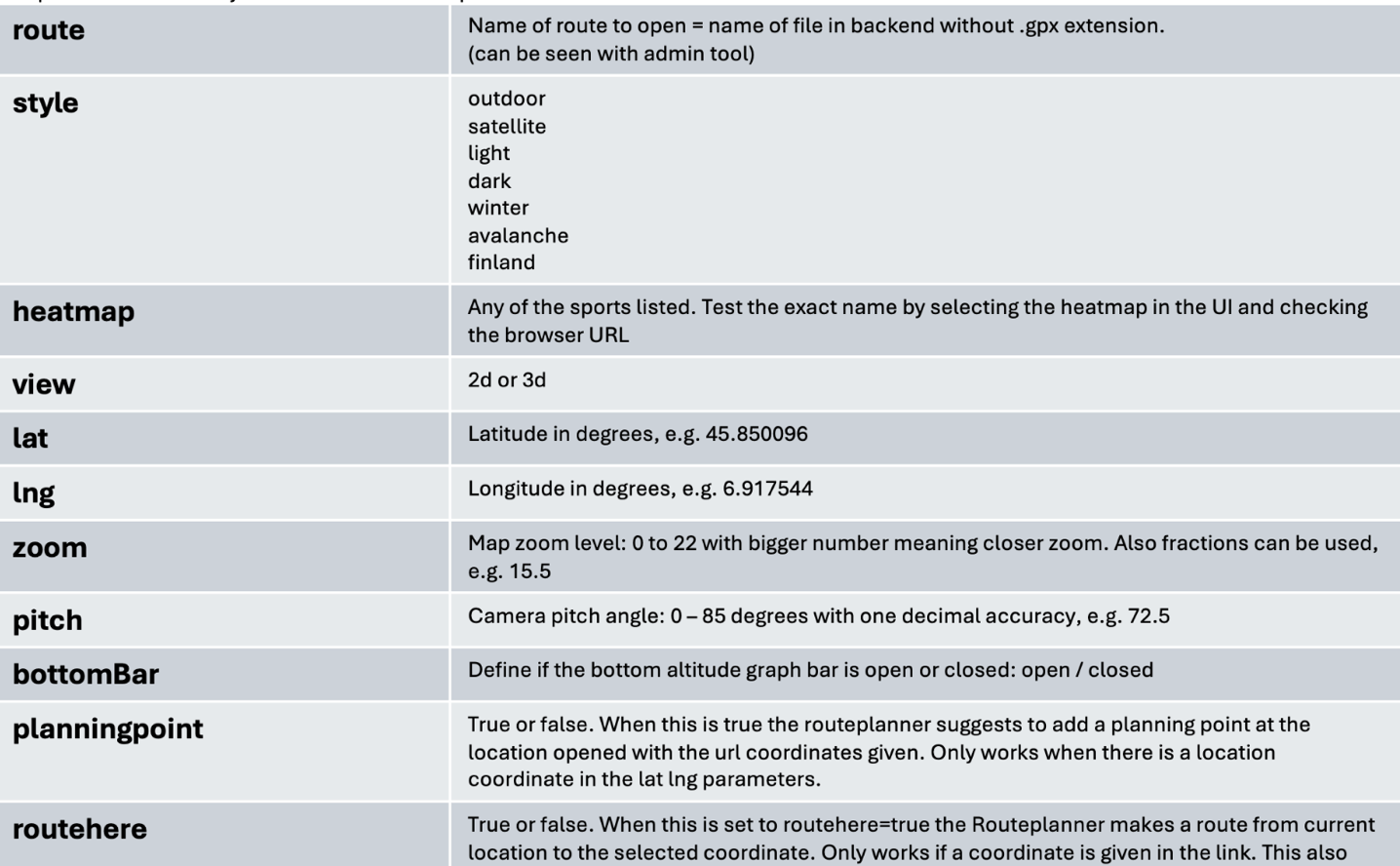
That last one is notable, it lets you create a route automatically from the user’s start location, to a given point. Akin to basically giving out the start location of a route/meeting point, and then people can simply save/sync that to get to the start (e.g., for a group ride). Super cool. Here’s an example using the ferry terminal in Barcelona as an example (where you’d board the boat to come see me in Mallorca).
Wrap-Up:
I could geek out all day long on this kind of stuff. No account needed, no payment, just creating routes for fun with tons of options (both practical and geeky). But perhaps more notable for Suunto customers, is a bit of a return of features they lost half a decade or so ago. Features that some of their competitors have, that Suunto could potentially tempt new customers too.
Easily, this is incredibly useful for people who don’t want to pay for routing on Strava or Komoot. I’d have zero issues using this to quickly create routes with this for just about any GPS device (since almost all of them support importing in .GPX files, well, save Apple Watch). I’d love to see someone like Wahoo link up a bit with Suunto on letting them push routes from this to Wahoo devices. Sure, Suunto already has a partnership with Hammerhead for route data – but one not a threesome? Atop that, Wahoo is done making watches (years ago), so they aren’t really competitors anymore. Anyway, food for thought.
With that – thanks for reading!
FOUND THIS POST USEFUL? SUPPORT THE SITE!
Hopefully, you found this post useful. The website is really a labor of love, so please consider becoming a DC RAINMAKER Supporter. This gets you an ad-free experience, and access to our (mostly) bi-monthly behind-the-scenes video series of “Shed Talkin’”.
Support DCRainMaker - Shop on Amazon
Otherwise, perhaps consider using the below link if shopping on Amazon. As an Amazon Associate, I earn from qualifying purchases. It doesn’t cost you anything extra, but your purchases help support this website a lot. It could simply be buying toilet paper, or this pizza oven we use and love.

















Free service is always appreciated, but the heat map lags behind the competition. I did a quick search for mountain bike trails in my area, and it didn’t show some of the usual trails. On the other hand, it marked many roads as mountain biking routes. Garmin Connect is also free and has more routes (due to its larger user database).
Yeah, I think in general Suunto’s going to skew towards being most useful for runners/hikers/triathletes, with a notable side of road riding. Whereas their devices aren’t really targeted towards MTB/etc, and even the Hammerhead Karoo (which they partner with), has always been a bit more road/gravel focused, rather than being MTB-forward (though certainly, it works there).
The heat maps here, in Finland, are amazing though.
For example: link to routeplanner.suunto.com
It’s super cool of Suunto to allow access to this without an account. As such, I wouldn’t mind linking my Garmin(/Strava) account to Suunto to allow them access to my activities to help improve their heatmap data.
Not tried Suunto’s mapping yet but I have used Garmin’s quite a lot without many problems (the main one is if there’s a bike line garmin puts you on it, even if it’s on the other side of a dual carriageway (UK), and the head constantly flashes off course make a U turn) till last week, i was plotting a road course and everything was ok, following roads, till I looked at the finished map – two extra loops inserted, totalling 10k, for no reason, when I started undoing individual points (looking at the full map), one point removed from the end of the route removed the two loops one was 10k away the other 20k away. Reinserted that point, the two loops came back. This was basically an out and back route of 40k.It took me over 1hr to get the correct map.
Thank you so much for this information! As a Suunto-user for years I missed a way to create longer routes with TbT functionality. Now I can do this with every Web-connected device and no longer depending to tap it out in the Suunto-App! Very cool – another gap closed!!!
Great comment about Greenland 🇬🇱 speaking as a Dane 🇩🇰
I had a brief look with my local routes, and the routing is not great.
Unless you really like gravel, when you selected “only paved”.
It is a bit weird, since they do have heatmaps.
I am sure they can improve this over time.
If you want free and better routing, give link to bikerouter.de a try.
It also has the nerdiest settings. :-) Only if you really want to tweak your profile.
I am still mostly on Strava for routing, as it is the one with the most predictable outcomes.
But if I ever stop paying again, I’ll be on bikerouter.
It’s nice to see a free option.
But IMHO, the strength of Komoot isn’t really in the route creation, it’s in the routes themselves. Curated collections by tourist boards and bike shops, collections from various people etc. When I’m planning a hike, my go-to move is to type “route name komoot” into a search engine and in 100% cases I get a route I was looking for, already created.
Thanks for the review, DC.
The tool seems quite good indeed. I live in Brazil, where Suunto is quite far from being a common sight (I don´t think I have seen one being used around here), and the heatmap for my home town seems really good.
I have clicked in two more or less random points, and the street running suggestion was quite reasonable, although it added a few more street crossing points than I would have chosen on a manual basis.
Compared to the Garmin route planning, it would be at least in the same ball range, in my opinion.
Just my two Brazilian real cents
You might like link to gpx.studio very much.
You do not have heat map, but otherwise you have much more such many layers and POI. It is open source, free, no account. And of course you can import/export GPX. The UI might be a little bit less user friendly but I see it as a better alternative than the Suunto one for a workflow : Go to Komoot for inspiration and then build your own custom GPX. Sometimes I even take better inspiration from gpx.studio exploring some trails that no Komoot users did already, thanks to OpenStreetMap data which is used to build the trails on GPX.studio.
I would be curious about your thoughts here Ray.
Here’s a +1 for GPX.studio. brilliant piece of software in the best of the open source traditions.
I agree, best ever!
Absolutely! GPX.studio creates the best (not Komooted ride through a field for no reason etc) routes… and there is also a desktop Chrome plugin that allows integration with Strava Heatmaps that delivers that final missing feature, heatmap filterable by sport categories too.
Hidden settings include detailed country maps (not OSM) for specific countries using native national mapping tiles for the UK, Spain, France and USA +6 other countries inc Finland.
Review it 👍
Cool stuff. A bit geeky, but cool nonetheless. As you noted, the UI is a little bit less intuitive at first (it’s funny how just simply things like requiring you to make some additional clicks/taps before you can actually start tapping on the map to create a route, are notable).
I think in general, heatmap data is super important for route planning. Obviosuly, most of these tools are based on OSM, and its awesome that OSM exists. And planning routes on mostly well-known trails/roads/etc, will yield reasonably good routes.
Where heatmaps really make the difference is being able to suss-out whether or not something is *still* a good trail, or is the route most people go (for any number of reasons). This is especially true with deep backcountry stuff where it’s like “Ohhh…I see that while that trail looks like a good cut-across, in reality, nobody has taken it, or, everyone keeps having to turn-around”, to avoid in route-making.
It’s a reason why I think it would really make sense for Wahoo to join with Suunto a bit here. They need all the heatmap data they can get, and given Strava’s upcoming IPO, I can virtually guarantee you Strava is going to start squeezing not just consumers, but partner companies even more (as they already have).
Nice, but I’ve used so many different web mapping/planning sites since starting using GPS back in 2008. Settled on Ridewithgps a long time ago and have used that since never having to pay for subscription. I find it very easy to use. It syncs automatically with my Garmin Edge units. It’s got a good heatmap but I prefer Strava heat maps, and augment that with Google satellite and street views as needed.
I use both Strava and Komoot to create routes. Just curious if this has any features that would make me want to use it. Regardless, very cool that they did this!
Core-feature wise, Strava has all the same bits as this (even things like finding openwater swim areas).
I think some of the geekery features though, are unique (like the quick links via URL and such), but unless you had a hyper-specific use case, I’d keep using Strava Routes if one had a subscription to it (since, it’s locked behind a paywall in Strava’s case).
Nice (web)app! Especially the triathlon heat map is interesting. Unfortunately the heatmap of swimming Suunto users looks very empty in my neighborhood. And would like to see row and speed skating (ice) heatmaps.
Giving this a quick play for cycling around Boulder – it is bad. To quote Ray, it is dumpster fire bad. On the generic “cycling” heat map, it is straight up creating routes that cross private land with gates (and people with guns behind them.) When switching to “fast cycling” it seems to produce more legal route, but combining VERY rough single track with very fast roads full of traffic. Just a weird combo that no local would actually ride.
Given the same start & end, Garmin produces a legal route with a bias against dirt even for a “gravel ride.” Again with the same start and end, Strava produces exactly what a local would ride, both for gravel and road.
Replying to myself – realizing the heat map type and the routing type are separate. It is just weird. “Any road or path” is following stuff that is flat out illegal and/or has not existed this century. “All road types” includes mountain bike trails and highways. But in neither case does it seem to be routing according to the heat map.
If you want free routing with many different profiles and very detailed control like no-go areas, using different profiles for different sections, writing your own heuristic for which road to.prefer, seeing water taps or cafes or supermarkets as POI dots etc. etc. then a really awesome option is:
https://bikerouter.de
No 3D or heatmap stuff though afaik.
Would live it if you could review it, Ray, I am sure the developers would like your feedback too.
I made this one for myself (a custom framebuilder with an IT-background): link to crowbarcycles.com. It’s currently in beta, doesn’t require an account and is free, but limited to Europe for now. Hosting routable maps that cover the entire planet is surprisingly expensive. I mainly wanted something for creating long bikepacking routes where I can easily switch between road and gravel along the way.
Great write up – and simple enough to get it on a Garmin as well.
On your phone (iOS):
1. Download the GPX
2. Click to show downloads (icon to the left in the url field)
3. Open the file and click share
4. Select Garmin Connect
Wondering if I should end my Strava subscription now?
Very nice option. I would not have known of this otherwise.
In Edge browser, the route line did not appear, just the waypoints.
In Chrome, works … but it’s laggy. I like the running elevation gain as you mouse across the elevation profile. I wish Strava did that.
Looks like the Suunto route planner – unlike most other tools and sites – is smart enough to allow the watch to do turn-by-turn navigation. Finally a proper way to plan runs on a notebook. Greatly appreciated !
It’s also a lot less buggy then Strava. Compared to Garmin…well just look at Garmin maps…they are horrible. Not understandable for such a big company.
Has an outdoor enthusiast I always leaned to Suunto because of their maps/heatmaps just because Garmin never solved this. Got a Suunto Run this week after Fenix , 6 Pro and Forerunner 165.
Have been looking for an excuse to change from my Garmin Forerunner 965 to the Race 2, and I think this is it. It’s so easy to use, and if you flick the heat map setting to walking and mountaineering, it’s actually pretty detailed in my neck of the woods. Well done, Suunto.
I want to use the planned route in Rouvy, however you need embedded track data. I wrote a smoll (completely free) tool which runs in you browser (nothing stored centrally) which is completely open ad free source :-) Real cycleware to do this. This is an initial Version (ver rough cut) so feel free to test and give me comments on platon@nullo.de.
http://way2track.nullo.de
I’ve been pretty content using RideWithGPS for route planning and exporting to my Garmin Edge. Pretty ok map interface and easy to share the routes. But you have to pay for heat maps.
I’m going to give Suunto a try.