
You may remember last fall at Interbike I spent a bit of time getting a tour of all of the ANT+ enabled gym equipment. These are commercial grade pieces of exercise equipment (Gym equipment) that can connect with certain ANT+ devices, namely some of the Garmin Forerunner series (though, nothing is stopping any others from connecting to them). The devices in turn offer detail such as speed/pace, distance, and even power output (cycling).
Given I was on a show floor last September, it was a bit difficult to get more than a fleeting glance at some of the offerings. In such some of this may be similar to what I wrote last fall. This time though I really wanted to play with it on my own without a bunch of PR people standing around and with regularly used gym bikes – not perfect show-floor samples.
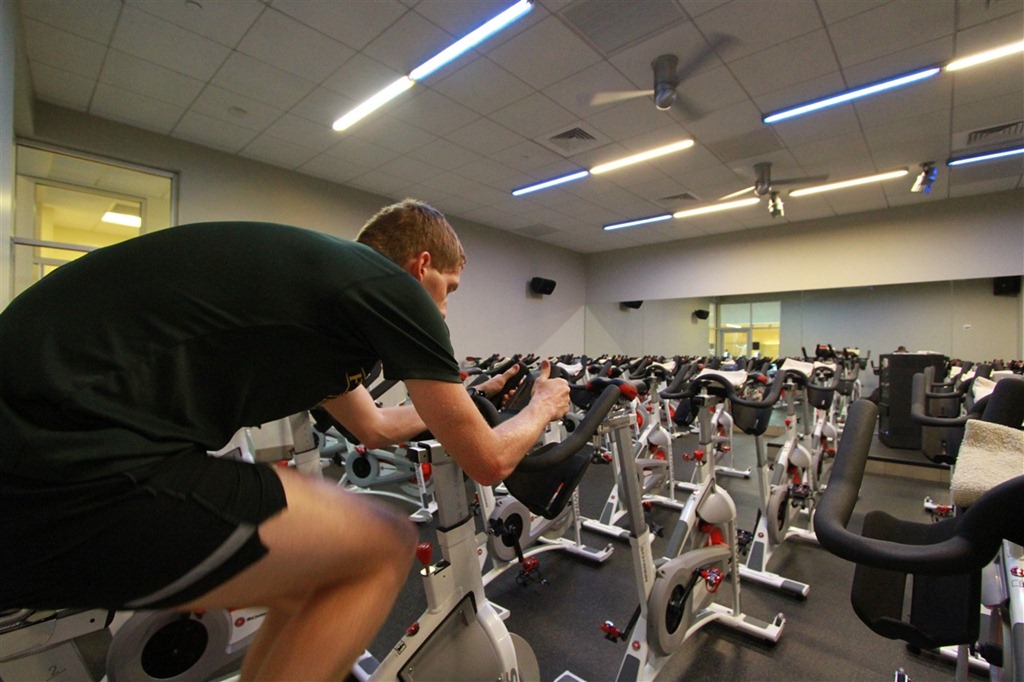
Over the past week I got access to the Equinox Gym just outside of DC as part of the Men’s Health gig, and they are one of the few places out there that actually has some of the ANT+ enabled spinning bikes. Thus naturally, the only logical thing to do was go visit them. These Gym’s have the Schwinn A.C. Performance Stationary Bikes in them, combined with the Schwinn MPower Performance LCD system (ANT+ compatible). Now, Schwinn very carefully calls these ‘stationary bikes’, as opposed to ‘spin bikes’, likely due to various licensing issues. But, since I’m just a normal guy – I’m going to call a spade a spade and just call it a spin bike.
In this particular gym, the spin bikes aren’t used very much – only twice a day for an hour, and even during that hour, it doesn’t appear the classes are very full. Outside of that timeframe though you’re welcome to use any of the equipment you see fit. So I simply picked a time in between classes and got busy.
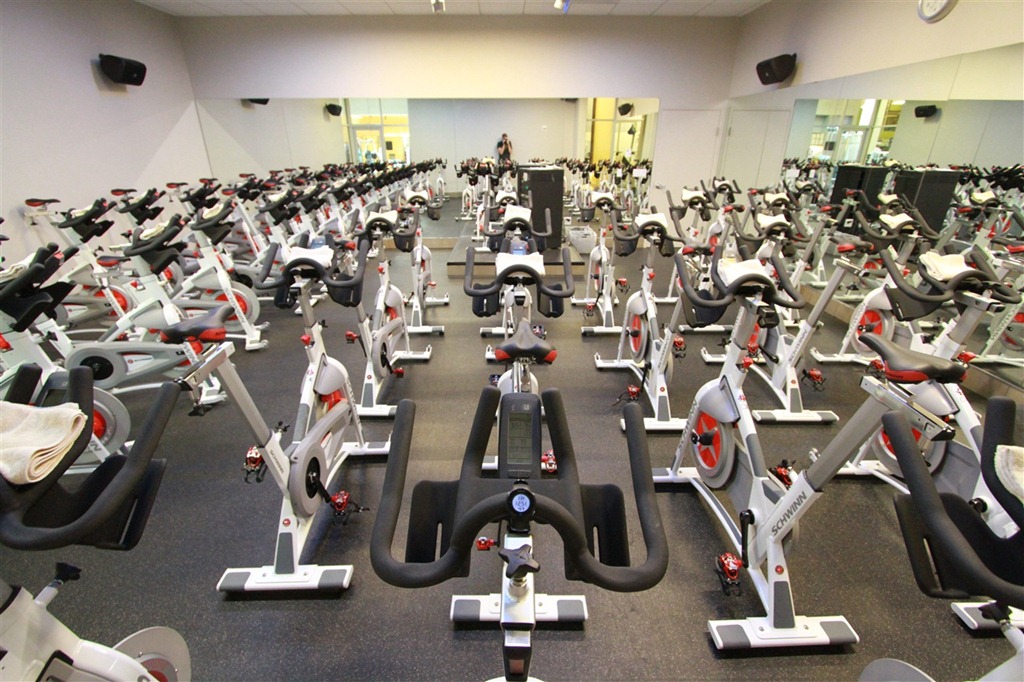
From a basic functional level this spin bike isn’t terribly different than any others. In fact, if you were to remove the LCD console, you’d probably be hard pressed to tell it apart from a regular one.
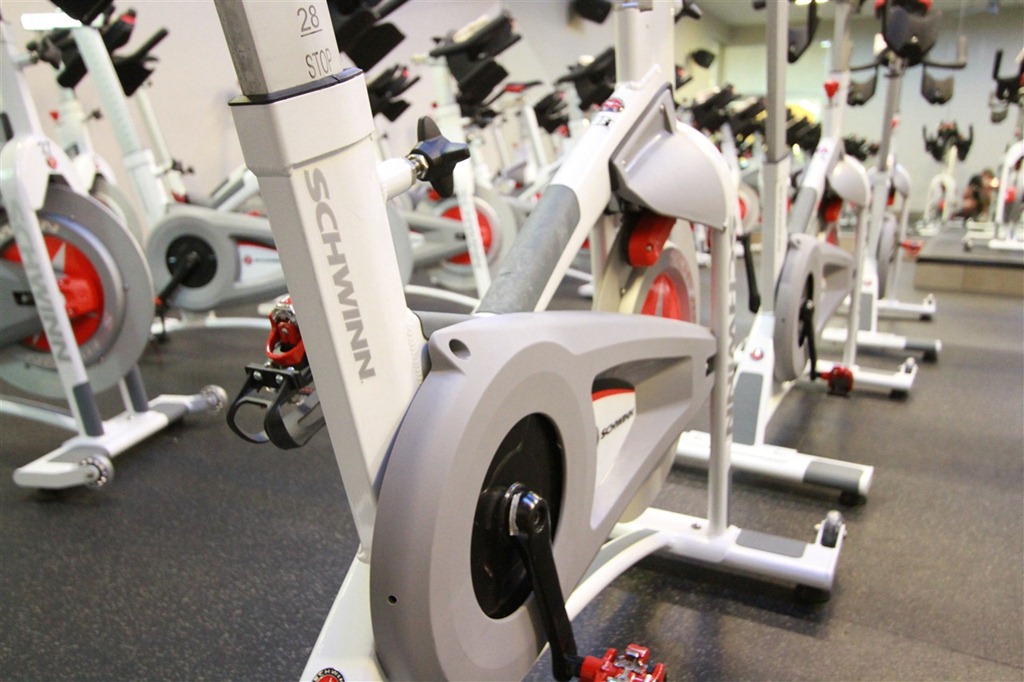
However, the biggest stand-out feature is the ANT+ enabled LCD console, which gives you all the data points you’ve come to expect from a typical bike computer:
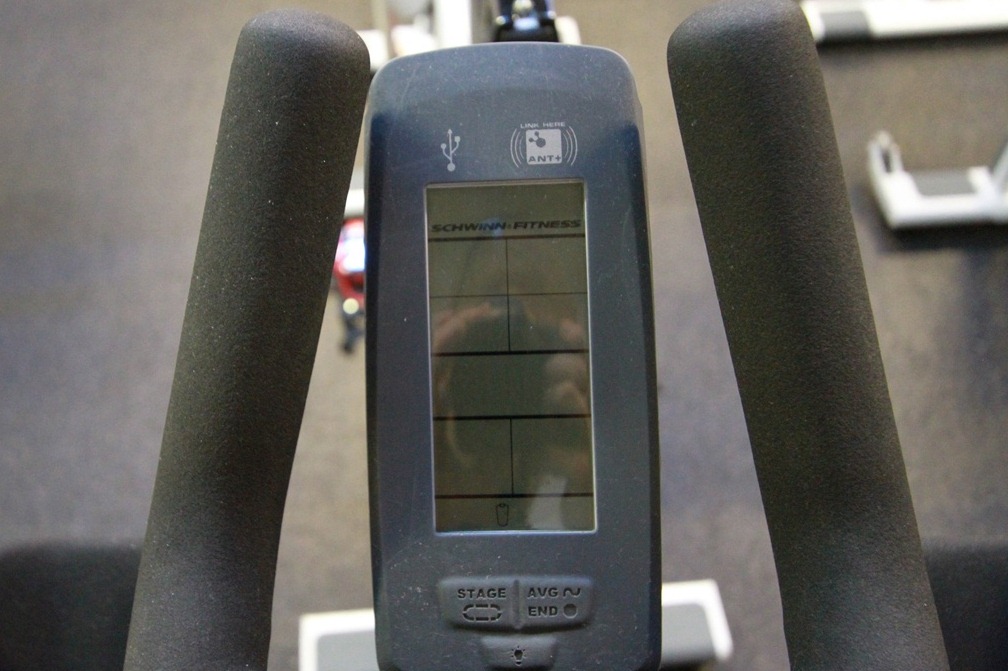
At the top though is the important part, the little ANT+ logo. Think of this one square inch area as a ANT+ hotspot, and anything ANT+ that you rub up against it will start talking to each other (kinda like on a dance floor).
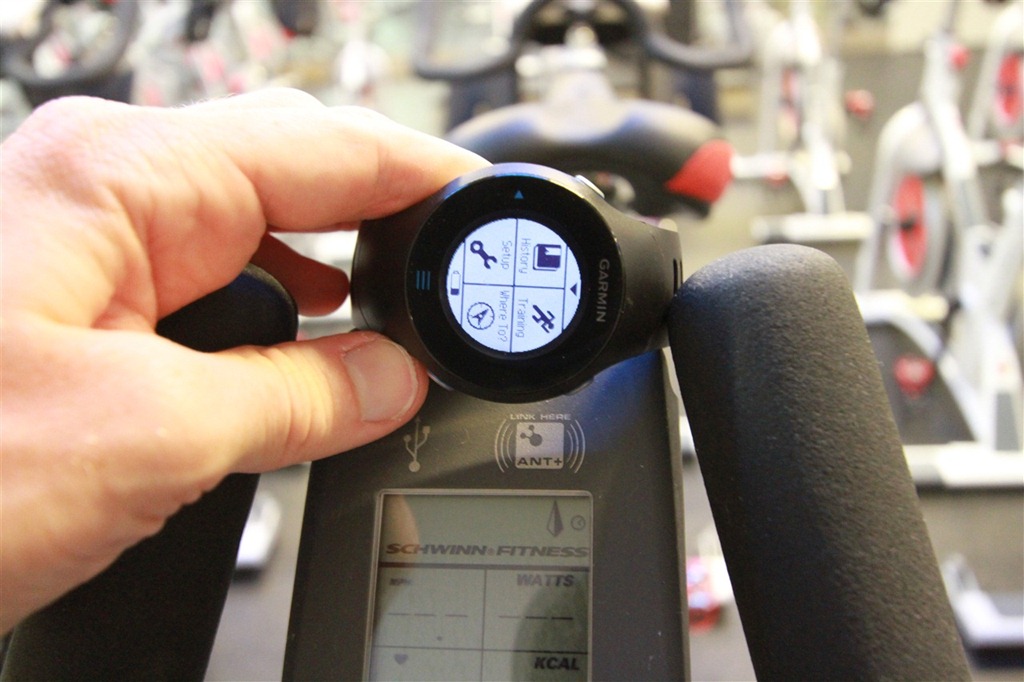
In my case, I was using the Garmin FR610. Though, there is also support on the Garmin FR60 and FR310XT. Again though, other vendors could add this functionality if they wished to. Once you get rubbing, a short moment later the watch will let you know that it has found its friend:
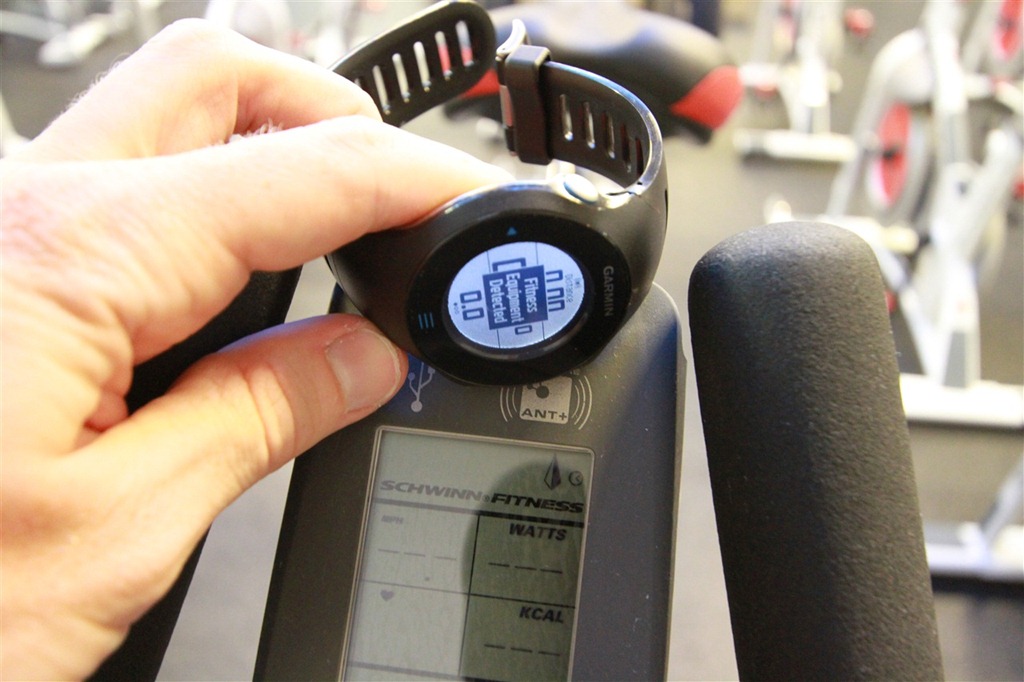
At this point, you’re basically ready to go. What it’s done now is create a link between the two units – a tether of sorts. Though the data flow is largely one way, from the bike to the watch. But as part of this data flow it’s sending over cadence speed, distance, cadence and power. Here you can see cadence being displayed:
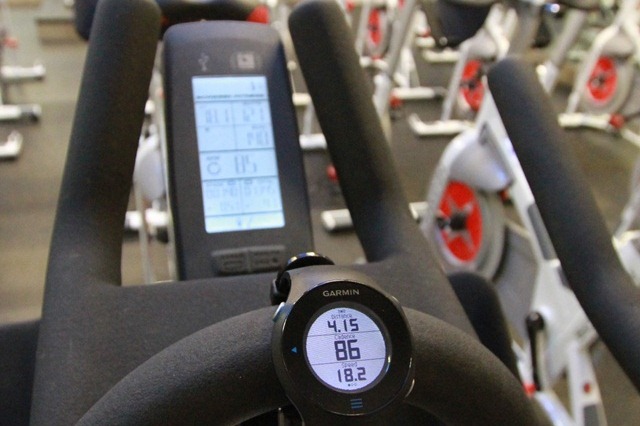
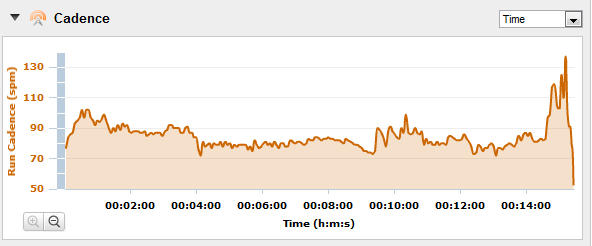
There is a small bit of lag between the bike LCD screen and the watch – perhaps 1-2 seconds. This is pretty much fine though because realistically you’re looking to just record data here more than monitor it (since you can monitor it just fine on the giant LCD screen). You can see the lag above where the watch shows a cadence of 86 while the unit shows a cadence of 85 (center of LCD). Of course, all of this cadence information is stored as well:
The two devices keep in sync for basic things like laps/splits. For example, when I press the lap button on the LCD screen, the unit will automatically trigger a lap on the watch as well. You can see that below in this short video clip:
ANT+ Spinning Bike with Garmin FR610 synchronized
I thought it was interesting however that pressing lap on the watch won’t trigger it to lap on the bike console.
Laps/splits are all recorded on your watch just like your normal lap/split function – all later accessible within Garmin Connect (or any other application you use):
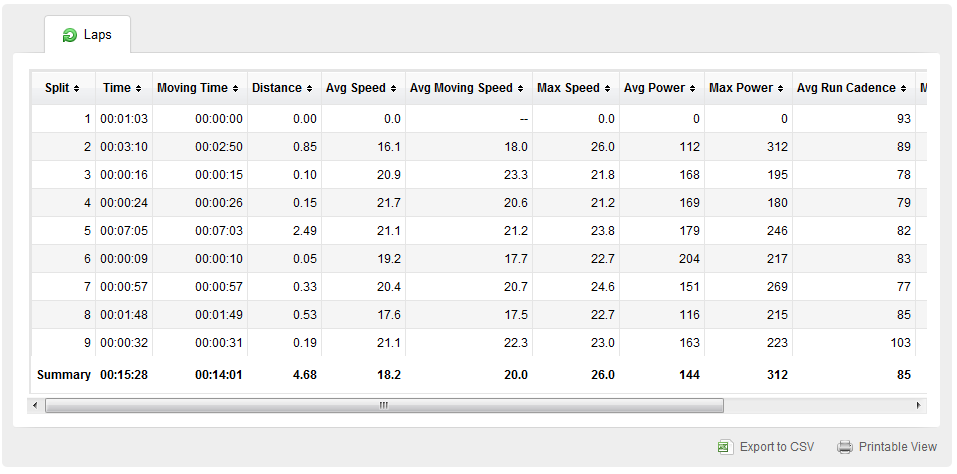
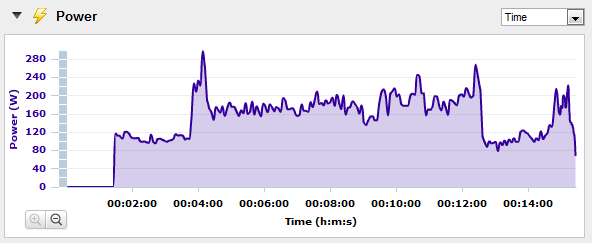
I think for me, I’ve always said the coolest thing about the ANT+ spin bikes is that it will send out power information. It does this via measuring the angle of the resistance unit on the bike itself. Now, the real kicker here is that it will send this to watches that don’t otherwise support power (watts) – that’s the cool part. For example, the cheap $90 Garmin FR60 doesn’t support power meters…but does support power via the spinning bikes. Same goes for the running focused FR610, it doesn’t support power meters, but does support power data streams from the fitness equipment. Note however that it won’t display power on the FR610 itself, but rather just afterwards online. Since power data is on the console in front of you, I can understand that compromise.
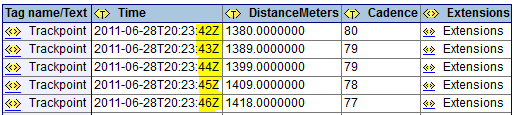
One of the more interesting things I discovered when playing around with the FR610 compared to my previous 2 minute Interbike show floor test with the FR60 is that the FR610 with the increased recording options allows you to record the data at 1-second intervals. I noticed it initially in Garmin Training Center when looking at the activity moments after it downloaded, but it wasn’t until I broke up an XML editor that I was able to validate the data is being streamed and recorded at 1-second intervals (I’ve highlighted the 1-second increments in yellow):
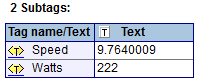
And to geek-out for a brief second (everyone else can move along), I found it interesting that unlike most .TCX files where the power value (watts) is stored at the same XML level as the distance/cadence, but is instead recorded one level deeper in a subtag called under ‘extensions’ (along with speed):
Had I been wearing a heart rate strap, that data would have been recorded as well, but alas, I somehow managed to forget it at home. Thus, perceived effort was my only indicator aside from power – and with the sweat slowly building, it seems like I was at least showing some effort:
Now, this is all very cool – but the biggest challenge continues to be club availability. Today, it’s largely limited to a few high-end clubs, such as Equinox and Life Time Fitness. And based on changes in the last 1-2 years – either that hasn’t changed…or the official list hasn’t changed. I suspect it’s probably a little bit of both.
The issue for most gyms or rec centers would be the justification for increased costs of these machines and the extra LCD dashboards over standard units. Multiply that times 20-30 units and it starts to add up – especially in the razor thin margin world of gyms.
Unfortunately, the number of folks out there that can take advantage of these bikes is pretty small. While Polar has great penetration at the low-end of the market with many of their cheaper (sub $120) heart rate monitors (which aren’t ANT+), Garmin lags a bit there. This is likely because Garmin only has one product – the FR60 in that category (about $90). And their marketing simply isn’t there to drive product adoption of that line. While in the ideal DC Rainmaker gym I’d love to have bikes like this (and anything else that integrates), I can certainly see it being a tough call to make – especially given how few customers could take advantage of it.
Of course, Garmin could drive increased adoption of these through a firmware update to their other Forerunner watches that don’t support it today, specifically the FR405/FR410, the FR110/FR210 and then the FR305. Once you add in these watches (especially the FR305), you start to really get a much larger group of folks that could take advantage of them. Heck, even an update to the Edge 500/Edge 705/Edge 800 wouldn’t hurt, since road cyclists and spin bike folks likely have more crossover than runners and spinners.
Though the blame doesn’t fully lie with Garmin either here – there are plenty of other ANT+ watch makers that could fill in and offer support. Further, one of these could look to create a watch that is price-wise competitive with the FR60 (and most of the popular Polar units) that could work with these units.
With that – I’d love to hear about your experiences with the units out there – do they work well in full class environments (they should, since pairing is unique)? Are you seeing many people use the functionality if your gym supports it? Drop a note in the comments with your thoughts!
FOUND THIS POST USEFUL? SUPPORT THE SITE!
Hopefully, you found this post useful. The website is really a labor of love, so please consider becoming a DC RAINMAKER Supporter. This gets you an ad-free experience, and access to our (mostly) bi-monthly behind-the-scenes video series of “Shed Talkin’”.
Support DCRainMaker - Shop on Amazon
Otherwise, perhaps consider using the below link if shopping on Amazon. As an Amazon Associate, I earn from qualifying purchases. It doesn’t cost you anything extra, but your purchases help support this website a lot. It could simply be buying toilet paper, or this pizza oven we use and love.















Oh I wish my YMCA would get these spin bikes next go around!
Why does a gym have to fully stock their spin studio with these bikes? That would be very expensive. How about getting a couple, put them in a corner and label them accordingly. If it’s high demand, schedule it or get some more. Otherwise, the few customers that want it will have it.
I have toyed with the idea of joining Equinox in Bethesda but the monthly price of $140 didn’t seem worth it over what I pay now. This doesn’t really change that, I’m not doubling my monthly gym fee for these bikes, but it is REALLY COOL! I don’t have a power meter so it would be really interesting to see where my numbers are. I do wish more gyms had this capability, but I do think that when they offer ‘Spinning’ classes the gym might be under some contract to provide spinning branded bikes (just a guess).
Also I think that the clientele of Equinox could afford the FR60. I know that at my gym they have pushed people to purchase Polar HR monitors (thru the gym) for spinning, and LOTS of people in the class bought them (cost $60). I think that Equinox could offer something like that, and at $90 I think they could be successful at it. Maybe the clientele doesn’t know about this possibility.
Hope your having a GREAT honeymoon!
This comment has been removed by the author.
So, the support for power information from ANT+ spin bikes is not the saem as the support for power information from power meters?
You said that ‘the cheap $90 Garmin FR60 doesn’t support power meters…but does support power via the spinning bikes. Same goes for the running focused FR610, it doesn’t support power meters, but does support power data streams from the fitness equipment’ and that the EDGE500/705/800 does not work with the spin bikes?
That’s very strange !!!!
Why would computers that support the ANT+ power stream from a power meter not support it from a spin bike? or if the FR610 receives it from the ANT+ spin bike, why can’t it receive from a power meter?
I thought that the ANT+ power information stream was all the same regardless it’s coming from a spin bike, trainer, or power meter?….
Could you clarify that?
At the spin studio at Chelsea Piers they have the Keiser spin bikes, which I LOVE. link to amazon.com
But the best thing about them is the quality of the ‘spin’ – much more like riding a real road bike than any other spin bike I have tried.
Both the power and the distance numbers are ‘imaginary,’ and vary a great deal from bike to bike, so you’d be well advised to make sure you got the same bike each class if you were hoping for comparative numbers!
I wear my Garmin 305 during class to store HR data, as alas, the HR function on the bikes only works with Suunto, which is a pain. The system displays HR of those wearing those monitors as percentage of max – instructor often has one on too – it is interesting to watch, but currently in a class of 15 or so I would say usually only 2-3 are using, because the Suunto is so much less popular a monitor than either Polar or Garmin.
Great review and definitely on the right track. We have an Indoor Cycling Studio in Manhattan Beach, CA (you’re right, can’t use “Spinning” unless using “Spinning” bikes) We prefer “Indoor Cycling” anyway as that is what we teach. We have 22 of the AC Performance bikes and currently only have the MPower console on the teaching bike. I actually paired mine to the Digifit app on my Iphone/Ipad and it works great (will work with Wahoo as well,
I suspect). I also can see all of my numbers much clearer in a darker environment. The other easy way to capture and upload data is the USB port on the top of the MPower console. The USB port has to be enabled via the master settings, but once it is, it is as easy as plugging in a thumb drive, capturing the data during the ride, unplugging the thumb drive and then uploading it via a one-click operation to Training Peaks. So, I use Digifit for the real time stream and a quick review the ride (or my student’s rides via an email share) and then I can analyze it with a one click share to Training Peaks or I sometimes just use the thumb drive option. You are right though, these units come at a price and are probably only feasible for clubs or Indoor Cycling Studios.
Indoor Cycling is making a huge resurgence as “Spinning” has lost it’s stranglehold on the industry. More and more competitors are producing quality bikes, like Schwinn AC series, Kaiser M3, Real Ryder, Free Motion, etc… This new technology is incorporating magnetic resistance instead of the old pad and strap resistance to create lighter flywheels with less inertia, and more consistent tension between bikes. Combine this with cycling specific training like intervals and hill repeats and you have an environment where novices to experts can enjoy the ride or suffer a little…
I just joined a gym (Colorado Athletic Club) that has a studio full of these. It was a pleasant surprise since I mainly joined for the pool but we have had a rainy month and I’ve taken several spin classes.
One other thing to point out – that I have been doing, is that the Schwin bikes offer a USB port to download your workout file. This is just a simple .CSV file.
Ray – could you maybe provide a clue about how to incorporate the .CSV file into training peaks? I was stumped..
-John
first of all thanks a ton for all your invaluable insight… so i gathered up my garmin 610 went to the gym linked it up flawlessly to the schwinn computer. i was stoked for about 2 seconds when i realized that this computer was set up for cadence and time only!!! ugh! is there an upgrade module?? navigating schwinn’s website is impossible. thanks in advance, and keep up the good work.
Hey Jeff-
Assuming you still don’t see the data once in Garmin Connect (note, it won’t show power on the watch during the activity, only afterwards and/or in history), then it sounds like they were using the cheaper of the two Schwinn computers, the MPOWER Sport, as opposed to the MPOWER Performance. Only the performance shows watts. That’s a bummer. 🙁
thanks for the response… that is one expensive cadence meter at $249. take it easy.
Would you know why 405CX doesn’t work with the bike since it is ANT+ enabled?
I’ve just tried the Wahoo Fisica key with my iPhone. Can’t find any application that truly supports the MPower console. Wahoo gets close, but its buggy…
Any ideas?
Just joined a new gym (24 Hour Fitness in Sunnyvale CA) and delighted to see they have the Schwinn spin bikes with MPower.
Haven’t tried it yet, but next time I will take my iPhone with the Wahoo Fisica key and see how it goes.
My preferred app is LiveCycling which works great with the Wahoo key, and also uploads to strava.com.
So my hope is that I now have a way of capturing my spinning metrics and logging it directly to strava.
Anybody tried this already? Can’t see why it would *not* work…
By the way, one follow-up comment to my previous post: I don’t know if the MPower consoles will take data from an ANT+ HRM, but they certainly work with Polar HRMs (I tried it today).
The key item to remember when it comes to Apps and these spin bikes is that it has to support the ‘Fitness Equipment’ profile, which is a bit different than just supporting power meters.
Oddly enough, I actually just used one today for my workout, so next time I’m in the gym I’ll give another one a shot and try and find some apps. I’ll hit up Wahoo and see if they have any suggestions.
Thanks!
Thanks DC, great info. It sounds like someone has previously had success with the Wahoo app and MPower bikes so I assume that app at least supports this “fitness equipment profile” of which you speak.
(BTW, I can’t see a setting anywhere within the app for this profile so I’m kinda hoping it the app and the bike find each other automagically…)
I’ll let you know how it goes.
If all else fails, I can guess I can always take my Edge 800 into the class…
Thanks for an awesome website, keep up the good work.
Steve M (aka “unknown”…)
Hi Steve-
I checked on this. All I can say at the moment is some stuff is movin’ and shakin’, and expect to see something within a few weeks. 🙂
Will do – thank you!
In the meantime, do you happen to know what other ANT+ devices are supported by the MPower console?
In your (excellent) article above, you mention “I was using the Garmin FR610. Though, there is also support on the Garmin FR60 and FR310XT”.
I scoured the Schwinn website but couldn’t find a list.
I wonder if my Garmin Edge 800 is supported?
BTW, I was able to capture my workout data from the MPower on to a USB stick, and then successfully uploaded it to TrainingPeaks. However, I’m a hardcore Strava user so not much use to me
(MPower support is a much requested feature on the Strava forum – one day hopefully!)
Keep up the great work!
Just grabbed my Edge 800 – not on there (I didn’t think it was, but figured I’d double check).
The FR910XT also supports it. None of the Timex’s do, basically, just the Garmin’s.
Thanks for the note DCR but am a bit confused – are you saying the Edge *does* work with the MPower or does *not*?
See reply #32..
I successfully paired my Garmin Edge 500(sw version 3.0) with the Schwinn AC Performance with MPower Power Upgrade. Everything works perfectly, except speed and distance. Time, heart rate, cadence, and all power measures(FTP, NP, TTS, IF, etc.) are there in real time(um, one second intervals). I set my spinner up with its own bike profile. Then I told the Edge 500 to add a power meter, and when it did, the rest of the measures were activated. The Edge 500 doesn’t magically “talk” to the MPower Console like the Garmin watches do. Pressing Lap on the console has no effect on the Edge 500. However, while start, stop, and lap functions are operated directly on the Edge 500, they have no effect on the Mpower console. So you have to start and stop them both separately. Assuming speed and distance don’t matter on a spin bike, like they don’t matter on a trainer, then the athlete has everything he needs with his Edge 500. Unfortunately I ordered a Garmin FR70 the day before I discovered this.
Sorry, does not.
That’s a drag but no worries – thanks for the reply!
Until Wahoo tackles this issue, I can always dump the data off to a USB stick, that seems to work pretty well.
Separate question – if you were to recommend any single Garmin unit for triathlon training, what would it be?
I wrongully assumed the ANT enabled Free Motion bikes at our gym would be able to communicate with my new Wahoo key. It pairs and get’s cadence, but then stops when you press record. That will teach me not to bring my jump drive as a back up before I knew it worked.
ANYWAY…so I emailed the Wahoo folks and got a reply from Murray (I’d imagine there aren’t many Murray’s at Wahoo). They’ve been working with Stages(?) on a special app to support Free Motion specifically. Out tomorrow – 3/15. Almost perfect timing…
Chris – you have totally lucked out!
You’re right, the Stages app is now in the iTunes store and it does indeed work with the FreeMotion bikes.
Now, my gym has the Schwinn MPower bikes that DCR references in this article.
The good news is that the Stages app works with them too (I tried it tonight). I guess it should work with any ANT+ spin bike.
Well done Wahoo and Stages!
FWIW The Columbia Association Supreme Sports club just upgraded to these bikes. I believe there are plans to switch over the Columbia Gym next
Hi Chris,
How did you like the FreeMotion cycles?I am looking at the amd the Keiser M3+
I have a Garmin Forerunner 210 (which I think is a great product) that I wear when running and cycling for heart rate training, pace, route recording, etc. My local gym (24 Hour) just installed FreeMotion bikes with power consoles. After wearing my watch during a cycling class, when I uploaded the information from my watch into Training Peaks and Garmin Training Center, I was surprised to see that it had picked up all the info from the power console (watts, cadence, speed, etc.). I contacted Garmin for some help/info about this, but got no support. Here’s their response:
“Thank you for contacting Garmin International.
If the spin bike is ANT+ it may capture the heart rate if paired. The cadence and power meter are not able to be paired with the Forerunner 210.
Please, contact us with any further questions.
With Best Regards,
Garmin International”
Notwithstanding Garmin’s response, I paired it with the power console again yesterday during a workout and it recorded my workout again, successfully. I’m still experimenting with how to make it work optimally (my Garmin is set to record stats every mile, and I’ve been segmenting every “stage” of my indoor ride, so there are some breaks in the data that I wish weren’t there), but I thought it was interesting that it DOES capture metrics from the power console on the FreeMotion bikes when paired properly. There’s also a USB port for downloading your workout data into a USB drive (phone, Garmin, iPod), but I haven’t used that yet.
Since I don’t have a power meter on my road bike, I thought this was a great find, although it seems Garmin should either make an active effort to know which 3rd party products work with their watches, or affirmatively enable their watches to interface with others’ devices. Seems like it would be a good selling point.
The JCC in Manhattan just got these bikes with the ant+ mpower consol, and I’ve been having a heck of a time getting my garmin 910xt to pair with them. It will detect the power sensors on the bike but not pair with the consol. Is there a trick to it? Do I have my watch settings wrong? Are the consols not set up properly (they are having a tough time with some of them…) Could you let me know what settings your 910xt was in when it paired with the console, which you turned on first etc? Thanks!
Hi Amy-
You just need to enable the Fitness Equipment mode, which is via the mode button by tapping the left hand side. Then it’ll search for it. Enjoy!
The bikes at our local YMCA are the spinning ion computers, but I’ve had the best luck as follows:
power up the 910xt
while searching for GPS, press enter and select “use indoors? – YES”
go into the settings on the watch
turn fitness equipment off
turn fitness equipment back on
back all the way out of the menus on the watch
hold the watch close to the ant+ logo on the spin bike (but not too close)
start spinning the cranks to power up the bike.
The watch will usually detect the bike in 5 to 10 seconds. I have also had tremendous problems IF I use my Motorola heart rate strap, but it works like a charm when I use the Garmin strap. Something with my Motorola strap I think interferes with the communication from the spin bike, but that’s just a hunch, I have no proof. However, I will say everytime I use the moto strap I have problems with syncing the bike. Everytime I use the garmin strap, no problems. The moto strap works fine with just the watch, if I’m jogging for example, just not in conjunction with the spin bike. So if you’re having problems, try a different HR strap and see if it gets any better.
Fantastic, thanks, that was the trick I was missing, guess it helps to actually read the manual :-/
I am now experiencing a much more frustrating and perplexing problem. I’m finding that the watch only pairs with the bikes about 50 percent of the time and only receives telemetry about 50 percent of the times it pairs. It consistently syncs with my heart monitor as do the bikes, but for what ever reason the watch pairing is really spotty. Its not even that some bikes do and some bikes don’t, sometimes the same bike will pair flawlessly once but then never again. Any idea why this might be?
The bikes are set to be celebrated every ride, and they don’t calebrate equally, depending on the bike I could be putting out 75-100 more wats than a previous ride, or some bikes the powermeter wont read anything over 20wats (this the JCC notes as a problem, the inconsistent pairing and Wats numbers they dont really seem to be concerned about) I have to say based on the finickyness of the bikes I’m assuming at this point it’s not my watch that’s the problem. But after powering my watch down and back up, and recalebrating the bike (neither of which actually fix the problem) I usually just end up frustratedly recording only my heart rate for the workout, not a great measure of fitness or effort but it’s something.
Any thoughts on what might be going on here? I have to tell you, it’s pretty infuriating!
Thanks! Amy
I successfully paired my Garmin Edge 500(sw version 3.0) with the Schwinn AC Performance with MPower Power Upgrade. Everything works perfectly, except speed and distance. Time, heart rate, cadence, and all power measures(FTP, NP, TTS, IF, etc.) are there in real time(um, one second intervals). I set my spinner up with its own bike profile. Then I told the Edge 500 to add a power meter, and when it did, the rest of the measures were activated. The Edge 500 doesn’t magically “talk” to the MPower Console like the Garmin watches do. Pressing Lap on the console has no effect on the Edge 500. However, while start, stop, and lap functions are operated directly on the Edge 500, they have no effect on the Mpower console. So you have to start and stop them both separately. Assuming speed and distance don’t matter on a spin bike, like they don’t matter on a trainer, then the athlete has everything he needs with his Edge 500. Unfortunately I ordered a Garmin FR70 the day before I discovered this.
Hey man, how did you managed to pair edge 500 with it please? I tried several times but failed miserably. Hr strap connects just fine but not the device itself.
Thank
A
They have these spin bikes in the Equinox in Kensington, London (Equinox’s first and flagship UK gym). I went to a class wearing my Forerunner 610 and, unbeknown to me, everything synced perfectly. A great surprise – another awesome bit of functionality for my Garmin watch. I was a little baffled by it and did a search which led me to your page here. Thanks for explaining.
Does the 910xt also communicate with the mpower? I could not get mine to connect today 🙁
Got my 910 a few days ago and with Fitness equipment enabled it still will not see the mpower console.
Assuming the watch goes into the search mode, you may need to validate that the mPower console is correctly enabled for ANT+ (even if it says so).
Sorry if someone posted about this already; do you know how reliable these things are, and how easily off-calibrated they can become?
The reason I ask this is that I belong to equinox and have been regularly spinning there in classes and own my own. I have yet to record data to a Garmin device (the computers also just use USB incase no one mentioned that either) but I have also not attempted to record on usb yet (I will do both tomorrow or thursday). But I have noticed quite a variance in readings from the 2 different model computers and different readings from multiple bikes.
At my home equinox I am using the computer that looks like the ones in your photo, a gray. The other equinox I recently visited looks like the one in your link to the computer.
Also here: link to schwinnequipment.com
I am not sure if there are ever variations, or improvements to ability to read stats, or upgrades in components between year to year. But the different computers have all seemed to give me a wide range of read outs while I feel my riding has stayed consistent (except for sprints and when I was trying to ‘break my high score’ with the watt meter).
When I go in the next few days, I will check the comparison between my 510, usb stick, and what I notice the computer reads out on my ride and at the end of each session with averages and maxes.
Just wanted to know if you or anyone else has insight into this.
More info on use of the USB if you or anyone else ever needs help on using one. link to trainingpeaks.com
Almost all gym equipment needs some occasional checks. I’d be somewhat skeptical of power numbers that seem odd from each other. I’d suspect that most gyms, even Equinox, don’t do a great job at keeping them calibrated. I’ve seen the same with treadmills as well, for example.
That was my assumption too. I will get around to testing and comparing numbers, and I will let you know my findings. I have a feeling that the computers just get off-calibrated from the amount of use they get, and the use from users who dont know what they are doing.
Ok, So I am visiting the Palos Verdes Equinox in Southern California. I have done several rides on their Schwinn stationary bikes. My first attempt to record data on a USB failed (due to a dying USB I believe) and I was not able to get my Edge 510 with the latest firmware to sync with the bike (aside from HR which is coming from my Garmin HR strap). I asked the training staff if they knew if I could pair the device, and if so how would I do it? They directed me to the group fitness manager who teaches spin classes and is an avid road biker herself. She informed me that the PV Equinox has the latest gear from Schwinn when it comes to the bikes and computers and that Schwinn uses that specific club to test and launch new products for stationary cycling. Not that this means much; I just thought it was cool. (She also informed me that my home gym in Dallas would be getting new bikes and new computers soon. So I’m excited about that). She believes the Edge should be able to sync to the Mpower computer, and recommended I try turning my phone off while in the studio and holding the Edge right next to the computer when trying to sync. She said if I had issues getting it to pair to shoot her an email and she would either find the solution or put me in contact with the people they work with at Schwinn.
We also discussed the accuracy of the computers and how easily they can become un-calibrated. She said that when you are riding the bikes like you ride on a real road, you could pretty much trust the data that is being displayed. I then asked her about the jump in watts (because on higher resistances when I really push myself I am able to get the watts to display 800-960; which to me seems like a misread). She said that she experiences the same thing and that what she believes is going on is that the computer is anticipating you keeping RPMS and other metrics stable and that the large watt read outs are more of an anomaly and that the computer sometimes takes a few seconds to realize that you aren’t going to keep 100-120 RPMs at that resistance. Otherwise she said you can pretty much trust THEIR computers because they are more active (at that club) in monitoring the calibration.
So… round two was today. I used a different USB and was successful in recording the data using the step by step in my previous link. It creates a CSV file with.1mile interval data recording on: Distance, Speed, Watts, HR & RPM. All very cool to see, but you still have to do some work in excel to really chart the data or do more with it than just see a data dump. I was still unable to pair my edge even with my iPhone’s bluetooth turned off, the phone in airplane mode, and the phone turned completely off. So at this point, I am not sure if the Edge computer is able to sync, if I am doing something wrong, or of there is another external factor that I am overlooking.
I am going to shoot her an email right now and will hopefully get a response from her/Schwinn before I leave on the 1st. I am hoping to get the Edge to pair and compare data between the USB and the edge computer. I would also like to see how the Edge presents the data from the rides. I am hoping if it is possible to pair that the Edge will give a more user-friendly data dump with less work to analyze what I am doing on the rides.
If you have any insight on how to pair the Edge to Mpower I would love to hear it, otherwise I will report back with what I hear.
Interesting, thanks for sharing. Would love to hear more as you get to that level of detail!
My Android app link to trackmyindoorworkout.github.io is capable of importing MPower Echelon 2 exported CSV files (I’m riding on Schwinn AC Perf+ Carbon Blue used by Cyclbar). And then the app can sync it to Strava, SUUNTO, MapMyRide and TrainingPeaks as well. Or you can export it to FIT or TCX.
Do you know if the FR 410 have this capability?
My gym has spinning bikes with the ANT+ LCD (I am not sure if the ANT+ realy works…old machines?)
I tried today to connect my 410 based on these instructions (for the FR 610) but was unsuccessful.
As you know, FR 410 has the ANT+ capability.
Thanks for any advice.
It does not connect to Fitness Equipment unfortunately, albeit having ANT+ for other sensors. Sorry!
Great post! I just wanted to ask you if I can use my Garmin Edge800 with the ANT+ capabilities of the stationary bike to obtain all my data.
thanks for your answer!
have a good one!
Some confusion on this topic at link to forums.garmin.com
This article and previous one link to dcrainmaker.com only mentions bikes not treadmills.
It looks like the 620 does not support this at all at the moment (especially without yet a bike mode) but does this also work on compatible devices (Garmin 610/310/60/910 it seems) and a compatible treadmill ? If so does distance/speed come from treadmill and be recorded by the Garmin?
Definitely doesn’t support it (FR620). I think we’ll see that die off temporarily in Garmin products (as we have with the Fenix2, FR620, FR220, etc…). The reason is simple: There’s practically zero treadmills that support it. In fact, only one to my knowledge: The Woodway, which is a $10K treadmill.
Spin bikes the story is slightly better, especially with Lifetime fitness having many of those. Still, Garmin has kinda said ‘Thanks but no thanks’ there for new devices. I asked back in September, again in Jan, again in March, and the story remains the same with no plans there.
I suspect we’ll see longer term inclusion of some of the bike trainer profile pieces on some Edge units. Not now, but perhaps in time for next winter training season.
For those devices today that support it, my understanding is the speed/distance does indeed come from the treadmill. Unfortunately it’s a bit of a unicorn in actually finding one.
Hi, Looking for some help (sinve the Garmin customer service is useless). I got the Fenix 3 but I have not been able to pair it with the bike freemotion s 11.9 w/ console w/ power sensor spining bike in lifetime fitness. I am so frustrated. I try some many different ways. Garmin customer service keep telling me the problem is the bike but I had the FR 610 and it connected to the same bikes with no major issue. Hope you can help.
Yes, I’d like to know specifically at 24 Hr Fitness what machines might be compatible with the Fenix 3. (Love to have those workouts become data rich upload to Training Peaks!!!)
Regards,
Dave
No, the Fenix3 doesn’t support gym equipment. Pretty much no new Garmin devices do.
DC Rainmaker, dude, absolutely love your website. Do you know why the Fenix 3 (or the new Garmins in general) do not support gym equipment? I had a Vivoactive, but recently bought a Fenix 3. I love it, but with the crappy weather, I’m on a spin bike 3-4 times a week. The bike is a Spinner Blade Ion and my friend’s 910xt connects to the computer (which has distance, rpm, cadence) no problem. I just think it is messed up that the newer watches cannot connect. What am I missing? I have tried all the Garmin Forums and no one seems to have a good idea.
Also, I’ve looked at all of your posts about measuring data for spinning bikes. I have a Wahoo speed/cadence on my bike at home, but it looks like for a gym or spinning bike, I’m out of luck if I want distance. I could get the Wahoo RPM for cadence and RPM and a heart rate monitor, but for distance, it doesn’t look like there is a good, easy setup solution.
I’m guessing my Fenix 3 will not be able to connect to treadmills at the gym either? Thanks!!!!
Speed and distance on a spin bike are made up from power and cadence, so this isn’t useful data anyway. If you can get power, cadence, heart rate and duration, then that is all you really need anyway.
DCR – have you checked to see if the Edge 1000 implements the fitness equipment profile the way the Edge 810 does? I’m having problems getting speed&distance onto the 1000 from a FreeMotion S9.11 spin bike, which has the powermeter/ant+ console.
I can connect as a power meter, and get cadence and power, but not speed or “distance”.
I have not checked. It’s tricky as I have no such device (Fitness Equipment) in my inventory. :-/
I also posted this on a Garmin support site and got a very bland response.
I’m fairly certain that I got full data out of the Edge 810. Actually, looking back at my Strava data from March, it does not appear that Strava picked up this info. Does not appear to be in Garmin Connect either, so I guess I was dreaming / mis-remembering what could be picked up – it HAS been a while since I did Spin class. 8P
My Gym got a bunch of these bikes a couple of weeks ago and some of them have the MPower Power Upgrade Consoles fitted. The Garmin ANT+ HRM Chest Strap nearly always syncs up but of the last 10 attempts to record the session with my 910XT watch I have only succeeded only once, which means to date I have lost over 9 hours of data 🙁 I have tried using different bikes and usually end up three or four times before the training session starts to no avail.
It’s a shame this functionality is so flakey because the one time it did sync up it did record some useful information that I uploaded into Garmin Connect.
When it does sync up it automatically creates another sport called “Indoor Cycling” but I think it reset all the custom data fields I had set up, I cannot confirm this is the case because I cannot get the damned thing to sync up with my watch again.
I have also tried to capture the data with a USB flash stick and although the light on the USB flashes to indicate that it is writing data to the flash stick when I put it in my PC there is nothing there.
I am a Cisco Qualified Data Comms Engineer so you would think I could get this to work but sadly no.
The bikes themselves are really good and the MPower Power Upgrade console do give you a lot of feed back during the session including Watts, Speed, HR (as long as you have a chest strap) Cals Distance etc which makes the indoor cycling experience so much more interesting than spinning which I find really boring by comparison.
If anyone has found or finds a reliable way of syncing the Garmin 910XT Watch with the Mpower Power Upgrade console please share post it up here.
Hmm, that’s definitely odd to see such high failures. Do you have the unit on our wrist or sitting on the console?
Also, when using it for other purposes (such as on a normal bike), do you ever see dropouts in the ANT+ data?
I have the quick relese wrist strap so I click it off and hold it against the ANT Link Here Symbol on the console, I cannot get it any closer, A few months ago I was having some problems with the HRM droping out while running but I replaced the Garmin Chest Strap with a Polar one and it’s been perfect since.
I also have a Garmin Speed/Cadence sensor on my road bike and I also have a footpod for runing on the treadmill and these all work fine.
I did notice that my watch was set up to detect ANT scales and I thought it might be that so I turned it off but it made no difference.
It is odd that it usually links to the HRM Strap and that is a lot further away from the console.
After a lot of searching on Google I did find a comment from soemone that he briefly pressed the power button but when I tried it did nothing.
When I have managed to get it linked up a pop-up appeared on the watch screen saying “Fitness Equipment Detected” but I’ve only seen that twice, once when I was in a class and the other time I stayed behind after a failed session to try and get it to link which it did so I thought it was sorted but it failed the next time went..
I will do some (I suspect a lot) more testing on my own next week because I also want to try and get the USB working as a backup.
Very suprised that this is so flakey, ifi wasn’t for the fact that I alreay have Garmin watch I would have given up a lng time ago.
I did try and email Schwinn Support but the on line form needs location details in the USA, hopefully they will add other countries at some stage.
I know this is a gazillion years old (ok, 2), but I did testing on this very issue.
Basically, whenever a nearby bike wakes up, it goes into pairing mode, and it will become the master for your ANT+Fitness watch.
So, I paired, started warming up, and I’m showing high wattage because I’m a big guy.
Small people grab the bikes around me, and I end up with very spotty connections to their bikes, and none of my data after that point.
This is probably part of why ANT+FIT is not in any of the new watches – Reliability. The software design for this costs more than the number of people who buy specifically for this. Plus, when people ride on trainers at home, they can use all of their normal sensors, get power, speed, cadence, etc.
Wrt pairing a Garmin with an indoor bike with ant+, I’ve had a lot of success, and some problems due to the density of ant+ signals in the room. To be successful, get there early and pair when there aren’t any other active bikes.
Well I have managed to sync my watch up to the Schwinn bikes a couple of times but it is really hit and miss, both times I have had to run through the startup process 5 or 6 times before the little magic “Fitness Equipment Found” popup appears on my watch. The HRM usually kicks in shortly after you start pedaling but the watch seems very hit and miss and I still haven’t discovered a definitive procedure for getting my watch synced every time, I’ve tried with a few different bikes but have the same problem on them all, the only thing that is still common to all attempts is my watch but it does work with my foot pod, cadence sensor and HRM strap and occasionally the Schwinn Bike when it has a mind to so I am assuming my watch is not the cause of the problem.
If anyone has success getting their watch synced with the Schwinn bike please post it up so I can see where I’m going wrong, it is a little frustrating having to spend 5 or 6 minutes just to get your watch working.
Ted,
My club just got these bikes and I ran into the same problem. What if multiple people want to sync as they come into class (I’m a teacher and want to think about starting a class that attracts triathletes) Any solution to this?
If you go into the setup screens, you can get the Ant ID of each bike and label the bike with it. This way, someone pairing knows which of the identified devices is their bike. This should help get through the confusion.
If you were looking to set up a power enabled studio, there is some way to get all of this ant data back to a central monitoring station and display it. I don’t know what the setup is, but Wired Cycling in DC has it set up and working
Right I may have solved this conundrum, while the Garmin 910XT will (sometimes) sync up with the Schwinn Mpower Power Console more often than not it doesn’t.
I found that pressing the “Mode” button on the 910XT makes the antenna symbol in the top right hand corner of the screen start to radiate presumably it’s scanning and almost immediately the Fitness Equipment Found Popup appears.
While this seems to resolve the problem I was having I have found another slight problem, once or twice now after a successful sync there has been no HR displayed on the Mpower Power Console even though the Garmin watch does display it, no problem I thought it will just use the watch to calculate the miles, power, calories etc…..wrong! I believe if no HR is displayed it tries to calculate the miles, power, calories etc from a previous calorie figure from a previous rider and in my case it was probably 50% under what it should have been based on previous rides.
The solution is to stop clear the display by pressing the “End” button repeatedly and starting again, takes about 30 to 60 seconds.
I use my FR610 with the Schwinn spin bikes everyday without issue. I also capture the data with a USB stick at the same time. I’ve noticed the metrics don’t match when both (FR610 and USB stick) are uploaded to Training Peaks. I assume the FR610 reports the data with my body specifics (height, age, weight, HR zones) where the USB reports the data with the defaults from the bike. For example Calories and TSS are slightly different between the Garmin workout data and USB stick workout data. Not sure if these are calculated on the watch and bike and then reported to Training Peaks, or, if Training Peaks calculates these using the data that was uploaded. Very cool that I can capture Power, Cadence, Speed and HRM using both methods simultaneously.
A follow-up on my previous comment. In digging deeper on the differences between the USB Stick data and the Forerunner 610 I came across a post on Garmin where they recommend switching from Smart Record to 1 Second Record. I assume Ray had his watch set to 1 Second Record because he mentions his data had Power data recorded at 1 second intervals. Also, Garmin suggests turning off the Auto Pause feature.
I’ve been taking a photo of the MPower’s summary display just in case I have a recording failure. I have noticed the USB Stick data is sometimes short from the display’s summary. For instance, distance, time and calories are lower on the USB data. My USB Stick lights up when data is being written to or read from it. I can see it write at intervals as I ride. I think what may be happening is that I may not be getting the last write before I pull the USB out of the computer. The MPower manual says to hold the END button for 3 seconds to get the summary screens. I’ll try this later today and will report back if it helps with getting the last bit of data written to the USB stick.
I was able to get the data to match between the USB and FR610. What I do is mount the watch relatively close to the bike computer and I swipe across to make sure the watch isn’t in lock mode. I plug the USB stick into the bike computer, set the resistance to zero, and hit the light button to power on the bike computer. I hit the light button two more times following the prompts to calibrate the bike computer. It’s important that resistance is set to zero and you are not clipped into the pedals. Once it’s calibrated, I clip in and pedal up to 80rpm. 80rpm is the preset level at which the timer starts and the lower fields on the computer start working. At this point the watch has found the fitness equipment and has paired up. I do my workout and at the end of the workout I press and hold the End key on the bike computer for 3 seconds. After the 3 seconds it’ll flash the Average screen followed by the Maximum screen. I can see my USB stick light up with the final write of data so I know the workout has been completely saved. Without pressing End for 3 seconds you risk not getting that last write of data because I think the computer writes at predetermined intervals (time, distance or bytes, not sure). To ensure I have the data saved to my FR610 I press and hold the Lap/Reset button for 3 seconds. At this point both the USB stick and FR610 have the workout saved. This has worked for me on my last two workouts (last night and this morning).
THANK YOU, LINUS!!! Your information plus what I already knew about my FR60 helped me get connected this morning AFTER 2 days of NO CONNECTION. So very THANKFUL!!!!
ka
Anyone able to use a Wahoo Key or a Garmin or Sunnto Ant USB stick with the MPower console? I have tried the Wahoo Key but it won’t connect to the MPower.
I spoke with Schwinn who said that only the devices certified here would work:
link to thisisant.com
None of these listed allow me to send realtime data (speed, watts, etc) out. I’d love to use either an iOS or PC based training application like trainerroad with the MPower but haven’t been able to find a way.
Unfortunately I don’t know of any apps or devices that would allow that, except the Garmin ones. Others could most definitely implement it/do it. But none have. :-/
Thanks,
To clarify a bit, the garmin units will store the training data for later update into other applications that sync with garmin units? Or are you saying the Garmin units can send data in realtime to other applications (e.g. bluetooth)?
Thanks and sorry – this who ant+ “standard” is a bit of a pain….
Thanks so much for this review…we just purchased a Schwinn indoor cycle for home use…and added the MPOWER console. My wife and I both have FR60’s that we found refurbished. Today…my indoor cycling event uploaded flawlessly to Garmin Connect…much to my surprise, it also transferred successfully to my STRAVA account using CooyMySports. I can’t tell you how thrilled I am with this setup. Now…even if it gets cold and rainy…I can get my cardio on.
Great content and site! I just learned that the Schwinn bike above can export data, didn’t work the first time, but today worked great. Not sure if I’m overdoing it, but my procedure was: push stage button to turn on unit, insert USB, do my intervals using the stage button, hold END when finished, then hold END to turn off unit, remove USB stick. I use Strava and my Android for recording all my MTB rides, etc. Suggestion how to import the .csv file I get from the trainer into Strava? Have searched for a while now. I don’t use Garmin or Training Peaks but am open to it if that is the only way to convert the csv into something Strava likes. Thanks!
I can’t convert to .gpx from link to gpsvisualizer.com since there is no location data. I did create a Training Peaks account and did successfully import my csv file to there. I know TP can sync to Strava via link to tapiriik.com , but that only works with the paid version, which I don’t want. Now wondering if I can sync the basic version of TP to Garmin Connect and then Tapiriik takes care of syncing that to Strava (or maybe GC just auto syncs to Strava)? What a mess! Advice?
Someone has done some work to get Golden Cheetah to ingest the Stages / FreeMotion S11.x power console CSV format, but it isn’t apparently present / working in either the developer or release strings on GitHub. I refreshed the change request to support this format earlier this week. If the csv file format is different for the Schwinn bike, you should be able to put in a support request for that as well.
I *think* that there is a way to export data from the Golden Cheetah database into a .FIT file that could be imported to Strava, Garmin Connect, etc.
Thanks Ted, I posted there, not sure if in the right place. No response yet.
Chris, did you get a solution? I recently downloaded GC and needed a solution for myself. I searched around and found only this post for GC + FreeMotion. Seeing no solution, I created my own. It’s a webpage whereby you paste your FreeMotion workout data in one text area and GC XML compliant data is populated into an adjacent text area. You then copy & paste the GC XML data into a anyname.gc text file and import it into GC. The expected layout of the CSV file data is: Time,Miles,MPH,Watts,HR,RPM which matches the format generated in my gym’s FreeMotion devices (FreeMotion FMPW11.0/FMRPM11.0) . I’m going to add code to make the data layout user selectable but for now it’s hard coded. The web page is here: silab.cannoncorp.us\converter\textarea.html
If that format doesn’t work then either wait until I make the user selectable field adjustment or post here what your format is and I’ll make the change.
Jeff, no. Are you able to go from the Schwinn data and import Time,Miles,MPH,Watts,HR,RPM, etc to Strava? That is my need.
I believe that I’ve gotten from a FreeMotion bike with the power console via USB storage to GC, and then a TCX export that can be uploaded to Strava.
I had to delete any stage or summary data before using the converter site, or the resulting .gc XML file didn’t load properly into GC. The bike I exported from went strange and exported the data in metric, not English, so I had to unit convert the csv.
A bit of a kabuki dance, but it worked.
I’m also trying out the free trial of Perf Pro with an ANT stick to see if I can get all the data that way.
Using a Garmin Edge 1000, all I can get is data from the power meter (power and cadence) plus any paired HRM data.
1000 just doesn’t understand that bikes FIT profile. Neither does GC directly, or trainerroad. I haven’t tried perf pro yet, but it looks like that is the software that another studio uses to collect and display all the data – but that was probably from WASP not ant sticks, but that shouldn’t matter.
Hello Chris/Ted,
Chris, I verified what Ted explained FreeMotion -> Golden Cheetah (via my webpage converter described above) -> export to a TCX file -> Strava. Note that GC has the ability to link directly to Strava from w/in the application and you can push directly to Strava from GC w/out the export/import steps (I’m all about reducing steps). GC is free and easy.
Alternatively, I looked at the TCX file format and it’s not much different than the GC XML I already coded for my needs (again, the website I created and linked above). I could add code to convert directly from USB drive to TCX format but would only do that if it actually was going to be used. Chris, would you use it?
Ted, my site ignores the summary information in the .CVS file so you don’t have to delete it. Again, I’m all about reducing steps.
Hi, your conversion is awesome, but when I save to a .gc file and then try to upload to Garmin connect it says only .fit, tcs. or gpx are allowed. I must be missing something pretty simple? Seems the straight to tcx is the way to go since both GC and Strava will take it?
Any idea on this? Just curious…still have no way to make this work. the import to Garmin Connect as a .gc file references don’t make sense…no such file extension?
Pat, I haven’t had a chance to recode that page to produce a tcx file. Honestly, it takes an effort to recode and I wasn’t going to put in the effort unless I sensed a real need. Now that you’ve followed that original post with a second request I’ll commit to recoding it this weekend. I need a fun side project now anyway. It keeps the mind fresh.
In the mean time there is a circuitous path to your destination: Install Golden Cheetah (link to goldencheetah.org), import the .gc file and then export the ride as a tcx file. Note, I have nothing to do with GC other than I like and use the software personally so please don’t think this is a sales pitch (it’s freeware anyway). It’s not.
Wow, I feel like an idiot. Everytime I read the “import the .gc file into garmin connect” I thought the .gc file was a native garmin connect file I didn’t know anything about. I now understand .gc to be Golden Cheetah, followed your instructions and everything works great. Thanks again!
I have a python script that converts the MPower output from my gym to TCX. It’s tested with Strava and Golden Cheetah. I can make an application out of it if anyone is still interested. Jeff’s link to his converter doesn’t work for me.
Tossing your script up on github, and/or making a webUI for it, would be really appreciated. I never did get ours to write to USB. I’m sure I’ll run out of things that work eventually, and may go back to making USB work on the bikes.
I ended up trying older watches, the 210, but it leaks too easily, and the wrist band only lasted 8 months.
I am now on an FR70, which really just works so much better for gym stuff, both bike pairing, and weight training. It’s waterproof, no GPS, CR2032 battery, ANT+. I just walk in the house, and it uploads. Great for a day-to-day watch.
Regarding the USB, the MPower console only seems to like older flash drives. I don’t know if it’s the overall size, the sector size or what. I use a 1GB drive.
Ok, this version assumes the user is familiar with python. It can become a packaged GUI if there’s demand:
link to github.com
So, I added a GUI and packaged up my MPower to TCX converter over the holidays. It works on Windows and OS X.
This is an early release, so please report any problems.
I’ve recently turned this CSV to TCX app into a cloud service at link to upload.bike
It supports Schwinn, Stages Indoor bikes and CSV file made by The Sufferfest
Just bought the Fenix3, able to add power sensor but the power value is not showing up.
Not able to add the cadence sensor too.
Any way this can be connected to a 920xt? on thisisant.com it says they’re compatible with each other.
No, it can’t. The site would be wrong. I’ll poke them about it.
Love the bike yes but my old 910xt worked with it.
Record power on Garmin 910XT in spinning class equipped with Body Bike performance consoles.
Bike Settings of 910XT:
>ANT+ Kad sensor registeret
>ANT+ Power sensor registeret
>Fitness equipment mode OFF!
Start spinning the Body Bike with 910XT in bike mode and calibrate the power sensor when found.(Indicated on the 910XTdisplay). Preferably this should be finalized when only few other bikes are active in the room in order not to get multiple power sensors detected before calibration has ended and locked to the 910XT. I successfully calibrated the power and did not get any further power meters detected subsequently even though the class ended up full (+25 bikes).That has previously been a huge problem to me but now it seems to work.
I tried to pair with console through but lost the power and cadence data. So I restarted without the activated and it worked as described above. This is in contrast with recommendations seen in other threads that suggest to have the activated so its like very console specific.
Thanks Soren! I was trying to connect my 920xt though.
DCRM, any idea if these Schwinn bikes are “smart” trainers? I have a friend who has one with an mPower computer in his home. I’d like to get him set up on Zwift and/or TrainerRoad.com and downloading data to TrainingPeaks.com.
I’ll know more when I see him next weekend on model / version of the mPower, but from what I know now it’s the red one. I’d love for one of those to drive the workouts, but even a passive display like I used to do on TrainerRoad.com before my KICKR would be nice.
thanks for all you do!
It should be able to work with Zwift, receiving the data with an ANT+ stick. All Zwift really needs is power (cadence is a nice add). The ANT+ stick should be able to receive from the strain gauge directly, without any translation from the mPower console. (At least this is how it works with the Freemotion bikes).
The MPower module for Schwinn Echelon consoles is hard-wired. There is no standalone power meter.
The Freemotion bikes have a Stages power meter on the crank arm with an oversized battery pack. You can pair BT or ANT+ with those. Totally different technology.
Didn’t know that. Good to know. Guess you won’t get any data out of the mPower unless your device understands the FIT profile, and few devices do. More understand FE-C, but that doesn’t help.
Totally love my Fenix 3 hr, although is useless at the gym. For such an expensive device, should be able to do at least what its predecessors i.e. Garmin 610.
Garmin support= waste of time; not even an answer on my request
I’m seriously thinking in returning the watch for one that is waterproof and ant+ friendly
Is there any update with ant+ connection and data flow for either the fr620 or the edge 800, we are purchasing 2 of these machines for the gym at work and would like to be able to upload my data to training peaks.
Thanks in advance for any info.
Iain
No, the FR620 doesn’t support it (basically none of the new Garmin watches do). I don’t remember offhand if the Edge 800 does, sorry!
I’m trying to figure out the same thing – Gymbox in London (Old St) has a bunch of the Schwinn bikes hooked up to one big monitor at the front. I’ve got a Garmin Edge 520, but so far only been able to pair my HRM with the bike (and then the Edge records HR too). Although on the Ant website, it lists the 520 (and 500, 510, 800, 1000) as being compatible (link to thisisant.com) so I’m going to investigate again and try to jailbreak my spin data!
Have you had any luck linking your Garmin Edge 520 to the Schwinn? I tried this morning at Ride Republic spin studio in London and my Garmin was not able to pair with the Schwinn unit. I selected ‘Indoor Trainer’ in the Training menu to try to sync. HR transmitted fine to both the Schwinn and the Garmin.
I’ve tried (and failed) to get the GymBox Schwinn bikes to talk to a bunch of Garmin devices (inc the FR60 which supposedly works for the model – but not the GymBox ones) and a Wahoo ANT+ key. The USB ports do work, however, so putting in a USB flash drive, downloading to computer and using the CSV>TCX converter referenced above allows you to upload to Strava, Garmin, etc. Power, cadence, HR, etc all come out in 10 second intervals.
Hey there–
i know this is an old post, but my gym finally got these bikes/sensors. today i finally rode with a usb to record my info. Overall, i really like it, but the power readings seemed very high (or i’m in better shape than i thought)–i was averaging 380w/hour. Do these need calibration or can you do that yourself?
Dr Matt – did you have to do anything in particular to get the Schwinn to record the data to the USB stick. I tried this the other day and nothing was recorded. I inserted it at the start and pulled it out when finished. I believe I pressed the start and stop buttons on the control unit. Thanks
I don’t think the bike console writes data to the USB during the session, I believe it writes the data when the “End” button is pressed, I can see the LED flashing when its pressed, you may have to keep it pressed until the display turns off.
Hi, I have one of these at home and absolutely love the bike – I actually prefer the riding experience to the wattbike I use in the gym. However, mine definitely, consistently, reads wattage too high by some 60ish watts (it does seem highly consistent though). This annoys me to no end and whilst I love the bike I’ll eventually install a real power meter on the cranks (or get power meter pedals).
Note there is a calibration routine which I follow every time I ride but it doesn’t seem to help with accuracy (though maybe with consistency).
Im few years behind… trying to download the power data into Connect but I dont see it!
thanks
Has the activity been recorded by the watch, if so then it should transfer to Connect the same as other activities.
Have you ever managed to pair and Ant+ computer on a Spinning Bike – e.g. Spinning Blade ION to a Garmin Edge 1000?
If so how please!
M
Mark, the Edge 1000 does not support ANT+FIT. None of the bike head units support fitness equipment, and only a few of the watches, which stopped after 610 and 910xt.
But I have gotten power + cadence from a Freemotion bike into a Edge 1000. Just no speed or distance. Power+Cadence is coming direct from the Stages powermeter. Speed and distance comes from the ANT-FIT profile, which the 1000 doesn’t understand.
Equinox Bethesda MD
We have red units. Ant compatible as well.
I cant make edge 800 connected. But you can use hr strap and bike will show your hr.
Probably gonna buy fr60 for these bikes
I recently switched an old 610 for xt735, so I could swim with it. Very happy with it except That is not able to communicate with ANT fitness equipment.
Is this something Garmin can fix with firmware??
Anything ANT+ could support anything else, but demand vs cost probably do not balance. They might need to remove something that sells 1000 watches to fit the code in, that might only get 100 watches sold. Also, the cos to convert the old device code to the new watch, and test it… Plus support, patching, troubleshooting could double or triple the profit generated.
If we want new devices to support fitness equipment, we need many paying device owners to write to Garmin and ask nicely for it.
Bought fr60 on ebay ($29) – works perfectly on these bikes.
I think it’s best solution so far. I’m using hr strap, rest reading from bike. btw bike reads from hr strap as well.
So i take it my Garmin235 is not compatible then 🙁 my spinning groups bikes are Ant+ but my watch won’t connect
It looks like compatibility was limited to a small group of devices and they haven’t added anything new in years. My gym charges extra for access to the data and I’m thinking that’s the motivation for keeping the info locked up. One more reason I may just ditch the gym and get a smart trainer.
Trying to get my Fenix3 HR to pair with one of these and not having any luck? Having it search for all sensors, tried power meters, etc. Nothing. Any tips on pairing them? (wow old post huh?!) Thanks Ray! (or anyone!)
When I tried to pair the sensors it saw multiple meters but as I posted in my comment I couldn’t tell which one was mine. I’ll try touching it to the one square inch next time.
Really, not enough information in your comment to tell you the solution. Some bikes are Polar; some are ANT+FIT; and some are individual sensors in ANT+ or BT.
Fenix watches can handle individual ANT+ sensors, but not ANT+FIT, and definitely not Polar, Bluetooth, etc.
If it’s a Stages bike, you can connect to the power meter itself, which should also get cadence, but no speed data.
For the others, you can use USB, if that’s enabled, or you can use one of the old watches that supports ANT+FE (FR60, FR70, FR210, FR310XT, FR610).
If you see NO sensors, then it’s just not a compatible combination.
If you see a gazillion sensors, then it’s about getting paired successfully. There’s magic to it, but basically, once you wake it up, you can pair to it, and once you start the timer, pairing will be set. Sometimes it can be really tough to do this in a class unless you are early.
Hi Josh, thanks for taking time to reply. After more research it seems the spin bikes at our club are ANT+FIT enabled only so looks like the FR235 can’t actually link with them. It’s a shame really as some of the older watches do. A lot of the machines at my gym are ANT+FIT and I can’t link to them with my watch 🙁
Thanks for the info. It sounds like its not comaptible from all that I have read in various places.
I’m not sure what other information I left out. Trying to pair the Fenix3HR with the MPower computer on the spin bike shown and referenced in Rays post above.
I might give my old timex ironman watch a spin and see if that one works?!
Thanks again.
The best I can recommend is to use the contact form at Garmin to let them know you want ANT+FIT on a modern watch.
It’s all about demand and dollars for them. If they perceive no one wants the feature, then they will just leave it missing.
The code for it cannot be too huge, and considering they take downloadable apps and screens now, it should be easy enough for them to fit it back in.
Some of it comes down to testing and equipment, so the bike makers maybe need to work with Garmin too, though really, other than pairing being quirky in a room full of bikes, I find the older watches work perfectly. The FR70 is great, and I wear it daily. No charging needed, and it syncs when I walk into the office. Battery is 4-12 months, depending on use, and it’s a normal CR2032 – easy to replace. No GPS built in though, so really a gym watch.
The FR210 was unreliable. The waterproofing is poor, and the strap didn’t last long. I went through 3 or 4 of them in a year.
The FR610 is just a touchscreen FR210. Same waterproofing and strap issues.
The 310XT is clunky, but does work with all sorts of sensors.
But, having this in the 920XT / Fenix 3 / FR735 line would let me upgrade to something newer, all-in-one. Having optical HR, ANT+FIT, support for cycling power, and a long battery life (a couple of weeks as a watch only, and at least 8 hours with GPS and sensors) would make me giddy. It would totally be worth the money.
This was a great article! I was on a FreeMotion spin bike meter (ANT+ enabled) this morning and couldn’t figure out how to sync to my Garman Fenix 3. It was seeing multiple power meters and I didn’t know which one was associated with the bike I was on. Next time I’ll try the rubbing technique!
The 24 hour fitness super sport club in Tysons has this device.
You can go into setup on the console and discover the ant+ ID of the powermeter.
All you are going to get is the power and cadence from the stages crank. That is transmitted using the power profile. Other data is being broadcast from the console, but that is using the FIT profile that almost no consumer equipment understands anymore.
Some studios use WASP to pick up the full data and have a software package to display a data wall.
I know Wired Cycling in DC does this.
Any idea if they’ve made the Fenix 3 HR compatible with these bikes?
I haven’t been able to pair mine.
Thanks
Harris
No, it’s not compatible.
I know this is a fairly old post, but still quite relevant. Do you have a complete list of Garmin devices that are enabled for ANT+ spin bikes? The Garmin website talks about FR60, FR310XT, FR210 and FR610. We know that FR910XT is also supported (although not on the Garmin website). The FR920XT and FR935 are not supported. Any other clue?
Essentially, they stopped supporting it about 4-5 years ago on wearables. So basically anything after the FR910XT isn’t supported. So not the FR35/FR230/235/630/920/735/935/Fenix3/Fenix3HR/Fenix5/Vivoactive/VivoactiveHR.
Slightly off topic, but we just got a Keiser M3i for indoor training. This bike has a built in power meter that transmits via Bluetooth Smart/LE. So far I’ve been unsuccessful in getting it to pair with my Ambit3. Do you know if the new Suunto Spartans might pair with this? I’d like to stay in the Sunnto ecosystem if possible…
It doesn’t follow any standard, so it won’t work:
link to dev.keiser.com
Bummer! It seems to pair fine with my iPhone and connect with their rudimentary Keiser app…
My Fénix 3 hr picks power and HR from a Schwinn blue carbon . However not sure how accurate it is. the tricky part at the gym is being first so other bikes are not spinning since recognizes all the bikes simultaneously.
Which console is on the bike? Supposedly the new Echelon2 consoles will in fact work with the Fenix 3.
Actually. It does. However on a room with 20 other bikes is hard to pair to your watch. Usually picks somebody else’s data.
How do you pair?
Get there early, and put the watch right on the sensor in the top/center of the console. Pair after going into activity mode, and after telling it “yes, indoor, no GPS”, and before hitting start on the watch.
Once you hit start on the bike or the watch, it should go out of pairing mode, though a tickle in the back of my head says that there’s a 2 minute window where you want to keep your hands on the bars, and not, say, behind your back or whatever.
At least, that’s how it happened on my FR70. I have not tried the newest watches on the Echelons.
I have a Garmin 310XT and it use to pair with the Stages indoor SC3 bike console with Ant +. I use to select fitness equipment and it would find the Stages SC3 bike while it was in warmup mode. Once I pressed Stage, the Garmin would automatically start and collect the data from the Stages SC3 bike. For some reason it will no longer pair no matter what I try. It does find the power meter but it will not pair with the SC3 console display as it did in the past. I also tried my Garmin Vivoactive and to no avail neither device will pair. Today I updated the firmware on the SC3 console to the latest version on the stages website: link to stagesindoorcycling.freshdesk.com and that didn’t seem to help. Any ideas?
I had hoped my ANT+ Garmin 735xt would play nice with a Freemotion spin bike at Life Time Fitness, but no soap. Since spin biking can be a little dull (understatement) I’m on a mission. My next attempt was capturing the data via the spin bike’s USB port using a thumb drive. That worked fine, but getting the data from the thumb drive to the Garmin Connect or Runkeeper app (I use both) in a useable format is a hassle. Nothing is automated.
Next up: the Wahoo Fitness Key. The Key is an ANT+ dongle for the iPhone, in my case, an iPhone 8 with a Lightning connector. The Key uses the older 30-pin connector so a Lightning/30-pin adapter is also required. The iPhone App used is Wahoo Fitness (currently 5.10.1). After several attempts over a couple months the Key and the spin bike never hooked up – not even a blip. I gave up for a while, but after a couple software updates on the iPhone I tried again and, lo and behold, the Key and the spin bike hooked right up.
The data streamed to the iPhone is time, power (watts), intensity factor, and cadence (rpm). The spin bike console also displays speed and distance, and the app is configured for the data, but neither was streamed to the iPhone – both were zero’s. That’s a bummer since most of my workouts and goals are based on distance. Although not automatic, there’s a reasonably convenient method to push the saved data from the app to Runkeeper, but since there’s no distance data Runkeeper shows the workout, but it has no distance and no value.
There seems to be enough meat here that pestering Wahoo Fitness might yield something. In summary, the ANT+ Wahoo Key and app will save all the parameters from the Freemotion spin bike except speed and distance.
I have yet been successful in getting the bike and my Garmin to pair. I have tried 3 different bikes at the local Y. Is there something I am missing?
So the newer consoles from Schwinn are called the “Echelon 2” (used in studios like CycleBar).
With the 935, pairing isn’t a problem (at least as a “power/cadence” sensor). Even with multiple bikes, you can just choose the 5 or 6 digit ID for your bike.
_My_ problem is, no matter which bike I’m on, I’m getting these terrible dropoffs. It looks like older devices would allow you to toggle “No Zeroes” which I’m guessing would bridge this data and correct the problem, but Garmin curiously isn’t allowing it on wearables such as the 935.
I’m wondering if anyone might have any tricks for this (maybe the 1 second recording someone mentioned above?). I’m surprised no one in the comments above has run into this problem, as it’s pretty unavoidable on any bike I use. The overall data ends up being recorded at a lower level and it throws off all of my GC stats! Any help/suggestions would be appreciated.
Here’s a “solution” that I use, and it works great. Bring a USB stick and download the workout to the stick on the Echelon2. Then use this free program to convert to .tcx. Not all sticks will actually work in the Echelon2, (way to go Schwinn!) I have tried a few, and found that a Kingston 16GB DTSE9 works fine.
link to github.com
Thanks for the reply! That MPower exe is setting off every known alarm in Windows 10 but I’ll check this out somehow. Couple of questions on that method:
1) How does it work with average power etc since there’s no way to start/stop the data recording? (or is there?)
2) Is there anything special that you need to do once the USB is inserted into the Echelon2? Does it work automatically?
There’s a “Stage” button on on the lower left of the console that will start what amounts to an interval timer. It’ll show the time in the stage, as well as the average power of the stage. So I press the button to start the interval, then press again 4 minutes later to stop the interval, and quickly press again to start timing the rest interval. I later import the tcx file into Training Peaks and mark the intervals there. If you use TP, then you probably know what I mean. The guy who writes the software said he was going to add a feature that would recognize the “stages” and create “laps” in the tcx file, but I don’t need that feature, as it takes me just a few seconds to mark those stages in Training Peaks.
There’s northing really to do. Just insert the USB stick, then at the end of the workout, once the display starts blinking, you’ll see a little USB icon on the upper left of the screen come on that indicates the console is writing to the stick. It doesn’t start writing for a minute or two. You can accelerate the process by stopping pedaling, and then press the lower right hand button on the console, keeping it depressed until the screen starts to blink. A few seconds later you’ll observe the console writing to the stick. The author of the software has a pretty good description of the process, along with screen captures, if you can find it. Great software! Great author!
I should add, the console write an excel file to the stick, and the file includes all data, including average power of the entire exercise, as well as the average power of the stages. I use a Rhythm2 heart rate strap that the console picks up perfectly and also write that data to the excel file. If all don’t need a tcx file, then the excel file has all of the data that you’ll need.
Thanks for all of the info here. I saw the video that the author posted (re: uploading to USB) and will give it a try. Since Garmin Connect seems to take .CSV, I’ll see how that looks. If there’s any advantage to converting to .TCX first (other than being to upload to Strava which I guess would be nice), let me know.
I’m just puzzled that none of these companies has addressed this yet. Schwinn (e.g. why can’t it send a clear meter signal on ANT+?), Garmin or any of the other ones having trouble. It should be so simple and it looks like this problem is years old.
I just tried to import the straight csv to Connect. It doesn’t work, I get an error. It thinks it’s a Fitbit file. I don’t see how it could work actually, unless Connect’s import was designed to import Schwinn csv. Looks like you’ll have to work with that software I linked to. Maybe you can email the developer with your concerns about Windows 10.
Ah I was afraid of that (since they’re just separated values and could be anything) — thanks for checking. TCX it is! I think I found a drive that should work, too (16GB, 2.0, Fat32). We’ll see.
Some drives just won’t work, even though they’re USB 2 and fat 32 formatted. I’ve tried a few, and here is one that did work. Another drive with similar specs wouldn’t work.
link to amazon.com
Good to know. I’ll bookmark it in case mine has trouble on the next ride (I’m in no rush since I’ve been dealing with the spotty ANT+ stuff for a good year now).
And I have the MPower program working (after virus checking the s*** out of it). It will be so nice to eventually have some clean data! I’m still in disbelief that this hasn’t somehow been resolved already. Thx again for the input/info…
ooh I have to say, I’m not a fan of the USB method. There are errant spikes in the data and though it’s nice to not have the issue with zeros, it doesn’t count toward any of my larger stats (Training Status, calories burned or anything else). It thinks I physically traveled 11.9mi. I appreciate all of your info/input (and it looks like Mpower does a great job converting) but it’s back to the drawing board with my gaps in data since it’s still better than what’s happening here. God why can’t they just figure this out…
I forgot to tell you. There’s a preferences setting that you have to uncheck in the latest version, otherwise you’ll get some funky results, and it has to do with distance. I actually downgraded to version 1.1.1 and I get no funky spikes. I did message the developer about it when I first tried the newer version, and he asked me to send him the tcx files, but I never did. The older version works perfectly. Not one issue whatsoever. Write the developer and ask for the older version, until he manages to fix the latest version.
I just saw the rest of your post, about the training status and calories burned. I don’t have that issue because I don’t use Garmin Connect. Training Peaks shows calories burned according to its own algorithm, and I use the TP Performance Management chart, which is essentially what Garmin’s Training Status does, only better. Here’s my final suggestion, if you really need such tight Garmin integration, Buy a used Garmin FR70. It uses the Ant+ Fitness protocol, and I have read that that’s what the Echelon2 was designed to work with. I actually bought one used for $40, and although it does work, I find the USB stick a lot more convenient than fiddling with the ancient interface of the FR70.
You’re full of great info! Honestly I’d gladly spring the $35 for a used FR70 if I knew it didn’t end up with gaps. OR (and I know I’m going out on a limb here), Garmin could simply allow wearables to ignore zeros! That would truly solve every bit of this and still keep my stats straight on the 935.
Also good to know on the older version of Mpower. The developer seems pretty open/receptive to tweaking his program whenever anyone raises an issue.
I went through this with both Fenix 3 and recently Fenix 5. I called Garmin and was told that there was going to be an update soon to correct this bug… 1 y later no update!
There are 2 things you can do 1, get the 6 digit code from your bike and be sure the one the watch is picking up is the correct one. Not very consistent! 2. If you are the first person spinning in the roomthe watch will get the code only from that one, and even if more people join, it’ll remember your watch.
I do not get any digits. trying to pair the Garmin vivoactive hr to the Console.. I was able to broadcast the heart rate monitor from the garmin to the MPower Echelon 2 console today. So, I went to the local fitness shop and tried to pair to a usb ant+, same thing.. could not find it.. so I turned on the heart rate broadcast and it picked it right up.. This may need a call to Garmin
Has anyone used their Powertap/Assioma/Garmin pedals on the Schwinn AC Indoor Cycle? Does this provide reproducible and/or comparable power numbers similar to a road bike?
I’ve been using a USB stick to record data off the Red MPower Eschelon computer and the MPowerTCX (Windows 10) program to upload to Garmin Connect and Strava with moderate success for about six months now to record cadence and “power.” I use the same bike in my spin class every chance I get and calibrate the MPower before each ride. I estimate that the power on my favorite spin bike is ~15% higher than my Powertap hub, but from what I can tell the numbers are not linear.
I currently use a Schwinn AC Performance Plus with a pair of Assioma pedals. The pedals replaced the Echelon 2 (with power) console that I had been using, and as you, I used MPower to upload, in my case to Training Peaks.
I was mightily disappointed to discover that the Assioma’s were recording about 40 watts less than the Echelon 2. I believe the pedals were correct. The Echelon 2 was inflating the numbers. The Assiomas actually measure power in real time using strain and cadence sensors. The Echelon 2 simply measures the angle of the bolt that lowers the magnets onto the rotating disk, and then uses a lookup table to readout a wattage, a table of power ratings that at some point was measured on some “reference” bike, using a real power meter, a hub, or pedals. The Echelon 2 is waste of money IMO. Fortunately the retailer refunded my money. The Assioma’s work great. I run TrainerRoad on a cheap refurbished Android tablet I picked up on eBay. It’s an excellent setup!
Is there a way to get a power reading from the Schwinn AC bikes for less than the price of the Assioma pedals?
What about the Schwinn Cruiser exercise bike with Bluetooth? (As seen being ridden by Eric Min of Zwift?) will you be reviewing this fun looking machine?
There is a Schwinn AC Sport in my apartment complex without a monitor. Is there something I can purchase that will read the power?
actually they do have monitors!
I picked up an almost new Schwinn AC Performance Plus Carbon Blue with the Mpower Echelon 2 power console for $700 on Craigslist. Previously I had gotten my wife a $300 Sunny spin bike from Amazon to help her rehab from a knee replacement. But then I decided to transition from treadmill to exercise bike and got the Schwinn figuring my wife would not be happy with a bike/trainer setup.
I am pretty happy with Schwinn and it is very solid and smooth riding. The console provides enough information for me to measure a workout. Namely cadence, time, power, and heart rate. I use an old Wahoo TICKR X HR monitor strap I had. I have found the power readings to be consistent and seemingly accurate. You can zero set the console and compare power readings to a chart Schwinn provides to check accuracy. Google: Schwinn® MPower Echelon2 Power Validation Table
But then I got the urge to use a trainer app as the console is not that easy for my old eyes to read!
So I got a dongle and adapter so it would fit my android phone which has the Wahoo Fitness App on it and connected them. I don’t use Bluetooth as it seems it can cause problems. I do everything Ant+ with Bluetooth turned off.
You will need to go into the Mpower console and make sure Antenna is turned on!
The Mpower console transmits cadence and power readings.
Using the above techniques I have successfully connected the bike to TheSufferfest, Rouvy, Zwift, and Golden Cheetah. I am not sure what app I will finally subscribe to if any. I am thinking about checking out Trainerroad.
The bike worked well in Zwift but I feel more inclined to doing Rouvy climbs with virtual partners than the few Zwift activities which are active when I want to train. With Rouvy I can pick from hundreds of routes and just go.
All the above was done on android phones and windows 10 PCs and laptops. I have a 12.5″ laptop which fits right into center part of the bike’s bars (TT bars) which works great for me. Only problem is it blocks the view of the console but the only thing I am interested in there is what gear I am in which I just do by feel.
Hope this helps anyone trying to use a Schwinn with trainer apps!
I sold my Mpower Echelon 2 power console. It was measuring 50 watts high, as measured by a pair of Assioma power meter pedals. Prior to the Assioma purchase, I did compare the unit to the validation table you reference, and it seemed accurate. It wasn’t!
50 watts high at what reading? At 200 watts or 500 watts? I still find this useful in that it gives me a measure of my performance from one ride to the next. There are a lot of factors which make comparing oneself to others not so simple. I am not going to spend thousands of dollars to get my exact power output.
As I thought about this some more I would be interested in knowing more about the 50 watt error. Was this error in regards to average power over an exercise session or was it noticed in spikes when doing say intervals and rapidly ramping up the power. Some people can get well over 1000 watts in surges. Thanks for the information. It’s just that for now I like the idea of having what I have for around $750! I am trying to keep it about exercise and not getting the latest tech! But I can understand the motivation behind wanting the latest and best tech as I struggle to contain myself in this!
The error I noticed was where I usually worked out….around 300 watts, doing 5 minute intervals. The Echelon had me at 330 watts. I thought I was doing great! The Assiomas brought me back to reality. You can buy a single pedal assioma for $400. I did find the Echelon 2 power readings consistent, so if you are working out in a vacuum and don’t need consistency from outdoors to indoors, I guess it’s alright.
I see your point. That’s almost an 18% error if 280 is the correct reading. And yes that makes a lot of difference. You may have just cost me some money. But then that opens up a whole can of worms for me. And I don’t know if my power is off that much. Since I do all my training indoors I would probably opt for a bike/trainer combination and leave the Schwinn for my wife. But I like it so maybe getting into it for another $400 isn’t that bad! One problem would be constantly swapping pedals as my wife uses the cages and not clip-ons.
There’s a setting in the Echelon 2 menu that allows you to bias the power reading, I believe. So if you know if your unit is off, you can bias the unit to make up for the error. I lied in my first post. I just remembered, I didn’t sell it, I returned it to the vendor more than six months after purchasing it, because it wasn’t really ANT+ enabled as advertised. It wouldn’t link with my Fenix 3. The vendor quickly refunded my money, as if that hadn’t been the first time.
Any chance for updated information around ANT enabled bikes from 2019/2020?
Can the same happen with Fenix 6 pro and Keiser M3i?
I have the latest M computer with both Ant+ and Bluetooth on my Keiser, but I only get cadence/distance data no Watts on the Fenix 6 pro.
Any ideas? Many thanks!